
Ad Manager tracks performance automatically, so you always know which ads and slots are working. There are two views.
All-ads overview #
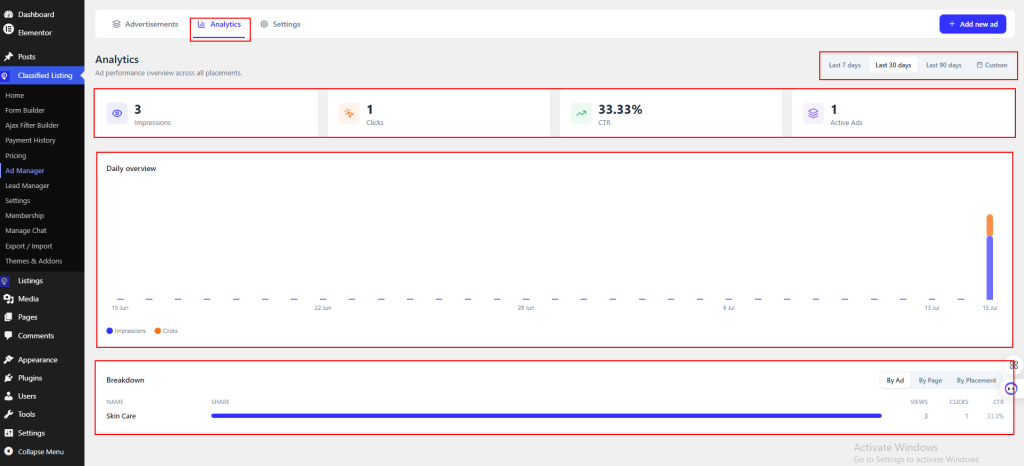
Open the Analytics tab for a performance summary across every ad and placement. A date-range switcher at the top right — Last 7 days, Last 30 days, Last 90 days, or Custom — controls the whole page.
Summary cards give you the headline numbers: Impressions, Clicks, CTR (click-through rate), and Active Ads.
Daily overview charts impressions (blue) against clicks (orange) over your selected range, so trends and quiet days stand out at a glance.
Breakdown lists performance row by row, with a share bar and views/clicks/CTR per row. Use the toggle to slice the same data By Ad, By Page, or By Placement — the quickest way to see what’s earning and what to reprice or retire.
Single-ad view #
Click into any ad for its own performance page (use Back to Advertisements to return, or Edit Ad to make changes). It shows the same date-range switcher, Total Impressions / Total Clicks / CTR cards, a Daily breakdown chart, and a By placement table breaking the numbers down per slot — so you can see exactly which positions carry that specific ad.


