
After activating Coupon new menu will add under the Classified Listing menu name Coupons. One single order can apply one single coupon.
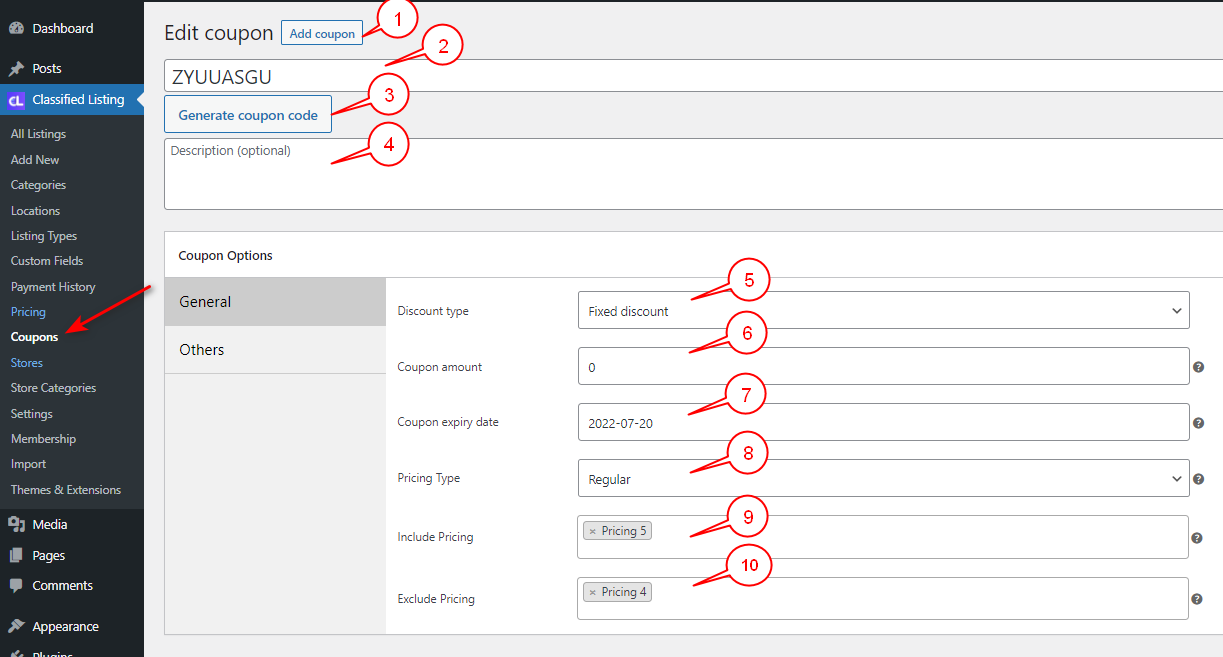
Point 1: Click Add Coupon button and create new coupon.
Point 2: This is the coupon code
Point 3: Generate Coupon Code Random code will generate by the button.
Point 4: Description Field not mandatory. It just note for the coupon.
Point 5: The discount Type field has 2 types ( Fixed discount And Percentage discount ) Fixed discount for fixed price Percentage discount for Percentage Based on the pricing prices.
Point 6: Coupon amount the discount will reduce based on Discount type.
Point 7: Coupon Expire date ( Not Mandatory ). if empty then Coupon will not expire.
Point 8: Pricing Type ( Not Mandatory ). Select one for the specific pricing type. If empty then Coupon will apply for all pricing.
Point 9: Include Pricing ( Not Mandatory ). Chose for the specific pricing.
Point 10: Exclude Pricing ( Not Mandatory ). Chose for the exclude specific pricing.
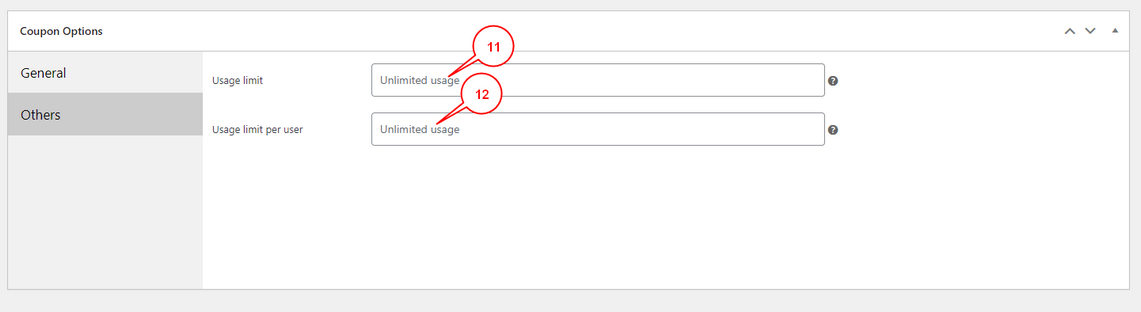
Point 11: Usage Limit ( Not Mandatory ). How many times coupon will be applied? Set the number. Coupon Will automatically be expired after the limit.
Point 12: Usage Limit per user ( Not Mandatory ). Coupon User uses limitation. A single User can’t cross the limit.


