
After activating Classified Listing – BuddyPress Integration Addon will add a new button named Listings on the profile page. Describe Bellow in detail.
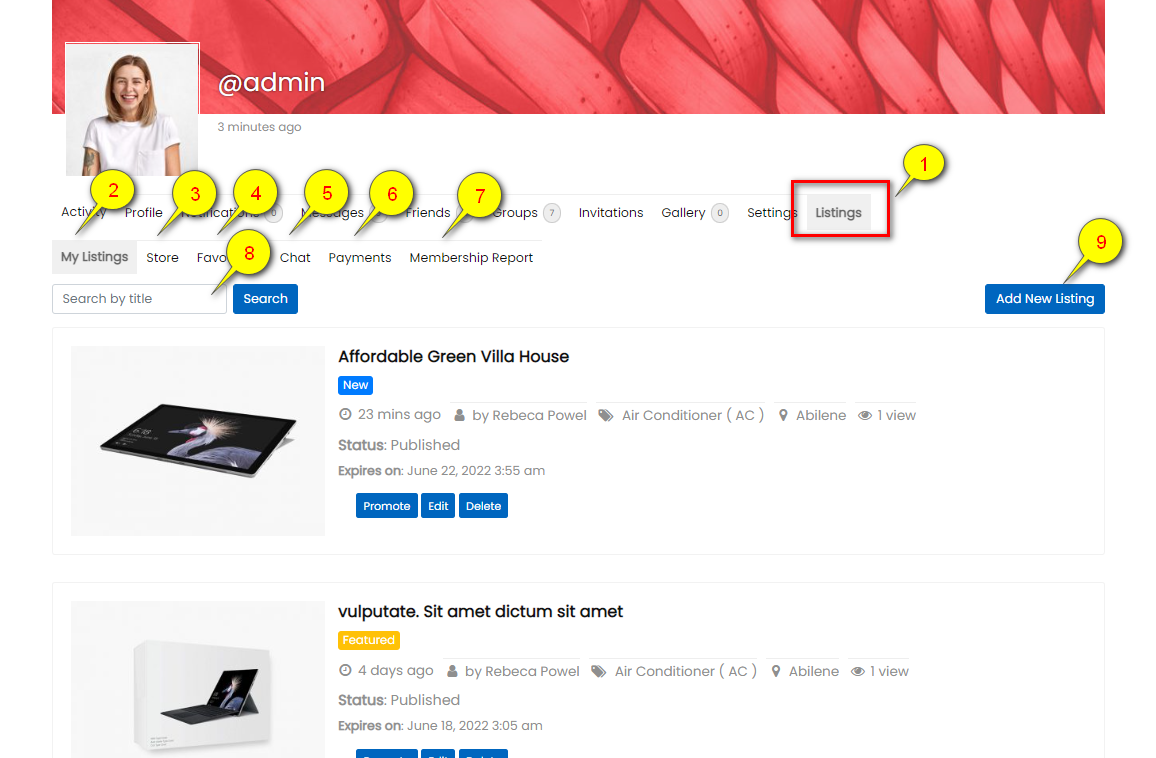
Point 1: After activating the addons this button will add here. Then The user can see some submenu.
Point 2: Displayed all listings for the user.
Point 3: Store menu will show if the Classified Listing Store plugin is activated.
Point 4: Favourites menu will show the user’s favorite listing list.
Point 5: The chat menu shows his chat list with the customer or Listings owner. ( This menu only for users own profile ).
Point 6: Payments menu shows the user’s payment history. ( This menu only for users own profile ).
Point 7: The membership Report menu will show the user’s membership report. ( This menu only for users own profile ).
Point 8: The users can search thir listings.
Point 9: The users can add their listing by visiting Add New Listing / Listing Form page.


