
• Classified Listing Docs
    • Classified Listing Plugin
    • Classified Listing All Addons
    • Classified Listing Mobile App
    • Classima Mobile APP
    • Listygo Mobile App
    • Homlisti Mobile App
  • Woocommerce Plugins Docs
    • ShopBuilder Elementor Addon
    • Woo Variation Swatches
    • Woo Variation Gallery
    • Zilly Mobile App
  • General Plugins Docs
    • The Post Grid
    • Testimonial Slider
    • Team Members
    • Food Menu
    • Review & Schema
    • Portfolio
    • Business Review
  • Our Plugins
    • The Post Grid
    • Classified Listing
    • ShopBuilder
    • Food Menu
    • Team
    • Portfolio
    • Testimonial Slider
    • Review & Schema
    • See All Plugins
  • Get Addons
×
  • Classified Listing Docs
    • Classified Listing Plugin
    • Classified Listing All Addons
    • Classified Listing Mobile App
    • Classima Mobile APP
    • Listygo Mobile App
    • Homlisti Mobile App
  • Woocommerce Plugins Docs
    • ShopBuilder Elementor Addon
    • Woo Variation Swatches
    • Woo Variation Gallery
    • Zilly Mobile App
  • General Plugins Docs
    • The Post Grid
    • Testimonial Slider
    • Team Members
    • Food Menu
    • Review & Schema
    • Portfolio
    • Business Review
  • Our Plugins
    • The Post Grid
    • Classified Listing
    • ShopBuilder
    • Food Menu
    • Team
    • Portfolio
    • Testimonial Slider
    • Review & Schema
    • See All Plugins

Booking Addon

9
  • Overview
  • Requirements
  • Booking Addon Settings
  • Booking Field in Form Builder
  • Event Booking
  • Services Booking
  • Rent Booking
  • Pre-Order Booking
  • Payment via WC

Claim Listing Addon

7
  • Requirements
  • Settings
  • Email Notification
  • Badge
  • Manage Claim Listings
  • Submission
  • Video (How to Use)

Mobile Number Verification Addon

8
  • OTP Protection
  • OTP Login
  • Requirements
  • How to setup Firebase
  • OTP Verification Field
  • Other Settings
  • Add Twilio Information
  • Add Firebase Information

Bookings List

2
  • My Bookings
  • All Bookings

Marketplace Addon

7
  • Requirements
  • Installation
  • Settings
  • Email Notification
  • Commission & Payout
  • Screenshots
  • Video (How to Use)

Seller Verification Addon

6
  • Requirements
  • Documents Submission
  • Manage Request
  • Seller Badge/Status
  • Badge Color
  • Video (How to Use)

Settings

3
  • End-point
  • Email Settings
  • Badge Color

Multi Currency Addon

8
  • Requirements
  • Installation
  • General Settings
  • Location Settings
  • Design Settings
  • Update Settings
  • Front End Look
  • How to use Multi-Currency Addon (Video)

PDF Invoices Addon

5
  • Requirements
  • Installation
  • Settings
  • Download PDF
  • Video (How to Use)

BuddyBoss Integration

6
  • Requirements
  • Installation
  • Addon Settings
  • Activity Feeds
  • Profile page
  • Video (How to Use)

BuddyPress Integration

5
  • Requirements
  • Installation
  • Addon Settings
  • Activity Feeds
  • Profile page

Coupon Addon

5
  • Requirements
  • Installation
  • Coupon Uses
  • Coupon Settings
  • Video (How to Use)

FAQ Addon

4
  • Requirements
  • Settings
  • Add And View FAQ
  • FAQ Addon

Job Manager Addon

11
  • Overview
  • Requirements
  • Job Manager Addon Settings
  • Job Submit Form in Form Builder
  • Job Archive Page
  • Job Details Page
  • Job Submission
  • My Account Dasboard
  • Job Manager Dasboard
  • Job Applications Form Builder
  • Video (How to Use)

TranslatePress Multilingual

4
  • Translation for User Dashboard Side
  • Translation for Admin Side
  • Installation
  • Requirements

Real Estate Agent

5
  • Add Agent
  • Agent List
  • Agent Additional Info
  • Override Agent Archive Page
  • Override Agent Single Page

Elementor Archive & Single Page Builder

2
  • Requirements
  • Installation

Build Archive Page

3
  • General
  • Archive Listing Widget
  • Page Header Widget

Build Store Single Page

8
  • General
  • Store Listings Widget
  • Store Contact Info Widget
  • Store Opening Hours Widget
  • Store Slogan Widget
  • Store Description Widget
  • Store Banner Widget
  • Store Name Widget

Build Single Page

17
  • General
  • Listing Review Widget
  • Related Listing Widget
  • Social Profile Widget
  • Listing Video Widget
  • Business Hours Widget
  • Saller Information Widget
  • Listing Map Widget
  • Actions & Social Share Widget
  • Custom Fields Widget
  • Listing Price Widget
  • Listing Badge Widget
  • Listing Meta Widget
  • Listing Description Widget
  • Listing Image Widget
  • Listing Title Widget
  • Page Header Widget

Classified Listing Toolkits

1
  • Classified Listing Toolkits

Divi Addons

13
  • Divi Modules
  • Classified General Module
  • Listing Categories
  • Listing Location
  • Listing Search Form
  • Listing Single Location
  • Listing Store
  • Listing Grid
  • Listings List
  • Listings Slider
  • Classified Archive Modules
  • Classified Single Page Modules
  • Classified Store Single Page Module

Elementor Addons

13
  • Elementor Addon
  • Listing Category
  • Listing Showcase
  • Single Location
  • All Locations
  • Header Button
  • Search Form
  • Search Form—Sortable
  • Category Slider
  • Listing Slider
  • Pricing Table
  • Listing Store
  • Archive Listing

Search Alert

8
  • Search Alert Settings
  • Overview
  • Save Searches Instantly
  • Custom Notification Preferences
  • Search Alert List Backend
  • Dashboard Search Alert List (Frontend)
  • Email Notifications for Matching Results
  • Search Alert Video Tutorial:

Offload Media Addon

3
  • Requirements
  • Introduction
  • Settings

Lead Manager Addon

5
  • Overview
  • Capturing a Lead (Visitor Side)
  • Managing Your Leads (Admin Side)
  • Allow Lead Collection per Membership Plan
  • Leads from the Seller’s Account (Front-End)

Ad Manager

5
  • Overview
  • Add New Ad
  • Analytics
  • Settings
  • What Visitors See

Account Field Manager

6
  • Overview
  • Installation
  • The Form Builder
  • Creating Your First Field
  • Field Types & Field Settings
  • Best Practices

Classified Listing Auction

5
  • Overview
  • Auction Settings
  • Auction Field in Form Builder
  • Auction Lifecycle
  • Winning, Paying & Completing an Auction
  • Home
  • Docs
  • Job Manager Addon
  • Job Archive Page
View Categories

Job Archive Page

2 min read

0:00 / 2:23
  • View as Markdown Open this page as plain Markdown (opens in a new tab)
  • Open in ChatGPT Ask questions about this page (opens in a new tab)
  • Open in Claude Ask questions about this page (opens in a new tab)
  • Open in Google AI Studio Ask questions about this page (Google account required) (opens in a new tab)

If your site lists more than just jobs, you can give job posts their own dedicated page. This keeps jobs away from cars, property, and other ads, so job seekers only see jobs.

Setting It Up #

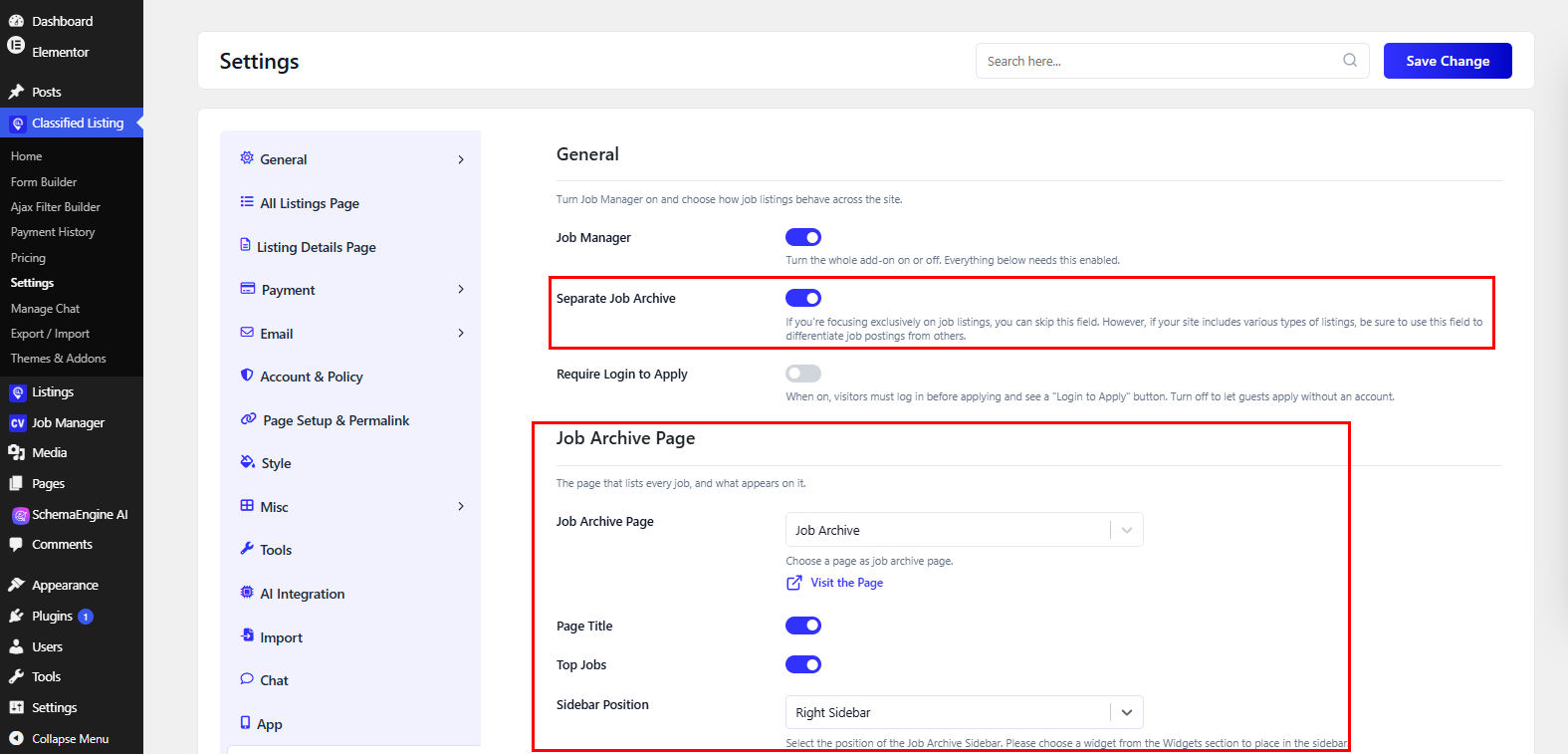
Go to Classified Listing → Settings → Addon Settings → Job Manager.

1. Turn On Separate Job Archive #

Under General, switch on Separate Job Archive. You can skip this if your site is jobs-only, but turn it on if you have several listing types and want jobs kept apart.
2. Choose the Job Archive Page #

Under Job Archive Page, pick the page that will list all your jobs, for example a page called “Job Archive.”

Once it’s selected, a Visit the Page link appears just below, so you can jump straight to the front end and see how it looks.

Tip: Create a blank page under Pages → Add New first, name it something clear like “Jobs” or “Job Archive,” then select it here.

3. Adjust What Appears #

Page Title: shows or hides the title at the top of the page.

Top Jobs: shows or hides the Top Jobs section.

Sidebar Position: choose Right Sidebar or Left Sidebar for the job filters, or leave it unset for a full-width page.

Note: The sidebar stays empty until you add widgets to it under Appearance → Widgets.

4. Save #

Click Save Change.

What Visitors See #

Open the page on your site and you’ll find a job-only listing page.

The search bar at the top has the category already set to Jobs, so any search made from this page only returns job posts. Visitors can still narrow things down by location or keyword.

The results count sits above the listings, telling visitors how many jobs are showing.

The sort dropdown lets them reorder results, for example by Recently added (latest).

The view switcher (the two icons beside it) toggles between list view and grid view.
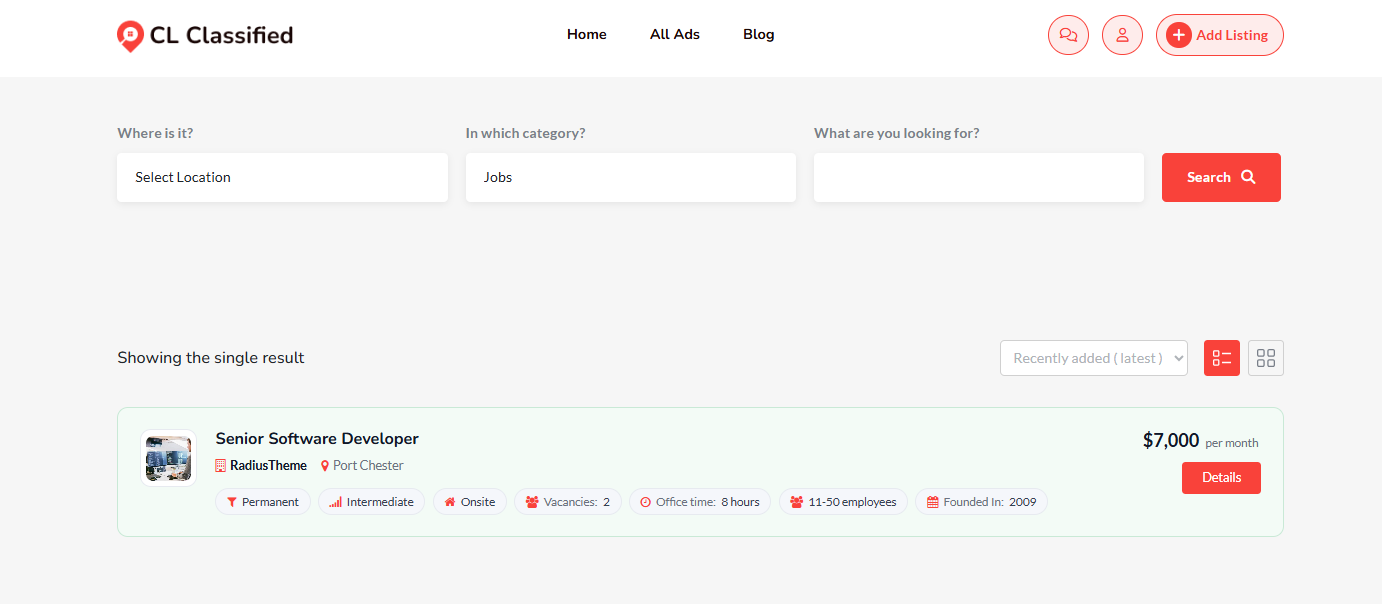
Each job card uses the Job Layout, showing the title, company, location, salary, and the detail tags such as Job Type, Experience, Flexibility, Vacancies, Office time, Company Size, and Founded In, plus a Details button.

The Job Archive page always uses the job layout, whatever you’ve set as the Job Card Layout elsewhere.

Quick Tips #

  • Add the Job Archive page to your main menu so visitors can find it.
  • Use Ajax Filter Builder to add job filters like Job Type and Experience to the sidebar.
  • Use Visit the Page after saving to check your work straight away.
  • Leave Separate Job Archive off if your site only lists jobs, since you don’t need it.
What are your Feelings

Share This Article :

  • Facebook
  • X
  • LinkedIn
  • Pinterest
Still stuck? How can we help?

How can we help?

Updated on September 23, 2026
Job Submit Form in Form BuilderJob Details Page
Table of Contents
  • Setting It Up
    • 1. Turn On Separate Job Archive
    • 2. Choose the Job Archive Page
    • 3. Adjust What Appears
    • 4. Save
  • What Visitors See
  • Quick Tips
Copyright© 2026 RadiusDocs by RadiusTheme