
• Classified Listing Docs
    • Classified Listing Plugin
    • Classified Listing All Addons
    • Classified Listing Mobile App
    • Classima Mobile APP
    • Listygo Mobile App
    • Homlisti Mobile App
  • Woocommerce Plugins Docs
    • ShopBuilder Elementor Addon
    • Woo Variation Swatches
    • Woo Variation Gallery
    • Zilly Mobile App
  • General Plugins Docs
    • The Post Grid
    • Testimonial Slider
    • Team Members
    • Food Menu
    • Review & Schema
    • Portfolio
    • Business Review
  • Our Plugins
    • The Post Grid
    • Classified Listing
    • ShopBuilder
    • Food Menu
    • Team
    • Portfolio
    • Testimonial Slider
    • Review & Schema
    • See All Plugins
  • Get Addons
×
  • Classified Listing Docs
    • Classified Listing Plugin
    • Classified Listing All Addons
    • Classified Listing Mobile App
    • Classima Mobile APP
    • Listygo Mobile App
    • Homlisti Mobile App
  • Woocommerce Plugins Docs
    • ShopBuilder Elementor Addon
    • Woo Variation Swatches
    • Woo Variation Gallery
    • Zilly Mobile App
  • General Plugins Docs
    • The Post Grid
    • Testimonial Slider
    • Team Members
    • Food Menu
    • Review & Schema
    • Portfolio
    • Business Review
  • Our Plugins
    • The Post Grid
    • Classified Listing
    • ShopBuilder
    • Food Menu
    • Team
    • Portfolio
    • Testimonial Slider
    • Review & Schema
    • See All Plugins

Booking Addon

9
  • Overview
  • Requirements
  • Booking Addon Settings
  • Booking Field in Form Builder
  • Event Booking
  • Services Booking
  • Rent Booking
  • Pre-Order Booking
  • Payment via WC

Claim Listing Addon

7
  • Requirements
  • Settings
  • Email Notification
  • Badge
  • Manage Claim Listings
  • Submission
  • Video (How to Use)

Mobile Number Verification Addon

8
  • OTP Protection
  • OTP Login
  • Requirements
  • How to setup Firebase
  • OTP Verification Field
  • Other Settings
  • Add Twilio Information
  • Add Firebase Information

Bookings List

2
  • My Bookings
  • All Bookings

Marketplace Addon

7
  • Requirements
  • Installation
  • Settings
  • Email Notification
  • Commission & Payout
  • Screenshots
  • Video (How to Use)

Seller Verification Addon

6
  • Requirements
  • Documents Submission
  • Manage Request
  • Seller Badge/Status
  • Badge Color
  • Video (How to Use)

Settings

3
  • End-point
  • Email Settings
  • Badge Color

Multi Currency Addon

8
  • Requirements
  • Installation
  • General Settings
  • Location Settings
  • Design Settings
  • Update Settings
  • Front End Look
  • How to use Multi-Currency Addon (Video)

PDF Invoices Addon

5
  • Requirements
  • Installation
  • Settings
  • Download PDF
  • Video (How to Use)

BuddyBoss Integration

6
  • Requirements
  • Installation
  • Addon Settings
  • Activity Feeds
  • Profile page
  • Video (How to Use)

BuddyPress Integration

5
  • Requirements
  • Installation
  • Addon Settings
  • Activity Feeds
  • Profile page

Coupon Addon

5
  • Requirements
  • Installation
  • Coupon Uses
  • Coupon Settings
  • Video (How to Use)

FAQ Addon

4
  • Requirements
  • Settings
  • Add And View FAQ
  • FAQ Addon

Job Manager Addon

11
  • Overview
  • Requirements
  • Job Manager Addon Settings
  • Job Submit Form in Form Builder
  • Job Archive Page
  • Job Details Page
  • Job Submission
  • My Account Dasboard
  • Job Manager Dasboard
  • Job Applications Form Builder
  • Video (How to Use)

TranslatePress Multilingual

4
  • Translation for User Dashboard Side
  • Translation for Admin Side
  • Installation
  • Requirements

Real Estate Agent

5
  • Add Agent
  • Agent List
  • Agent Additional Info
  • Override Agent Archive Page
  • Override Agent Single Page

Elementor Archive & Single Page Builder

2
  • Requirements
  • Installation

Build Archive Page

3
  • General
  • Archive Listing Widget
  • Page Header Widget

Build Store Single Page

8
  • General
  • Store Listings Widget
  • Store Contact Info Widget
  • Store Opening Hours Widget
  • Store Slogan Widget
  • Store Description Widget
  • Store Banner Widget
  • Store Name Widget

Build Single Page

17
  • General
  • Listing Review Widget
  • Related Listing Widget
  • Social Profile Widget
  • Listing Video Widget
  • Business Hours Widget
  • Saller Information Widget
  • Listing Map Widget
  • Actions & Social Share Widget
  • Custom Fields Widget
  • Listing Price Widget
  • Listing Badge Widget
  • Listing Meta Widget
  • Listing Description Widget
  • Listing Image Widget
  • Listing Title Widget
  • Page Header Widget

Classified Listing Toolkits

1
  • Classified Listing Toolkits

Divi Addons

13
  • Divi Modules
  • Classified General Module
  • Listing Categories
  • Listing Location
  • Listing Search Form
  • Listing Single Location
  • Listing Store
  • Listing Grid
  • Listings List
  • Listings Slider
  • Classified Archive Modules
  • Classified Single Page Modules
  • Classified Store Single Page Module

Elementor Addons

13
  • Elementor Addon
  • Listing Category
  • Listing Showcase
  • Single Location
  • All Locations
  • Header Button
  • Search Form
  • Search Form—Sortable
  • Category Slider
  • Listing Slider
  • Pricing Table
  • Listing Store
  • Archive Listing

Search Alert

8
  • Search Alert Settings
  • Overview
  • Save Searches Instantly
  • Custom Notification Preferences
  • Search Alert List Backend
  • Dashboard Search Alert List (Frontend)
  • Email Notifications for Matching Results
  • Search Alert Video Tutorial:

Offload Media Addon

3
  • Requirements
  • Introduction
  • Settings

Lead Manager Addon

5
  • Overview
  • Capturing a Lead (Visitor Side)
  • Managing Your Leads (Admin Side)
  • Allow Lead Collection per Membership Plan
  • Leads from the Seller’s Account (Front-End)

Ad Manager

5
  • Overview
  • Add New Ad
  • Analytics
  • Settings
  • What Visitors See

Account Field Manager

6
  • Overview
  • Installation
  • The Form Builder
  • Creating Your First Field
  • Field Types & Field Settings
  • Best Practices

Classified Listing Auction

5
  • Overview
  • Auction Settings
  • Auction Field in Form Builder
  • Auction Lifecycle
  • Winning, Paying & Completing an Auction
  • Home
  • Docs
  • Offload Media Addon
  • Settings
View Categories

Settings

2 min read

0:00 / 2:06
  • View as Markdown Open this page as plain Markdown (opens in a new tab)
  • Open in ChatGPT Ask questions about this page (opens in a new tab)
  • Open in Claude Ask questions about this page (opens in a new tab)
  • Open in Google AI Studio Ask questions about this page (Google account required) (opens in a new tab)

To manage settings in the Offload Media addon, first install and activate the addon from your WordPress dashboard.

Go to Classified Listing → Settings → Addon Settings → Offload Settings, where you can configure all the necessary options. The settings include:
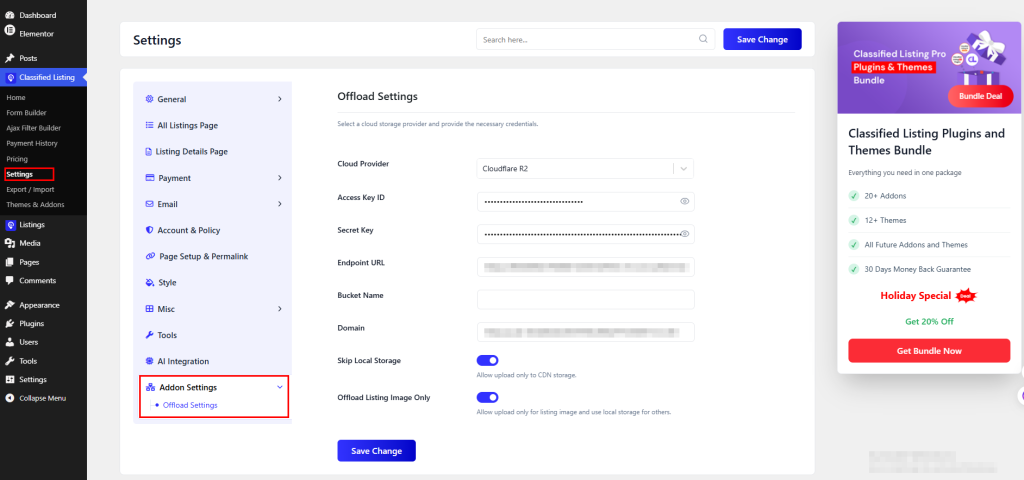
  • Cloud Provider – Select your cloud storage provider (Cloudflare R2 or Wasabi) from the dropdown.
  • Access Key ID – Insert the access key provided by your cloud storage account.
  • Secret Key – Enter the secret key from your cloud storage account.
  • Endpoint URL – Provide the endpoint URL for your cloud storage bucket.
  • Bucket Name – Write the name of your storage bucket.
  • Domain – Set a custom domain for serving your media files.
  • Skip Local Storage – Toggle this on to upload images only to CDN storage without keeping a local copy on your server.
  • Offload Listing Image Only – Toggle this on to offload only listing images and use local storage for all other media.

Once configured, click Save Changes. All newly uploaded listing images will be automatically optimized and offloaded to your cloud storage.

Why Should You Use This For Your Classified Listing Site? #

Classified listing and directory sites are image-heavy by nature. Every listing comes with one or more photos, and as your site grows, thousands of images pile up on your server, slowing down page loads and increasing hosting costs.

A universal offload plugin handles all WordPress media without understanding your directory structure. This addon is different — it is purpose-built for Classified Listing and knows exactly which images belong to listings. 

With Cloudflare R2, you get zero egress fees, meaning you pay only for storage — not for delivering images to your visitors. Wasabi offers simple, predictable pricing with no API call charges. Either way, your hosting bill goes down as your heaviest assets move off your server.

This addon integrates directly into the Classified Listing settings panel. There is no separate plugin dashboard to manage. No compatibility issues to troubleshoot. No extra configuration overhead. Just install it, enter your cloud credentials, and you are ready to go. Every new listing image is automatically optimized and offloaded from that point forward.

If you are running a classified listing or directory site, this addon is built exactly for you. Faster page loads. Lower server costs. Scalable media storage. All in one lightweight addon.

What are your Feelings

Share This Article :

  • Facebook
  • X
  • LinkedIn
  • Pinterest
Still stuck? How can we help?

How can we help?

Updated on June 7, 2026
Introduction
Table of Contents
  • Why Should You Use This For Your Classified Listing Site?
Copyright© 2026 RadiusDocs by RadiusTheme