
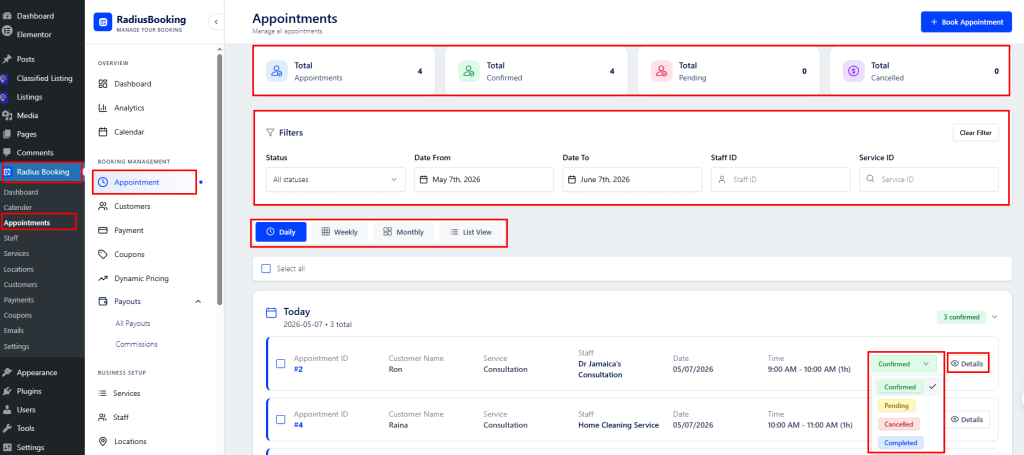
The admin can manage all bookings site-wide from Radius Booking → Appointments. This page provides a complete overview of every appointment across all staff and services.
Summary Cards #
At the top, four key metrics are displayed at a glance:
- Total Appointments — The overall number of appointments created.
- Total Confirmed — Appointments that have been confirmed.
- Total Pending — Appointments awaiting confirmation.
- Total Cancelled — Appointments that have been cancelled.
Filters #
The admin can narrow down appointments using the following filters:
- Status — Filter by All, Confirmed, Pending, Cancelled, or Completed.
- Date From / Date To — Set a custom date range to view appointments within a specific period.
- Staff ID — Filter appointments by a specific staff member.
- Service ID — Filter appointments by a specific service.
Click Clear Filter to reset all filters back to default.
View Modes #
Appointments can be displayed in four different views: Daily, Weekly, Monthly, and List View, allowing the admin to switch between a calendar-style layout and a detailed list depending on their preference.
Appointment List
Each appointment entry displays the Appointment ID, Customer Name, Service, Staff member, Date, Time, and Duration. The admin can:
- Change Status — Use the status dropdown on each appointment to switch between Confirmed, Pending, Cancelled, and Completed without opening the full details.
- View Details — Click the Details button to open the full appointment record.
- Book Appointment — Use the + Book Appointment button at the top right to manually create a new appointment on behalf of a customer.
For a complete guide on managing appointments, staff, services, payments, and all other Radius Booking features, refer to the official documentation.
📖 Radius Booking Documentation


