
To use Payfast payment gateway, you have to purchase the addon ———–
To setup Payfast payment gateway, go to Classified Listing=> Settings => Payment=> Payfast
If you want to use Payfast payment, you first need to enable it by checking the box, and then fill the necessary fields as shown in the window below.
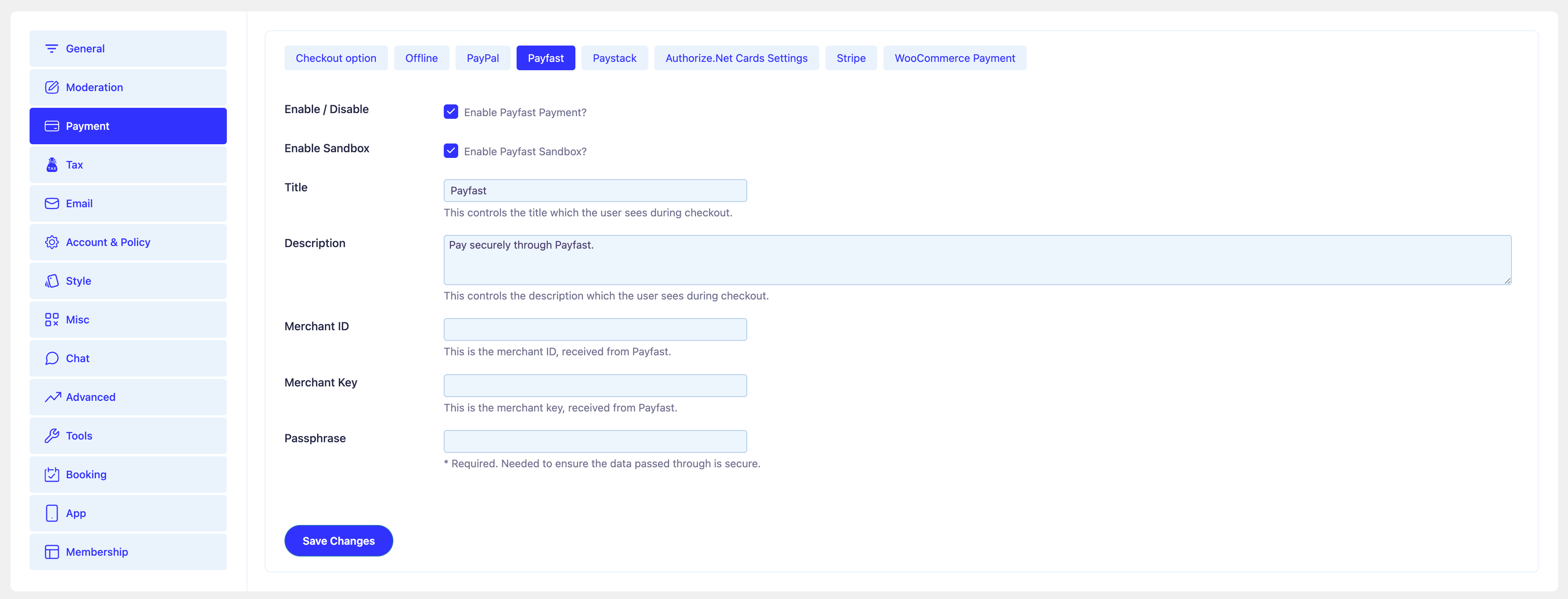
Enable / Disable: To enable Payfast payment, check the “Enable Payfast Payment” box.
Enable Sandbox: Enable developer mode to test whether the payment gateway is successfully activated or not.
Title: Give the title that will show as the payment name during the checkout process.
Description: Write the description that will be displayed during the checkout process.
Merchant ID: Enter the Merchant ID to complete the payment setup, will get key here
Merchant Key: Enter the Merchant key to complete the payment setup, will get key here
Passphrase: Enter Salt Passphrase string which is needed to ensure the data passed through is secure, will get it here


