
To use Paystack payment gateway, you have to purchase the addon from here
To setup Paystack payment gateway, go to Classified Listing=> Settings => Payment=> Paystack
If you want to use Paystack payment, you first need to enable it by checking the box, and then fill the necessary fields as shown in the window below.
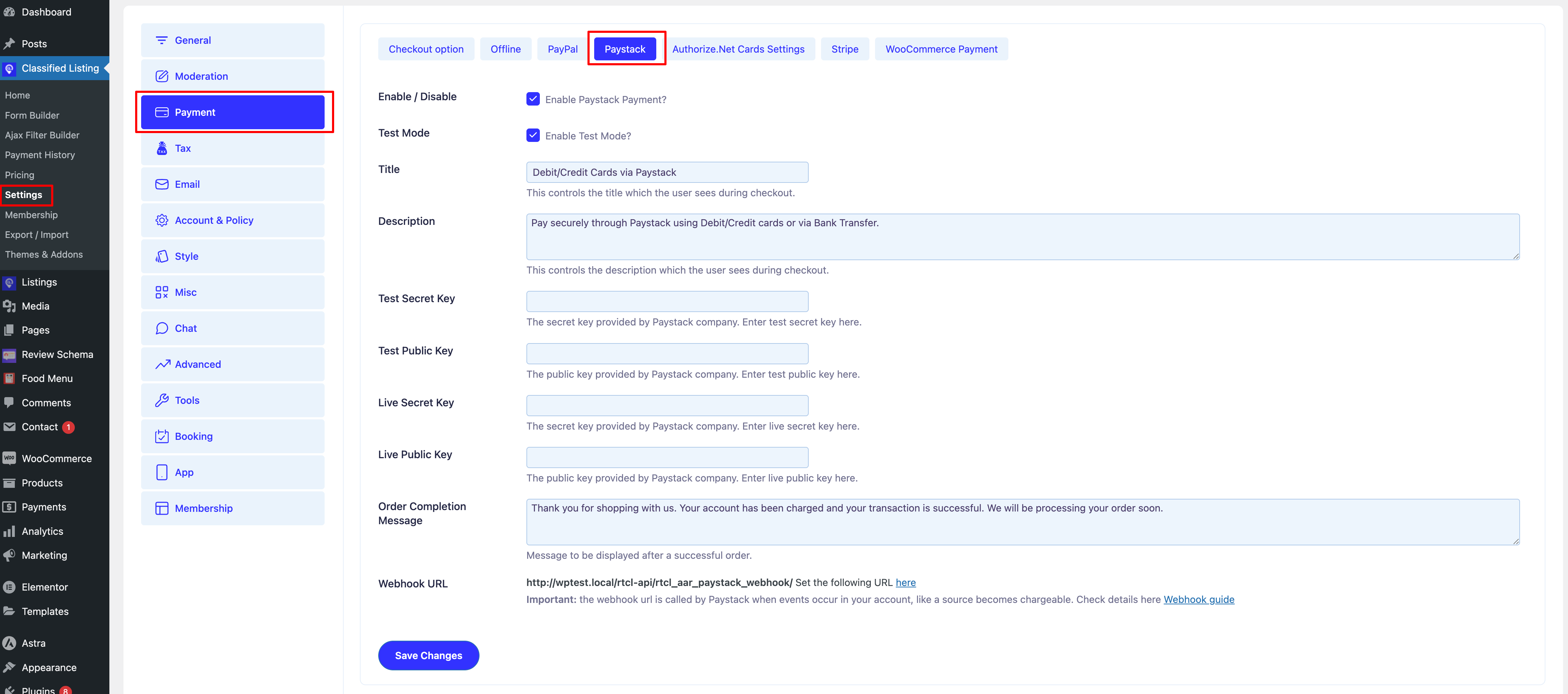
Enable / Disable: To enable Paystack payment check the “Enable Paystack Payment” box.
Test Mode: Enable test mode to test whether the payment gateway is successfully activated or not.
Title: Give the title that will show as the payment name during the checkout process.
Description: Write the description that will be displayed during the checkout process.
Test Secret & Public Key: Enter the Secret key and Public key to check test mode of payment setup, will get key here
Live Secret & Public Key: Enter the Secret key and Public key to complete the payment setup, will get key here
Order Completion Message: Enter a message which will be display after a successful order.
Webhook URL: Leave it as default and have to set the URL in following field Webhook URL You can find details instructions in the guide URL Webhook guide


