• Classified Listing Docs
    • Classified Listing Plugin
    • Classified Listing All Addons
    • Classified Listing Mobile App
    • Classima Mobile APP
    • Listygo Mobile App
    • Homlisti Mobile App
  • Woocommerce Plugins Docs
    • ShopBuilder Elementor Addon
    • Woo Variation Swatches
    • Woo Variation Gallery
    • Zilly Mobile App
  • General Plugins Docs
    • The Post Grid
    • Testimonial Slider
    • Team Members
    • Food Menu
    • Review & Schema
    • Portfolio
    • Business Review
  • Our Plugins
    • The Post Grid
    • Classified Listing
    • ShopBuilder
    • Food Menu
    • Team
    • Portfolio
    • Testimonial Slider
    • Review & Schema
    • See All Plugins
×
  • Classified Listing Docs
    • Classified Listing Plugin
    • Classified Listing All Addons
    • Classified Listing Mobile App
    • Classima Mobile APP
    • Listygo Mobile App
    • Homlisti Mobile App
  • Woocommerce Plugins Docs
    • ShopBuilder Elementor Addon
    • Woo Variation Swatches
    • Woo Variation Gallery
    • Zilly Mobile App
  • General Plugins Docs
    • The Post Grid
    • Testimonial Slider
    • Team Members
    • Food Menu
    • Review & Schema
    • Portfolio
    • Business Review
  • Our Plugins
    • The Post Grid
    • Classified Listing
    • ShopBuilder
    • Food Menu
    • Team
    • Portfolio
    • Testimonial Slider
    • Review & Schema
    • See All Plugins

Getting Started

4
  • System Requirements
  • Installation
  • Permalink Settings
  • How to use(video)

Main Settings

15
  • Overview
  • General Settings
  • All Listings Page
  • Listing Details Page
  • Payments
  • Tax
  • Email
  • Account & Policy
  • Style
  • MISC Settings
  • Chat Settings Pro
  • Page Setup & Permalink
  • Tools
  • App Settings
  • Membership [Store addon] Pro

Email Settings

3
  • General Settings
  • Email Template
  • Video (How to Use)

Developer Docs

1
  • Developer Docs

Listing Management [Admin]

9
  • Admin End Ads View
  • Category
  • Locations
  • Listing Type
  • Pricing
  • Payment History
  • Export & Import Settings
  • Default Import [XML]
  • Stores [store addon]

AI Integration

5
  • Create Form with AI
  • Frontend AI Integration
  • AI Integration Settings
  • AI Semantic Search
  • AI Image Enhancement

Radius Booking Integration

10
  • How to Use (Video)
  • Integration with Radius Booking
  • Radius Booking Field in Form Builder
  • Enable Radius Booking on Existing Listing
  • Payout Settings
  • Payout Request from Front End Dashboard
  • Payout Request on Admin Panel
  • Commission Overview — Admin Panel
  • My Account – Booking
  • Appointments – Admin Panel

Theming

4
  • Add theme support for plugin templates
  • Override Ad Submission Form
  • Override ad detail page
  • Theming

REST API

54
  • Form Builder Image Sort REST API
  • Form Builder Image Delete REST API
  • Form Builder File Delete REST API
  • Form Builder File Upload REST API
  • Create Listing via Form Builder REST API
  • Email Store Owner REST API
  • Get Single Store REST API
  • Get Store Listings REST API
  • Get Stores REST API
  • Upload My Store Banner REST API
  • Upload My Store Logo REST API
  • My Store REST API
  • My Store REST API
  • Report Listing REST API
  • Update Subscription Payment Method API
  • Cancel Subscription REST API
  • Get Pricing Plans REST API
  • Get Single Payment / Order Details REST API
  • Get Payment History REST API
  • Get Checkout Data REST API
  • Create New Tag REST API
  • Change Order Status REST API
  • Manage Orders REST API
  • Mark Message as Read REST API
  • Chat Message REST API
  • Check Conversation by Listing REST API
  • Start New Conversation API
  • Get Conversation Messages API
  • My Chat List REST API
  • Toggle a favourite listing REST API
  • Get My Favourite Listings REST API
  • Upload My Profile Image REST API
  • Update My Account REST API
  • Get My Account Info REST API
  • Mark Listing as Sold REST API
  • Change Listing Status REST API
  • Renew Listing REST API
  • Delete My Listings REST API
  • Get My Listings REST API
  • Get Single Listing API
  • Create a listing API
  • User Sign Up REST API
  • Login REST API
  • Logout REST API
  • Account Delete REST API
  • Reset Password REST API
  • Contact REST API
  • Configuration API
  • Locations API
  • Categories API
  • Listing Types API
  • Email Seller API
  • Listings API
  • General

Code Snippets

18
  • Mask more digits
  • Change Business Hour Start and End Time
  • Add Price Unit
  • Trim zero from payment price
  • Show mark as sold listing in the search
  • Remove required attribute for phone field
  • Remove Price Type
  • Modify listing submission success message
  • Modify checkout form fields
  • Display listing image in media library
  • Change radius unit and distance
  • Change Price Type
  • Change Favourites to Favorites
  • Change Excerpt Limit
  • Change Currency Symbol
  • Change archive page listing column
  • Add New Price Type
  • Code Snippets

Filter Hooks

15
  • rtcl_countries_all_countries
  • rtcl_checkout_fields
  • Checkout
  • rtcl_my_account_endpoint
  • rtcl_account_menu_items
  • My Account
  • rtcl_listing_pricing_types
  • Listing Form
  • rtcl_social_profiles_list
  • rtcl_registration_redirect
  • rtcl_listing_seller_contact_form_data
  • rtcl_listing_query_meta_query
  • rtcl_get_base_location
  • General
  • Filter Hooks

Action Hooks

14
  • Email
  • rtcl_payment_receipt
  • rtcl_checkout_process_success
  • Checkout
  • rtcl_account_{$menu_key}_endpoint
  • My Account
  • rtcl_listing_form_before_category_retrieve
  • rtcl_listing_form_after_save_or_update
  • Listing Form
  • rtcl_new_user_created
  • rtcl_listing_loop_item
  • rtcl_after_author_meta
  • General
  • Action Hooks

Payment

8
  • Checkout Option
  • Offline Payment
  • Paypal
  • Authorize.net [PRO]
  • Stripe [PRO]
  • WooCommerce [PRO]
  • Payfast [Addon]
  • Paystack [Addon]

Elementor Addons

11
  • Elementor Addons
  • Listing Category
  • Listing Category Slider
  • All Location
  • Single Location
  • Listings
  • Listing Slider
  • Listing Store
  • Pricing Table
  • Search Form
  • Header Button

WPML Addon

3
  • System Requirements
  • Location Translations
  • WPML Settings

AJAX Filter Builder

2
  • Add Filter Items
  • Filter Widget

Frequently Asked Questions (Faq’s)

29
  • Frequently Asked Questions(Faq’s)
  • Fix taxonomy page listing sorting issue
  • Disallow query string and specific URL [SEO]
  • Enable New Dashboard [Canvas]
  • Custom Fields for Listview
  • Custom Fields for Filter
  • Pay Per Ad
  • Admin Menu Access
  • How to change listing archive category description position
  • Category & Location Menu Link
  • Add Re-Captcha
  • Add Google Map
  • Rank Math SEO Settings
  • Enable Chat
  • Renew listing process
  • How to set Local Time for Business Hour
  • Enable WooCommerce Payment
  • Fix Custom Field Save Issue
  • Enable Mark as Sold
  • How to add Compare
  • How to clear plugin cache?
  • Change Archive Page Title
  • User don’t get Registration & Verification Email?
  • How to change custom fields order?
  • How to add Watermark
  • How to separate login and registration page?
  • How to hide contact information for non logged in users?
  • Enable Social Login
  • Enable User Registration

Listing Management [Front End]

3
  • Front End View
  • Front End Submission
  • My Account Menu

Shortcodes

9
  • Shortcodes
  • Categories Display
  • Checkout Page
  • Listing Submission Form
  • My Account Page
  • Store List
  • Location Wise Display
  • Category Wise Display
  • Listing Filter

Drag & Drop Form Builder (New)

14
  • How to add your own icon in the builder
  • Multi-Category Selection
  • Enable Form Builder
  • Form List
  • Add New Form
  • Preset Fields
  • Custom Fields
  • Single Listing Layout Builder New
  • Enable Multiple Forms
  • Enable Conditional Logic
  • Add Bulk Options Pro
  • Smart Dependency Pro
  • SEO-Friendly Slug Builder
  • Image Crop Feature

Gutenberg Block

10
  • Gutenberg Block
  • Listing Category
  • Listing Category Slider
  • All Location
  • Single Location
  • Listings
  • Listing Slider
  • Listing Search
  • Pricing Table
  • Stores
  • Home
  • Docs
  • Main Settings
  • Tools
View Categories

Tools

2 min read

0:00 / 2:02
  • View as Markdown Open this page as plain Markdown (opens in a new tab)
  • Open in ChatGPT Ask questions about this page (opens in a new tab)
  • Open in Claude Ask questions about this page (opens in a new tab)
  • Open in Google AI Studio Ask questions about this page (Google account required) (opens in a new tab)

Classified Listing → Settings → Tools

This section covers plugin licensing and site data management — two housekeeping tasks every site admin should know how to handle. It’s split into two parts:

  1. Licensing
  2. Data Management

1) Licensing #

If you’re using the Pro version of Classified Listing, this is where you activate your plugin(s) using the license key(s) you received after purchase.

1.1) Main Plugin License Key — Enter the license key for the core Classified Listing Pro plugin here.

1.2) Store Plugin License Key — If you’ve purchased the Store add-on, enter its separate license key here.

Note: You’ll receive your license key(s) in your purchase confirmation email, or you can retrieve them anytime by logging into your account on RadiusTheme.com and checking your Purchase History.
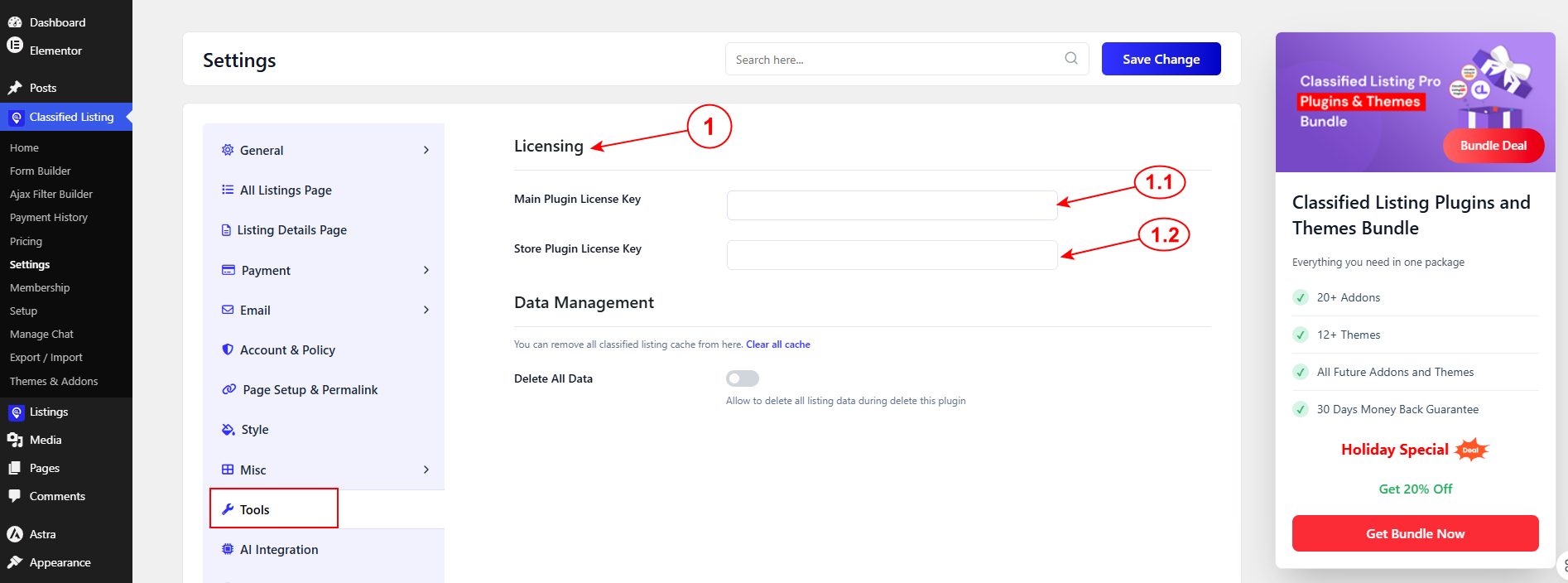
Why this matters: Activating your license doesn’t just unlock Pro features — it also ensures you receive automatic plugin updates and are eligible for official support. An unactivated license may leave you on an outdated version and without access to help from the RadiusTheme team.

2) Data Management #

This section gives you two tools for maintaining your site’s data: clearing cached data, and controlling what happens to your listing data if the plugin is ever removed.
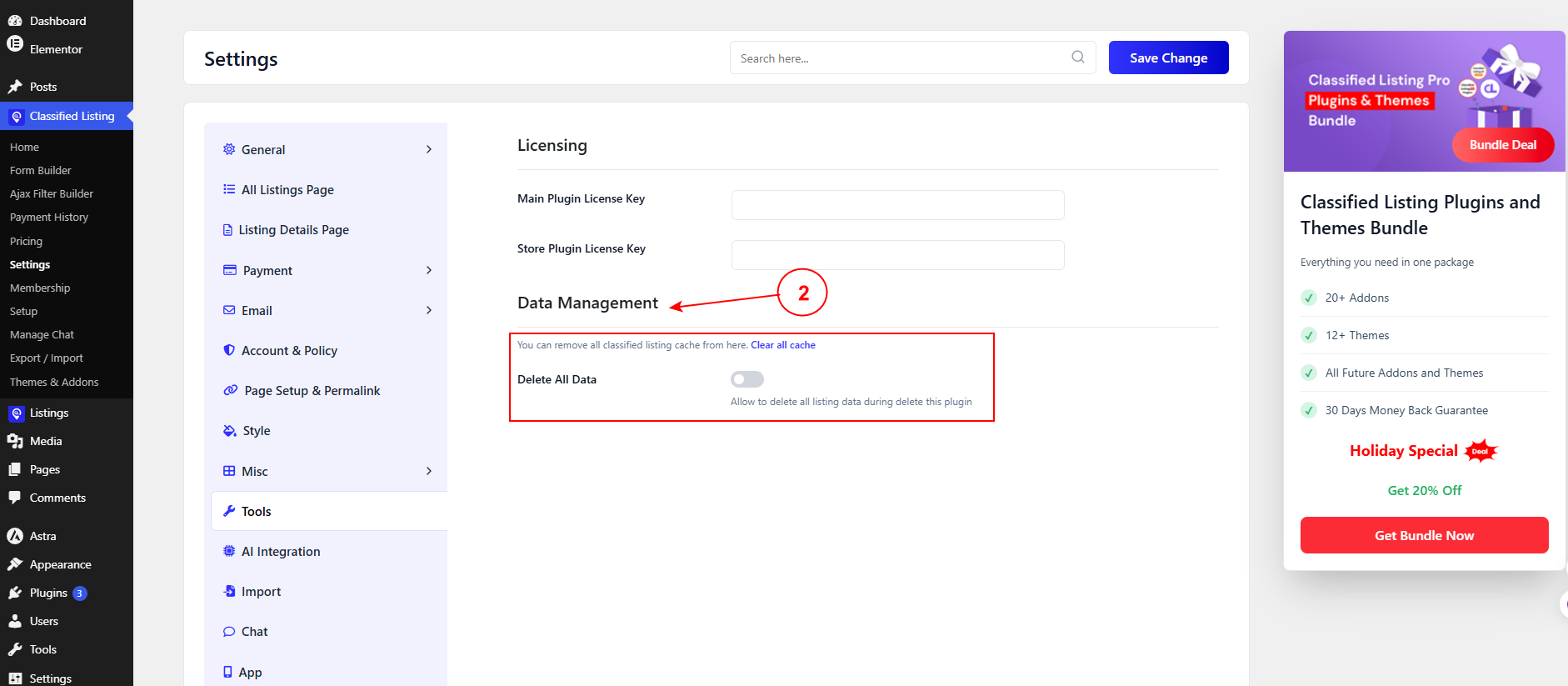
Clear All Cache

A one-click link that removes all Classified Listing cache from your site.

Tip: If you’ve made changes to settings, listings, or layouts and they don’t seem to reflect on the frontend, clearing the cache is often the first thing to try before troubleshooting further.

Delete All Data

A toggle that determines whether all your classified listing data (listings, categories, locations, settings, etc.) gets permanently deleted from your database if you uninstall the plugin.

  • Toggle ON: Uninstalling the plugin will wipe all associated listing data permanently.
  • Toggle OFF (default): Your data is preserved even if you delete the plugin — useful if you’re temporarily deactivating or plan to reinstall later.

Caution: Only enable this toggle if you’re certain you want a clean removal. Once data is deleted this way, it cannot be recovered — there’s no undo. If you’re unsure, leave this off and consider taking a full site/database backup before uninstalling the plugin regardless.

What are your Feelings

Share This Article :

  • Facebook
  • X
  • LinkedIn
  • Pinterest
Still stuck? How can we help?

How can we help?

Updated on August 20, 2026
Page Setup & PermalinkApp Settings
Table of Contents
  • 1) Licensing
  • 2) Data Management
Copyright© 2026 RadiusDocs by RadiusTheme