
The admin can track all commission earnings from appointments by navigating to Radius Booking → Payouts → Commissions.
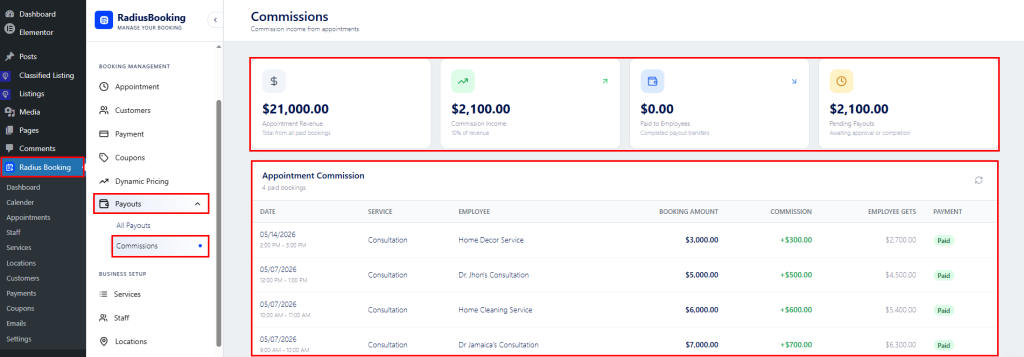
Summary Cards
At the top of the page, four key metrics are displayed at a glance:
- Appointment Revenue — Total revenue generated from all paid bookings.
- Commission Income — The admin’s total commission earned, calculated as a percentage of revenue (e.g., 10% = $2,100.00).
- Paid to Employees — The total amount already transferred to employees via completed payouts (e.g., $0.00).
- Pending Payouts — The total amount awaiting admin approval or completion (e.g., $2,100.00).
Appointment Commission Table
Below the summary, a detailed breakdown of every paid booking is listed under the Appointment Commission. Each row includes:
- Date & Time — When the appointment took place.
- Service — The service booked (e.g., Consultation).
- Employee — The staff member or seller who provided the service.
- Booking Amount — The total amount paid by the customer.
- Commission — The admin’s cut deducted from the booking amount (shown in green).
- Employee Gets — The net amount the employee receives after commission.
- Payment — The current payment status (e.g., Paid).
This page gives the admin a complete financial picture of all booking revenue, commissions earned, and pending employee payouts in one place.


