
To setup WooCommerce Payment go to Classified Listing=> Settings => Payment=> WooCommerce Payment
First, you need to install and activate the Woocommerce plugin. To start using WooCommerce payment, you first need to enable it by clicking on the checkbox.
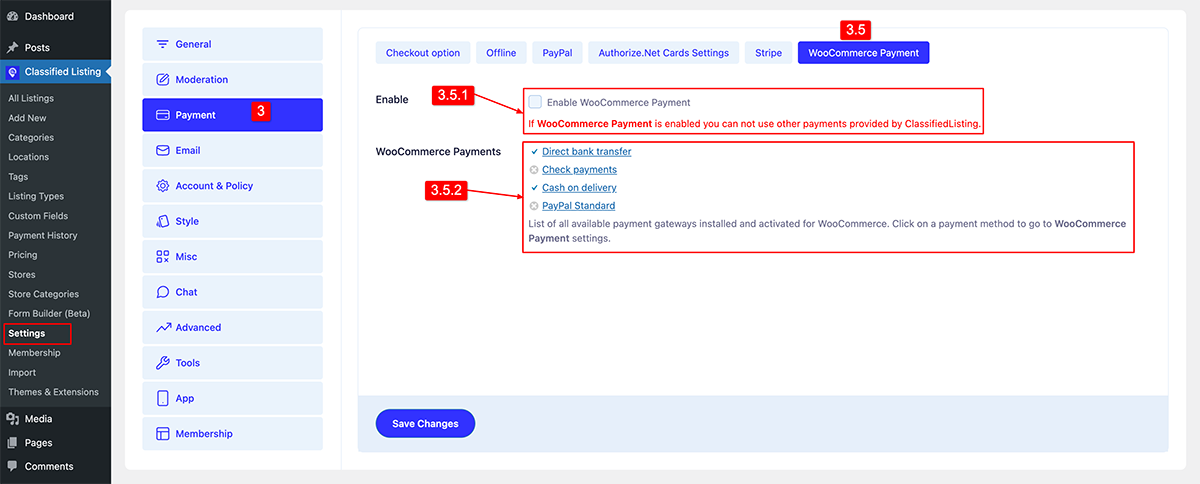
3.5.1) Enable: First Enable the WooCommerce payment by checking the box that reads “Enable WooCommerce Payment“.
3.5.2) WooCommerce Payment: Here, you will find all the available WooCommerce payment gateways that you have installed and activated. However, please note that you need to set up the WooCommerce payment gateways that you want to use before they appear here.
Note: For Woocommerce payment please check the order history from WooCommerce don’t follow the Classified Listing Pro plugin order history.


