
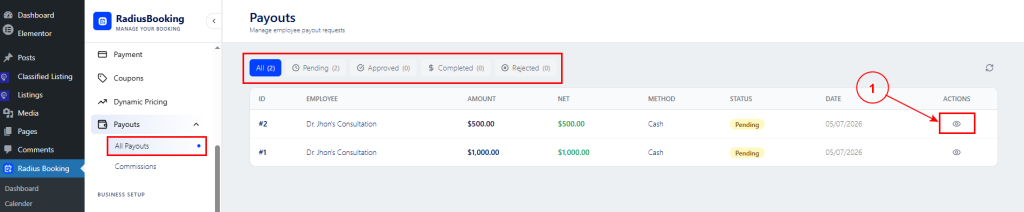
When a seller or staff member submits a payout request, the admin can review and manage all requests from Radius Booking → Payouts → All Payouts.
Payout Request Overview
The Payouts page displays all incoming requests in a table with the following details:
- ID — Unique request identifier.
- Employee — The staff member or seller who submitted the request.
- Amount — The gross amount requested.
- Net — The net payout amount after commission.
- Method — The preferred payout method (e.g., Cash, Bank Transfer).
- Status — Current request status.
- Date — The date the request was submitted.
Requests can be filtered by status using the tabs at the top: All, Pending, Approved, Completed, and Rejected.
Click the eye icon (1) in the Actions column to open the detailed payout popup. This shows:
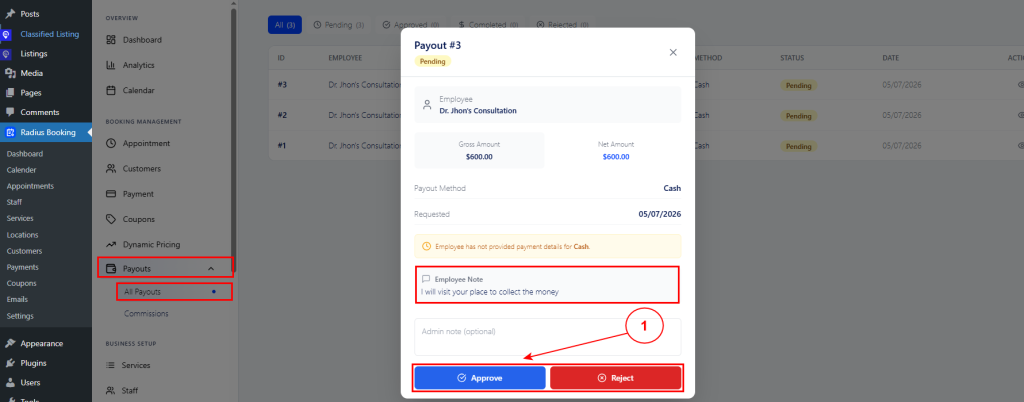
- Employee name
- Gross Amount and Net Amount
- Payout Method (e.g., Cash)
- Request Date
- Employee Note — Any message left by the seller (e.g., “I will visit your place to collect the money”)
- Admin Note — An optional field for the admin to add internal remarks before taking action.
Taking Action
After reviewing the request details, the admin can either:
- Click Approve to confirm and process the payout.
- Click Reject to decline the request.


