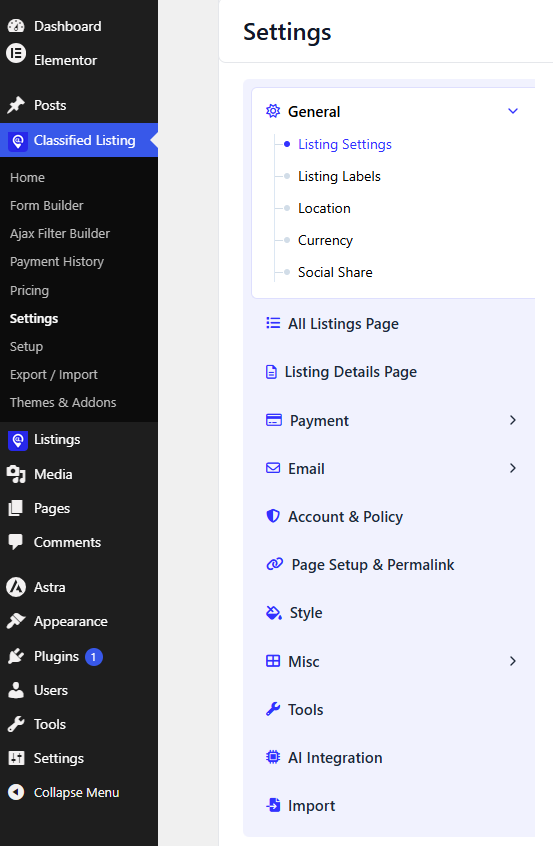
This section gives you a quick summary of everything you’ll find under Settings, so you know exactly where to go to configure each part of your listing site.
General – The core control center for the plugin. Configure listing settings, listing labels, location, currency, and social share options all in one place.
All Listings Page – Control how your listings are displayed across the site. Set listings per page, choose a layout type, and manage filtering and sorting options.
Listing Details Page – Customize the single listing view, including the review form, ratings, gallery behavior, and other detail-page functionality.
Payment – Set up your payment gateways to start monetizing listings. Choose from PayPal, Stripe, and other supported methods, and define your pricing structure.
Email – Manage all outgoing notifications, including email templates and sender configuration.
Account & Policy – Handle user-related settings and admin role permissions, along with your Terms & Conditions and Privacy Policy content.
Page Setup & Permalink – Configure permalinks, core page assignments, account endpoints, and checkout endpoints.
Style – Fine-tune the visual look of your listing pages, including global styles, label styling, and other display preferences.
Misc – Additional configuration options, including reCAPTCHA setup, media handling, and map settings.
Tools — Manage licensing, data import/export, and general app-related tools.
AI Integration — Turn on AI-powered features such as auto-generated listing descriptions and smart content suggestions.
Chat (Pro) — Enable and configure real-time chat between buyers and sellers, including Pusher integration.
App (Pro) — Manage push notification settings and general configuration for the mobile app.
Import — Bring listings and related data into your site from an external source or file, letting you migrate or bulk-populate content without manual entry.