

On This Page
Craigslist started in 1995 as a simple email list of San Francisco events. Since then, it has grown into one of the most recognized classified ads platforms in the world. People use it to buy and sell goods, find apartments, post job openings, and connect with local communities.
Even today, Craigslist pulls in over 110 million monthly visits and remains the number one horizontal classified site in the United States by traffic. However, its revenue has dropped from over $1 billion in 2018 to around $302 million in 2024. Competitors like Facebook Marketplace, OfferUp, and Mercari are steadily gaining ground.
That decline creates a massive opportunity for you. Building your own Craigslist-style classified website lets you capture local markets that Craigslist is losing. You can offer a modern design, better user experience, mobile-first features, and flexible monetization — all things Craigslist still lacks.
This guide walks you through every step of creating a website like Craigslist using WordPress and the Classified Listing plugin. Whether you want to build a local buy-and-sell marketplace, a niche job board, or a multi-city classifieds platform, you will find everything you need right here.
Related: If you need a free directory plugin, check out the best WordPress directory plugin roundup.
📖 You might also find these helpful:
- How to Create a Classified Website with WordPress — Complete beginner’s guide
- How to Create a Website Like Gumtree — Similar platform, UK-focused
- How to Build a Website Like OfferUp — Mobile-first marketplace approach

What Is Craigslist and Why Is It Still Relevant?
Craigslist is an online classified advertising platform founded by Craig Newmark in 1995. It operates in over 70 countries and supports 14 languages. Users can post and browse listings across categories like housing, jobs, services, items for sale, community events, and personal ads.
Here is what makes Craigslist unique and why millions of people still use it:
- Minimalist design: Craigslist has barely changed its interface since the 1990s. Its text-heavy, newspaper-style layout loads fast and is easy to scan.
- Free or very cheap listings: Most ad categories are completely free. Job postings in major US cities cost between $10 and $75, which is far cheaper than dedicated job boards.
- Massive category diversity: From apartments and cars to gigs, personal services, and community forums, Craigslist covers nearly every classifieds category.
- Local-first approach: Listings are organized by city or region, making it easy for users to find items and services nearby.
- No account required for browsing: Anyone can view listings without signing up. Outside the US, posting is also possible without registration.
Despite these strengths, Craigslist has clear weaknesses that a modern competitor can exploit. There are no built-in payment systems, no user verification, no ratings or reviews, and no mobile app optimization. These gaps make room for new classified websites that combine Craigslist’s simplicity with modern features.
Essential Features Your Craigslist-Like Website Needs
Before jumping into the technical steps, you should understand what features separate a successful classified ads website from one that never gains traction. Here are the must-have features:
| Feature | Why It Matters |
| User Registration & Profiles | Lets buyers and sellers create accounts, manage listings, and build trust through a visible profile. |
| Category & Location Taxonomy | Organizes listings so visitors can quickly filter by product type and geographic area. |
| Search & Filters | Allows users to narrow results by price range, date posted, keyword, and custom fields. |
| Ad Posting with Images | Enables sellers to create attractive listings with photos, descriptions, pricing, and contact details. |
| Messaging / Chat System | Lets buyers and sellers communicate directly on the platform without sharing personal contact info. |
| Ad Moderation & Spam Prevention | Protects your site from spam, scams, and inappropriate content through manual or automated moderation. |
| Membership & Monetization | Allows you to charge for premium features like featured ads, top placements, or subscription plans. |
| Mobile Responsiveness | Ensures the website works flawlessly on smartphones, which account for over 60% of classified site traffic. |
| Search Alerts / Notifications | Notifies users by email when new listings match their saved searches, increasing return visits. |
| SEO-Friendly Structure | Clean URLs, schema markup, and optimized pages help your site rank in search engines and AI answers. |
The good news is that the Classified Listing plugin provides all of these features out of the box. You do not need to code anything or hire a developer.
💡 If you want to understand how classified businesses generate revenue, read our guide on the classifieds business model.
Craigslist vs. Your WordPress Classified Website
Here is a side-by-side comparison of what Craigslist offers versus what you can build with WordPress and the Classified Listing plugin:
| Feature | Craigslist | Your WordPress Site |
| Design | Text-only, 1990s style | Modern, fully customizable themes |
| Mobile Experience | Basic responsive layout | Mobile-first design + optional mobile app |
| User Verification | Email only | Email, phone, social login, ID verification |
| Payments | No built-in payments | WooCommerce, Stripe, PayPal integration |
| Seller Stores | Not available | Full store functionality with branding |
| Reviews & Ratings | Not available | Built-in review system |
| Chat / Messaging | Email-based only | Real-time in-app chat |
| Ad Promotion Options | Very limited | Featured, Top, Bump Up ads |
| Monetization | Posting fees only | Membership packages, commissions, ad fees |
| SEO Control | Minimal (no custom URLs) | Full SEO control with meta, schema, sitemaps |
As you can see, a WordPress-based classified site gives you far more flexibility and revenue potential than Craigslist ever could.
How to Make Your Own Website Like Craigslist
When creating a site like Craigslist, you have two approaches: building from scratch or using open-source tools like WordPress.
Option 1: Develop from Scratch
Building from scratch gives you full control over design and features. You can create a completely custom architecture tailored to your audience. However, this approach is complicated, time-consuming, and expensive. Expect to spend $15,000 to $50,000+ and several months of development time.
Option 2: Use WordPress (Recommended)
Building with WordPress is the cost-effective and fast approach. It requires little to no development effort. You can launch a fully functional classified ads website in a single day for under $100 in total costs (domain + hosting).
We recommend this method, and that is what this tutorial uses. Let’s get started.
Steps to Make a Website Better Than Craigslist
Here are all the steps to follow to make a classified site like Craigslist.
Step 1: Choose a Domain Name
The first thing you do is choose a domain name. A domain name is an address that allows visitors to find your site online. So, select a domain for your Craigslist like site.
While choosing a domain, follow the criteria below:
- Make it memorable, short, and catchy
- Make sure it reflects your brand
- Ensure it’s easy to write and pronounce
- Do not use any hyphens or other special characters in the domain name
- Check its previous registration history and spam score
- Pick the right domain extension (e.g., .com)
Step 2: Connect That Domain With a Hosting Provider
After selecting a domain name, you need to connect it to a host. For your information, a host serves as the house for your website, where you store necessary files, including images, videos, and illustrations, and provides access to visitors.
So, select a hosting provider and connect your domain. Remember to stay conscious while choosing a host. Ensure it guarantees high uptime, excellent bandwidth, automatic updates, security protection, and more. You may select SiteGround if you need a recommendation.
Step 3: Install WordPress
After connecting your domain to a host, you need to install WordPress, a popular CMS for building websites without coding.
You can contact the support of your chosen hosting provider to learn how to install this CMS in one click. Alternatively, explore cPanel to find WordPress and follow the on-screen instructions to install it.
Step 4: Install a Theme
Now comes the main part. You need to install the best classified ads theme on your WordPress site and make it similar to Craigslist. However, the question is where to find such a classified ads WordPress theme?
Simple! You can grab any one from our recommendations, including Classima, ClassiList, CL Classified, and more. Note that some are free and others are paid.
But to demonstrate this article, we’ll use a free theme titled Radius Directory. You may also use it to build your site like Craigslist.
Here’s how to install it.
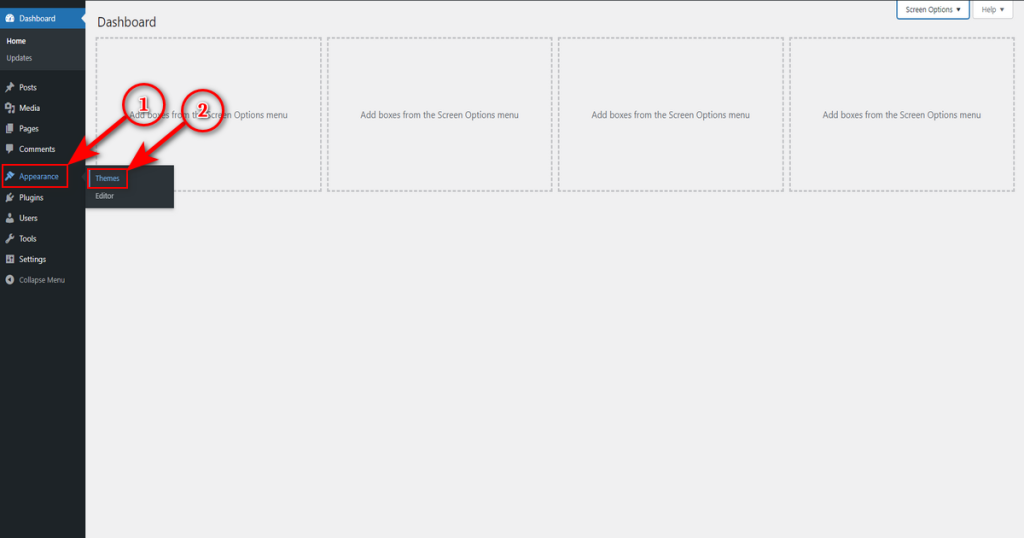
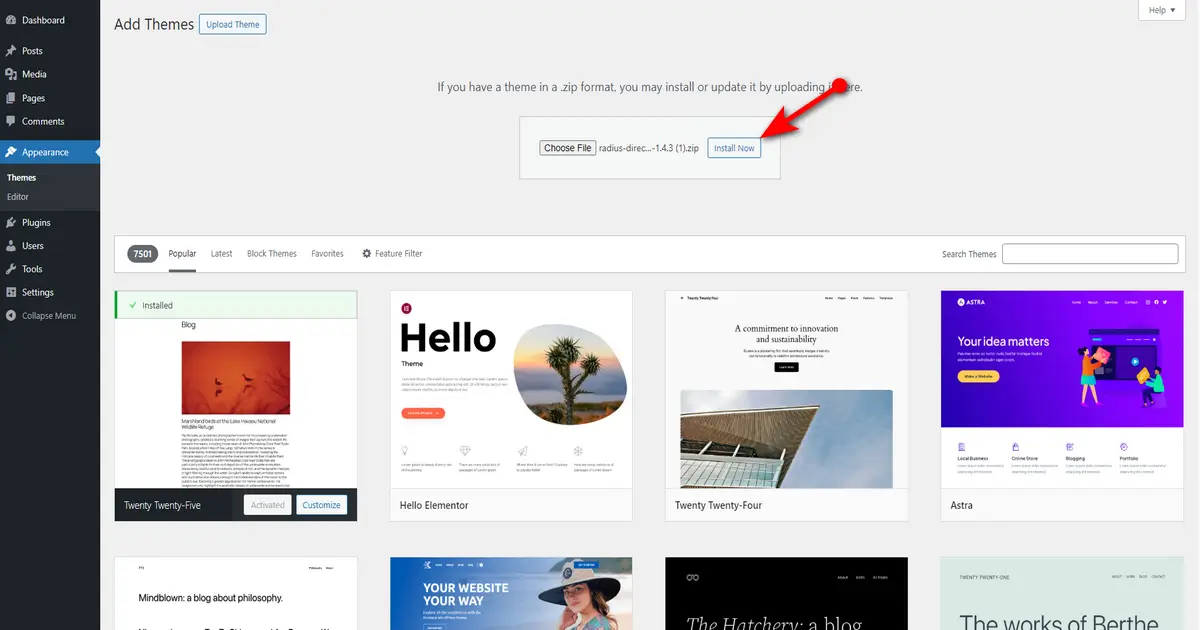
- Go to WordPress Admin Dashboard > Appearance > Themes.
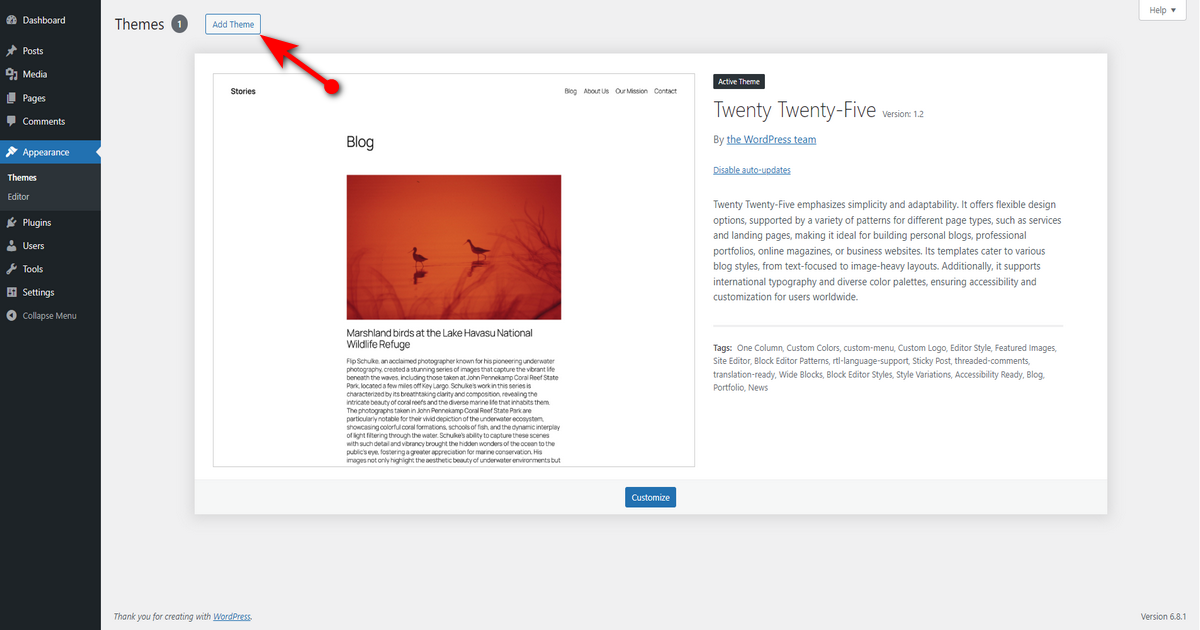
- Then, press “Add Theme” button.
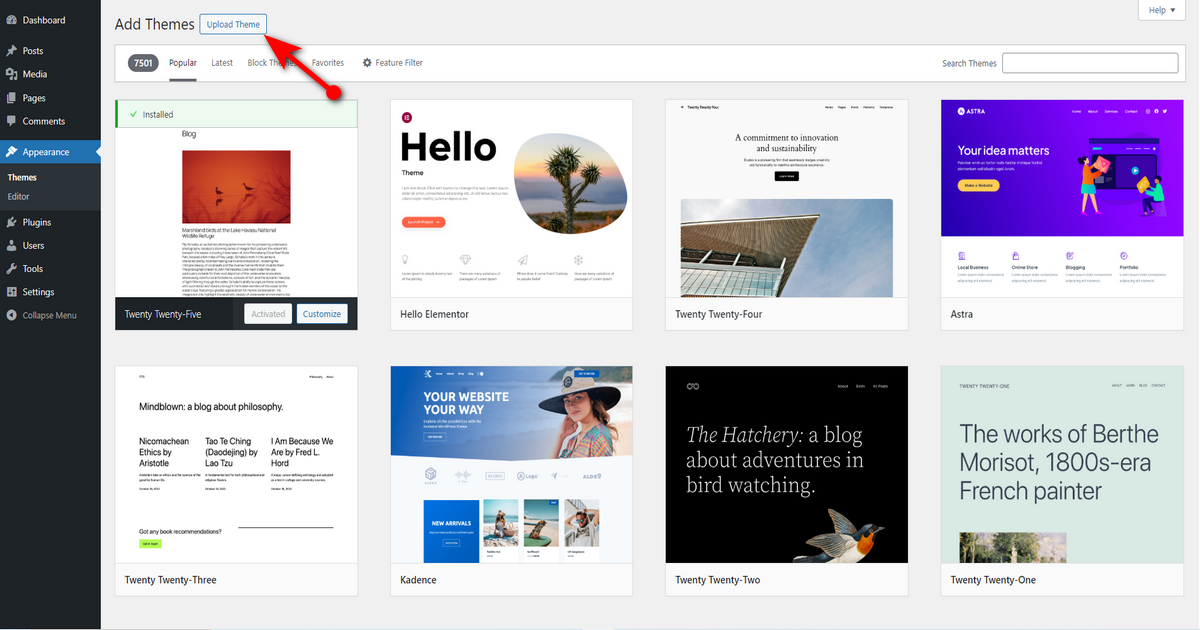
- Now, hit “Upload Theme” button.
- Click “Choose File” button and upload the zipped file of “Radius Directory” you downloaded from our website.

- Now, hit “Install Now” button.
- Finally, hit ‘Activate‘ link to activate this free classified ads WordPress theme.
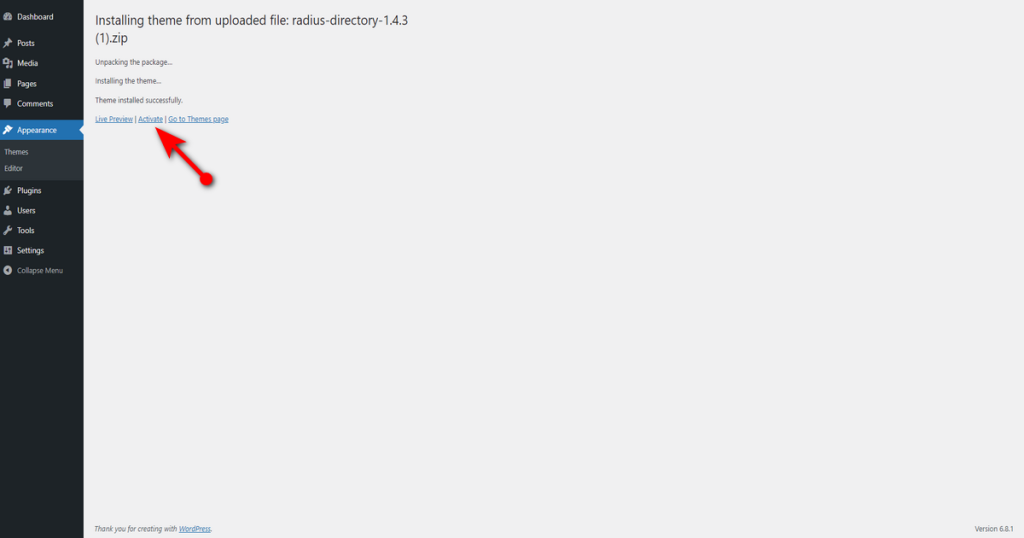
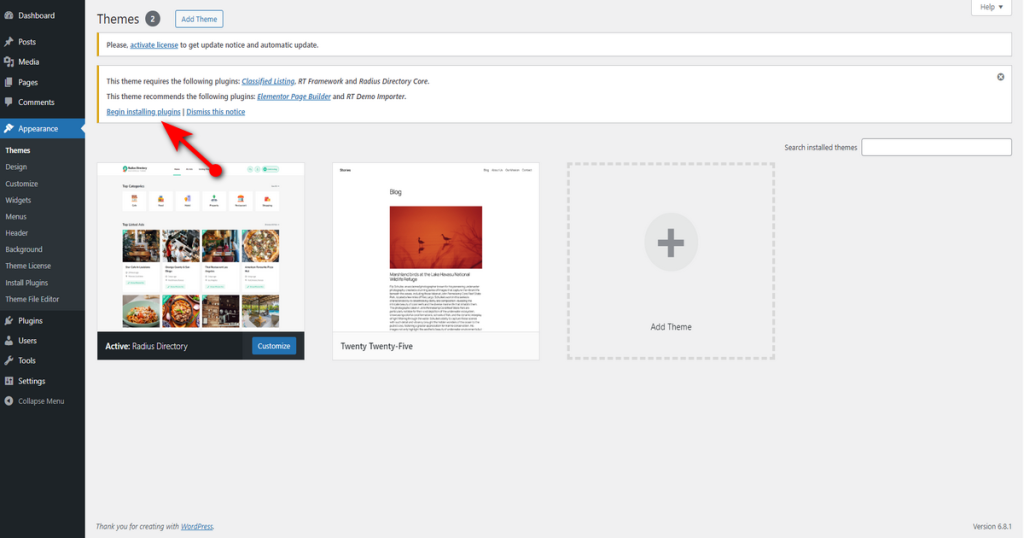
That’s it. You’ve installed and activated this theme. However, this theme requires some supporting plugins, including the Classified Listing and Elementor, to help you easily build and manage your directory site.
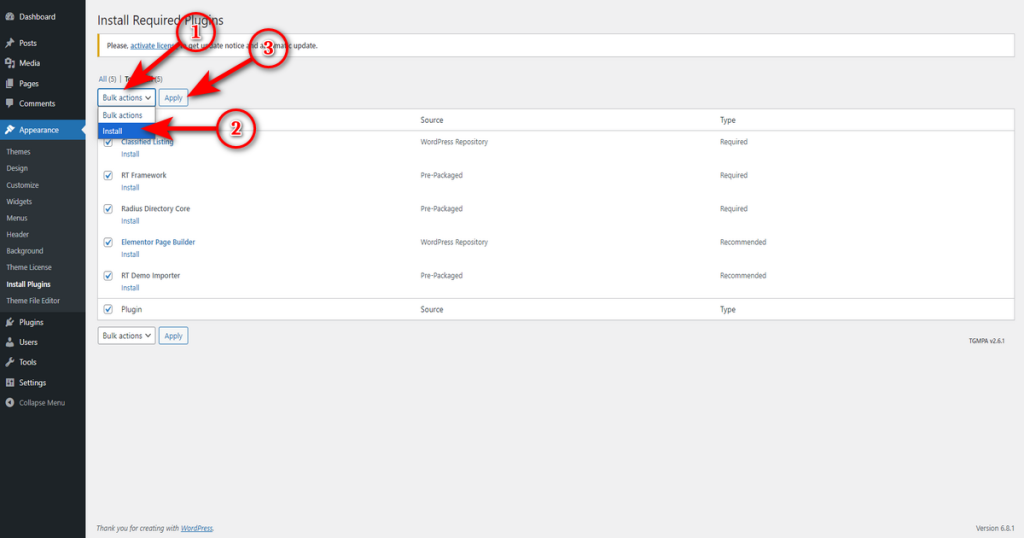
Therefore, you’ll notice a message asking you to install those supporting plugins once you install this free theme. Click “Begin installing plugins” link.
After that, place a checkmark in the box next to ‘Plugin.’
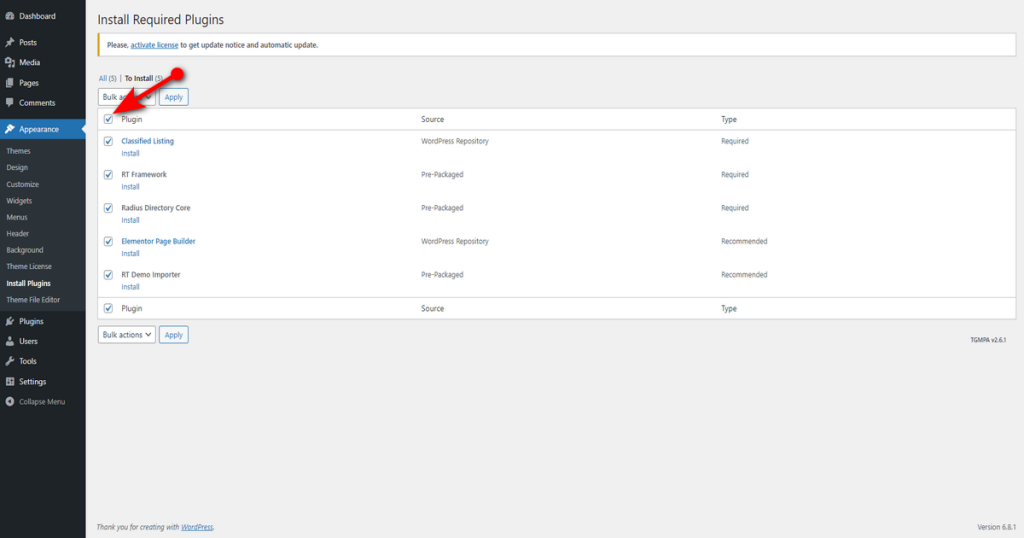
Now, head to “Bulk actions” drop-down menu, select ‘Install,’ and click ‘Apply‘ button.
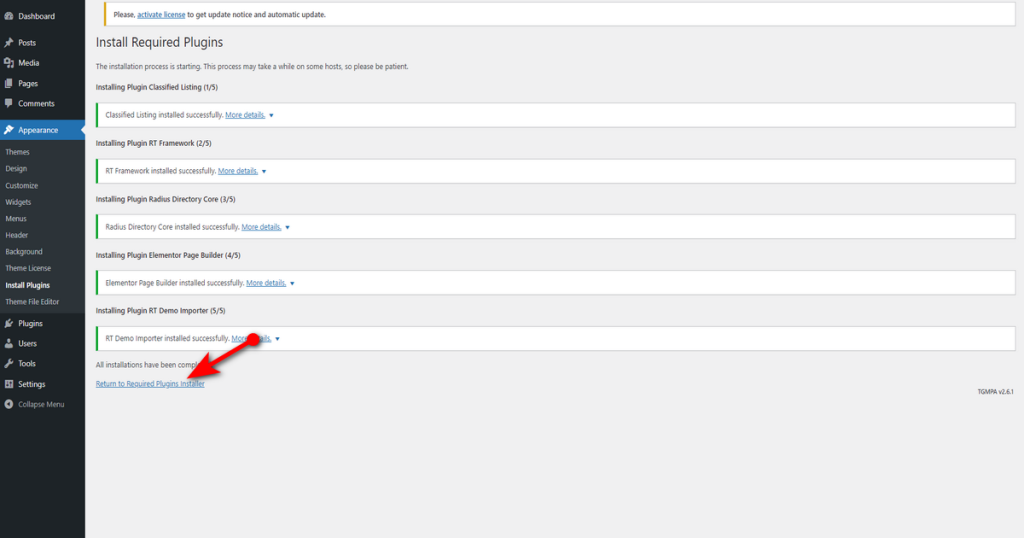
Now, click “Return to Required Plugins Installer” link.
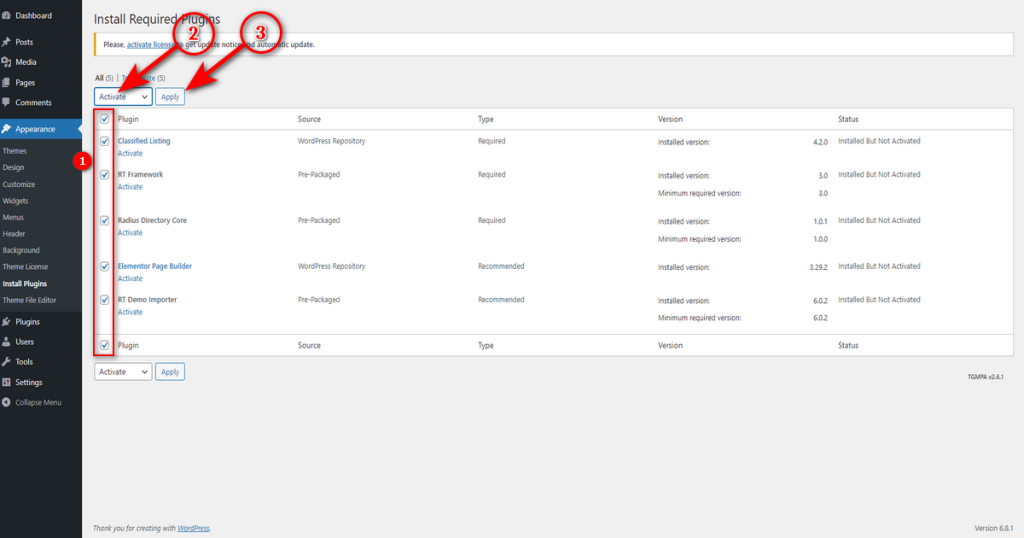
Lastly, repeat the same step to activate all these plugins at once.
You’ve done half the job associated with the creation of a website like Craigslist.
Step 5: Customize Your Website
Okay, you’ve installed the free theme and associated plugins. It’s time to customize the website. First, upload some demo content to make the customization easier.
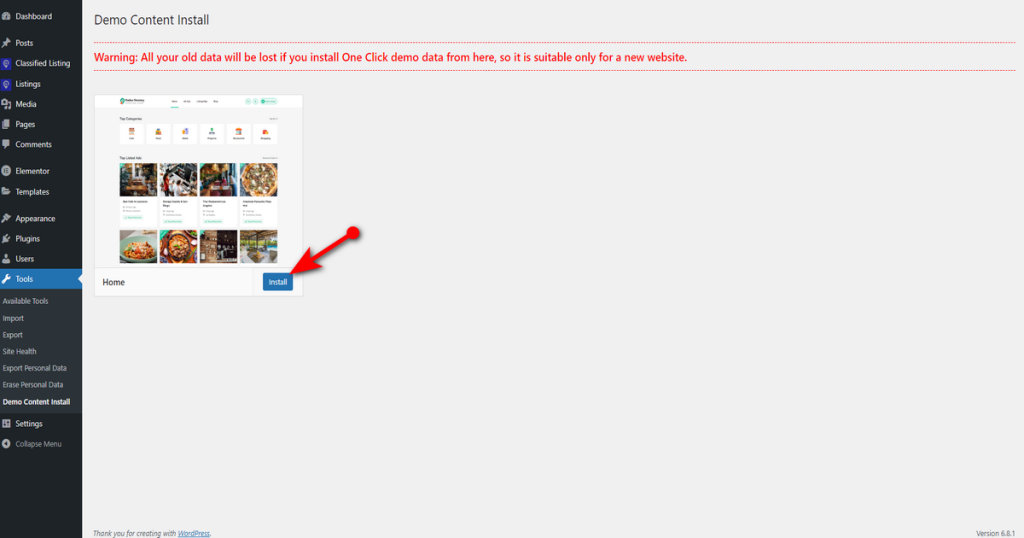
So, head to WordPress Admin Dashboard > Tools > Demo Content Install.
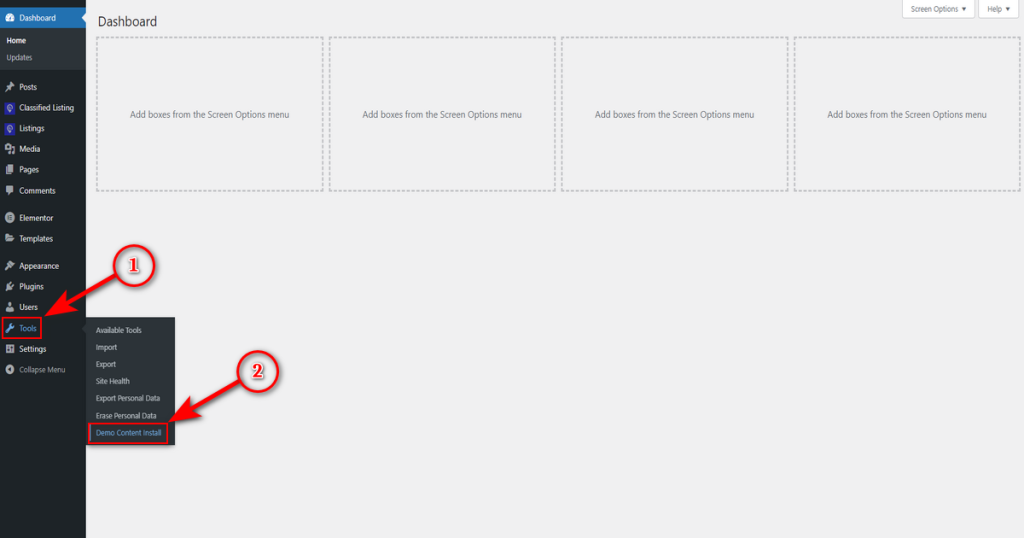
Then, press ‘Install‘ button.
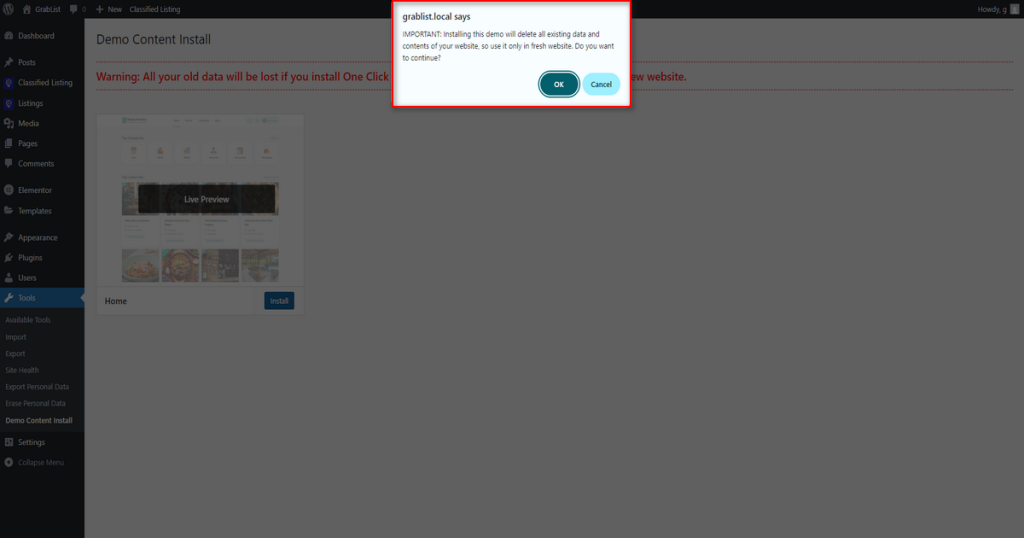
You’ll now see an alert message. Click ‘OK‘ to begin uploading demo content.
That’s it. You have uploaded all the demo content and made a professional directory website.
Now, make some customization. For example, you can change the logo and work on the typography. You can also update the hero section and the site colors. Use the Craigslist color palette: #38006b, #6a1b9a, #9c4dcc, #ce93d8, #f4f1f4.

N.B. To avoid making this article lengthy, we skipped showing how to customize your classified ads website. If you need to learn in-depth about customization, watch this video tutorial on building your directory website.
Step 6: Add Listing Locations and Categories
Once you customize your directory website, you need to make it work. Start adding features that a site like Craigslist has.
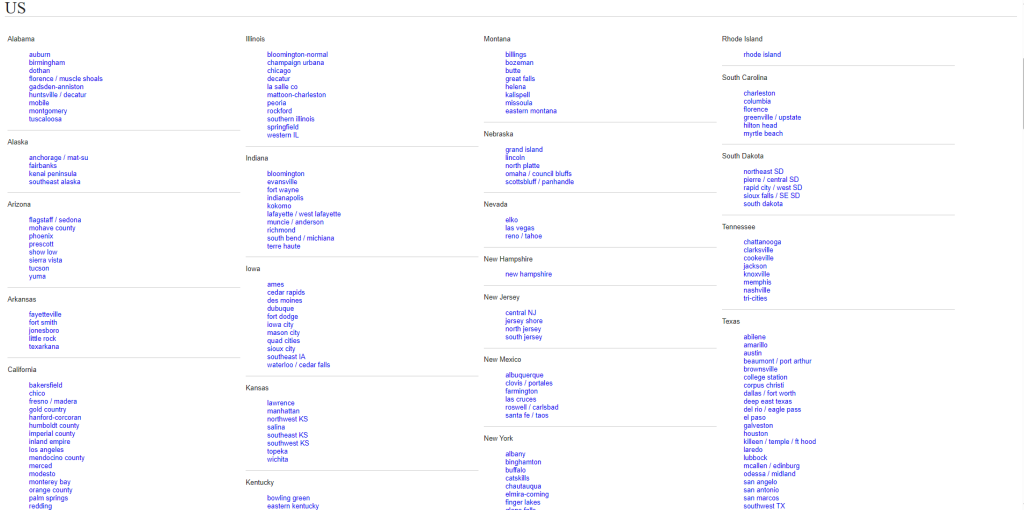
When you visit Craigslist, this website asks you to choose a location to display location-based listings.
When you click a location, you can view all the categories under that location on Craigslist.
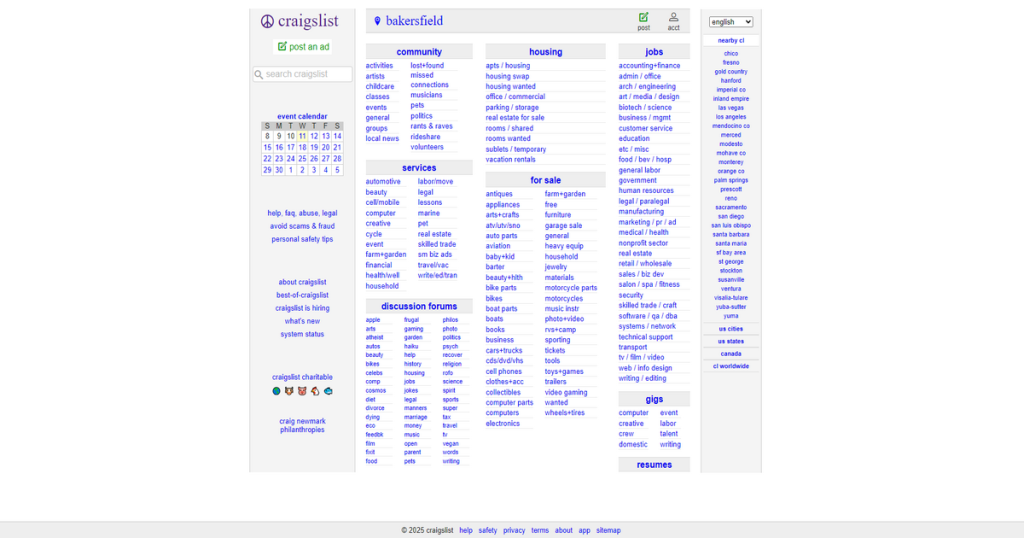
Then, you choose a category and view all the listings under that category.
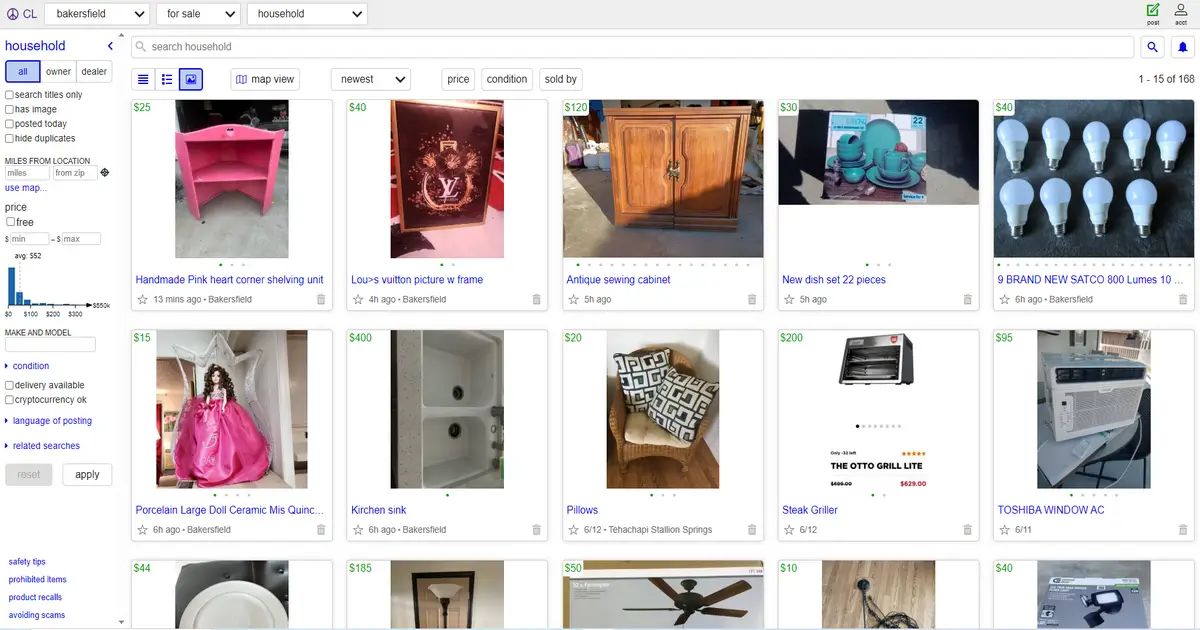
Let’s add these features to our website using the mighty Classified Listing plugin. It’s the best WordPress directory plugin you can find on the internet.
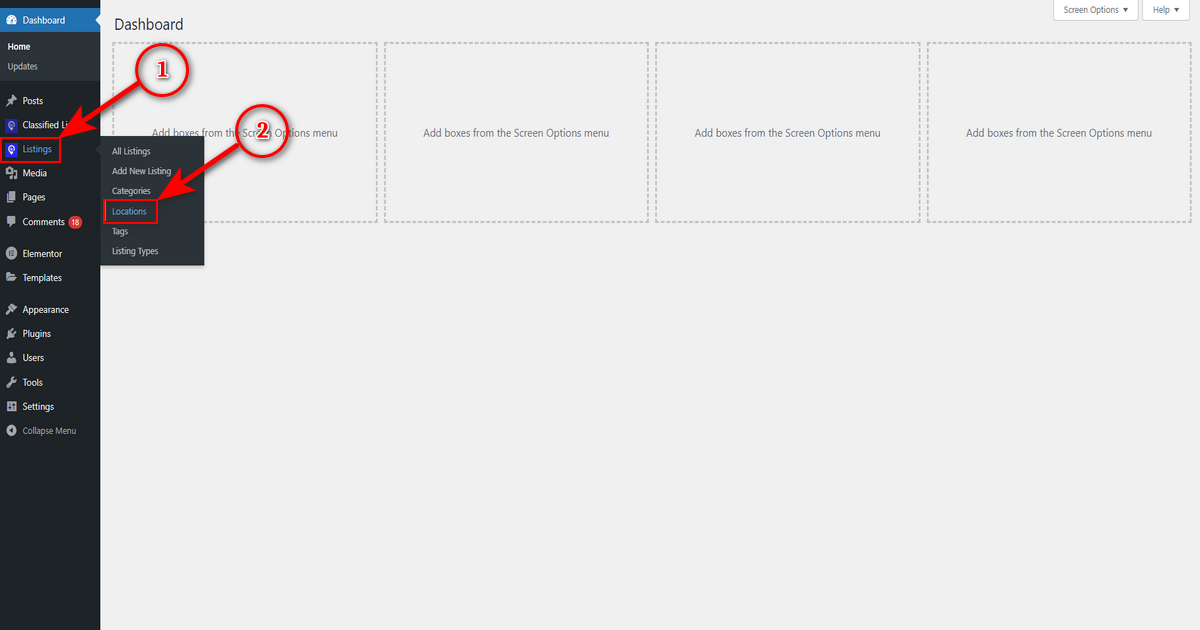
Okay, we’ll now add a location with this plugin. Therefore, head to WordPress Admin Panel > Listings > Locations.
Now, fill in all or the necessary fields with the required information. For example, write the location name in the ‘Name‘ field, write its slug in the ‘Slug‘ field, etc. Then, click “Add New Location” button.
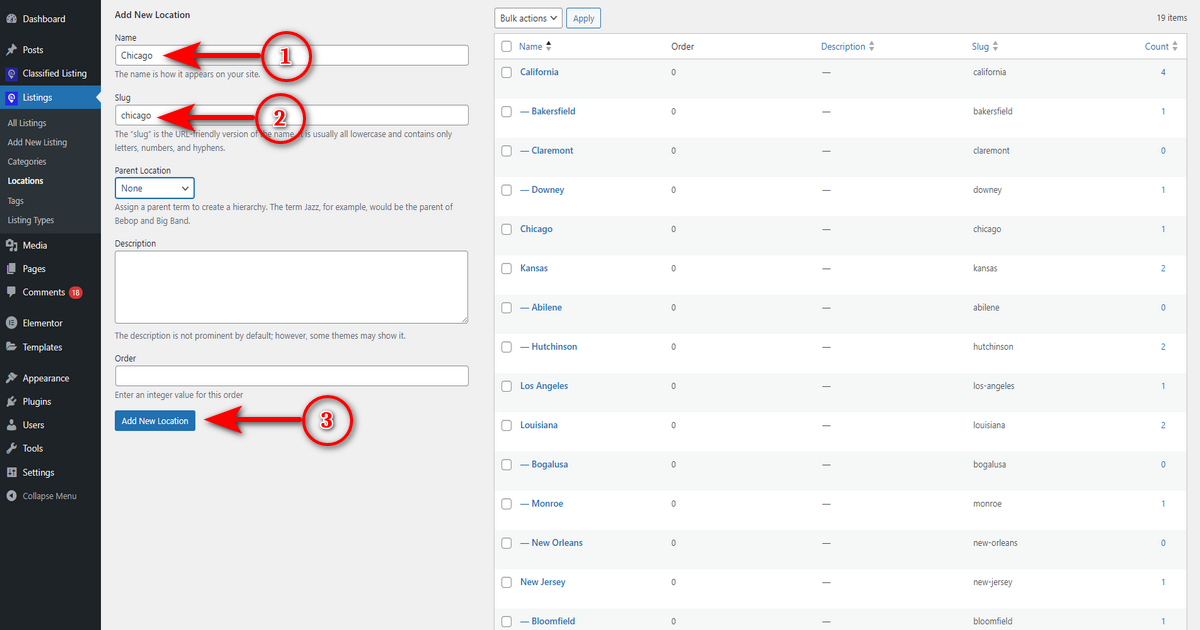
That’s how you add a listing location. Now, again, visit your WordPress Admin Dashboard. And go to Listings > Categories.
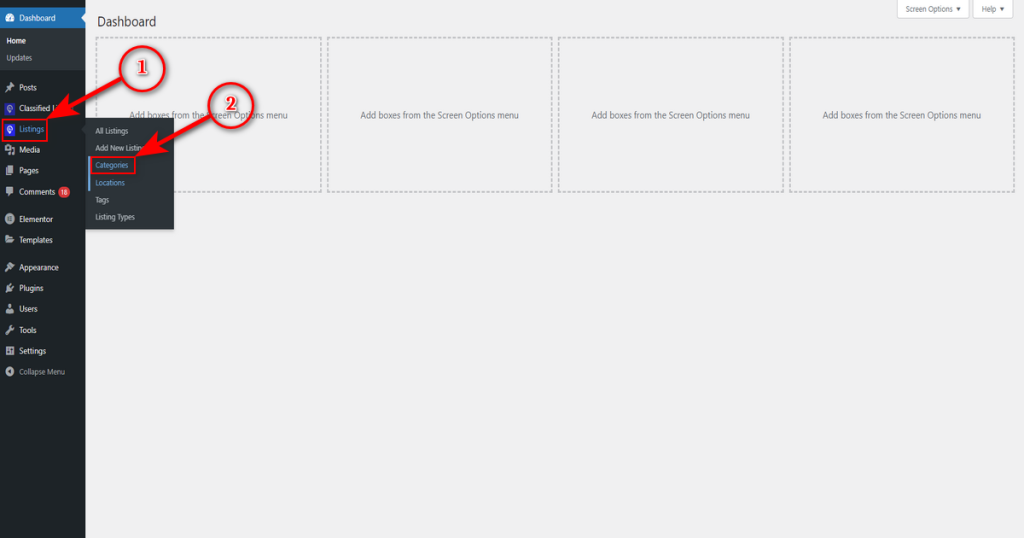
Now, fill in your preferred fields with the essential information as you did during listing location creation. Lastly, hit the “Add New Category” button.
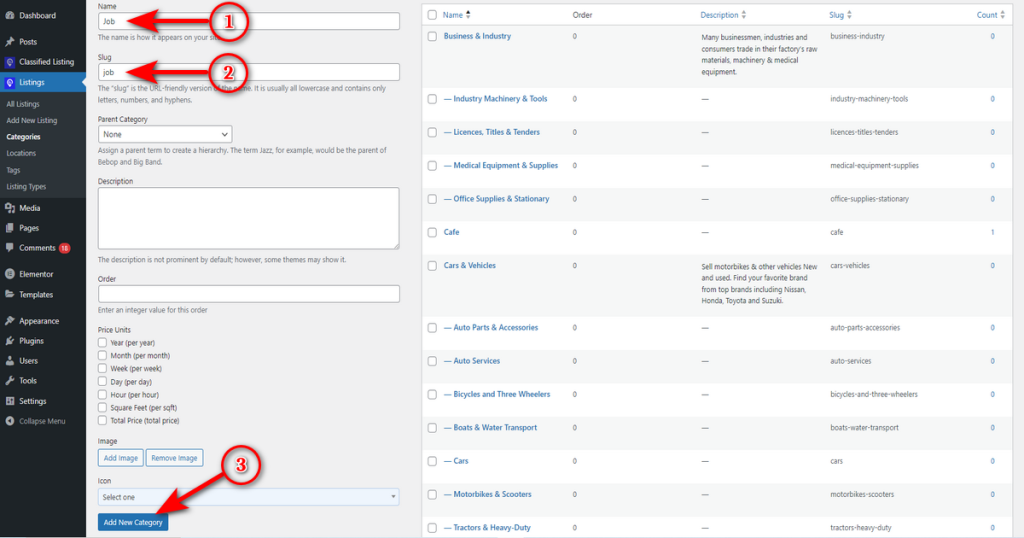
That’s how you add a listing location and a category similar to Craigslist with the Classified Listing plugin.

Step 7: Include a Listing
Now that we’ve created locations and categories, let’s create our first listing by following the steps below:
- Navigate to WordPress Admin Dashboard > Listings > Add New Listing.

- Now, watch the animation below to learn how to create a listing.
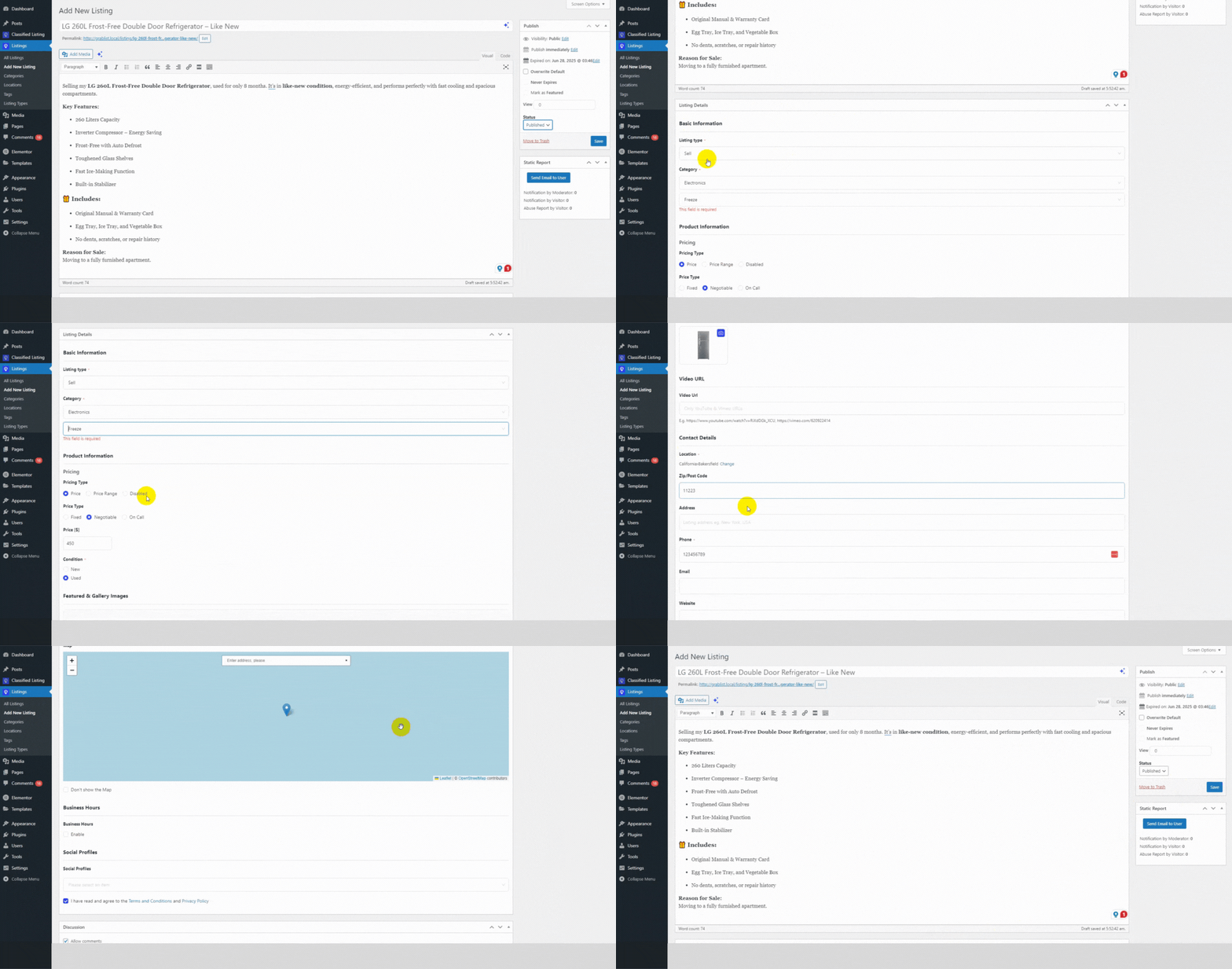
This is how you create a listing using the Classified Listing.
Please note that the form displayed in the animation is customizable to meet your specific needs. You can use this plugin to integrate AI. With just a few clicks, you can create multi-directory forms automatically!
Step 8: Add Marketplace Functionality
Currently, only you can create listings on your directory site, and visitors can view ads and contact you. That means it’s a personal ad website like Craigslist. However, Craigslist enables numerous individuals to create listings and achieve their goals.
To offer the same feature, you need to install the Store and Membership Addon of Classified Listing. It helps you change a regular directory site into a marketplace. Sellers can build stores, create ads, and promote listings. They can use different options like Top Ads, Featured Ads, etc.
On the contrary, buyers can navigate to stores, browse listings, contact their preferred sellers in real time, and make purchases.
As a website owner, you can earn commissions per sale and sell membership packages to sellers. Besides all these, there are more benefits of using this addon – so get it.
Step 9: Integrate Search Alert
As you know, Craigslist notifies users via email when new listings match their preferences. We need to enable this feature on our classified ads website. We can do that using the Search Alert addon of Classified Listing.
Just install and activate this addon, and allow users to save their searches and get notified when sellers make listings that match their queries.
Step 10: Review, Publish, and Promote Your Website
We’ve built, customized, and virtually added all the features of Craigslist to our website. Now, we need to review it carefully. We need to check whether it’s responsive and fast. Additionally, we may ask our friends and family members to visit the site.
Then, we can publish it. After that, we should begin promoting our classified ads website. We can optimize our website for SEO to gain organic traffic. We can also utilize paid marketing channels, such as Meta and Google Ads, to increase traffic.
That’s all the steps associated with creating a site like Craigslist. Let’s take a look at the website we’ve just created.

How to Monetize Your Craigslist-Like Website
One of the biggest advantages of running your own classified website is the ability to monetize it in multiple ways. Here are the most effective revenue models:
1. Membership Packages
Offer tiered subscription plans that give sellers benefits like more listings per month, featured placement, or priority support. For example, you could offer a free tier with 5 listings per month, a Silver plan at $9.99/month with 25 listings, and a Gold plan at $24.99/month with unlimited listings and featured ads.
2. Listing Fees
Charge a small fee for posting ads in premium categories like jobs, real estate, or automotive. Craigslist charges $10–$75 for job ads in major cities. You can set similar or lower pricing to attract users.
3. Promoted Listings
Let sellers pay to boost their ads to the top of search results or mark them as “Featured.” This is the easiest monetization method and converts well because sellers see immediate visibility.
4. Commissions on Sales
If your marketplace supports transactions, you can take a percentage of each sale. Mercari charges 10% per sale, and this model works well for C2C platforms.
5. Display Advertising
Once your site has steady traffic, you can sell banner ad space or use Google AdSense to generate passive revenue from page views. The Store and Membership Addon for Classified Listing makes it easy to set up membership plans, seller stores, and ad promotion features without any coding.
💡 Want to learn more about revenue models? Read our deep dive on how Craigslist makes money.
Why Should You Follow This Method?
There are several compelling reasons to use WordPress and the Classified Listing plugin instead of other approaches:
- Modern design: While Craigslist has not updated its interface since 1995, this method lets you build a visually appealing, mobile-first classified website with search filters, advanced promotions, and sleek layouts.
- Diverse ad types: You can support buy-sell listings, rental properties, job postings, service ads, and any custom category you need.
- Flexible pricing: You can offer completely free listings or set up tiered pricing that is more affordable than Craigslist’s fees.
- Store functionality: Unlike Craigslist, your site can allow sellers to create branded stores, which builds trust and encourages repeat business.
- Full ownership: You own the platform, the data, and the revenue. There is no dependence on a third-party service that could change its policies overnight.
- Scalability: Start with a single city and expand to multiple locations as your traffic grows. The Classified Listing plugin supports multi-location setups natively.
- SEO and AI visibility: WordPress gives you full control over meta titles, descriptions, schema markup, and content structure, all of which help your site appear in Google search results and AI-generated answers.
Check Out These Websites Similar to Craigslist
Below are details on some websites similar to Craigslist. It’ll be wise to have a look at them.
1. Facebook Marketplace

Facebook Marketplace is a section within Facebook. It was launched in October 2016. It allows users to buy and sell items both locally and internationally, with shipping options.
It’s, in essence, a digital marketplace similar to Craigslist. It offers users the ability to browse listings, filter ads by location and category, and communicate with sellers to make purchases.
2. eBay

It was one of the largest buy-sell sites launched in 2005 in Canada under the name Kiji. Later, it was introduced in the U.S. in 2007 and was rebranded as eBay Classifieds in 2010.
This website allowed visitors to create diverse listing types on eBay’s homepage. Although this site worked similarly to Craigslist, its sorting function was much more advanced than Craigslist’s. Users can sort listings within a particular category by price, distance, and other criteria.
However, eBay discontinued the eBay Classifieds platform in 2020. Now, this site allows users to create classified ads for certain categories.
3. OfferUp

OfferUp is a famous mobile-first online marketplace. It enables users to buy and sell items within their community. They can connect with buyers and sellers through the mobile app and accomplish their jobs.
Not only this, but OfferUp also allows users to rate both buyers and sellers, enhancing trust and improving transaction quality.
Finally, this website, similar/alternative to Craigslist, provides a network of secure community meetup spots, often located at places like police stations.
👉Good Read: How to Create Website like OfferUp
4. Mercari

Mercari is a top mobile-first marketplace with millions of active users and billions of active listings. It lets users buy items and post free classified ads.
It’s a safe marketplace where anyone can buy and sell products. It makes money when sellers make sales. It takes around 10% of each successful sale.
Overall, Mercari is an excellent alternative to Craigslist, and unlike Craigslist, it supports nationwide sales.
5. Oodle

Oodle is another well-known marketplace with a UI that is quite similar to Craigslist. However, it functions differently. Unlike Craigslist, you’ll see recent listings with listing categories and other information after visiting Oodle.
Oodle also collects listings from various sources, including local newspapers and partner sites, which means users often find a wide range of listings compared to Craigslist.
Lastly, Oodle integrates with social media platforms like Facebook to help buyers and sellers connect more easily than Craigslist does.
Frequently Asked Questions (FAQs)
Yes. Craigslist still receives over 110 million monthly visits, primarily from the United States, Canada, and Mexico. However, its traffic and revenue have declined significantly since 2018 as alternatives like Facebook Marketplace and OfferUp have grown.
Craigslist earns revenue primarily through posting fees for job ads and certain commercial listings. Other sites in the classified space use membership plans, transaction commissions, promoted listings, and display advertising to generate income.
For users, Facebook Marketplace and OfferUp offer better interfaces and built-in safety features. For entrepreneurs, building your own classified site with WordPress gives you full control over features, design, and revenue — without the limitations of an existing platform.
Using the WordPress method described in this guide, you can launch a classified website for under $100. That covers a domain name ($10–15/year) and shared hosting ($3–10/month). The Classified Listing plugin and the Radius Directory theme both have free versions. If you want premium features, the Classified Listing Pro plugin starts at $39/year.
Absolutely. WordPress is a no-code platform, and the Classified Listing plugin handles all the classified ads functionality through a visual interface. You can set up categories, locations, custom fields, pricing plans, and even a marketplace — all without writing a single line of code.
Start by focusing on one city or niche. Seed the site with your own listings so it does not look empty. Use local SEO to rank for terms like “[city name] classifieds” or “sell used items in [city name].” Share listings on social media, join local Facebook groups, and consider running targeted Google or Facebook ads with a small budget. As traffic grows, user-generated listings will create a self-sustaining cycle.
The Classified Listing plugin by RadiusTheme is widely regarded as the most comprehensive option. It includes listing management, categories, locations, custom fields, search filters, chat, ad promotions, membership plans, and store functionality. It powers over 10,000 classified websites worldwide.
Yes. RadiusTheme offers Android and iOS app templates that integrate directly with the Classified Listing plugin. This allows your users to browse, post, and manage listings from their phones, giving you a significant advantage over Craigslist, which does not offer a dedicated mobile app experience.
Wrapping Up
Building a website like Craigslist is no longer a massive technical challenge. With WordPress, the Classified Listing plugin, and a well-chosen theme, you can create a modern classified ads platform that outperforms Craigslist in design, functionality, and user experience.
To recap, your Craigslist-like site should include user registration, category and location taxonomies, robust search filters, easy ad posting with images, in-platform messaging, ad moderation, and monetization options. All of these are available through the Classified Listing plugin and the Radius Directory theme.
Start with the free versions to test and learn. Once you are ready to scale, upgrade to the pro versions to unlock advanced features like visual table reservations, AI-powered listing creation, and marketplace functionality.
Recommended next reads:
- How to Create a Classified Website with WordPress — In-depth guide with more customization details
- Best Classified WordPress Themes — Find the perfect design for your classified site
- How to Secure Your Classified Website — Essential Security Practices
- Attract Buyers and Sellers to Your Classified Ads Website — Growth strategies that work



