
On This Page
Ask ten restaurant owners how much money is sitting in their walk-in cooler right now, and most can only guess. That guess is exactly the problem. In a business where profit margins run in the single digits, the food in your storage isn’t just ingredients — it’s cash. And cash you can’t count is cash you’re probably losing.
Restaurant inventory management is the discipline of knowing what you have, what you’re using, and what you need — precisely, not approximately. Done well, it’s one of the highest-leverage habits in the entire business: it curbs waste, prevents theft, stops you from over-ordering, keeps popular dishes from running out, and hands you the numbers you need to price your menu profitably.
If the idea of counting stock every week sounds tedious, stay with me. This beginner’s guide breaks restaurant inventory management down into a simple, repeatable system — the core concepts, the exact steps, the formulas that matter, and the common mistakes to sidestep — so you can go from guessing to knowing.
What is restaurant inventory management?
Restaurant inventory management is the process of tracking every food and beverage item that comes into your restaurant, how it moves through your kitchen, and what’s left over. It answers three deceptively simple questions: What do I have? How fast am I using it? How much should I reorder?
It covers everything you buy to run the kitchen — proteins, produce, dry goods, dairy, beverages, and even non-food consumables like napkins and takeout containers. The goal isn’t to count for counting’s sake. It’s to turn your storeroom into data you can act on: buying the right amount, catching problems early, and protecting your margins.
👉 Good Read: Kitchen Display System for Restaurants
Why inventory management matters more than owners think
Poor inventory control quietly bleeds money in ways that rarely show up as a single obvious line item.
It controls your single biggest variable cost. Food is typically 28–35% of revenue. Small inefficiencies in ordering and usage compound fast across a year.
It prevents waste and spoilage. When you know what’s on hand and how quickly it moves, you stop over-ordering perishables that rot before they’re used. (Tightening inventory is one of the most effective ways to reduce food waste in your kitchen.)
It exposes theft and “shrinkage.” Inventory that disappears faster than sales explain is a red flag. Without counts, you’d never see it.
It keeps dishes on the menu. Running out of a signature item mid-service costs you sales and disappoints guests. Good inventory means you reorder before you run dry.
It powers accurate pricing and profit. You can’t calculate true food cost — or price your menu for profit — without knowing what your ingredients actually cost and how much you use. Inventory is the foundation the rest of your numbers sit on.
Key inventory terms every beginner should know
A few core concepts do most of the heavy lifting. Learn these and the rest falls into place.
Par level — the minimum quantity of an item you need on hand to get through to your next delivery, plus a small safety buffer. When stock drops to par, it’s time to reorder. Par levels take the guesswork out of ordering.
FIFO (First In, First Out) — the rule that older stock gets used before newer stock. Store new deliveries behind existing product and label everything with dates. FIFO is your single best defense against spoilage.
Sitting inventory — the total value (and amount) of stock you have on hand at a given moment. It’s the dollar figure in your cooler right now.
Depletion / usage — how much of each item you use over a period. Comparing usage to sales reveals waste, over-portioning, or theft.
Inventory turnover — how many times you sell through and replace your inventory in a period. Higher turnover generally means fresher food and less cash tied up in stock.
Variance — the gap between how much product you should have used (based on sales and recipes) and how much you actually used. Variance is where hidden losses hide.
How to manage restaurant inventory: a step-by-step system
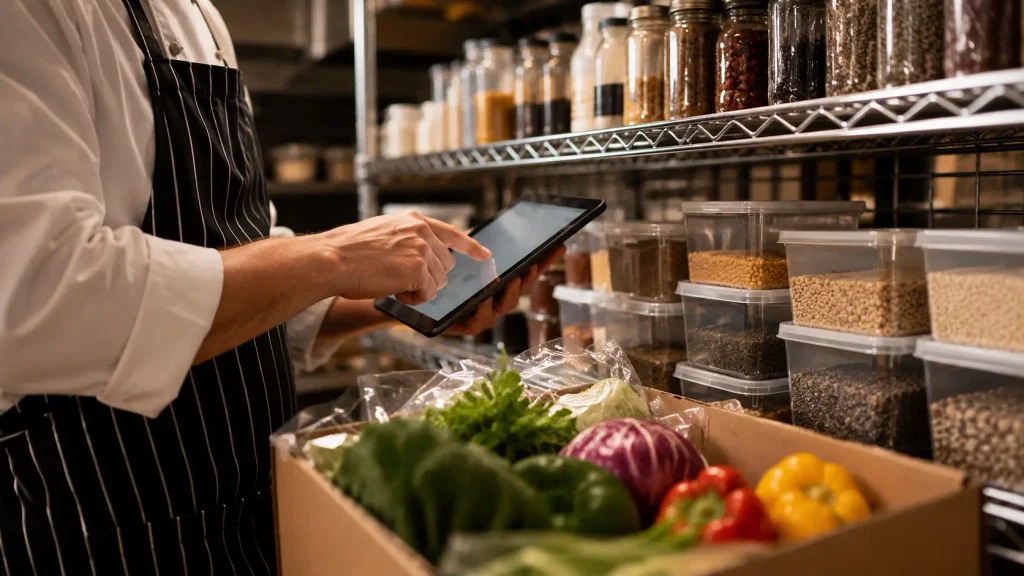
Here’s a straightforward system a beginner can put in place this week.
Step 1: Create a master inventory list
List every item you stock, organized by storage area (walk-in, freezer, dry storage, bar) and in the order you’ll physically walk past them. Include the unit you count in (case, lb, each, bottle) for each item. Counting in a consistent order and unit is what makes counts fast and accurate.
Step 2: Set par levels for every item
For each item, decide the minimum quantity that carries you to the next delivery plus a small buffer. Base it on how much you actually use between deliveries. Par levels turn ordering from a guessing game into a simple rule: count, compare to par, reorder the difference.
Step 3: Count on a consistent schedule
Consistency beats frequency. Count high-value, fast-moving, and highly perishable items (proteins, seafood, produce) most often — often weekly or even daily — and count everything else on a regular weekly or monthly cycle. Always count at the same time (ideally before a delivery or after close), and have the same trained person or process do it. Two people counting the same shelf two different ways is how errors creep in.
Step 4: Practice disciplined FIFO storage
Organize storage so the oldest product is always the easiest to grab. Label deliveries with received and use-by dates, rotate new stock to the back, and keep storage areas clean and at correct temperatures. Good physical organization makes every count faster and every shift less wasteful.
Step 5: Track usage and calculate the numbers
Between counts, track what you use so you can spot problems. Two formulas do most of the work.
Cost of Goods Sold (COGS) — what the inventory you actually used cost you:
COGS = Beginning Inventory + Purchases − Ending Inventory
Inventory turnover ratio — how efficiently you’re cycling stock:
Inventory Turnover = COGS ÷ Average Inventory Value
A very low turnover suggests you’re overstocked and tying up cash (and risking spoilage); an extremely high turnover can mean you’re cutting it too close and risking stockouts. Tracking these over time tells you whether your system is improving.
Step 6: Order strategically and hold suppliers accountable
Use your par levels and usage data to order the right quantities — not the “safe” over-order. Order perishables more often in smaller amounts, consolidate deliveries where it makes sense, and always check deliveries against what you ordered and were invoiced for. Receiving is where a surprising amount of loss occurs: short deliveries, wrong items, and quality problems all cost you if nobody’s checking.
👉 Good Read: How to Price Menu Items for Profit
Common inventory mistakes to avoid
- Counting inconsistently. Different people, times, or units make your data useless. Standardize everything.
- Over-ordering “just in case.” Excess perishable stock is waste waiting to happen. Trust your par levels.
- Ignoring variance. If usage doesn’t match sales, investigate — it’s waste, over-portioning, or theft.
- Relying on memory or scattered notes. Inventory in someone’s head disappears when they do. Write it down or, better, systematize it.
- Never updating par levels. Demand shifts with seasons and menu changes. Revisit pars regularly.
Manage your inventory right from your WordPress site with Food Menu
Here’s the reality for beginners: spreadsheets and clipboards work, but they’re easy to abandon when service gets busy. The moment inventory management becomes part of the same system you already use to take orders and run your menu, it actually sticks.
If your restaurant’s website runs on WordPress, the Food Menu plugin builds inventory management right into the tools you use every day — and one of its standout features is the Front-End Dashboard Manager. It lets you and your team run the whole operation from the front end of your own site, without ever logging into the WordPress admin panel. (Building your restaurant site from scratch? Pairing the plugin with a purpose-built theme like FoodyMat gives your menu, ordering, and inventory tools a polished home from day one.)
From that dashboard you can:
- Track stock in real time — monitor item availability and usage as orders come in, so you always know what’s running low.
- Log wastage — record waste directly, turning it into data you can review instead of a mystery at month-end.
- Pull reports and activity logs — see stock movement, sales, and shift-based reports (day and night), so counting and analysis live in one place.
- Assign role-based access — give specific staff permission to manage inventory, orders, or the kitchen monitor, so the right people handle the right tasks — securely.
Because your menu, online orders, and stock all live in the same system, your inventory updates against real sales automatically — exactly the “know, don’t guess” discipline this guide is about, without the clipboard.
Want to see how it works on your own menu? Book a free demo of Food Menu and watch inventory management happen right from your website’s front-end dashboard.
Frequently asked questions
What is restaurant inventory management?
It’s the process of tracking all the food and beverage stock coming into a restaurant, how quickly it’s used, and what remains — so owners can order the right amounts, cut waste, prevent theft, and calculate accurate food costs.
How often should a restaurant take inventory?
Count high-value and highly perishable items (proteins, seafood, produce) most frequently — often weekly or daily — and count the rest on a consistent weekly or monthly cycle. Consistency of timing and method matters more than raw frequency.
What is a par level in a restaurant?
A par level is the minimum amount of an item you need on hand to last until your next delivery, plus a small safety buffer. When stock hits par, you reorder — which removes the guesswork from ordering.
What is the inventory turnover ratio for restaurants?
It measures how many times you sell through and replace inventory in a period, calculated as COGS ÷ Average Inventory Value. Healthy turnover means fresh stock and less cash tied up, without cutting it so close that you run out.
Can I manage restaurant inventory from my website?
Yes. With a WordPress plugin like Food Menu, you can track stock, log wastage, and pull reports from a front-end dashboard tied to your live orders — no separate spreadsheet or admin login required.
The bottom line
Restaurant inventory management sounds intimidating, but it comes down to a handful of habits: keep a master list, set par levels, count consistently, follow FIFO, track your usage, and order to the data instead of your gut. Master those, and you replace guesswork with clarity — less waste, fewer stockouts, tighter costs, and a real understanding of where your money goes.
You don’t need a warehouse-grade system to start. You need consistency and a tool that keeps inventory in front of you instead of buried in a drawer. Build the habit, connect it to the way you already run your menu and orders, and your storeroom stops being a black box — and starts being one of your most reliable sources of profit.