


On This Page
If you’re looking for instructions, resources, and information on how to create a website like Gumtree, this article is what you need.
Gumtree is a renowned online classified advertisement and community website. It’s a platform where you can buy and sell items, cars, and properties, as well as find employment opportunities.
Building a website like Gumtree might seem challenging, but with the right resources and guidance, it’s entirely achievable. We’ll guide you through the entire process, recommending easily accessible tools that deliver the best results.
Learn About the Key Features Of Gumtree
We recommend you learn about the features of Gumtree before you get into creating a site like it. Here are the key features you should know.
- Classified Ads: Gumtree allows users to post classified ads, which can be either free or paid, depending on the product category and geographical market.
- Ad Boosting Features: Gumtree offers several ad boosting features, including Bump Up, Highlight, Featured Ads, and the Urgent tag, among others, to enhance users’ ad visibility.
- Messaging System: Gumtree offers a secure and straightforward communication channel between buyers and sellers through in-app messaging.
- User Registration and Profiles: Gumtree enables users to create accounts, manage their listings, and communicate with other users.
- Search and Filtering: It offers robust search functionality with filters for categories, prices, and other criteria.
- Review and Rating System: Gumtree enables users to rate and review one another, enhancing trust.
These are the significant features that Gumtree contains. Hence, your would-be classifieds site should have these features. Let’s now learn how to create such a website.

How to Build a Website Like Gumtree – Step-by-Step
In this section, we’ll begin with the building process of a website similar to Gumtree.
Step 1: Determine Your Niche
Before starting to build a website like Gumtree, you first need to decide what kind of listings your website will contain. For example, it can list either general or specific items. A general classified website encompasses various categories, including electronics, furniture, jobs, and real estate, among others.
On the contrary, a niche directory website focuses on a specific market, such as used cars, rental properties, pets, and other related categories. Therefore, you need to choose what your directory website will include. Afterward, you should define your target audience.
Step 2: Pick a Domain Name
After selecting your niche, you need to choose a domain for your listing website. A domain name is the address of your website, which allows web visitors to find and access your site online.
So, get a domain name first. Brainstorm name ideas or use numerous domain name generators for help. Once you choose a domain name, check the following:
- It should be short, easy to spell, pronounce, and write
- It’ll be better if it contains your niche-related keywords
- It shouldn’t feature any special characters, hyphens, or numbers
- It must come with the correct domain name extension, such as “.com”
- It should be available and free from trademark issues
- It shouldn’t have any previous registration history or spam score
- Finally, make sure the social media handles related ot your domain are available
If your chosen domain meets the criteria above, register it with a popular domain registrar like Namecheap.
Step 3: Connect Your Domain with a Host
At this step, you need to connect the domain with your preferred host. You can go with any of the popular hosting providers to connect your domain and host your website. However, ensure your selected host meets the criteria below.
- It should offer a high uptime, excellent bandwidth, and adequate storage
- It must provide automatic updates and security features, such as SSL certificates and firewall protection.
- Select a host that has a data center close to your target audience
- It must offer easy migration
- Check if the hosting company ensures 24/7 customer support
- It should come with a beginner-friendly control panel
- It should have excellent customer reviews
- It should be affordable or have competitive pricing
Step 4: Install WordPress on Your cPanel
Now is the time to install WordPress on your cPanel in your hosting account. You might think Why WordPress? WordPress is a popular Content Management System that powers many websites on the internet. It’s beginner-friendly and allows anyone to build simple and complicated websites without dealing with code.
That’s why we suggest you install this CMS on your cPanel inside your hosting account. You’ll find an application named Softaculous on the cPanel. This application lets you easily install WordPress. You just need to follow the on-screen instructions and make a few clicks.
However, contact your hosting provider’s support if you face challenges while installing WordPress on your hosting account.
Step 5: Install a Classifieds WordPress Theme
After installing WordPress, you need to install a classified ads WordPress theme that enables you to build a website like Gumtree easily. However, where can you get such a theme?
You might read this article about the best free WordPress directory themes for a solution. You can select a theme from this article and install it on your site. For demonstration, we’ll use the “Radius Directory” theme.
It’s free to use. To learn how to install it and upload demo content, watch this video tutorial.
Step 6: Customize Your Gumtree-Like Website
At this step, you need to edit the website according to your preferences. You can easily do this with the theme customizer or using Elementor. Let’s say you want to utilize the Gumtree website color palette on your directory website.
In this case, open the theme customizer by heading to your WordPress Admin Dashboard > Appearance > Customize.
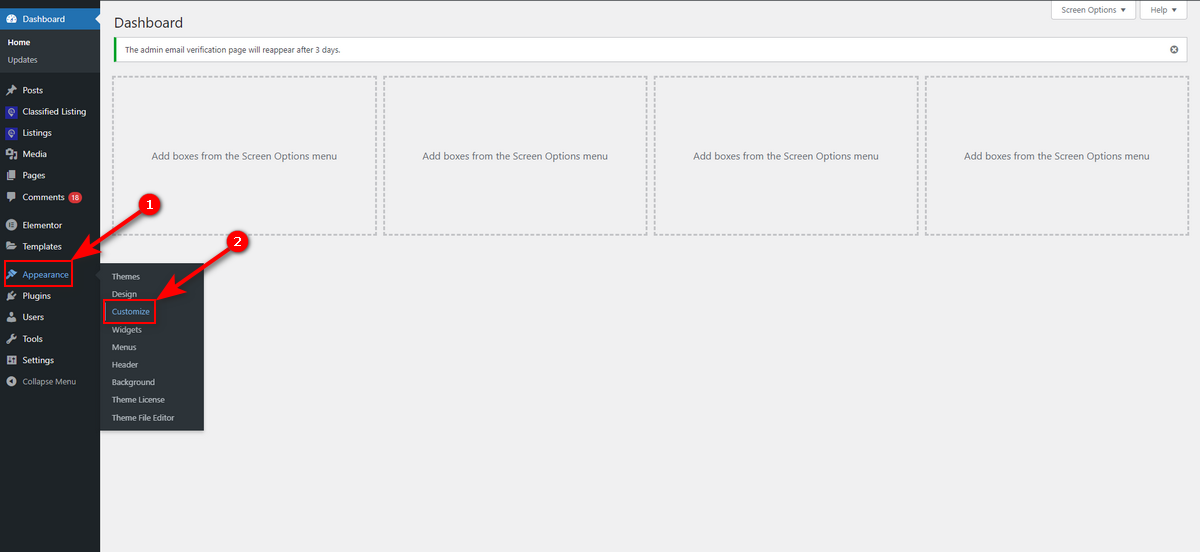
Then, click ‘Color‘ on the left-side panel.

Now, hit “Site Color.”
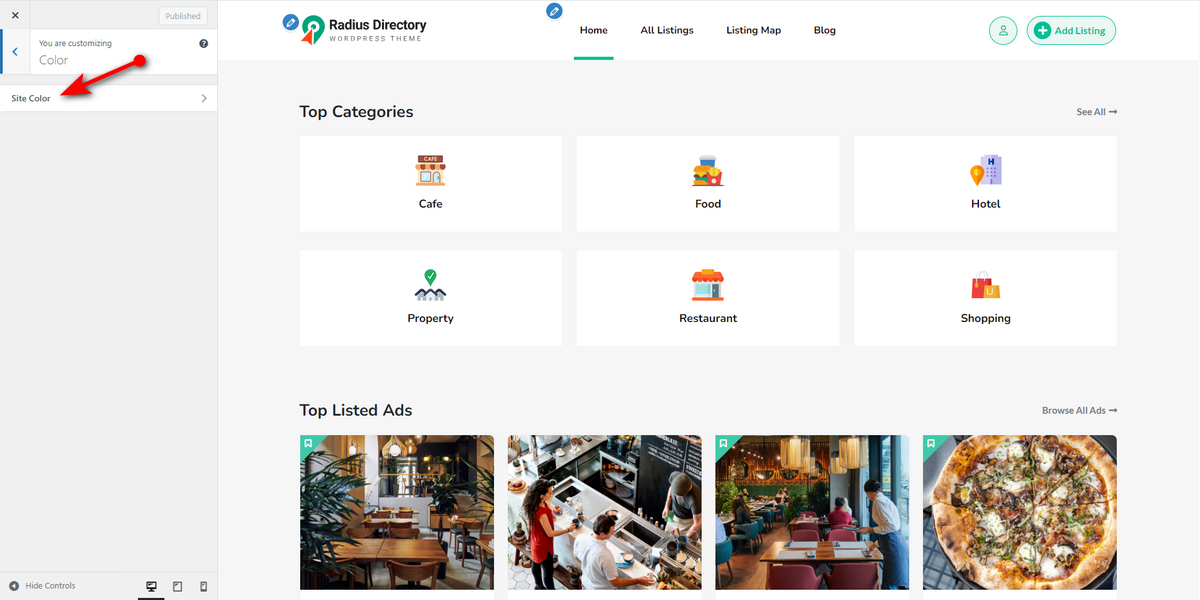
After that, set the primary and secondary colors of your site by following the Gumtree color palette: Green (#72ef36), Blackcurrant (#3b3141), and Pampas (#f0ece6). Then, hit the ‘Publish‘ button.

That’s how you use the theme customizer to edit your classified ads site, similar to Gumtree.
Step 7: Build Listing Categories Like Gumtree
Now, let’s build a listing category. Although you’ll see some pre-built listing categories after uploading demo content, we’ll show you how to create one.
Go to WordPress Admin Panel > Listings > Categories.

Then, type a category name, a slug, and a description, and click the “Add New Category” button.

That’s it. You can build as many categories as you want by following these few steps.
Step 8: Make a Listing as an Admin
We’ll now create a listing as an admin. So, we’ll visit our WordPress Admin Dashboard. Then, go to Listings > Add New Listing.
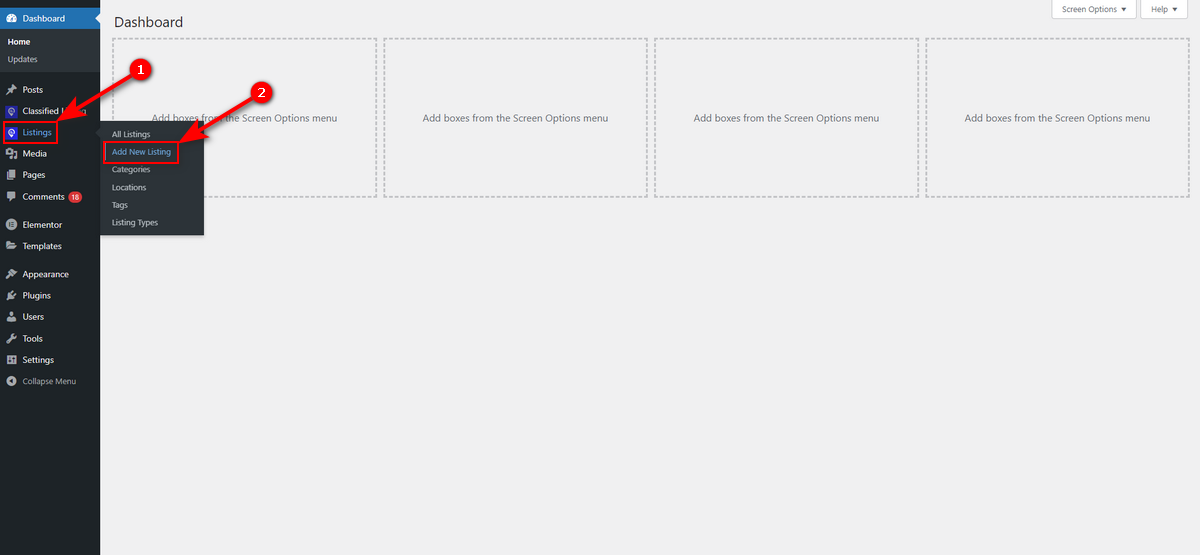
Then, type your listing information using the listing fields, box, and other elements of the listing form shown in the animation below.

Here’s the screenshot of the listing details page.

Step 9: Add a Review and Rating System
As you know, Gumtree allows users to rate and review other users’ services. You should also integrate this system into your website. And you can easily do that using the Review Schema plugin from Radius Theme.
Just install and activate this plugin and watch this tutorial to learn how to use Review Schema WordPress plugin.
Step 10: Review and Publish Your Website
We’ve created a classified ads website similar to Gumtree. Now is the time to double-check everything and ask our friends and family to review the website. If everything goes well and we are happy with the site, we can publish it.
Then, we can frequently accomplish website maintenance tasks. Additionally, we can employ promotional strategies such as SEO and Paid Advertisements to promote our website.
Check Out These Gumtree Type Websites
We’ve listed some websites similar to Gumtree below to help you get design inspiration.
1. Craigslist

Craigslist is a renowned classifieds platform with a minimalist, text-based design. Its simple, monochromatic layout organizes listings into categories like housing, jobs, and for-sale items.
The site uses a simple navigation with a basic search bar and category links. Although it has an old-school design, it ensures a quick browsing and posting experience. Craigslist’s strength lies in its vast user base and uncluttered interface, making it a go-to for local deals.
Also Read – How to Make Website Like Craigslist
2. Preloved

Preloved is a UK-based classifieds site with a clean, community-focused design. Its warm, inviting layout features a grid-based listing display, clear category menus, and a prominent search function.
The site emphasizes local deals, from furniture to pets. Its modern yet uncluttered interface balances aesthetics and usability. Preloved’s focus on community engagement and straightforward navigation makes it a solid reference for user-friendly classifieds.
3. Kijiji
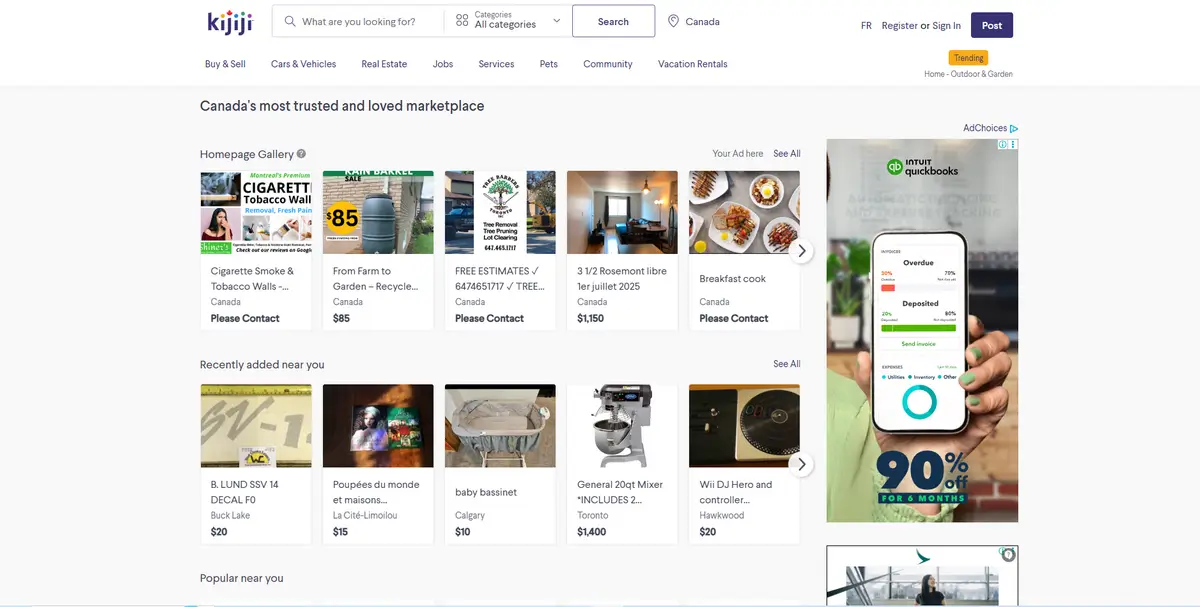
Kijiji, popular in Canada, offers a polished, user-friendly classifieds experience with a vibrant, image-driven layout. Its homepage features a dynamic grid of local listings. The design is colorful yet organized, ensuring easy navigation across categories.
Kijiji prioritizes local connections, with location-based results and secure messaging for transactions. Kijiji is an excellent source of design inspiration because it combines a clean look, clear categories, and easy-to-use features. It’s a good example of how to build a modern and user-friendly local classifieds website.
Good Read – How to Build a Website Like Kijiji
4. OfferUp

OfferUp is a mobile-first marketplace with a sleek, image-centric design. Its intuitive interface features large, high-quality listing photos, well-organized categories, and a powerful search with location filters.
Its navigation is simple, and the design is visually appealing. You can take design ideas from OfferUp’s vibrant visuals and trust-building features before building your classifieds website.
Also Read – How to Build a Website Like OfferUp
5. Autotrader

Autotrader is a specialized classifieds platform for vehicles. It boasts a professional and feature-rich design. Its layout showcases detailed car listings with high-resolution images and advanced search filters.
The site’s clean, structured interface organizes vehicles by make, model, and location, ensuring easy navigation. Autotrader enhances user trust with pricing guides and dealer reviews.
Its responsive design works seamlessly across devices. For inspiration, Autotrader is a great example of how to design a high-quality classified site. It features detailed listings, powerful filters, and a clean, professional look, making it ideal for building user-friendly platforms.
Frequently Asked Questions (FAQs)
What Website is Similar to Gumtree?
There are several websites similar to Gumtree. For example, Craigslist, Preloved, Kijiji, and OfferUp are a few notable examples.
Does Gumtree Work in the USA?
Gumtree doesn’t work in the USA. Although it was launched in the USA in 2007 to target expat communities from specific areas, such as New York, Boston, and Chicago, it’s no longer active in the US market today.
What is the US Equivalent of Gumtree?
The US equivalent of Gumtree is Craigslist, which is also popular in the UK, Australia, and South Africa. Both Craigslist and Gumtree prioritize local buying and selling. Both platforms have a range of categories and numerous listings.
Bottom Line
That’s all the information about how to create a website like Gumtree. You can now easily build a professional classified ads website from scratch by following the steps we shared above.
Here’s a recap. Determine a niche, select a domain, connect the domain with a host, install WordPress, choose and install a WordPress directory theme, customize the website, build categories and listings, add a review and rating system, recheck the site, and publish it. These are the primary steps involved in creating a website like Gumtree.



