


On This Page
Building a website like Kijiji in WordPress is straightforward when you have the right tools at your disposal. Kijiji, Canada’s most extensive classified ads site, caters to a wide array of needs, making it a one-stop shop for buying and selling goods, finding jobs, or discovering services. In a 2024 poll, Kijiji ranked as one of the 5 most popular classified ad sites in the world.
Kijiji’s success lies in its user-friendly interface, focus on local communities, and its reach across Canada. Many people use it to buy and sell new or second-hand items, find jobs, and find services within their local community. It is valuable for users who want to find listings that are relevant to them based on location.
Know About the Core Features of Kijiji
It’ll always be wise to learn in-depth about something before you dive deep into that topic. So, know about the core Kijiji features before you plan to build a similar website. Let’s begin.

Local Buying and Selling: Kijiji promotes local buying and selling by connecting users within their communities.
Ad Management: Kijiji allows registered users to post, manage, and edit their ads.
Category Diversity: This platform offers a wide range of categories, allowing users to browse or list products across multiple niches.
Bump Up: Kijiji’s this feature lets users promote their ads by placing them at the top of the search results.
Highlight: This is another promotional feature that enables users to highlight their ads in a large format within search results and category listings.
Top Ad: This feature enables users to place their ads in the top section of their corresponding categories, increasing visibility.
Location-Based Search: Kijiji offers users the option to search listings based on their locations.
Saved Searches & Alerts: Kijiji allows users to save custom searches and receive email or app notifications when matching listings are posted.
These are the primary features of the Kijiji website. Hence, make sure your website covers all these.

How to Build a Website Like Kijiji
We’ll now explain easy steps to create a website like Kijiji. Ensure you stick to the end of this article.
Step 1: Select a Domain
The first step in building a website like Kijiji is to select a domain. It’s an easily memorable address that locates a website on the internet. For example, if you look at this website address: https://www.radiustheme.com, ‘radiustheme’ is the domain name.
So, determine a domain name first. You can utilize several domain name generators to get ideas. Remember the following criteria when selecting a domain name.
- Keep it short, easy to write, and pronounce
- Include keywords related to your niche in the domain
- Avoid hyphens and numbers
- Select the right domain extension (e.g., .com)
- Check for availability
- Examine previous registration history and spam score
- Check if social media handles are available with the domain name
- Inspect trademark issues
Then, select a domain and register it using a domain registrar like Namecheap.
Step 2: Host Your Domain
After securing a domain name, you need to host it using one of the best hosting service providers. Some domain registrars offer hosting services, and you can use their services to get your site live.
However, no matter which hosting provider you choose, ensure it meets the following criteria:
- Your selected host guarantees a high uptime
- It offers excellent bandwidth and sufficient storage
- It provides automatic updates
- Your chosen host must offer unparalleled security, like SSL certificates, DDoS protection, and more
- It should offer easy migration
- Consider the location of your chosen host’s data center
- Ensure it provides 24/7 customer support
- Choose a host with a user-friendly control panel
- Check customer reviews
- Compare pricing
Step 3: Install WordPress
You’ve picked a domain, registered it, and connected it with a host. Now is the time to install WordPress CMS to easily build and manage your listing website. You might wonder why WordPress and not other content management systems (CMSes).
WordPress powers a significant portion of the web and is beginner-friendly and popular. It offers lots of themes and plugins to help you build virtually any website hassle-free. Thus, install this CMS. You can find a WordPress icon on your control panel.
Just click on that and follow the on-screen instructions to install it. Alternatively, contact the customer support if you need guidance on installing WordPress.
Step 4: Install a Classified Ads WordPress Theme
At this stage, you need to install a WordPress theme ideal for a directory website. However, the problem lies in finding such a theme and determining which one is ideal for your site, especially when you want to build a website like Kijiji.
As a solution, we encourage you to read this article on the best free WordPress directory themes. Thoroughly read this article and select your preferred theme.
Now, to demonstrate, we’ll select the “Radius Directory” theme. You can download it and use it free of cost. Once you download the zipped file of this theme, watch this video tutorial to learn how to install this theme and upload the demo content.
Step 5: Edit Your Directory Website
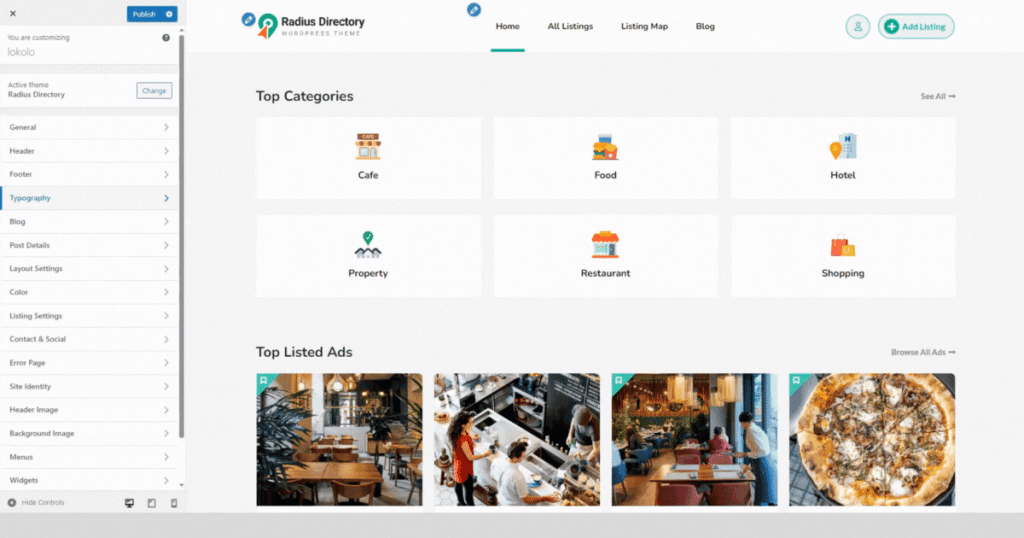
Now, you can customize the directory site as per your requirements. If you are familiar with Elementor, you can easily redesign any page of this theme. Besides, this theme has a built-in theme customizer to help you quickly edit the appearance.
Use it to change logo, typography, color scheme, and more to give your website a Kijiji-like outlook. You can watch the animation below to glance at the customization.
Step 6: Create Listing Categories and Locations
After installing the Radius Directory theme and uploading demo content, you’ll already have pre-built listings with locations and categories. You can edit those according to your wishes and build new ones.
Here’s how to create a listing category. Just navigate to WordPress Admin Panel > Listings > Categories.
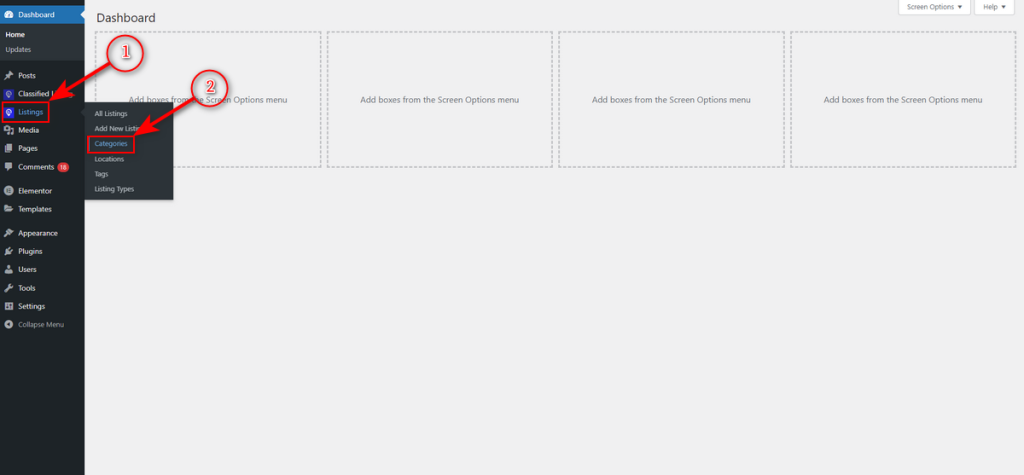
Now, write a category name, a slug, a description, and click “Add New Category” button.

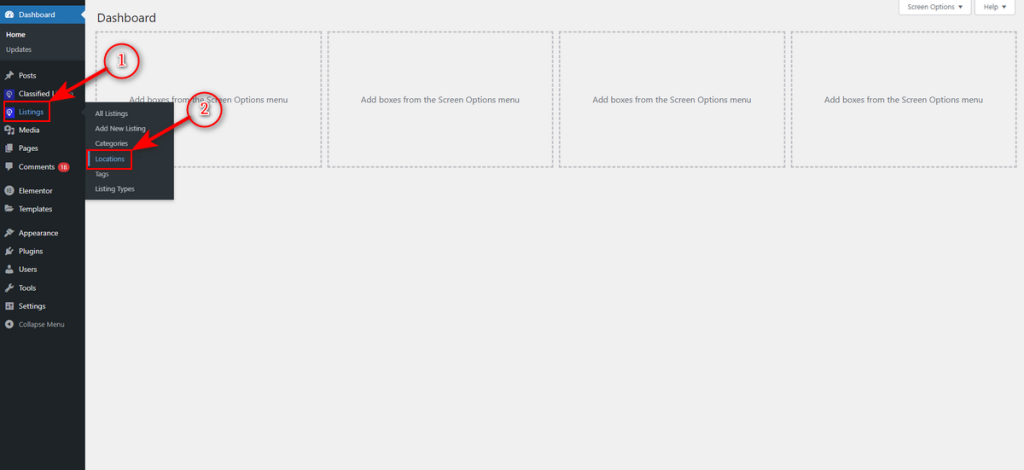
That’s how you build a listing category on your Kijiji-like website. Now, head back to your WordPress Admin Dashboard and go to Listings > Locations.
Afterward, write your location name and slug and hit “Add New Location” button.
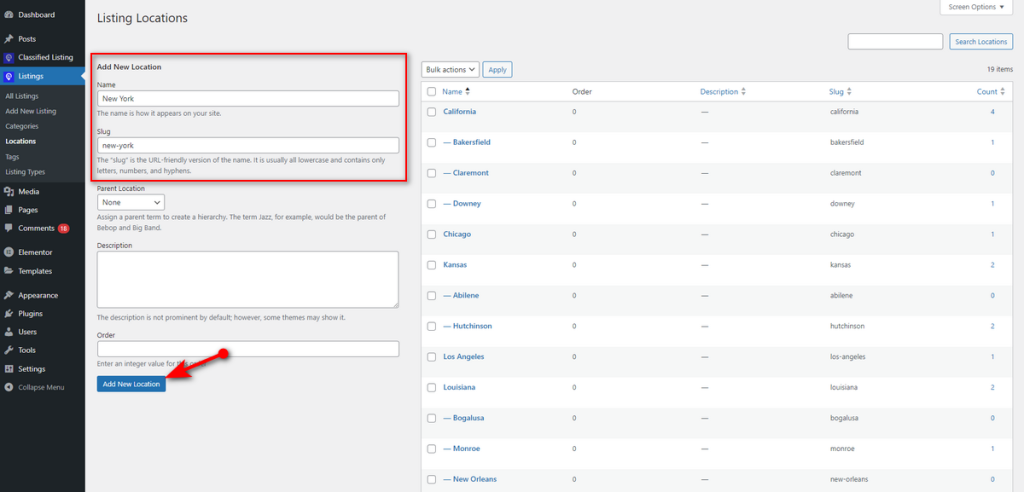
That’s it. Now, create as many listing categories and locations as you need on your classified ads website.
Step 7: Create a Listing as an Admin
Listing creation as an admin is Super Easy with the Classified Listing plugin. Just go to WordPress Admin Panel > Listings > Add New Listing.
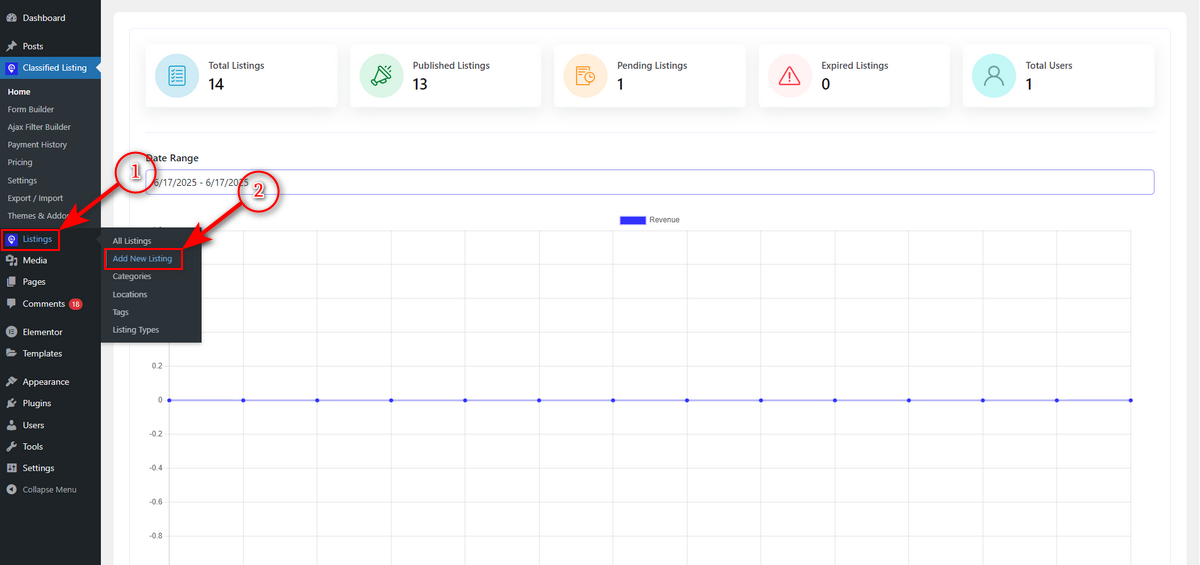
Then, fill out all or some of the fields with listing information, add listing images, pricing, and other relevant details. Watch the animation below to learn more about listing creation.

Step 8: Work on Ad Promotion and Highlighting Options
As you know, Kijiji focuses on ad promotion. Hence, we must have this feature. Luckily, you get this feature when you install the Classified Listing plugin or the Radius Directory theme and supporting plugins.
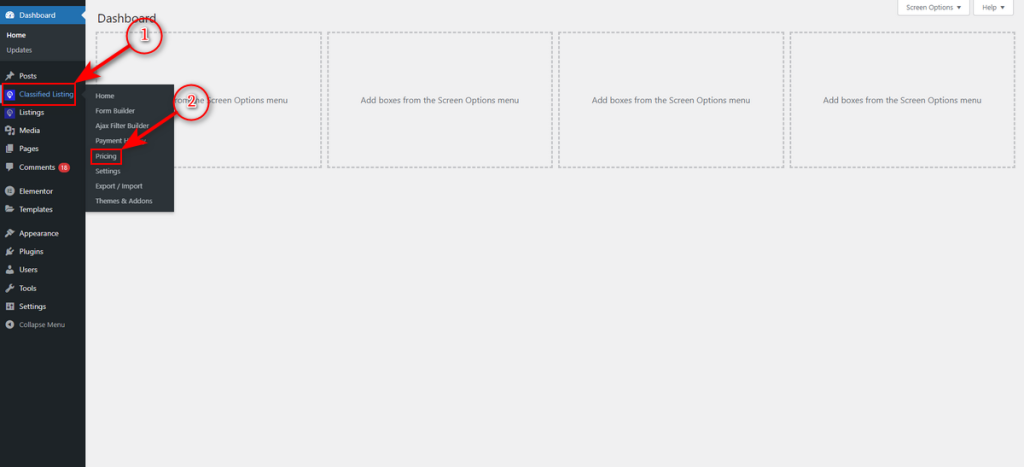
You’ll already have these promotional options pre-set. Still, if you need to create a different ad promotional option, just go to WordPress Admin Panel > Classified Listing > Pricing.
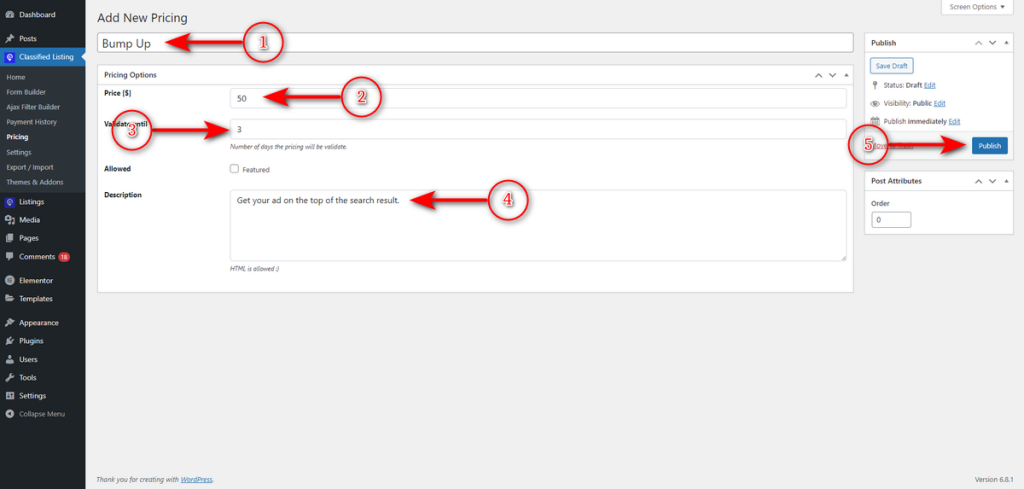
After that, write your ad promotional strategy name, like “Bump Up,” in the first field. Then, set the pricing and ad validity limit. Now, write a short description about the promotion and click ‘Publish‘ button.
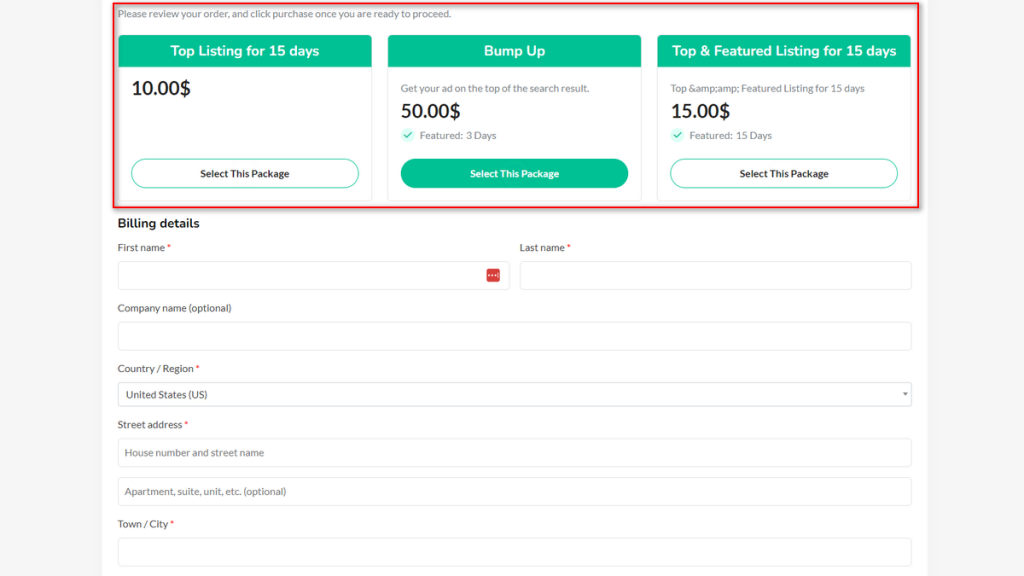
This way, you can create different promotional ad pricing. Now, when users submit listings from the frontend, they’ll be redirected to the checkout page and see promotional ad package cards on top of the checkout form.
Step 9: Integrate Search Alert
We’ll now implement the search alert feature into our website. Therefore, similar to Kijiji, users on our site can save their searches and get notifications via email when matching listings get posted.
That said, we need to install and activate the Search Alert addon of Classified Listing. And we are good to go.
Step 10: Review and Publish Your Website
We’ve developed a website similar to Kijiji and integrated all the features that Kijiji offers. Now, you can recheck everything, including your site’s responsiveness, and get it reviewed by your friends and family, if needed. Finally, publish your website.
After that, regularly perform maintenance tasks and follow some promotional strategies to promote your website. You can use SEO and paid marketing strategies to promote your site and gain traffic.
Explore These Similar Sites Like Kijiji for Inspiration
Below are some sites similar to Kijiji that you can explore and take inspiration from before you create your own.
1. Kijiji Autos

Kijiji Autos is an extension of the popular Kijiji classified site. It simplifies the process of buying and selling vehicles in Canada.
It prioritizes automotive listings and offers a unique experience to users seeking to browse, compare, and purchase new or used cars.
The site features various vehicle categories and allows users to filter their searches by make, model, price, mileage, location, and other key specifications.
Kijiji Autos offers similar functionalities to the Kijiji classified ads site and is a reliable platform for both automotive buyers and sellers.
2. Gumtree

Gumtree is a popular and similar classifieds platform to Kijiji. It connects buyers and sellers across various categories, including furniture, electronics, vehicles, and property.
The website offers a beginner-friendly interface and allows visitors to post and browse listings within their local area.
Gumtree offers a diverse range of listing types, including second-hand household items, job listings, and services. That means it has ads for virtually everyone.
Finally, this platform has built-in messaging tools, filtering options, and user review systems that an ideal directory site should have.
Good Read: How to Build a Website Like Gumtree
3. VarageSale
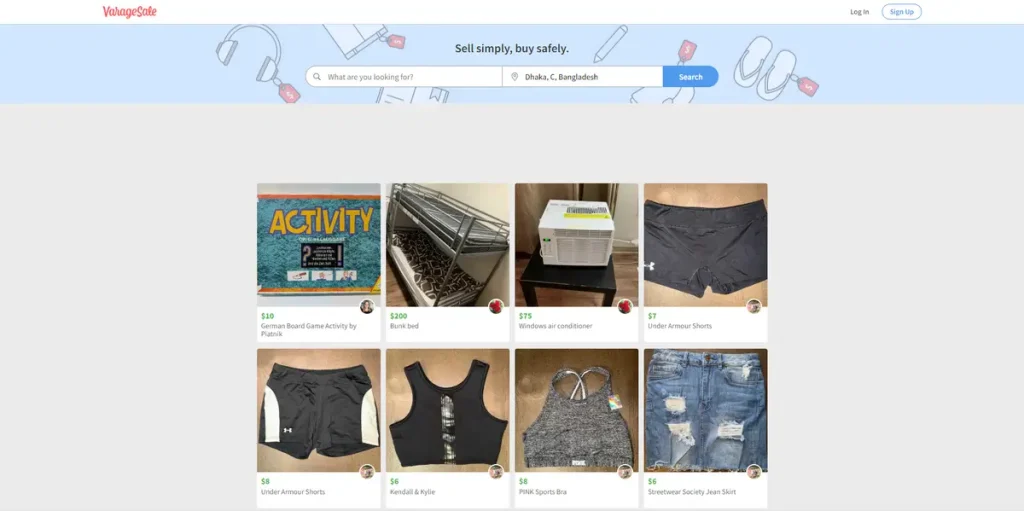
VarageSale is a unique and popular classified site. It connects locals, allowing them to buy and sell items within their communities.
The classified ads site features a diverse range of categories, including household goods, clothing, electronics, baby items, and more.
Plus, it offers several key features that enhance the user experience. Its interface is clean and simple to use.
Users can easily browse items, filter ads, and submit listings. All these make it a top choice among Canadian users.
4. Rentals
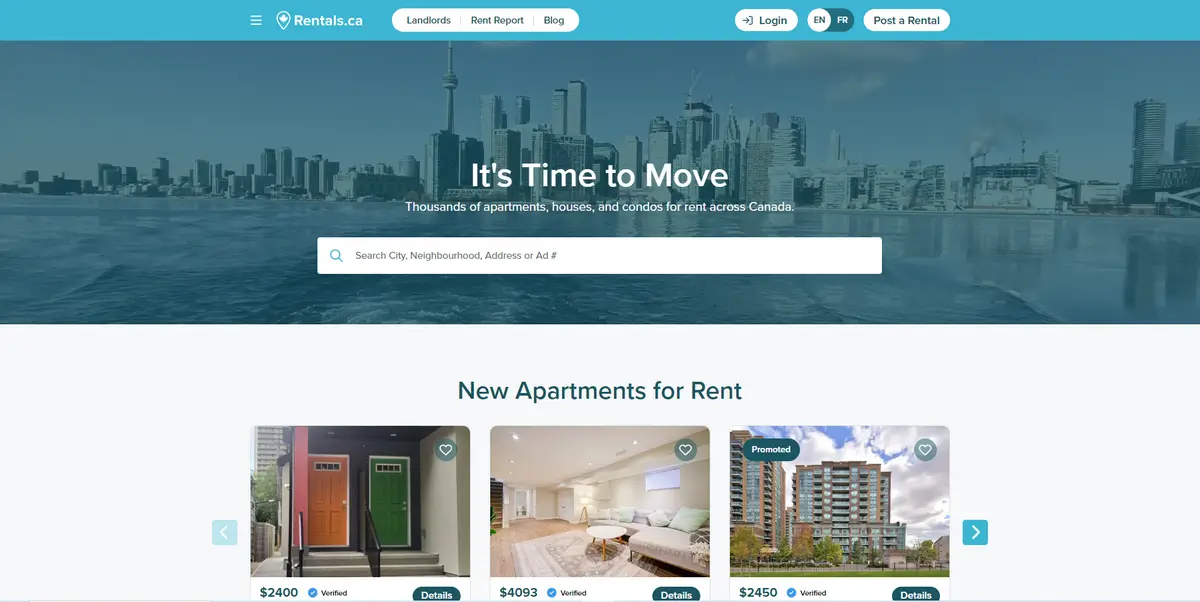
Rentals is a unique directory site that helps Canadians find apartments, condos, houses, and other residential properties with ease.
This site helps both tenants and landlords by offering tools that simplify the rental process from search to signing.
It allows users to filter rental listings by price, location, number of bedrooms, and other essential features.
It also includes high-quality images, walk scores, and neighborhood insights, helping renters make informed decisions.
Rentals prioritizes transparency and modern design and is a leading choice for people looking to rent in Canada.
5. Autotrader
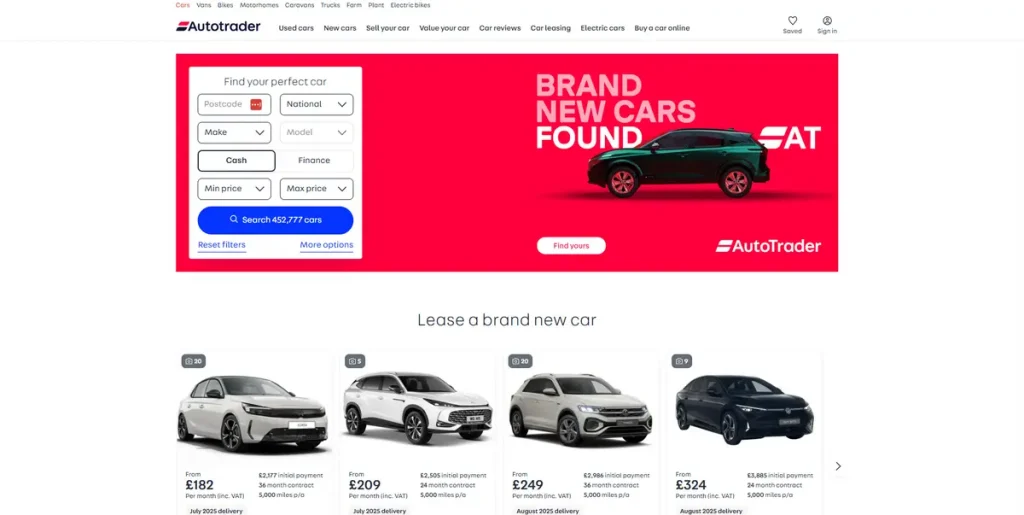
AutoTrader is one of Canada’s most established and widely used automotive marketplaces. It contains listings about various new and used vehicles.
Additionally, it provides search tools that allow users to filter their searches by make, model, year, mileage, fuel type, and more.
It also includes detailed vehicle information, price comparisons, etc., to ensure users get a clear view of what they’re purchasing.
This platform makes the car-buying and selling journey smooth and transparent, thanks to its trusted dealer partnerships, financing calculators, and other valuable features.
All these make it a top-tier platform for anyone seeking a high-quality vehicle in Canada.
Frequently Asked Questions (FAQs)
Are There Other Sites Like Kijiji?
Indeed, there are other sites like Kijiji. For example, notable platforms include Facebook Marketplace, Craigslist, OfferUp, and eBay.
Is Kijiji for Canada Only?
No, Kijiji isn’t only available in Canada. While this website is popular in Canada, it regularly receives visitors from over 300 cities in diverse countries, including Germany, France, Italy, China, India, Taiwan, Belgium, Switzerland, and more.
Does Kijiji Ship to the US?
No, Kijiji doesn’t ship to the US. It’s a local classifieds platform and doesn’t offer shipping. However, it lets buyers and sellers within the same city handle transactions and shipping.
How Much Would It Cost to Develop a Website Like Kijiji?
Various sources claim that one needs to spend over $12,000 to build a website like Kijiji. However, you can trim down that cost to under $200 to $300 if you follow the steps we shared in this article.
Our Concluding Thoughts
These are everything you need to know to create a website like Kijiji. Please read these steps carefully and take action accordingly. You’ll make mistakes along your development journey. Don’t stress. Instead, take time to figure out the problem and solve it.
Lastly, always have your website reviewed by others and seek expert help if needed. You may also contact us if you need support while building your site. We wish you the best of luck on your website development journey.



