

On This Page
Most Shopify stores lose money at the exact moment a shopper is most ready to spend. The customer has the credit card out, the cart is open, and nobody shows them the one item that pairs with what they just picked.
That is what cross-selling fixes. Learning how to add cross-sell products in Shopify is one of the cheapest ways to raise your average order value (AOV), because you are selling to a buyer you already paid to acquire. No extra ad spend. No new traffic.
This guide shows you two paths. First, the free Shopify default method. Second, a faster way using bundle offers with the Radius Bundles app, so your cross-sell also comes with a reason to say yes.
What Is Cross-Selling?
Cross-selling is when you offer a shopper a different product that goes with the one they are already buying.
Think of the checkout counter at a coffee shop. You order a coffee. The barista asks if you want a croissant. That is a cross-sell. The croissant is not a bigger coffee. It is a second item that makes the first one better.
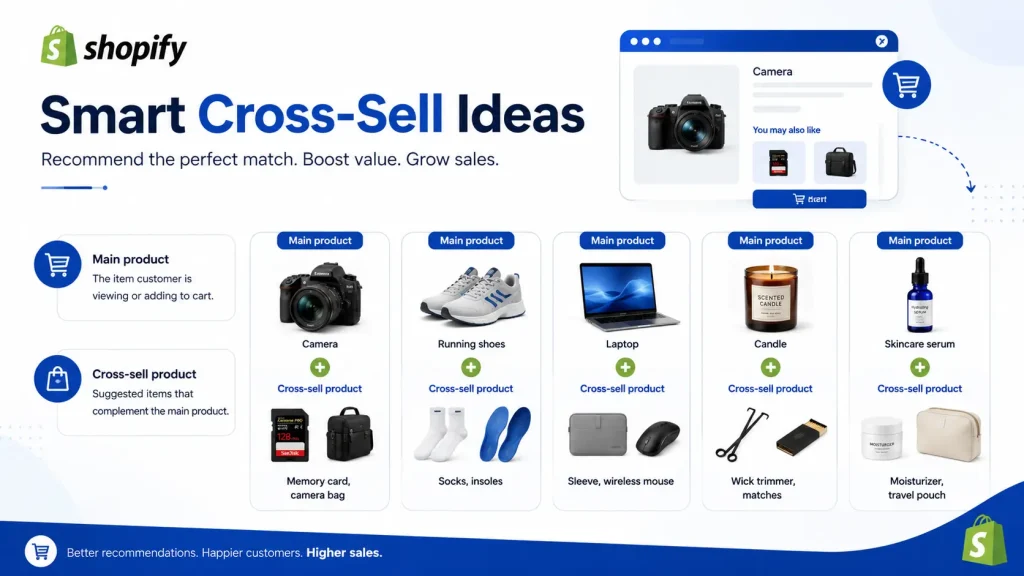
In a Shopify store, the same idea looks like this:
| Main product | Cross-sell product |
| Camera | Memory card, camera bag |
| Running shoes | Socks, insoles |
| Laptop | Sleeve, wireless mouse |
| Candle | Wick trimmer, matches |
| Skincare serum | Moisturizer, travel pouch |
The pairing works because the second item completes the job the shopper came to do. Nobody buys a camera to own a camera. They buy it to take photos, and they need a memory card to do that.
Why Cross-Selling Works So Well
- The hard part is done. You already paid to get that visitor. A cross-sell adds revenue with zero extra ad cost.
- It raises AOV, not traffic. More items per order means more profit from the same number of customers.
- It helps the shopper. A good cross-sell saves them a second trip. That is a better shopping experience, not a pushy one.
- It moves slow stock. Accessories that never sell on their own sell fine next to a bestseller.
Amazon has said for years that recommendation blocks like “Frequently bought together” drive a large share of its revenue. The mechanic is simple. The timing is what makes it powerful.
Cross-Sell vs Upsell
People mix these up all the time, and it leads to bad offers.
| Cross-sell | Upsell | |
| What it does | Adds a different product | Trades up to a better version |
| Example | Phone + phone case | 128GB phone > 256GB phone |
| Shopper mindset | “I also need that” | “I want the better one” |
| Effect on cart | More items | Higher item price |
| Best place | Product page, cart, post-purchase | Product page, checkout |
A quick rule of thumb: a cross-sell completes the purchase. An upsell improves it.
Shopify uses its own words for this. Complementary products are your cross-sells (bought together). Related products are similar items (a shopper usually picks one or the other, not both). Shopify auto-generates related products, but complementary products must be chosen by you.
Method 1: The Default Shopify Cross-Sell Method (Free)
Shopify’s built-in cross-sell tool is the free Search & Discovery app. Three steps, about 10 minutes.
- Install it. Add the free Shopify Search & Discovery app from your admin.
- Pick the products. Go to Product recommendations > Add recommendations. Choose a main product, then hand-pick up to 10 complementary products (your cross-sells). Use Bulk edit to do many products at once.
- Add the block. Go to Online Store > Themes > Customize, open the product template, click Add block, and choose Complementary products. Save.
Most people forget step 3. Picking the products does nothing until the block is on the page.
If the block looks empty, the product is probably sold out, priced at $0.00, set to Draft, a gift card, or already in the cart. Shopify hides all of these.
Where This Method Falls Short
- No discount. The add-on shows at full price. No offer, no savings badge, no reason to act now.
- All manual. Related products are auto-generated. Complementary products are not. You map every pair by hand.
- Cap of 10. Fine for a small catalog. Painful at 500 SKUs.
- Theme dependent. No complementary products block in your theme means no cross-sell.
- Weak reporting. You cannot easily see how much revenue one pairing earned.
It answers “what else can I show?” It does not answer “why should they add it?”
That is where bundles win.
👉 Good Read: 10 Best Shopify Bundle Apps to Increase AOV
Method 2: Add Cross-Sell Products With Radius Bundles (Offer-Based)
Radius Bundles turns a plain recommendation into a deal. Instead of showing a related item at full price, you show it with a discount that applies on its own at checkout.
You do not need to touch theme code. The widget is added as a theme app block, and the discount runs through a native Shopify Function, so there is no discount code for the shopper to enter.
The Idea in 3 Moves
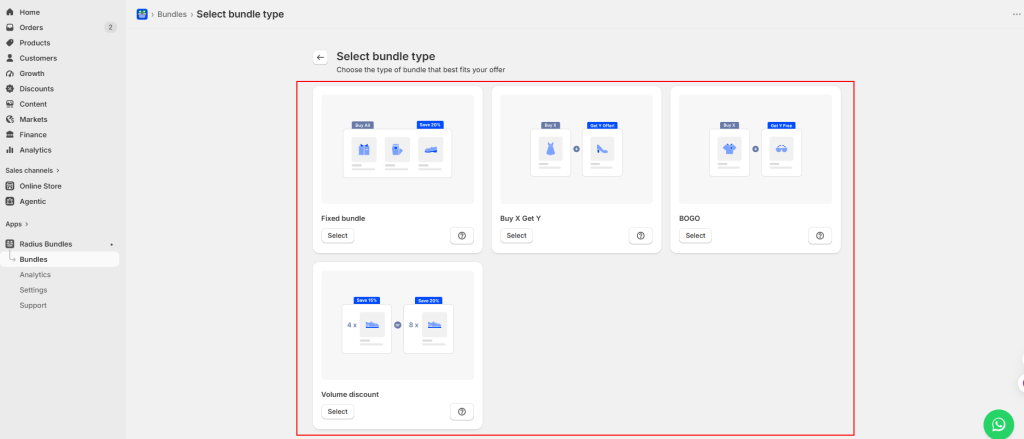
- Pick a bundle type. This is your offer mechanic.
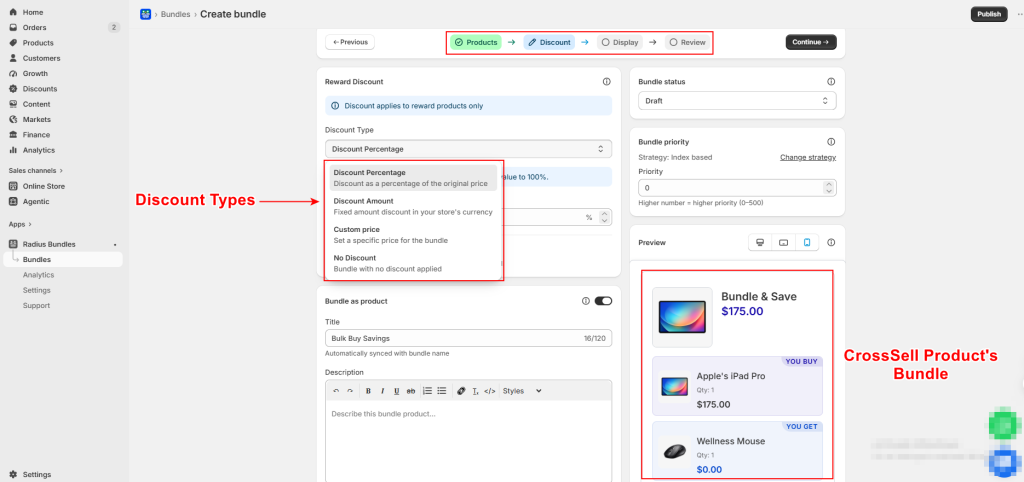
- Pick the products and the discount. Percentage, fixed amount, custom price, or no discount at all.
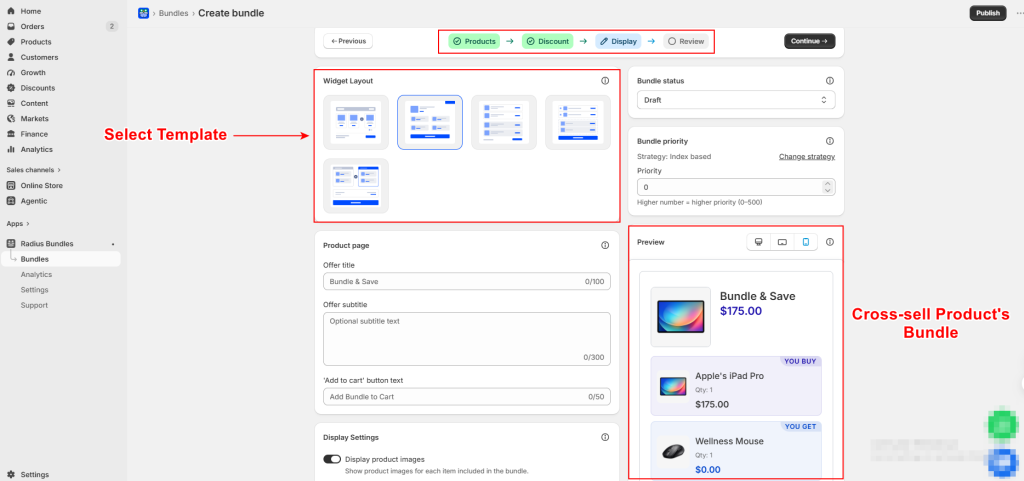
- Pick a template and publish. Choose a layout, tune the colors, drop the app block on your product page.
That is the whole flow. Most merchants have a live offer in a few minutes.
Which Bundle Type Fits Which Cross-Sell?
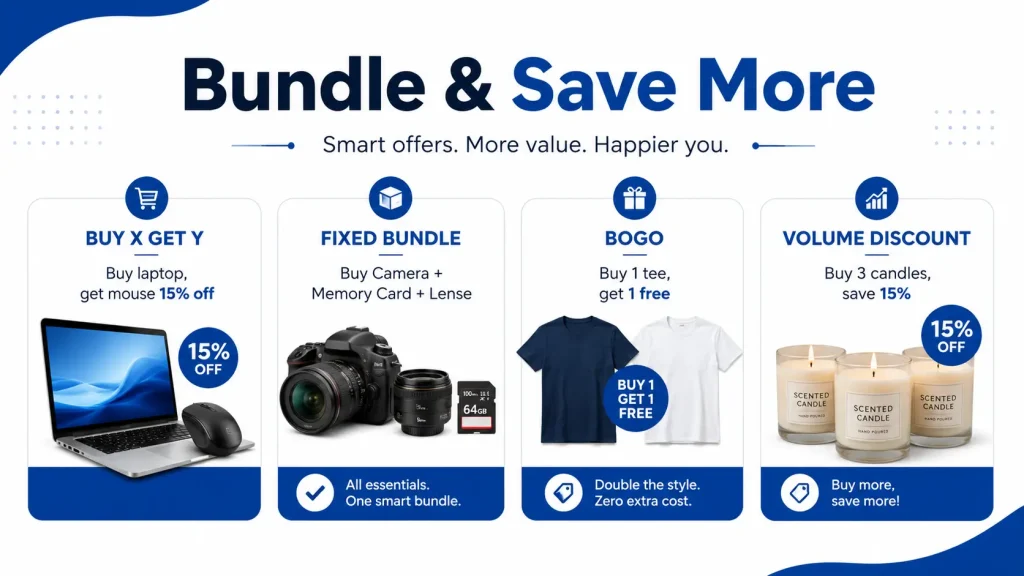
| Bundle type | Best cross-sell use | Example offer |
| Buy X Get Y | Accessory cross-sell | Buy a camera, get a memory card 30% off |
| Fixed Bundle | Product + accessory sets, gift kits | Laptop + case + mouse as one “Work Kit” price |
| BOGO | Fast-moving, repeat-buy items | Buy 1 tee, get 1 free |
| Volume Discount | Consumables and refills | Buy 3 candles, save 15% |
Buy X Get Y is the true cross-sell workhorse. You assign each product a role. The Buy product is what they must purchase at full price. The Get product is the discounted add-on. You can even set multiple buy products and multiple get products. Buy a tent and a sleeping bag, get a headlamp free.
One detail worth knowing: the discount only fires when the cart holds the full required quantity. If the deal is “buy 2, get 1 free” and the shopper adds 4, the offer applies twice. Partial deals get nothing.
There is also a Bundle as Product toggle. Turn it on and the bundle becomes a real Shopify product. It shows up in collections, search results, and connected sales channels. That gives your cross-sell offer its own landing page you can send ads and email traffic to.
Why This Beats a Plain Recommendation Row
- The offer has a reason attached, not just a nudge.
- Discounts apply at checkout, so no codes to leak or forget.
- Analytics show views, add-to-carts, purchases, and revenue per bundle. You learn which pairings actually earn.
- No theme edits, so switching themes does not break your setup.
Where to Place Cross-Sell Offers
Placement changes results more than copy does.
- Product page, near the Add to Cart button. Best spot for accessories. The shopper is already deciding.
- Cart page or cart drawer. Good for small, cheap add-ons like batteries or gift wrap.
- Post-purchase page. No risk to your main conversion rate. The order is already placed.
- Order confirmation email. Works well for refills and consumables.
Start with the product page. It is the highest-intent moment on your store.
7 Cross-Sell Rules That Actually Move AOV
- Follow the price rule. Keep the add-on under about 25% of the main product’s price. A $500 sofa pairs with a $60 cushion set, not another $500 sofa.
- Show 2 to 3 options, not 10. Too many choices freeze people.
- Pair by use, not by category. The question is “what does this buyer need next?” not “what is similar?”
- Say why. Headings like “Pairs well with” or “Complete your setup” beat “You may also like.”
- Give a small discount. Even 10% on the add-on changes the decision.
- Watch your stock. Sold-out add-ons disappear from Shopify recommendations. Rotate them.
- Test one offer for 14 days. Then check the numbers, keep the winner, kill the rest.
Common Problems and Fixes
My complementary products are not showing. Check three things in order. Did you pick them in Search & Discovery? Did you add the block in the theme editor? Is the product active and in stock?
My bundle widget is not visible. Creating the bundle is not enough. The Radius app block must be added to your product template in the theme editor.
Two offers appear on the same product. That happens when bundles share a product. Set a bundle priority in the app settings so one offer wins.
The discount is not showing in the cart. Bundle discounts from Shopify Functions apply at checkout, not in draft orders or the admin cart. Test with a real checkout.
Free or $0 products are missing. Shopify excludes them from recommendations. Give the item a price and discount it to zero through an offer instead.
Frequently Asked Questions
What is cross-selling in Shopify?
Cross-selling is showing a shopper a different product that goes with the one they are buying. A phone case with a phone. Socks with shoes. It raises cart value without new traffic.
Can I add cross-sell products in Shopify without an app?
Not really. Shopify’s own cross-sell tool is the free Search & Discovery app, which you install from the App Store. You can also code recommendations with the Product Recommendations API, but that needs a developer.
Does Shopify pick complementary products automatically?
No. Related products are auto-generated. Complementary products must be selected by you.
How many cross-sell products can I add per product?
Up to 10 complementary products and 10 related products in Search & Discovery. Bundle apps like Radius Bundles let you go further.
Will cross-sell widgets slow down my store?
A good one will not. Radius Bundles loads asynchronously through Shopify’s app block system and runs its discount logic server-side, so it does not add checkout delay.
Cross-sell or upsell: which makes more money?
Cross-sells usually convert more often because the add-on is cheap. Upsells earn more per sale. Run both.
Start With One Offer
You now know both ways to add cross-sell products in Shopify. The free Search & Discovery app puts the right products in front of shoppers. Radius Bundles gives them a reason to say yes with a real discount at checkout.
Pick your best-selling product. Find the one item people already buy with it. Build a single Buy X Get Y offer around it this week.
That one cross-sell bundle can lift your average order value more than a month of new ad spend.




