

On This Page
Looking for the best Gutenberg blocks plugin for your WordPress site? You want more blocks, better designs, and faster page building, all without slowing your site down or learning a heavy page builder.
This guide covers 7 of the top Gutenberg blocks plugins on WordPress.org right now. Each one is tested, free to start, and built to work with the native block editor. By the end, you will know which plugin fits your goals.
Quick Answer: Best Gutenberg Blocks Plugin for Each Need
- Best all-around: Spectra
- Best for performance and AI: Kadence Blocks
- Best for landing pages and patterns: Otter Blocks
- Best for blog and post layouts: The Post Grid
- Best for biggest free block library: Essential Blocks
- Best for block visibility and control: Widget Options
- Best for bloggers and content sites: Ultimate Blocks
What Is a Gutenberg Blocks Plugin?
A Gutenberg blocks plugin adds new blocks to the WordPress block editor. The default editor gives you basic blocks like paragraphs, headings, and images. A blocks plugin adds advanced ones like sliders, pricing tables, post grids, accordions, and forms.
There are two kinds:
- Block library plugins add many blocks at once (like Spectra or Essential Blocks).
- Single-purpose block plugins focus on one job, like post grids or testimonials (like The Post Grid).
Good Read: Best Free WordPress Page Builders
How We Picked These 7 Plugins
We looked at:
- Active installs and user ratings on WordPress.org
- Speed and impact on Core Web Vitals
- Number and quality of free blocks
- Ease of use for beginners
- Update frequency and developer support
- Real user reviews on Reddit, Quora, and WordPress forums
Every plugin on this list has a free version. You can start today without paying.
1. Spectra (Ultimate Addons for Gutenberg)

Active installs: 1 million+ | Rating: 4.7 stars | Developer: Brainstorm Force
Spectra is the most installed Gutenberg blocks plugin on WordPress.org. It used to be called Ultimate Addons for Gutenberg. The team behind the popular Astra theme builds it.
Spectra is a full website builder inside the block editor. You get 30+ free blocks, a popup builder, a coming soon mode, and AI tools to help write copy and design pages.
Top free blocks:
- Container, Row, and Loop Builder
- Form, Modal Popup, Image Gallery
- Post grid, Counter, Tabs, Accordion
- Lottie animations, Reviews, Star Rating
Why people pick Spectra:
- Loads fast because it only sends CSS for blocks you use
- Big library of starter templates with the Astra theme
- Schema-ready blocks help SEO
- Spectra AI writes content and builds layouts inside the editor
Drawbacks:
- Some advanced design features need Spectra Pro
- Very advanced users may want more flex and grid control
Best for: Anyone who wants one plugin that covers most page-building needs without buying Elementor or Divi.
2. Kadence Blocks

Active installs: 600,000+ | Rating: 4.9 stars | Developer: StellarWP
Kadence Blocks is loved for its lean code and AI-powered design library. It pairs well with the Kadence theme, but it works with any block-friendly WordPress theme.
Kadence is the choice for users who care about speed and Core Web Vitals. It only loads CSS or JavaScript for blocks that are on the page, which keeps load times short.
Top free blocks:
- Row Layout (one of the best column tools in any block plugin)
- Advanced Gallery (sliders, carousels, masonry)
- Advanced Form, Advanced Button, Countdown
- Info Box, Icon List, Tabs, Accordion
- Table of Contents, Posts, Testimonials
Why people pick Kadence Blocks:
- 900+ Google fonts and 1,500+ SVG icons in the free version
- Strong responsive controls (edit per device)
- Configurable defaults save time across a whole site
- Visibility rules hide blocks based on user role or device
Drawbacks:
- Free version has fewer blocks than Spectra or Essential Blocks
- Best features (dynamic content, advanced slider, modal popups) need Kadence Blocks Pro
Best for: Bloggers, agencies, and store owners who want speed first and design second.
3. Otter Blocks

Active installs: 300,000+ | Rating: 4.7 stars | Developer: Themeisle
Otter Blocks brings 30+ blocks plus 100+ ready-to-import designs to the block editor. It is built by Themeisle, the same team behind the Neve theme.
Otter shines at landing page work. The patterns library has full pages and sections you can drop in with one click, then tweak to fit your brand.
Top free blocks:
- Section (with up to 6 columns)
- Slider, Lottie animation, Flip Card
- Countdown, Progress Bar, Circle Counter
- Google Maps, Open Street Maps, Form
- Popup, Modal, Live Search, Review Comparison Table
- Add-to-Cart for WooCommerce
Why people pick Otter Blocks:
- 50+ animations you can add to any block
- Visibility conditions for logged-in users, roles, dates, and post types
- Custom CSS feature works on third-party blocks too
- AI tools help build content and forms
Drawbacks:
- Some designs feel similar to other Themeisle products
- Pro animations and dynamic content need Otter Pro
Best for: Anyone who builds landing pages, lead-gen forms, or simple eCommerce pages.
4. The Post Grid
Active installs: 100,000+ | Rating: 4.7 stars | Developer: RadiusTheme
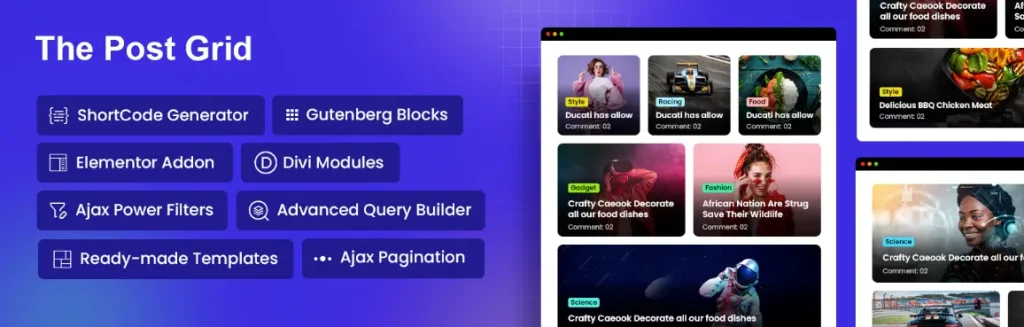
The Post Grid is a single-purpose plugin built for one job: showing posts in beautiful layouts. If you run a blog, news site, magazine, or any content-heavy WordPress site, this is the cleanest way to display posts inside Gutenberg.
It gives you 4 dedicated Gutenberg blocks with 45 total layout variations, plus shortcodes, Elementor widgets, and Divi modules.
Top Gutenberg blocks:
- Grid Layout with 9 variations
- List Layout with 7 variations
- Grid Hover with 16 variations
- Slider Layout with 13 variations
Why people pick The Post Grid:
- Live preview lets you see changes as you click
- AJAX filtering and pagination (no page reload)
- Built-in ChatGPT and Gemini support for writing posts inside Gutenberg
- 90+ pre-made sections and 10+ full page templates
- Front-end post submission feature in Pro
- Custom Post Type and ACF support in Pro
Drawbacks:
- Focused on posts, so you still need a library plugin for things like forms or sliders
- Some advanced filters need the Pro version
Best for: Bloggers, news publishers, magazine sites, and anyone whose homepage shows lots of posts.
Good Read: How to Create a Magazine Style Blog
5. Essential Blocks

Active installs: 100,000+ | Rating: 4.8 stars | Developer: WPDeveloper
Essential Blocks gives you 70+ free blocks, the largest free block library on this list. It is made by WPDeveloper, the team behind Essential Addons for Elementor.
If you do not want to upgrade to Pro for basic features, Essential Blocks is hard to beat. Most blocks are full-featured in the free version.
Top free blocks:
- Post Grid, Slider, Advanced Tab, Accordion
- Pricing Table, Team Member, Testimonial
- Countdown, Flipbox, Number Counter
- Feature List, Call to Action, Notice
- Fluent Forms styling block, Table of Contents
- Social Icons, Infobox, Advanced Image
Why people pick Essential Blocks:
- AI can write content right inside the editor
- 1,000+ Google fonts available in free version
- Asset Regeneration keeps load times fast
- Visibility rules based on date, time, user role, browser, or query string
- Lets you upload SVG and JSON files to the media library
Drawbacks:
- The huge block list can feel overwhelming for beginners
- Some users report bugs after big version updates (always test on staging first)
Best for: Users who want maximum blocks for free without paying for Pro.
6. Widget Options
Active installs: 100,000+ | Rating: 4.9 stars | Developer: Widget Options Team
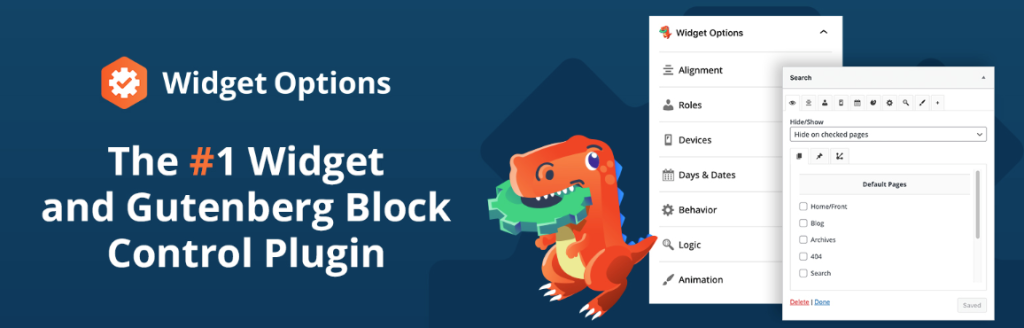
Widget Options is different from the others on this list. It does not give you new blocks. It gives you advanced control over the blocks and widgets you already use.
Think of it as a block manager. You can show or hide any Gutenberg block based on device, page, post type, user role, date, or custom logic. This is huge for marketers, agencies, and anyone who runs A/B tests or seasonal campaigns.
Top features:
- Show or hide any Gutenberg block by device (mobile, tablet, desktop)
- Set blocks to appear only on certain pages, posts, or categories
- Schedule blocks by date and time (great for sales and promos)
- Show blocks only to logged-in or logged-out users
- Works with Gutenberg, Elementor, Beaver Builder, and SiteOrigin
- ACF integration for custom field-based visibility (Pro)
Why people pick Widget Options:
- Solves the “cluttered mobile site” problem in minutes
- Saves time during seasonal sales (no manual swap)
- Only one of the 7 plugins focused on visibility logic
Drawbacks:
- Does not add new design blocks
- Best paired with one of the other plugins on this list
Best for: Site owners who want clean control over what shows up where, on which device, and to whom.
7. Ultimate Blocks

Active installs: 50,000+ | Rating: 4.6 stars | Developer: Ultimate Blocks Team
Ultimate Blocks is built for bloggers and content creators. It skips fancy hero sections and focuses on blocks that boost reading time, SEO, and conversions.
If your site is mostly long-form blog posts and reviews, this plugin gives you exactly what you need without bloat.
Top free blocks:
- Table of Contents (auto-generated from headings)
- Review Block (with schema markup for SEO)
- How To Schema Block
- Click to Tweet, Content Toggle, Tabbed Content
- Star Rating, Pros and Cons, Call to Action
- Content Filter, Expandable Content, Social Share
- Countdown, Progress Bar, Image Slider
Why people pick Ultimate Blocks:
- 100% free, no Pro upsell pressure
- Schema-ready blocks help your posts rank in Google
- Lightweight and fast
- Each block can be turned on or off to keep things lean
Drawbacks:
- Smaller block library compared to Spectra or Essential Blocks
- Fewer styling options than Kadence or Otter
- No AI tools
Best for: Bloggers, affiliate marketers, and review-site owners.
Internal link suggestion: How to Add Schema Markup in WordPress
Quick Overview of the Best Gutenberg Blocks plugin
| Plugin | Free Blocks | Active Installs | Best For | AI Tools |
|---|---|---|---|---|
| Spectra | 30+ | 1 million+ | All-around use | Yes |
| Kadence Blocks | 16+ | 600,000+ | Speed and performance | Yes |
| Otter Blocks | 30+ | 300,000+ | Landing pages | Yes |
| The Post Grid | 4 (with 45 layouts) | 100,000+ | Blogs and news sites | Yes (ChatGPT and Gemini) |
| Essential Blocks | 70+ | 100,000+ | Most free blocks | Yes |
| Widget Options | Visibility tool | 100,000+ | Block control | No |
| Ultimate Blocks | 20+ | 50,000+ | Bloggers and SEO | No |
Final Pick
If you want one plugin that covers nearly every block need, start with Spectra. It is free, fast, and has the biggest user base, which means more tutorials, more community help, and fewer surprises.
For speed-first sites, pick Kadence Blocks. For blogs and news, add The Post Grid. To get the largest free block library, choose Essential Blocks. For total visibility control over any block, pair your main plugin with Widget Options.
You do not need all 7. Pick one library plugin (Spectra, Kadence, Otter, or Essential Blocks) and one specialty plugin (The Post Grid, Ultimate Blocks, or Widget Options). That combo is enough to build any kind of site without bloating your install.
You might be interested in reading: How to Make a Post Slider in WordPress
Freequently Asking Question
What is the best Gutenberg blocks plugin for WordPress?
Spectra (Ultimate Addons for Gutenberg) is the best all-around Gutenberg blocks plugin in 2026, with over 1 million active installs and a 4.7-star rating. It offers 30+ free blocks, AI writing tools, a popup builder, and starter templates, making it ideal for users who want one plugin that covers most page-building needs without a heavy page builder like Elementor or Divi.
Which Gutenberg blocks plugin is best for site speed and Core Web Vitals?
Kadence Blocks is the best choice for speed and Core Web Vitals. It only loads CSS or JavaScript for blocks actually used on a page, keeping load times short. It is highly rated at 4.9 stars with 600,000+ active installs and is recommended for bloggers, agencies, and store owners who prioritize performance over a large block library.
Which Gutenberg blocks plugin has the most free blocks?
Essential Blocks by WPDeveloper offers the largest free block library on WordPress.org with 70+ free blocks. Most blocks are fully featured in the free version, including Post Grid, Pricing Table, Testimonial, Table of Contents, and more. It also includes AI content writing, 1,000+ Google fonts, and visibility rules based on date, time, user role, and browser.
What Gutenberg blocks plugin should bloggers and news sites use for displaying posts?
The Post Grid by RadiusTheme is the best Gutenberg blocks plugin for displaying posts on blogs, news sites, and magazine-style WordPress sites. It provides 4 dedicated Gutenberg blocks with 45 total layout variations, AJAX filtering and pagination, live preview, and built-in ChatGPT and Gemini support. It also supports Custom Post Types and ACF in the Pro version.
Can I use multiple Gutenberg blocks plugins at the same time?
Yes, you can use multiple Gutenberg blocks plugins together, but it is recommended to keep your install lean. The best approach is to pick one library plugin such as Spectra, Kadence Blocks, Otter Blocks, or Essential Blocks for general blocks, and pair it with one specialty plugin like The Post Grid for post layouts, Ultimate Blocks for SEO-focused content, or Widget Options for block visibility control. This combination covers most site-building needs without unnecessary bloat.



