


On This Page
Architecture is visual. Your clients hire you based on what they see, not what they read. That means your website needs to show your projects in the best possible light. A WordPress theme built for architecture does this out of the box. A generic business theme does not.
We put together this guide after testing 10+ architecture and interior design themes on live WordPress installs. Every theme below was evaluated for portfolio quality, design feel, builder flexibility, and how well it serves the needs of a real architecture firm.
How We Picked These Themes
RadiusTheme has spent over a decade in the WordPress space. We built Artex, our own architecture theme, so we understand the requirements firsthand. For this guide, we installed each theme, imported demos, tested page builders, and examined portfolio and project page features on desktop and mobile.
We focused on six criteria: portfolio layout variety, visual design quality, page builder usability, mobile responsiveness, code performance, and update frequency.
Quick Comparison
| Theme | Page Builder | Ideal User | Portfolio Options | Price |
| Artex | Elementor | Firms of all sizes | 6 layouts | $19 |
| Architecturer | Elementor | Interior + landscape designers | 80+ templates | $69 |
| TheBuilt | WPBakery | Construction + architecture | 14 layouts | $59 |
| Archicon | Elementor | Architecture + construction | Multiple | $69 |
| Prague | Elementor, WPBakery, Gutenberg | Creative studios | 9 layouts | $59 |
| Stoni | Elementor | Architecture agencies | Multiple gallery types | $69 |
| Hiroshi | Elementor | Minimalist studios | Large collection | $89 |
| Luxe | Elementor | Solo architects | Multiple | $59 |
| Brøk | Elementor | Bold portfolio presentations | Multiple | $89 |
| Emaurri | Elementor | Studios with large project libraries | Dozens | $69 |
| Corbesier | Elementor | Interior design agencies | Multiple | $69 |
1. Artex – Architecture WordPress Theme

Price: $29 | Page Builder: Elementor | Developer: RadiusTheme
Artex gives you a clean starting point without overwhelming you. It ships with 4 homepage layouts, 6 portfolio page options, 3 header variations, and 2 footer layouts. The portfolio section is well thought out, with enough variety to present residential, commercial, and interior projects differently.
Elementor handles the page building, and Gutenberg works as an alternative editor. The Redux admin panel gives you detailed control over settings. You also get unlimited color options, WPML support, one-click demo import, and responsive design.
At $19, Artex is the most affordable theme on this list. It is a smart pick for firms that want a professional site without a large upfront investment.
Who should use it: Architecture and interior design firms of any size, especially those looking for a clean Elementor-based theme at a low price point.
Worth knowing: The homepage options are fewer than premium-priced themes. If you need 10+ layout choices or advanced portfolio animations, look at Prague or Emaurri instead.
2. Architecturer
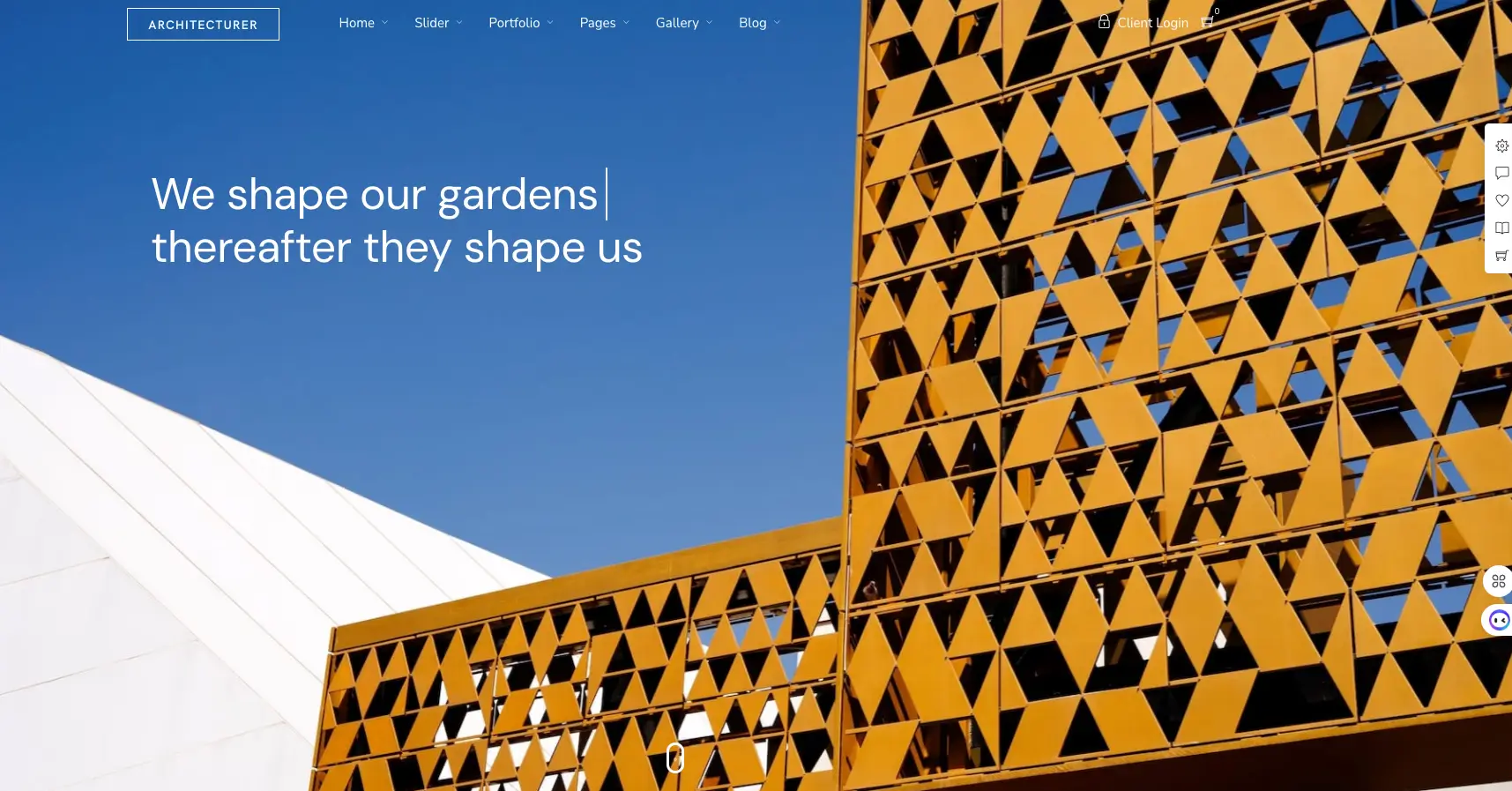
Price: $69 | Page Builder: Elementor | Developer: ThemeGoods
Architecturer was purpose-built for three groups: architects, interior designers, and landscape designers. It includes ready-made homepages for each, along with 80+ pre-designed templates for portfolio pages, gallery layouts, and slider presentations.
Two things set it apart from other themes. First, the page builder shows visual screenshots of each content element instead of generic icons. This makes it faster to find and place the right module. Second, it includes image protection tools: password-protected galleries, right-click blocking, image drag prevention, and watermarking. Architects who worry about project photography being stolen will appreciate this.
The built-in appointment management system lets clients book consultations directly through your site, which removes the back-and-forth of email scheduling.
Who should use it: Interior designers and landscape designers who need extensive template variety and want image protection features built in.
Worth knowing: The number of options can be overwhelming at first. Plan for extra setup time compared to simpler themes like Artex or Luxe. The theme maintains a 5-star rating on ThemeForest, and support reviews are consistently positive.
3. TheBuilt

Price: $59 | Page Builder: WPBakery | Developer: dedalx (Elite Author)
TheBuilt is built for companies that do both construction and architecture. It is one of the most feature-dense themes on ThemeForest, and it backs up those features with a 90/100 Google PageSpeed score.
The numbers tell the story: 9 homepage demos, 20+ header style combinations, 14 portfolio layout variations, 8 item animations, 18 category filter animations, 650+ Google Fonts, and unlimited color themes with 10 predefined options. You also get a built-in MegaMenu, lightbox galleries, and support for multiple post formats (text, video, audio, gallery, link, quote, status).
WPBakery comes with 12 custom theme elements, and Revolution Slider is bundled free. The image header feature lets you set unique backgrounds for individual posts and pages, which is handy for branding different project categories.
Who should use it: Construction and architecture companies that need a feature-rich, performance-optimized theme and are comfortable with WPBakery.
Worth knowing: WPBakery is the only page builder option here. If you strongly prefer Elementor, look at Archicon or Stoni instead. The sheer number of settings means a steeper learning curve for first-time users.
4. Archicon

Price: $69 | Page Builder: Elementor | Developer: Edge-Themes (Qode Interactive)
Archicon sits at the intersection of architecture and construction. Edge-Themes (the company behind Qode Interactive) has a long history of building high-quality ThemeForest themes, and that polish shows here.
The design is contemporary and professional without being flashy. It uses Elementor for page building and includes Revolution Slider for hero sections. Inner page templates cover services, about, contact, and project details. The documentation is well organized, and the support team is accessible through a dedicated help center.
Who should use it: Architecture and construction firms that want a well-supported, Elementor-based theme from a reputable developer.
Worth knowing: Portfolio layout options are not as extensive as TheBuilt or Prague. Archicon works best when you want a clean, straightforward presentation rather than dozens of layout variations.
5. Prague
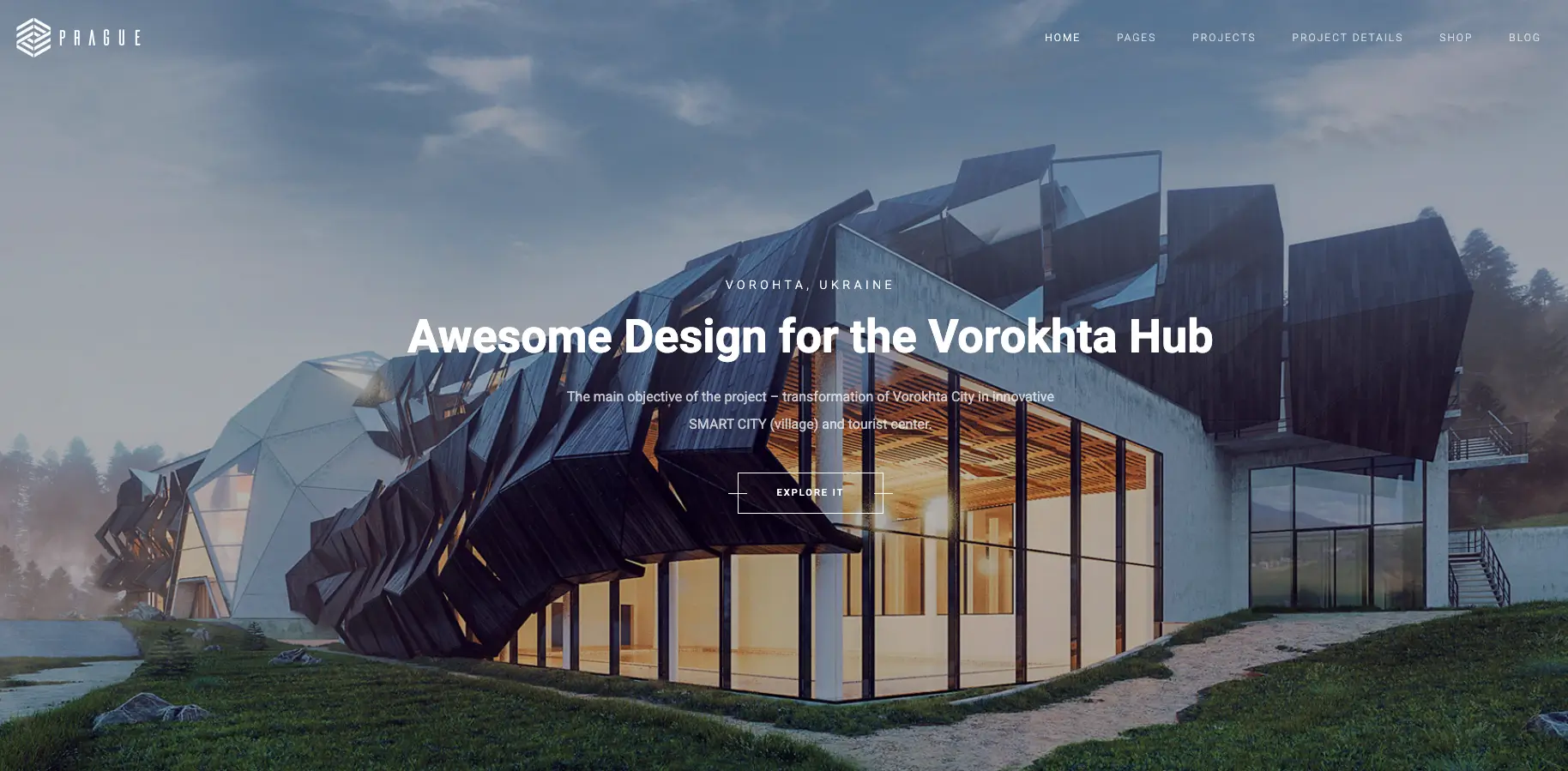
Price: $59 | Page Builder: Elementor + WPBakery + Gutenberg | Developer: fox-themes
Prague is the most flexible theme on this list when it comes to page building. It supports three editors: Elementor, WPBakery, and Gutenberg. You pick whichever one you know best.
The portfolio system offers 9 layout options, including two parallax designs that add depth to project showcases. You can create before-and-after comparisons, project timelines, or film strip galleries with large images and minimal text. With 29+ customizable homepages and 21 inner page designs, the variety is hard to match.
Revolution Slider is bundled, WooCommerce is supported for selling consultations, and the responsive design works well across devices.
Who should use it: Creative studios and architects who want maximum flexibility in both page building and portfolio presentation.
Worth knowing: The volume of options can feel complex for first-time website builders. Some older demo designs may look dated next to newer themes like Hiroshi or Brøk. Budget time for exploring and selecting the right homepage and portfolio combination.
6. Stoni

Price: $69 | Page Builder: Elementor | Developer: suspended suspended
Stoni focuses on one thing and does it exceptionally well: presenting architectural work with visual impact.
The theme includes multiple gallery types, each using clean design with generous negative space. Your projects become the focal point of every page. Demo pages import quickly, and the design feels immediately professional.
Beyond galleries, Stoni includes blog templates for publishing thought leadership content. This matters for SEO because architecture firms that publish articles about design trends, material choices, and project case studies rank better in search results. WooCommerce support lets you sell consultations or design-related products.
Who should use it: Architecture agencies that want their project photography to dominate every page.
Worth knowing: Stoni excels at visual presentation but does not include features like appointment booking or cost calculators. You will need separate plugins for those. If you need a booking system, plan to add one separately.
7. Hiroshi
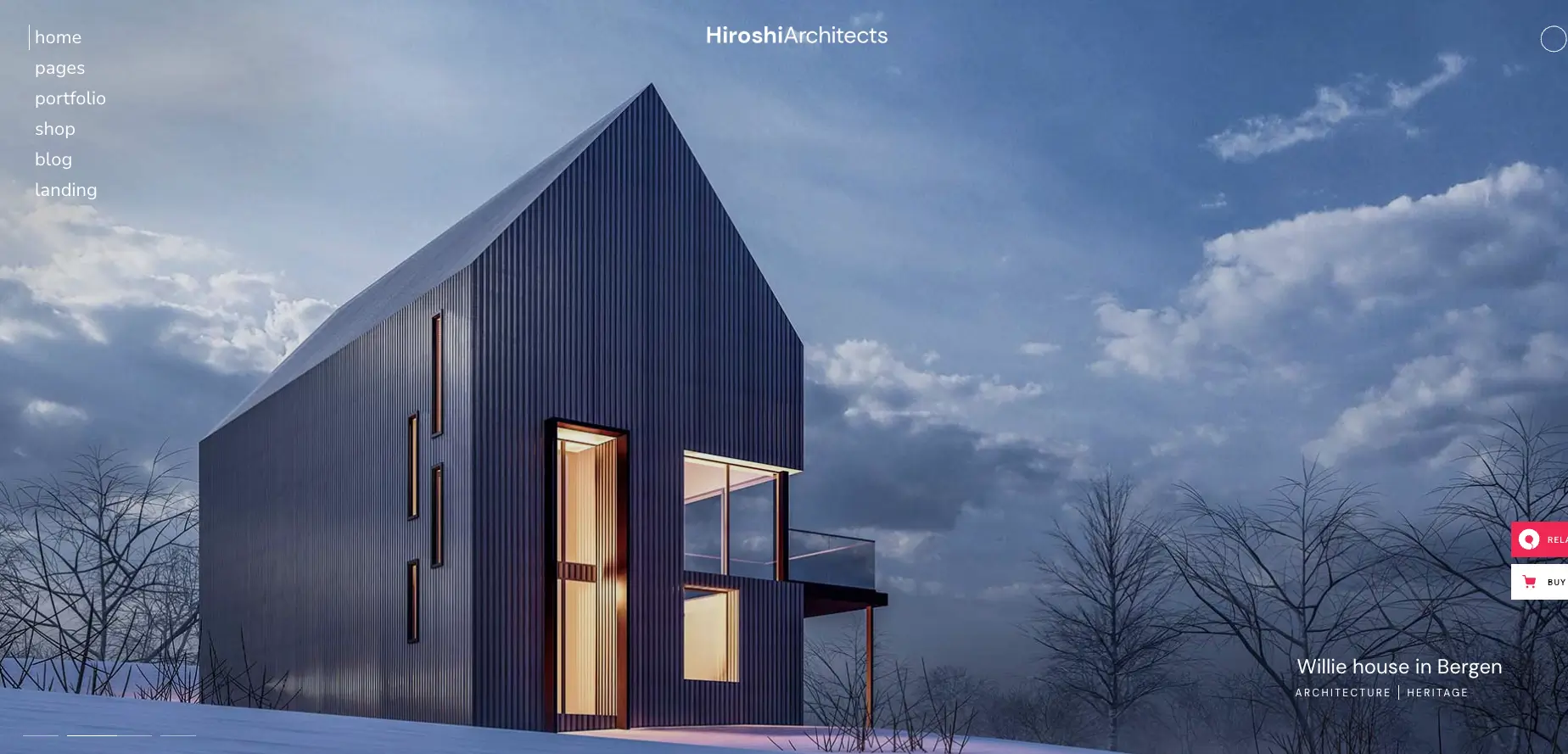
Price: $89 | Page Builder: Elementor | Developer: Qode Interactive
Hiroshi is for firms that believe less is more. The design is sleek, contemporary, and restrained. It lets your work speak without visual clutter.
You get 12 pre-designed homepages, a large collection of portfolio layouts and sliders, bespoke animations, and interactive project presentations. The custom widget collection covers banners, social media, contact info, search, Google Maps, calls to action, testimonials, and image galleries.
Hiroshi works well for architects, interior design studios, photographers, furniture brands, and property presentation websites. It supports Elementor, Contact Form 7, Mailchimp, and WooCommerce.
Who should use it: Minimalist architecture studios and interior designers who want a refined, understated online presence.
Worth knowing: At $89, it is one of the pricier options. The minimalist style suits design-forward firms but may feel too spare for construction companies or firms that want to convey scale and ambition. Test the demo thoroughly before purchasing.
8. Luxe

Price: $59 | Page Builder: Elementor | Developer: GloriaThemes
Luxe keeps things simple and elegant. The layout uses white space, clean typography, and carefully placed portfolio sections to let your projects stand out.
Interactive sliders and parallax scrolling add visual depth without feeling gimmicky. The theme is optimized for performance, so your image-heavy portfolio pages should load without delays. Pair it with an image compression plugin and a cache plugin for the best results.
Elementor handles customization, and WooCommerce is supported for selling services.
Who should use it: Solo architects and small interior design firms that want a polished site without a complex setup process.
Worth knowing: Fewer homepage demos and portfolio variations than themes like Prague or TheBuilt. If your firm has a large portfolio or needs advanced filtering, Emaurri or Architecturer will serve you better.
9. Brøk
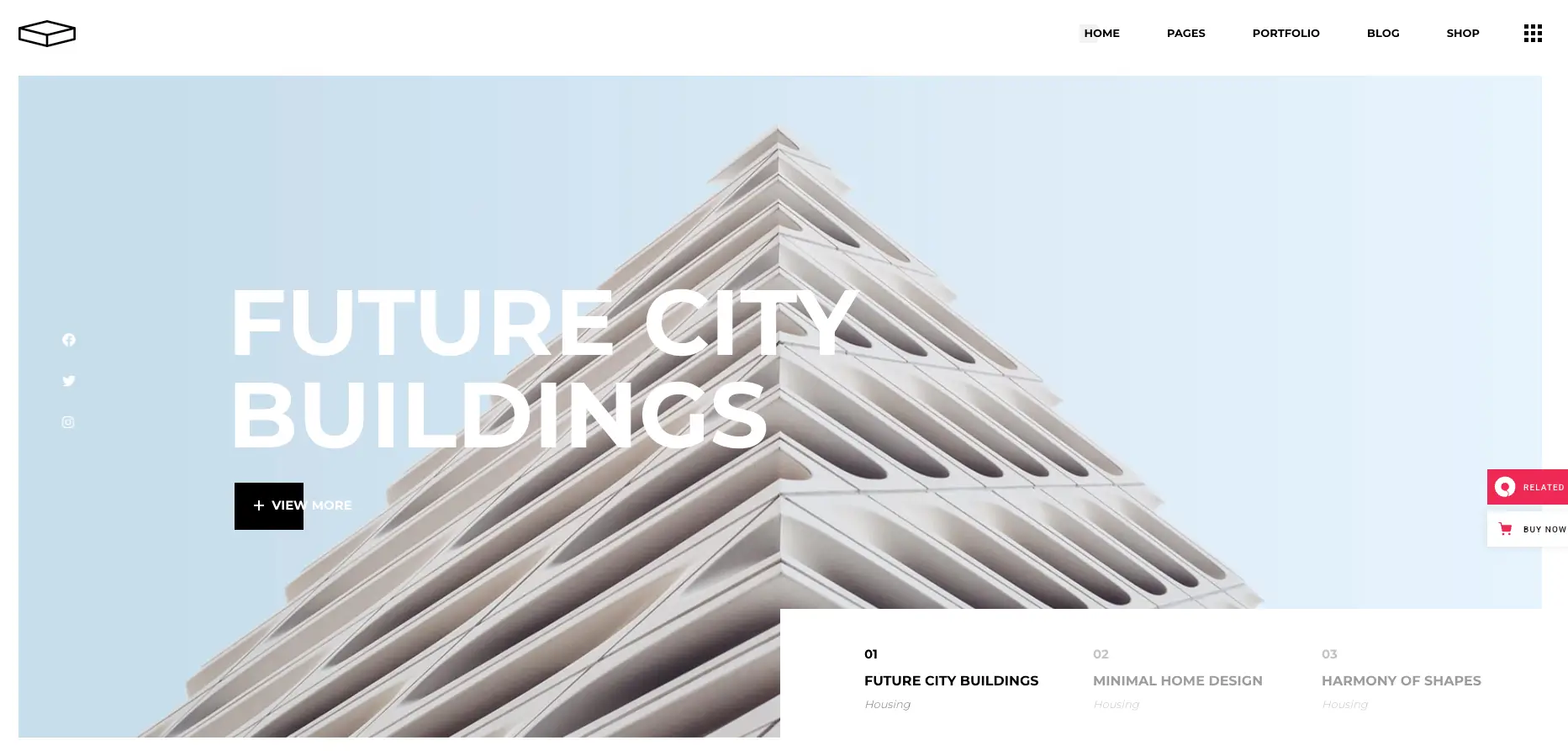
Price: $89 | Page Builder: Elementor | Developer: Edge-Themes (Qode Interactive)
Brøk makes a statement. The design is bold and confident, built for firms that want their website to feel as strong as their architecture.
The theme offers multiple post and page layout options with customizable headers and footers. Color schemes and typography choices are extensive, so you can match your firm’s branding precisely. Elementor handles the drag-and-drop page building.
Coming from Edge-Themes (the same team behind Archicon), Brøk benefits from consistent updates and reliable support.
Who should use it: Firms that want a bold, modern website that makes an immediate visual impression.
Worth knowing: The strong design personality may not work for every firm. If your brand leans toward soft, understated, or classic, Hiroshi or Luxe would be a better match. At $89, it is tied with Hiroshi as the most expensive theme on this list.
10. Emaurri
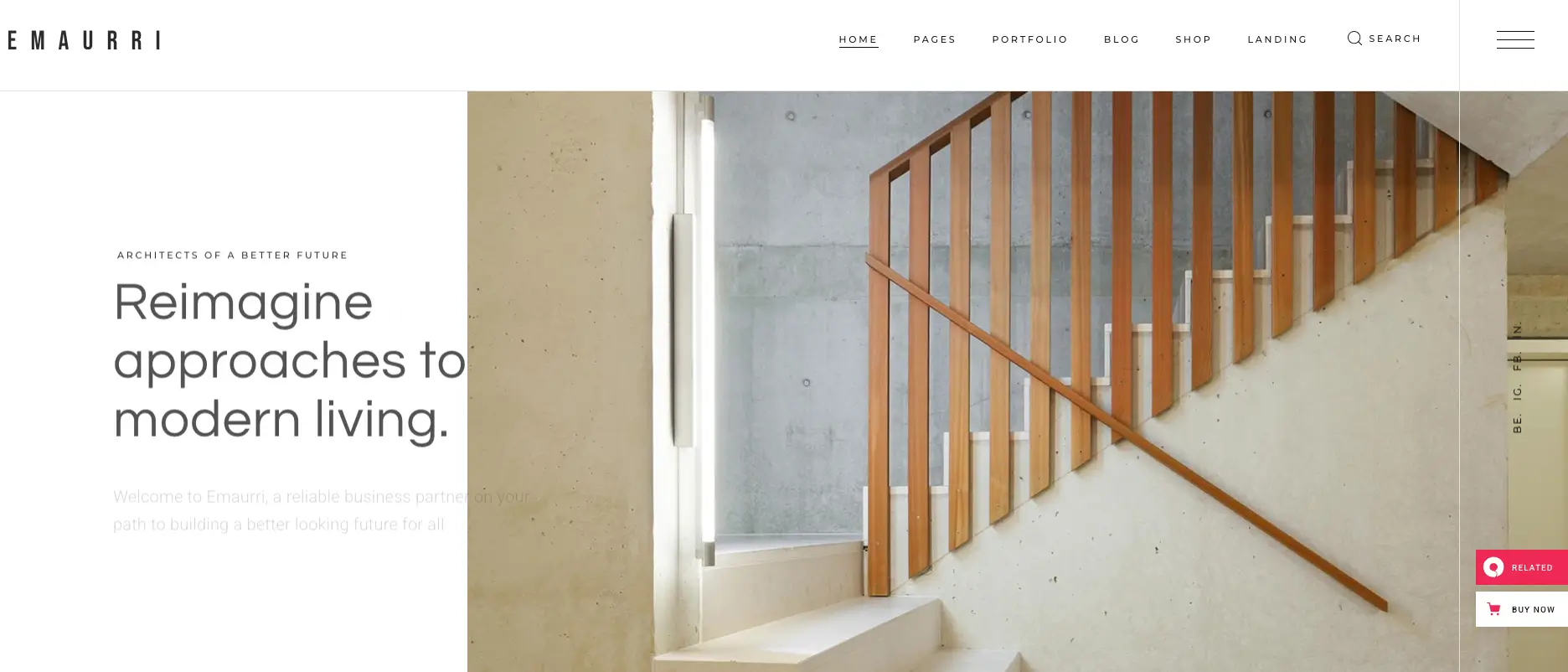
Price: $69 | Page Builder: Elementor | Developer: Mikado-Themes (Qode Interactive)
Emaurri is built for firms with a lot of work to show. If your portfolio has 50+ projects across multiple categories, this theme organizes and presents them beautifully.
The portfolio system offers dozens of layout variations, interactive project showcases, and fullscreen presentation modes. You get 7+ demos, 800+ Google Fonts, unlimited colors, a sticky sidebar, Google Maps, and a powerful admin panel. Revolution Slider is bundled (saving $85), and the theme is regularly updated.
Step-by-step guides and video tutorials help with setup. The theme supports WooCommerce, Contact Form 7, WPML, and includes a child theme. Using schema markup alongside Emaurri helps search engines understand your project pages better.
Who should use it: Architecture and interior design studios with large project collections that need advanced portfolio organization.
Worth knowing: Some users have flagged that documentation could be more detailed. The admin panel has many options, so expect a learning curve during initial setup. Once configured, the theme runs smoothly.
11. Corbesier
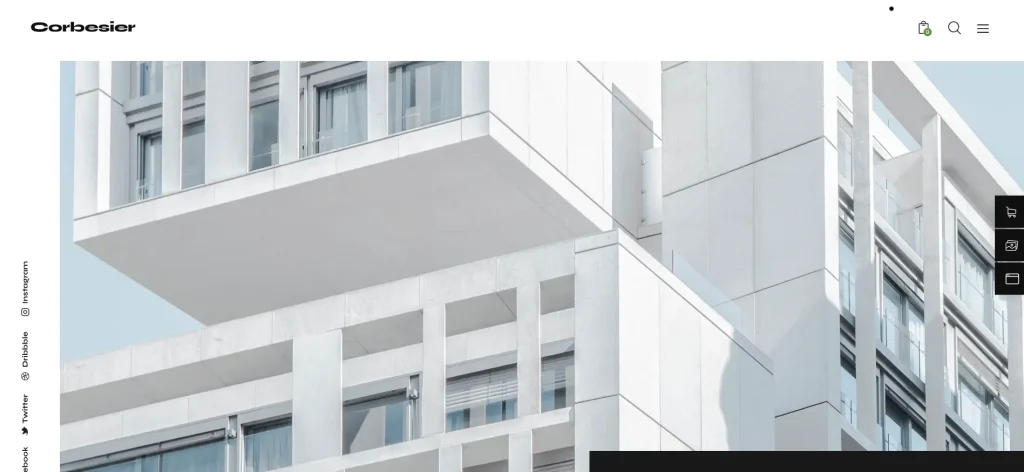
Price: $69 | Page Builder: Elementor | Developer: ThemeREX
Corbesier has a clean, editorial feel that works particularly well for interior design agencies. The layout presents projects in a magazine-like format, which suits firms that want their website to feel curated.
The theme is optimized for Slider Revolution, Mailchimp, Contact Form 7, and even elegro Crypto Payment (useful for firms accepting cryptocurrency). WooCommerce compatibility adds shop functionality for design products or consultation packages.
The design is responsive, retina-ready, and works well for portfolios, blogs, and service pages.
Who should use it: Interior design agencies, exterior design bureaus, and individual designers who want an editorial-style website.
Worth knowing: Corbesier is not as portfolio-heavy as Stoni or Emaurri. If showcasing a massive project library is your primary goal, those themes offer more specialized tools. Corbesier is better suited for firms that balance project showcase with written content and blog posts.
Choosing the Right Theme by Firm Type
Different firms have different priorities. Here is a shortcut:
Solo architect or freelancer starting out? Artex ($19) or Luxe ($59) will get you online quickly without complexity.
Interior design studio? Architecturer or Corbesier have the most interior-specific templates and editorial layouts.
Construction + architecture company? TheBuilt or Archicon cover both industries with matching page templates.
Studio with 50+ projects to display? Emaurri, Prague, or Stoni offer the deepest portfolio features.
Design-forward firm that values aesthetics above all? Hiroshi or Brøk deliver the most refined visual experiences.
Need appointment booking built in? Architecturer includes client scheduling. For other themes, add a booking plugin separately.
Building an Architecture Website That Wins Clients
The theme is the foundation. Here is what else matters:
Start with your 10 to 15 best projects. Do not dump every project on the site. Curate a collection that shows range and quality. Each project should have its own detail page with photos, a short description, location, and timeline.
Add a team page. Architecture clients want to know who they will be working with. Include headshots and short bios of your principals and lead designers.
Use a testimonial section. Client reviews on your homepage or project pages build instant credibility.
Set up SEO properly. Install an SEO plugin, write meta descriptions for every page, and add schema markup so Google understands your business type and location.
Compress your images. Architecture sites are photo-heavy. An image compression plugin keeps file sizes small without visible quality loss.
Secure your site. Use a WordPress security plugin and keep everything updated. Architecture firms handle project data that should stay private.
Speed things up. A cache plugin paired with quality hosting makes a noticeable difference in how fast your pages load.
Make contact effortless. Put your phone number in the header. Add a contact form on every service page. Include a Google Map with your office location.
Freequently Asking Question
What is the best WordPress theme for architecture firms?
The best WordPress theme depends on your firm’s needs. Artex ($29) is ideal for firms of all sizes wanting a clean Elementor-based theme at an affordable price. Hiroshi and Brøk suit design-forward studios, while TheBuilt and Archicon work well for combined construction and architecture companies. Emaurri is best for studios with large project libraries of 50+ works.
Which architecture WordPress theme has the most portfolio layout options?
Prague offers 9 portfolio layout options including two parallax designs, along with 29+ customizable homepages. TheBuilt provides 14 portfolio layout variations with 8 item animations and 18 category filter animations. Emaurri offers dozens of portfolio layout variations with fullscreen presentation modes, making it ideal for firms with extensive project collections.
Do any architecture WordPress themes include appointment booking features?
Yes, Architecturer ($69) includes a built-in appointment management system that lets clients book consultations directly through your website, removing the need for back-and-forth email scheduling. For other architecture themes on this list such as Artex, Stoni, or Hiroshi, you would need to add a separate booking plugin to enable this functionality.
Which architecture WordPress theme is best for protecting project photography?
Architecturer ($69) is the standout choice for image protection. It includes built-in tools such as password-protected galleries, right-click blocking, image drag prevention, and watermarking. These features are especially valuable for architects concerned about their project photography being copied or stolen without permission.
What should I look for when choosing an architecture WordPress theme?
When choosing an architecture WordPress theme, evaluate six key criteria: portfolio layout variety, visual design quality, page builder usability (Elementor, WPBakery, or Gutenberg), mobile responsiveness, code performance, and update frequency. Also consider your specific firm type — solo architects benefit from simpler themes like Artex or Luxe, while large studios with many projects should look at Emaurri or Prague for advanced portfolio organization.



