On This Page
Your construction company needs a website that looks professional and builds trust with potential clients. But hiring a web designer to build one from scratch can cost $3,000 to $10,000 or more.
Construction website templates solve this problem. You get a professionally designed, ready-to-use website for a fraction of the cost. Most templates cost between $14 and $25. You just add your content, images, and contact details, and your site is ready to go live.
But with thousands of templates available on marketplaces like ThemeForest, picking the right one takes time. Not all templates are built equal. Some look great in the demo but fall apart when you try to customize them. Others lack essential features like project galleries, service pages, or mobile responsiveness.
This guide reviews the 11 best construction website templates available right now. Each one has been selected for design quality, features, flexibility, and value for money. Whether you run a general contracting firm, a renovation company, or an architecture studio, you will find a template that fits your business.
What to Look for in a Construction Website Template
Before jumping into the list, here are the features that actually matter for a construction business website.
Responsive design. More than half of your visitors will view your site on a phone. Your template must look and work perfectly on mobile devices, tablets, and desktops. If the demo does not look good on your phone, skip it.
Project portfolio section. Construction clients want to see your past work. A template with a built-in portfolio or project gallery with filtering options lets you showcase completed projects by type (residential, commercial, renovation, new builds).
Service pages. You need dedicated pages for each service you offer. Look for templates that include pre-designed service page layouts so you can fill in your own content without designing from scratch.
Contact forms. Every page should make it easy for potential clients to reach you. Good templates include working contact forms, click-to-call buttons, and clear calls to action.
Fast loading speed. Heavy templates with bloated code drive visitors away and hurt your Google ranking. Choose templates built on clean HTML5 and CSS3, preferably using Bootstrap for lightweight performance.
SEO-friendly structure. Clean code, proper heading hierarchy, schema markup support, and fast load times all help your site show up in local search results. This matters a lot for construction companies that depend on local clients.
Easy customization. You should be able to change colors, fonts, images, and layouts without touching code. The best templates come with well-organized files and clear documentation.
Construction Website Template Quick Overview
| Template | Price | Best For | Pages | Key Feature |
|---|---|---|---|---|
| Renovate | $19 | Renovation and handyman businesses | 19 templates | Built-in cost calculator tool |
| Build | $25 | General construction companies | 35+ pages | Multiple portfolio layouts |
| Constro | $17 | Construction and architecture firms | 22+ pages | Mega menu + project showcase |
| Emarat | $21 | Architecture and construction | 4 homepage variations | Architecture-focused design |
| Konstruk | $18 | Modern construction businesses | 30+ pages | Dark and light versions |
| TheRoof | $17 | Roofing and renovation companies | 25+ pages | Service-specific page layouts |
| Shapen | $14 | Construction and architecture | 15+ pages | Clean minimal design |
| ConstX | $19 | Building and renovation | 20+ pages | Modern card-based layouts |
| Constrc | $14 | Construction and architecture firms | 18+ pages | Clean professional look |
| Elever | $17 | Construction companies | 20+ pages | Animated sections + portfolio |
Koncrete (WordPress Theme)

Although this is a construction website templates catalog, we couldn’t in good conscience leave out this gem of a WordPress theme for building and construction company websites. Koncrete is incredibly easy to customize, and its features are crafted to offer the smoothest page building experience. You have access to 12 hours of a real-time support team if you need a hand with the theme.
Koncrete comes with 4 fantastic pre-made homepages that are perfect for your landing pages. The inner pages include 2 blog pages, 3 about pages, 3 project pages, and 3 service pages. Your pages will look even more stunning with any of the 3 headers and 4 top bar options that add to your customization options. Koncrete boasts amazing compatibility with all popular plugins, add-ons, and extensions. For instance, you can edit all your pages using the Elementor page builder plugins that offers a drag & drop interface. Furthermore, you have access to the Gutenberg block editor.
Since Koncrete is based on the Bootstrap 4 framework, it is fully responsive and mobile-friendly, supporting all devices. It is SEO optimized and is compatible with Yoast SEO so that your pages will rank high on search engines. You can translate this theme into whatever language you want with the WPML plugin.
1. Renovate: Construction Renovation Template

Price: $19 | Best for: Renovation companies, handymen, and remodeling businesses
Renovate is specifically designed for renovation and home improvement businesses. It works well for handymen, carpenters, plumbers, electricians, tilers, and general remodeling companies.
The standout feature is the built-in Cost Calculator Tool. This lets your website visitors estimate the cost of construction, installation, repair, or renovation services directly on your site. You can create custom form fields, define your rates, and set the formula for calculations. This feature alone can save you hours of phone calls with potential clients asking “how much would it cost to…” questions.
Renovate comes with 19 page templates, the Slider Revolution jQuery plugin (valued at $16), premium font icons, a sticky menu, touch-friendly sliders and carousels, and an Ajax contact form. Every page element is fully responsive and adapts to any screen size. The template is also retina-ready, meaning your site looks crisp on high-resolution displays.
Best for: Renovation contractors, handyman services, home improvement companies, and any business that wants to offer online cost estimates.
2. Build: Construction Responsive HTML5 Template

Price: $25 | Best for: General construction and corporate businesses
Build is one of the most comprehensive construction templates on ThemeForest. It is designed for construction companies, corporate businesses, and contractor websites that need a professional, feature-rich online presence.
The template includes 35+ pre-built pages, multiple portfolio layout options, several blog page designs, creative sliders, and a variety of shortcodes that make customization easier. The design is modern, clean, and professional.
Build stands out for its flexibility. Whether you need a single-page layout or a multi-page corporate site, the template accommodates both. The code quality is well-organized, making it easy for developers to customize further. The responsive design adapts smoothly to all screen sizes.
Best for: Established construction companies and corporate contractors that want a large, feature-rich website with multiple sections.
3. Constro: Construction Business HTML5 Template

Price: $17 | Best for: Construction and architecture firms
Constro is a purpose-built HTML5 template for construction businesses, architecture firms, and building contractors. It offers a professional look with modern design elements.
The template comes with 22+ pages, a mega menu for easy navigation, a project showcase section with filtering, team member profiles, testimonial sections, and multiple service page layouts. It is built on Bootstrap 4 and uses clean, well-documented code.
One feature that sets Constro apart is its detailed project pages. You can display each completed project with multiple images, project specifications, client name, completion date, and a description. This helps potential clients see exactly what kind of work you do and the scale of projects you handle.
Best for: Mid-sized construction companies and architecture firms that want a detailed project showcase and professional team presentation.
4. Emarat: Construction and Architecture HTML Template

Price: $21 | Best for: Architecture and construction companies with a focus on design
Emarat targets construction and architecture businesses that want a design-forward website. The template balances professional functionality with strong visual appeal.
It includes 4 unique homepage variations, giving you options to choose the layout that best matches your brand identity. Each homepage has a different style, from bold and image-heavy to clean and minimal. The template also includes dedicated service pages, portfolio sections, about pages, blog layouts, and contact forms.
Emarat is built on Bootstrap and is fully responsive. The architecture-focused design makes it especially suitable for firms that want to highlight the design and aesthetic quality of their work, not just the construction.
Best for: Architecture firms website, design-build companies, and construction businesses that want their website to reflect the quality and creativity of their work.
5. Konstruk: Construction HTML Template
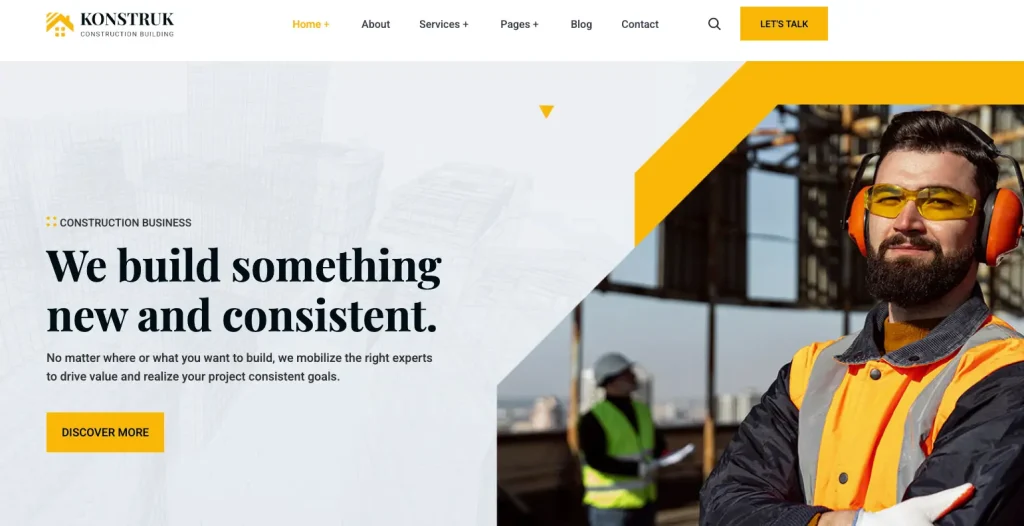
Price: $18 | Best for: Modern construction businesses wanting a contemporary look
Konstruk is a modern, clean construction template built on Bootstrap 5. It offers both dark and light design versions, which gives you more flexibility in matching your brand colors and style preferences.
With 30+ pre-built pages, Konstruk provides layouts for services, projects, team members, testimonials, blog posts, pricing tables, and contact information. The dark version works well for companies that want a bold, high-contrast look. The light version is better for firms that prefer a clean, corporate aesthetic.
The Bootstrap 5 framework means the template uses the latest web standards, loads faster, and is easier to customize with modern CSS utilities. The code is well-organized and documented for developers.
Best for: Construction companies that want a modern, contemporary design with the option to choose between dark and light themes.
6. TheRoof: Construction, Architecture & Renovation HTML Template
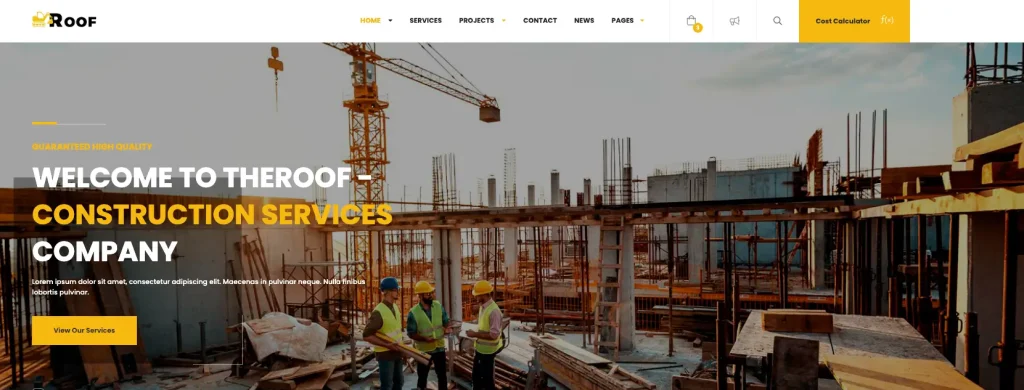
Price: $17 | Best for: Roofing, renovation, and general construction companies
TheRoof is designed for construction, architecture, and renovation businesses. It has a professional design with service-specific page layouts that work for specialized contractors.
The template includes 25+ pages with layouts tailored for different construction services. Whether you offer roofing, general contracting, interior renovation, or architectural design, TheRoof has pre-designed pages that match your service type. This saves you time because you do not have to design service pages from scratch.
TheRoof also includes portfolio sections with project filtering, team member displays, testimonial carousels, blog layouts, and a working contact form. The template is responsive and retina-ready.
Best for: Roofing contractors, renovation specialists, and multi-service construction companies that need service-specific landing pages.
7. Shapen: Construction and Architecture Template

Price: $14 | Best for: Construction and architecture firms on a budget
Shapen is one of the most affordable construction templates on this list, but the low price does not mean low quality. It offers a clean, minimal design that looks professional without being overly complex.
The template includes 15+ pages with layouts for services, projects, team, blog, and contact. Built on Bootstrap 4, it is lightweight and loads quickly. The minimal design approach means fewer distractions for visitors and a focus on your content, images, and calls to action.
Shapen is a good choice for smaller firms or startups that need a professional web presence without spending a lot on a template. The clean code makes it easy to customize, even for beginners with basic HTML knowledge.
Best for: Small construction firms, architecture startups, and contractors who want a clean, professional site at the lowest cost.
8. ConstX: Construction, Building & Renovation HTML Template
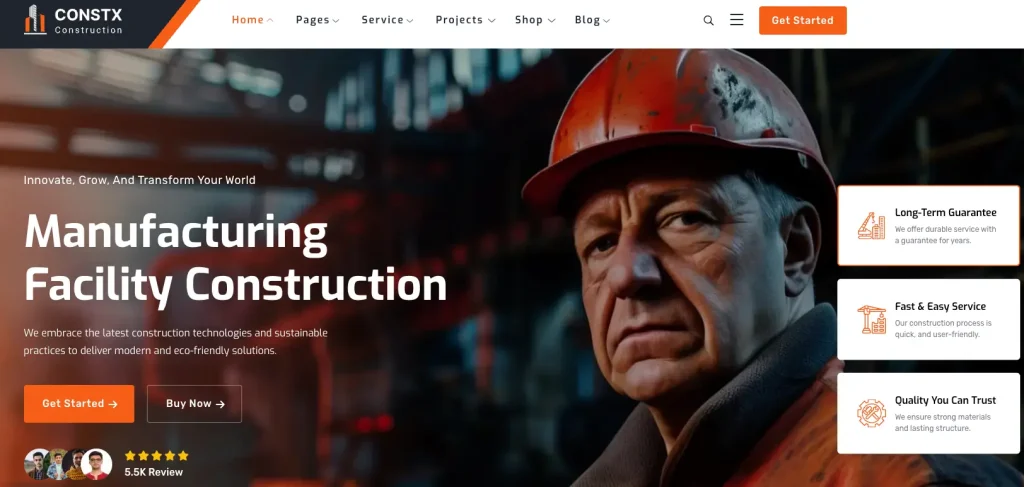
Price: $19 | Best for: Building and renovation companies wanting modern card-based layouts
ConstX is a newer template built on Bootstrap 5 with a fresh, modern design approach. It uses card-based layouts that give your website a contemporary look and make content easy to scan.
The template includes 20+ pages with sections for services, projects, team, testimonials, pricing, and blog. Each section uses clean spacing and modern typography that makes your content readable and professional.
Being a newer template, ConstX is built with current web standards and best practices. The code is clean, the design patterns are modern, and the responsive behavior works well across all devices. It also benefits from being designed with current SEO practices in mind.
Best for: Renovation and building companies that want a modern, card-based design with the latest Bootstrap 5 framework.
9. Constrc: Construction and Architecture HTML Template
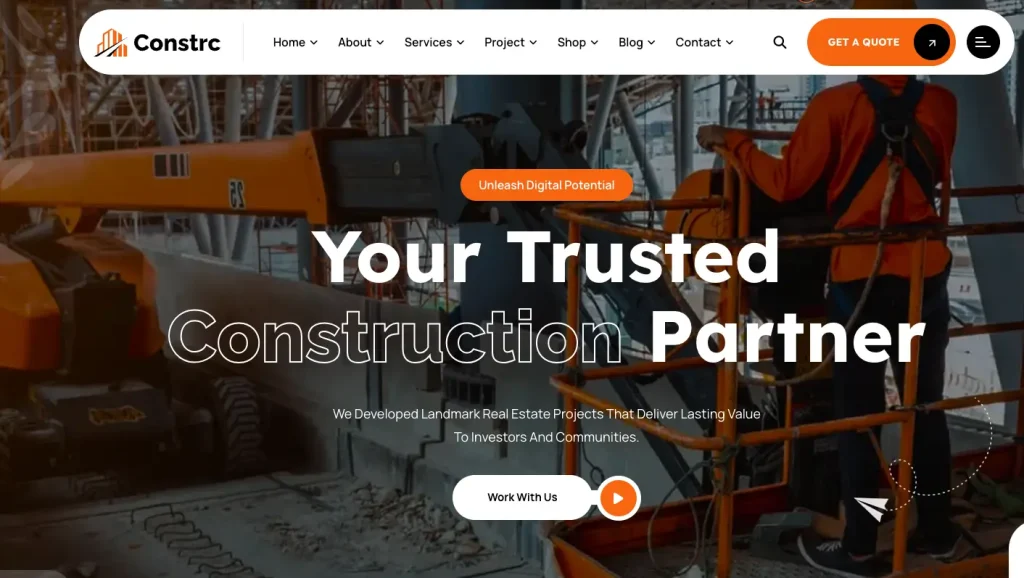
Price: $14 | Best for: Construction and architecture firms wanting a polished professional look
Constrc offers a clean, professional design built on Bootstrap 5. It is designed specifically for construction companies and architecture firms that want their website to reflect the quality and precision of their work.
The template includes 18+ pages with thoughtfully designed layouts for every section a construction business needs: homepage, about, services, individual service detail pages, project portfolio, team members, blog, and contact. The design is polished and consistent throughout all pages.
Constrc uses modern design principles with generous white space, professional typography, and high-quality image placements that let your project photos take center stage.
Best for: Construction companies and architecture firms that want a no-nonsense, professional website with clean Bootstrap 5 code.
10. Elever: Construction HTML Template
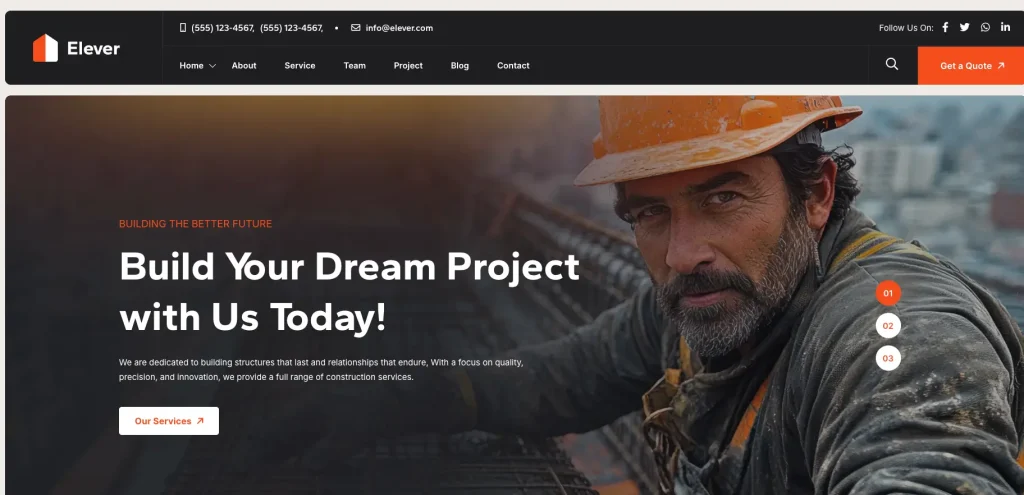
Price: $17 | Best for: Construction companies wanting animated, interactive pages
Elever is a construction-focused HTML template that adds visual interest through animated sections and interactive elements. Built on Bootstrap 5, it combines professional design with subtle motion effects that make your website feel dynamic and engaging.
The template includes 20+ pages with a project portfolio section, animated service showcases, team member profiles, client testimonials, a blog section, and contact pages. The animations are tasteful and professional, not overwhelming or distracting.
Elever also includes a variety of section styles and header options, giving you flexibility in how you present your content. The code is well-structured and documented for easy customization.
Best for: Construction companies that want their website to stand out with professional animations and interactive design elements.
How to Choose the Right Template for Your Business
With 11 options in front of you, here is a simple decision guide.
If your website is not ready yet, start with Gravity. It gives you a professional “coming soon” page while you build the full site, and it captures leads from day one.
If you run a renovation or handyman business, go with Renovate. The built-in cost calculator alone sets it apart. Letting visitors estimate project costs on your site reduces phone calls and qualifies leads before they contact you.
If you need the most pages and features, choose Build. With 35+ pre-built pages and multiple portfolio options, it covers every section a large construction company might need.
If budget is your top concern, look at Shapen, Constrc, or Gravity at $14 each. All three deliver professional quality at the lowest price point.
If you want a modern Bootstrap 5 template, choose Konstruk, ConstX, Constrc, or Elever. These are built with the latest framework and follow current web standards.
If design and architecture aesthetics matter most, Emarat gives you the most visually creative options with its 4 homepage variations.
How to Set Up a Construction Website Template
Once you buy a template, here is how to turn it into a live website.
Step 1: Buy and download the template. Purchase from ThemeForest, download the zip file, and extract it on your computer. Inside, you will find HTML files, CSS files, JavaScript files, images, and documentation.
Step 2: Get web hosting and a domain. You need a hosting account and a domain name (like yourcompany.com) to put your website online. Hosting typically costs $3 to $10 per month.
Step 3: Replace demo content with yours. Open the HTML files in a code editor (like Visual Studio Code) and replace the demo text, images, and links with your own content. Follow the template documentation for guidance.
Step 4: Add your project photos. Replace demo images with real photos of your completed projects. High-quality images of your work are the most convincing content on a construction website.
Step 5: Set up your contact form. Configure the included contact form to send messages to your business email. Most templates include a PHP contact form or instructions for connecting to a form service.
Step 6: Upload to your hosting. Use an FTP client (like FileZilla) or your hosting file manager to upload all files to your web server. Your website is now live.
Step 7: Test everything. Check your site on a phone, tablet, and desktop. Test the contact form. Click every link. Make sure images load properly and the site looks good on all devices.
Tips to Make Your Construction Website Stand Out
Having a template is the starting point. Here is what makes a construction website actually convert visitors into clients.
Use real project photos. Stock photos look generic. Visitors can tell the difference. Use real photos from your completed projects. Before-and-after shots are especially powerful.
Add client testimonials. Social proof is critical in construction. Include testimonials with the client’s name, location, and project type. Video testimonials are even more convincing.
Make your phone number visible. Put your phone number in the header of every page. Construction clients often want to call. Make it clickable on mobile devices.
Include a clear services list. Do not make visitors guess what you do. List every service you offer on a dedicated page, with a brief description of each.
Add a Google Maps embed. Show your service area with an embedded map. This helps with local SEO and tells clients you work in their area.
Set up Google Business Profile. Your template is your website, but Google Business Profile is how you show up in local search results and Google Maps. Set it up and link it to your website.
Consider adding online booking. If you want clients to schedule consultations or estimates directly from your website, adding a booking plugin can increase conversions. WordPress plugins like Radius Booking let clients book appointments through your site, including through AI-powered conversational booking.
Frequently Asked Questions
What is the best construction website template?
It depends on your business type. Renovate is the best for renovation and handyman businesses because of its built-in cost calculator. Build is the best for large construction companies that need the most pages and features. For budget-conscious businesses, Shapen and Constrc deliver professional quality at $14 each.
Are HTML templates better than WordPress themes for construction websites?
HTML templates are simpler, faster, and cheaper. They work well if you have a basic website with a few pages that do not change often. WordPress themes are better if you need a blog, want to update content frequently, or need plugin functionality like online booking or eCommerce.
Can I convert an HTML template to WordPress?
Yes, but it requires development work. You would need to create a WordPress theme from the HTML template files, which involves PHP, WordPress template tags, and function hooks. Many developers offer this as a service, typically costing $200 to $500.
Do I need coding skills to use these templates?
Basic HTML knowledge helps. You need to be able to open HTML files in a code editor, find text and image references, and replace them with your own content. Most templates come with detailed documentation that guides you through the process step by step.
How much does it cost to launch a construction website with a template?
The total cost breaks down roughly like this: template ($14 to $25), hosting ($3 to $10/month), domain name ($10 to $15/year). So you can launch a professional construction website for under $50 in the first month.
Will these templates work on mobile phones?
Yes. All 11 templates on this list are fully responsive, meaning they automatically adjust their layout to look and work properly on mobile phones, tablets, and desktop computers.
Can I use these templates for multiple projects?
ThemeForest licenses are per project. A regular license covers one project (one website). If you want to use the same template for multiple client websites, you need to buy a separate license for each.
What to Do Next
Pick the template that matches your business type, budget, and design preferences. Here is your action plan:
- Review the live demos by clicking the links above. Browse every page, check the mobile view, and test the navigation.
- Choose the template that fits your needs. When in doubt, Renovate is the safest pick for renovation businesses, and Build is the safest for general construction companies.
- Purchase and download from ThemeForest.
- Replace demo content with your real business information, services, and project photos.
- Get hosting, upload your files, and go live.
Your competitors already have websites. The longer you wait, the more leads you lose to companies that show up online when clients search for construction services in your area.