

On This Page
Let shoppers pick their own items, and they buy more. That is the power of a mix and match bundle.
In this guide, you will learn how to create a mix and match bundle on Shopify two ways. First with Shopify’s free built-in tools. Then with a bundle app called Radius Bundle. You will also see the limits of each method, so you can pick the right one for your store.
What is a mix and match bundle?
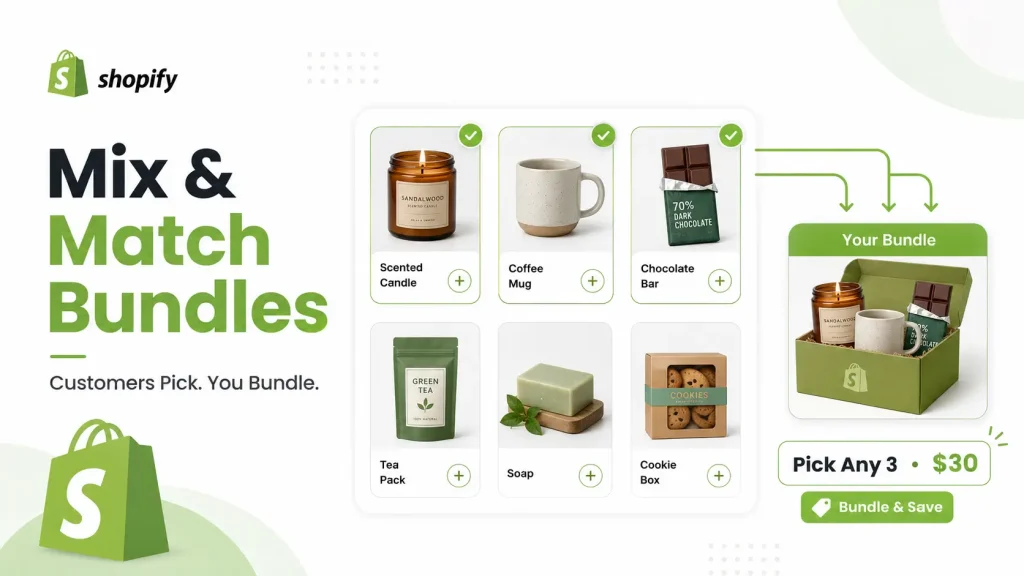
A mix and match bundle lets customers build their own set from products you choose. You decide which items they can pick. The shopper picks the ones they want. Then they buy them together at one bundle price.
Think “Pick any 3 candles for $30” or “Build your own snack box.” The customer chooses. That choice is what makes people add more to the cart.
This is different from a fixed bundle. In a fixed bundle, you choose every item. The customer buys that exact set with no changes.
Why merchants use mix and match bundles
- Higher average order value. Shoppers add more items to one order.
- Less choice stress. A “pick 3” flow feels easier than browsing a full catalog.
- A more personal feel. Customers get a set that fits their taste.
- Fewer discount codes. The deal is built into the bundle.
Mix and match works well for snacks, tea, coffee, skincare, supplements, and gift boxes.
Does Shopify have a native mix and match bundle option?
Short answer: not a true one. Shopify’s free Bundles app only supports fixed bundles and multipacks. It cannot show a “pick your own” builder on your store.
But you can still make a basic mix and match deal for free. You do it with a Shopify collection and an automatic discount. It is a good way to test the idea before you pay for an app.
Shopify Plus stores can also build custom bundles with Shopify’s Bundles APIs. That needs a developer, so most merchants skip it.
👉 Good Read: How to Create BOGO Bundle Offer on Shopify
Method 1: The free Shopify workaround (no app)
You can build a simple mix and match offer using tools already in your store. Here is the short version.
- Create a collection. Add every product you want people to choose from. Give it a clear name like “Build Your Own Coffee Box.”
- Link to the collection page. Add it to your menu, homepage, or a banner. Every collection has its own URL.
- Create an automatic discount. In your admin, open Discounts. Make an automatic discount that only applies to that collection. Set a percent or amount off. Add a minimum quantity, like “buy 3 or more.”
That is it. When a shopper adds enough items, the discount kicks in at checkout.
Where the free method falls short
This route works, but it has real gaps. Know them before you launch.
- No item cap. You can set a minimum, but not a maximum. Shoppers can pick any number.
- No live builder. There is no “pick your 3” screen and no live counter.
- No progress nudge. Nothing tells a shopper “add 1 more to save.”
- Hard to set one flat price. A fixed “3 for $25” price is tricky when item prices differ.
- Discount codes may not stack. An automatic discount often will not combine with a code. Test checkout first.
- Basic reports only. You see discount use, not bundle metrics like completion rate.
If you want a real builder with limits, live pricing, and clean reports, you need an app.
Method 2: Create a mix and match bundle with Radius Bundle
A bundle app fills the gaps the free method leaves. Radius Bundle is one option. It gives you a real “build your own” widget, item limits, flexible pricing, and inventory that syncs per product.
You do not need code. The setup uses a simple 4-step wizard: Products → Discount → Display → Review. Here is the brief idea of each step.
Step 1: Pick your products and groups
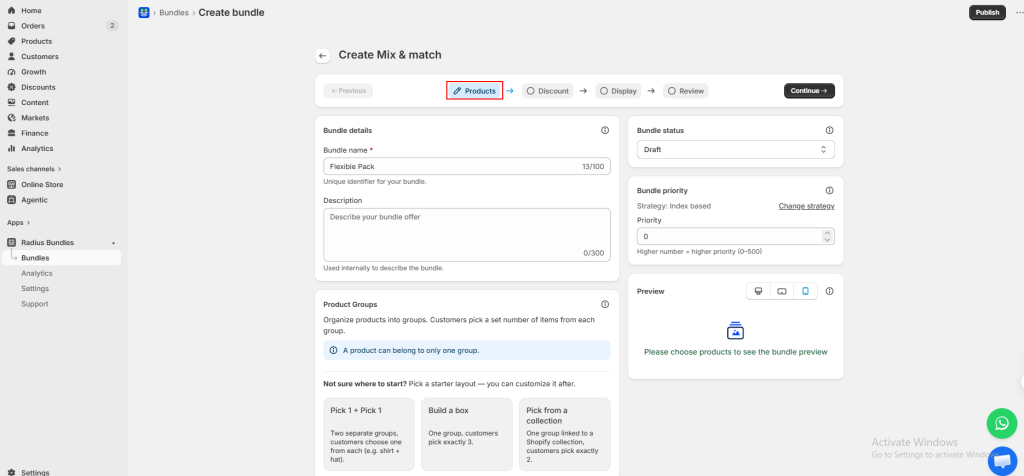
Name your bundle. Then create product groups. Customers pick a set number of items from each group.
You can start fast with a ready layout, like “Pick 1 + Pick 1,” “Build a Box” (pick 3 from one group), or “Pick from a Collection.” For each group, you set the rule: at least 1, exactly 3, up to 5, and so on.
Add items one by one, or link a whole Shopify collection. Linking a collection keeps the bundle fresh on its own. Add a product to that collection later, and it shows up in the bundle right away.
Step 2: Set your discount
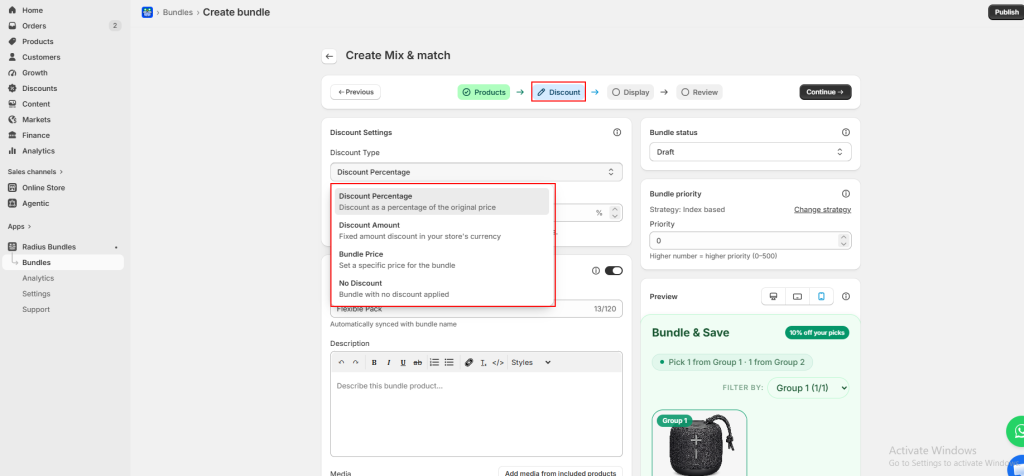
Choose how the deal works. Radius Bundle gives you four options:
- Percentage off (like 10% off)
- Fixed amount off (like $5 off)
- One bundle price (a single price no matter what they pick)
- No discount (just group items together)
You can also turn on free shipping or apply the discount to only some groups.
Step 3: Choose how it looks
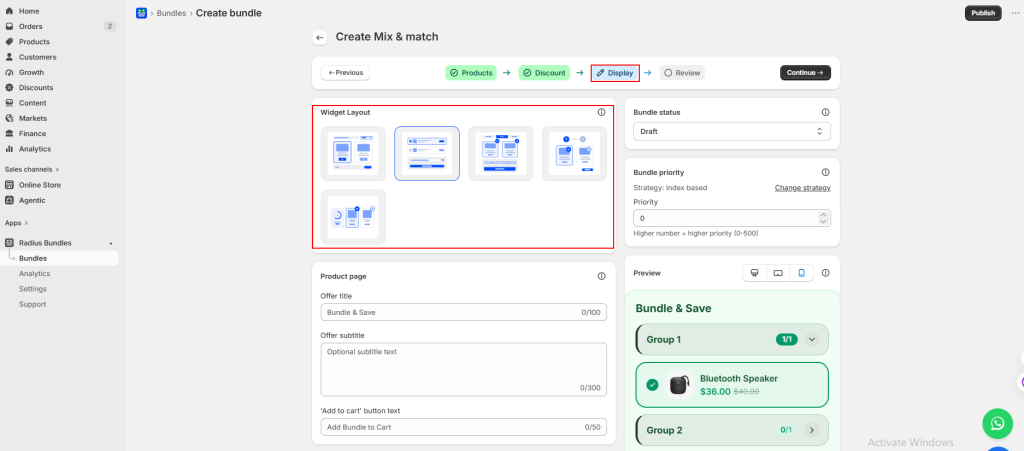
Pick a layout for the widget. Options include a grid with a progress ring (“1 of 4” picked), tabbed groups, a compact grid, a list with a sidebar, or a step-by-step flow.
The progress ring is a strong seller. It shows “select 1 more to unlock” and pushes shoppers to finish. You can also show prices, savings, and a small celebration when the bundle is complete.
Step 4: Review and publish
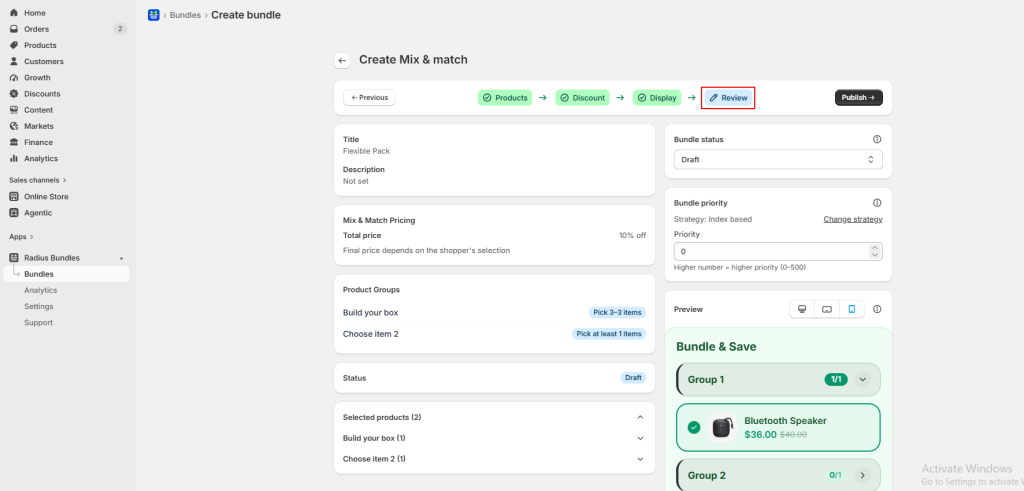
Check the summary. Confirm your groups, rules, pricing, and products. When it looks right, hit Publish. Your mix and match bundle goes live on the product page.
That is the full flow. Four steps, no code, and a real builder your customers can use.
Native Shopify vs Radius Bundle: quick comparison
| Feature | Free Shopify workaround | Radius Bundle app |
| Cost | Free | App plan |
| “Build your own” builder | No | Yes |
| Set a max item limit | No | Yes |
| One flat bundle price | Hard | Yes |
| Live progress ring | No | Yes |
| Per-product inventory sync | Limited | Yes |
| Free shipping toggle | No | Yes |
| Bundle reports | Basic | Detailed |
Tips to sell more with mix and match bundles
- Name the target in your copy. Say “Pick any 3” in the title, banner, and product text.
- Keep groups simple. Too many choices slow people down.
- Show the savings. Let shoppers see the amount they save.
- Use the progress nudge. “Add 1 more to unlock” lifts completion.
- Test checkout before launch. Make sure the price and inventory are correct.
Common mistakes to avoid
- Forgetting a max limit. Without one, a shopper could pick 20 items at a bundle price.
- Mixing discount types. Some discounts do not stack. Check the final cart price.
- Ignoring inventory. Make sure stock drops for each item picked, not just the bundle.
- Hiding the offer. If shoppers cannot find the builder, they cannot use it.
Frequently asked questions
Does Shopify support mix and match bundles natively?
Not fully. The free Shopify Bundles app only handles fixed bundles and multipacks. For a true “pick your own” builder, you need a third-party app.
Can I set a maximum number of items customers pick?
Not with the free workaround. It only supports a minimum. A bundle app like Radius Bundle lets you set both a minimum and a maximum.
How do I make a “3 for $25” bundle?
Use a bundle app. Set a group with “pick exactly 3” and a single bundle price of $25. The free discount method struggles with one flat price when item prices differ.
Does inventory sync when someone buys a bundle?
With a good bundle app, yes. Stock drops for each product the customer picks. Always place a test order to confirm.
Can customers use a discount code with a bundle?
Sometimes, but not always. Automatic discounts often do not stack with codes. Test the full checkout before you go live.
Will a bundle app slow down my store?
A well-built app adds little weight. Pick one that is built for Shopify and test your page speed after setup.
Final thoughts
You now know how to create a mix and match bundle on Shopify two ways. Start free with a collection and an automatic discount to test the idea.
When you want a real builder, item limits, flexible pricing, and clean reports, move to a bundle app like Radius Bundle.
Its 4-step setup makes a “build your own” bundle simple to launch. Pick the method that fits your store, then watch your average order value grow.




