


On This Page
Do you want to learn how to create a portfolio in WordPress? An online portfolio serves as your digital resume, enabling you to showcase your skills, experience, and projects in a way that captivates potential employers or clients.
Whether you’re an artist, writer, web developer, photographer, or graphic designer, an online portfolio lets you present your work with impact.
That said, this article will discuss what an online portfolio is, why it’s essential for standing out in a competitive market, and how to create a stunning portfolio in WordPress.
Content Heighlites:
- Who Needs a Portfolio?
- What is the Purpose of Your Portfolio?
- What Defines a Good Portfolio Website?
- Why Use WordPress to Create Your Portfolio?
- How to Create a Portfolio in WordPress
- Best Portfolio Website Examples
Who Needs a Portfolio?

Answering this with “everyone” would be almost accurate, but to a greater degree, unhelpful. If your work is creative in nature, you will need to show people and organizations that want to work with you samples of what you can do. Creative professionals include writers, musicians, painters, photographers, comedians, dancers, architects, engineers, designers, and developers.
If you make things for a living, you should have a portfolio of your best works. In the digital age, you need to have an online portfolio whose link you can share on your social profiles, proposals, and applications. What’s more, having such a website means that potential clients may bump into it and end up working with you.
Portfolios attract attention to your work while keeping it orderly, updated, and available at a moment’s notice.
What is the Purpose of Your Portfolio?

Before creating an online portfolio in WordPress, you must have a firm grasp of some factors, including understanding why you want the portfolio. Knowing what you want it to achieve gives you ideas on what it should have and look like. This way, you can create something that realizes your envisioned purpose for it.
Here are the most common purposes of online portfolios:
- Establishing professional credibility: When you showcase your creative works on an online portfolio, you accrue an air of credibility and professionalism. People also perceive you as being serious about your craft.
- Evolving showcase: Your portfolio is a representation of what you do best that evolves and adapts as your body of work expands or even improves. It is a documentation of your professional and creative journey.
- Job-seeking tool: When you include a link to your portfolio in email signatures and social profiles, it becomes a way to acquire new work opportunities.
- Lead generation: When you have a portfolio website, visitors who land on it can increase exponentially, therefore, giving you new leads that may turn into valuable clients. You can also sell the leads.
What Defines a Good Portfolio Website?
An excellent portfolio can radically change your career for the better. It can be the perfect platform for drawing in new clients and getting you jobs. However, you need to craft it in a way that maximizes its chances of being such a companion as you want it to be. What better way to ensure its success than to consider the existing successful portfolios and compare them to see what elements they share?
Here are some of the common characteristics of the best portfolios:
- They display the best of your work. You would be surprised by how many people create portfolios that don’t reflect their actual up-to-date work. You should ensure that you keep updating your portfolio so that it does speak for who you are, rather than who you were, assuming you keep getting better. Another reason why many fail to do this is that they create flashy websites with unnecessary elements that draw attention from their actual work. Avoid having distracting ads and unnecessary elements on your pages.
- They are minimalistic and focused. Nobody will browse through hundreds of works, so you should be very meticulous when choosing what to upload. Ensure you choose works that tell a story or serve a specific purpose. Always highlight and start with those you are proudest of and don’t include anything substandard.
- They speak to the targeted audience. The works you display should be tailored to target your intended audience. If you are targeting a specific niche, ensure that the work you upload touches on it significantly. A jack of all trades can be better than a master of one if they are really good in all of them. If you cover different niches, you can create categories so that your visitors can focus on what resonates with them.
- They are easy to navigate. All top portfolios are fast-loading and have easy-to-use navigations. You can categorize your works if they cover a wide range of fields. You can also throw in conspicuous and flexible search and filter elements. Ensure that your site has straightforward menus and standard navigation. Your website must load fast or else visitors will get impatient and leave.
- They have call-to-action buttons and contact info. If visitors like what they see, you must leave a way for them to get in touch or take the action you want. Sometimes, they don’t want to call you yet but they may end up doing so if you leave calls-to-action like a request quote button.
Why Use WordPress to Create Your Portfolio?

Why not use some other free platforms out there instead of WordPress?
There are a few answers to this question and you can start by appreciating that it is the most popular site creation and management system. It is user and beginner-friendly, which negates the need for hiring a coder or having coding experience. This is mostly aided by the abundance of WordPress, which are products that give you a comprehensive website at the click of a mouse.
WordPress boasts a vast repository of plugins that add and enhance different functions and features to your website. This content management system is also SEO-friendly right off the bat, leaving you little to no work in making your site more visible on search engines.
Since you want to have a website that is easily visible on all devices, WordPress should be your first choice because of its exceptional responsiveness. It also offers extensive customization options, letting you edit layouts, fonts, and colors. It is outfitted with a default block builder and accommodates other page builder plugins for this purpose. What’s more, it has a vast and active community that offers help with all the problems you could encounter.
Should You Use a WordPress Theme or Plugin to Build Your Portfolio?
Both plugins and themes can give you excellent results, but their processes and outcomes differ in several ways. We prefer that you go with a portfolio plugin since themes rarely come with an inbuilt portfolio functionality. We recommend Portfolio, which is the best portfolio plugin. You can start with the free version or go for the PRO version if you prefer to start on the front foot. This plugin enables you to showcase your portfolio items easily with widgets and a carousel slider.
This top-notch plugin is customizable with the Elementor page builder but also gives you the option to use Gutenberg, the WordPress default block builder. You can choose to add a profile image, and Portfolio lets you select the image size so you can keep your site as light and fast as you want. The filters it offers let you showcase items by whichever criteria you like.
You can choose the primary color of your portfolio as you take advantage of the 4 layouts in the free version. The PRO version takes things to the next level with 50+ layouts. The layouts include a carousel slider, masonry isotope, masonry grid, even grid, and even isotope. This premium version lets you order your items by drag & drop. It boasts 4 pagination types, including AJAX number pagination, normal number pagination, AJAX load more, and autoload on scroll.
How to Create a Portfolio in WordPress
Step 1: Select a Domain Name
The first step in creating a WordPress portfolio is to select a domain name for your site. No matter what domain name you select, ensure it’s catchy, short, memorable, easy to spell, write, and pronounce.
Additionally, make sure the domain name doesn’t contain any numbers, hyphens, or any other special characters. Your chosen domain name should be free from copyright infringements.
Lastly, check if there are any social media handles with your chosen domain name and select “.com” as the domain extension. If the “.com” isn’t available, try “.net” or another extension related to your profession, such as “.design.”
Once you fix a domain name, register it with a domain registrar, such as Namecheap.
Step 2: Choose a Hosting Provider
Once you register a domain name using your preferred domain registrar, you need to select a hosting provider to host your website. While selecting one, follow the criteria below.
- Check the hosting provider’s bandwidth and storage (it must guarantee a high uptime of at least 99.99%)
- Seek features like backups, scalability, security measures, and other tools like cPanel or one-click WordPress installation
- Make sure it provides SSL certificates, firewalls, and regular backups
- Ensure the customer support is available 24/7
- Read reviews of customers and compare pricing with other hosting providers
After considering these criteria, select a hosting provider and connect your domain.
Step 3: Install WordPress
Right now, you need to install WordPress using cPanel. You’ll get a cPanel from your chosen hosting provider. Some providers offer one-click WordPress installation, while others require you to follow a few steps to install this CMS.
That being said, follow the guidelines shared by your hosting provider to install WordPress. Contact their customer support if you encounter any issues during the installation.
Step 4: Select and Install a Portfolio Theme
This step is optional, but we recommend you follow it. You now need to select the best WordPress portfolio theme to make your site visually appealing. Here’s what to check before picking a portfolio theme.
- Ensure it is light, SEO-optimized, and responsive
- Make sure the theme has clean layouts, clear navigation, and well-organized categories
- Offers extensive customization options
- Check if the theme is compatible with popular plugins and the latest WordPress version
- Inspect if it gets regular updates
- Check for developer reputation, support, and customer feedback
- Check whether it comes with a free version
After considering these factors, select a theme and install it. You may read this article on the best portfolio website templates if you need recommendations regarding selecting a portfolio theme.
After installing the WordPress theme, you can move to the installing the portfolio plugin process.
Step 5: Install a Portfolio Plugin
At this stage, you need to install a portfolio plugin to exhibit your best work professionally on your chosen web page. But which plugin should you use? As you know, you’ll find tons of WordPress plugins that do the job. Therefore, selecting one plugin becomes challenging.
Does that mean you can’t find one? Of course, not. To find a portfolio plugin easily, simply consider the criteria below.
- Get a plugin with an intuitive interface
- It should be easy to install and set up
- Your plugin must feature diverse layouts and styles
- It must let you customize the colors, fonts, and styles of your portfolio
- Select a plugin that won’t slow down your website
- Ensure it is compatible with the latest WordPress version, your chosen theme, and other popular plugins
- Check if it gets regular updates and offers 24/7 customer support
- Examine the plugin developers’ reputation
- Read customer reviews and compare prices with other plugins
Now, you won’t face any challenges while seeking a portfolio plugin if you consider the criteria above. However, choose Portfolio by RadiusTheme plugin if you need recommendations. Here’s how you install and activate this plugin.
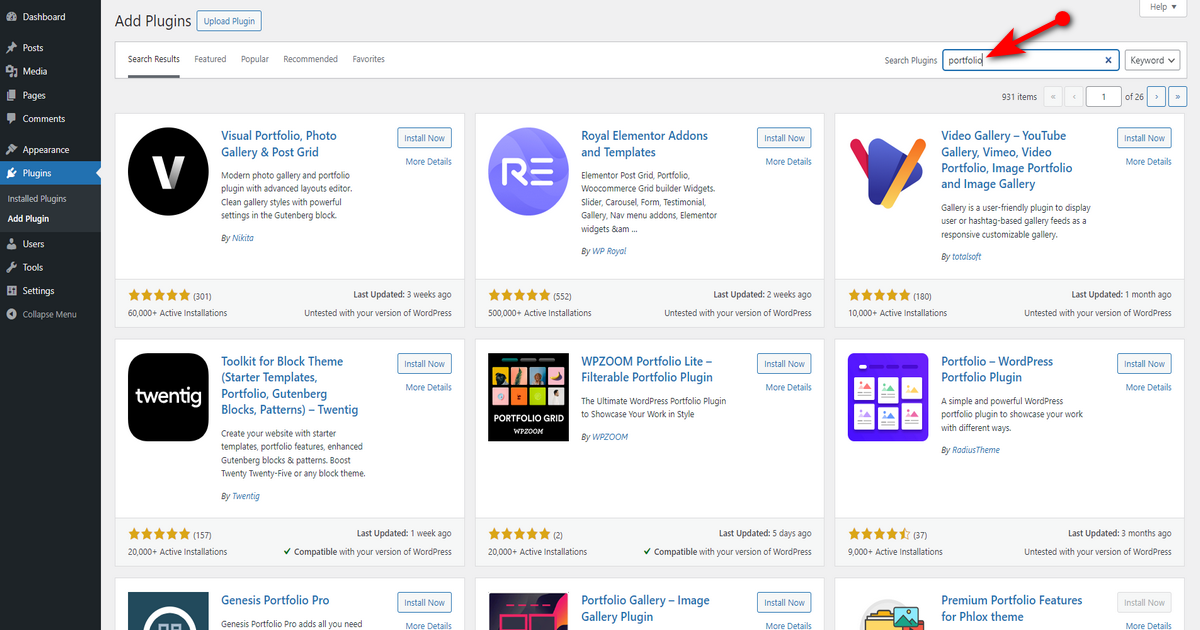
Go to WordPress Admin Panel > Plugins > Add Plugin.

Now, move your mouse pointer to the top right side and type ‘Portfolio’ in the search field.
Look for the marked plugin (Portfolio by RadiusTheme) in the screenshot below and hit “Install Now” button.
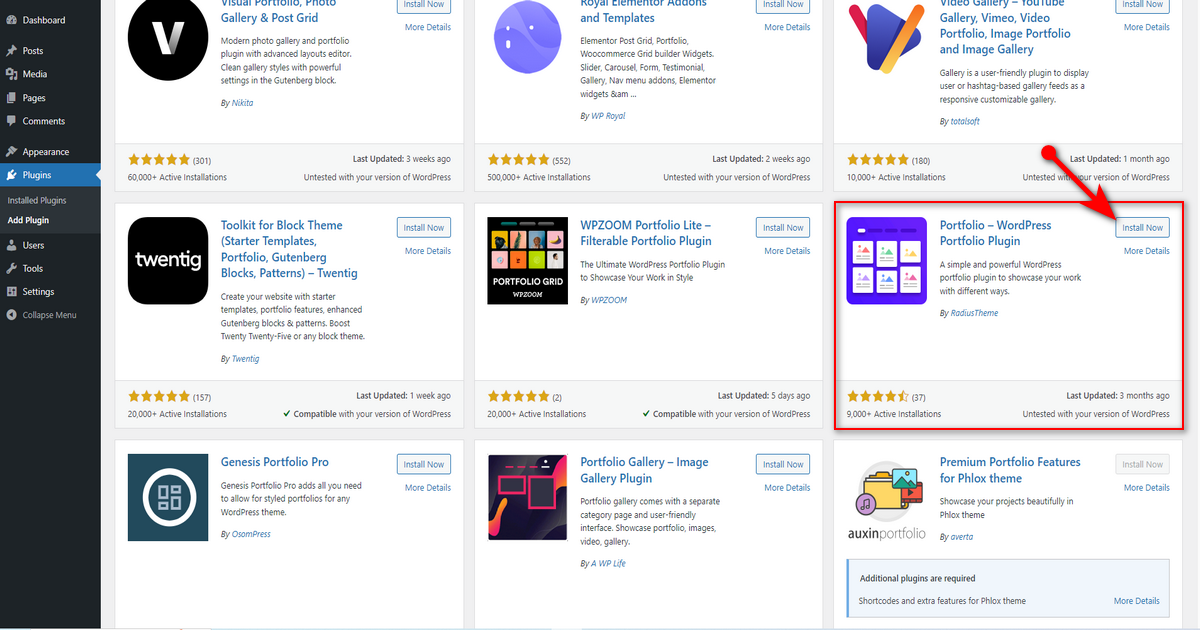
Afterwards, press “Activate” button.

That’s it. Now, use this plugin to add some of your best projects to your portfolio site.
Step 6: Add Projects to Your Portfolio Site
It’s time to include some projects in your portfolio website. Thus, let’s do it using the Portfolio plugin. Follow the steps below to learn how to use this plugin and add portfolio projects.
- Navigate to WordPress Admin Dashboard > Portfolio > Add Portfolio.
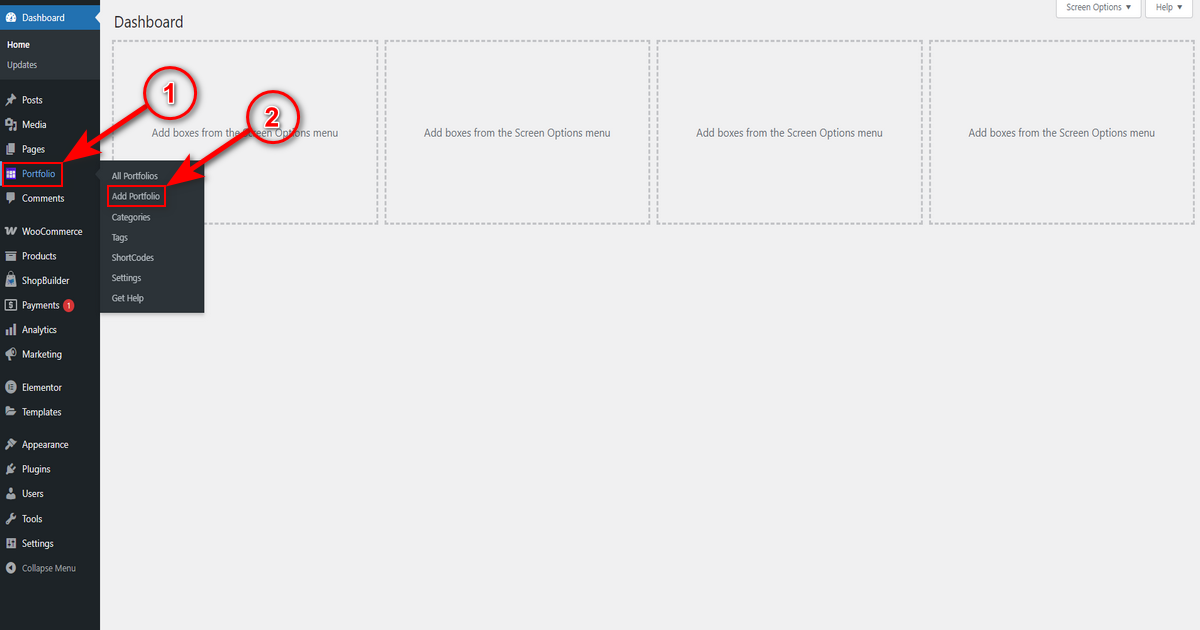
- You’ll now visit the Gutenberg editor. If you’re already familiar with this editor, you won’t need a demonstration to add projects. However, we’re still showing you.
So, write your project name in the title and scroll down to write the project’s short description, client name, and select your project completion date.

- Now, scroll down and insert a project URL and include information about the tools you used to complete this project.
Later, move to the right-hand side to add project tag, category, and featured image. Finally, hit the ‘Publish’ button.

That’s how you can add as many projects as you want. After including them, use a shortcode to display those projects on your preferred page in a professional manner.
Include Shortcode on a Page
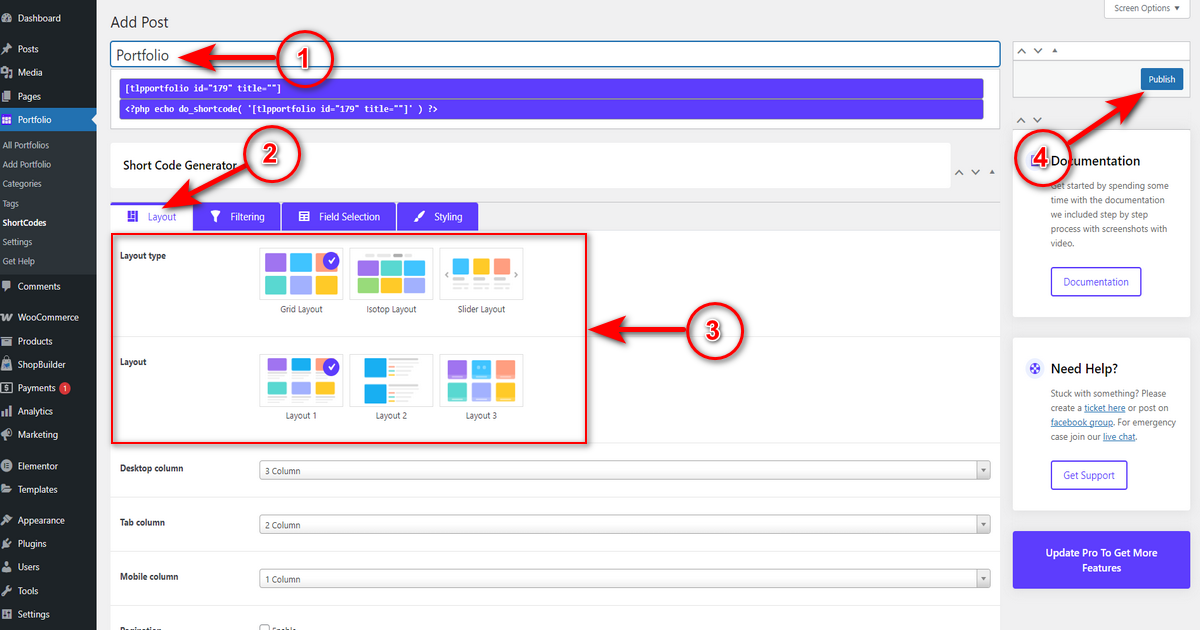
It’s an easy job. Just head to WP Admin Panel > Portfolio > Shortcodes.
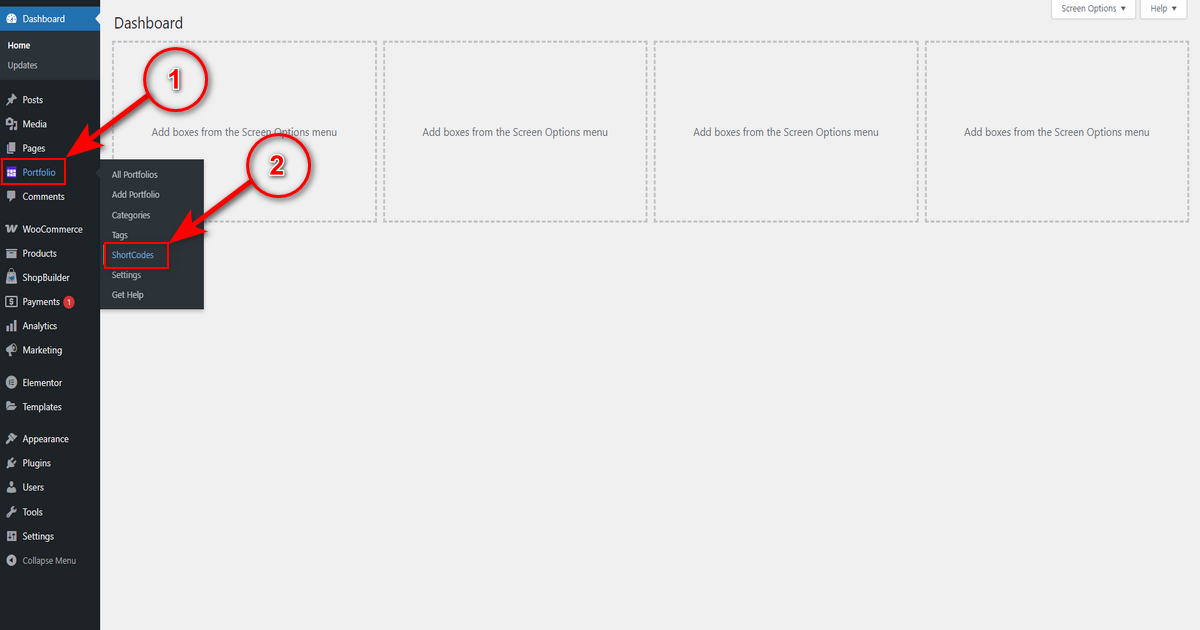
Then, press “Add Post” button on the top right.

Now, write a shortcode name in the “Add Post” field, move to “Short Code Generator” area, and make sure you’re on ‘Layout’ and select your preferred layout (how you want to display projects on a page), then hit ‘Publish’ button.
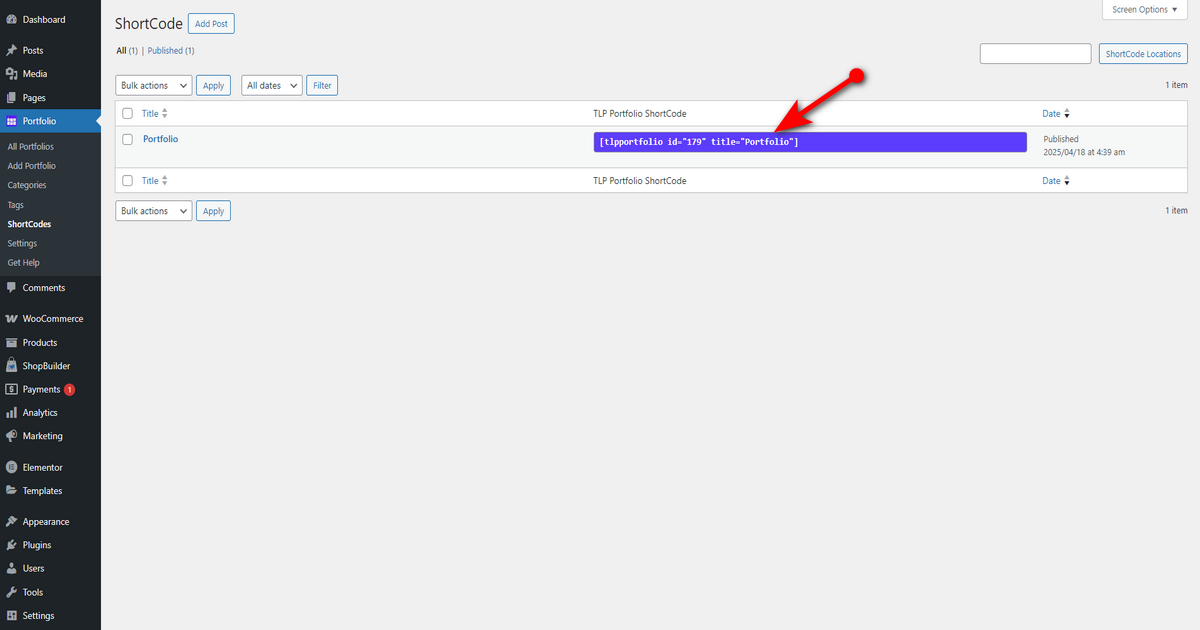
Now copy the shortcode. We’ll use it later on a page.
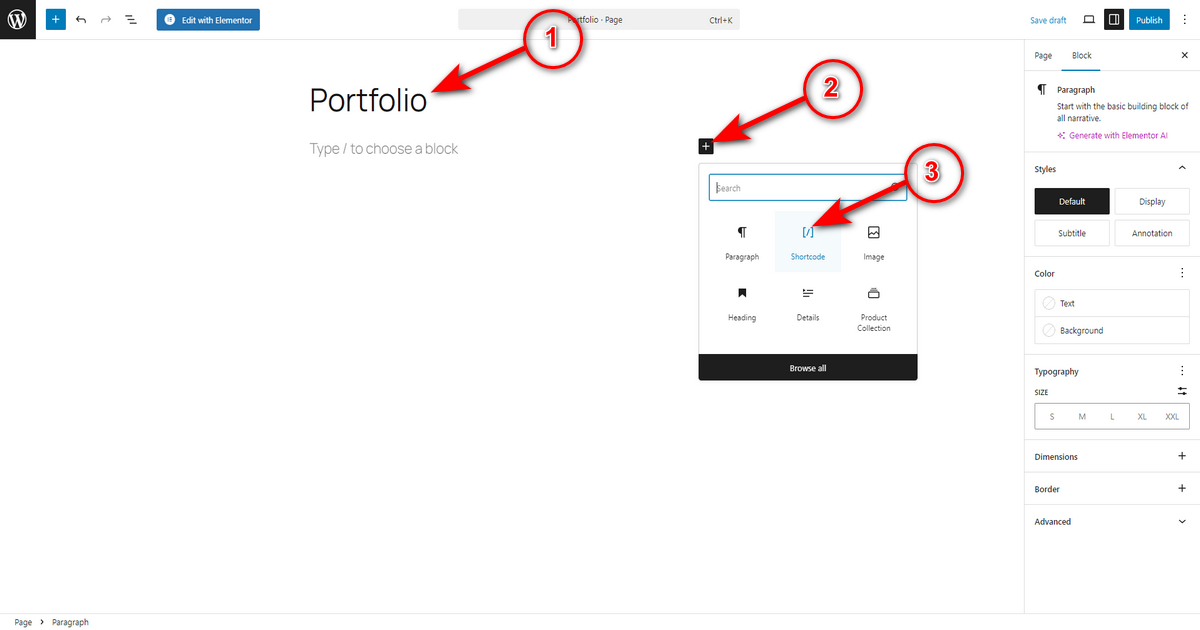
Next, navigate to WordPress Admin Panel > Pages, and select a page or create a new one. If you prefer building a new page, give it a name using the title field in the Gutenberg editor. Then, click the ‘+’ symbol and search for the shortcode block.
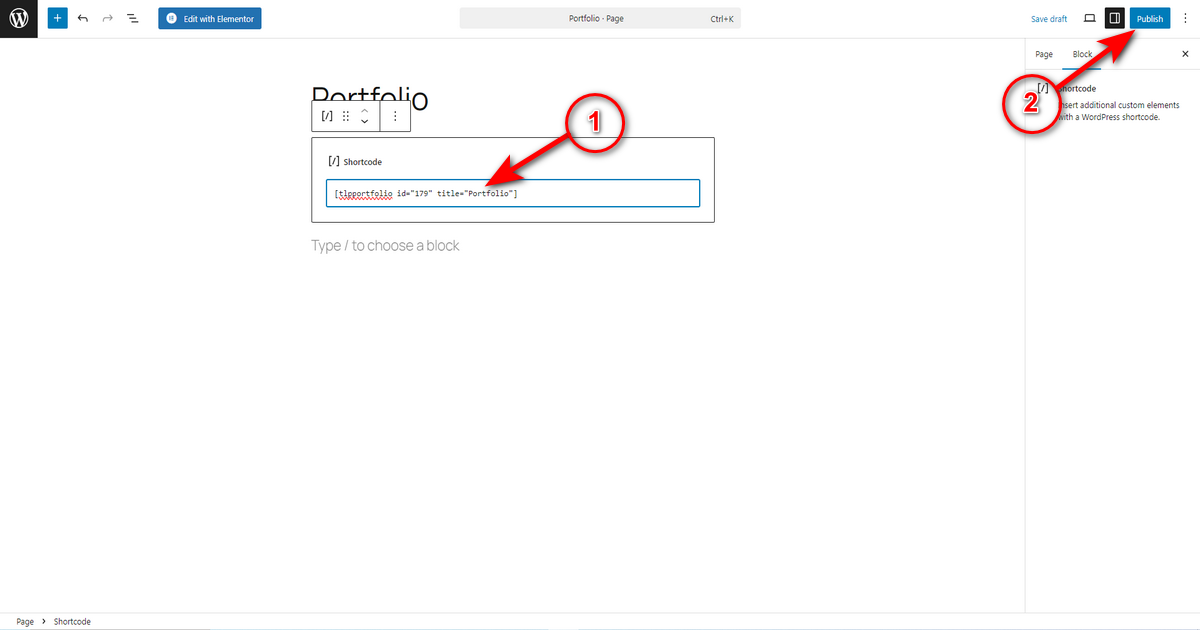
Paste the copied shortcode into that shortcode block and press ‘Publish’ button.
Finally, visit the page and see your projects.

Do you want to create a team page? here is how to create a team page in WordPress website.
Bonus: Best Portfolio Website Examples for Inspiration
This section reveals some of the best portfolio websites of the present time to help you gather portfolio site design ideas.
1. Cristiano Ronaldo

Every section keeps you engaged. The site’s colors, large images, videos, and minimal text are captivating and, at the same time, make the website easy to explore.
Hence, keep your portfolio website simple but powerful. Utilize big visuals, strong fonts, and easy navigation to help visitors stay focused – guide visitor’s eyes with clear design.
While building the portfolio site, ensure that even if someone visits for only a few seconds, they leave with the right impression about you.
2. Enrico Deiana

It promotes simple navigation, and the layout never feels crowded or forced. You move naturally from one project to the next without feeling overwhelmed.
This site teaches us the value of dark space and simple structure. You may implement this design technique and avoid crowding your website with too many features or decorations.
Try to maintain a neat and quiet design to make visitors feel relaxed and focused when they explore your work.
3. Alex Coven

Alex Coven’s portfolio is a unique website that demands praise for its creative and appealing design. Every element of this website keeps visitors engaged. This portfolio boasts subtle animations to capture attention and enhance the overall user experience.
Another noticeable factor is the natural flow of each page. You won’t feel like you’re viewing a disjointed collection of projects while browsing this site. You can build your portfolio by following the same design.
While creating, ensure that every page, every word, and every scroll should feel like a purposeful part of the overall experience.
4. Steven Mengin

Steven Mengin’s portfolio website uses smooth transitions and animated effects to keep visitors interested. You can use this approach to maintain visitor engagement on your site.
This website’s color palette seems fresh and young. You can take inspiration from this color palette or consider it when designing your site. Besides, add adequate interaction to your site to make visitors want to keep exploring.
Keep the site design playful, but make sure it stays smooth and easy to follow. Your goal should be to keep visitors curious and make them want to see more of your work.
Frequently Asked Questions (FAQs)
Absolutely, WordPress is an excellent choice for creating online portfolios. It provides an intuitive interface, numerous portfolio-focused themes and plugins, and strong SEO advantages, making it ideal for creatives.
Yes, WordPress offers various portfolio templates, both free and premium. These templates enable you to display your creative work, including photography, design, or writing. You can find them in the WordPress theme directory or through third-party marketplaces like ThemeForest.
The best hosting for a portfolio website depends on your needs, budget, technical skills, and the type of portfolio you’re building. However, we recommend choosing any of the top hosting providers, including Hostinger, Bluehost, GoDaddy, SiteGround, and A2 Hosting, among others.
Now Over to You
You now know how to create a portfolio in WordPress. We’ve shown easy steps to building a portfolio website and adding your best work. Hence, just follow these steps and create your portfolio site in no time.
Once your site is live, you can further customize it. Regularly update your portfolio with new projects. Share your portfolio on social media and professional networks to attract potential clients or employers. Our best wishes accompany you on this journey.



