


On This Page
- What Is a Rental Marketplace?
- Airbnb’s Business Model
- How to Create a Website Like Airbnb with WordPress
- Step 1: Select a Domain Name for Your Rental Business
- Step 2: Choose a Reputable Hosting Provider
- Step 3: Install WordPress on the Hosting’s cPanel
- Step 4 – Install an Airbnb-like WordPress Theme
- Step 5: Edit Your Airbnb-Like Site
- Step 6: Build Listing Categories and Locations Like Airbnb
- Step 7: Build a Listing Type
- Step 8: Create a Listing Form with AI
- Step 9: Install Other Necessary Add-ons and Plugins
- Step 10: Create a Listing as a User
- Explore These Best Websites Like Airbnb
- Frequently Asked Questions (FAQs)
- How Much Does It Cost to Build a Website Like Airbnb?
- How Long Does It Take to Build an App Like Airbnb?
- How Hard is It to Make an Airbnb?
- Rounding Up
Do you know that Airbnb generated around $2.3 billion in revenue during the first quarter of 2025? Pretty impressive, right?
Airbnb is a money-printing business model. And it motivates you to build a similar business to capture a small share of such a vast market. However, creating such a rental marketplace online is a daunting task unless you choose WordPress.
That said, today, we’ll walk you through how to create a website like Airbnb with WordPress easily in this comprehensive tutorial. Let’s get going.
What Is a Rental Marketplace?
It’s a platform that lets people rent real estate. It connects people who need to rent out their places with others seeking accommodations.
This rental marketplace has revolutionized the way people travel and stay in places, eliminating the hassle of searching for accommodations in hotels. It made people’s, especially those who frequently travel, lives easier than ever.
Airbnb’s Business Model
Airbnb is a community-based short-term rental marketplace. It’s free to sign up and allows people to list their properties for free! This platform charges users when a confirmed reservation is made. Airbnb receives commissions from both hosts and guests.
Guests usually pay around 6% to 12% of the booking total, and hosts typically provide a commission of around 3% on each successful booking to Airbnb.
Additionally, this rental marketplace generates revenue by offering supplementary services, such as Airbnb Luxe (luxury stays) and Airbnb for Work (business travel).
We encourage you to read this article on the Airbnb Business Model to learn more about this famous rental marketplace.
How to Create a Website Like Airbnb with WordPress
Here are all those easy steps that can help you build a website like Airbnb with WordPress hassle-free!
Step 1: Select a Domain Name for Your Rental Business
The first step is to select a domain name for your would-be rental marketplace. If you need to know what a domain is, let us explain that it’s an address people type on their browsers to find and access your website.
For example, if you look at this URL: Google.com, ‘Google’ is the domain name for this URL, and ‘.com’ is the domain extension. Now, let’s discuss what to consider while choosing a domain name similar to Airbnb.
- Search for a short, easy-to-type, spell, pronounce, and remember name
- Ensure it’s got your business-related keywords in it
- Use domain name generators to brainstorm name ideas
- Check domain name availability using a domain registrar like Namecheap
- Do not select a domain with a trademark issue
- Check the previous registration history and spam score of the domain
- Go with a popular domain name extension like ‘.com’
- Select a reputable domain name registrar, such as Namecheap, to register your domain
Next, you need to choose a hosting provider to connect that domain and host your website.
Step 2: Choose a Reputable Hosting Provider
As we said, find a famous hosting provider to integrate your domain and host your website. If you need recommendations, we suggest choosing one of the popular hosting providers, such as Hostinger or GoDaddy.
Hold on! Before selecting a host, consider your needs and evaluate a few key hosting selection criteria, which are as follows:
- Learn about different hosting types (e.g., shared, cloud, VPS, WordPress, and more)
- Ensure the host offers a high uptime, great bandwidth, and sufficient storage
- It should offer automatic backups and security features, such as malware protection, SSL certificates, and others
- It must allow you to migrate your website easily
- It should come with a 24/7 support system
- Check if it has an intuitive control panel
- Inspect and compare pricing with other providers
- Examine other customers’ reviews
Step 3: Install WordPress on the Hosting’s cPanel
You’ve chosen a domain name, connected it with a host, and now, you need to install the popular Content Management System, WordPress.
Many hosting provider offers a one-click WordPress installation solution. You can contact the support of your chosen host for guidance on easily installing WordPress. It won’t take much of your time.
Step 4 – Install an Airbnb-like WordPress Theme
At this stage, you need to install an Airbnb-like WordPress theme. So, search for such a theme on the WordPress directory and ensure your theme has the following features to help you easily build a property rental marketplace.
Booking System: Your target audience should be able to book accommodations on your website.
Marketplace Functionality: Your website should enable users to register and list their properties, similar to Airbnb.
Monetization Tools: Select a theme that offers a range of monetization models, enabling you to generate revenue through listings.
Ratings & Reviews: Ensure the theme allows users to rate and review accommodations, building trust.
Geolocation: Ensure your chosen theme allows users to perform location-based searches.
Diverse Search Filters: The theme must come with various search filters to help users easily narrow down their searches.
Messaging System: Lastly, ensure the theme allows users to communicate with each other.
These are the significant features your theme should have. Besides these, it needs to be lightweight, fast, SEO-optimized, and responsive. Now, the question is, where can you find this kind of WordPress theme?
You can find such a theme in this article, featuring the best free WordPress directory themes. Choose any theme and keep reading this article.
To illustrate further, we chose the “Radius Directory” theme. You can watch this video tutorial to learn the installation process of this theme.
Step 5: Edit Your Airbnb-Like Site
After installing the theme, supplementary plugins, and uploading demo content, you can focus on editing your rental marketplace. For example, you can change the logo, color palette, and typography using the theme customizer.
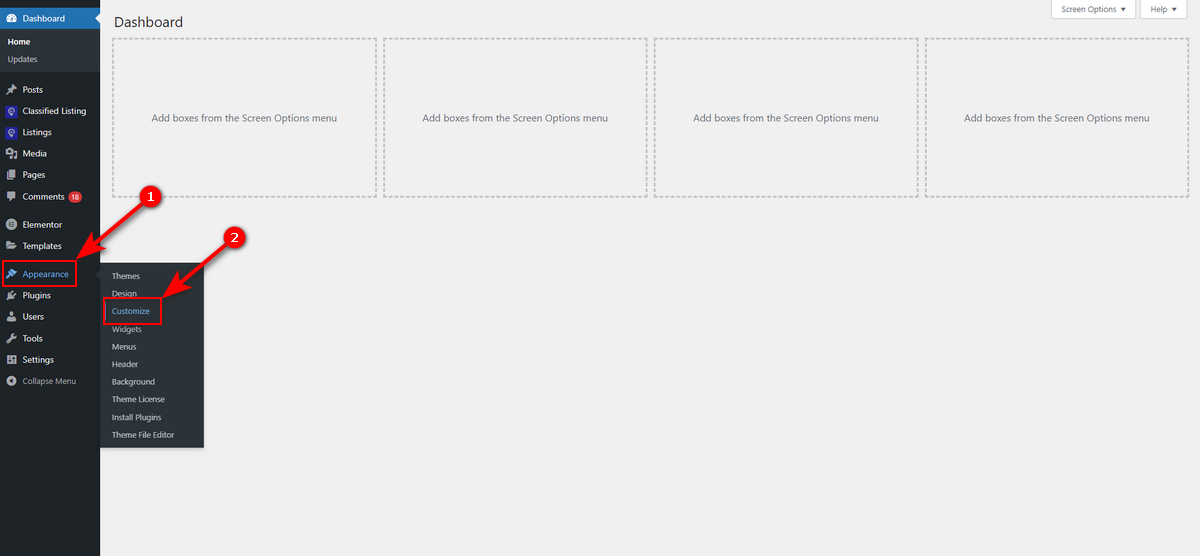
If you need to know how to access the theme customer, just go to WordPress Admin Panel > Appearance > Customize.
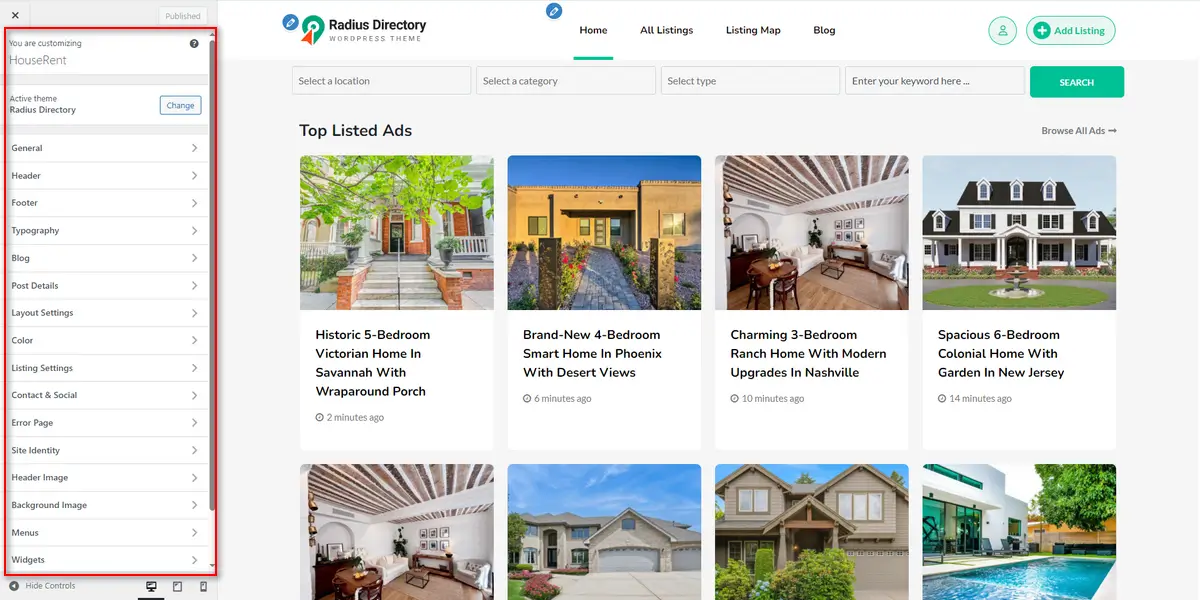
Then, explore each menu on the side panel to customise the header, footer, typography, site identity, color, and other elements.
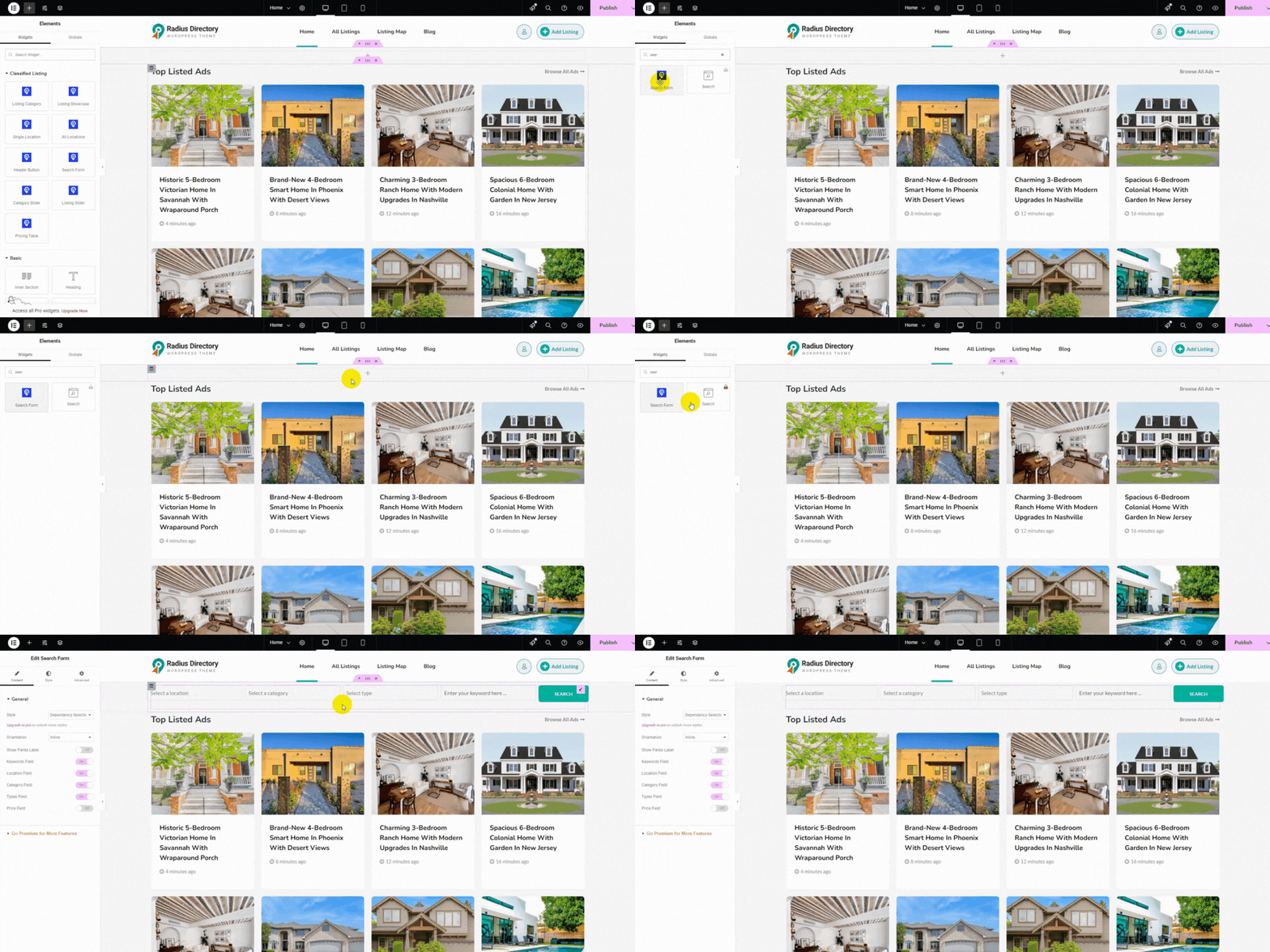
Alongside these, you can edit your marketplace using the Elementor editor. Just open your preferred webpage in the editor and start customizing it. Finally, publish that page.
Let’s say you want to add a search filter to the top of the homepage, underneath the header section. Watch the animation below to accomplish this job easily.
Step 6: Build Listing Categories and Locations Like Airbnb
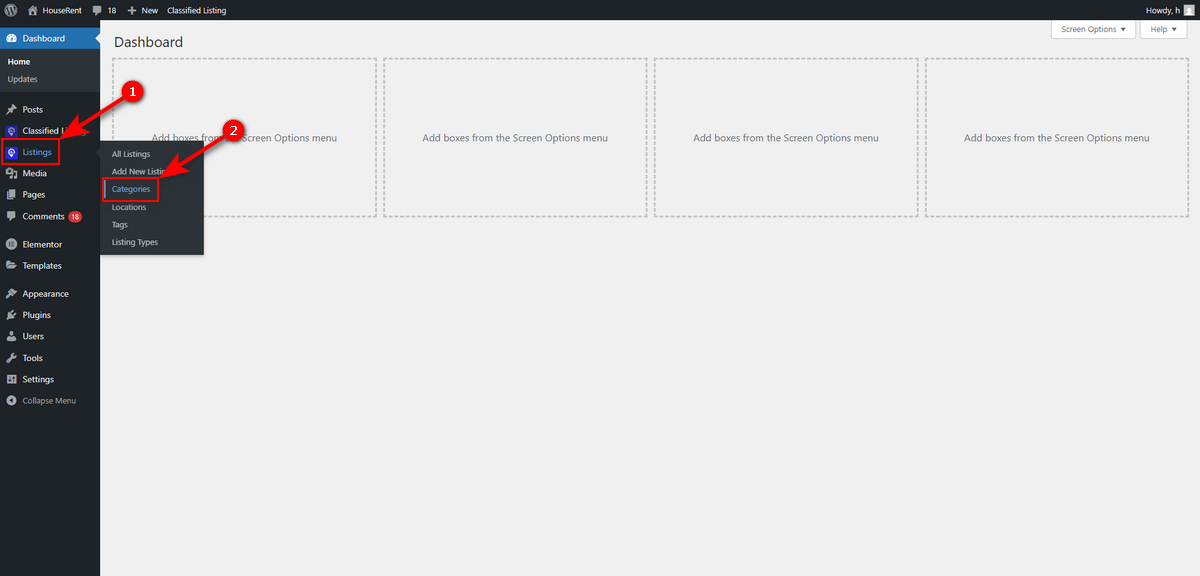
Once you’ve edited all or some web pages of your rental marketplace, it’s time to create some listing categories like Airbnb. So, visit WordPress Admin Dashboard > Listings > Categories.
Then, write a category name, a slug, and a description, and press “Add New Category” button.
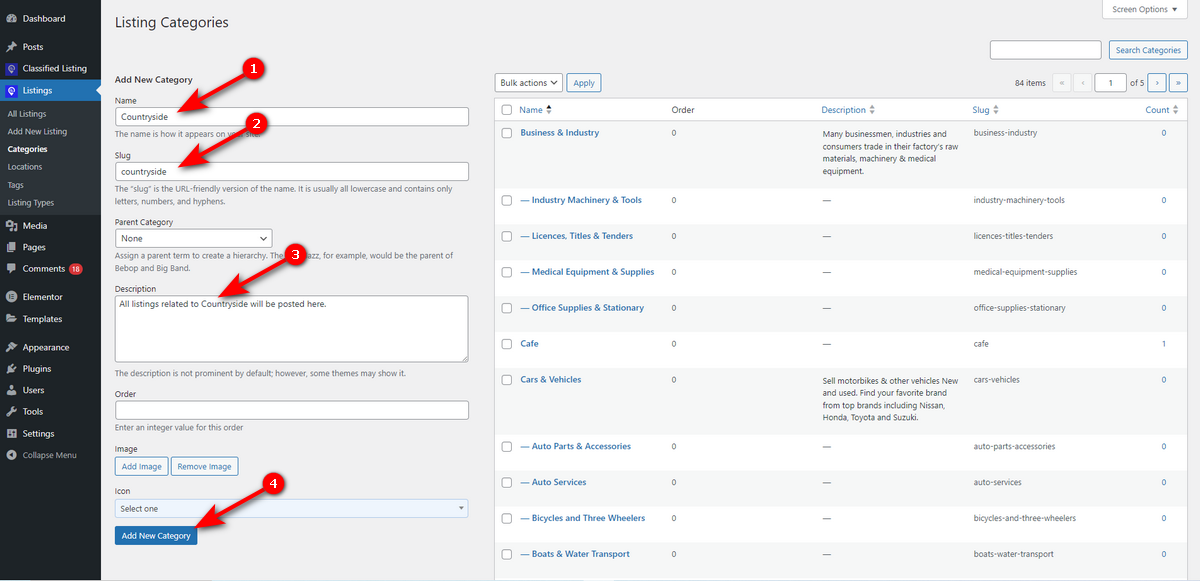
That’s how you create a listing category like Airbnb. Now, let’s build locations so that users can create and find location-based rental posts.
Head to WordPress Admin Dashboard > Listings > Locations. You’ll see the same window you get while creating a listing category. So, type your listing location, slug, description, and click “Add New Location” button.

Step 7: Build a Listing Type
Now, we need to create a listing type, specifically ‘Rent‘, to help users build listings to rent out their properties. Thus, navigate to your WordPress Admin Dashboard > Listings > Listing Types.

Now, write your listing type in the “Add new type” field and press “Add Type” button.
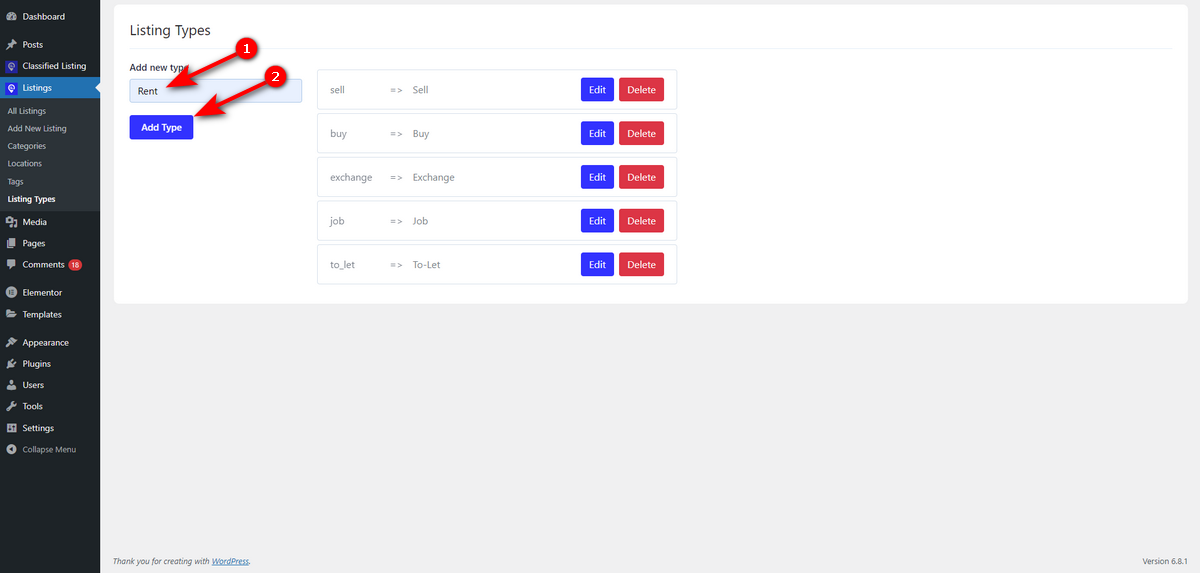
That’s it.
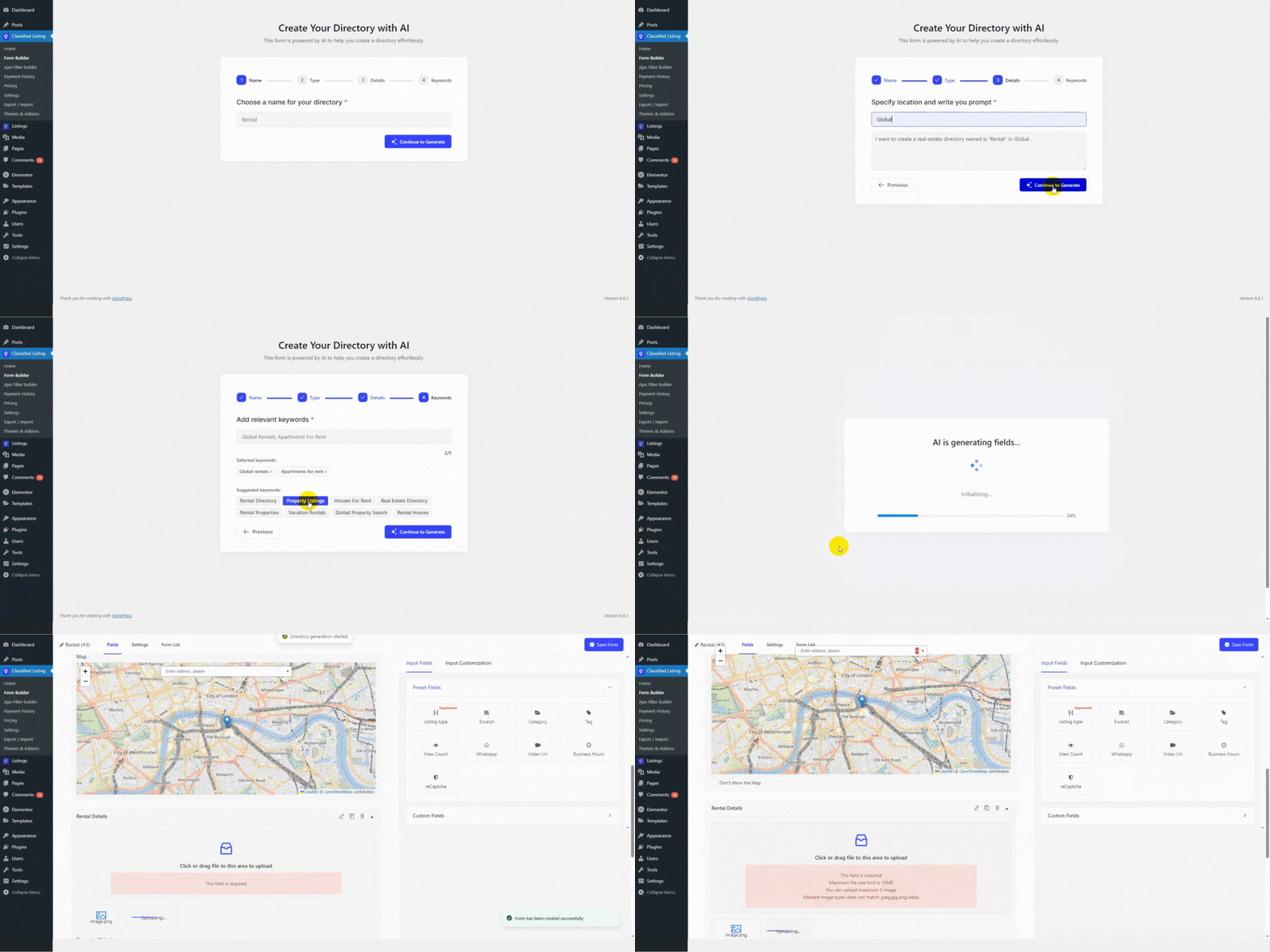
Step 8: Create a Listing Form with AI
Now that you’ve created a listing type, you need to design a form to help users add details about their accommodations and easily post them for rent. So, go to WordPress Admin Panel > Classified Listing > Form Builder.
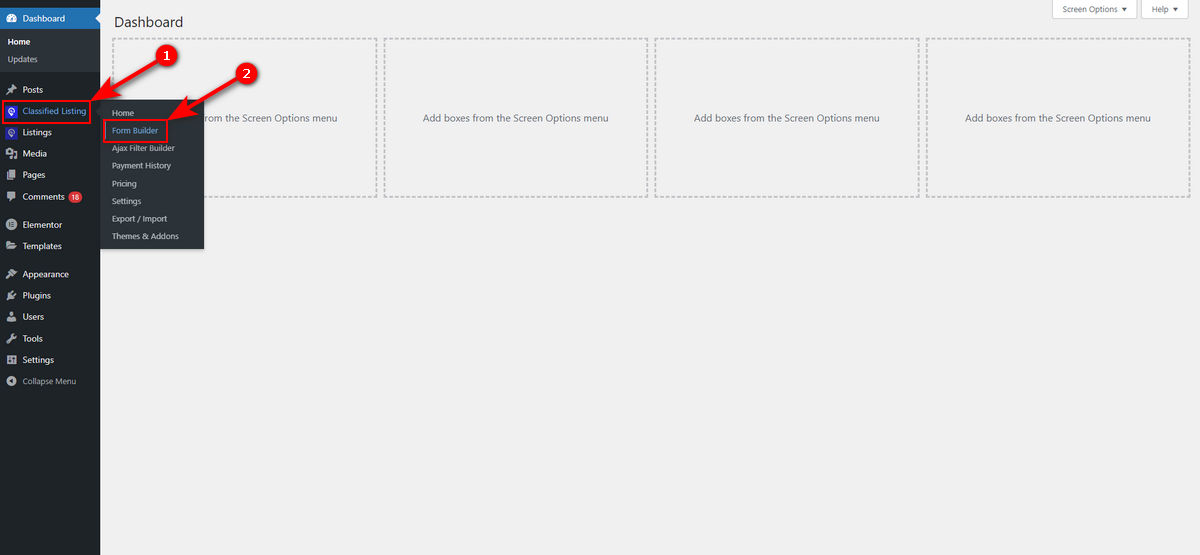
Then, hit “+ Add New Form” button on the top right.

You’ll notice a pop-up. Select “Create Form With AI” card inside that pop-up.
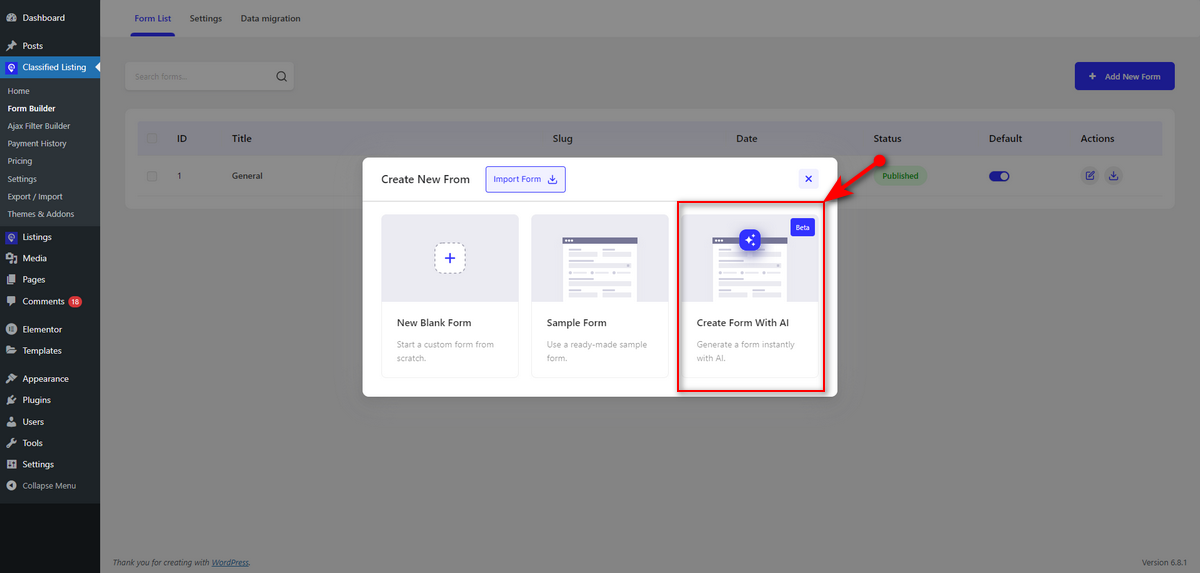
Now, watch the animation below to understand better how to create any listing form with AI of the Classified Listing WordPress plugin.
Step 9: Install Other Necessary Add-ons and Plugins
As you know, Airbnb enables users to reserve rooms, apartments, and houses online and allows them to rate and review hosts and their services. You also need to integrate these features into your website.
You can easily add the booking facility to your short-term rental marketplace by installing the Classified Listing Booking Addon. After installing and activating it, you can watch this video tutorial to learn more about this addon.
Next, install the Review Schema plugin to help users rate and review hosts and their services. However, don’t forget to watch this video to learn more about this WordPress plugin from RadiusTheme.
Step 10: Create a Listing as a User
We’re all set to launch our short-term rental website. Before doing so, let’s build a listing as a user. Create an account on your website and go to your My Account dashboard.
Afterward, you’ll notice the “+ Add Listing” button in the top right corner and under the My Account dashboard. Click on it.

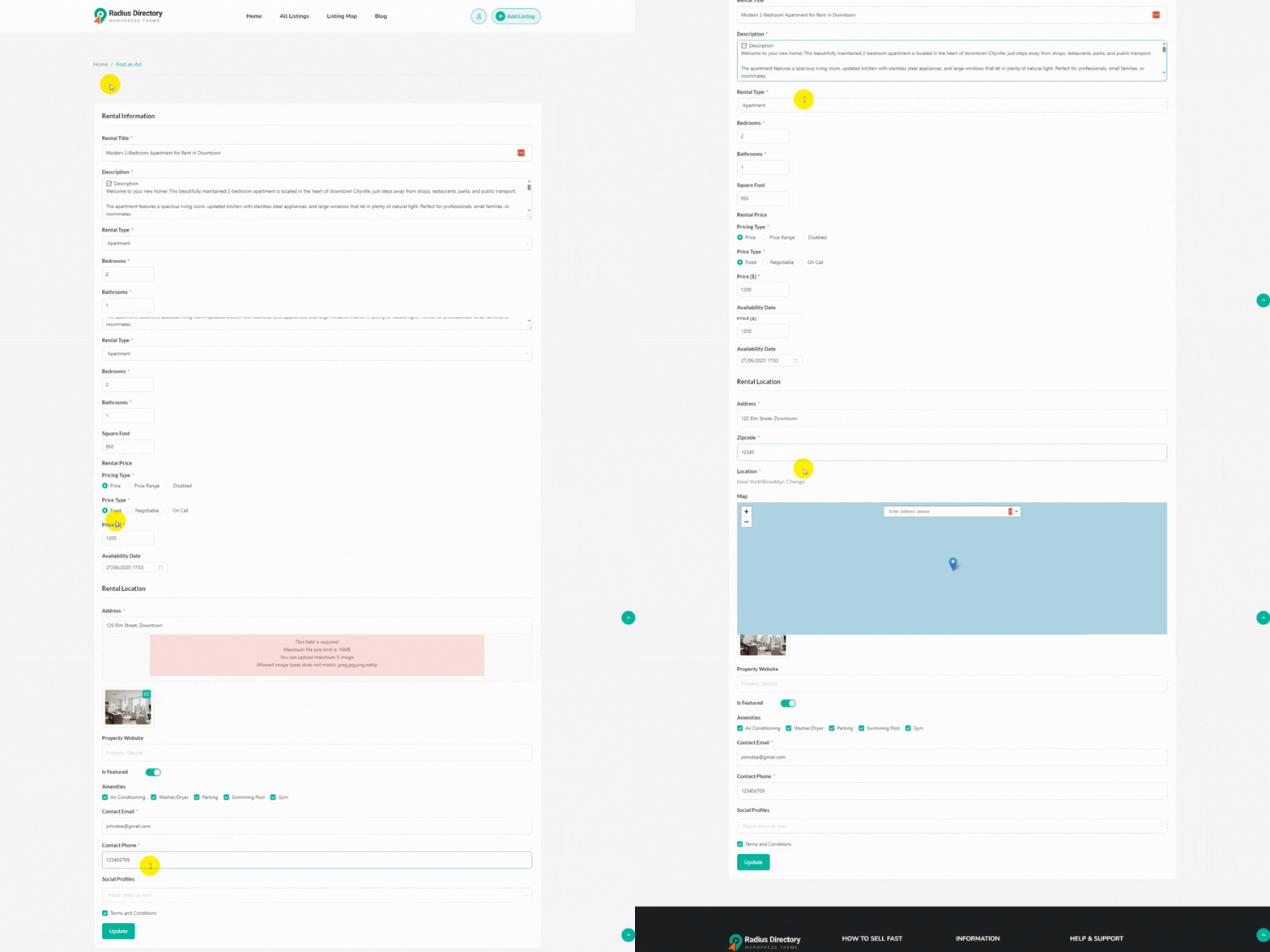
We’ll now see a rental form we created a while ago using the AI Form Builder of the Classified Listing WordPress plugin. We need to fill out this form by providing details of our accommodations as a user, specifically as a host.
See the animation below to learn how we complete the form and post a listing as a host on our short-term rental marketplace.
There you have it. Your website is ready, and you’ve just posted your first listing. Now, recheck everything and ask your friends and family to review the site before you hit the publish button.
Once you publish it, don’t forget to promote your site through social media platforms, SEO, and paid ads. So, that’s how you create a website like Airbnb with WordPress.
Also Read – How to Make Website Like Craigslist
Good Read- How to Build a Website Like Kijiji
Related Read – How to Create a Website Like Gumtree
Explore These Best Websites Like Airbnb
We’ve included this section to help you get design inspiration in case you need to study websites like Airbnb before you build your own with WordPress.
1. Booking.com
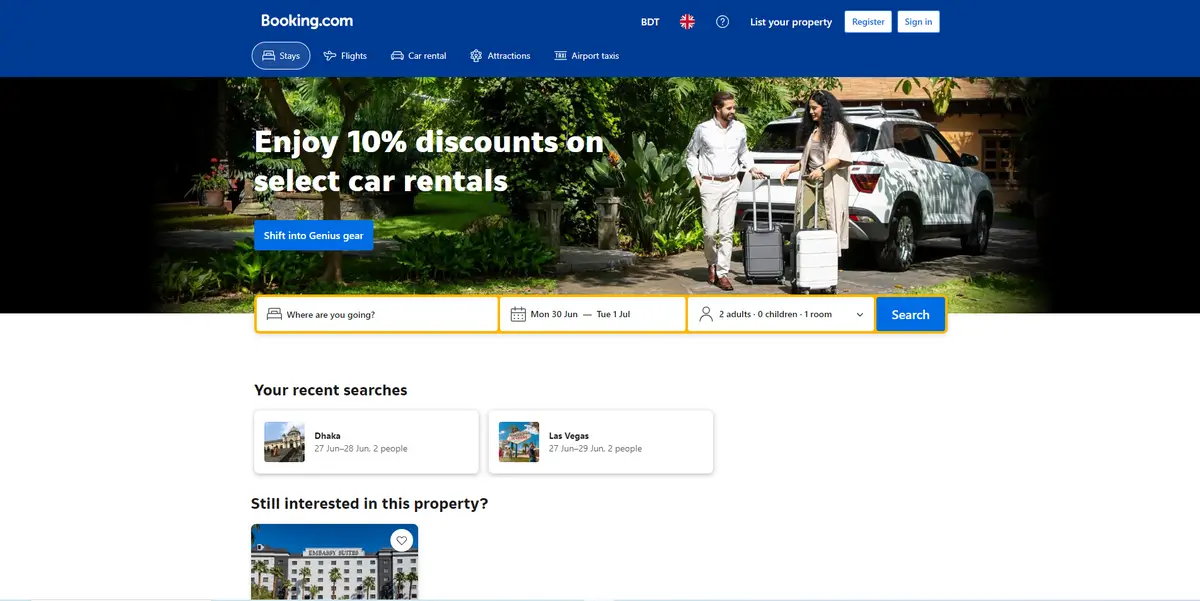
Booking.com is a popular and similar website to Airbnb. It offers a wide range of accommodation options, including hotels, apartments, resorts, and vacation rentals.
This platform is available in over 200 countries, enabling travellers and hosts to connect and help each other. Similar to Airbnb, this website is beginner-friendly and features filters to help visitors find accommodations based on their dates, budget, and other preferences.
Booking.com has a transparent guest review system and clear cancellation policies to gain user trust. This platform pays equal attention to both travellers and hosts.
For example, it charges hosts a small fee per booking and allows them to list their accommodations free of charge. That’s why it gains traction and becomes popular.
2. Vrbo

Vrbo prioritizes vacation rentals and offers homes, cabins, and condos for family-friendly gateways. This platform has listings of over 2 million properties in 190 countries.
This website features a search filter that allows guests to perform searches with various filter options. For example, they can filter their searches by pet-friendly options, pools, or beachfront locations.
Now, let’s discuss the benefits that Vrbo provides to both hosts and guests. It charges hosts a 5% commission per booking and offers free listings.
On the contrary, this platform features a guest review system and transparent pricing to foster trust among guests. All these make it a solid contender for Airbnb.
3. TripAdvisor
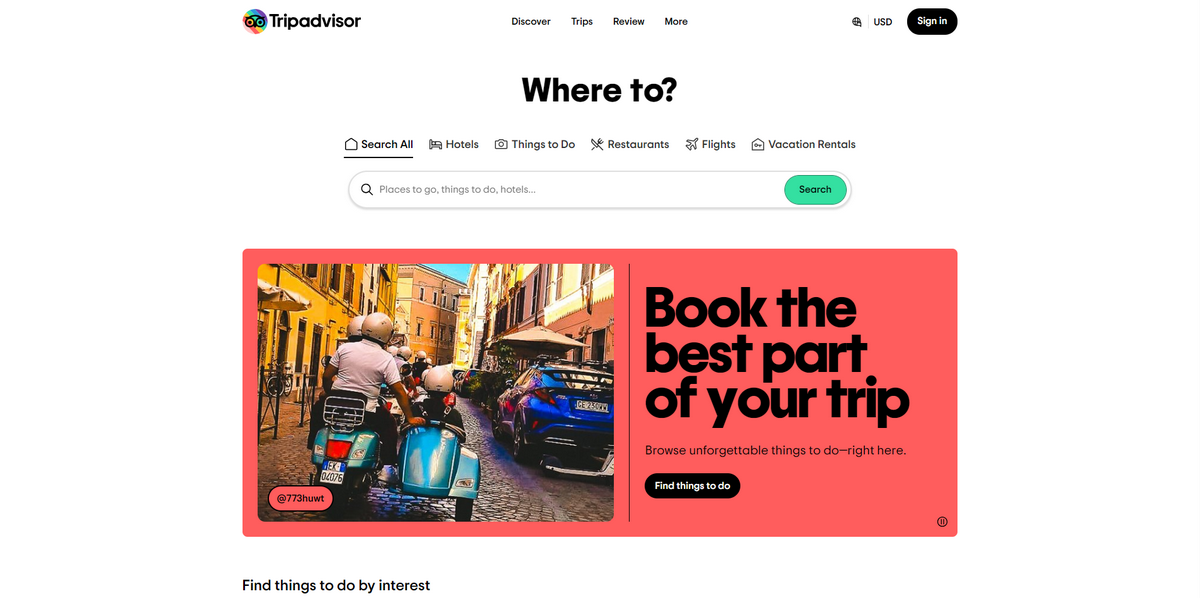
TripAdvisor provides vacation rentals, hotels, and activity bookings. It lists over 1 million properties, including homes, villas, and apartments, in more than 190 countries.
This platform allows travellers to filter their searches by price, amenities, or location. Additionally, it provides detailed reviews from other travelers, ensuring trust. The platform is free for hosts to list, charging a commission per booking.
TripAdvisor’s strength lies in its community-driven reviews and travel guides, helping users plan entire trips. It’s perfect for those seeking unique stays backed by reliable feedback.
4. Plum Guide
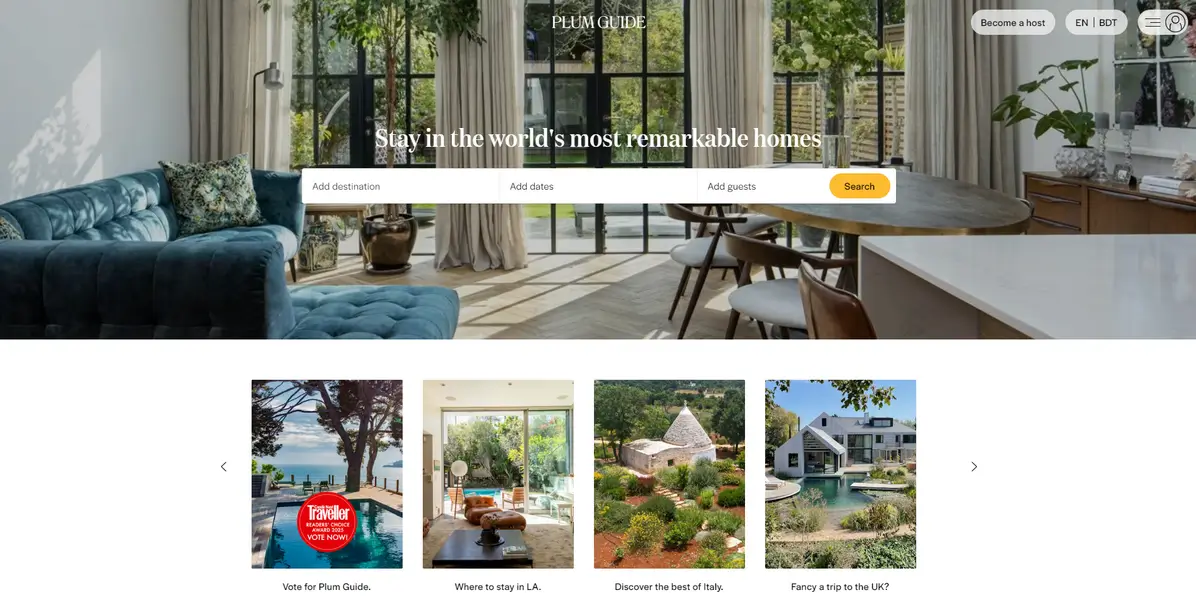
Plum Guide provides luxury vacation rentals. It focuses on quality and design while listing homes. It features over 1,000 handpicked homes in more than 20 cities.
This platform enables guests to filter searches by unique amenities, such as rooftop terraces or private chefs. It verifies each property to top standards.
Similar to Airbnb, it charges hosts a commission per booking and allows them to list their homes free of cost. For guests, it offers detailed photos and reviews to ensure trust and confidence.
All these make it perfect for travelers seeking premium, stylish accommodations over typical rentals.
5. Sonder
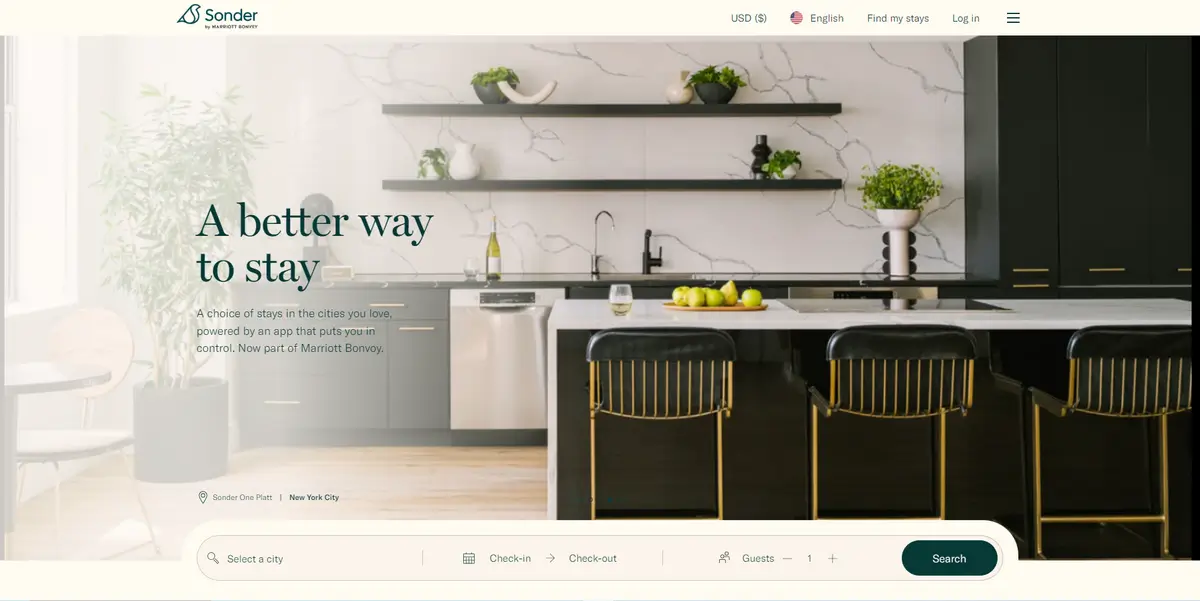
Sonder is the last contender on this list of the best websites like Airbnb. It offers stylish, hotel-like rentals, competing with Airbnb’s offerings.
This platform manages over 10,000 apartments in more than 40 cities worldwide. It allows guests to book modern suites with smart locks and full kitchens.
It offers filters for location and amenities. Unlike Airbnb, Sonder joins long-term lease agreements with property owners.
Then, they redesign those properties and rent them out to guests for short-term stays. Therefore, it is suitable for travelers seeking luxurious accommodations with hotel support.
Frequently Asked Questions (FAQs)
How Much Does It Cost to Build a Website Like Airbnb?
You need to spend anywhere from $100 to over $3,000, depending on your requirements. However, if you follow the steps outlined in this article, you can build the website at a reasonable price.
How Long Does It Take to Build an App Like Airbnb?
It can take you a few weeks to a few months or even a year if you follow the traditional path to build a website like Airbnb. However, you can create such a website in a day by following the steps we shared in this article.
How Hard is It to Make an Airbnb?
It’s not as difficult as it seems. You can easily build a website like Airbnb and launch a similar business if you follow the correct guidelines we included in this content.
Rounding Up
That’s all about how to create a website like Airbnb with WordPress. We hope this article has shown you the correct steps to create a site like Airbnb and helped you launch your accommodation business.
Keep in mind that you may encounter challenges while developing an Airbnb-like website. Don’t get frustrated if you face so. Instead, be patient and search for solutions to your problems online.
Alternatively, you can contact us to help you professionally build a rental marketplace better than Airbnb. We wish you good luck on your website creation journey.



