

On This Page
“Add one more and the next one is free.” Few words make a shopper click “add to cart” faster.
That pull is what a Buy X Get Y offer gives your store. It can lift order value, clear slow stock, and make buyers feel like they won.
You can build one in Shopify two ways. Use the free built-in discount tool for simple deals. Use an app like Radius Bundle for advanced deals that drop the free item into the cart on their own.
This guide covers both. It also explains the one problem most merchants hit, and how to fix it.
What is a Buy X Get Y offer?
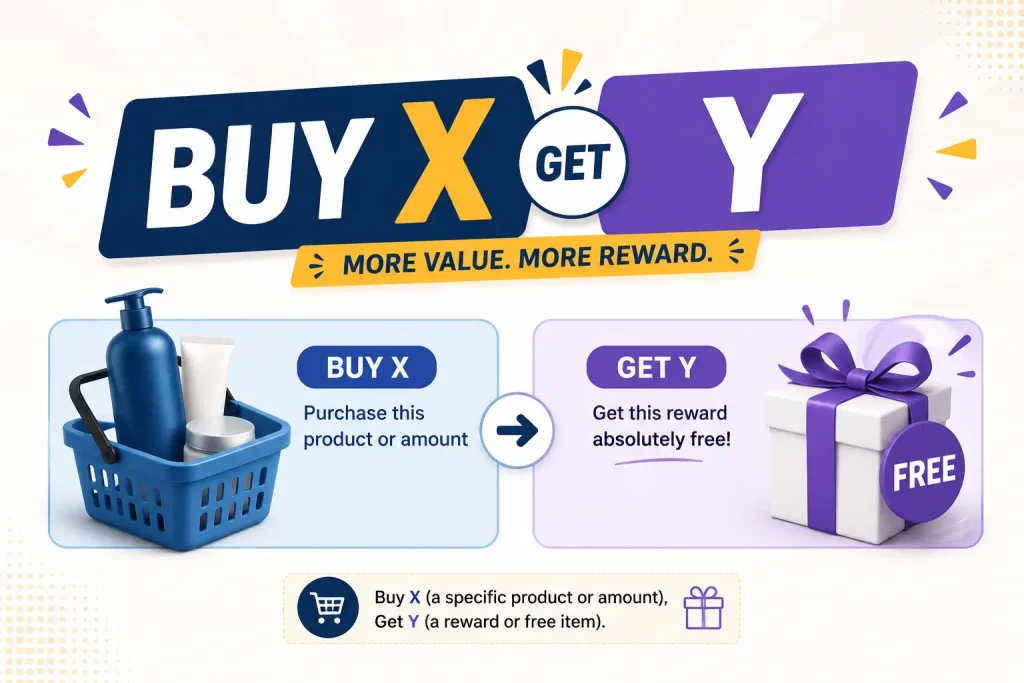
A Buy X Get Y offer gives a reward when a shopper buys a set product or amount. The “X” is what they buy. The “Y” is what they get.
Common examples:
- Buy 1 shirt, get 1 shirt free
- Buy a camera, get a memory card 30% off
- Buy 3 skincare items, get a free travel bag
- Spend $75, get a free tote bag
It is one of the oldest sales moves online. It works because shoppers love feeling like they got more for their money.
Types of Buy X Get Y offers
You can run this deal in many ways. Here are the most common types.
- BOGO (Buy One, Get One free). Buy one item, get the same item free. A classic for apparel and beauty.
- Buy One, Get One at a discount. The second item is not free, just cheaper. Like buy 1, get the 2nd 50% off.
- Buy X, get a different item free. Buy a main product, get a related one free. Like buy a phone, get a free case.
- Buy X, get a different item discounted. Same idea, but the bonus item gets a percent off instead of being free.
- Spend an amount, get a gift. Hit a cart total, get a free item. Like spend $75, get a free tote.
- Tiered deals. The more they buy, the more they get. Like buy 2 get 1, or buy 4 get 2.
- Mix and match. Buy any items from one group, get an item from another group.
Pick the type that fits your goal. Use BOGO to clear stock. Use a spend goal to lift order value. Use a free add-on to push a new product.
This offer does more than hand out a discount. Here is what it helps with:
- Raise average order value. Shoppers add more to hit the deal.
- Clear slow stock. Pair a slow item with a popular one.
- Push new products. Use a new item as the free “Y” reward.
- Reward loyal buyers. Give repeat fans a reason to come back.
- Improve the shopper experience. A free gift feels good and builds trust.
👉 Good Read: 10 Best Shopify Bundle Apps
Two ways to set up Buy X Get Y in Shopify
- Shopify’s native discount. Free, built in, and good for basic deals.
- A bundle app like Radius Bundle. Better for advanced deals and a smoother cart experience.
Start with the native tool. If it falls short, move to an app. Here is how to set up both.
Method 1: Use Shopify’s built-in discount
Shopify has a Buy X Get Y discount type. You do not need code or an app.
You can pick from two methods:
- Discount code: The shopper types a code at checkout.
- Automatic discount: The deal applies on its own when the cart matches the rule.
Steps to create it
- In your Shopify admin, go to Discounts.
- Click Create discount, then pick Buy X Get Y.
- Choose Discount code or Automatic discount.
- Under Customer buys, set the rule. Pick a minimum quantity or a minimum spend. Then add the “X” products or collections.
- Under Customer gets, set how many “Y” items they get. Add those products or collections.
- Set the reward value: Percentage, Amount off each, or Free.
- (Optional) Set a max number of uses per order.
- Under Eligibility, choose who can use it.
- Set start and end dates.
- Click Save.
Your deal is now live. Test it in your store before you share it.
The catch most Shopify merchants miss
Here is the part many guides skip. Shopify’s native deal does not add the free item to the cart for you.
The shopper must add both the “X” and the “Y” items themselves. If they forget the “Y” item, they get nothing. The discount only applies when both items sit in the cart.
This leads to lost sales and confused buyers. To soften it, you can:
- Add a note on the product page that explains what to add.
- Use a cart reminder to prompt the free item.
Native discounts also have limits:
- Only one deal tier per discount. You cannot run “Buy 2 Get 1” and “Buy 4 Get 2” in one offer.
- The “Y” item must be in stock, or the whole offer breaks.
- No built-in widget to show the deal on your store.
For one simple deal, this is fine. For anything bigger, an app helps.
Method 2: Use the Radius Bundle app
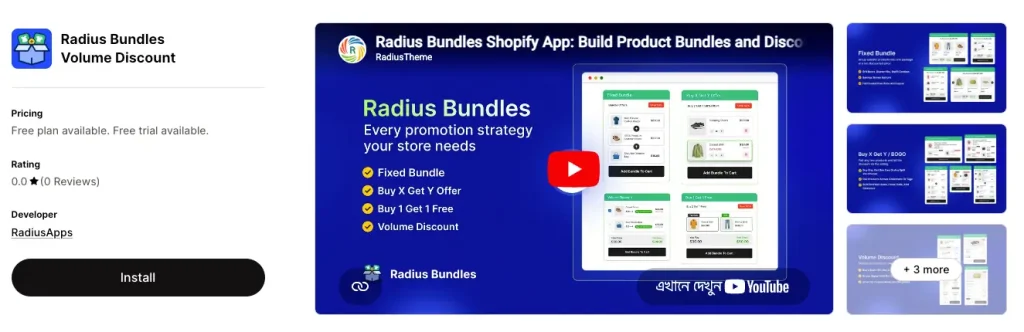
Radius Bundle is a Shopify app that builds bundle and discount offers. Its Buy X Get Y type fixes the gaps in the native tool.
The big win: it can add the items to the cart for the shopper. No more lost rewards from forgotten items.
Here is how to set it up. The steps are short, so you can follow along fast.
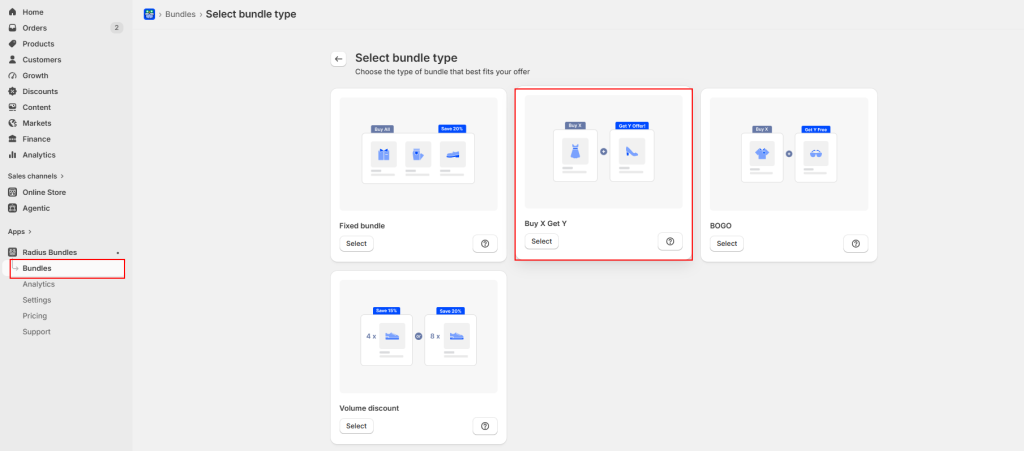
Step 1: Start a new bundle.
Open the app. Go to Bundles, click Create bundle, and pick the Buy X Get Y type.
Step 2: Add your products and set roles.
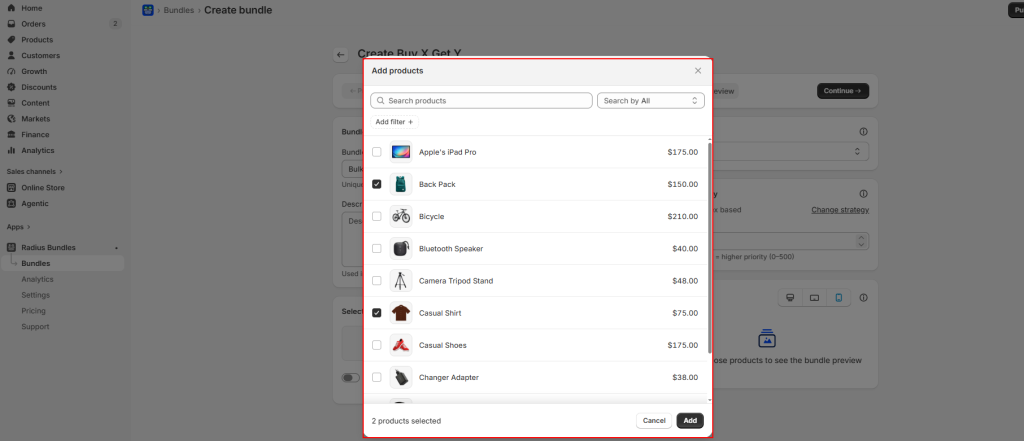
Add the products for your deal. Give each one a role. Mark the items shoppers must buy as Buy. Mark the reward items as Get. You can add many of each.
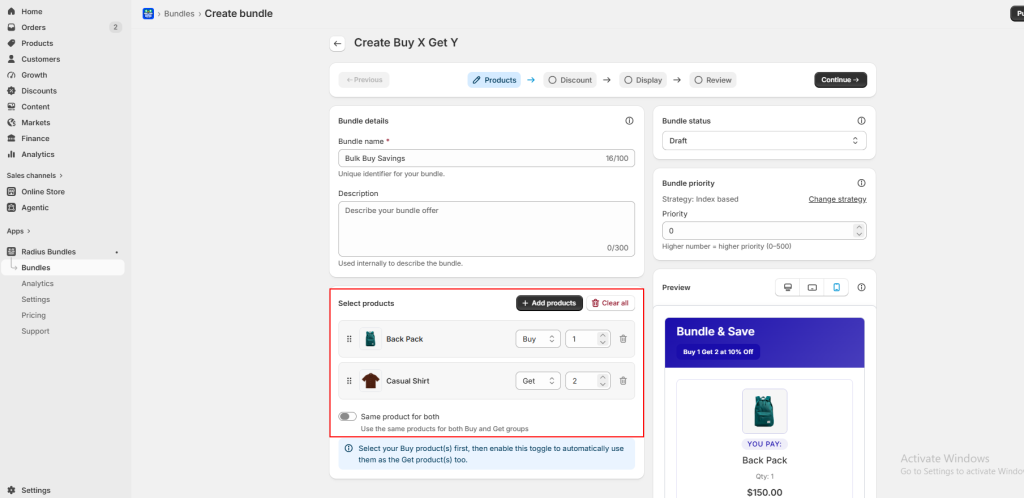
Step 3: Set the quantities.
Pick how many of each item the deal needs. For example, set 2 “Buy” shirts and 1 “Get” shirt for a “Buy 2, get 1” deal.
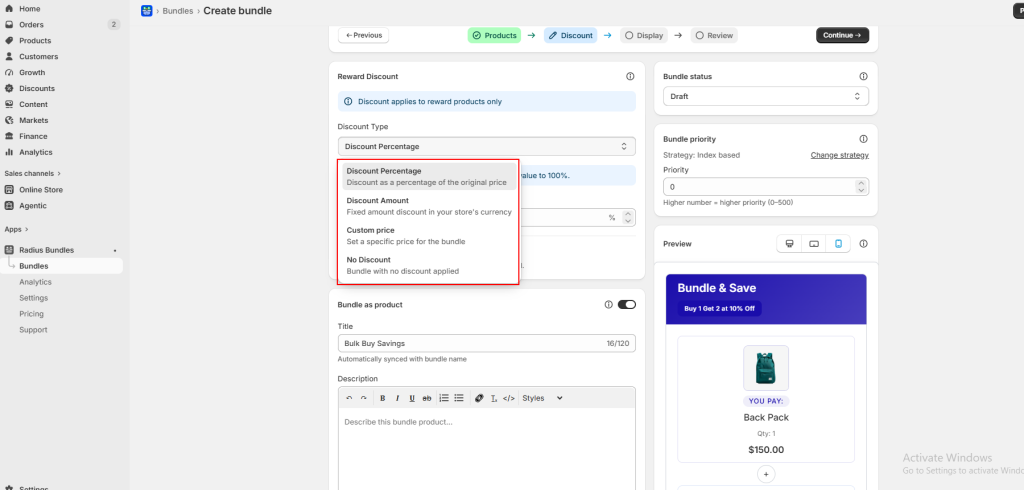
Step 4: Choose the reward.
Set what the shopper saves on the “Get” item. Pick Percentage, Fixed Amount, or No Discount.
Turn on “Bundle as Product” (optional).
Flip this toggle to show the whole deal as one product in your store. This also lets the app add the items to the cart for the shopper.
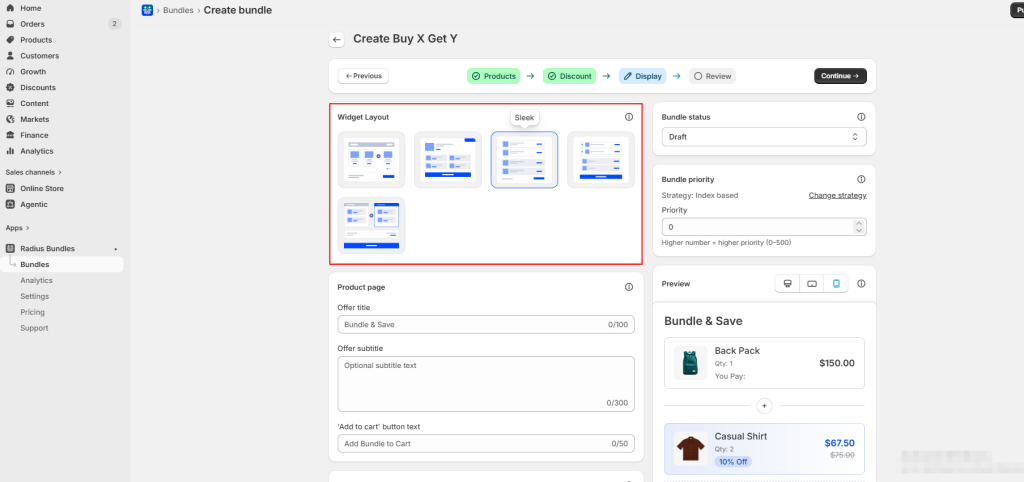
Step 5: Pick a layout and publish.
Choose how the deal looks on your store. Review it once, then click publish.
At checkout, the app counts how many full deals fit the cart. It then applies the right reward. Partial deals get nothing, so the math stays clean.
You can see the full setup in the Radius Bundle Buy X Get Y docs.
What makes Radius Bundle better for this
- Auto-add to cart. The free item lands in the cart on its own.
- Many buy and get items. Mix and match products in one deal.
- A storefront widget. Show the deal right on the product page.
- Flexible roles. Set the same product as both buy and get for BOGO-style deals.
Shopify native vs Radius Bundle
| Feature | Shopify Native | Radius Bundle |
| Cost | Free | App (free plan available) |
| Auto-add free item | No | Yes |
| Multiple buy/get products | Limited | Yes |
| On-site deal widget | No | Yes |
| Multiple deal tiers | One per discount | Yes |
| Setup difficulty | Easy | Easy |
Use native for one quick, simple deal. Use Radius Bundle when you want a smooth shopper path and more deal types.
Tips to make your offer convert
A live deal is only half the work. These tips help it actually drive sales.
Make the “Y” item appealing. The free or discounted item is the hook. If it is something shoppers do not want, the deal falls flat. Pick a “Y” item that feels like a real prize. A popular product or a useful add-on works best. A dusty item nobody buys will not move carts.
Keep the rule simple. Shoppers should grasp the deal in one second. “Buy 2, get 1 free” is clear. A deal with many steps or odd math makes people pause. A confused shopper leaves. The simpler the rule, the more orders you get.
Show the deal clearly. Shoppers cannot act on a deal they never see. Put the offer on the product page, the cart, and a banner. Use plain words like “Buy 2, get 1 free.” If the deal hides at checkout, most people will miss it.
Set an end date. A deal with no end has no push. Add a clear deadline so shoppers act now instead of later. “Ends Sunday” works better than an offer that runs forever. Limited time gives people a reason to buy today.
Watch your margins. Free items still cost you. A deal that loses money on every order is not a win. Run the numbers before you launch. Make sure the bump in orders covers the cost of the gift. Track sales while it runs so you can stop a deal that does not pay off.
Common mistakes to avoid
These slip-ups cost merchants sales. A quick check helps you dodge them.
Forgetting the auto-add gap. This is the top mistake with native deals. Shopify does not add the “Y” item to the cart on its own. If a shopper does not add it, they get no reward. Tell shoppers exactly what to add. A note on the product page or a cart reminder helps. Or use an app like Radius Bundle that adds the item for them.
Letting the “Y” item sell out. An out-of-stock gift breaks the whole offer. The deal stops working and shoppers get nothing. Keep an eye on the stock of your “Y” item. If it runs low, restock it or swap in a new gift before the deal breaks.
Stacking too many discounts. Shopify lets you set how discounts combine. If you leave this open, deals can pile on top of each other. You may end up giving away more than you planned. Check your combine settings before launch. Decide which deals can stack and which cannot.
Skipping the test. Never launch a deal you have not tried. A small setup error can break the offer for every shopper. Place a test order in a fresh browser first. Add the items, apply the deal, and check the final price. Fix any issue before you send traffic to it.
Frequently Asked Questions
Does Shopify have a built-in Buy X Get Y discount?
Yes. Go to Discounts, click Create discount, and pick Buy X Get Y. It is free and needs no code.
Does Shopify add the free item to the cart for me?
No. With native discounts, the shopper must add both items. The free “Y” item is never added on its own. An app like Radius Bundle can add it for you.
Can I run more than one Buy X Get Y deal at once?
The native tool allows only one tier per discount. To run several tiers in one offer, use an app.
Can the “X” and “Y” be the same product?
Yes. That setup is a classic BOGO deal, like “Buy 1, get 1 free.” Radius Bundle has a toggle for this.
Why is my Buy X Get Y discount not working?
The most common reasons: both items are not in the cart, the “Y” item is out of stock, the dates are wrong, or another discount is blocking it. Test the deal in a fresh browser to find the issue.
Start your first offer
A Buy X Get Y deal is a fast way to lift sales and clear stock. Start with Shopify’s native tool for a simple test. When you want auto-add carts, more deal types, and an on-site widget, try Radius Bundle.
Pick one offer. Set it up today. Watch your cart sizes grow.




