On This Page
For more than twelve years, you’ve known us through ThemeForest. Since October 2013 RadiusTheme shipped 99+ themes, served over 61,500+ customers, and held a 4.75★ rating across 1,894 reviews — enough to earn Power Elite author status, the marketplace’s highest tier.
We’re proud of that, and we’re not leaving. But starting today, you can also buy our themes directly from radiustheme.com — for less money, with twice the support, and one-click updates.
Here’s the honest story behind that decision.
Why Move Your Support to Us
We took this step for one honest reason: cost. On 1 July 2026, Envato raised its author commission to a flat 50%, cutting the share of each sale that reaches us by nearly half — money that used to fund updates and support. On top of that, ThemeForest never even gives us your email, only a purchase code, so we can’t reach you about security patches or free upgrades; support is locked to 6-month blocks that cost more the longer you wait to renew; and every update means downloading a ZIP and re-uploading it by hand. Redeeming your license fixes all of it — and here’s exactly what you gain.
The Math That Made The Decision For Us
When you buy a $59 theme on ThemeForest, $12 is a fixed Envato buyer fee. The remaining $47 is the “item price,” and that’s the only part the author is paid a percentage of.
| What happens to your $59 | Before 1 July 2026 | After 1 July 2026 |
| You pay | $59.00 | $59.00 |
| Envato buyer fee | $12.00 | $12.00 |
| Envato’s author fee | 12.5% → $5.88 | 50% → $23.50 |
| Reaches RadiusTheme | $41.13 | $23.50 |
You pay the same $59. We receive $17.63 less. None of that difference went into better themes or faster support.
When the money that funds building the product and helping you gets cut nearly in half, something has to give. We refuse to let it be code quality or support speed. So we built a better option instead.
What You Get When You Move Your Support to RadiusTheme
- 3 months of free support extension on top of your remaining time
- Regular updates and improvements for the life of the theme
- Priority technical support, direct to our team
- A licence management dashboard for all your themes and invoices
- Instant updates from your own site — one click, no ZIP files
- Rate-locked support renewals — no escalating penalty for renewing late
How to Redeem Your Envato License at Radius Theme
Bought our theme on ThemeForest? You can redeem your Envato purchase on our website to get 3 extra months of free support and one-click updates. It only takes a few minutes and costs nothing.
Follow these four steps.
Step 1: Verify Your Envato Purchase
Go to the Envato License Redemption page on our website.
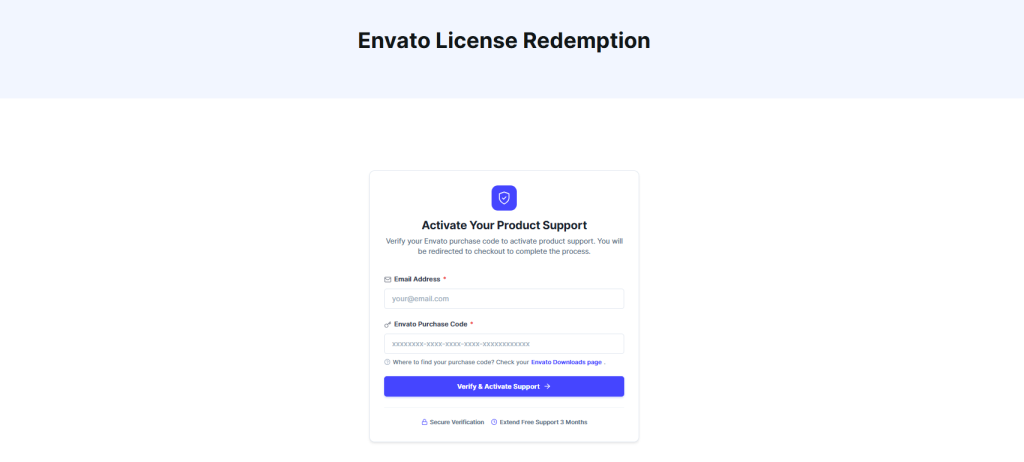
You’ll see a short form. Fill in two things:
- Email Address — the email you want tied to your Radius Theme account
- Envato Purchase Code — the code from your ThemeForest purchase
Where do I find my purchase code?
Log in to Envato, open your Downloads page, find the item, and click “License certificate & purchase code.” The code looks like this:xxxxxxxx-xxxx-xxxx-xxxx-xxxxxxxxxxxx
Once both fields are filled, click Verify & Activate Support.
You’ll then be taken to the checkout page.
Step 2: Complete Your Details at Checkout
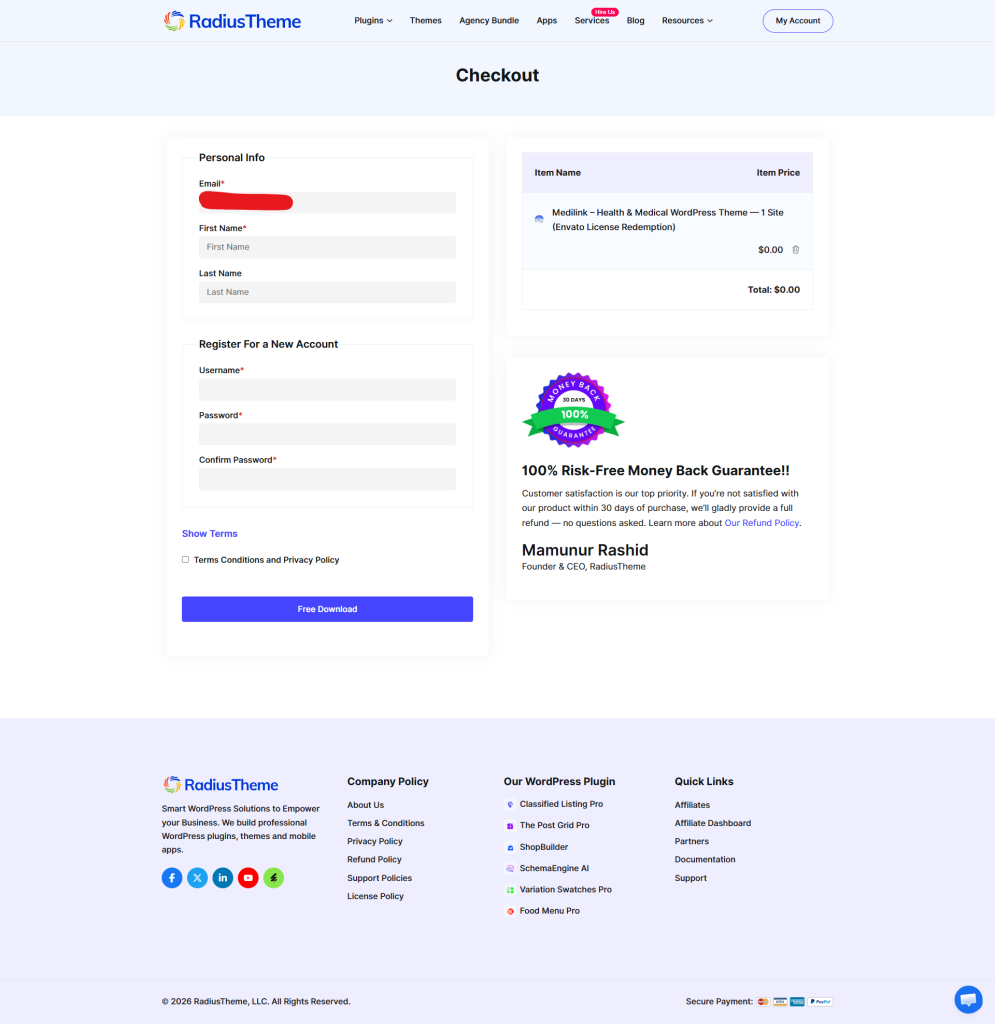
On the checkout page, you’ll create your free Radius Theme account.
Fill in the Personal Info section:
- First Name
- Last Name
Then, under Register For a New Account, choose your:
- Username
- Password
- Confirm Password
Tick the Terms & Conditions box.
Your order total will show $0.00 — there is nothing to pay. This is a free redemption.
Click Free Download to finish.
Step 3: Get Your Confirmation and License Key
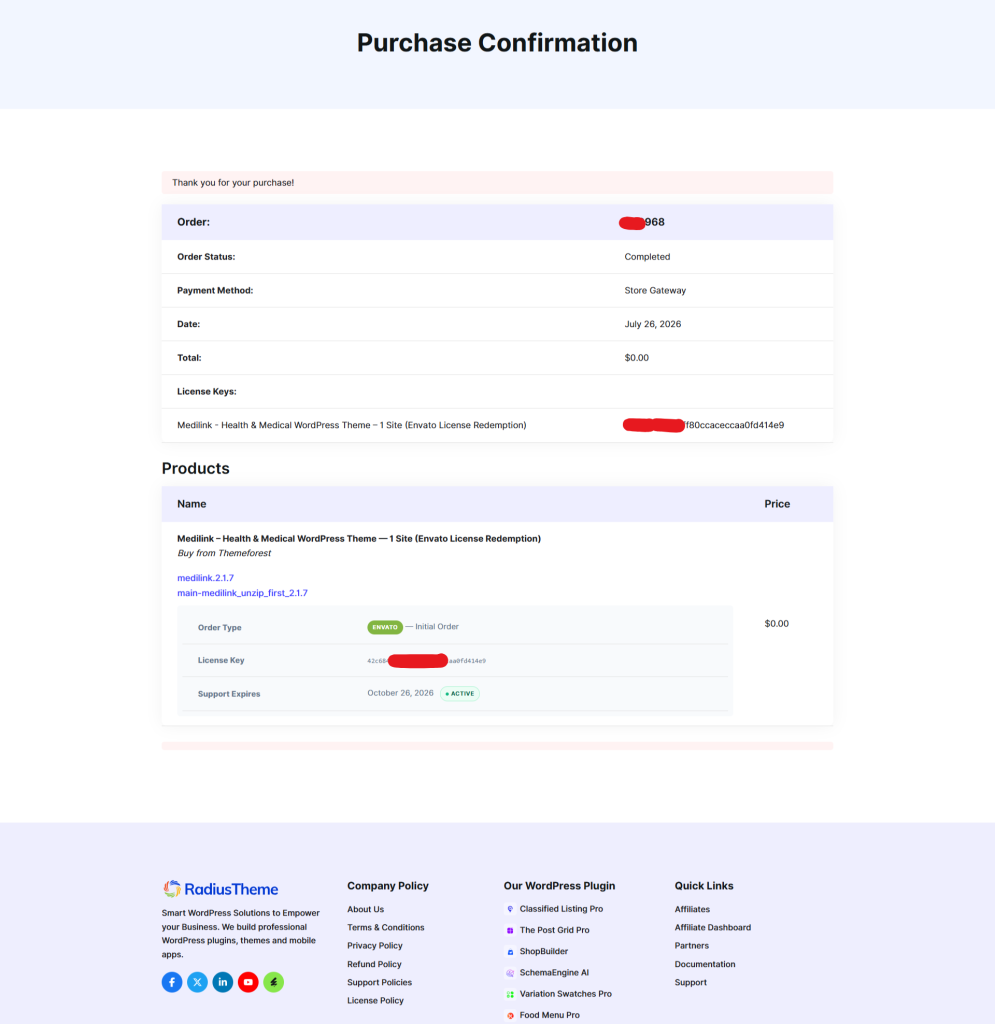
After checkout, you’ll land on the Purchase Confirmation page. This page has everything you need, so it’s worth saving.
Here you’ll see:
- Order number and status (marked Completed)
- Your license key — this is the important one
- Download links for the theme files
- Support Expires date, shown as Active
Your license key is what you’ll use in the next step. Copy it and keep it somewhere safe. A copy is also sent to your email.
Step 4: Activate the License in Your WordPress Site
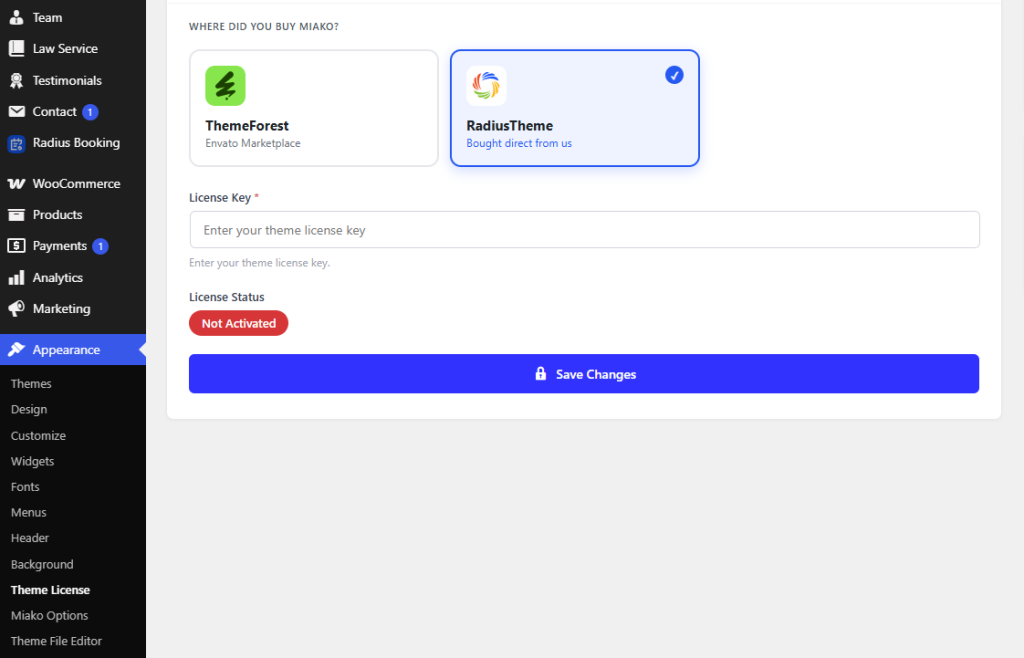
Now log in to your WordPress dashboard and activate the license.
- Go to Appearance → Theme License
- Under “Where did you buy [theme]?”, select RadiusTheme (not ThemeForest)
- Paste your license key into the field
- Click Save Changes
Your License Status will change from Not Activated to active.
That’s it — you’re done! ✅
Your theme is now licensed, your support window is extended, and you’ll get updates directly in your WordPress dashboard.
What You Get Buying Direct From RadiusTheme
👉 Choose your desired theme here: https://www.radiustheme.com/wordpress-themes/
Quick Comparison
| ThemeForest | RadiusTheme Direct | |
| Price | List price + $12 buyer fee | Lower — no marketplace markup |
| Discount | Regular Price | More than 30% discount available |
| Support included | 6 months | 12 months |
| Support renewal | 62.5%–87.5% of item price, 6 months | Flat lower rate, 12 months |
| Updates | Manual download & re-upload | One-click from your dashboard |
| Licence management | Purchase codes | Full account dashboard |
| Direct contact for critical updates | Not possible | Yes |
| Where your money goes | Half to the platform | Development and support cost |
1. A lower price — no marketplace markup
When you buy on ThemeForest, a large slice of what you pay never reaches us. It goes to the marketplace as a buyer fee and a commission on top.
Selling from our own store removes both of those layers entirely. So the same theme costs you noticeably less.
And because nothing is being skimmed off in between, we still end up better funded than before. This is a rare case where a lower price genuinely helps both sides.
2. Twelve months of support, not six
This is the difference that costs marketplace buyers the most, and almost nobody notices it until support expires.
On ThemeForest, item support is sold in 6-month blocks, priced as a percentage of the item price — and it gets more expensive the longer you wait:
| ThemeForest support option | Cost | You get |
| Included with purchase | Free | 6 months |
| Add at checkout (Support Upgrade) | 37.5% of item price | +6 months |
| Extend while still active (Support Extension) | 62.5% of item price | +6 months |
| Renew after it expires (Support Renewal) | 87.5% of item price | +6 months |
Yes — renewing late can cost you nearly as much as the theme itself, for half a year of support.
Buying direct from us:
| RadiusTheme support | Cost | You get |
| Included with every purchase | Free | 12 months |
| Renew for another year | Flat, lower rate | 12 months |
Double the support window from day one, and no escalating late penalty. Renewing in month 14 costs exactly what renewing in month 11 costs.
3. One-click automatic updates
On ThemeForest, updating a theme means:
log into Envato → find Downloads → download the ZIP → open your WordPress dashboard → deactivate → delete → re-upload → reactivate. Every single time.
Buying direct, updates work the way WordPress is supposed to work: a notification appears in your dashboard, and you click update. That’s it. Same as any plugin.
For anyone maintaining more than one site, this alone is worth the switch.
4. You become our customer, not a purchase code
Here’s something most buyers don’t know: ThemeForest never gives authors your email address. We receive a purchase code — a string of characters. That’s it.
It means that in twelve years and 61,554 sales, we’ve had no way to tell you about a critical security patch, a major redesign, or a free upgrade unless you happened to log back into Envato and check.
Buying direct gives you an actual account with us: your licenses in one dashboard, direct notification when something important ships, and a support history that follows you.
5. One payment, lifetime updates
Buy a theme once and it’s yours for good. There’s no yearly subscription, no licence that quietly expires, and no risk of being locked out of updates because a renewal date passed while you weren’t looking.
Every purchase includes lifetime updates — new WordPress and WooCommerce compatibility releases, security patches, and new features keep arriving as long as we maintain the theme — plus 12 months of hands-on support from day one.
After that first year, renewing support is entirely optional and offered at a reduced rate. Skip it and nothing breaks: your licence stays valid and your updates keep coming. You’d only renew if you want direct access to our support team again.
What Happens to What You Already Bought?
Nothing bad. To be completely clear:
- ✅ Every ThemeForest licence you own stays valid forever. We’re not migrating, revoking, or expiring anything.
- ✅ You keep getting updates through ThemeForest exactly as you do today.
- ✅ Your existing support period is unaffected.
- ✅ We’re still on ThemeForest. All 92 themes remain listed. If you prefer buying there, that’s completely fine.
This is an additional option, not a replacement.
Frequently Asked Questions
Is the theme different if I buy direct?
No. Identical files, identical updates, identical licence terms. Only the checkout, the price, and the support length differ.
Can I move my existing ThemeForest licence to my RadiusTheme account?
Get in touch with your purchase code and we’ll do what we can — contact our support team.
Is buying direct safe?
Payments are handled by an established payment provider over a secure checkout.
Do I get an invoice for my business?
Yes, automatically, downloadable from your account dashboard.
Why should I trust a direct store a big marketplace?
Fair question. The best answer RadiusTheme has is the record: since 2013, 92 themes, 61,554+ sales, 4.75★ from 1,894 ratings, and Power Elite status — all earned by supporting customers well, long before we had a store of our own.
We’re Still The Same RadiusTheme
Same themes. Same team. Same standards we’ve held since 2013. The only thing that’s changed is where the smartest place to buy them is.
By buying direct, you pay less, get supported twice as long, update with one click — and you keep an independent team healthy enough to keep building.
→ Browse our themes and buy direct
Thank you for being part of the RadiusTheme story.