

On This Page
Want to sell more in a single order without dropping your prices? A fixed bundle offer in Shopify does exactly that. You group a few products together, set one price, and give shoppers a deal they can grab in one click.
This guide shows you two ways to create a fixed bundle offer in Shopify. First, the default Shopify tools. Then a faster third-party app called Radius Bundles. You will also learn the mistakes that break bundles and how to price them right.
What Is a Fixed Bundle Offer in Shopify?
A fixed bundle is a set group of products sold together at one combined price. Every shopper gets the same items. There is no picking or swapping.
Think of a skincare store selling a “Glow Kit” with a cleanser, a toner, and a moisturizer. The customer buys all three as one product, usually at a small discount.
Common fixed bundle examples:
- Gift sets: a candle, a diffuser, and a room spray sold as a “Home Kit”.
- Starter packs: two or three best sellers for new buyers.
- Product plus accessory: a laptop paired with a case and a mouse.
- Outfit sets: a jacket, trousers, and a belt as one “Work Look”.
Fixed Bundle vs Other Bundle Types
It helps to know where fixed bundles sit next to other options.
| Bundle Type | How It Works | Best For |
| Fixed bundle | Same set of products, one price | Gift sets, kits, starter packs |
| Multipack | Many units of the same item | 3-pack of shirts, 6-pack of drinks |
| Mix and match | Customer picks their own items | Build-your-own box |
| Volume discount | More units means bigger savings | Consumables, refills |
| Buy X Get Y / BOGO | Buy one, get one free or cheap | Promotions and clear-outs |
This guide focuses on the fixed bundle. It is the simplest type and a strong place to start.
👉 Good Read: How to Create Volume Bundle Offer in Shopify
Why Fixed Bundles Are Worth It
Fixed bundles do more than group products. They lift your numbers.
- Higher average order value. Shoppers spend more per visit.
- Faster inventory clearing. Pair slow stock with a best seller.
- Less choice stress. One clear offer beats endless browsing.
- Better perceived value. Buyers feel they got a smart deal.
Bundles often lift average order value by 10% to 30%. That is real revenue from products you already stock.
Method 1: Create a Fixed Bundle With Shopify’s Default Tools
Shopify gives you two free ways to build a fixed bundle. Pick based on how much you care about stock tracking.
Build a Bundle as a New Product (No App)
This is the quickest free method. You treat the bundle like one new product.
- In your Shopify admin, go to Products, then click Add product.
- Give it a clear title, like “Morning Routine Set.”
- In the description, list every item inside and the savings.
- Add a photo that shows all the products together.
- Set one combined price for the pack.
- Click Save and publish.
The catch: Shopify treats this bundle as one standalone item. It does not deduct stock from the individual products when the bundle sells. You have to track that stock by hand. That gets risky as you grow.
Method 2: Create a Fixed Bundle With Radius Bundles
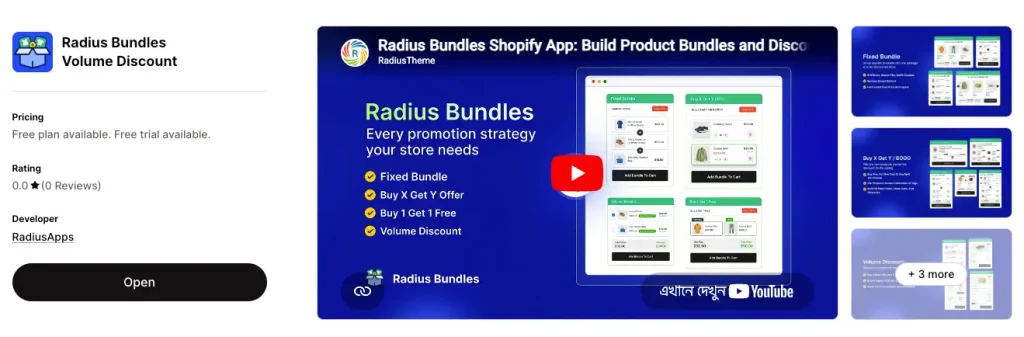
Radius Bundles is a third-party Shopify app for merchants who want more than the basics. It keeps setup simple but adds flexible discounts, a cleaner storefront widget, and more offer types. Here is the full setup in four short steps.
Step 1: Choose Fixed Bundle Type
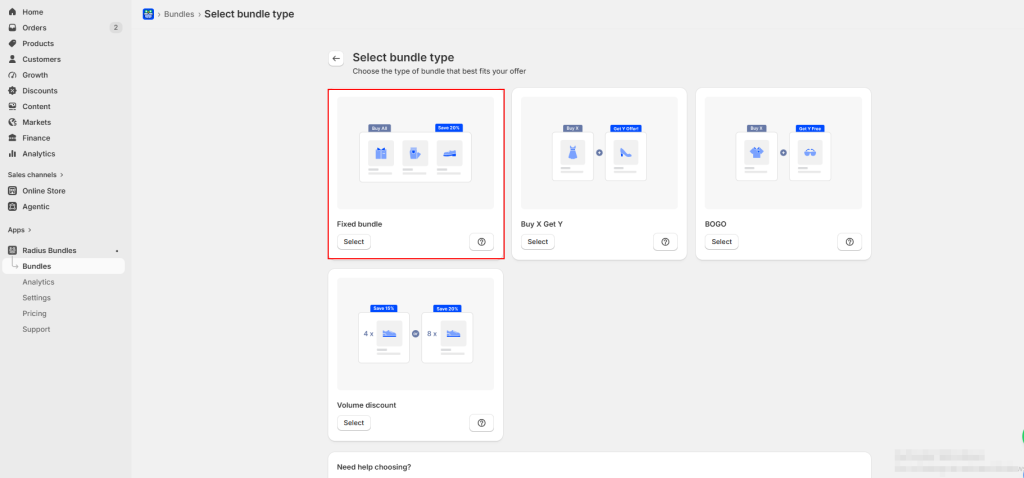
Open the app. Go to Bundles, click Create bundle, and pick the Fixed Bundle type.
Step 2: Add Your Products
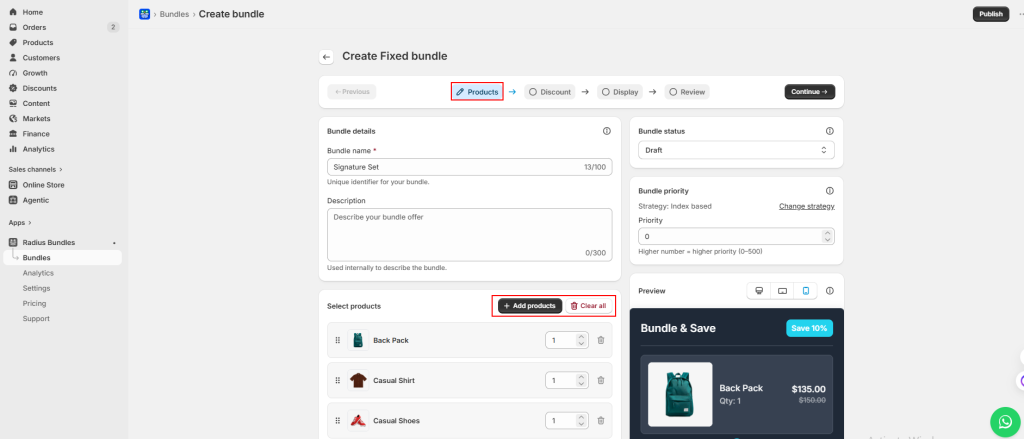
Give the bundle a clear name, like “Home Sanctuary Kit.” Click Add products and pick each item. Set a quantity for each one, then drag to reorder how they show.
Tip: a fixed bundle needs at least 2 products. The free plan allows up to 10. Pro allows unlimited.
Step 3: Set the Discount
Choose how much to take off the combined price.
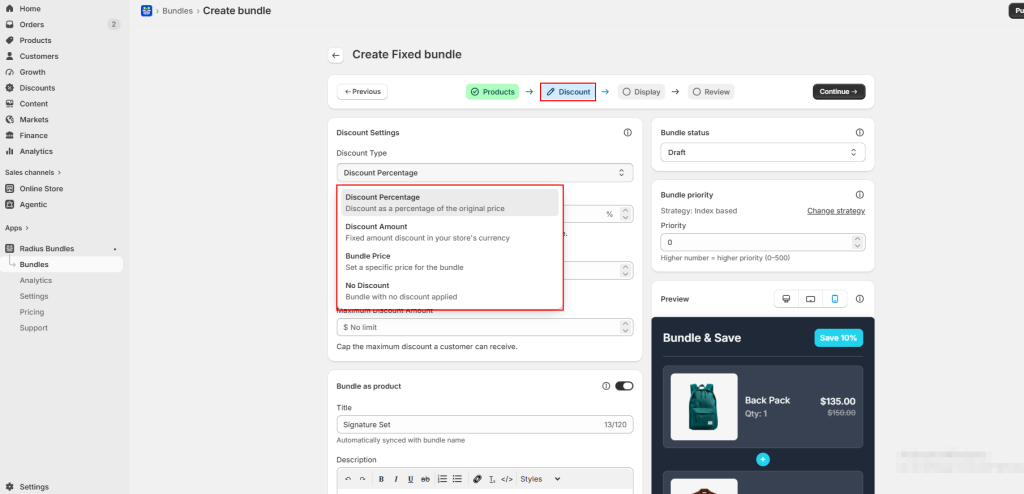
| Discount Type | Example | Plan |
| Percentage | 15% off the combined price | Free and Pro |
| Fixed amount | $12 off the combined price | Free and Pro |
| Custom price | Set the bundle total to exactly $49.99 | Pro only |
| No discount | Group products with no price cut | Free and Pro |
Handy extra: On this step you will see a Bundle as Product toggle. Turn it on and the app creates a real Shopify product for the bundle. It then shows up in collections, in search, and across your sales channels. When a shopper buys it, the app adds each item to the cart for you.
Step 4: Choose the Display
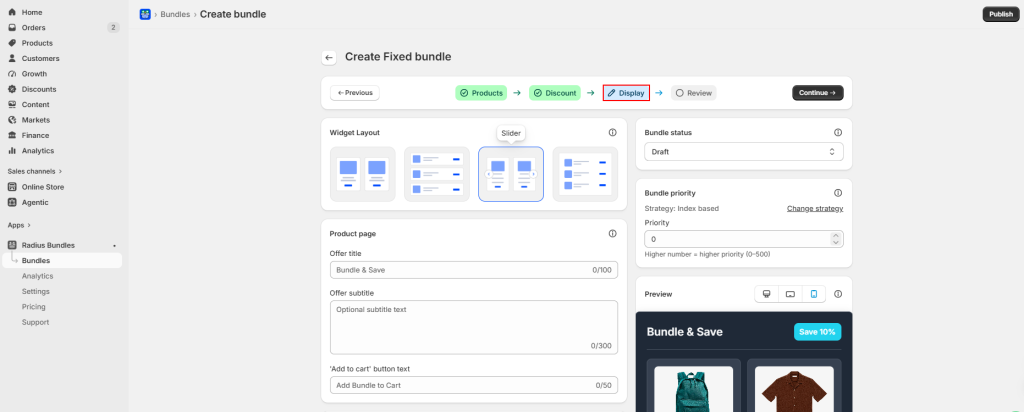
Pick how the bundle looks on your product page. On the free plan you can choose List or Grid. Toggle what shows: product images, prices, and a savings badge.
Step 5: Review and Publish
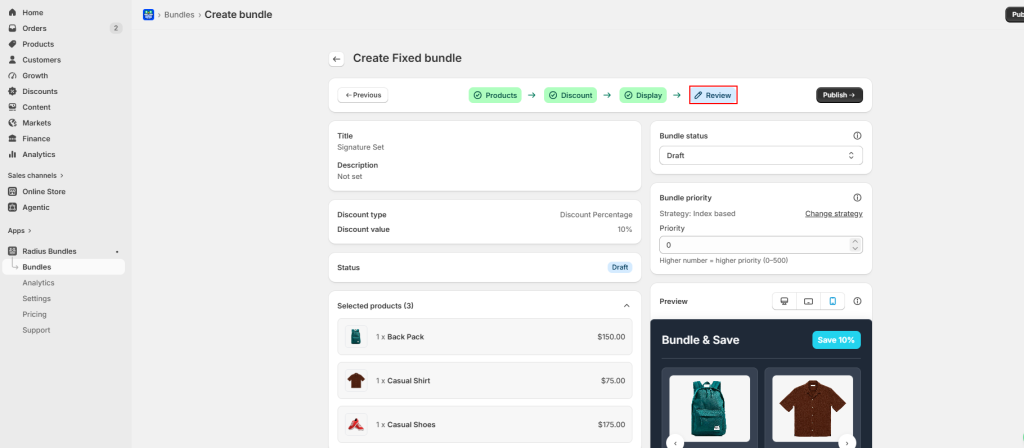
Check the summary. Click Publish to go live now, or Save to keep it as a draft.
Why Does My Shopify Bundle Show “Sold Out”?
This is one of the most common questions merchants ask. A bundle can show sold out even when the items look in stock. Here is why it happens:
- One product inside the bundle hit zero stock. The whole bundle then reads sold out.
- Stock did not sync, so the app shows old numbers. A manual resync often fixes it.
- The bundle is only assigned to one location, but stock sits at another.
- A product in the bundle is missing from an active shipping profile.
Quick tip: check the stock of every item inside the bundle first. About 9 times out of 10, one child product at zero is the cause.
How to Price a Fixed Bundle
The right price protects your margin and still feels like a deal. You have three main choices.
- Fixed price: one flat total for the whole bundle. Good for “meal deal” style offers.
- Percentage off: take a set percent off the combined price. Travels well across currencies.
- Fixed amount off: take a set dollar amount off the total.
Before you set any discount, add up the cost of every item, plus packing. Make sure the bundle still earns a healthy margin. Always show the original price with a strikethrough. Shoppers buy on the savings they can see.
Start Your First Fixed Bundle Offer in Shopify
Creating a fixed bundle offer in Shopify is one of the fastest ways to raise your average order value. Start simple. Use Shopify’s default tools if you only need a basic bundle. Move to Radius Bundles when you want flexible discounts, a cleaner storefront widget, and more offer types.
Pick two products that sell well together. Build one fixed bundle this week. Watch your order value over the next 14 days, then bundle more of what works.




