

On This Page
Buy 2, save 10%. Buy 6, save 25%. Deals like this push shoppers to add more to their cart. A volume bundle offer in Shopify does exactly that. It rewards people for buying more of the same product.
This guide shows you two ways to set one up. First the free Shopify way. Then a faster way with the Radius Bundles app. Both are simple. You do not need code.
What is a Volume Bundle Offer?
A volume bundle offer gives a bigger discount as the shopper buys more of one product. It is also called a “buy more, save more” deal or a quantity break.
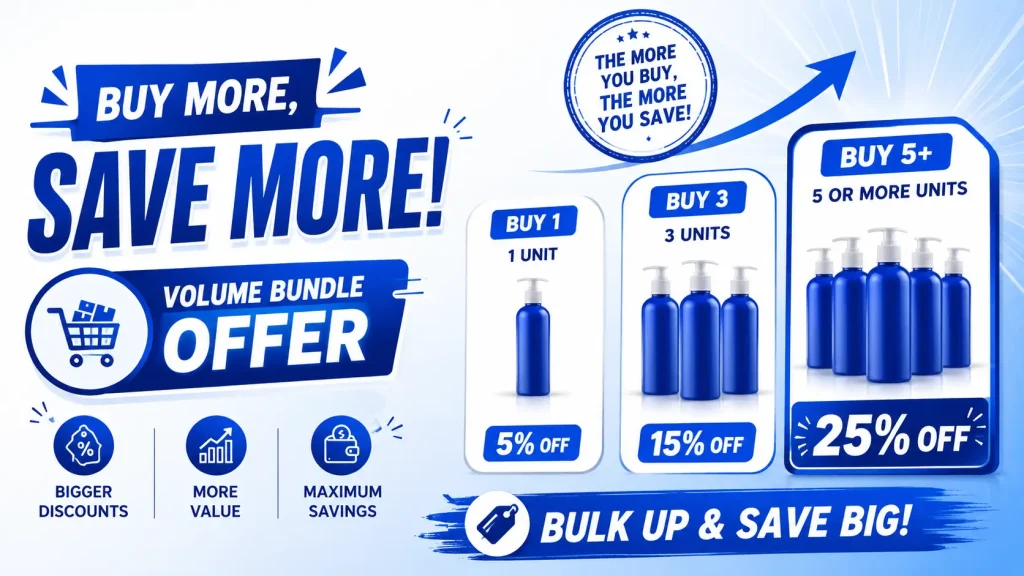
Here is a simple example:
| Quantity | Discount |
| Buy 2 to 4 | 10% off |
| Buy 5 to 9 | 20% off |
| Buy 10 or more | 30% off |
Each row is called a tier. The shopper gets the tier that matches how many they buy.
Volume bundle vs. regular bundle: A regular bundle groups different products together, like shampoo plus conditioner. A volume bundle is about one product bought in larger amounts. They solve different goals.
👉 Good Read: Best Volume Discount App for Shopify
Why Merchants Use Volume Bundle Offers?
- Average order value (AOV) goes up because shoppers add more to hit the next tier.
- Slow stock moves faster when a bigger discount kicks in.
- Repeat-buy items like coffee, supplements, or soap sell in larger amounts.
- Wholesale and bulk buyers get a clear reason to order more.
Method 1: Create a volume bundle with Shopify’s own tools
Shopify has a few native options. Each one has limits, so pick the one that fits your store.
Option A: The free Shopify Bundles app (multipack)
Shopify’s free Bundles app can make a multipack. A multipack sells a set amount as one product, like a “6-pack” at a set price. This is the closest native version of a volume deal for normal shoppers.
Quick steps:
- From your Shopify admin, go to Apps and install Shopify Bundles.
- Open Apps > Bundles and click Create bundle.
- Add a title, such as “Coffee 6-Pack.”
- Select your product and set the quantity.
- Click the “…” menu and choose Add quantity as an option to build the pack.
- Set your pack price, set the status to Active, then save.
Good to know: A multipack is a fixed pack at a fixed price. It does not show a tier table that changes as the shopper picks more. For that, see Method 2.
Option B: Native B2B quantity price breaks (wholesale only)
Since April 2026, Shopify offers quantity price breaks inside B2B catalogs on all plans. This is real tiered pricing, but only for B2B company accounts.
Quick idea:
- Go to Customers > Companies and create a company profile.
- Go to Products > Catalogs and make a B2B catalog.
- Add quantity price break rules to a product, like 10+ at $17 and 25+ at $14.
- Assign the catalog to the company.
The logged-in B2B buyer then sees the price table. Regular storefront visitors do not.
The limit of the native tools
Shopify alone cannot show a live “buy more, save more” tier table to every visitor on the product page. Multipacks are fixed. B2B price breaks are for company accounts. Discount codes need manual entry. To get a full storefront tier offer without code, most merchants use an app.
Method 2: Create a volume bundle with the Radius Bundles app
Radius Bundles is a Shopify app made for offers like this. Its Volume Discount type builds a real tier table that any shopper sees on the product page. It takes four short steps. (Volume Discount is a Pro plan feature.)
Step 1: Pick the product
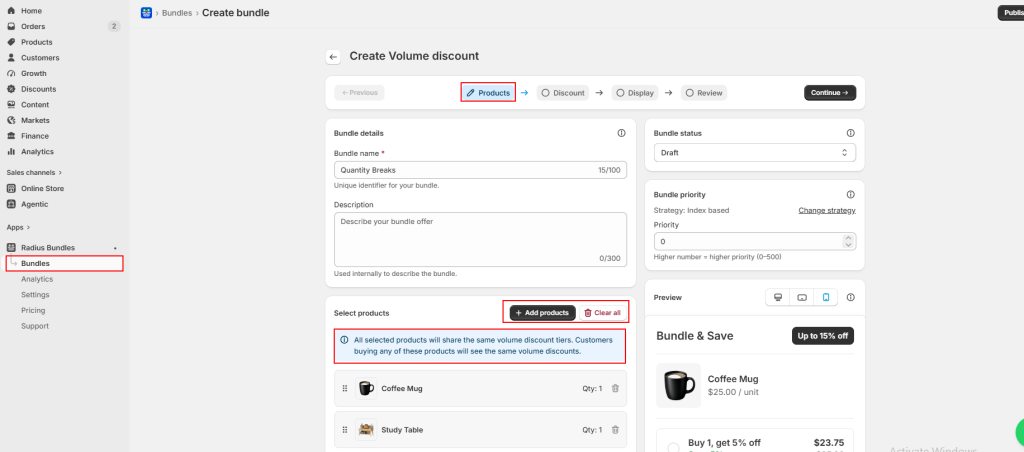
Open the app and go to Bundles > Create bundle, then choose Volume Discount. Add one product. This deal works on a single product.
Step 2: Set your tiers
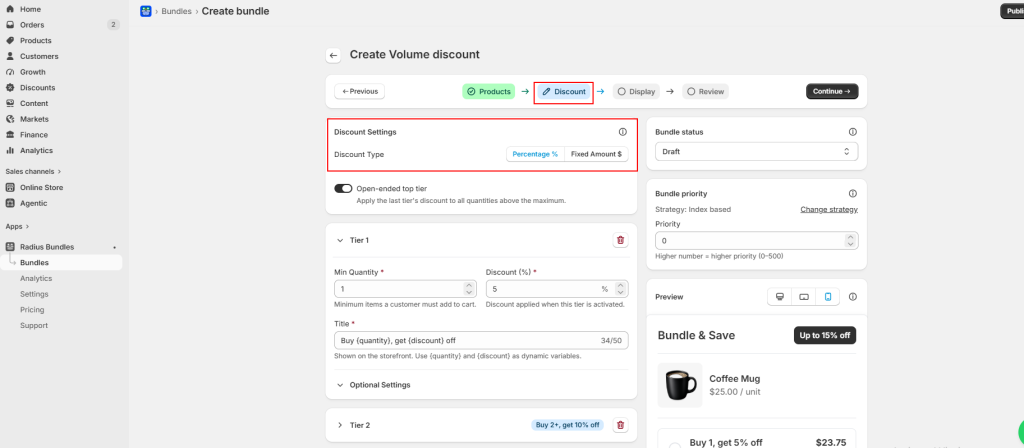
Choose your discount type: Percentage (% off) or Fixed Amount ($ off per item). For each tier, set the minimum quantity and the discount. Click Add tier for more levels. On the last tier, turn on Open-ended so any large order still gets your top discount.
Step 3: Choose the look
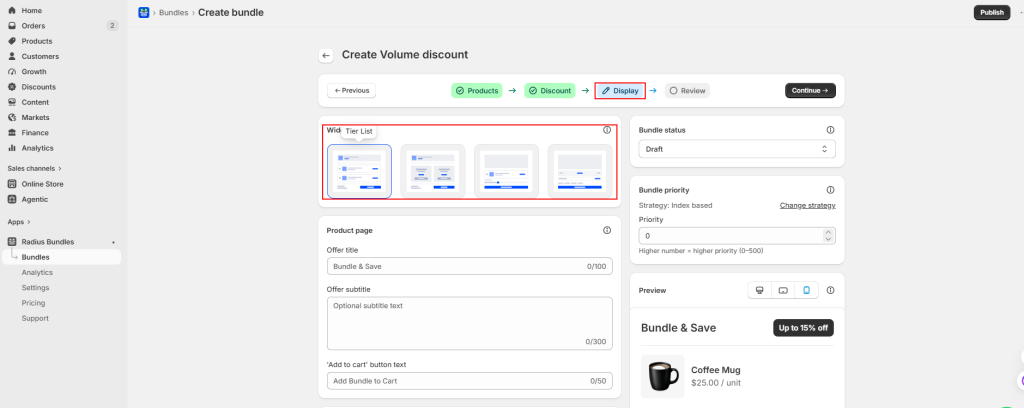
Pick how the offer shows on your product page. A tier table is the clearest for shoppers. You can also use pricing cards, a slider, or a quantity calculator.
Step 4: Review and publish
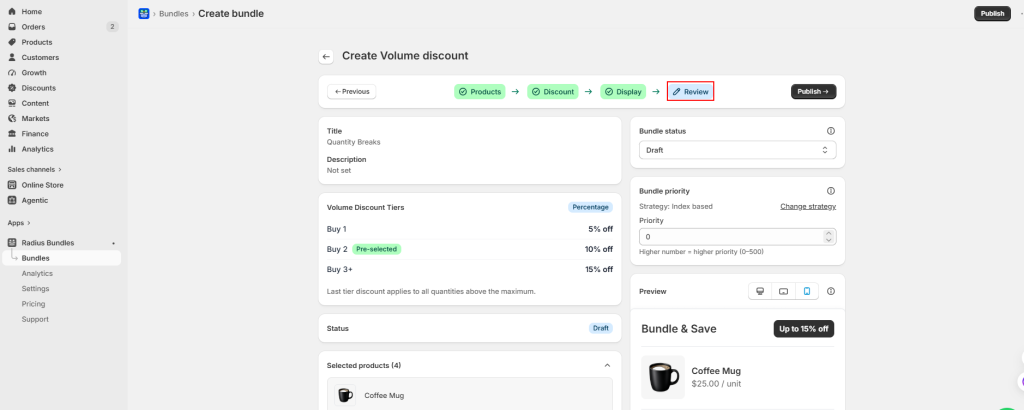
Check that the tiers look right, then hit publish. The app applies the correct discount at checkout based on how many the shopper buys.
Native vs. app: which one should you pick?
| Need | Best choice |
| Sell a fixed pack, like a 3-pack | Free Shopify Bundles app |
| Tiered pricing for wholesale buyers | Native B2B price breaks |
| Live “buy more, save more” table for all shoppers | Radius Bundles or similar app |
Common Mistakes to Avoid
- Gaps between tiers. If one tier ends at 4 and the next starts at 6, a shopper who buys 5 gets nothing. Start each tier one number above the last.
- No open-ended top tier. Without it, an order bigger than your highest tier may get no discount.
- Using a volume discount for many products. It works on one product. For deals across different products, use a Buy X Get Y offer instead.
- Tiers that hurt your margin. Do not set a discount below your cost. Check the price per item at each tier before you publish.
Tips to make your offer convert
- Show the savings clearly. A table that says “Save 20%” beats a vague label.
- Keep tiers simple. Two or three levels are easy to read.
- Match the widget to your theme colors so it looks native.
- Test it on mobile. Most shoppers buy on their phones.
- Watch your app’s analytics and adjust tiers based on real sales.
Frequently Asked Questions
Does Shopify have a built-in volume discount?
Partly. The free Shopify Bundles app makes fixed multipacks. Native tiered price breaks exist for B2B company accounts since April 2026. A live storefront tier table for all visitors needs an app.
Can I do “buy more, save more” without an app?
Only in a limited way. You can use multipacks or discount codes. These do not show a tier table that updates as the shopper picks more.
What is the difference between a bundle and a volume discount?
A bundle groups different products together. A volume discount lowers the price when a shopper buys more of the same product.
Will a volume discount hurt my profit?
Not if you plan the tiers. Set each discount above your cost so every tier still earns money.
Do volume discounts work on mobile?
Yes. A good app shows the tier table on both desktop and mobile.
Can volume discounts stack with other discounts?
It depends on the app and your setup. Always test both offers together before you go live.
Final thoughts
A volume bundle offer in Shopify is one of the easiest ways to raise your average order value. Shopify’s free tools cover fixed packs and B2B pricing. For a full “buy more, save more” table that every shopper can see, an app like Radius Bundles sets it up in minutes.
Ready to try it? Start with a simple two or three tier offer on your best seller. Watch the results, then adjust. Small changes here can add up to real revenue.




