

On This Page
The Food Menu – Restaurant Menu & Online Ordering plugin just got its biggest update ever.
Four premium features are now completely free. The settings panel is rebuilt in React. And the Pro version introduces a full front-end restaurant dashboard.
For restaurant owners tired of juggling multiple plugins, paying platform commissions, or struggling with clunky WordPress admin panels — this update changes everything. Food Menu now handles menu display, online ordering, reservations, discounts, tipping, kitchen operations, and business reports. All from one plugin. No monthly SaaS fees. No per-order charges. Full ownership of every customer interaction.
Here’s a complete breakdown of what’s new, what’s free, and why it matters for every food business running on WordPress.
Free vs Pro: Full Feature Comparison
After this update, the free version is more powerful than many paid alternatives. Here’s the complete breakdown.
| Feature | Free | Pro |
| Menu Layouts (Grid, List, Carousel) | 5+ | 20+ |
| Category Filter | Basic | Advanced (AJAX) |
| Pagination (Load More, Infinite Scroll) | ✅ | ✅ |
| Even & Masonry Grid | ✅ | ✅ |
| Shortcode Generator | ✅ | ✅ |
| Gutenberg Block Support | ✅ | ✅ |
| Elementor Addon | ✅ | ✅ |
| WooCommerce Integration | ✅ | ✅ |
| Mini-Cart (Floating Cart) | ✅ | ✅ |
| Single Item Popup | ✅ | ✅ |
| Gallery Images | ✅ | ✅ |
| Currency Settings | ✅ | ✅ |
| Drag & Drop Item Ordering | ✅ | ✅ |
| Table Reservation | ✅ (NEW!) | ✅ |
| Tips / Gratuity | ✅ (NEW!) | ✅ |
| Special Menu (Time-Based Popup) | ✅ (NEW!) | ✅ |
| Percentage Discount | ✅ (NEW!) | ✅ |
| Food Location (Multi-Branch) | ✅ | ✅ (Address & Thumbnail) |
| Front-End Dashboard | — | ✅ |
| Role Manager | — | ✅ |
| Custom Order Statuses | — | ✅ |
| Order Timeline / Tracking | — | ✅ |
| QR Table Ordering | — | ✅ |
| Timed Products | — | ✅ |
| Fixed Discount (Threshold-Based) | — | ✅ |
| Pickup & Delivery | — | ✅ |
| Custom Checkout Fields | — | ✅ |
| Visual Table Reservation | — | ✅ |
| Drag & Drop Ingredients | — | ✅ |
| Drag & Drop Nutrition | — | ✅ |
| Nutrition & Review Control | — | ✅ |
| Product Addons | — | ✅ |
| Order Bumps | — | ✅ |
| POS Printing | — | ✅ |
| SMS & WhatsApp Notifications | — | ✅ |
| Checkout Extra Fields | — | ✅ |
Pro Spotlight: Front-End Dashboard for Restaurant Management
Front-End Dashboard is a dedicated management panel on the front end. Staff manage orders, inventory, kitchen prep, and reports — without touching wp-admin. No training needed. No admin credentials shared.
Dashboard Home
Five real-time summary cards appear on login: Total Products, Total Sold, In Stock, Total Wasted, and Recent Orders. At a glance, managers see the full operational picture.
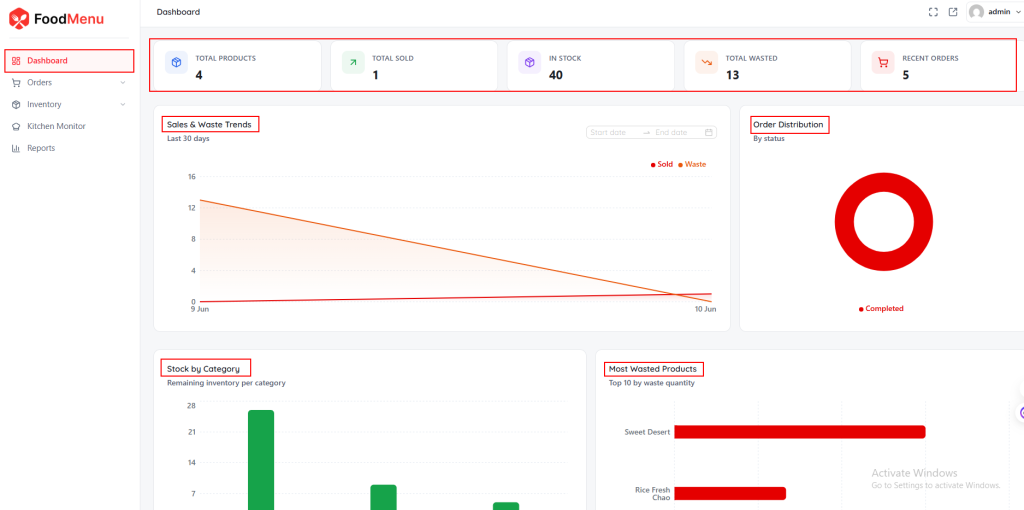
Below that, interactive charts dig deeper:
- Sales & Waste Trends — Line chart covering the last 30 days. Custom date ranges supported.
- Order Distribution — Donut chart grouped by status (Completed, Processing, On Hold).
- Stock by Category — Bar chart showing remaining inventory per food category.
- Most Wasted Products — Top 10 items by waste quantity.
Two additional views round out the dashboard. Stock Velocity projects daily sales and estimated days until stock-out for each product. Waste Analysis shows waste as a percentage of inventory received. Low Stock Alerts flag items that need restocking before they hit zero.
Order Management
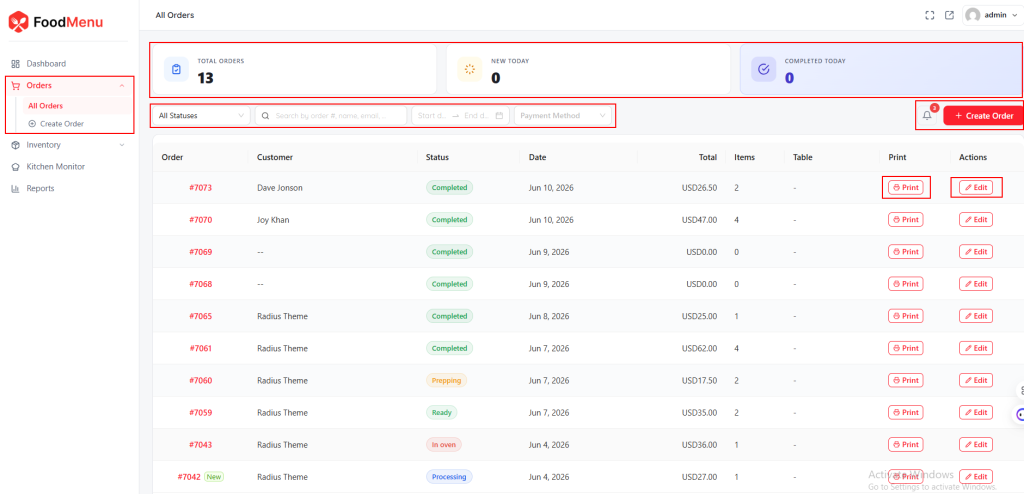
A filterable, searchable order table. Columns for order number, customer, status, date, total, items, table, and actions. Summary cards show total, new, and completed orders at a glance. Staff update statuses and print slips directly. No wp-admin required.
Inventory Management
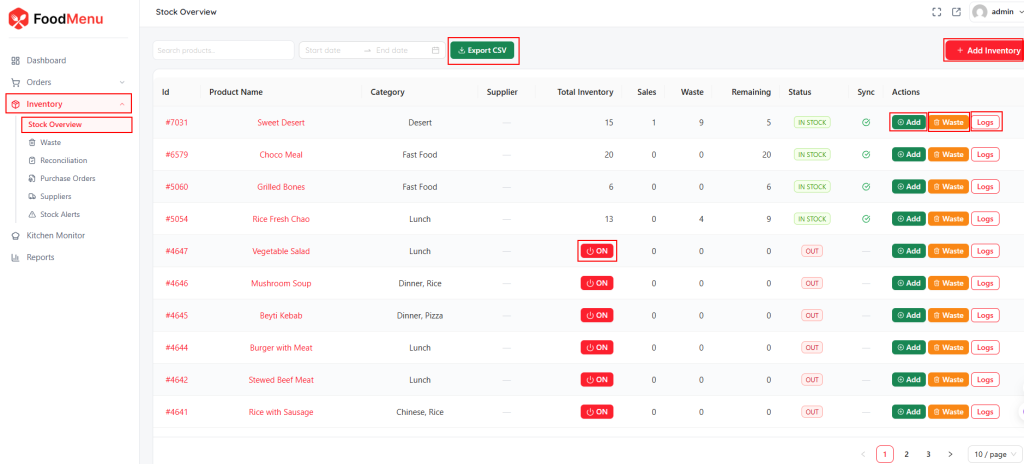
The Inventory module goes beyond basic stock tracking.
Stock Overview shows every product’s inventory, sales, waste, and remaining units with quick actions to add stock, record waste, or view logs.
Waste tracks discarded items by reason — spoiled, damaged, or expired.
Reconciliation compares expected stock against actual counts to catch discrepancies early.
Purchase Orders lets staff create and manage supplier orders directly from the dashboard.
Suppliers stores all vendor details in one place.
Stock Alerts flags products that drop below a set threshold. Six sub-sections. Full inventory control. All from the front-end dashboard.
Kitchen Monitor
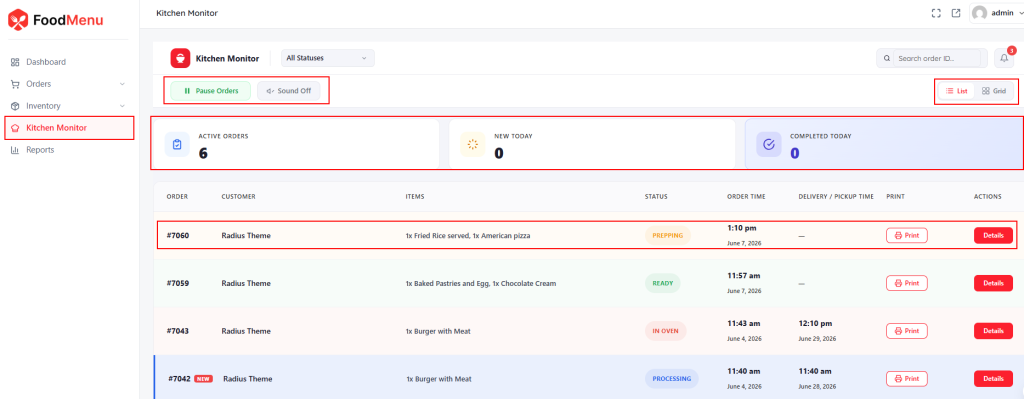
A live, auto-refreshing order feed designed for kitchens. New orders appear automatically. The refresh interval is configurable from 30 to 3600 seconds. Mount a tablet on the kitchen wall. The team always knows what’s coming next. No paper tickets. No missed orders.
Reports — Five Views That Matter
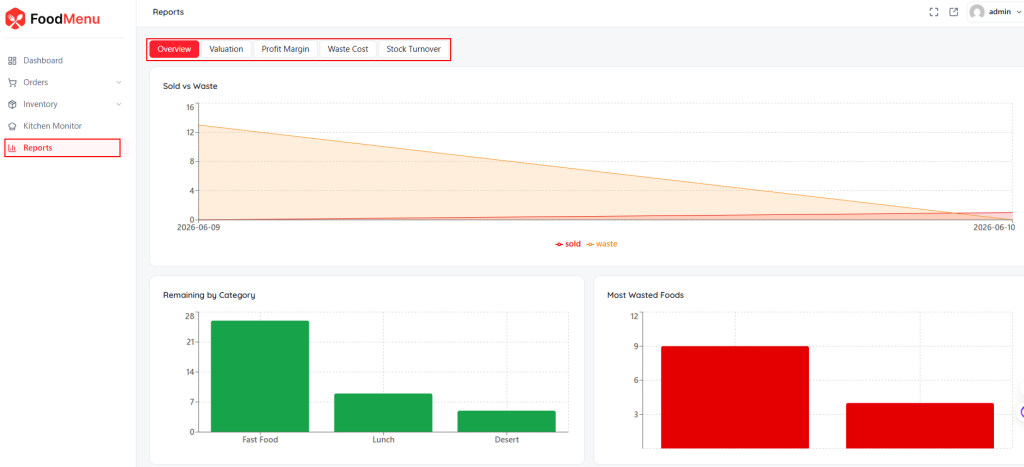
- Overview — Sold vs waste, remaining by category, most wasted foods.
- Valuation — Total stock value, units, average cost per unit.
- Profit Margin — Revenue, COGS, gross margin per product and category.
- Waste Cost — Financial loss by waste reason with trend tracking.
- Stock Turnover — Turnover ratio, days of supply, daily sales per product.
These are operational metrics. They help reduce waste, fix pricing, and improve purchasing decisions.
Role Manager
Create custom roles. Control what each team member sees and does. Kitchen staff get Kitchen Monitor only. Managers see orders and reports. Every role is fully customizable.
Full documentation: radiustheme.com/docs/food-menu/docs/front-end-dashboard/
All New Features in the 2026 Update
1. React-Based Settings Panel
The entire settings panel is rebuilt in React. Pages load instantly. No full-page reloads.
The interface is cleaner and faster to navigate. Every section — General, Checkout, Order Flow, Reservation — loads in milliseconds. For restaurant owners who configure settings daily, this saves real time.
2. Table Reservation — Now Free
Previously Pro-only. Now available in the free version.
Customers select a date, start time, end time, and guest count. Capacity handling prevents overbooking. The admin list shows all bookings with full management controls.
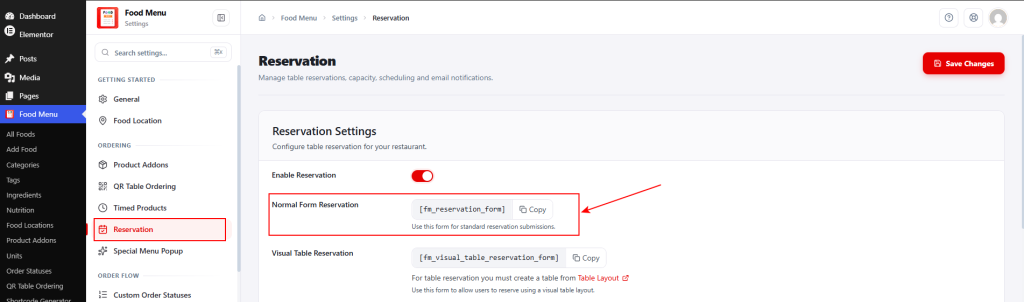
Setup in two minutes: Enable the toggle in Food Menu → Settings → Reservation. Copy [fm_reservation_form]. Paste into any WordPress page using a Shortcode block. Publish. The reservation form is live.
Customers see a clean booking form on the front end. Date, time, and guest fields — nothing complicated. This makes Food Menu one of the best free restaurant menu plugins with built-in table reservation support.
3. Tips / Gratuity — Now Free
Customers add a tip at checkout. Fixed amount or percentage — their choice. Tips show inline with clear labels like “(Fixed)” or “(20%)”. Full transparency for customers and staff.
This update also adds WooCommerce Blocks support. The tip feature works with both classic shortcode-based checkout and the modern block-based checkout.
4. Special Menu Popup — Now Free
Create timed promotional popups. Perfect for holiday specials, weekend offers, or limited-time deals.
Set a discount percentage. Target specific products or categories. Choose where the discount badge appears on the menu. Build urgency and boost sales without any extra plugin. Previously Pro-only — now free for everyone.
5. Percentage Discount — Now Free
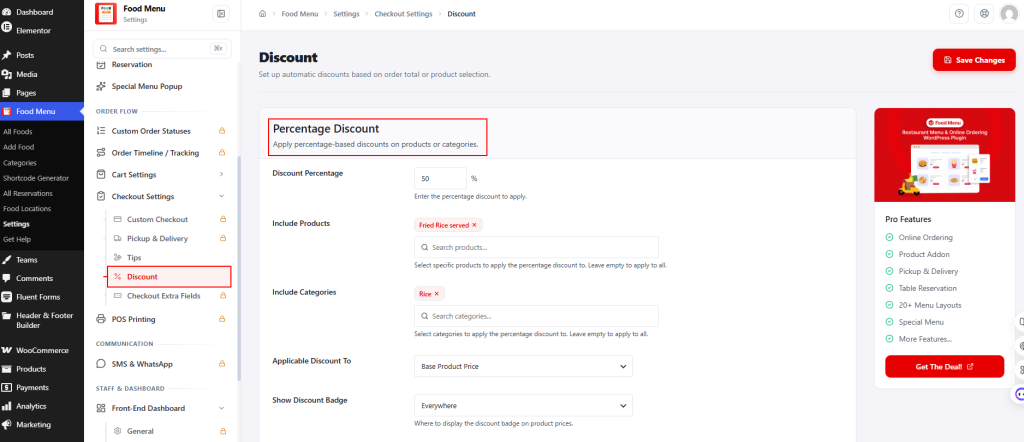
Go to Food Menu → Settings → Checkout Settings → Discount.
Set the percentage. Pick target products or categories. Choose if it applies to product price only or price plus add-ons. Control where the discount badge shows up.
For threshold-based fixed discounts (e.g., “$10 off orders over $50”), the Fixed Discount option with a custom message remains a Pro feature.
6. Food Location on WooCommerce Orders
Multi-branch restaurants now see the Food Location directly on WooCommerce order pages. Staff instantly know which branch an order belongs to. No more digging through order details. A small change that solves a daily frustration for multi-location restaurant operations.
7. Mini-Cart Page Exclusion
The floating mini-cart now supports page and post type exclusions. Show it on menu pages where it drives conversions. Hide it on blog posts, about pages, or landing pages. Restaurant owners get full control over where the cart appears.
8. WooCommerce Blocks Integration
New cart integration loader for Pickup/Delivery and Tip blocks. Full compatibility with WooCommerce’s block-based cart and checkout. Restaurants using the newer Blocks editor get seamless functionality. No extra configuration needed.
9. Better WordPress Compatibility
Improved backward compatibility with older WordPress versions. Sites that haven’t updated to the latest release still run Food Menu without conflicts or errors.
More Pro Features That Power Restaurants
The Pro version unlocks advanced tools built for restaurants that need full operational control. Here’s what each one does.
QR Table Ordering
Generate unique QR codes for every table. Dine-in guests scan with their phone, browse the full menu, and place orders directly. No app download required.
Orders are automatically linked to the correct table, so staff always know where to deliver. Set a session timeout to auto-release tables. Enable minimal checkout to show only name, email, and phone — since the table already identifies the customer. Download or print all QR codes in bulk.
Custom Order Statuses
Default WooCommerce statuses like “Processing” and “Completed” don’t reflect how a kitchen actually works. Custom Order Statuses lets restaurants define their own workflow steps — “Order Received,” “Prepping,” “In Oven,” “Ready for Pickup,” or anything else.
Each status gets a custom color, icon, and slug. Automatic email notifications trigger at every step.
Timed Products
Schedule menu items to appear or hide automatically based on date and time. Set available date ranges per product. Auto-hide items outside their schedule. Show countdown badges so customers know when items return.
Choose to display unavailable items as disabled or hide them completely. Perfect for breakfast-only items, seasonal specials, or limited-edition dishes.
Order Timeline / Tracking
Give customers a live timeline of their order from placement to completion. Every status change is recorded and visible. Each order gets a unique tracking URL that can be shared via SMS or WhatsApp.
Set a tracking link expiry (e.g., 30 days). Customize the tracking page title. Choose which status marks the order as “finished” with a green checkmark. Optionally show staff notes on the public tracking page. Full transparency without a single phone call.
POS Printing
Auto-generate print-ready documents the moment an order comes in. Four slip types are supported: Order Confirmation, Kitchen Slip, Packing Slip, and Delivery Driver Slip. Kitchen staff get clear, organized tickets instantly. No manual printing. No missed orders. Configurable per order type — print what each team needs, skip what they don’t.
SMS & WhatsApp Notifications
Send real-time order updates straight to customers’ phones. SMS and WhatsApp notifications trigger at key order stages — confirmation, status changes, and completion.
Customers always know what’s happening without checking email or refreshing a page. Reduces support calls. Builds trust. Keeps the customer informed at every step.
Who Should Use the Food Menu Plugin?
Small restaurants and cafes. The free version covers menu display, reservations, tipping, discounts, and WooCommerce ordering. Launch a complete online presence at zero cost. No developer needed.
Multi-branch restaurant chains. Food Location support, branch-level order identification, and the front-end dashboard make multi-location management simple. Each branch operates independently while staying connected through one WordPress installation.
Cloud kitchens and delivery-only brands. WooCommerce integration handles payments. Mini-cart drives conversions. Pickup and delivery options (Pro) streamline fulfillment. No third-party commission fees eating into margins.
Restaurant owners switching from food delivery platforms. Stop paying 15–30% commissions per order. Take orders directly through a WordPress site. Keep 100% of every sale. Food Menu provides the tools to make that transition smooth and permanent.
Why Food Menu Is the Best WordPress Restaurant Plugin
The restaurant industry doesn’t need more tools. It needs fewer, better ones.
One plugin replaces five. Menu display. Online food ordering. Reservations. Discounts. Tipping. QR ordering. Kitchen monitoring. Reports. All in one installation. Fewer plugins mean fewer conflicts and less maintenance.
Modern ordering experience. Floating mini-cart. Single-item popups. Category filters. 20+ layouts. Add QR table ordering for dine-in guests. Online and in-person ordering — both covered from one system.
Staff work faster. The Front-End Dashboard gives each role what it needs. Kitchen staff see prep tasks. Managers see orders and reports. Auto-refresh keeps everything current. No WordPress admin training required.
Data drives decisions. Five report views built in. Stock Velocity predicts shortages before they happen. Waste Analysis reveals spoilage patterns. Margin reports show which items earn money. No more guessing.
Zero coding required. React settings panel. Visual shortcode generator. Drag-and-drop ordering. WooCommerce handles payments automatically. Restaurant owners focus on food, not code.
Start free. Scale to Pro. Reservations, tipping, special menus, and discounts are now free. Launch online food ordering at zero cost. Upgrade when the business is ready for the dashboard, POS printing, SMS notifications, and role management.
Frequently Asked Questions
Is Food Menu free to use?
Yes. The free version includes menu layouts, WooCommerce integration, table reservation, tipping, special menu popups, percentage discounts, mini-cart, and more.
Does Food Menu work with WooCommerce?
Yes. Food Menu integrates directly with WooCommerce for cart, checkout, and payment processing. All WooCommerce payment gateways are supported.
Can I accept table reservations with the free version?
Yes. The normal form reservation system is now free. Customers book by selecting date, time, and guest count directly from the front end.
Does Food Menu support multiple restaurant locations?
Yes. The Food Location feature supports multi-branch setups. Pro adds address and thumbnail fields for each location.
What page builders does Food Menu support?
Food Menu works with Gutenberg (WordPress default), Elementor, and shortcodes. Menus can be embedded on any page using any of these methods.
Do I need coding skills to use the Food Menu?
No. Everything is configurable through the settings panel. The shortcode generator, drag-and-drop ordering, and WooCommerce integration require zero code.
Can staff manage orders without WordPress admin access?
Yes. The Pro Front-End Dashboard lets staff handle orders, inventory, and kitchen prep entirely from the front end. Custom roles control who sees what.
Does Food Menu support QR code table ordering?
Yes. The Pro version includes QR Table Ordering. Each table gets a unique QR code. Dine-in guests scan, browse the menu, and order from their phone.
Get Started with Food Menu
This update makes Food Menu the most complete WordPress restaurant plugin available in 2026. Four premium features — table reservation, tipping, special menu, and percentage discount — are now free for every user.
Whether launching a small cafe or scaling a multi-branch restaurant chain, Food Menu covers every aspect of the business. Menu display. Online ordering. Inventory. Kitchen management. Customer communication. Reports. All from one plugin. No commissions. No third-party platforms. No coding. Just a smarter way to run a food business on WordPress. Update today and see the difference.
Read full documentation: radiustheme.com/docs/food-menu



