

On This Page
Quick answer: The best table reservation system is the one that matches how you already run your restaurant. If your site runs on WordPress, Food Menu by RadiusTheme is the most cost-effective pick — a one-time or low yearly license with no per-booking fees. If you want a hosted, standalone booking platform, Tableo and Eat App both offer free starter tiers, while easyTable, Tablein, and SimplyBook.me compete on flat, transparent monthly pricing. This guide compares all six on features, real pricing, and who each one fits best.
Key takeaways
- A table reservation system replaces phone-and-notebook booking with an online widget, a digital floor plan, and automated confirmations that cut no-shows.
- Pricing splits into two models: a WordPress plugin you own (one flat cost) versus hosted SaaS you rent monthly (often $60–$300+/month, sometimes with per-booking fees).
- WordPress users save the most with Food Menu, since reservations, menu, and online ordering run from one plugin instead of a separate subscription.
- Free tiers exist — Tableo and Eat App both start at $0 for low booking volumes, which is ideal for testing.
- Match the tool to your volume: a small café and a 200-cover restaurant group have very different needs, and the “best” system changes accordingly.
What is a table reservation system?
A table reservation system is software that lets guests book a table at your restaurant online and gives your staff a digital way to manage those bookings. Instead of a paper diary and a ringing phone, you get a booking widget on your website, an interactive floor plan, and automatic email or SMS confirmations and reminders.
A good system does four jobs: takes bookings 24/7, prevents double-booking, reduces no-shows with reminders and deposits, and builds a guest database you can market to later.
Why restaurants use one
It captures bookings while you’re closed. A large share of reservations are made outside opening hours — a phone that nobody answers at 11pm is lost revenue.
It cuts no-shows. Automated reminders, and optionally a card hold or deposit, dramatically reduce empty “booked” tables.
It frees up staff. Nobody has to stop mid-service to answer the phone and scribble in a book.
It turns diners into data. Every booking builds a guest profile — visit history, preferences, allergies — that powers repeat business.
The 6 best table reservation systems compared
Here’s the fast version, then a detailed look at each.
| System | Model | Starting price | Free tier | Best for |
|---|---|---|---|---|
| Food Menu (RadiusTheme) | WordPress plugin | $49/year (or lifetime) | Free plugin core | WordPress restaurants wanting all-in-one |
| easyTable | Hosted SaaS | ~$68/mo (annual) | 1 month free | Flat-fee simplicity, no per-booking cost |
| SimplyBook.me | Hosted SaaS | Free / low monthly tiers | Yes | General booking beyond restaurants |
| Tableo | Hosted SaaS | Free, then ~$57.50/mo | Up to 100 covers/mo | Growing restaurants & groups |
| Tablein | Hosted SaaS | ~$79/mo (50 bookings) | 14-day trial | Small restaurants, no-commission bookings |
| Eat App | Hosted SaaS | Free, then $69/mo | Up to 100 covers/mo | Data-driven venues & hospitality groups |
Pricing verified from vendor sites in 2026 and shown in USD where available; SaaS prices change often, so confirm on each vendor’s page.
1. Food Menu by RadiusTheme
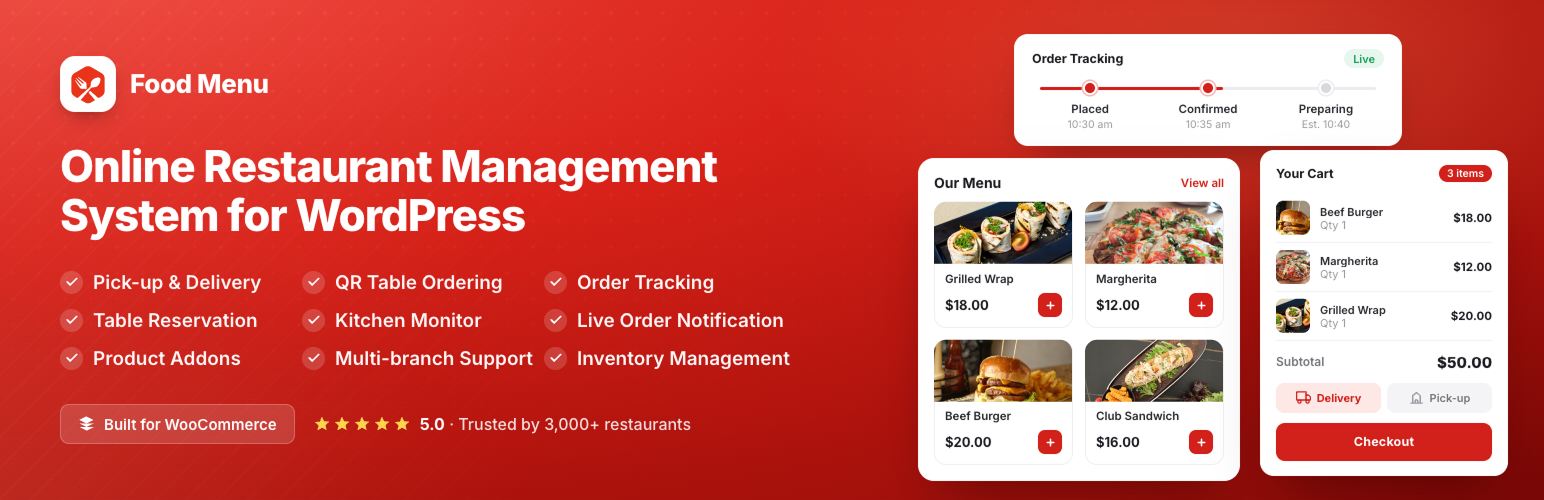
What it is: A complete restaurant management plugin for WordPress, built on WooCommerce. Its Visual Table Reservation lets guests pick their exact table and chairs from an interactive layout of your floor plan, rather than just requesting a time.
Reservation highlights:
- Interactive, visual table-and-seat selection instead of a plain form.
- Single or multiple time-slot reservations.
- Mobile-friendly booking interface.
- Weekly and holiday scheduling, seat capacity, and min/max guest controls.
- Email notifications and a cancellation form.
Why it stands out: It’s not just a reservation tool. The same plugin runs your menu display, online food ordering (pickup and delivery), QR table ordering, and — in the 6.0 release — a kitchen monitor and front-end dashboard. For a WordPress restaurant, that means one plugin instead of stitching together a booking SaaS, a menu tool, and an ordering platform.
Pricing: A single flat license rather than a monthly per-booking fee. Plans start at $49/year for one site, with lifetime licenses also available, plus a 30-day money-back guarantee. There are no per-reservation charges, which is the big structural difference from hosted platforms.
Best for: Independent restaurants, cafés, and small groups whose website already runs on WordPress and who want reservations, menu, and ordering unified in one owned system.
Keep in mind: It requires a WordPress site with WooCommerce. If you don’t run WordPress, a hosted platform below will be a more natural fit.
2. easyTable
What it is: A hosted restaurant booking system focused on simplicity and transparent, fixed pricing with no per-booking charges.
Highlights:
- One fixed price that gets cheaper the longer you commit.
- No commission per booking and no binding lock-in contract.
- Free website integration, onboarding, support, and staff training.
- Optional SMS notifications and prepaid bookings (small percentage fee).
Pricing: Billed as a single flat rate — roughly $76/month paying monthly, dropping to about $68/month on an annual plan and lower on multi-year terms. The first month is free with no card required.
Best for: Restaurants that want dead-simple, predictable billing with no per-cover math and no long contract.
Keep in mind: It’s a booking-only system — it won’t run your menu or online ordering.
3. SimplyBook.me — best for general-purpose booking
What it is: A broad online scheduling platform with a dedicated table-booking setup for restaurants. It’s the most “general” tool here, used across many service industries.
Highlights:
- Free tier for low booking volumes, with paid tiers scaling up.
- Booking widget, website, and social-media booking buttons.
- Large library of add-on features (deposits, memberships, promotions).
Pricing: A free plan plus low-cost monthly tiers that scale with bookings and features — flexible, though the à-la-carte add-ons mean cost depends on what you switch on.
Best for: Venues that also offer classes, events, or experiences, or owners who want one scheduler beyond just tables.
Keep in mind: Because it’s built for booking in general, its restaurant-specific tooling (floor plans, coursing) is less specialised than the restaurant-only platforms.
4. Tableo
What it is: A smart restaurant reservation and table-management platform with a free entry tier and a clear upgrade path to CRM, payments, and multi-location tools.
Highlights:
- Free “Freemium” plan for up to 100 covers a month.
- Interactive floor map, real-time reservations, and waitlist.
- Commission-free bookings from website, Google, Facebook, and Instagram.
- Payments, deposits, and no-show fees on higher tiers; AI messaging and chain cross-selling at the top.
Pricing: Free up to 100 covers/month, then Organise at ~$57.50/mo, Grow at ~$95.83/mo, and Expand at ~$164.17/mo (billed annually; ~17% cheaper than monthly).
Best for: Restaurants that expect to grow and want to start free, then scale into payments, marketing automation, and multi-outlet features.
Keep in mind: SMS/WhatsApp carry carrier fees, and the most useful anti-no-show tools sit on the paid tiers.
5. Tablein
What it is: A reservation system aimed squarely at small and independent restaurants, with commission-free bookings and a free website included.
Highlights:
- All features on every plan — tiers differ only by included reservation count.
- Calendar, floor plan, guest database, reports, and a free restaurant website.
- No commission on Google Reserve bookings; SMS and email notifications.
- Freeze your subscription during renovations or off-season.
Pricing: Starter ~$79/mo (50 reservations included, then per-booking overage), Growth ~$139/mo (150 reservations), Success ~$209/mo (unlimited); annual plans give two months free on Success.
Best for: Small restaurants that want full features from day one and predictable per-restaurant pricing.
Keep in mind: Lower tiers meter reservations, so a busy month can add overage costs unless you’re on Success.
6. Eat App
What it is: A feature-rich reservation and guest-management platform with strong CRM, analytics, and enterprise tooling, plus a genuine free tier.
Highlights:
- Free plan for up to 100 covers/month with table management and a chat inbox.
- Real-time floor plan, waitlist, guest profiles, and shift reports.
- Deep CRM, smart reports, marketing automation, and POS/payment integrations on higher tiers.
- Booking network, WhatsApp, and enterprise multi-venue tools.
Pricing: Free ($0, up to 100 covers), Starter $69/mo, Essential $159/mo (unlimited covers), Pro $299/mo (billed annually; monthly rates run higher). Many capabilities are add-ons unless you’re on Pro.
Best for: Established restaurants and groups that treat guest data and analytics as a competitive edge.
Keep in mind: Costs climb once you add the CRM, automation, and integration modules that make it shine.
How to choose the right table reservation system
Work through these questions in order:
1. What platform is your website on? If it’s WordPress, a native plugin like Food Menu removes an entire recurring subscription and keeps everything in one place. If you don’t run WordPress, choose a hosted platform.
2. Do you want booking only, or an all-in-one system? easyTable, Tablein, Tableo, and Eat App are booking-first. Food Menu also handles menu display, online ordering, and QR ordering — useful if you want one system to run the whole front end.
3. What’s your booking volume? Low volume → a free tier (Tableo, Eat App) or a flat plugin license (Food Menu). High volume → watch for per-reservation metering (Tablein’s lower tiers) and prefer flat or unlimited plans.
4. How do you feel about per-booking fees? If unpredictable costs bother you, favour flat-fee models (Food Menu, easyTable) over metered ones.
5. Which features are non-negotiable? Need deposits and no-show fees? Confirm which tier includes them. Need multi-location or CRM? That usually means a higher SaaS tier or a group plan.
Table reservation system pricing models, explained
Flat license (own it). Pay once or yearly for a plugin you host yourself, like Food Menu. Lowest long-run cost and no per-booking fees, but you need your own WordPress site to run it.
Flat subscription (rent it). A fixed monthly fee regardless of bookings, like easyTable. Predictable, simple, but recurring forever.
Metered subscription. A monthly fee that includes a set number of reservations, then charges per extra booking, like Tablein’s lower tiers. Cheap when quiet, pricier when busy.
Freemium + tiers. Free up to a cover limit, then paid tiers unlock features, like Tableo and Eat App. Great for starting out; costs rise as you add modules
Frequently asked questions
What is the best table reservation system for restaurants?
There’s no single winner — it depends on your setup. For WordPress restaurants, Food Menu by RadiusTheme is the most cost-effective all-in-one option. For hosted platforms, Tableo and Eat App offer strong free tiers, while easyTable and Tablein compete on flat, transparent pricing.
What is the cheapest table reservation system?
A WordPress plugin like Food Menu is usually cheapest over time, starting around $49/year with no per-booking fees. Among hosted platforms, Tableo and Eat App have free tiers for up to 100 covers per month.
Can I add a table reservation system to WordPress?
Yes. The Food Menu plugin adds a visual table reservation system to any WordPress site running WooCommerce, letting guests select tables and chairs from an interactive floor plan — with no separate subscription.
Do table reservation systems reduce no-shows?
Yes. Automated email and SMS reminders, plus optional deposits or card holds, significantly cut no-shows by confirming intent and reminding guests before their booking.
Do I need to pay per booking?
Not always. Flat-license (Food Menu) and flat-subscription (easyTable) models charge no per-booking fee. Some platforms meter reservations on lower tiers, so check whether overage fees apply.
Is a free table reservation system good enough for a small restaurant?
Often yes. Free tiers from Tableo and Eat App, or the core Food Menu plugin, cover the essentials for low-volume venues. You typically upgrade only when you need higher volume, payments, or CRM.
What’s the difference between a reservation system and a POS?
A reservation system manages bookings, tables, and guest data before and during the visit. A POS processes orders and payments. Some tools integrate the two, but they solve different problems.
Which reservation system is best for a restaurant group?
For multi-location groups, Eat App and Tableo’s higher tiers offer shared guest databases and cross-location tools. WordPress groups can also run Food Menu’s multi-location features across branches.
Final verdict
If your restaurant runs on WordPress, Food Menu by RadiusTheme is the smartest starting point — you get visual table reservations plus menu and online ordering in one owned plugin, without a recurring per-booking bill. If you’re not on WordPress, pick the hosted platform that matches your volume and priorities: Tableo or Eat App to start free and scale, easyTable for flat-fee simplicity, or Tablein for a small restaurant that wants every feature from day one.



