On This Page
A good restaurant website answers five questions fast: what do you serve, what does it cost, are you open, where are you, and can I book or order? The best sites answer all five on a phone in a few seconds.
You may think that designing and developing a website is time-consuming and complex. Also, you may face difficulty in finding attractive restaurant websites for inspiration.
Don’t worry! We’ve the solution.
We’ve compiled several restaurant website examples to inspire you. This article will enlighten you on how a perfect website can transform normal browsers into loyal diners.
Let’s get started.
Does a restaurant still need its own website?
Yes. Your Google listing, Instagram, and delivery apps all help people find you, but your website is the only one you control.
Here is what the numbers say:
- In a Toast survey, 32% of diners said they always check a restaurant’s website before a visit. Another 51% said they sometimes do. Only 4% never do.
- In a 2019 MGH survey, about 7 in 10 of the diners who visit restaurant sites said a website had put them off going. The top site problems were hard navigation, hard-to-read menus, and an old look.
- Delivery apps typically take 15% to 30% of each order. On a $40 order, that is $6 to $12. They also keep most of the customer data.
“I have Instagram. Isn’t that enough?”
This is one of the most common questions owners ask. Instagram is great for showing your food. It is poor at answering “Are you open right now?” Diners often dislike it too. Review of Reddit threads found that a Facebook-only presence, missing menu prices, and forced PDF downloads were the top complaints.
What should a restaurant website include?
Every restaurant website needs a text menu with prices, hours, an address with a map link, a phone number, and a clear way to book or order. Test yours on a phone. If any of these takes more than two taps to find, fix that first.
Must-have items
- Homepage: Say what you serve and where in the first screen.
- Menu: Use real text, not a PDF or photo. Show prices.
- Hours and location: Let people tap to call and tap for directions. Update your holiday hours.
- Book or order button: Keep it visible as people scroll on a phone.
- About page: Use real names, real faces, and your story.
- Allergy and dietary notes: Mark dishes on the menu itself.
Helpful extras
- Parking and walk-in info: This answers a question people often call about.
- Gift cards: These are an easy source of extra income.
- Email signup: This builds your own list, which no app can take away.
Add only if they fit
- Private events or catering: If you offer these, give them their own page and form.
- Blog or events: Add these only if you will keep them up to date.
Best restaurant website examples
We mixed fine dining with casual and multi-location brands, so there is an idea here for every type of owner.
| Restaurant | Type | The one idea to copy |
| Canlis | Fine dining | Use press as proof |
| Alinea | Fine dining | Put booking on the homepage |
| Eleven Madison Park | Fine dining | Explain what you leave out |
| Noma | Destination | Give the page one job |
| Le Bernardin | Fine dining | Keep contact details in view |
| Gramercy Tavern | Two dining rooms | Explain each option in one line |
| Girl & the Goat | Busy two-city restaurant | Repeat the Reserve button |
| Momofuku | Restaurant group | Sort locations by place |
| Founding Farmers | Multi-location | Sell your mission and the season |
| Federalist Pig | Casual BBQ | Show deals with clear prices |
Secret Elements of a Tempting Restaurant Website
A great restaurant website is not about putting beautiful pictures. You need to blend all the crucial elements to make the website stand out.
The best design has an appealing visual, easy navigation, and consistent branding. It will impact customers emotionally and encourage them to visit the restaurant.
Let’s learn more about these elements.
High-Quality Visuals
Do you know that customers’ appetites are enticed visually? That’s why many websites use high-quality professional food videos and photographs. You should follow them and make your restaurant dishes look fresh, vibrant, and tasty.
Also, use short video clips of food preparation and decoration to create excitement. Always use landscape images. They fit in the screen perfectly and keep the layout clean.
Every visual should reflect your restaurant’s ambiance. Be consistent with light and style. This will transport viewers straight to your dining room.
Consistent Branding
Branding reflects the website’s personality. Use close-knit color palettes, fonts, and design patterns. This strengthens the restaurant’s aesthetic, rustic, traditional, or playful theme.
Everything from the logo to the footer should convey the same vibe. Customers will feel satisfied after visiting your restaurant’s website.
User-Friendly Navigation
Your restaurant website visitors should never feel lost. Minimum clicks ensure maximum clarity. Use sticky menus that stay in place during scrolling. Write simple labels like “Menu”, “Location”, and “Reservation”.
Keep the home page clutter-free. Make essential info (Hours, Online Order) a one-click access. Display your visuals and core messages creatively. This will guide users naturally to explore more.
Engaging Content
Share blogs with recipes, upcoming food events, and trendy culinary news. For inspiration on crafting a standout menu, explore Unique restaurant menu ideas.
Publish user-generated content by showing Instagram photos. It will build community and create transparency.
Add a newsletter signup for loyalty programs and updates. Keep your content fun and interactive.
Best and Unique Restaurant Website Examples
The culinary industry is now digitalized. A restaurant’s website serves as its digital storefront and is a vital component of revenue generation.
Ready to design your own website? Then jump on!
This section will walk you through some of the best restaurant website examples for inspiration
1. Canlis

Canlis puts its phone number and address at the top of the page. It then moves to a warm invitation and the story of its building. The page describes the views of Lake Union and the Cascade mountains, so you can picture your evening before you book. It also notes that the building won a James Beard design award in 2019.
Copy this: Add a short press section. Canlis tells visitors that Food & Wine ranked it the #2 restaurant in America in 2025. It links to the article, so the claim is easy to check. Praise from others builds more trust than praise from yourself.
You will surely love this simple website.
2. Eleven Madison Park

Eleven Madison Park has a very simple homepage with one main action: book on Resy. Its About page gives hours for both the dining room and the bar. It also explains the choice between the full tasting menu and a shorter bar tasting menu. Guests learn that the bar takes walk-ins as well as reservations.
Copy this: Be honest about what is missing. The restaurant says its menu changes too often to publish. One line stops the question before it is asked. Most restaurants should still post a menu, though. This works because of how famous the restaurant is.
Skip this: Its drink lists are PDFs, which are harder to read on a phone.
3. Alinea

Alinea places a booking tool on its homepage, with date, time, and party size. It also names its three dining options: the Kitchen Table, the Gallery, and the Salon. A short section lists its biggest awards, including three Michelin stars. A photo gallery shows the experience, and the address sits at the bottom of the page.
Copy this: Let people start booking without leaving your homepage. Alinea also asks visitors to join a mailing list for ticket news. If your tables are hard to get, this turns a disappointed visitor into a future guest.
4. Gramercy Tavern

Gramercy Tavern has two very different rooms. The homepage gives each one a single sentence and a “View Menus” button. One is graceful and seasonal. The other is casual, with an open wood-burning grill. The first room serves seasonal menus at lunch and dinner, while the second serves dishes à la carte. With so little else on the page, that choice gets all the attention.
Copy this: If you offer more than one experience, explain each in one line. Visitors know right away which one fits their night out.
5. Le Bernardin

Le Bernardin keeps the address, phone number, and Reservations link easy to reach. It also offers an “Accessibility View” for people who need one. The homepage stays short and simple, which suits a formal seafood restaurant. A link to sign up for updates sits with the other small links.
Copy this: Make your site easy for everyone to use. Few owners think about screen readers or low vision until a guest has a problem. An accessible site also tends to be cleaner for all visitors.
6. Girl & The Goat

Girl & the Goat names both cities in its page title. That is simple and smart for search. Magier’s review found the address, hours, phone, and directions on the homepage, along with separate dinner, brunch, and drinks menus. The site takes bookings through OpenTable. Its page title also includes chef Stephanie Izard’s name, which helps people who search for her.
Copy this: Repeat your main button. The site puts a Reserve button after each section, so nobody has to scroll back up. It also has an accessibility menu.
7. Momofuku

Momofuku lists every restaurant with its address and a “Make a Reservation” link. Visitors can filter by state: California, Nevada, or New York. Each restaurant also has an “Explore More” link for people who want details. The brand story stays short: one line about David Chang opening Noodle Bar in 2004, then a link to learn more.
Copy this: If you have more than one location, let people choose by place. Momofuku also puts current events at the top and has clear links for its shop, gift cards, and national shipping.
8. Founding Farmers

Founding Farmers keeps “Reserve a table or order online” at the top. Its page changes with the season. In November, it explains three ways to enjoy Thanksgiving: dine in, take the meal to go, or heat it at home. Lower down, you will find patio details, catering, and gift boxes. The newsletter box has some fun with its headline: “You’re Gonna Want To Get This.”
Copy this: Tell a story only you can tell. This restaurant is owned by family farmers, and the page says so in plain words. It backs up its values with a fact: about 90% of its waste stays out of landfills.
9. Federalist Pig

Federalist Pig is the best model here for a casual restaurant. The homepage promotes specials, happy hour, lunch combos, and catering, each with its own button. It also mentions that it has won a Michelin Bib Gourmand twice. A rewards club, shared with its sister restaurants, gives regulars a reason to come back.
Copy this: Be specific. It says lunch combos run Monday to Friday, 11:30am to 3pm, and cost $15 to $17. A Thanksgiving offer even gives an order deadline. Clear details like these help people decide.
Skip this: Be careful with sliders. Six rotating slides are a lot, and most visitors will only see the first one or two. Put your best offer first.
10. NOMA
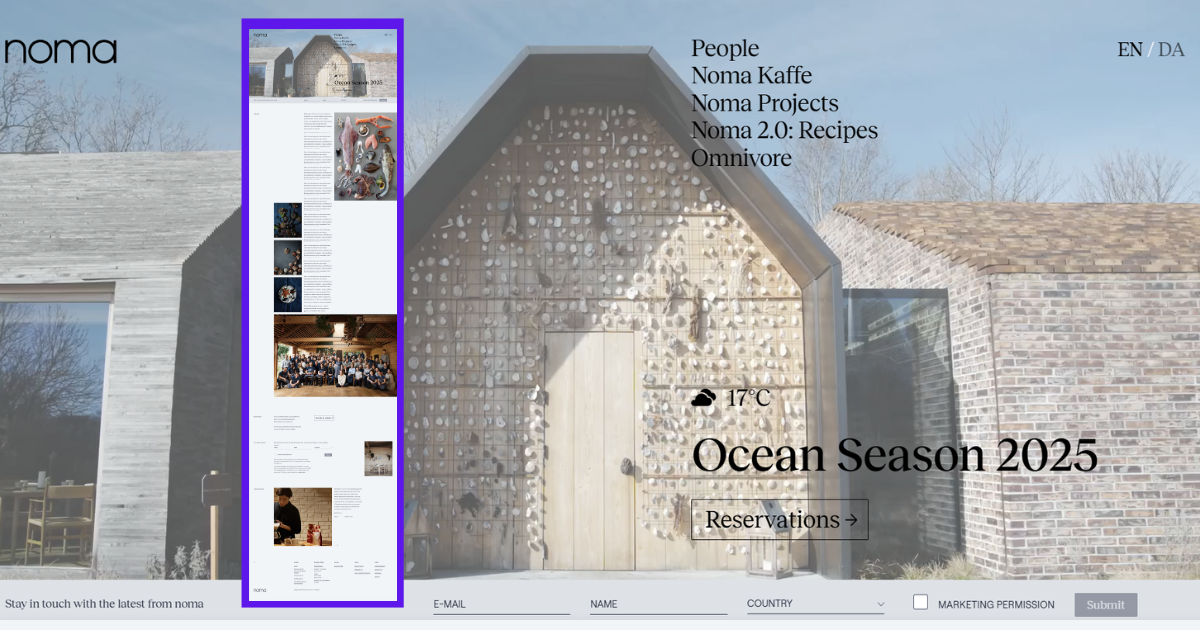
Noma opens with its location and season, then a “Book a table” button. A signup form for reservation news comes next, followed by its pantry products and coffee. Further down, a letter from the team explains its move home from Los Angeles and its plan for twelve seasons, one for each month. It reads more like a note to friends than an ad.
Copy this: Give your homepage one main job. Noma’s job is getting people to book, and everything else waits lower down. It also sells products without making the page feel like a store.
Skip this: There is no menu or price on the homepage. A neighborhood restaurant cannot get away with that.
How to Develop a Functional Restaurant Website
Restaurant website development isn’t overwhelming. With the right tools and strategic plan, you can launch a high-performing site that will attract diners and keep them returning.
That said, here are the steps to develop a functional restaurant website.
Select a Domain
Your restaurant’s online identity is your domain name. So, select something that matches your brand and creates a buzz among customers. If you’re struggling for ideas, check out Unique restaurant name ideas for inspiration. Firstly, use a common extension like .com or .restaurant. Avoid using numbers and hyphens. Keep the name short. Before purchasing, check the availability of the domain name.
After finalizing the name, purchase the domain from a reliable source, like GoDaddy, Google Domains, or Namecheap.
Pick a Hosting
After completing the domain setup, you need to choose a hosting provider to keep your website live and fast. Hosting is the place where all your data is stored. Go for Bluehost, SiteGround, or Hostinger. They are well known because of their fast speed and excellent customer support.
Choose the plan that matches your restaurant’s needs.
Choose a Content Management System
The first step is selecting a suitable platform. Wix, Squarespace, and WordPress are popular for their flexibility and user-friendly interfaces.
WordPress is the best fit if you want to share blog content. It offers detailed customization. You can use a restaurant website theme to create your website with a few clicks. You don’t need to have any coding knowledge.
Design and Customize
Choose a template that reflects your restaurant theme. Explore different restaurant website themes. Furthermore, you can customize the theme according to your brand guidelines.
Always use professional food images and short videos of the restaurant’s ambiance. Keep in mind to make the site mobile-friendly.
Also, compress images and limit third-party plugins to ensure fast loading. Maintain a visually clean and clutter-free website.
Don’t forget, great design is not about being good-looking; it makes the viewers satisfied and informed.
Build Essential Web Pages
Before designing, map out the pages you will include in the restaurant website. Precisely, you will need the following-
– Home page with intro and key links
– Clearly organized and readable menu.
– About us, to share your culinary journey and team members.
– Contact with address, phone numbers, and opening hours.
– Reservation and online ordering.
Optional Pages: Insert a gallery, a blog, and upcoming events pages. These pages will attract customers to explore your restaurant website.
Add Functionality
The functionality of a restaurant website can convert viewers into customers.
So, add different features like online ordering, reservation, and a digital menu on your website. You can integrate all these functions by using plugins.
Link all your social media platforms and Google Maps. It will help customers navigate your website without any hassle.
Implement a newsletter signup to accumulate customer emails. In the future, you can run promotions or events by creating a calendar or blog section.
Initiate Launching and Optimization
Evaluate your website’s function on desktop, mobile, and other devices before launching. Check that menus, links, and buttons work correctly. Seek feedback from friends, family, or staff for improvement.
You can use Google Analytics to track traffic. Pinpoint the best-performing pages and note the pages that need improvement.
Frequently update your menu, photos, and open hours. Publish seasonal and trending content to keep your site fresh and interactive.
Remember, you need to treat your restaurant website as an online store. It requires maintenance to stay welcoming.
That’s how you create a restaurant website. You may read this article on how to make a restaurant website in WordPress to learn more about developing a restaurant website.
Restaurant website mistakes that cost you guests
The most costly mistakes all make people work too hard for simple facts.
- Using a PDF menu. It is slow and hard to read on a phone. A PDF can stay as a printable extra, but it should not be your main menu.
- Hiding prices. Many people check the menu to see what a meal will cost. Without prices, some will just leave.
- Keeping old hours. Wrong holiday hours send people to a locked door. Update your site and Google on the same day.
- Sending all orders to delivery apps. Put your own order link first. Keep the apps for new customers.
- Autoplaying a heavy video. It slows the page. It can also use up a guest’s mobile data.
- Blocking pinch zoom. Some sites stop people from zooming. This hurts anyone who needs larger text.
- Showing stale news. A “Summer Specials” banner in November makes people wonder if you are still open.
Frequently Asked Questions (FAQs)
What should be on a restaurant website?
At a minimum, a restaurant website should contain a homepage, menu, contact information, reservation or ordering links, and social media profiles. You can add optional pages like blog, gallery, and calendars. These pages will enhance customer engagement.
How do I make my restaurant website unique?
Utilize high-quality images and unified branding. Ensure the website has a mobile-responsive design. Use storytelling content to display your unique vibe. Engaging content like promotions, chef stories, and user-generated content increases traffic.
How to design a restaurant website?
To design a restaurant website, gather up information and ideas. Choose a tempting template. Prioritize branding to reflect your brand identity. Ask for feedback.
Final Thoughts
Hope you gather all the ideas to build a stunning restaurant website.
A well-designed restaurant website acts as a digital brochure. It is a powerful digital tool to increase traffic and maximize profit margin.
A high-class web-based presence is important to stay ahead in a fierce culinary market. Your restaurant website should deliver guests an adventurous dining experience.
Craft a captivating restaurant website through inspiration and examples. Take your restaurant business to the next level.