


On This Page
Ever thought about how to start a gaming blog? You know you can connect with fellow gamers, share tips, tricks, and guides to help others by launching a gaming blog.
You can also make a handsome amount by sharing knowledge on your gaming website. Indeed, having a gaming blog has many benefits. That’s why you might want to build one.
However, the problem begins when you opt to create one, as you may not know where to start. Don’t worry. We encourage you to read this helpful content to the end to get all your answers, along with a step-by-step guide to creating a gaming blog. Let’s jump right in.
How to Start a Gaming Blog Easily
To build a gaming blog, follow the easy steps outlined in this section. So, read it and take action accordingly.
Step 1: Select Your Niche
Before you ponder creating a gaming blog, you first need to select the perfect blog niche. If you make any mistakes at this step, no matter how hard you try, all your efforts will end up in vain.
So, cautiously select your niche that aligns with your passion and expertise within the gaming industry. We recommend using Google Trends to determine if people are still searching for the niche you want to blog about. Check the data from the past five years of that niche and ensure it’s in an upward trend.
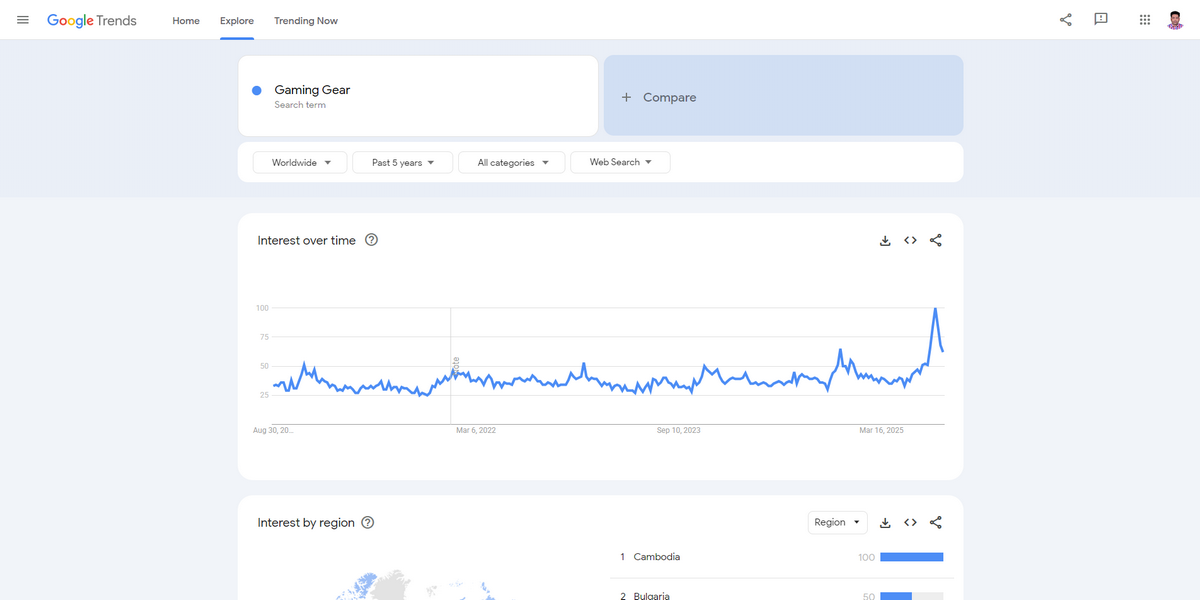
Explore sub-niches of your main topic. Then, research those topics using various forums, news blogs, journals, videos, and other relevant content.
Look for what people discuss and what problems they frequently encounter – these are excellent resources for creating informational content on your would-be blog. You need to immerse yourself in the gaming community and explore the cultural aspects of gaming. In short, be a gamer.
Once you select some subtopics/niches, evaluate the competition in those topics to identify opportunities and gaps. You can use Google’s Keyword Planner to find keywords/topics for free.
However, we suggest you utilize Ahrefs, SEMRush, or other popular keyword research tools to find keywords and assess competition.
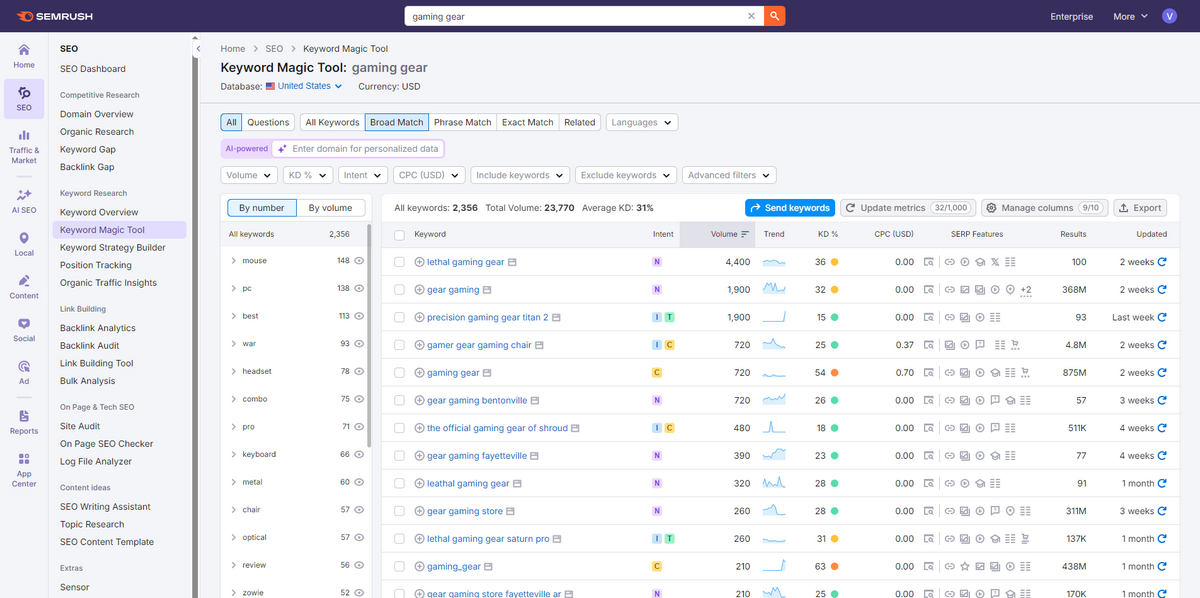
Finally, select a main niche or a sub-niche after researching them thoroughly.
Pro Tip: Choose a sub-niche with low competition to achieve success fast with your gaming blog.
Step 2: Pick a Domain and Connect It with a Host
Once you choose a niche/sub-niche, you need to select a domain name for your gaming blog. It’s necessary to help people access your website. So, carefully select one by considering the criteria below.
- Make sure the domain is short, catchy, and easy to remember
- Ensure the domain is easy to write, spell, and pronounce
- Utilize domain name generators to brainstorm ideas
- Don’t include any numbers, hyphens, or special characters in the domain
- Check its previous registration history and spam score
- Include relevant keywords in the domain (but don’t overdo it and avoid pigeonholing yourself)
- Check social media handles for that particular domain
- Inspect trademark and other legal issues for that domain
- Check the domain name availability and register it immediately upon finding it
After registering your domain name using a famous domain name registrar like Namecheap, you need to connect that domain with a host. Here’s what to take into account while choosing a domain host.
- Learn about different types of hosting (Shared, VPS, WordPress, Cloud, etc.)
- Check your chosen host’s uptime and bandwidth facilities (ensure it offers a high uptime and excellent bandwidth)
- Inspect how good the hosting provider is at offering automatic and regular backups
- Make sure it provides adequate storage
- Prioritize a hosting provider that offers dedicated and 24/7 support
- Ensure the host has an easy-to-use cPanel or hPanel
- Make sure it offers unparalleled security like SSL certificates, DDoS protection, malware protection, and more
- Check other users’ reviews and compare pricing with contenders
After choosing your hosting provider, reach out to customer support to connect your domain name. It will take one to a few hours to get your domain connected.
Step 3: Choose a Website Builder
At this point, you need to select a website builder to start creating your gaming blog. You can find many site builders to choose from. However, we’ll use WordPress for this tutorial, and we recommend you do the same.
Why WordPress? It’s a free and open-source platform. This content management system (CMS) takes care of over 43.4% of all websites on the internet. Besides all these, WordPress gives you all the functionalities to easily develop a gaming blog or any other website, meeting your requirements.
That’s why we select WordPress as our website builder. You can easily install this CMS on your cPanel. If you encounter any issues during installation, contact your chosen hosting provider’s customer support for guidance on installing WordPress.
Step 4: Install a WordPress Theme
Now that you’ve installed WordPress, the next step is to install an attractive, SEO-optimized, responsive, easy-to-navigate, and modify a top-quality WordPress theme to enable your gaming blog to look its best.
You can find many gaming blog WordPress themes on the WordPress repository. Select one that meets your requirements. We encourage you to pick a paid theme like Gamxo if you want to quickly and easily create a professional gaming blog on WordPress.
Step 5: Install and Activate The Post Grid Plugin
If you don’t install the premium Gamxo theme, you’ll need to install and activate the Post Grid plugin to create your gaming website effortlessly. This WordPress blog builder is available in both free and pro versions.
While its free version is decent for tackling general blog tasks, we recommend you go with its pro version to reap the plugin’s full benefits. So, get it today and follow the installation and activation instructions below.
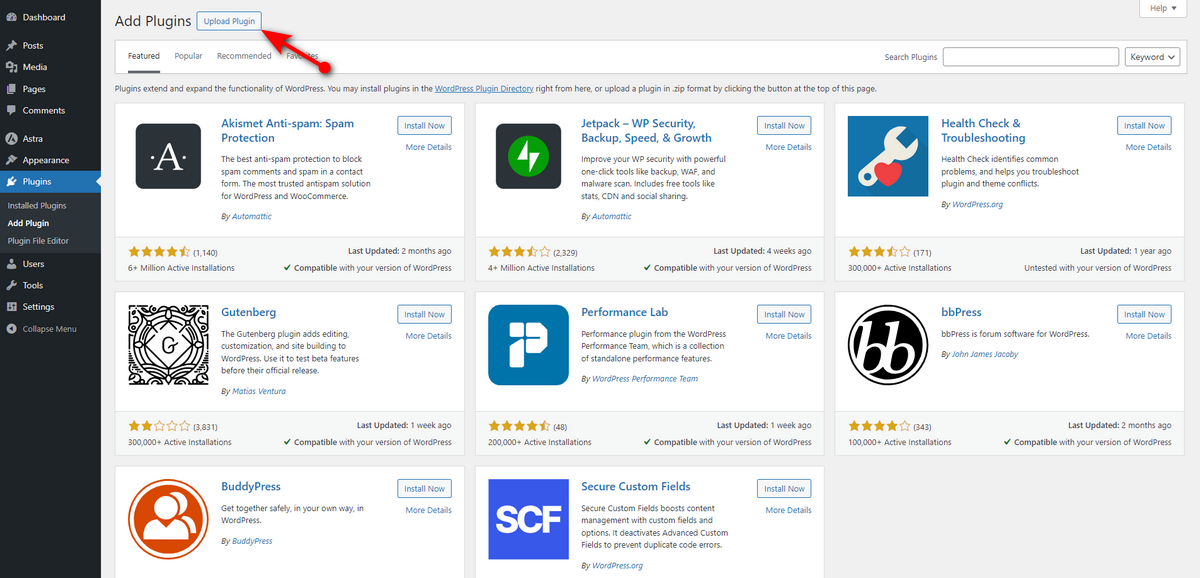
- Go to your WordPress Admin Sidebar >> Plugins >> Add Plugin.

- Click Upload Plugin button to upload the plugin zip file you received via email after purchasing the pro version of the Post Grid.
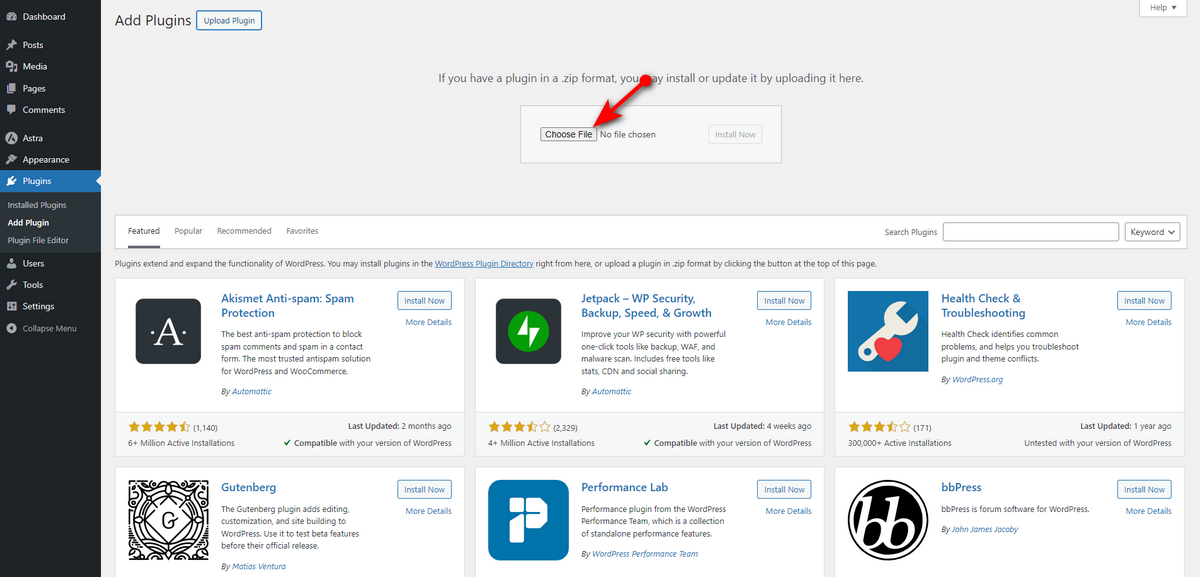
- You can now click the Choose File button and upload the zip file.
- Afterward, click the Install Now button.

- Now, press Activate Plugin button.
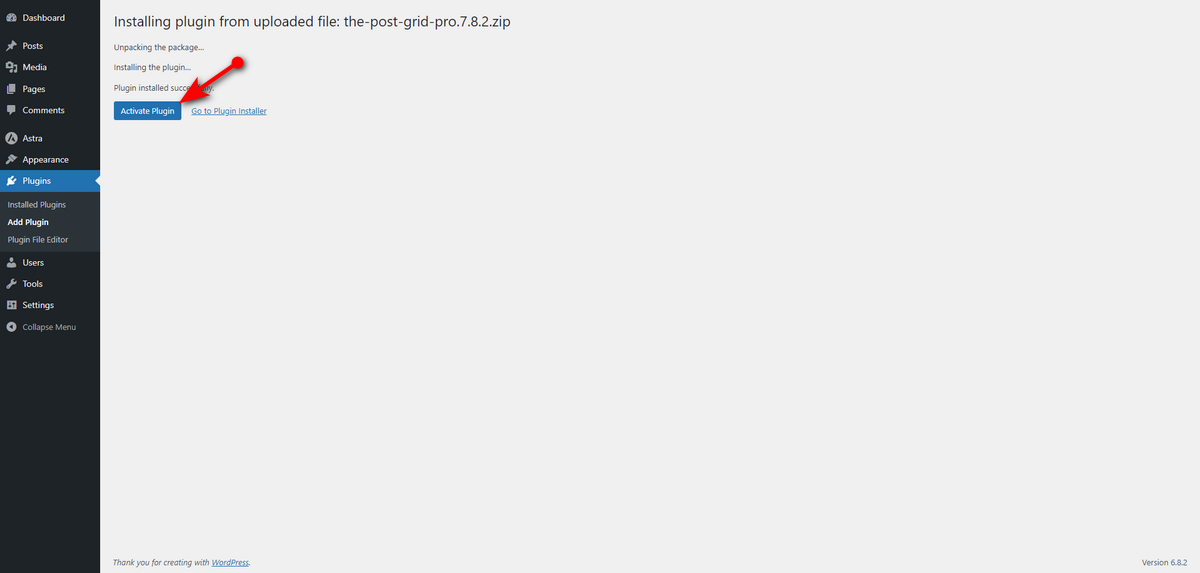
At this stage, you’ll witness a message at the top of the plugin installer window. You’ll be asked to install and activate the free version of the Post Grid plugin for the pro version to work correctly.
So, install the free version from the WordPress plugin repository and follow the next steps in the following section.
Step 6: Design Your Gaming Blog
Now, you need to work on designing your gaming blog. The Post Grid has several gaming templates that you can use to instantly design your website. Let’s see how to use a template to your benefit.
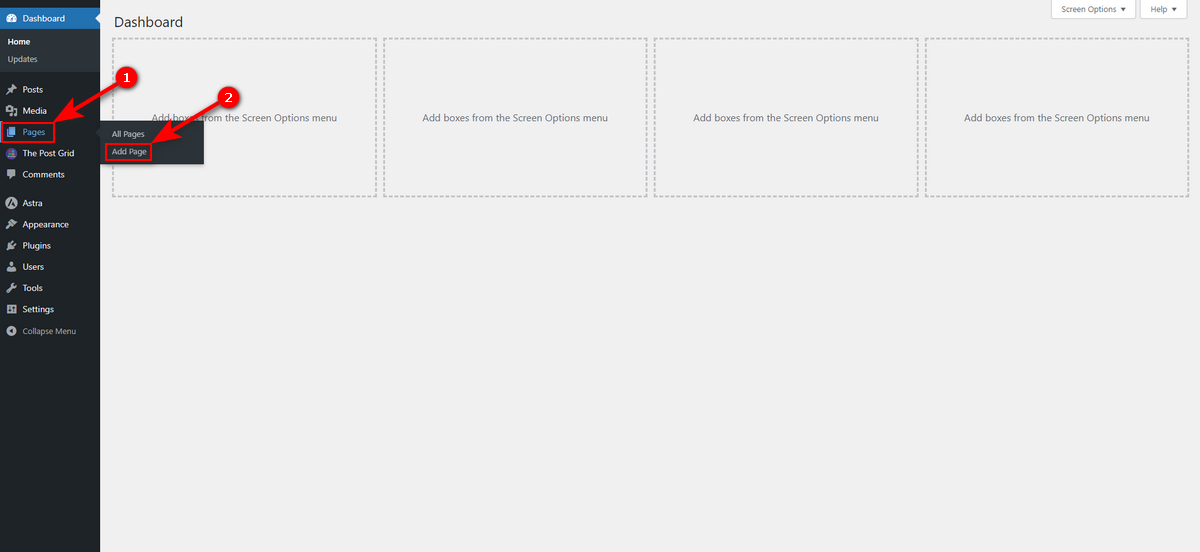
We’ll design the homepage using a postgrid template. To do so, let’s create a page with the Gutenberg editor. Go to Pages >> Add Page from your WordPress Admin Sidebar.
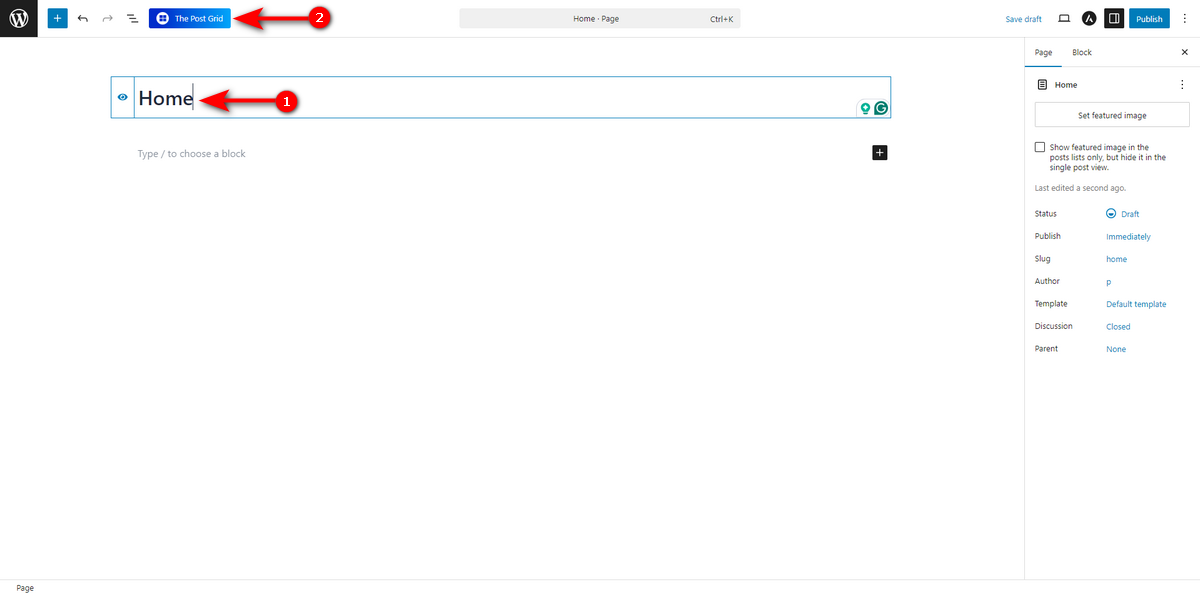
Write your page name inside the Gutenberg editor and click The Post Grid button at the top left.
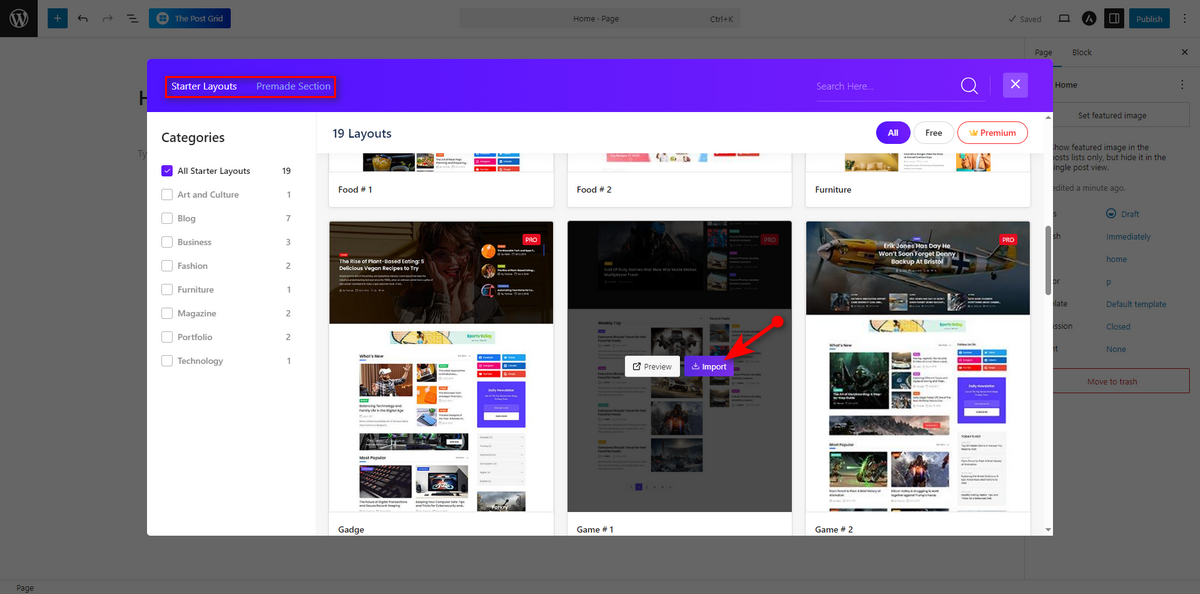
You’ll now see a pop-up featuring Starter Layouts and Premade Sections. Explore all the layouts and select a game layout you like. Hover your mouse pointer over your chosen layout, and two buttons will appear; click the Import button.
The layout will be inserted inside the block editor, and you’ll notice block settings on your right side.
Note that you build some demo posts before including a layout. Otherwise, you won’t see anything after adding a layout to the block editor.
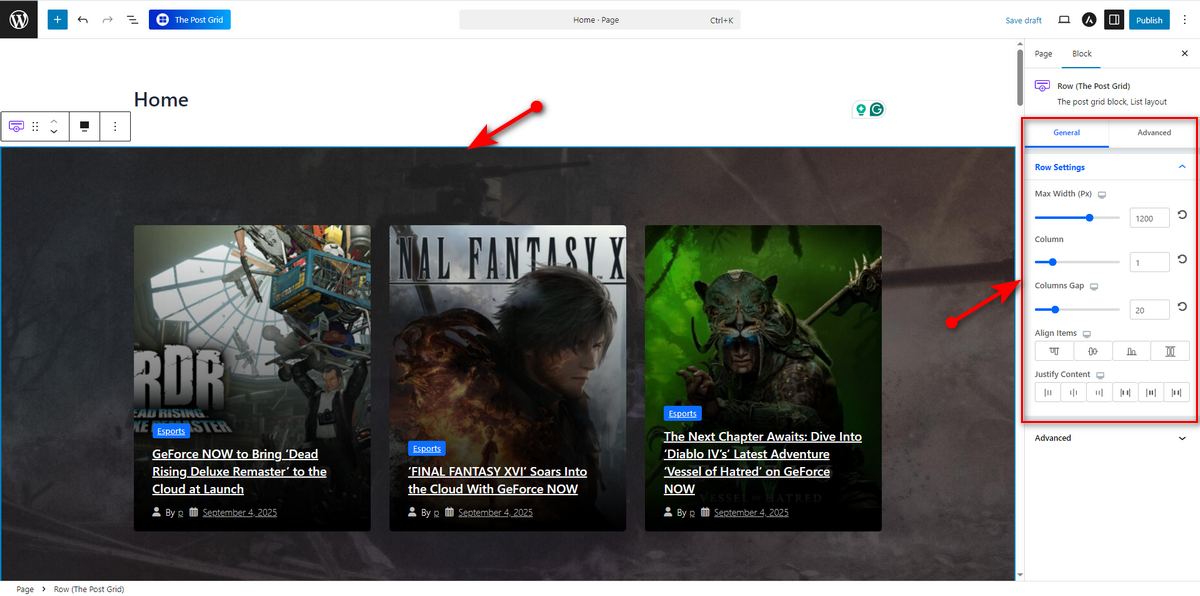
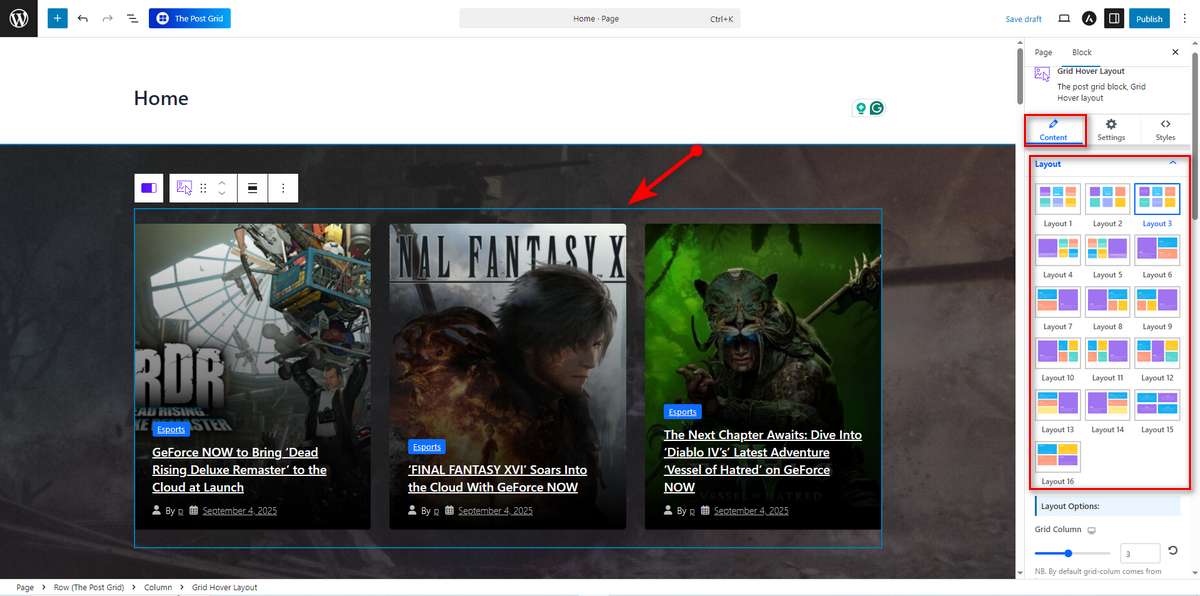
You can now start customizing the layout as you wish. For instance, you want to change card layout inside a block. So, select it and you’ll see a couple of layouts on the right side under Content tab. You may choose one that fits your style.
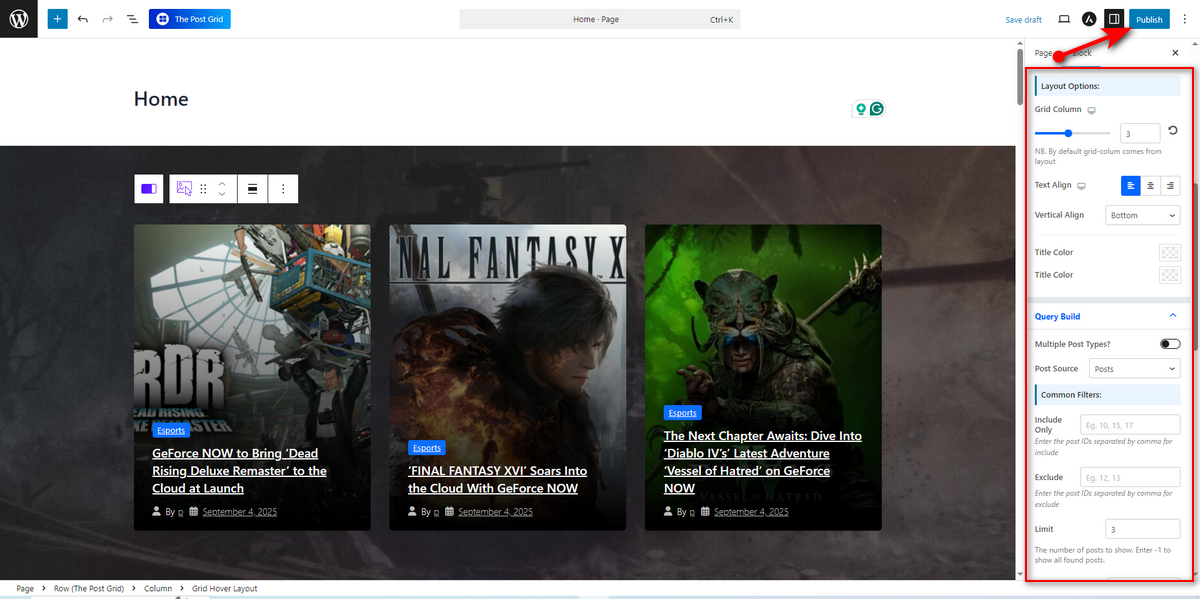
If you scroll down on the right sidebar while on the Content tab, you’ll see Layout Options that enable you to define the number of grid columns, set alignment, select title color, etc.
If you jump over to Query Build section, you can notice the Multiple Post Types? switch, Post Source, Common and Advanced Filters, and other settings to help you customize the layout according to your requirements.
Once you’re happy with the modification, hit Publish button to make your homepage go live.
That’s how you design your gaming blog’s homepage with the Post Grid plugin. You can read the plugin documentation to learn about all the functionalities of this blog builder. Okay, let’s now take a look at the homepage we designed.
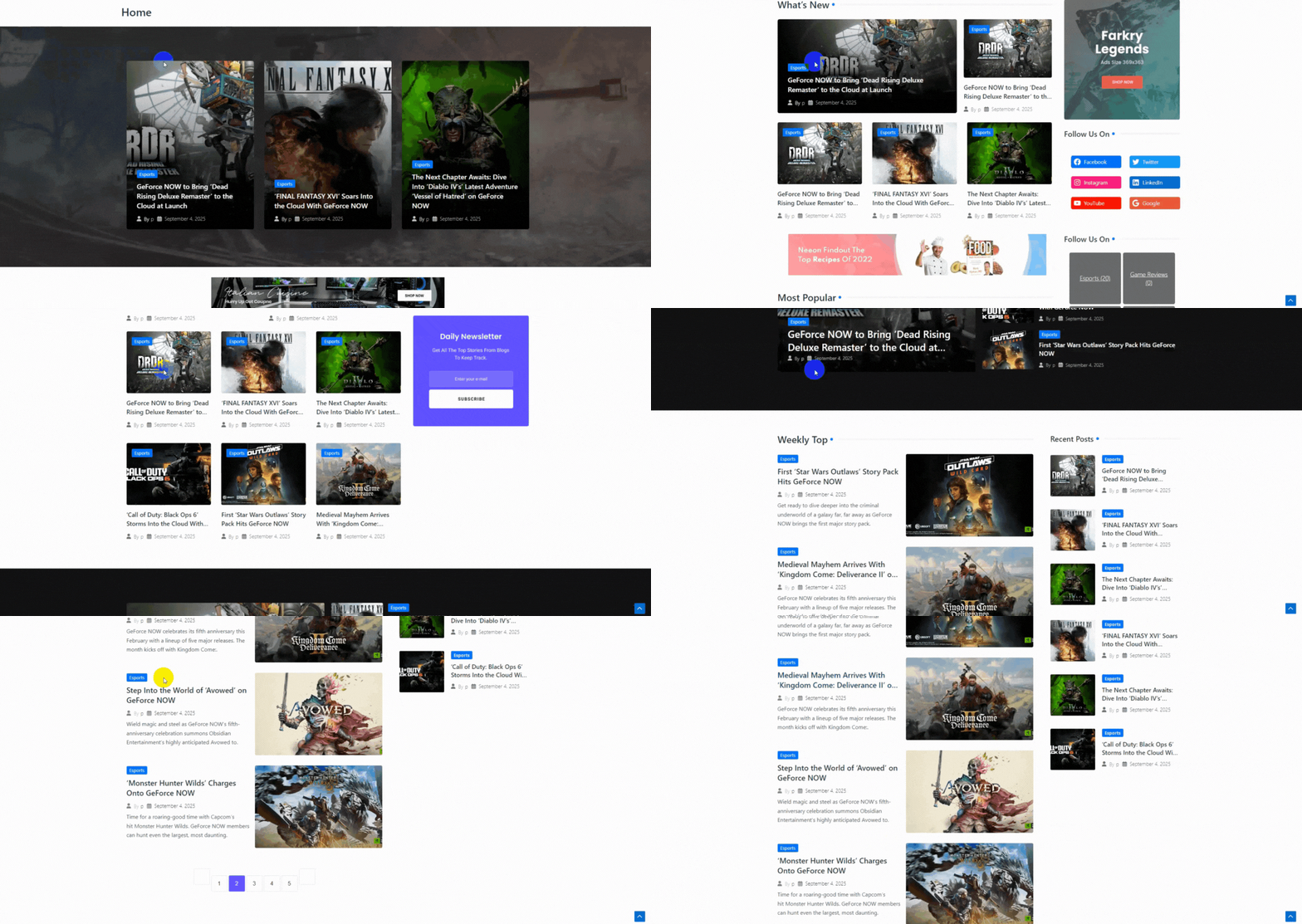
We won’t show you the full website editing process, such as editing header and footer sections, to keep this article compact. We believe you can easily accomplish these tasks.
Step 7: Build Other Necessary Pages
After creating the homepage of your gaming blog, you need to focus on building other essential pages. Here are the other web pages you need to make.
About: You must build an About page to introduce yourself to your readers, share your blog’s purpose, and tell why they should care. You can also use this page to link to popular posts or services.
Contact: A contact page is important for a gaming blog. It offers readers a way to get in touch with you. Hence, create such a page and include a contact form to help readers reach out to you.
Blog: This is the most essential page where you’ll post all your articles, including game reviews, latest news, and other blog content to gain organic traffic.
Privacy Policy: You need to build a privacy policy page on your gaming blog since it’s legally required to inform readers how you collect and use their data.
Step 8: Plan, Write, and Publish Your Gaming Blog
Will your gaming blog be successful? The answer to this question lies in effective content planning and creation. So, you need to build a solid plan regarding how you will accomplish the blog posting task.
Begin by understanding your audience’s preferences and challenges, and then address their needs with informative, factually correct, and up-to-date content. To achieve a great outcome, you should organize your articles with a content calendar.
Additionally, consider the following tips while creating content for your gaming blog:
- Build how-to guides and techniques ideal for beginners and experts.
- Don’t forget to share your unique insights through opinion pieces within the articles to benefit from SEO.
- Include high-quality visuals like concept art, infographics, and screenshots in articles.
- Embed video content like gameplay, tutorials, or game trailers within articles.
- Ensure your blog posts have digestible sections with subheadings.
- Write compelling titles to attract readers and increase click-through rates.
- Ensure all articles are error-free and verify the accuracy of any facts or statistics.
- Finally, publish your blog posts.
Step 9: Promote Your Gaming Blog
After publishing your gaming blog, you need to promote it to attract more visitors. Follow the strategies below to grow your gaming website.
SEO (Search Engine Optimization): It’s a powerful method to help you obtain organic traffic on your gaming blog. We’ve already discussed some parts of SEO in the first step of this article.
There, we talked about how to choose a niche. However, we skipped telling how to research different types of keywords and optimize blog posts. We suggest you read external sources to learn about these topics.
SMM (Social Media Marketing): In addition to SEO, consider sharing your posts on various social media platforms, including Facebook, Instagram, Pinterest, and others, to reach a broader audience. Leverage diverse gaming-related groups and forums to reach the right audience for your articles.
Email Marketing: Email marketing is an outstanding strategy to reach a targeted audience. Consider adding a newsletter pop-up or section to your gaming blog, inviting readers to subscribe for exclusive content, special offers, and exciting giveaways.
Once they join and you’ve built an email list, use it whenever you publish a new blog post. Send a portion of the blog to their inbox and invite them to read the full gaming blog.
Collaborations: You can collaborate with other gaming bloggers or invite guest writers to contribute to your gaming website by enabling the front-end post submission feature.
Step 10: Monetize Your Gaming Website
Okay, you’ve built your gaming website, published articles, and promoted it. Thus, you continuously receive a good amount of web traffic per month. It’s time to start earning some money with your blog. Here are ways you can utlize to monetize your gaming site.
Affiliate Marketing: Find some gaming-related companies that offer high-commission affiliate programs. Join those programs, get approval, and earn commissions by promoting gaming gear through your gaming blog.
Display Ads: You can earn money through display ads from platforms like Google Adsense. Add these ads to your gaming blog and earn revenue whenever visitors view those ads.
Subscription Content: Create, or collect, and introduce some premium-quality content and offer it on a paid subscription. You can also create various membership packages that provide access to exclusive content for a limited time, and then sell these packages to users to generate revenue.
Here are a few tactics to help you make money with your gaming blog. There are more ways to generate cash through blogging. You may conduct thorough research on this topic if you need more options to earn money other than those mentioned here.
Gaming Blog Examples to Get Design Ideas
How your website appears matters a lot in keeping readers engaged. You need to make it look attractive and easy to navigate.
So, research established gaming website designs before you start creating your blog site. To help you with the research, we listed a few websites below – check these out.
1. IGN

IGN is one of the largest and most recognized names in gaming media, and its website design reflects its massive scale. What you should immediately notice is its content-rich homepage, which typically utilizes a clean grid system to display a wide variety of content types.
Pay close attention to their navigation bar, which allows users to quickly jump to specific platforms, genres, or content pillars. This is an excellent lesson in information architecture.
For your own blog, you can learn from IGN’s use of a strong visual hierarchy. The grid-style layout immediately grabs visitor attention and guides them to the latest content.
2. GameSpot

Like IGN, GameSpot is a major authority in the gaming space, but its design offers a slightly different approach. The website often presents a cleaner, more spacious layout with a strong emphasis on high-quality content right on the homepage.
Notice how their featured articles and reviews are presented in well-defined blocks, each with a crisp image and a bold headline. This creates an experience that feels less cluttered and more like a modern digital magazine.
The key takeaway from GameSpot is its clutter-free layout. You can study how GameSpot displays its content to keep users engaged and implement its design in your gaming website.
3. Kotaku

Kotaku’s design philosophy leans more toward a traditional blog feed, making it a fantastic model for a content-first website. When you land on their homepage, you’re immediately presented with the latest stories in a single-column layout.
This design choice puts the focus squarely on compelling headlines and powerful featured images. Kotaku proves that you don’t need a complex grid or dozens of widgets to be successful.
Instead, they prioritize readability and a simple user journey. For your new blog, analyze how Kotaku’s article pages are structured for long-form reading.
This is a perfect example of how to build a site that encourages visitors to scroll and discover the next great article.
4. Polygon

If you want your gaming blog to have a unique and bold brand identity, you must study Polygon. Their website design is known for its distinct visual flair, often breaking from traditional layouts.
They utilize a unique color palette, custom fonts, and illustrations for their significant features, which makes their content instantly recognizable. What you can learn from Polygon is the power of branding through design.
They don’t just report the news; they present it with a specific personality. While you may not have their resources for custom art, you can adopt their principle of choosing a distinct color scheme and font pairing to make your blog stand out in a crowded market.
5. Shacknews
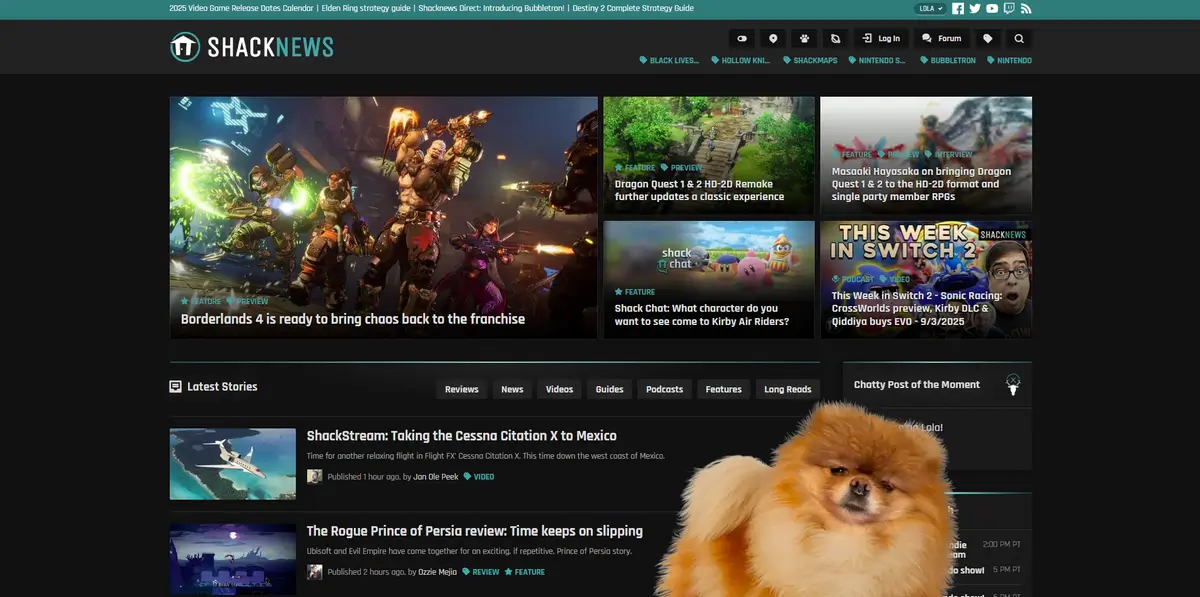
Shacknews is a veteran in the gaming journalism world, and its website design is a masterclass in serving a dedicated community.
While it features all the standard news and reviews, its design smartly integrates its famous “Chatty” community forum directly into the user experience.
You will notice that articles often have a prominent link or section dedicated to community discussion, making readers feel like part of a larger conversation.
This approach turns a one-way content feed into a two-way street. For your blog, consider how Shacknews prioritizes this interaction.
You can replicate this by enabling a robust comments section, adding a forum, or featuring user-generated content. Their design shows that building a space for your audience to connect can be just as important as the articles you write.
Benefits of Starting a Gaming Blog
Okay, so you understand the steps to build a gaming blog, but you might be wondering what the actual rewards are for your effort. Here are the key benefits you can look forward to.
Build Your Brand Awareness: Your blog is a fantastic tool for making an impact in the crowded gaming space. Through consistent, high-quality content, you introduce your perspective and values to a global audience. This is how you stop being just another gamer and start building a recognizable brand.
Engage and Understand Your Audience: A blog enables you to communicate directly with your readers. You can use the comments section and community feedback as a testing ground for your content ideas.
By interacting with your audience, you gain unparalleled insight into what they want, what problems they face, and what games they are passionate about.
This information is invaluable, enabling you to craft future articles and content strategies that perfectly match your readers’ needs.
Establish Yourself as an Authority: Consistently publishing insightful, well-researched content will position you as a credible expert within your chosen niche. This authority is the foundation of a successful blog.
Increase Your Online Visibility: One of the most crucial benefits of regularly updating your blog is the boost it gives your SEO (Search Engine Optimization).
Every time you publish a new article optimized with relevant keywords, you give search engines like Google fresh content to index.
This significantly improves your website’s ranking, making it much easier for new readers to discover your blog organically.
Frequently Asked Questions (FAQs)
Do You Need to Be a Professional Gamer to Run a Gaming Blog?
Of course, not. You don’t need to be a professional gamer to run a gaming blog. You just need enthusiasm and deep passion for gaming. You need to learn and share information about gaming through your blog regularly.
Do Small Blogs Make Money?
The answer to the question depends on the size of your blog. If your blog doesn’t attract a significant number of visitors per month, you’ll struggle to make any money. To generate revenue with your gaming website, you need to have patience and implement a correct strategy and consistent effort.
How Long Does It Take to Make $1000 Per Month Blogging?
It can take anywhere from a few months to over a year. Basically, it depends on your niche and the marketing channels you utilize to promote your gaming blog.
Remember that making money with blogging isn’t a quick process. So, have patience and follow successful bloggers along with their strategies.
Summing Up
There you have all the information regarding how to start a gaming blog by following the easy steps. With this guideline, building a gaming blog in 2025 has become incredibly easy. So, follow these and create your desired gaming website on WordPress.
Remember, to become a successful blogger, you need to deeply research your niche, find out your target users’ pain points, and address their problems through helpful guides, tutorials, videos, and other forms of content. Only then can you expect to grow your blog. Our best wishes will be with you on your blogging journey.



