


On This Page
Customizing your restaurant’s food menu to feature diverse cuisines is an excellent strategy for attracting a broader customer base and boosting sales.
However, success hinges on careful planning rather than simply adding new dishes.
This guide outlines the critical factors you must consider, from analyzing your target audience and local food preferences to assessing kitchen capabilities and ingredient sourcing.
We will then provide a practical, step-by-step tutorial on how to customize your food menu for different cuisines to ensure your online menu remains both appealing and operationally sound.
Factors to Consider Before Customizing
Before you consider customizing your food menu on your restaurant website, careful planning is essential to ensure success. Here are some significant factors to evaluate to build a food menu that aligns with customers’ expectations.
Target Audience and Demographics
It’s essential to research your target audience for effective menu planning. If your target audience is young diners, they prefer trendy fusion dishes over traditional options that appeal to older diners. So, learn about your audience before you consider customizing your food menu.
Local Food Preferences
The appreciation of your target audience for your food menu depends on their tastes and cultural norms.
For instance, people who live in coastal regions prefer eating seafood-heavy cuisines. On the other hand, you can serve pork dishes to diners who reside in the Middle East.
Thus, research local preferences before customizing the food menu to make it feel authentic and appealing to your target group.
Ingredient Availability and Cost
You need to consider ingredient availability and cost when customizing your restaurant’s food menu. As you know, without ingredients, you can’t prepare dishes, let alone put their names on the food menu.
So, check whether food ingredients are available locally and come at a low price. Research local markets and online suppliers, and gather ingredients from either or both.
No matter who you choose to get food ingredients from, ensure that you receive the best quality at a low price.
Kitchen Capabilities and Staff Expertise
Your kitchen’s infrastructure and team’s skills determine what cuisines you can execute well. Some cuisines require specialized tools, like a tandoor for Indian naan or a wok for Chinese stir-fries. Assess if your kitchen can handle these.
Ensure your team is trained in the techniques of new cuisines. For example, sushi requires precision cutting, while Mexican dishes need mastery of spice blends.
Start with dishes that leverage existing skills. If your staff excels at grilling, consider Mediterranean or Latin American grilled specialities.
You need to invest in training or hiring a chef with expertise in a specific cuisine to elevate your menu’s quality and authenticity.
👉 Relevant Read: Unique Restaurant Menu Ideas
How to Customize Your Food Menu for Different Cuisines
If you have a restaurant website on WordPress, you can easily customize your food menu. You just need to install the Food Menu plugin by RadiusTheme and follow the steps outlined below.
Step 1: Install the Food Menu Pro WordPress Plugin
Get the Food Menu Pro plugin and follow these steps to install it. For your information, this plugin is available in both free and paid versions. We recommend opting for the pro version, as it offers the most benefits.
That said, here are the steps for installing this plugin.
- Visit your WordPress Admin Panel and then go to Plugins > Add Plugin.
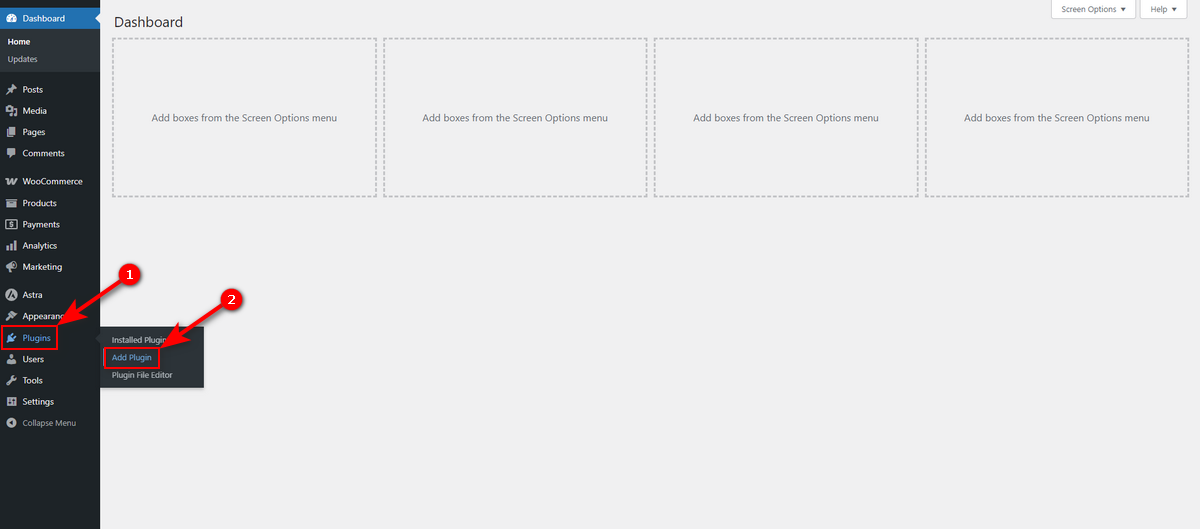
- Hit Upload Plugin button.
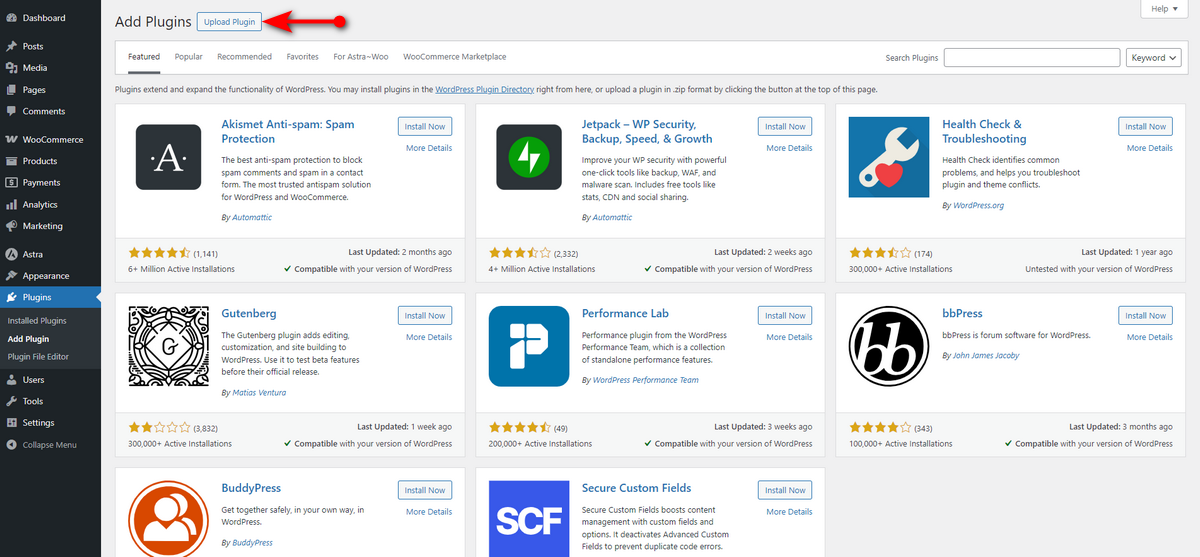
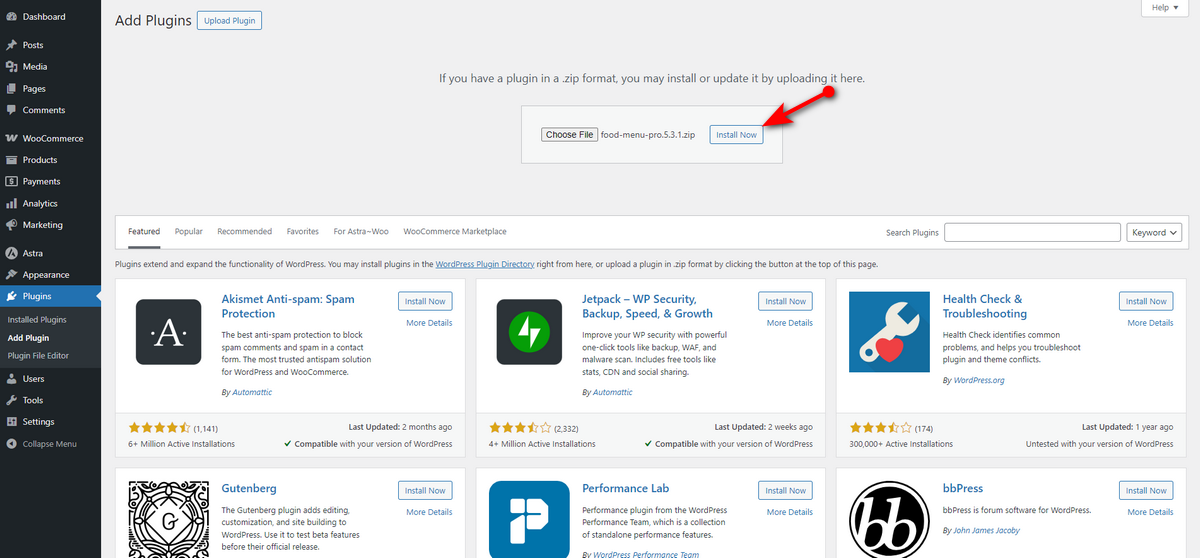
- Click Choose File button and upload the pro version zip file of Food Menu.

- Hit Install Now button and wait.
- Now, click Activate Plugin button.
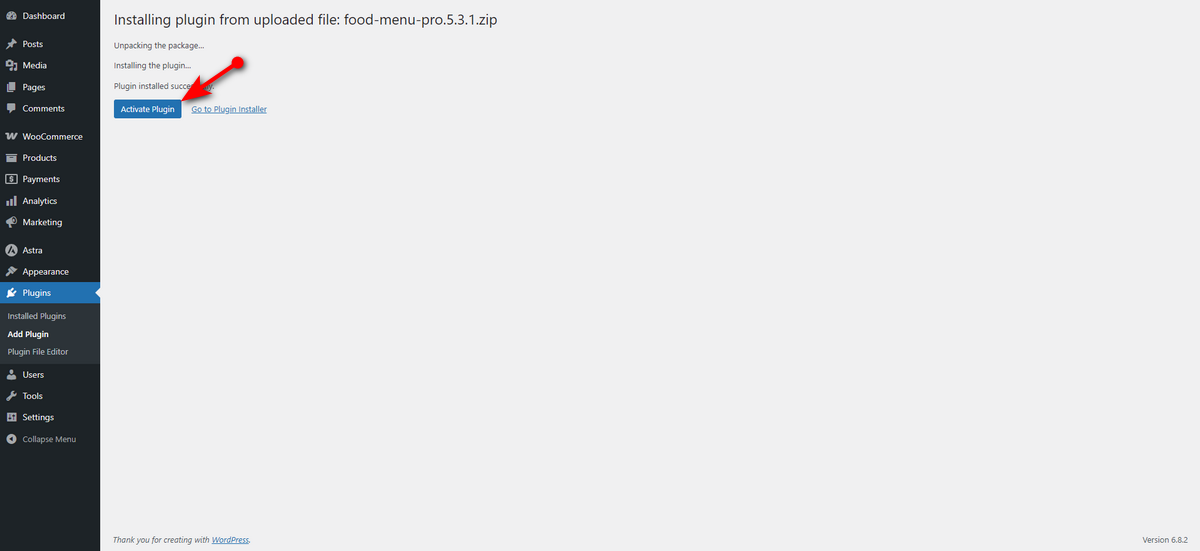
There, you’ve installed the pro version. Note that you need to install and activate the free version, too, for the pro version to become functional.
Additionally, we recommend installing and activating the WooCommerce plugin to enable online ordering on your restaurant website.
Step 2: Add Food Details
Customizing your food menu begins by adding details about your menu items. For example, the type of food your menu item contains, the specific food ingredients each item has, and other relevant information.
This plugin allows you to add everything with ease. Let’s explore how to create food categories, add ingredients, and track nutritional values using this great plugin.
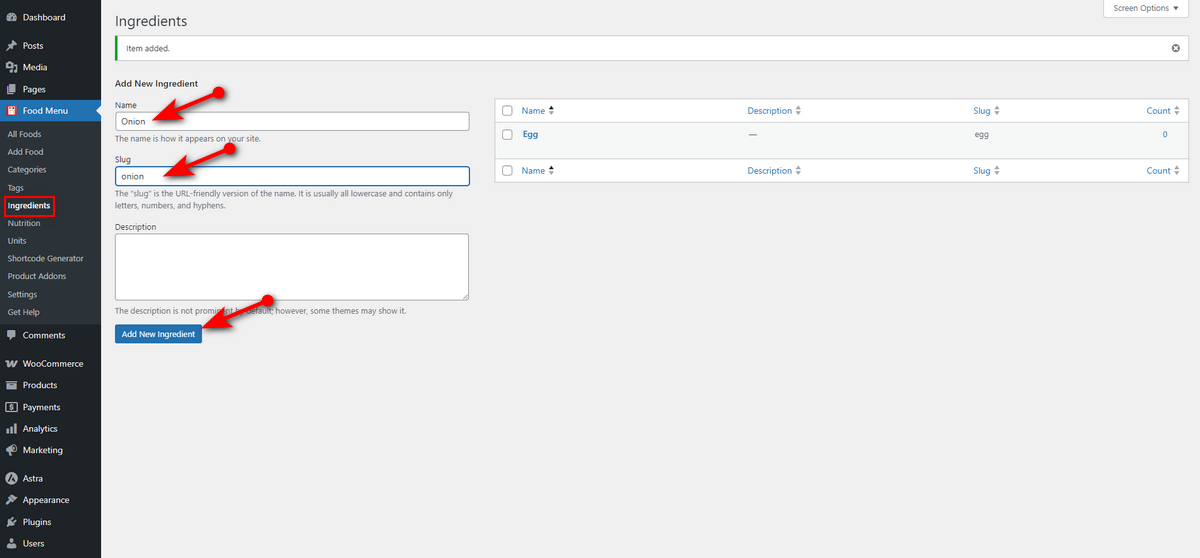
We’ll first create food categories for different cuisines. Remember, you need to follow these same steps for adding food ingredients and nutritional value. Let’s begin.
- Go to Food Menu and then to Categories from your WordPress Admin Panel.

- Now, write your food category name and slug, and then click Add New Category button. Repeat this step every time you want to create a new category.
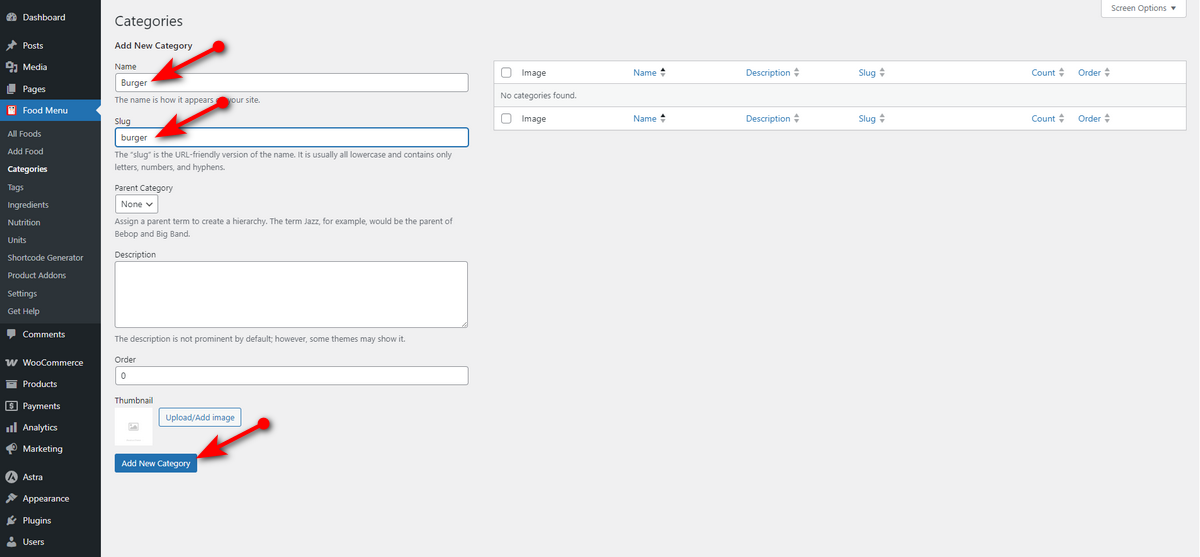
That’s how you create a food category. You need to follow these exact steps to add food ingredients and nutritional values to your food items.
Step 3: Include Food Items
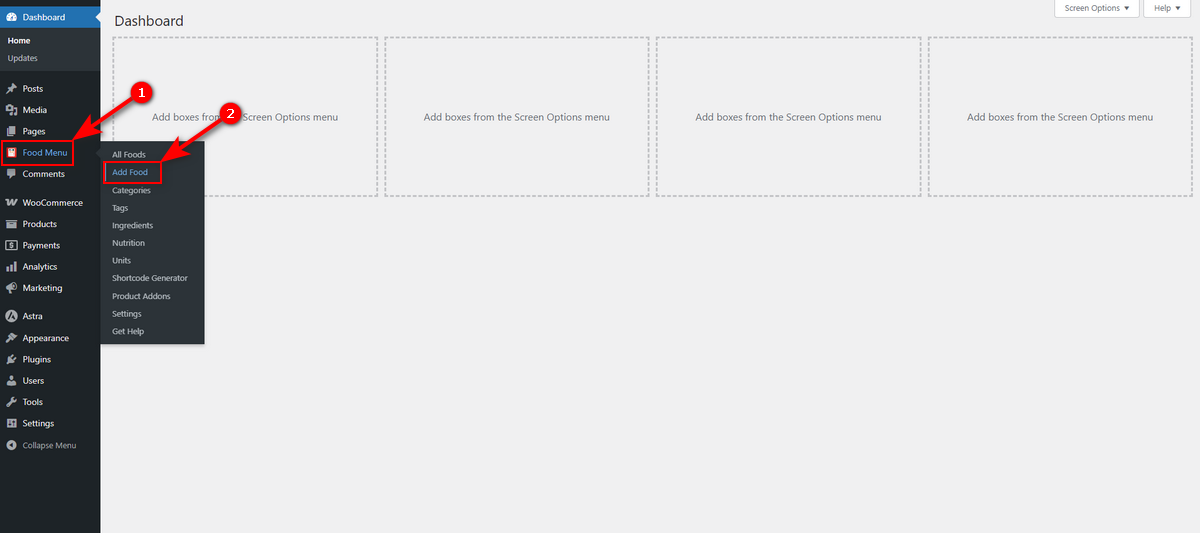
After creating and adding food categories, food ingredients, and nutritional value, you can start including your restaurant’s food menu items. To do so, head to WordPress Admin Dashboard >> Food Menu >> Add Food.
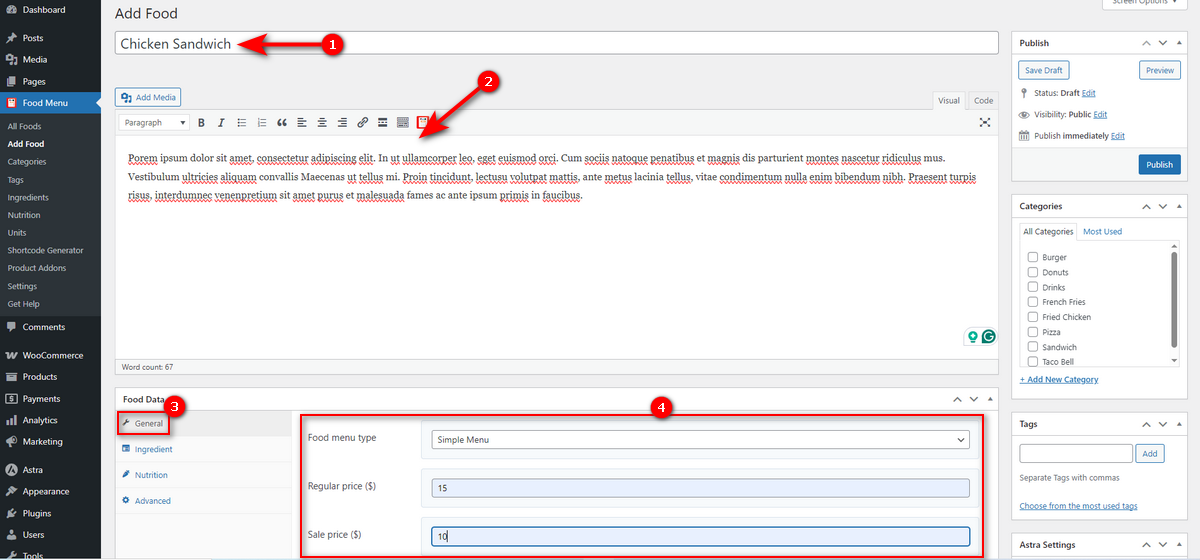
Now write your food item name and give it a short description. Next, navigate to the Food Data area, select the General tab, and choose either simple or variable as a food menu type. Then, add the regular and sale prices.
Next, click the Ingredient tab and drag the food ingredients for that product from the right side to the left side.

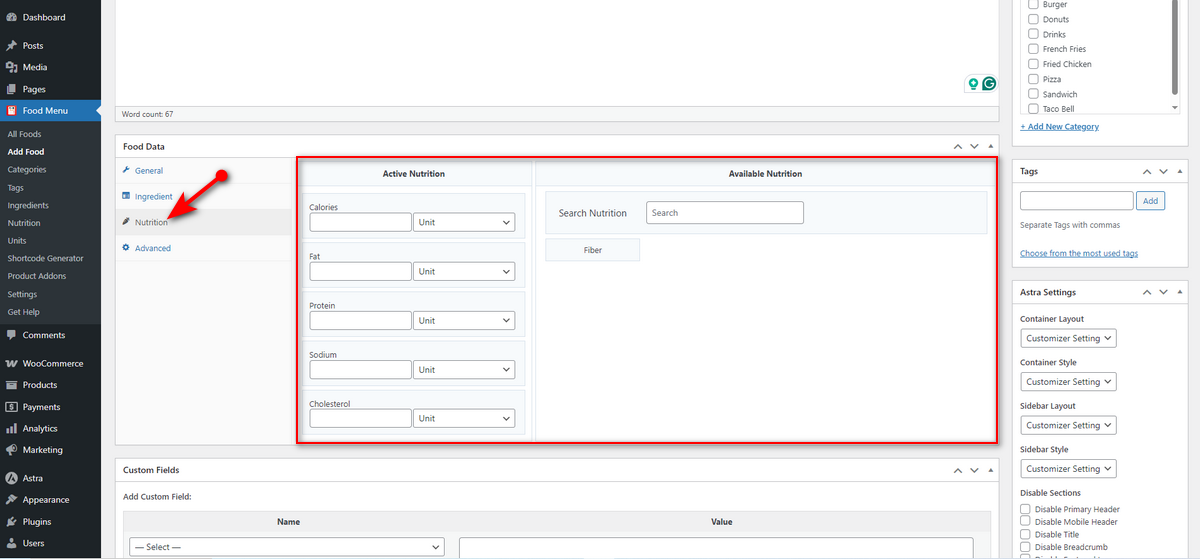
Hit the Nutrition tab, then drag and drop the nutritional value of that food item, following the same process as adding food ingredients.
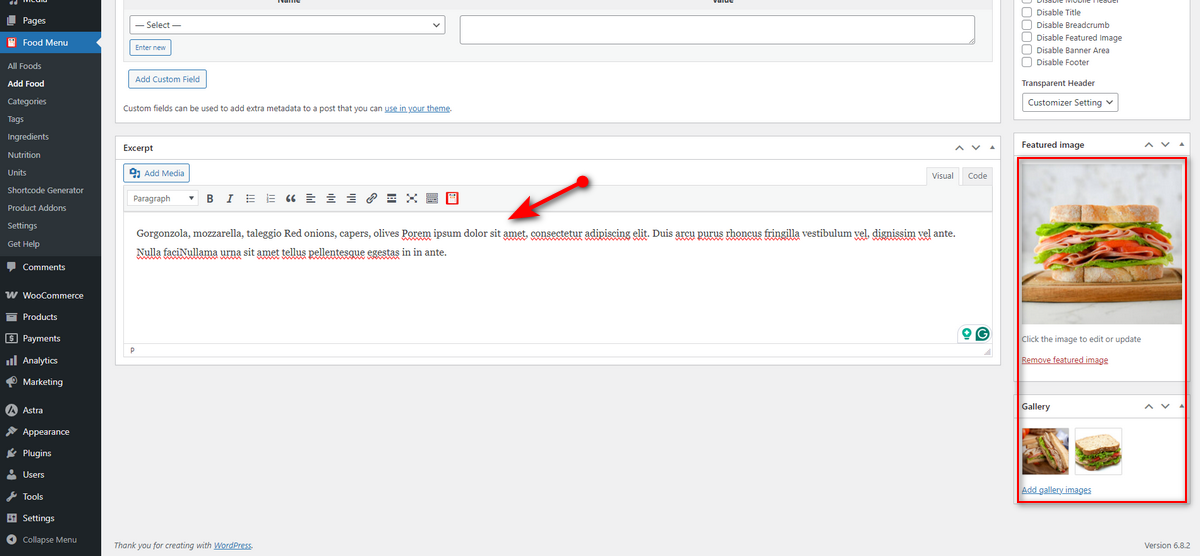
Now, scroll down to the Excerpt area and add a short description of the food item. On the right side, include the food item’s featured image and gallery images.
Finally, scroll up, check mark food item category and hit Publish button.
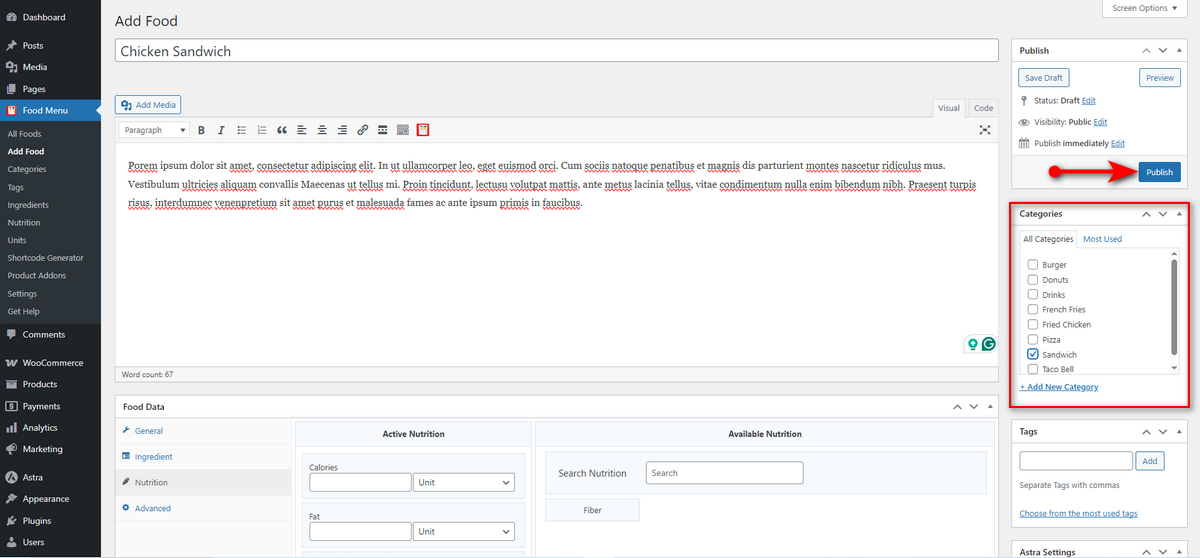
That’s how you add a food menu item using the Food Menu plugin. Remember that you need to upload these food items as WooCommerce products if you want to enable online ordering on your restaurant website.
Step 4: Generate a Shortcode to Display Food Menu
Now that we’ve included food menu items from various cuisines, it’s time to display them. To do so, we first need to create a shortcode and insert that shortcode in our preferred page (where we want to display the food menu).
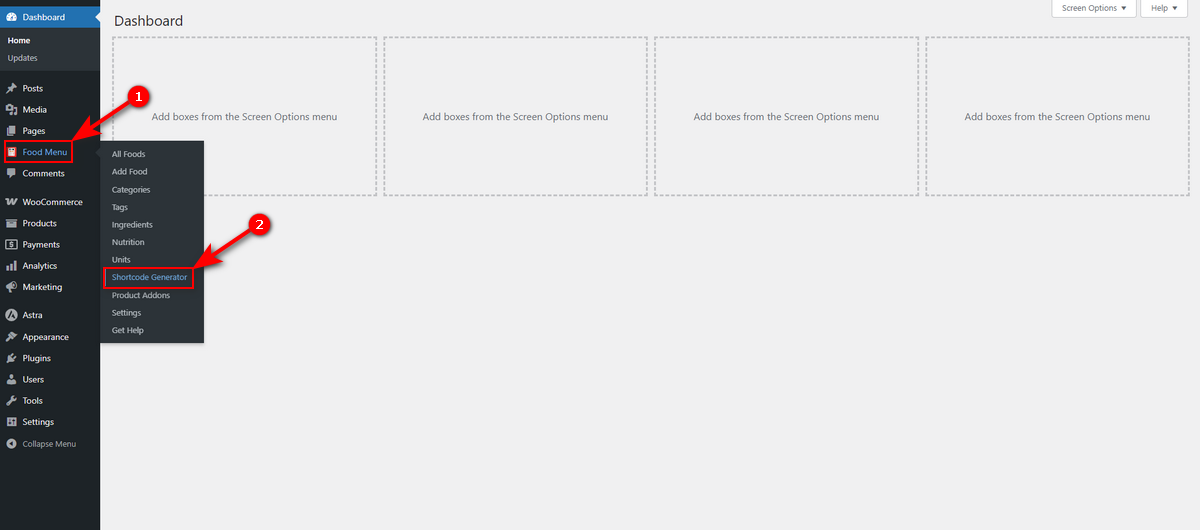
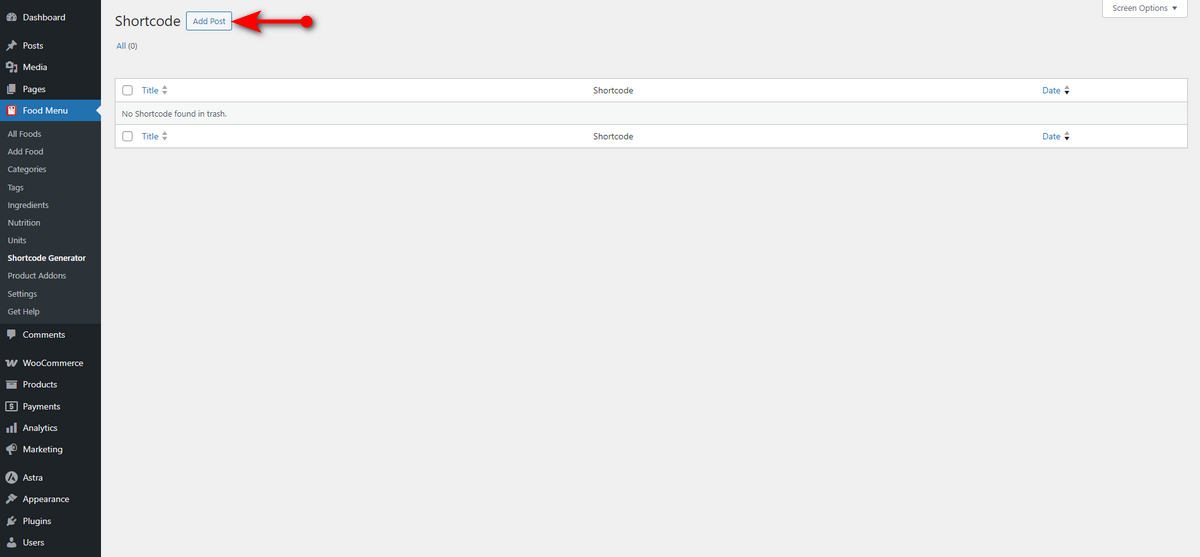
Hence, navigate to the WordPress Admin Dashboard > Food Menu > Shortcode Generator.
Now, hit Add Post button.
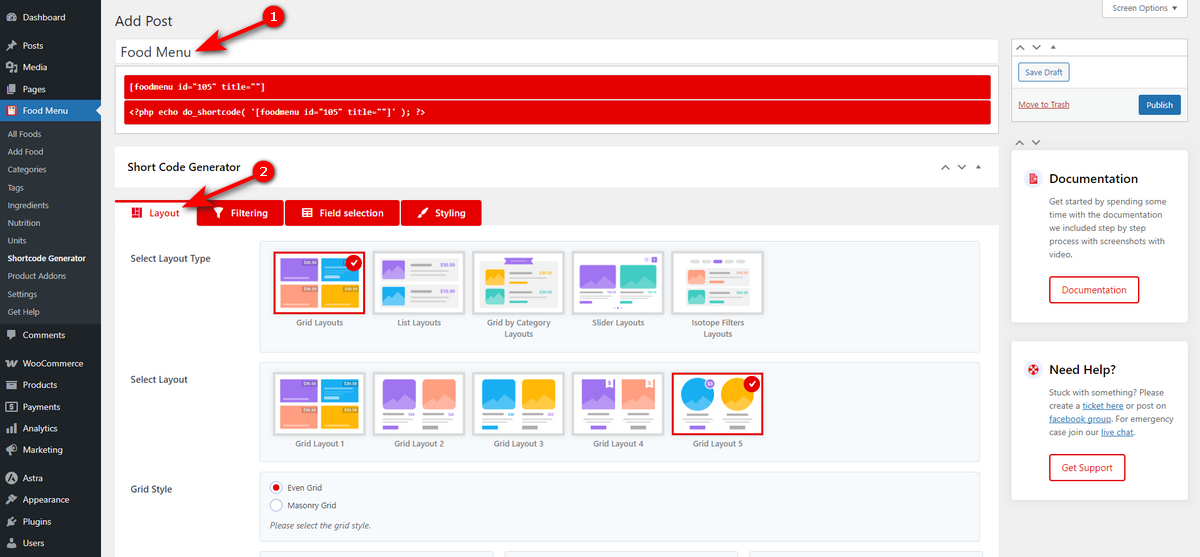
Now, give the shortcode generator a name and scroll down to Layout tab. Here, you get many layout options, including Grid, List, List by Category, Slider, and Isotope.
Each layout has varied styles to match your restaurant’s theme and your preferences. So, explore them.
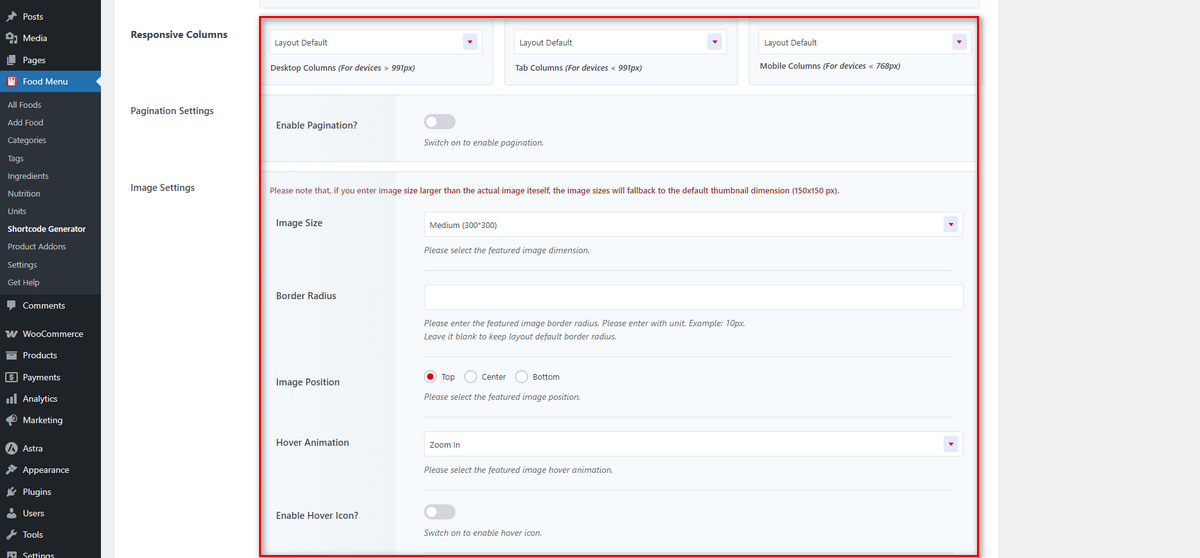
This Layout tab has many other options. For example, you can control the responsiveness of the food menu. You can turn pagination on or off, customize image size, position, hover animation, and much more.
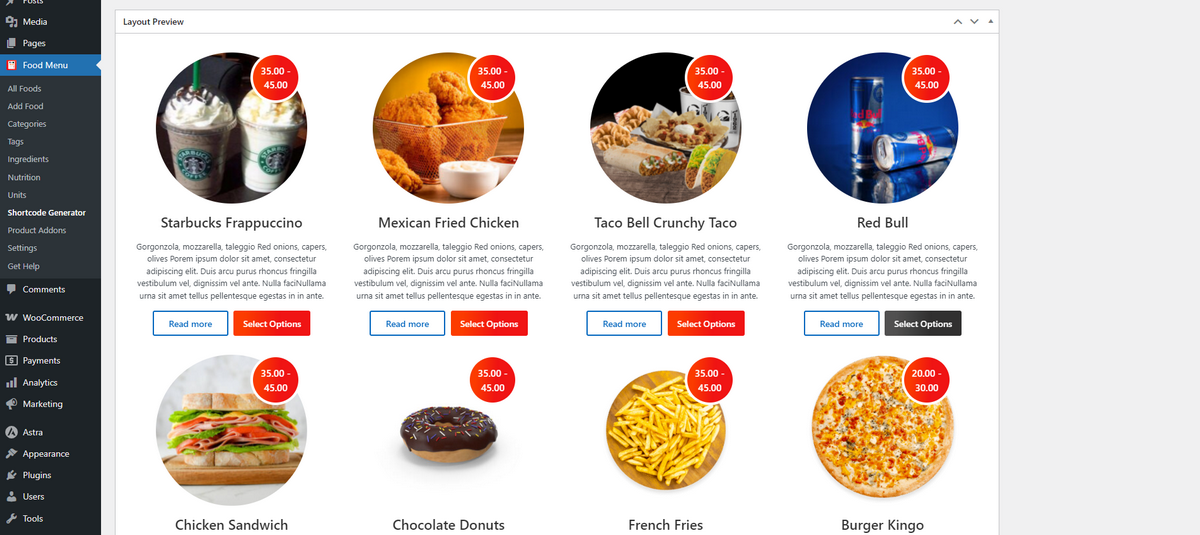
Scrolling down to the end of the Layout tab will give you a live preview of your food menu.
Now, scroll all the way back up and click Filtering tab. Then, select the food menu data source.
If you use Food Menu to add food items, select Food Menu. In contrast, choose WooCommerce if you upload food items as WooCommerce products. Lastly, hit the Publish button.

You can explore other tabs of the Food Menu’s Shortcode Generator option and read the documentation to learn more about this WordPress plugin.
Anyway, now, you need to copy the published shortcode and save it for later use.
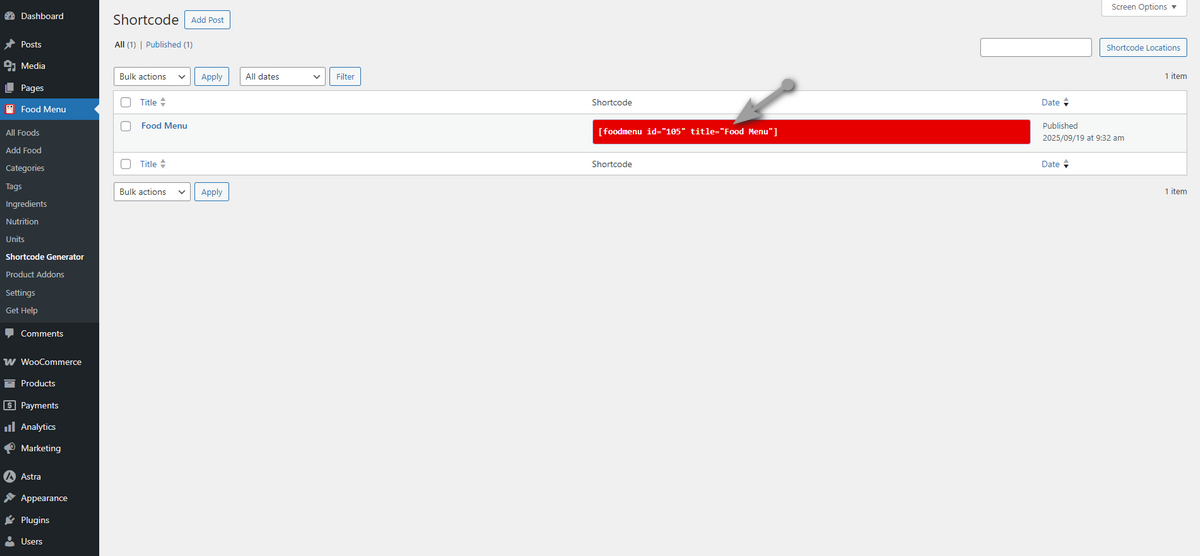
Step 5: Insert Shortcode to Display Food Menu
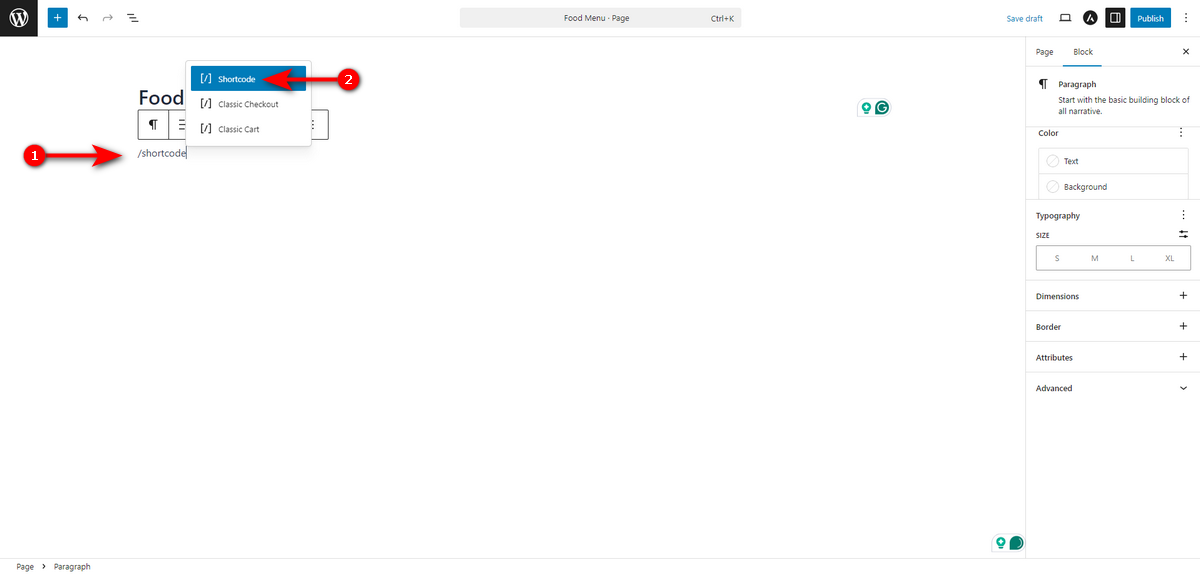
At this stage, we need to select or create a page where we want to display the food menu. Once we finalize a page, we need to open it in the Gutenberg editor. Then, on an empty field, type “/shortcode” and select the shortcode block.
Now, paste the shortcode we generated using the Food Menu’s shortcode generator and hit Publish button.
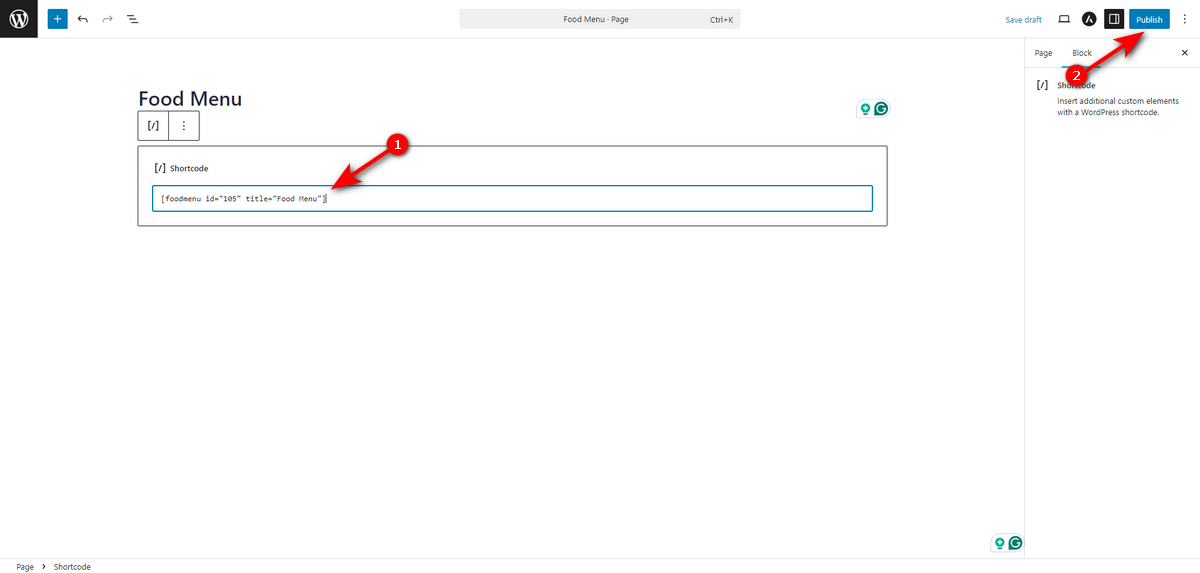
Finally, visit the page and see how well you’ve customized the food menu.

This is how you customize your food menu for diverse cuisines.
Best Practices for Multi-Cuisine Menus
Creating a multi-cuisine menu is an exciting way to attract diverse customers, but it requires strategic planning to ensure success.
Follow these best practices to customize your food menu effectively, keeping it appealing, authentic, and manageable.
Keep the Menu Manageable
A sprawling menu can overwhelm customers and strain your kitchen. To avoid this, offer 2-3 signature dishes per cuisine, such as sushi rolls for Japanese or tacos for Mexican.
Besides, try using versatile ingredients like rice or chicken that work across diverse cuisines. Lastly, group dishes by cuisine (e.g., American Favorites) for effortless navigation.
A concise, well-organized menu enhances customer experience and boosts operational efficiency.
Test and Refine Based on Feedback
Customer feedback is critical to perfecting your multi-cuisine menu. So, run pilot tests by introducing new dishes as specials to gauge popularity before including these dishes permanently.
Then, gather insights by using comment cards, online reviews, or social media posts to understand what your customers love and what needs to be improved.
You need to constantly monitor which dishes are popular and get the most sales. If your Thai dishes outperform your Italian food, you need to consider expanding Asian options.
Refining your menu based on honest feedback ensures it resonates with your audience.
Ensure Staff Training for Authenticity
Authenticity elevates your multi-cuisine menu and builds customer trust. Hence, train your staff on techniques to ensure quality.
Employ chefs with expertise in particular cuisines, such as a Mexican chef for more traditional dishes or a Bangladeshi chef for Sorshe Elish. You need to educate staff on the cultural significance of dishes to enhance service and storytelling.
Common Mistakes to Avoid
When you customize your food menu to include different cuisines, it’s easy to fall into traps that can harm your restaurant’s reputation and operations. You need to avoid the common mistakes that menu restaurant site owners make, as outlined below.
Overloading the Menu with Too Many Cuisines
Offering a vast array of cuisines may seem appealing, but it can backfire. Too many options, such as Italian pastas, Thai curries, and Mexican tacos, on one menu can overwhelm diners and dilute your brand.
So, we recommend you start with 1–2 cuisines and focus on a few signature dishes, ensuring quality and manageability.
Using Poor Substitutes for Authentic Ingredients
Authenticity is critical when offering different cuisines, and cutting corners on ingredients can ruin the experience.
For instance, when you substitute lemongrass with lemon extract in Thai dishes or use generic spices for Indian curries, this fusion can sacrifice taste.
This blending might work for some, but diners, especially food enthusiasts, notice inauthentic flavors and may share negative feedback.
Hence, source authentic ingredients for recipes, even if it means adjusting your menu to what’s locally available.
Ignoring Dietary Preferences or Restrictions
Failing to account for dietary needs alienates a significant portion of your audience. In 2025, demand for vegan and gluten-free options is high. Ignoring these limits your customer base.
Customers with allergies or restrictions may leave poor reviews if options are lacking, impacting your online reputation.
Some cuisines, like Middle Eastern or Indian, may need adjustments to meet religious dietary rules, such as avoiding pork or beef.
So, include clear dietary labels (e.g., “Vegan,” “Gluten-Free”) and offer adaptable dishes, like plant-based sushi or halal-friendly kebabs, to meet diverse needs.
Wrapping Up
To conclude, you can create a successful multi-cuisine menu through a balance of strategic planning and technical implementation. Before customizing your offerings, it is vital to evaluate your audience, kitchen capacity, and ingredient supply chain.
Using a WordPress plugin like the Food Menu can help you smooth the process of showcasing your dishes online. However, long-term success depends on best practices and avoiding common mistakes.
We believe this guide will be helpful for your journey to food menu customization for different cuisines.



