


On This Page
Classified Listing and Directorist are two well-known WordPress plugins that help you make websites for directories and classified ads. Both provide a lot of great features and offer great assistance to help your business run effectively.
But when it comes to choosing the right plugin for your purposes, you often have to choose between a few options and can’t determine which one to go with.
We know this, so we wrote this post on Classified Listing vs. Directorist to assist you learn more about each one and selecting the ideal plugin for you. Let’s read.
Why Classified Listing Is a Better Alternative to Directorist?
- Lower price — Cheaper on both single-site plans: $90/year and $279 lifetime, versus Directorist’s $103 and $379.
- AI features live today — Full AI suite already working: AI Form Generator (one-click setup), Write with AI for titles and descriptions, Semantic AI search, and AI image enhancement, powered by ChatGPT, Gemini, or DeepSeek.
- More built-in — Live chat and PayPal payments included out of the box, while Directorist locks chat behind a separate add-on and payment gateways behind Pro.
- Easier to use — Cleaner, beginner-friendly dashboard plus conditional-logic custom fields.
Overview of Classified Listing
Classified Listing is a simple yet powerful WordPress plugin. It provides an extensive set of features to help both novice and experienced users create professional, functional, and visually appealing directories and classified ads websites with little effort.
One of the notable features of this plugin is that it lets you build any directory site with the power of AI. You simply tell the AI the directory type you want, and it will create that directory for you. Isn’t that amazing?
Whether you want to build classified ads platforms or directories in a variety of industries, ranging from real estate listings, automotive marketplaces, service-based directories, job boards, or general classified ads websites, you can rely on the features and support of Classified Listing WordPress directory plugin.
Overview of Directorist
Directorist is also a feature-rich and AI-powered WordPress directory plugin. It lets you build versatile directory websites using AI or from scratch. This plugin excels in building multi-directory websites, restaurant listings, event directories, and service-based platforms.
This WordPress directory plugin offers a modern, no-code-required user interface. So, anyone can easily make complex directories. It gives users the freedom to customise their directories and has strong capabilities that let them alter them however they wish.
Classified Listing vs. Directorist- Feature Comparison
Now, the actual plugin comparison starts. Before learning details about each plugin, we recommend you glance at the table below.
| Feature | Classified Listing | Directorist |
| User Interface & Ease of Use | Easy-to-use dashboard, simple design with easy navigation for beginners. | Simple setup, but can be cluttered for beginners |
| AI-Powered Directory Creation | AI-assisted directory creation with ChatGPT, Gemini, or DeepSeek integration for content generation. | AI-powered directory creation |
| Customization | Highly customizable with configurable fields and 12 theme integrations for different industries. | Drag-and-drop form builder with 13 theme integrations for various directory types. |
| Search & Filtering | Ajax-powered, customizable filters with location-based search and Search Alert Addon. | Advanced AJAX filters, Universal Search extension for multi-directory websites. |
| Monetization Features | Various options like ad packages, membership packages, and multiple payment methods (PayPal, Stripe, WooCommerce). | Modular monetization through premium extensions, including pricing plans and prominent listings. |
| Listing Management | Organized, beginner-friendly management, supports unlimited custom fields for different industries. | Organized, beginner-friendly management, supports unlimited custom fields for different industries. |
| Unlimited Custom Fields | 12 field types with Conditional Logic for form organization by category. | 11 field types, no Conditional Logic for field categorization. |
| Multiple Mapping Sources | Supports Google Maps and OpenStreetMap integration for listing location accuracy. | Supports Google Maps and OpenStreetMap integration for listing location accuracy. |
| Addon Integration | Offers a wide range of premium addons such as Search Alert, Job Manager, Marketplace, Seller Verification, etc. | Offers addons like Authorize.net Payment, Booking, Social Login, Google reCAPTCHA, etc. |
| Theme Integration | Compatible with all popular and well-coded WordPress themes | Compatible with any themes, including dJobs, dRestaurant, and OneListing. |
| Secure & Live Chat | Built-in live chat for buyer-seller communication without sharing contact info. | Live chat is available as a separate add-on. |
| Mobile Apps Accessibility | Offers mobile apps for Android & iOS for easy site management on the go. | Also offers mobile apps for Android & iOS for convenient management on mobile devices. |
| Premium Features | Includes Store & Membership addons, Marketplace, Multi Currency, BuddyPress Integration. | Features multi-directory system, private listings, and service marketplace with analytics and review systems. |
| Compatibility & Integrations | Works seamlessly with Elementor, Gutenberg, Divi, WPBakery, WooCommerce, etc. | Integrates with Elementor, Gutenberg, Brizy, Oxygen Builder, and more for diverse design preferences. |
| Ideal User | Appropriate for all users needing an all-around solution | Ideal for entrepreneurs needing good features and monetization options |
| Core Free Version | Excellent for basic to advanced sites, but encourages Pro upgrade | Good for basic websites |
| Scalability | Easily handles small to large directories | Optimized for large business directories |
| Pricing Model | Freemium model, but comes with a competitively priced Pro version | Has a premium and pro version |
User Interface and Ease of Use
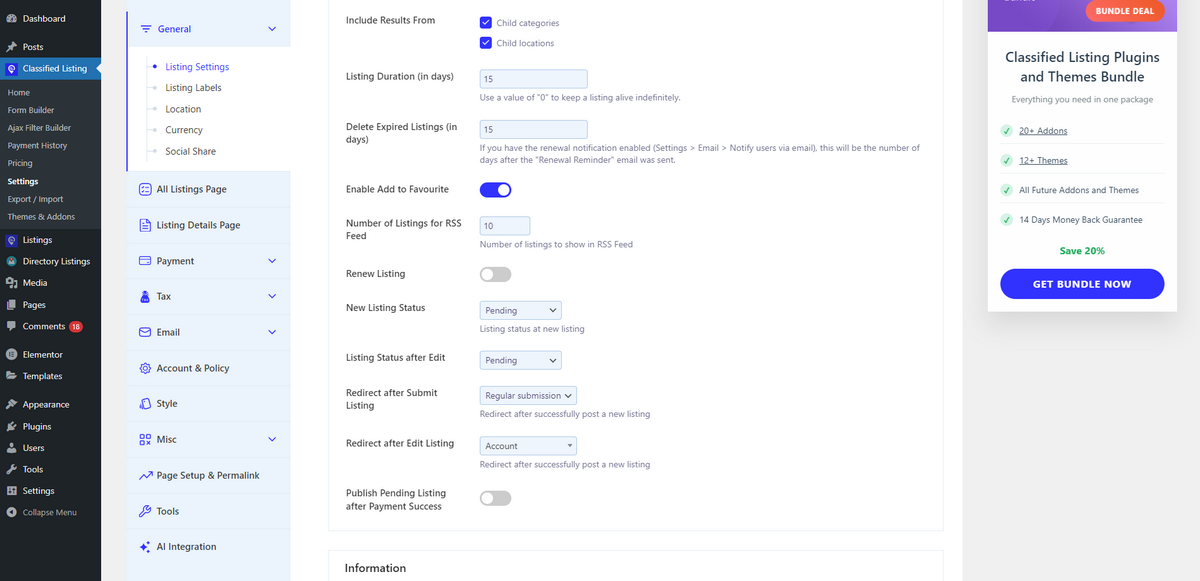
Classified Listing features an easy-to-use dashboard designed for beginners. Thus, people who are unfamiliar with technology can easily set up and manage a directory website.
Its design is simple and offers easy navigation both for administrators and end users. Users can quickly understand how to create listings, manage categories, and customize settings without getting lost in complex menus.
On the other hand, Directorist features a simple setup process that makes it easy to create a directory. However, for those unfamiliar with technology, its dashboard can appear cluttered and challenging to understand.
Although it has numerous powerful features, they aren’t well-organized, which could make things difficult.

AI-Powered Directory Creation
Not everyone can easily build directories or classified ads websites on WordPress using either of these plugins. However, to make directory creation easier than before, both plugins offer AI-assisted directory creation.
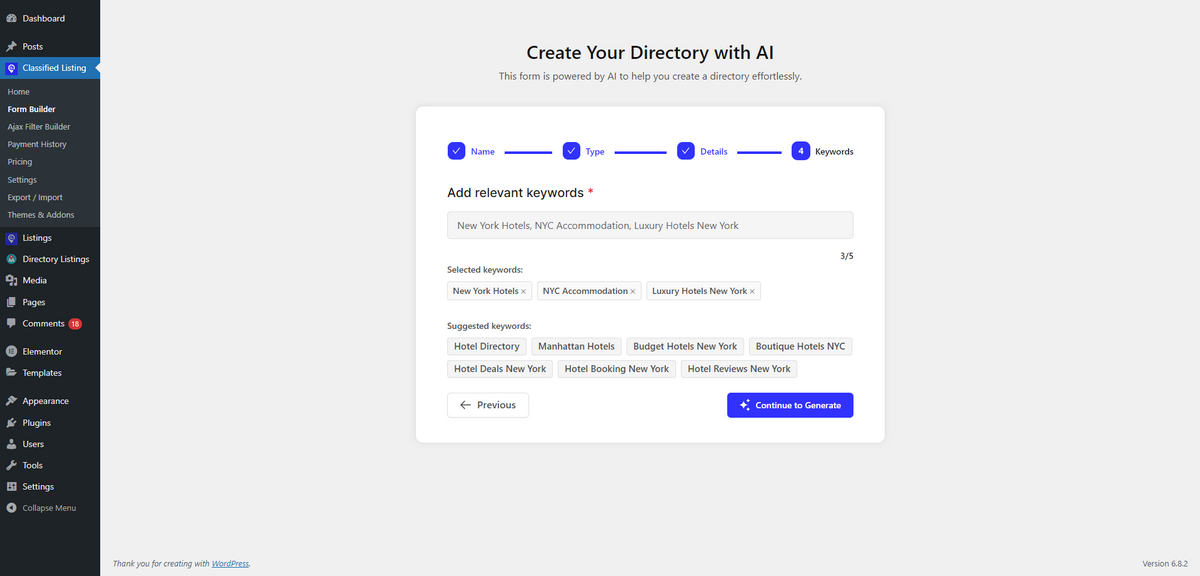
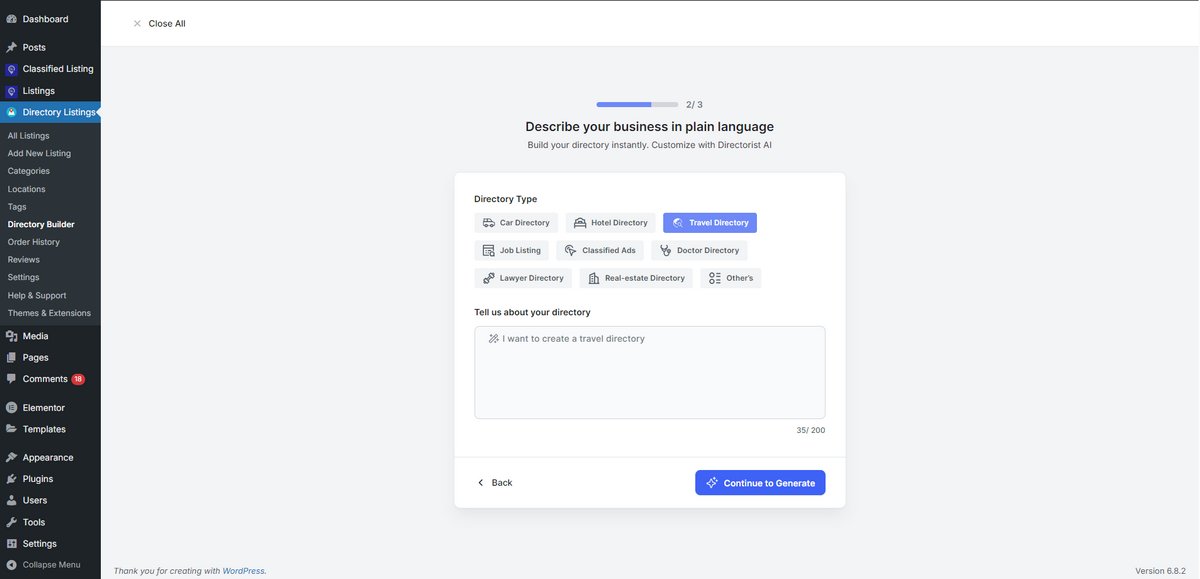
Classified Listing and Directorist allow users to build classified ads websites or directories with the power of AI. They just guide the AI about the type of directory they want, and the AI will build it according to their preferences.
It’ll automatically suggest keywords based on your business type and generate listing forms to suit your directory or classified ads website. Here’s the screenshot of Classified Listing’s AI creating a directory website.
Here’s a screenshot of Directorist’s AI building a directory site.
While both plugins use AI for directory creation, Classified Listing goes the extra mile. Alongside directory or classified ads site building, Classified Listing enables site owners to utilize the APIs of ChatGPT, Gemini, or DeepSeek.
Consequently, their website users can easily generate listing content while building listings with the form builder. Directorist lacks this feature.
Customization
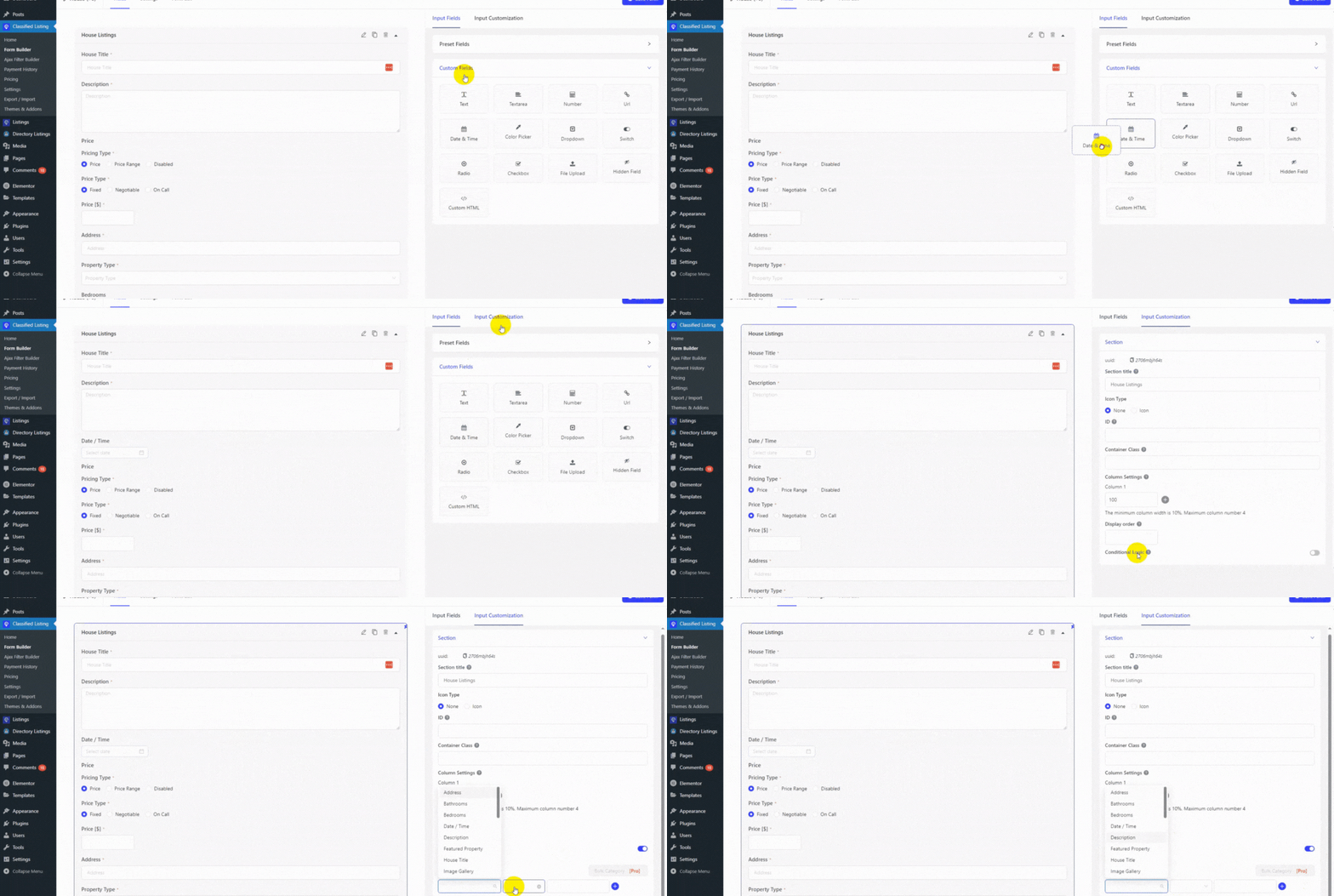
With many configurable fields, Classified Listing gives you a lot of freedom. You can make listing forms for any industry, such as real estate, employment boards, vehicle ads, and more.
Its fields for each category let users enter data in different ways depending on the type of listing, so they only see the fields that are relevant to them.
With integration across 12 popular WordPress themes, it provides visual consistency and user-friendly design out of the box.
Directorist offers an intuitive drag-and-drop form and layout builder, providing users with complete control over how listings and directory pages are structured.
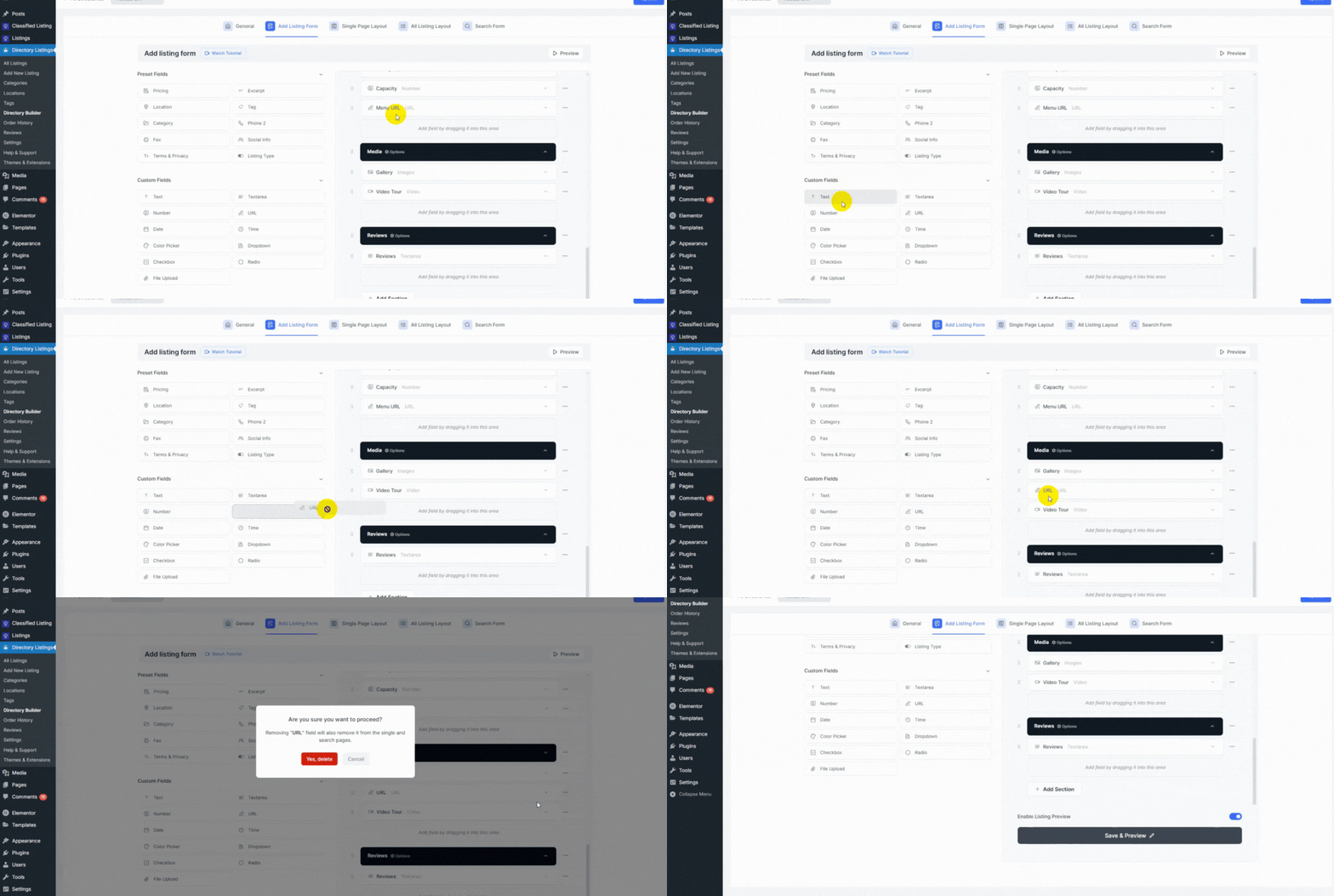
With 13 supported theme integrations, it offers users extensive layout options to help them build directories of diverse types.
Search and Filtering
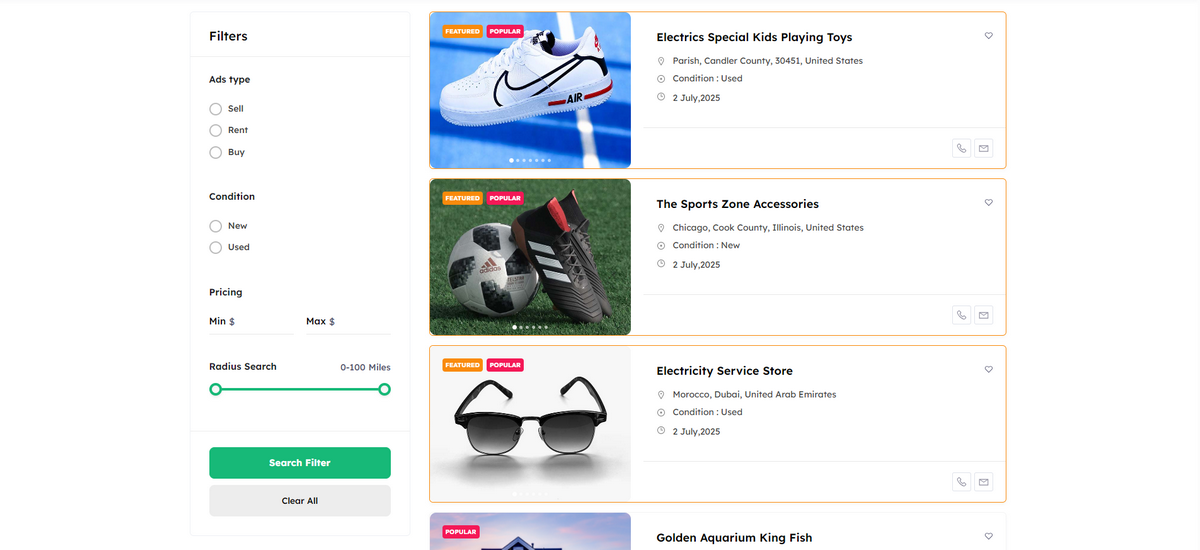
Classified Listing allows customers to easily narrow down their results with Ajax-powered, completely customizable filters and location-based search. Businesses can rearrange these filters according to their specific needs, resulting in a more personalized browsing experience.
Not only this, but Classified Listing also features a Search Alert Addon that further enhances the browsing experience by allowing users to save their search queries and receive email notifications when new listings matching their queries are published.
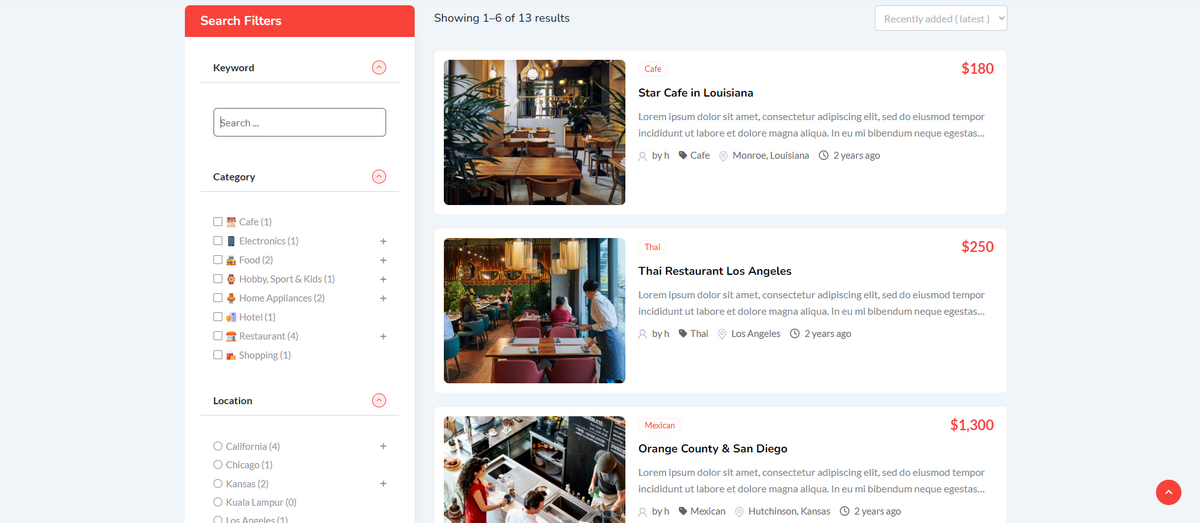
Directorist, in contrast, provides equally excellent search capabilities. Its advanced AJAX filters support text, category, location, and radius-based queries, as well as integration with custom fields.
Additionally, the Directorist’s Universal Search extension can help users quickly find their preferred listings across multiple directories. This only feature makes Directorist ideal for managing complex directory websites.
Monetization Features
Classified Listing provides a wide variety of options to business owners to generate revenue from their websites. They can charge users per ad submission.
They can also earn money by promoting users’ listings through various ad packages, including Top Ads, Bump-Up Ads, and others. They can even make money by selling membership packages.
Classified Listing supports many payment methods, such as PayPal (available in the free version), offline payments, Stripe, Authorize.net, and WooCommerce.
Directorist is more modular in its approach. It offers powerful monetization tools through premium extensions. Site owners can make pricing plans and charge for prominent listings.
It works with a number of payment channels, such as PayPal, Stripe, and Authorize.net. However, unlike Classified Listing, all payment gateways are available in the Pro version of Directorist.
👉 Good Read: How to Monetize your Directory Website
Listing Management
Classified Listing offers an organized and beginner-friendly listing management system. It enables both site administrators and users to add, edit, and manage directory entries easily.
It lets users add listings from the front end and allows admins to manage all listings from the WordPress dashboard.
Users also get a front-end, easy-to-use dashboard where they can quickly change, delete, promote, or renew their ads.
Since Classified Listing supports assigning unlimited custom fields to specific categories, business owners can design listing structures for different industries, such as real estate, automotive, or job boards.
In contrast, Directorist offers a robust listing management experience. Similar to Classified Listing, it also features a drag-and-drop form builder that enables you to create listing submission forms quickly and easily.
Directorist supports multi-directory management, meaning you can create entirely separate listing categories, such as services, jobs, or events, with their unique fields and styling.
From the frontend, users can log in to their personalized dashboard to manage listings. On the backend, site admins enjoy bulk actions, status filters, and seamless editing options.
Unlimited Custom Fields
Classified Listing and Directorist plugins let you insert an unlimited number of customizable fields on the submission form. Therefore, you can allow customers to fill out all the necessary information they need to submit an ad.
While both plugins offer unlimited custom fields, Classified Listing has a Conditional Logic feature. It enables you to assign form fields by category and organize them into groups.
| Feature | Classified Listing | Directorist |
| Custom Fields | ✔️ (14 Field Types) | ✔️ (12 Field Types) |
Multiple Mapping Sources
Classified Listing and Directorist plugins allow you to connect Google Maps or OpenStreetMap with your directory or classified ads website. Thus, you can display listings with pinpoint location accuracy.
Given the feature, both plugins make a tie in this section of our Classified Listing vs. Directorist content.
Addon Integration
To extend your directory website’s functionality, Classified Listing and Directorist offer premium addons.
| Classified Listing Addons | Directorist Addons |
| 1. Search Alert 2. Payfast 3. Paystack 4. Job Manager 5. Marketplace 6. Listing FAQs 7. Claim Listing 8. Booking (Reservation & Appointment) 9. PDF Invoices 10. Elementor Builder 11. Multi Currency Addon 12. Seller Verification 13. Mobile no Verification 14. WPML MultiLingual Addon 15. BuddyPress Integration 16. BuddyBoss Integration 17. Store & Membership Addon 18. Real Estate Agent Addon 19. Coupon Addon 20. Razorpay Payment |
|
Theme Integration
As you know, the first impression of your website is crucial in engaging prospects and converting them into loyal customers. So, directory and classified ads site owners prioritize designing their websites, and you should do the same.
The Classified Listing and Directorist plugins integrate with some eye-catching, responsive, and lightweight themes to help you level up the look of your website.
| Classified Listing Themes | Directorist Themes |
| 1. CLRestaurant 2. CLDirectory 3. Radius Directory (Free Theme) 4. CLHotel 5. Obitore 6. CLDoctor 7. Servlisting 8. CLPlace 9. CLClassified (Free Theme) 10. CLCar 11. CLProperty 12. ClassiList | 1. dJobs |
Secure Live Chat
Classified Listing and Directorist plugins offer a secure and live chat feature. It allows you to enable buyers and sellers on your website to chat with each other without sharing their contact information.
Let them close their deals, and you monitor their conversation, filtering out inappropriate words as a directory or classified ads site owner.
While both plugins offer this fantastic feature, Classified Listing has it built-in, and Directorist provides it as a separate add-on.
More Premium Features
Classified Listing and Directorist both include numerous additional features that enhance the overall functionality of a directory website.
Classified Listing comes with a number of useful add-ons that are meant to make it more powerful. The Store and Membership addon and the Marketplace addon are two of the most important ones.
Directorist has a multi-directory system that lets you run many types of directories, including real estate, events, or other businesses, all on the same website.
The plugin also enables you to have private listings, renew listings, import and export CSV files, and save your favourite listings.
Last but not least, Directorist provides a Booking extension that turns your directory into a service marketplace. For monetization tracking and scalability, it also includes analytics dashboards, review systems, claim listings, etc.
Compatibility and Integrations
Classified Listing is entirely compatible with most modern WordPress themes and plugins. It works seamlessly with Elementor, Gutenberg (which includes Gutenberg blocks), Divi Builder, WPBakery, and WooCommerce to enhance e-commerce functionality.
Additionally, it supports WPML and features clean code that adheres to WordPress coding standards.
Directorist excels in terms of compatibility and is designed to work well with both classic and block-based WordPress themes. It integrates deeply with Elementor, Gutenberg, Brizy, and Oxygen Builder, making it a versatile option for people with diverse design preferences.
Mobile Apps Accessibility
Do you know that people prefer visiting and managing websites on their mobile devices over using larger, non-portable ones? According to Statista, the number of mobile users worldwide is expected to surpass 7 billion by 2025.
Considering this fact, Classified Listing and Directorist plugins have mobile apps (available for both Android & iOS) to help you easily manage your website using your favorite smartphone.
Get Your Classified Listing App Today
Strengths & Weaknesses of Each Plugin
We’ll now examine the strengths and weaknesses of Classified Listing and Directorist WordPress directory plugins.
Strengths of Classified Listing
- Unlimited custom fields and category-based structure
- Seamless integration with payment gateways for monetization
- Powerful ad and listing management tools
- AI-powered directory creation
- Compatible with a wide range of WordPress themes and plugins
Strengths of Directorist
- Multi-directory support for diverse business models
- User-friendly, drag-and-drop layout builder
- Ideal for service, event, and restaurant directories
- AI-powered tools and advanced search experience
Weaknesses of Classified Listing
- Limited to 12 theme integrations
- Lacks setup wizard
Weaknesses of Directorist
- Premium features locked behind extensions
- Some users report bugs and slower support for premium plans
- Slight learning curve for advanced setups
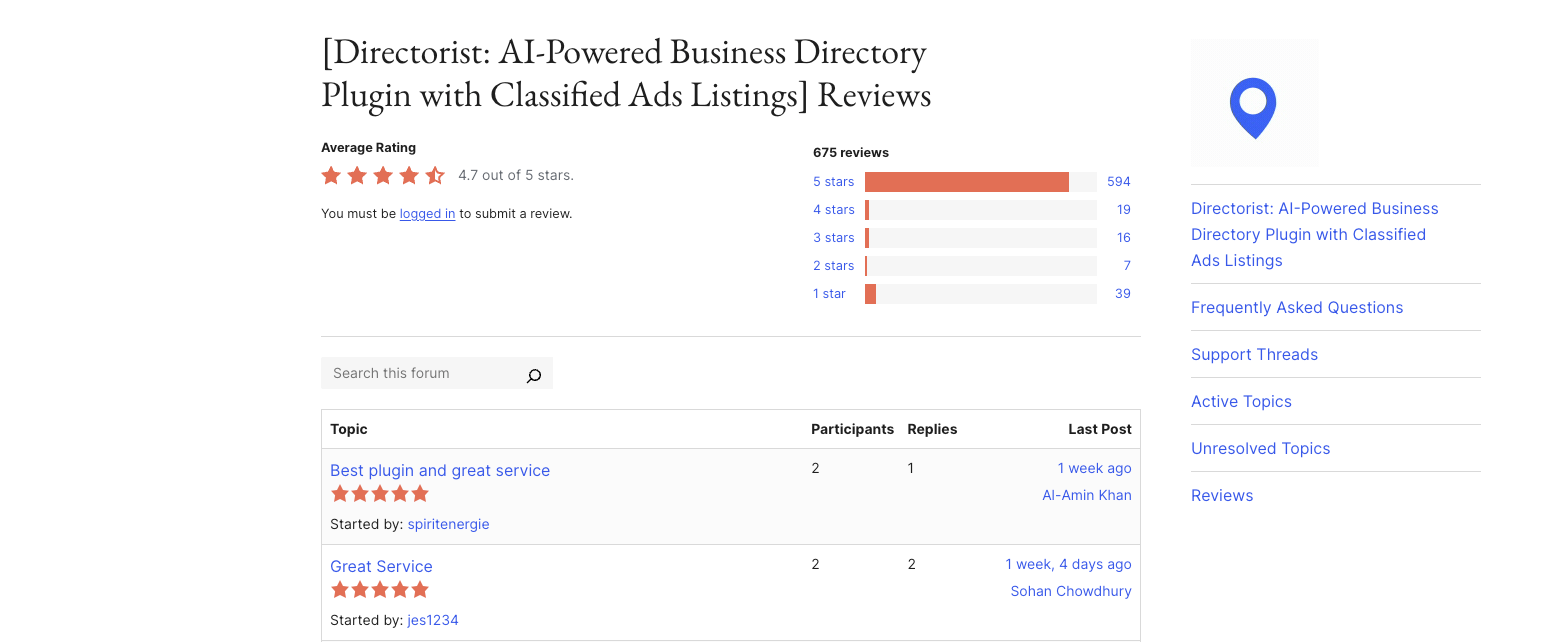
User Feedback & Reviews
People like Classified Listing because it is easy to use, has a lot of valuable features, and can be customized in many ways.
Business owners and beginner users praise this plugin for its budget-friendly nature. That’s why many users have been using this plugin for years.
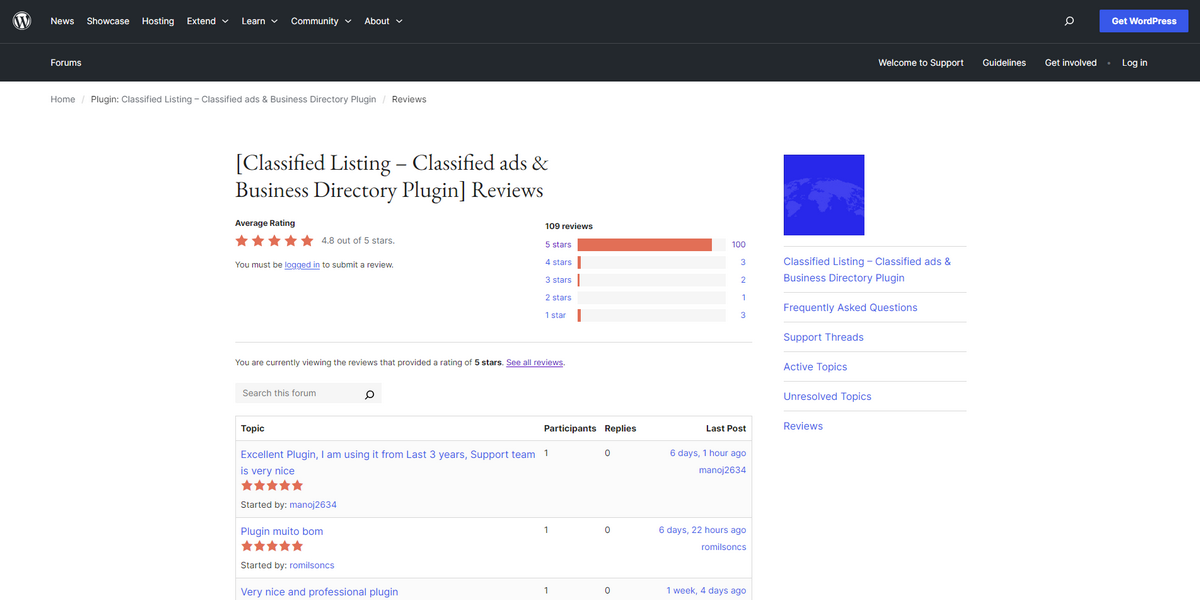
Directorist also receives positive reviews for its flexibility, multi-directory support, and Elementor compatibility. However, it gets negative reviews for its terrible support system and block-based theme.
Pricing
Directorist excels with positive reviews for its incredible flexibility, powerful multi-directory support, and flawless compatibility with Elementor! Users love how effortless it is to develop and customize beautiful directories exactly the way they want.
| Pricing Plan | Classified Listing | Directorist |
| Yearly plan for one site begins at | $44 | $129 |
| Lifetime deal starts at | $319 (Bundle 1 Site) | $379 |
Which One Should You Choose?
Both Classified Listing and Directorist are outstanding plugins for WordPress directories. Directorist is great for setting up multiple directories and adding niche-specific features.
Classified Listing outperforms its competitors in terms of price, ease of use, flexibility, and reliability. It’s perfect for real estate, job boards, or general classifieds sites.
For individuals and businesses seeking a cost-effective, reliable, and adaptable solution, Classified Listing is the ideal choice. So, the clear winner in this battle of Classified Listing vs. Directorist is Classified Listing AI-powered WordPress directory plugin.



