


On This Page
There’s a high chance you might’ve encountered HivePress while searching for WordPress plugins. Indeed, it’s a great plugin with so many users worldwide.
That’s why we picked it as a contender for Classified Listing and prepared this comparison article titled Classified Listing vs. HivePress to help you understand how each plugin differs in terms of features and UIs.
By the end of this article, you’ll learn about each plugin’s features, strengths, and weaknesses, and easily select the perfect one for your classified ads or directory site.
An Overview of the Classified Listing
Classified Listing is a popular WordPress plugin that is both strong and easy to use for making classified ads and directory websites. It lets people make websites where they may post jobs, services, products, real estate, and more.
Classified Listing is easy for users to manage listings and make money with. It has innovative features like AI integration, an easy-to-use form builder, search and filter, live chat, and a lot of ways to generate income.
The best feature of this plugin is that it utilizes AI to create directories. It also comes with a number of add-ons that improve the functionality of your website, so it’s a great choice for anyone who wants a flexible and easy-to-use solution.
HivePress in a Nutshell
HivePress is an open-source WordPress plugin that may be used for many different types of directories. HivePress has everything you need to make a strong directory website, from job boards and classified advertisements to real estate listings and company directories.
The plugin has all the basic functionality you need, such as frontend submission, customisable search criteria, user profiles, and a large library of add-ons.
What makes HivePress different is that it focuses on customisation and flexibility. HivePress is great for developers who want to have more control over how their directory website looks and works.

Feature Comparison Table
Here’s a quick reference to compare key features of Classified Listing and HivePress side by side:
| Feature | Classified Listing | HivePress |
| User Interface | Intuitive, beginner-friendly | Not so intuitive user interface |
| AI Integration | AI-powered directory creation and content generation | No such functionality |
| Form Builder | Drag-and-drop, 14 field types, unlimited custom fields with conditional logic | Customizable forms, supports custom fields |
| Search & Filtering | AJAX-powered, location-based, Search Alert add-on | Custom search filters with support for custom fields |
| Monetization | Paid listings, featured ads, memberships, claim listings | Paid listings, featured ads, claim listings |
| Listing Management | Frontend and backend submission, user dashboard | Frontend submission, user dashboard |
| Live Chat | Real-time private chat with moderation | Not available |
| Mapping Sources | Google Maps, OpenStreetMap | Google Maps and Mapbox |
| Add-ons | 18+ add-ons | Around 18 add-ons |
| Themes | 12 responsive, SEO-optimized themes | 6 basic themes |
| Mobile App | Android and iOS apps are available | No mobile app support |
| Pricing | $44/year for one site, $319 lifetime | Free core plugin, premium themes, and extensions starting at $29 |
| Ideal User | Perfect for users with small to more advanced directory or classified ads websites | Suitable for beginners and startup |
| Free Version | Works well for basic and large sites | Offers significant features to build basic directories |
| Scalability | Can easily handle small and large-scale directories and classified ads websites | Best for small to medium-sized websites |
Detailed Feature Comparison
We’ll now begin our expedition and learn about the major features of each WordPress plugin, compare them, and finally select the best one.
Free Version Availability
Both plugins have free versions. With Classified Listing’s free version, you can create a professional classified ads or directory website. You can build and manage listings, categorize them, and let users submit ads from the frontend.
However, to get more out of your directory or classified ads site, you need to opt for the premium version of the Classified Listing plugin. On the other hand, HivePress comes completely free.
It has some features in its free version to help you build a basic directory website. You can manage listing submissions. You can give users basic search functionality and customizable user profiles with this free plugin.
User Interface
Classified Listing boasts an intuitive and user-friendly interface that is perfect for beginners. Its clean layout and well-organized menus make it easy for users to navigate through the plugin’s settings, even with minimal technical knowledge. The setup process is seamless, allowing users to quickly configure their directory or classified ads website.

For those who need extra assistance, Classified Listing offers detailed documentation, tutorial videos, and blog posts to guide users through every step.
Additionally, the plugin comes with live support, ensuring that help is always just a click away. Once installed and activated, users can immediately start managing listings, customizing categories, and editing ads on their directory site without any hassle.
HivePress offers a basic user interface. Mainly, it just uses WordPress’s built-in dashboard to display its features. That means you get nothing new in terms of UI.
However, the plugin enables users to easily create and manage listings, offering them complete control over their directory’s appearance and functionality.
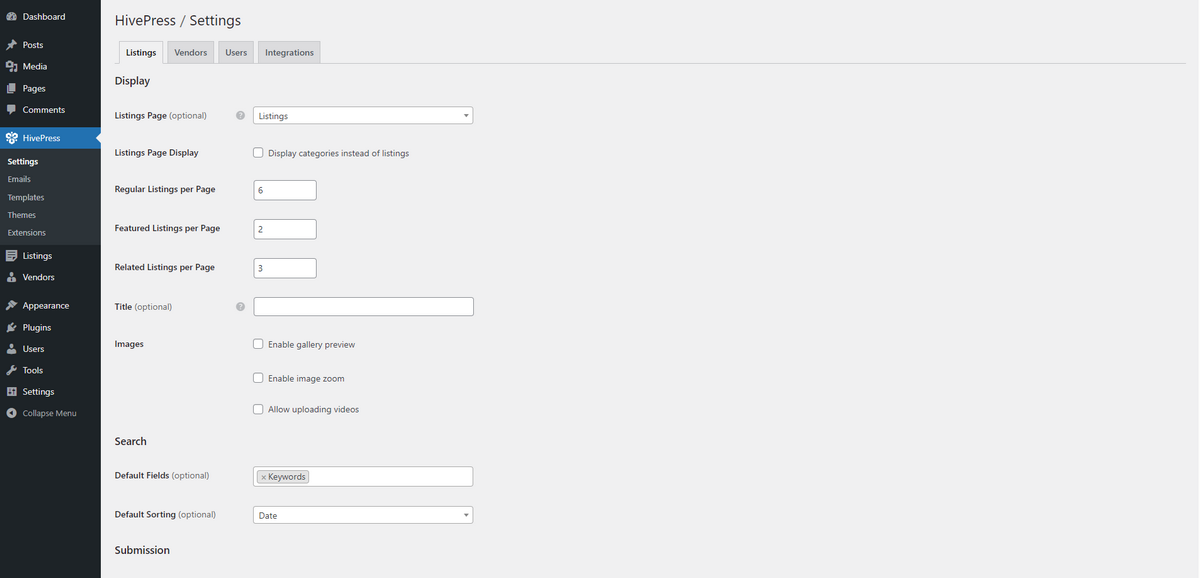
Whether you are adding a listing or adjusting user profiles, HivePress ensures that the process is smooth and manageable. While HivePress doesn’t offer as much beginner-focused guidance as Classified Listing, it provides a user-friendly interface that developers and advanced users will appreciate.
AI-Assisted Directory Building
When it comes to building a directory website with AI assistance, Classified Listing has a clear edge over HivePress.
Classified Listing’s AI-driven features allow users to easily create and optimize directory websites. With just a simple description of the type of directory you want to build, the AI swiftly generates the entire structure, providing automatic, directory-specific keyword suggestions to boost your SEO.
It doesn’t stop there; you can also integrate your personal API keys for ChatGPT, Gemini, and DeepSeek, letting your visitors generate ad content and auto-fill listing forms.
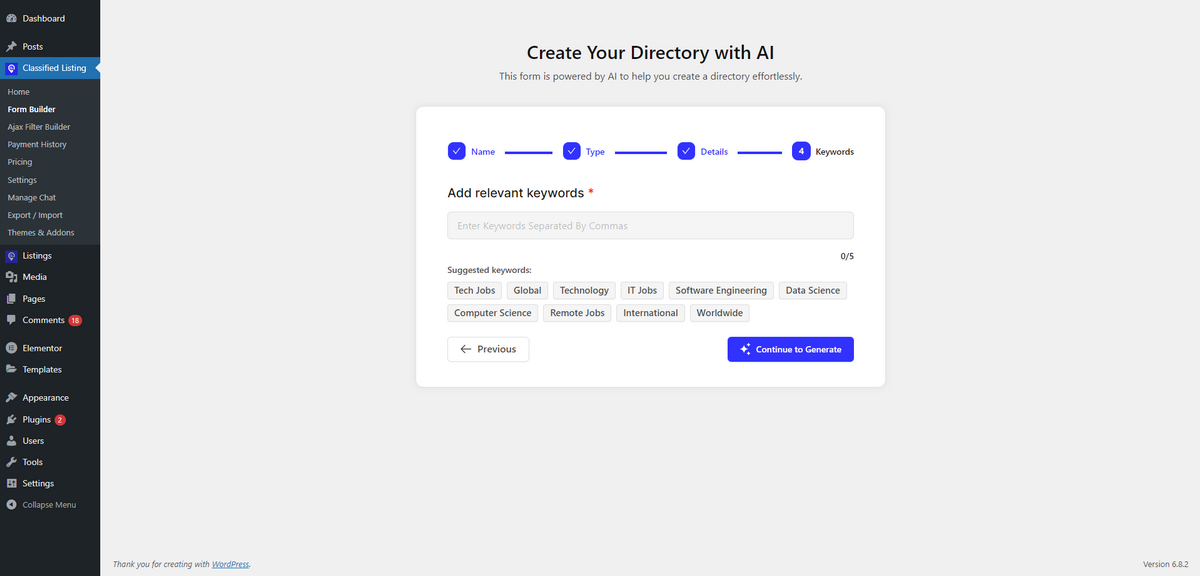
In comparison, while HivePress is known for its flexible and customizable directory-building tools, it doesn’t have the same level of AI integration as Classified Listing.
Users of HivePress will need to rely on third-party plugins or external AI tools to automate tasks like content generation or SEO optimization, which can add extra complexity and potential costs to the project.
Powerful Form Builder
Classified Listing comes with an advanced drag-and-drop form builder that allows users to create listing forms by dragging and dropping preferred form fields. The form builder includes 14 custom field types, offering flexibility in capturing information from users.
Additionally, it allows users to build unlimited custom fields with conditional logic! This makes Classified Listing a powerful tool for creating complex forms with ease.

HivePress, in contrast, doesn’t have a drag-and-drop form builder. Instead, it requires users to create listing attributes each time they add custom fields to their listing forms. This gets complex for beginner users.
Additionally, users must rely on third-party software for form creation. All these make HivePress less likely to be picked over the Classified Listing WordPress directory builder.
Search and Filtering
Classified Listing offers users an AJAX-powered, customizable search filter system. It enables them to refine their search results based on specific criteria, such as categories, price, location, and other custom fields.
The use of location-based search further enhances the user experience by letting visitors search for listings within a specific geographic area. This seamless search process ensures users can easily find what they are looking for without page reloads, improving the overall browsing experience.
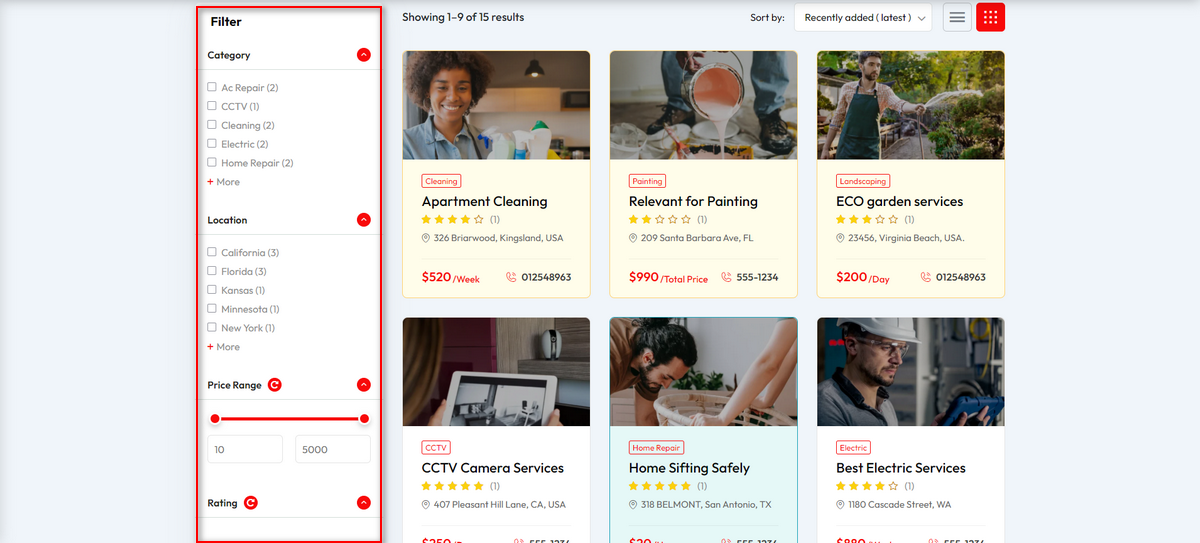
Additionally, Classified Listing surpasses typical search functionality with its Search Alert add-on. This feature allows users to save their search queries and receive email notifications when new listings matching their criteria are published.
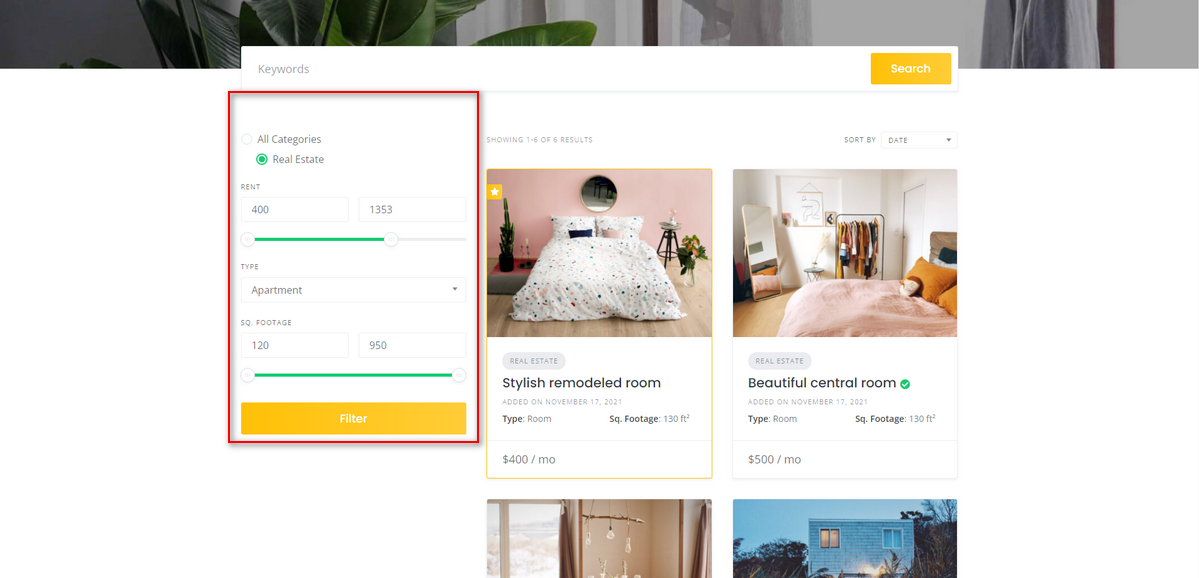
On the other hand, HivePress offers a basic search and filtering system. While it does provide standard search functionality, it lacks the level of customization and advanced filtering features found in Classified Listing. Once again, Classified Listing outshines HivePress in terms of its features.
Monetization Features
When it comes to monetizing directory or classified ads websites, both Classified Listing and HivePress offer options to help site owners generate revenue. However, Classified Listing provides more flexibility and variety in monetization strategies.
Classified Listing offers a diverse range of monetization options, enabling you to charge users in various ways to generate income. You can offer ad packages like Top Ads, Featured Ads, Pay Per Ad, Bump-Up Ads, Claim Ads, and more.
Not only this, but you can also build membership packages to get users to pay for premium access or benefits. There’s a claim listing option that allows you to generate revenue by enabling businesses to claim and manage their listings.
This directory and classified ads site builder integrates with popular payment gateways Flike PayPal, Stripe, Authorize.net, PayFast, RazorPay, and more to help you easily receive your money.
In comparison, HivePress also offers monetization options. It allows you to charge users for paid listings and membership plans. It also features a claim listing option and integrates seamlessly with dozens of payment gateways.
Here we can see a tie when comparing the monetization features of these plugins in this Classified Listing vs. HivePress article.
Ad Submission and Management
Classified Listing offers a simple, structured system for managing directory listings. Users can easily submit listings directly from the front end, and administrators maintain complete control through the WordPress dashboard.
The platform is designed to be intuitive, allowing users to add, edit, and manage their listings easily. Additionally, a user-friendly front-end dashboard is available, allowing users to update, delete, promote, or renew their ads with ease.
HivePress offers a customizable experience for listing management. Like Classified Listing, HivePress allows users to submit and manage listings from the front end.
Additionally, HivePress enables users to create detailed listings with custom fields, categories, and tags. So, both plugins excel in listing submission and management.
Private and Real-Time Chat
Classified Listing has a fantastic feature. It allows users on a directory or classified ads website to communicate with each other in real-time and without sharing their contact details. Additionally, this plugin allows site owners to monitor users’ conversations and filter out unwanted text messages.
In contrast, HivePress does not include a live chat feature by default. It just features a free Messages extension to enable the chatting function, and that’s not even in real-time. Thus, Classified Listing gets ahead of HivePress one more time with this secure and live chat feature.
Multiple Mapping Sources
Classified Listing lets you integrate Google Maps and OpenStreetMap to help users find listings based on proximity. It enables you to display listings with precise geolocation through interactive maps.
Whether you’re running a directory that requires accurate location tracking or a classified ads website where users need to find items according to their preferred locations, Classified Listing can benefit you in this case.
On the other hand, HivePress doesn’t have built-in functionality to integrate with map services. It requires you to install a free extension of it to connect your directory with Google Maps or Mapbox. Some users may find installing another extension and then following the steps to integrate the map a hassle.
In this sense, Classified Listing is more beginner-friendly and doesn’t need users to follow so many steps to integrate Google Maps or OpenStreetMap.
Add-on Support
If the features above don’t meet your needs, we encourage you to explore all the add-ons that Classified Listing offers to enhance your website’s functionality.
Classified Listing Addons vs HivePress Extensions
| Classified Listing Addons | HivePress Extensions |
|---|---|
| Payfast | Bookings |
| Paystack | Marketplace |
| Booking (Reservation & Appointment) | Requests |
| PDF Invoices | Memberships |
| Elementor Builder | Search Alerts |
| Multi Currency Addon | Social Login |
| Seller Verification | Social Links |
| Mobile no Verification | Import |
| WPML MultiLingual Addon | SEO |
| BuddyPress Integration | Opening Hours |
| BuddyBoss Integration | Statistics |
| Store & Membership Addon | Tags |
| Real Estate Agent Addon | Paid Listings |
| Coupon Addon | Claim Listings |
| Razorpay Payment | Favorites |
| Job Manager | Messages |
| Marketplace | Geolocation |
| Listing FAQs | Reviews |
| Claim Listing | |
| Search Alert |
Extensive Collection of Themes
Do you know that themes play a crucial role in making your classified ads or directory website look good or incredibly dull? So, cautiously choose your website theme before you even select a plugin.
Classified Listing Themes vs HivePress Themes
| Classified Listing Themes | HivePress Themes |
|---|---|
| CLRestaurant | MeetingHive |
| CLDirectory | RentalHive |
| CLCar | ExpertHive |
| CLProperty | TaskHive |
| Radius Directory (Free Theme) | JobHive |
| CLClassified (Free Theme) | Listinghive (Free) |
| ClassiList | |
| CLHotel | |
| Obitore | |
| CLDoctor | |
| Servlisting | |
| CLPlace |
Mobile App Availability
Would it be amazing if you could manage your classified ads or directory sites using your smartphone? Indeed, it will be fantastic, and so Classified Listing has mobile versions. You can use this software on your Android and iOS smartphones and can manage your websites on the go.
However, HivePress doesn’t feature any Android or iOS apps, nor does it offer the same level of benefits as Classified Listing.
User Reviews
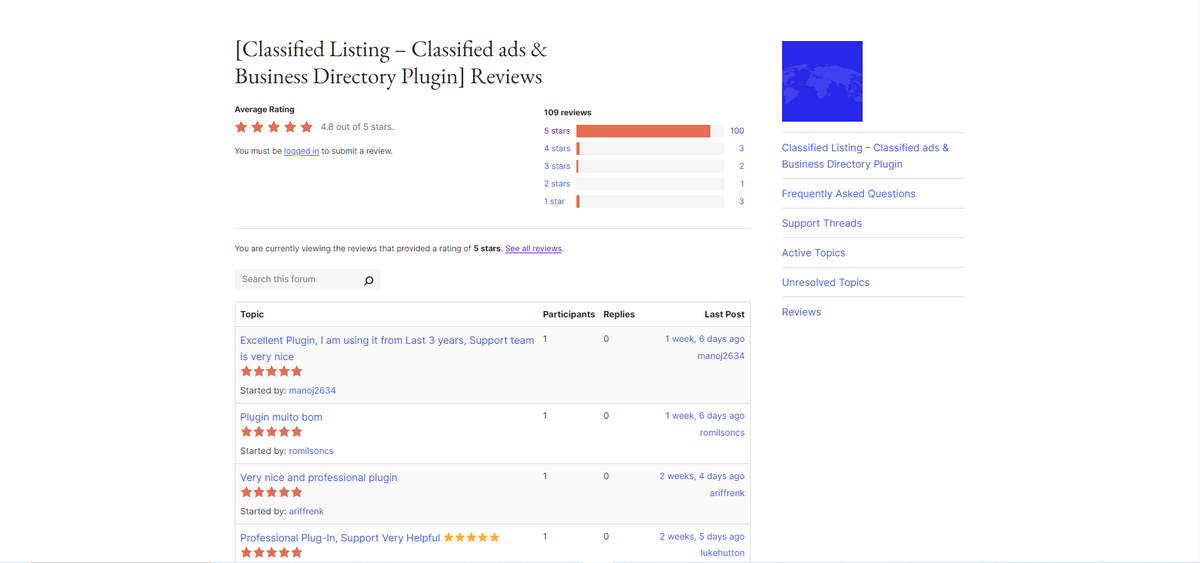
As we’ve said at the beginning of this article, Classified Listing is a popular plugin. Don’t just take our words. Instead, you can visit the WordPress plugin repository and check reviews from users of Classified Listing.
Most of the reviews are positive with high ratings.
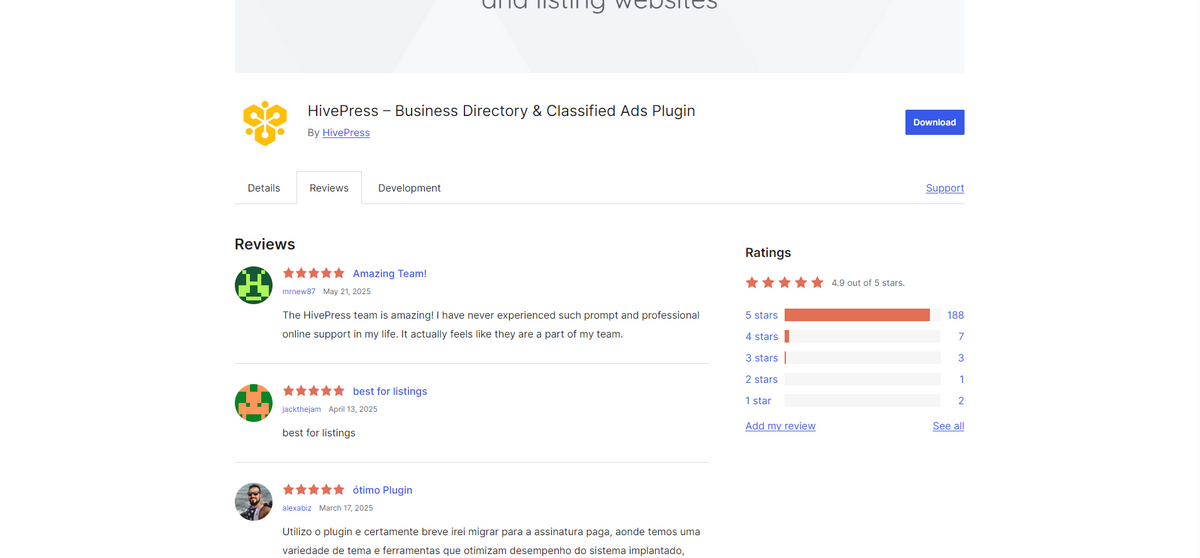
HivePress comes with mixed reviews. Some of these reviews are positive and some are negative. Some users shared concerns about this plugin’s code, while others were amazed by its functionality. Here is what users say about this plugin.
Pricing
Classified Listing has a reasonable pricing plan. Given its features, this plugin has a comparatively lower pricing plan than other similar plugins. HivePress, in contrast, is free to use, but it charges significant fees if you want to extend its capabilities.
| Pricing Plan | Classified Listing | HivePress |
| Yearly cost for 1-site | $44 | Free |
| Lifetime deal cost | $319 (Bundle 1 Site) | No lifetime deal |
Strengths and Weaknesses
We’ll now explore each plugin’s strengths and weaknesses so that you can easily understand which plugin is the best for your job. Let’s get started.
Classified Listing
Here are the strengths and weaknesses of the Classified Listing plugin.
Strengths:
- Beginner-friendly and intuitive interface
- AI-powered directory creation
- Drag-and-drop form builder
- Advanced search and filtering
- Private, live chat
- Mobile Apps
- Responsive themes
- Extensive add-ons
Weaknesses:
- Limited features in the free version
HivePress
Okay, let’s now look at the strengths and weaknesses of HivePress:
Strengths:
- Customization and flexibility
- Free core plugin
- Developer-friendly
- A significant number of extensions
- Customizable user profile
Weaknesses:
- No AI integration
- No drag-and-drop form builder
- Basic search functionality
- No live chat
- No mobile apps
- and more
Which Plugin Will You Choose?
Now comes the hard part, as you need to select the best plugin between these two. Well, it’s not that challenging.
Suppose you read everything we shared in our Classified Listing vs. HivePress content. In that case, you’ll agree with us that Classified Listing easily beats HivePress with its fantastic features and UI.
With AI support, real-time live chat, advanced search and filtering, drag-and-drop dashboard, and mobile app, Classified Listing offers everything you need to build and monetize a professional classified ads or directory website. Hence, give it a try.



