On This Page
Best AI WordPress Plugins at a Glance
The best AI WordPress plugins automate content creation, SEO, customer support, and site security. AI Engine is the top choice for chatbots and content generation, Resolver for self-updating support chatbots, GetGenie for SEO-driven writing, WordLift for schema markup and semantic SEO, Quttera for AI malware scanning, and Akismet for automatic comment spam filtering.
Best AI WordPress Plugins by Use Case
- AI chatbots and content generation: AI Engine adds ChatGPT-style chatbots, AI content generation, and reusable templates.
- AI customer support chatbot: Resolver learns from your site content, retrains automatically when pages change, and runs on your own OpenAI, Google, or Anthropic API key.
- SEO content writing: GetGenie provides keyword research, SERP and competitor analysis, and SEO-scored AI writing.
- Semantic SEO and knowledge graphs: WordLift adds Schema.org markup, knowledge graphs, and content recommendations.
- Schema markup and rich results: SchemaEngine AI generates structured data automatically or with AI across 30+ schema types.
- Malware and security scanning: Quttera uses an AI scan engine to detect unknown malware and check blacklist status.
- Comment spam protection: Akismet automatically filters spam comments and discards the worst threats.
Plugin Best For Standout AI Feature AI Engine Chatbots and content Trainable chatbot with embeddings GetGenie SEO content writing SERP and NLP keyword analysis PurioChat WordPress support and WooCommerce sales Product-aware AI chat with in-chat cart actions Resolver AI chatbot Auto-retrains when pages change WordLift Semantic SEO Knowledge graph generation SchemaEngine AI Schema and rich results AI-assisted schema generation Quttera Malware scanning AI scan engine for unknown threats Akismet Spam protection Machine-learning comment filtering
AI has moved from a buzzword to a practical toolkit for WordPress site owners. Today’s AI plugins can write and optimize content, answer visitor questions around the clock, add structured data for rich results, and stop malware and spam before they cause damage.
The challenge is choosing the right one. Many AI plugins overlap in features, some depend on paid API keys, and a few have been abandoned or pulled from WordPress.org entirely. We’ve organized this list by use case, so you can pick the plugin that solves your specific problem. Each pick is actively maintained and available today.
Factors to Consider When Choosing an AI WordPress Plugin
When choosing an AI WordPress plugin, there are several factors to consider to ensure that you select the best option for your website’s needs. Here are some key considerations to keep in mind:
- Functionality: Look for a plugin that provides the functionality you require to enhance your website’s performance. Determine what you want to achieve, such as improving user engagement or optimizing your website’s SEO, and choose a plugin that aligns with those goals.
- Ease of use: Choose a plugin that is easy to set up and use, even if you don’t have technical expertise. Consider plugins that offer user-friendly interfaces and intuitive features.
- Compatibility: Ensure that the plugin is compatible with your current WordPress version and other plugins you’re using to avoid conflicts that can cause issues with your website’s functionality.
- Support and updates: Look for plugins that offer reliable support and frequent updates to ensure that the plugin remains compatible with the latest WordPress updates and AI advancements.
- Security: Make sure the plugin is secure and has no history of vulnerabilities that could put your website at risk. Check user reviews and ratings to see how other users have rated the plugin’s security.
- Cost: Determine the plugin’s cost and evaluate it based on its value for money. Some plugins are free, while others require a one-time or recurring fee. Consider the benefits of the plugin against the cost to ensure it’s a worthwhile investment.
By considering these factors, you can choose an AI WordPress plugin that meets your needs and helps you achieve your website’s goals. Here are the plugins that we’ve chosen out for you:
AI Engine

AI Engine is a fantastic AI WordPress plugin that offers a variety of exciting features to enhance your website’s performance. With just a simple shortcode, you can add a ChatGPT style chatbot to your website that allows users to engage with your site in a conversational manner. The chatbot is available in fullscreen, popup, and window modes, providing a range of options to suit your website’s needs.
Generating fresh and engaging content is crucial to keeping your website relevant and up-to-date, and AI Engine’s content generation feature makes it easy to achieve. The AI Playground feature provides a range of tools like translation, correction, and SEO, allowing you to experiment with different techniques and find the best fit for your website.
Creating templates for everything you do is a great way to save time and increase productivity, and this artificial intelligence WordPress plugin allows you to do just that. With this feature, you can quickly create templates for various tasks, including WooCommerce product fields, titles and excerpts for your posts, and more.
One of AI Engine’s most exciting features is its ability to train your AI to perform specific tasks better. This functionality allows you to customize your AI to meet your website’s unique needs and provide a more personalized experience for your users.
Speech-to-Text with Whisper API and embeddings add more context to your chatbot based on your data, allowing for more natural and engaging conversations. Furthermore, AI Engine includes built-in statistics to help you keep track of your OpenAI usage and optimize your website’s performance.
Finally, AI Engine has many upcoming features in the works, promising even more exciting functionalities in the future. With this artificial intelligence WordPress plugin, you can leverage AI technology to take your website to the next level and stay ahead of the competition.
Pricing: Free
Feature Highlights:
- Chatbot styled after ChatGPT
- Popup and Fullscreen chatbot mode
- Trainable AI for specific tasks
- Internal API
- Whisper API for speech to text functionality
- Embeds support for extra context for chatbot
- Easy template creation to save time
SchemaEngine AI
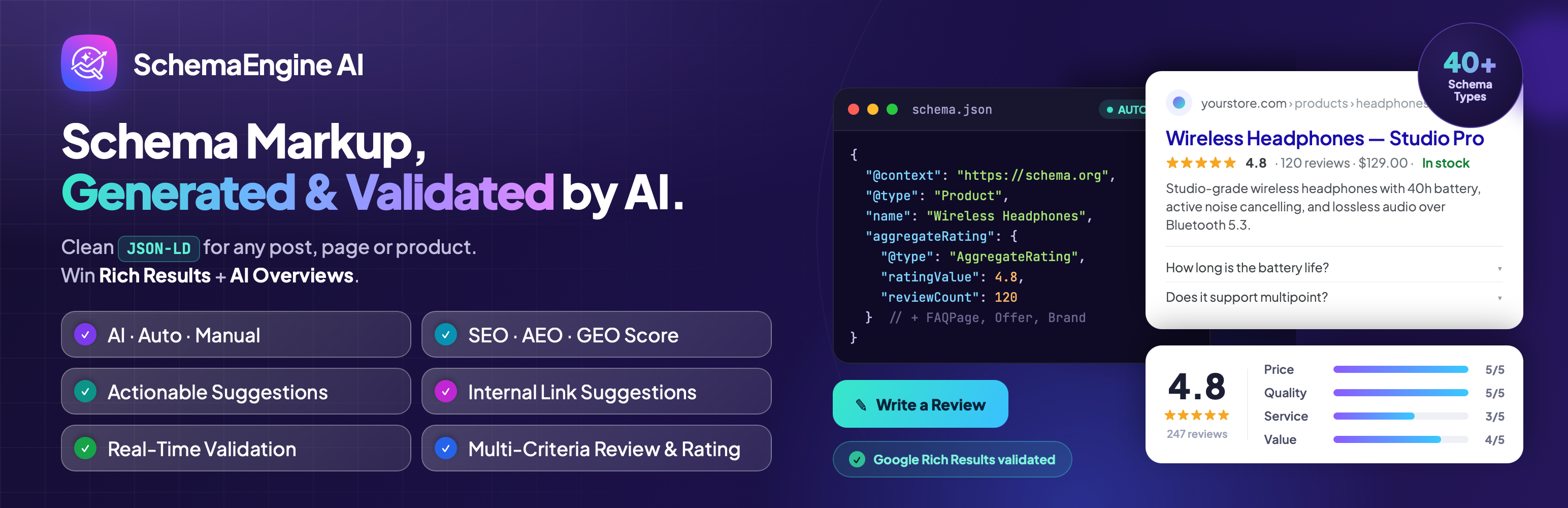
SchemaEngine AI (formerly Review Schema) is a structured data plugin that helps search engines and AI systems understand your content. Rich results such as review stars, FAQs, products, and recipes can lift click-through rates. SchemaEngine AI generates the markup for you, so you don’t have to write JSON-LD by hand.
The plugin supports more than 30 schema types and offers three ways to work. Manual mode gives you full control over every field. Auto mode maps your existing content to the right schema. AI mode generates schema from your page content in seconds. All output is clean, graph-based JSON-LD, which connects related entities the way Google and AI Overviews prefer to read them.
SchemaEngine AI also includes a multi-criteria review system. Visitors can rate products, services, or listings across several criteria, and those ratings feed straight into Review and AggregateRating schema. This makes it a strong fit for review sites, WooCommerce stores, directories, and local businesses that want star ratings in search results.
Pricing: Free, with a Pro upgrade (add current Pro price)
Feature Highlights:
- 30+ schema types
- Manual, Auto, and AI generation modes
- Graph-based JSON-LD output
- Multi-criteria review and rating system
- Rich result support for reviews, FAQs, products, and more
GetGenie

GetGenie is an AI-powered WordPress plugin that provides a range of exciting features to help you optimize your website’s content and improve its performance. With over 30 templates available for quality content and copywriting, GetGenie is an excellent content research tool that makes it easy to find inspiration for your website’s posts.
One of the standout features of this artificial intelligence WordPress plugin is its ability to help you find trending and high search volume long-tail SEO keywords quickly. The plugin provides competitor and SERP analysis data for SEO guidance, allowing you to optimize your website’s content for maximum impact. Another impressive feature of GetGenie is its competitor and content analysis data, which enables you to generate finely-researched and unique articles.
The plugin also offers idea generation for microblogs and unique SEO title suggestions, helping you to create engaging and optimized content quickly. GetGenie’s quick outline generation for your blog posts or content, related frequently asked questions, and the best intro and summary for any content make it an excellent tool for optimizing your website’s content. Additionally, the AI WordPress plugin shows related Reddit and Quora questions to answer, further enhancing your website’s user experience.
AI content generation is finely optimized for SEO, ensuring that your website’s content is of high quality and ranks well in search engines. GetGenie also offers a framework for inspiring copywriting, on-page SEO scores for better optimization, WooCommerce product description writer, and support for advanced editors like Elementor and Gutenberg. It has many more exclusive SEO features, including keyword, NLP keyword, and competitor analysis, related questions, SERP visualizer, content score, and NLP Keyword suggestions.
GetGenie is OpenAI GPT-3 DaVinci compatible, ensuring that you have access to the latest advancements in AI technology.
Pricing: Free and $19 to $99 per month
Feature Highlights:
- Over 30 content and copywriting templates
- Competitor and SERP analysis
- Easy generation of mini-blog ideas
- SEO-rich content generation
- Related FAQs
- Exceptional SEO title suggestions
- Accurate scores for on-page SEO
- Competitor content analysis for high-quality posts
- Presentation of Quora and Reddit questions for answers
- Compatible with OpenAI GPT-3 DaVinci
PurioChat
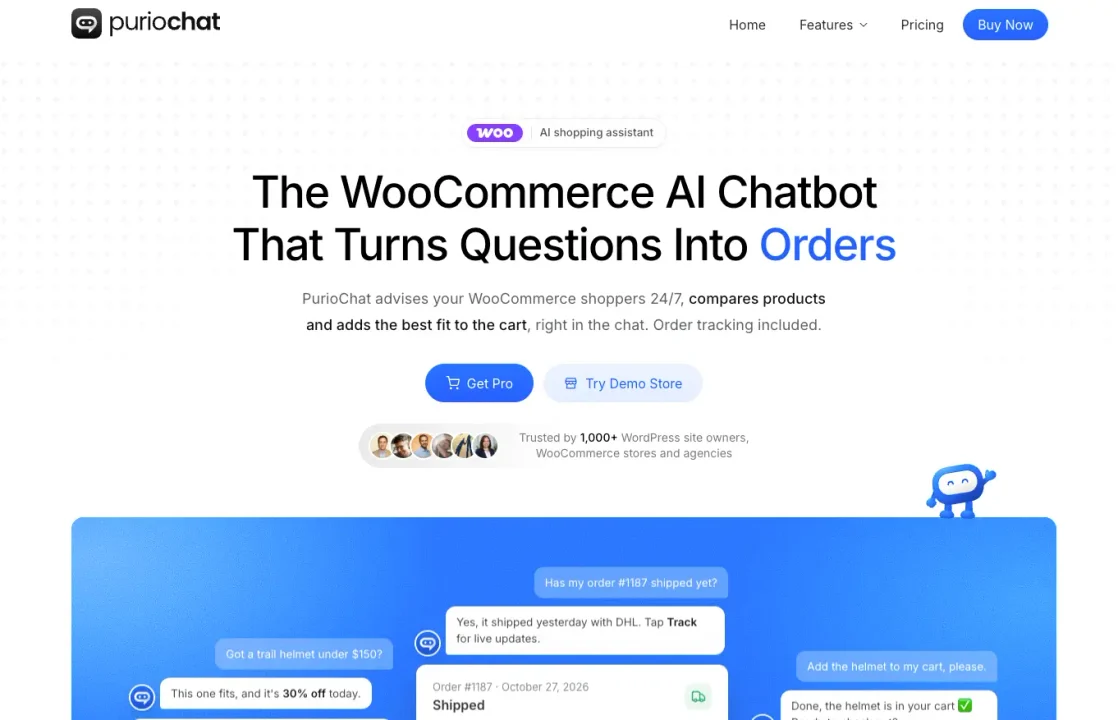
PurioChat is an AI shopping assistant for WooCommerce that answers questions using your own pages, posts, PDFs, and products. Instead of relying on a generic script, it retrieves relevant information from your site before replying. That makes it useful for customer support and for helping visitors find the right product.
PurioChat for WooCommerce: an AI shopping assistant built into WordPress.
For WooCommerce stores, shoppers can describe what they need in ordinary language. PurioChat searches the product catalog, recommends and compares relevant items, and displays product cards with prices and stock. Customers can choose product variations, add items to their cart, and ask about an existing order without leaving the conversation.
Site owners choose what content the chatbot learns, review conversations in the WordPress dashboard, and hand off a conversation to a human when needed. The same trained content can also power AI search on the site.
Feature Highlights:
- Answers grounded in WordPress pages, posts, PDFs, and WooCommerce products
- Product recommendations and comparisons based on shopper questions
- Product cards, variation selection, and add-to-cart actions in chat
- WooCommerce order-status answers
- Human live chat handoff and conversation insights
- AI-powered site search using the same trained content
Best for: WordPress and WooCommerce sites that want one chatbot for support, product discovery, and shopping assistance.
Resolver
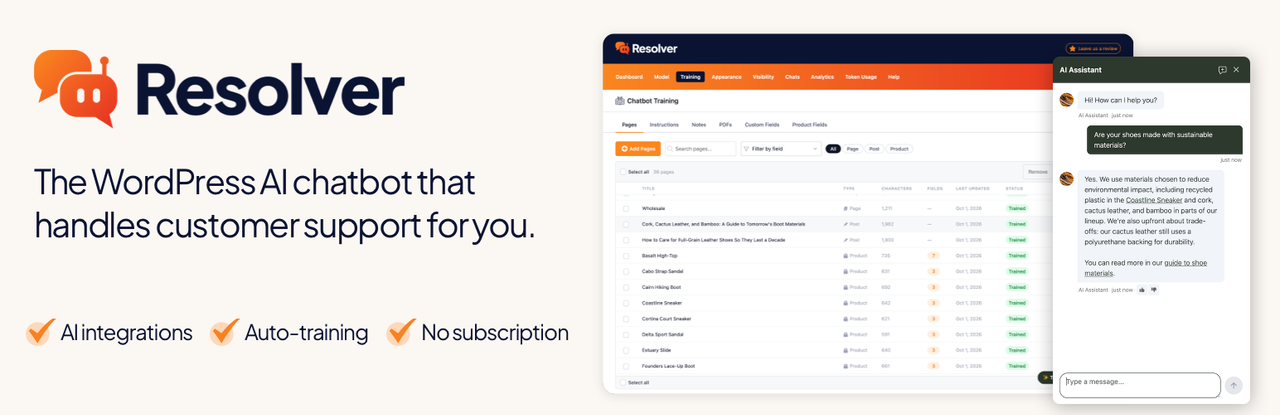
Resolver is a WordPress AI chatbot plugin that takes repetitive customer support off your plate. It learns from your website’s content and uses that knowledge to reply to visitors instantly, so your customers get quick answers, and you get fewer tickets to handle.
Keeping a chatbot informed is usually the hard part, and this is where Resolver stands out. Because it runs natively inside WordPress, it notices when a page changes and retrains itself. It can also add new pages to its training data as they go live. Resolver reads content from the Classic Editor, Gutenberg, and page builders like Elementor, Beaver Builder, and Bricks, and it even expands shortcodes to learn from their content.
Getting started doesn’t require any prior AI knowledge. You pick a model from OpenAI, Google, or Anthropic, select the pages to train on, and test your bot privately before it goes live. You can easily tweak its behavior in the Instructions section to keep its replies on brand.
Cost is another strength of this WordPress chatbot plugin. Instead of a monthly SaaS subscription, you enter your own API key and pay your AI platform directly for usage. Sites with a few new chats per day can expect to spend a few dollars a month. To keep spending under control, you can set a monthly token limit and receive email alerts as you approach it.
Resolver Pro adds training on PDFs, custom fields, and WooCommerce product fields, along with training notes, chat analytics, and user feedback. These tools help you fill knowledge gaps and steadily improve your chatbot’s answers.
Pricing: Free and Premium from $49 per year, plus AI platform usage costs.
Feature Highlights:
- AI chatbot powered by OpenAI, Google, or Anthropic models
- Automatic retraining when pages are edited
- Auto-training on newly published pages
- Compatible with major page builders
- Private preview before launch
- Custom instructions for on-brand replies
- Full conversation history
- Token limits and email alerts
- No limits on chats in the free version
Bertha AI

Bertha AI is a versatile and powerful AI WordPress plugin that can help you create high-quality content quickly and easily. With a wide range of features that cover everything from content creation to SEO optimization, Bertha AI can help you take your website to the next level.
Its ability to create unique and engaging images using Bertha Art is one of its top features. This module allows you to generate images based on your imagination, and Bertha can even write image descriptions for you. You can also search for AI images to use as you wish, and use searched image prompts to help you get better results with Bertha Art.
Bertha AI is also great for creating compelling website copy. With its ability to generate persuasive selling points for e-commerce websites, audience and conversion-focused blog posts, and SEO titles and meta tags, artificial intelligence WordPress plugin can help you improve your website’s ranking and visibility.
Bertha AI PRO’s Chat GPT module allows you to chat with Bertha using the chat module, while the Content Rephraser module can help you improve the quality of your writing. The Unique Value Proposition feature helps you create a short and concise statement telling visitors what you offer, how it can make their life better, and what they have to do to get it. Meanwhile, the Section Title Generator and Paragraph Generator modules help you create creative titles and compelling body copy for each section of every page on your website.
Bertha AI PRO is also great for generating call-to-actions, benefit titles, service/product benefit lists, product/service descriptions, and personal bios. It can even write an overview and history for your company, inspiring mission and vision statements for your “About Us” page, and generate a list of frequently asked questions and their answers for your blog or website.
Pricing: Free and Premium, from $20 to $150 a month
Feature Highlights:
- Works with all major page builders
- Unique value proposition
- Section title generator
- Paragraph generator
- Call to action
- Contact form description
- SEO title tag
- Persuasive bullet points
WordLift

WordLift is an AI WordPress plugin that offers several powerful features to help bloggers and content creators create and publish better content. One of its key features is its ability to support the writing process with trustworthy and contextual facts. With WordLift, users can easily add links, images, and interactive visualizations to their content, making it more engaging and informative for readers.
Another great feature of this artificial intelligence WordPress plugin is its ability to keep readers engaged with relevant content recommendations. By analyzing the content on your website, WordLift can recommend related articles and resources that will keep your readers interested and coming back for more. Additionally, the plugin produces content that is compatible with schema.org markup, allowing search engines to better index and display your website in search results.
WordLift is an innovative way to produce and distribute content through metadata. With the plugin, users can publish metadata that can be shared, sold, and distributed to help promote their content and drive traffic to their website. One of the most exciting features of this AI WordPress plugin is its technology to self-organize content using publicly or privately available knowledge graphs. This means that WordLift can help users build datasets and have full data ownership, making it easier to create web content using contextually relevant information.
WordLift also provides access to a vast range of free photos and illustrations from the Commons community. This includes everything from maps to astronomical imagery to photographs and artworks, making it easy for users to add visual interest to their content. Finally, WordLift offers content tagging for better SEO. By tagging your content with relevant keywords and phrases, you can improve your website’s search engine ranking and drive more traffic to your site.
Pricing: Free and premium from $49 per month
Feature Highlights:
- Contextual and factual information
- Helpful images and links inclusion
- Easy use of metadata to share and sell content
- Engaging and relevant recommendations for readers
- Easy content tagging to improve SEO
- Multilingual support
Quttera

Quttera Web Malware Scanner is a must-have AI WordPress plugin for website owners who want to keep their sites safe and secure. With its One-Click Scan feature, Quttera can quickly and easily scan your entire website for malware, saving you time and effort. Its Unknown Malware Detection technology ensures that even previously unknown threats are detected, keeping your website safe from new and emerging threats. It also detects files that may be infected by PHP malware and injected PHP shells, two common types of website malware.
In addition to scanning for malware, Quttera also checks for External Links that may be harmful to your website’s reputation. By keeping track of any suspicious links on your site, the AI WordPress plugin helps protect your site from malicious attacks. Unlike other malware scanners that rely on Signatures or Patterns updates, Quttera uses Artificial Intelligence Scan Engine to detect malware. This means that it can detect even the most advanced malware threats, keeping your website secure.
One of the most important features of Quttera is its ability to check your website’s Blacklist Status. If your site is listed on Google or other blacklisting authorities, it can negatively impact your website’s traffic and reputation. With the plugin, you can easily check if your site has been blacklisted and take steps to address the issue.
Quttera also utilizes Cloud Technology to ensure that it scans your website quickly and efficiently, without putting a strain on your server’s resources. What’s more, the artificial intelligence WordPress plugin provides a Detailed Investigation Report, allowing you to see exactly which files were scanned and which malware was detected.
For WordPress website owners, Quttera offers a special Investigation of WordPress files feature, which helps detect any malware or security issues within your WordPress installation.
Pricing: Free and Premium from $10 per month up to $249 per year
Feature Highlights:
- One-click scans available
- Detection of unknown malware
- Support for cloud backups
- Detailed status reports
- Detection of external links
- Easy detection and identification of PHP malware
- PHP shell detection
Akismet

Akismet is an AI WordPress plugin that offers top-notch spam protection for your website. By automatically checking all comments and filtering out those that look like spam, Akismet saves you the time and effort of having to manually moderate your comments section. URLs in the comment body can often contain hidden or misleading links, which can lead to a negative user experience. With Akismet, URLs are shown in the comment body, making it easier for moderators to identify and remove potentially harmful links.
Arguably the most useful features of this artificial intelligence WordPress plugin is its status history for each comment. This allows you to easily see which comments were caught or cleared by the plugin and which were marked as spam or unspam by a moderator. This feature is especially helpful for websites that receive a lot of comments.
With Akismet, moderators can also see the number of approved comments for each user, allowing them to quickly determine if a user has a history of posting spammy or low-quality comments. This information can be used to make more informed decisions about which comments to approve or delete.
One unique feature of Akismet is its discard feature. This feature outright blocks the worst spam, saving you disk space and speeding up your website. This is especially useful for websites that receive a lot of spam comments, as it can significantly reduce the amount of spam that needs to be stored on your server. In order to use Akismet, you’ll need to obtain an Akismet.com API key, which is free for personal blogs. Paid subscriptions are also available for businesses and commercial sites.
Pricing: Free and Premium from $8.33 a year
Feature Highlights:
- Automatic comment assessment
- URLs displayed in comment body
- Display of amount of approved comments
- Discarding of the biggest spam threats
What is the best AI plugin for WordPress?
AI Engine is the best all-round choice for chatbots and content generation, while Resolver is the best pick for automated customer support.
Are there free AI plugins for WordPress?
Yes. AI Engine, Resolver, GetGenie, SchemaEngine AI, and Quttera all offer free versions, and Akismet is free for personal blogs. Plugins that connect to AI models, like AI Engine and Resolver, require your own API key from the AI provider, billed by usage.
Do AI plugins slow down a WordPress site?
Most don’t, because the AI processing happens on external servers, not your hosting. Frontend features like chatbots do load extra scripts, though. Test your site with PageSpeed Insights before and after activating a plugin, and load chat widgets only on the pages that need them.
Is AI-generated content bad for SEO?
No, as long as it’s helpful. Google rewards high-quality content regardless of how it’s produced, but mass-produced, low-value pages can violate its spam policies. Use AI for research, outlines, and drafts, then edit for accuracy, expertise, and original insight before publishing.
How do I choose a safe AI WordPress plugin?
Check that the plugin was updated recently, is tested with your WordPress version, and has a solid install base and support record. Review what data it sends to third-party AI services, especially if you handle customer information under GDPR. Avoid plugins that haven’t been updated in over a year.
Final Thoughts: Choosing an AI WordPress Plugin
There’s no single best AI plugin for every site. The right pick depends on the problem you’re solving. Start with your biggest bottleneck. If content production is slow, try AI Engine or GetGenie. If content production is slow, try AI Engine or GetGenie. If support tickets pile up, Resolver can answer common questions for you.
Whichever you choose, pick actively maintained plugins, watch your AI API costs, and keep a human editor in the loop. Used well, these tools save hours of manual work and help your WordPress site compete in a search landscape increasingly shaped by AI.