

On This Page
Quick answer: You get your first 100 listings without traffic by adding them yourself, not by waiting for people to submit them. Pull real businesses from public sources (Google Maps, association lists, existing directories, local communities), add them as free “claimable” listings — or, on WordPress, import real businesses straight from Google Maps in bulk — then invite the owners to claim their profile. Your listings then become your first traffic — each one is a page Google can rank. The rule that makes it work: go narrow enough that 100 listings covers your entire niche or town.
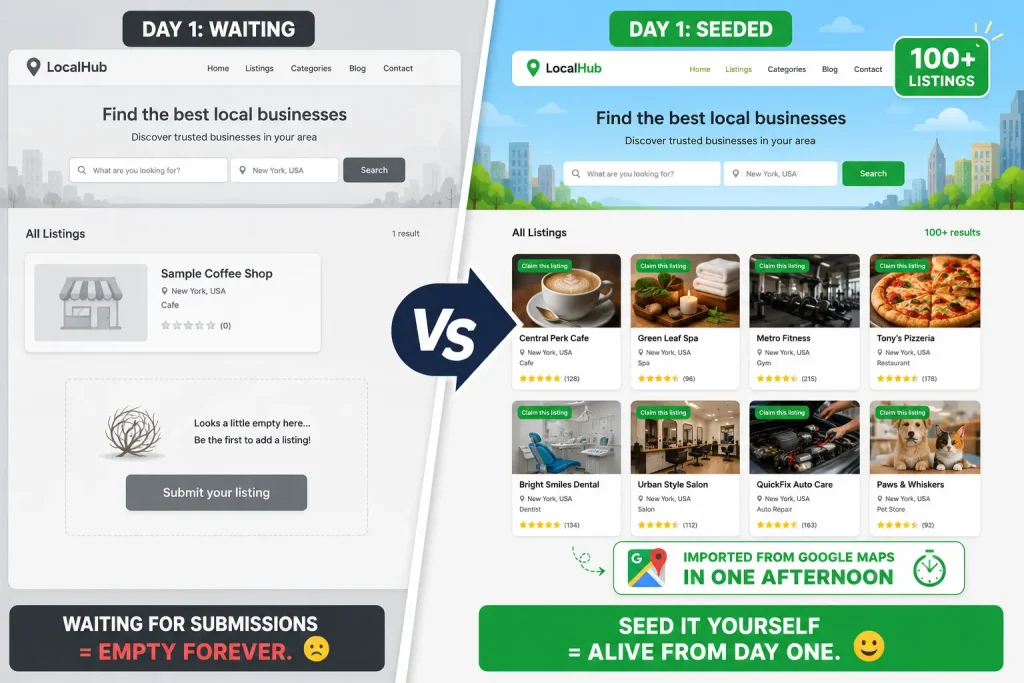
Most new directory owners get stuck in the same trap. They build the site, add a “Submit your listing” button, and wait. Nothing happens. No traffic means no submissions, and no listings means no reason for anyone to visit. It feels impossible.
Here’s the truth that breaks the loop: the first 100 listings are not something you collect. They’re something you build. Let me show you exactly how.
The mindset shift that changes everything
Every failed directory has one thing in common: the founder treated listings as inbound. They expected businesses to find the site and sign up.
Every successful directory did the opposite. The founder treated the first batch of listings as a task to complete, like writing the first pages of a book. Nobody submits your first listings. You add them, one by one, by hand.
This is not cheating. This is how nearly every marketplace on earth started:
- Reddit looked busy on day one because the founders filled it with fake user accounts and posted the content themselves, so real visitors wouldn’t see an empty site.
- Airbnb didn’t wait for hosts to upload nice photos. The founders went door to door and photographed the apartments themselves.
- Food delivery marketplaces listed restaurants that hadn’t signed up yet, then used that “supply” to attract diners, and only then went to the restaurants.
The pattern is always the same: build one side of the marketplace by hand, before it can grow on its own. For a directory, that side is your listings. Your job for the first 100 is to be the supply.
Why listings come before traffic (not after)
Here’s the part most people get backwards. They think: first I need traffic, then I’ll get listings.
It’s the reverse. Your listings are what create your traffic.
Every listing is a page. A page has a business name, a location, a category, a description. That’s a page Google can index and rank. One listing is one door into your site. One hundred listings is one hundred doors — one hundred chances to show up in a search like “plumbers in [your town]” or “vegan bakeries near me.”
A directory with zero listings has zero reasons to visit. A directory with 100 real, useful listings has 100 reasons. So you don’t wait for traffic to earn listings. You add listings to earn traffic.
Where to actually find 100 listings (without a single submission)
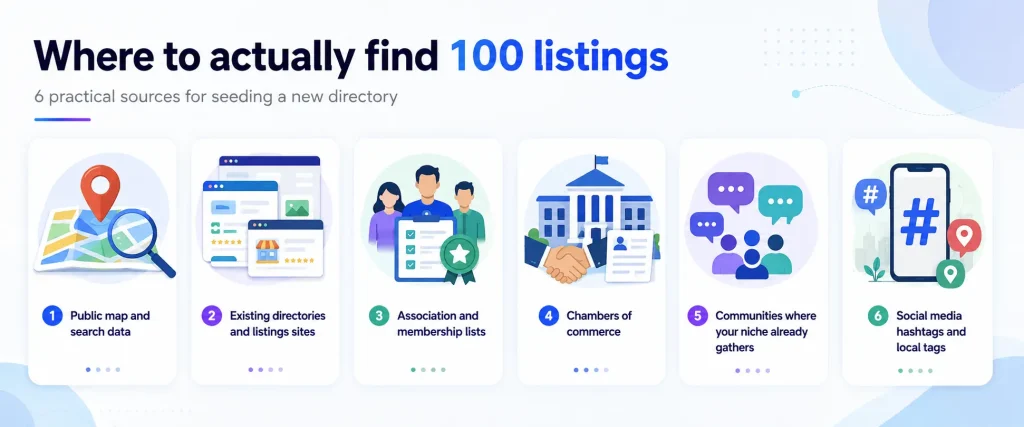
This is the practical part. You don’t need submissions because the businesses already exist — their information is already public. Your job is to gather it and organize it better than anyone else. Here’s where to look:
1. Public map and search data. Search your niche + location on Google Maps or Google Search. Every result is a real business with a public name, address, phone, and hours. This is factual business information, and it’s your richest source.
2. Existing directories and listings sites. Yellow pages, industry directories, and local listing sites already list businesses in your niche. Use them to build your list of who exists (see the ethical note below on what you can and can’t copy).
3. Association and membership lists. Almost every industry has an association, and many publish a public member directory. A “members” page is a ready-made list of exactly the businesses you want.
4. Chambers of commerce. For local directories, the local chamber of commerce usually publishes a member list — pre-qualified local businesses, all in one place.
5. Communities where your niche already gathers. A Facebook group, a subreddit, or a forum for your niche is full of the exact businesses and people you want to list. You don’t need your own traffic — you can borrow theirs.
6. Social media hashtags and local tags. Businesses tag themselves by location and category on Instagram and Facebook. Search the tags and you’ll find dozens more.
You are not inventing anything. You’re collecting public facts that are scattered everywhere and putting them in one organized place. That organizing is the value of a directory.
The secret weapon: claimable listings
Here’s how you turn 100 businesses you added into 100 real, engaged users — and it’s the smartest tactic in the whole playbook.
Add each business as an unclaimed, claimable listing. You fill in the public basics (name, category, location, a short description). The listing shows a small button: “Is this your business? Claim it.”
Now watch what happens:
- A business owner searches their own name (everybody does this).
- They find your listing of their business.
- They see a claim button and think, “Wait, I should control this.”
- They claim it, complete it, maybe upgrade it — and now they’re a real user who came to you.
You’ve flipped the whole problem. Instead of begging businesses to join an empty site, you built a useful site first, and the businesses come to claim their spot.
This is the flywheel: seed → owner finds themselves → owner claims → owner engages → owner tells others.
The shortcut: import listings straight from Google Maps
Everything above works by hand — but if you build your directory on WordPress, one tool removes almost all of the manual effort: the Classified Listing plugin.
Instead of copying businesses one at a time, Classified Listing lets you import real businesses directly from Google Maps and Google Business data. You search the way you’d search anyway — by business name, by category, or by area (like “dentists in Manchester” or “coffee shops in Austin”) — and pull those real listings straight into your site, complete with the public details like name, address, phone, hours, and location.
This changes the math completely. The “do things that don’t scale” grind we just talked about? It scales now. On your very first day, you can:
- Import 100 listings to make a niche directory look complete,
- Import 500 to cover a whole city,
- Or build a database of thousands of listings before you’ve had a single visitor.
And because these come in as listings you control, you can set them up as claimable listings — so the same flywheel applies. You import a business from Google Maps, the owner later finds their own profile on your site, sees the “claim this listing” button, and becomes a real, engaged user who came to you.
That’s the fastest honest way to solve the empty-directory problem: real business data, organized on your site, from day one. You get the density that earns trust and rankings without spending weeks on manual entry.
(Classified Listing also includes claimable listings, bulk CSV import, paid/featured listings, and monetization tools — so the same plugin that fills your directory also helps you earn from it later.)
👉 Good Read: How to Monetize Your Directory Website
The rule that makes 100 listings feel easy: go narrow
One hundred listings sounds like a lot until you shrink your scope. The mistake is going too broad — “a business directory for my whole state.” You’ll never fill that, and it’ll always look empty.
Instead, go so narrow that 100 listings covers your entire market. For example:
- Not “restaurants in California” → but “vegan restaurants in Austin.”
- Not “a global lawyer directory” → but “immigration lawyers in Toronto.”
- Not “home services everywhere” → but “plumbers in one county.”
When your niche is tight, 100 listings makes your directory look complete, not empty. A visitor thinks, “This site has every one.” That perception of completeness is what earns trust, links, and the first submissions. You can always expand later — but you win by owning a small pond first.
Do things that don’t scale (just this once)
The first 100 listings are allowed to be slow, manual, and unglamorous. You will:
- Copy business details in by hand, bulk-import a spreadsheet, or import them from Google Maps.
- Message a few owners directly and add their listing for free.
- Spend a weekend building instead of automating.
That’s fine. You only do this once. The goal isn’t an efficient system yet — it’s density. Once you have 100 listings, you have SEO pages, social proof, and a reason for the next business to submit on its own. The manual grind buys you the momentum that makes everything after it automatic.
A realistic 100-listing sourcing plan
Here’s how to hit 100 in a focused push, so it doesn’t feel vague:
| Source | Listings | How |
|---|---|---|
| Google Maps / Search for your niche + town | 40 | Add public name, category, location, hours |
| Local association or chamber member list | 20 | Copy the public member roster |
| Niche Facebook group / subreddit / forum | 20 | Find businesses active in the community |
| Existing directory cross-reference | 10 | Catch the ones you missed |
| Direct outreach (free listing offer) | 10 | Message owners; add for them |
| Total | 100 | A focused weekend or two of work |
On WordPress, a plugin like Classified Listing can import most of these Google Maps and business listings automatically — turning this two-weekend task into an afternoon.
Add them as claimable listings, keep the info factual, and you’ve got a directory that looks alive from day one.
A quick ethical and legal note
Pre-filling a directory with public business data is normal and widely done — but do it the right way:
- Do use public, factual information: business name, address, phone, category, hours, website.
- Don’t copy other sites’ original content, photos, or user reviews. Those may be protected. Write your own short descriptions.
- Do give owners easy control: a clear way to claim, edit, or remove their listing.
- Do respect a source’s terms of service, and never scrape in ways a site forbids.
The principle: you’re organizing public facts, not stealing someone’s work. Stay on the “public facts” side and you’re on solid ground.
Frequently asked questions
How do I get listings for a new directory with no visitors?
Add them yourself. Gather real businesses from public sources like Google Maps, association member lists, and niche communities, then add each as a free claimable listing. On WordPress, a plugin like Classified Listing can import businesses from Google Maps in bulk, so you don’t need visitors to build the first 100 — you source and organize the businesses that already exist.
Is it okay to add businesses to my directory without asking them?
Yes, if you use public, factual information (name, address, phone, category) and let owners claim, edit, or remove their listing. Avoid copying other sites’ photos, descriptions, or reviews, and follow each source’s terms of service.
How many listings do I need before a directory looks credible?
Enough to look complete for your niche. If you go narrow (one town, one category), around 100 listings can make your directory feel like it covers the whole market, which builds instant trust.
Should I charge for the first 100 listings?
No. Add the first 100 for free to build density and usefulness. You earn the right to charge only after the directory has listings, traffic, and value. Charging on an empty site is the fastest way to stall.
How do claimable listings help a new directory grow?
When you pre-fill a business’s listing, the owner often finds it by searching their own name. A “claim this listing” button turns that moment into a new, engaged user who came to you — instead of you chasing them.
Can I import listings into a directory automatically?
Yes. On WordPress, the Classified Listing plugin lets you import real businesses from Google Maps and Google Business data by name, category, or area — so you can add 100, 500, or thousands of listings on day one, then let owners claim their profiles.
How long does it take to add 100 listings?
By hand, most people reach 100 focused listings in one or two weekends. With a Google Maps import tool, you can do it in an afternoon.
The bottom line
Zero traffic is not your problem. Waiting is your problem. You don’t need visitors to get your first 100 listings — you need to stop treating listings as something people submit, and start treating them as something you build.
Go narrow, gather the businesses that already exist from public sources, add them as claimable listings (or import them straight from Google Maps), and let each one become a door into your site. Do the unscalable work once. Those 100 listings become your first 100 pages, your first search rankings, your first real users — and the reason the 101st listing finally arrives on its own.



