• Classified Listing Docs
    • Classified Listing Plugin
    • Classified Listing All Addons
    • Classified Listing Mobile App
    • Classima Mobile APP
    • Listygo Mobile App
    • Homlisti Mobile App
  • Woocommerce Plugins Docs
    • ShopBuilder Elementor Addon
    • Woo Variation Swatches
    • Woo Variation Gallery
    • Zilly Mobile App
  • General Plugins Docs
    • The Post Grid
    • Testimonial Slider
    • Team Members
    • Food Menu
    • Review & Schema
    • Portfolio
    • Business Review
  • Our Plugins
    • The Post Grid
    • Classified Listing
    • ShopBuilder
    • Food Menu
    • Team
    • Portfolio
    • Testimonial Slider
    • Review & Schema
    • See All Plugins
  • Get Pro
×
  • Classified Listing Docs
    • Classified Listing Plugin
    • Classified Listing All Addons
    • Classified Listing Mobile App
    • Classima Mobile APP
    • Listygo Mobile App
    • Homlisti Mobile App
  • Woocommerce Plugins Docs
    • ShopBuilder Elementor Addon
    • Woo Variation Swatches
    • Woo Variation Gallery
    • Zilly Mobile App
  • General Plugins Docs
    • The Post Grid
    • Testimonial Slider
    • Team Members
    • Food Menu
    • Review & Schema
    • Portfolio
    • Business Review
  • Our Plugins
    • The Post Grid
    • Classified Listing
    • ShopBuilder
    • Food Menu
    • Team
    • Portfolio
    • Testimonial Slider
    • Review & Schema
    • See All Plugins

Getting Started

2
  • System Requirements
  • Installations

Plugin Settings

2
  • General Settings
  • Detail Page Settings

Special Features

10
  • POS Printing PRO
  • QR Table Ordering PRO
  • Food Location
  • Timed Products Pro PRO
  • Custom Order Statuses PRO
  • Order Timeline PRO
  • Order Bumps PRO
  • WhatsApp Order Notifications PRO
  • Product Addons PRO
  • Special Menu Pop-up

Front End Dashboard (Pro)

7
  • General PRO
  • Order Management PRO
  • Inventory PRO
  • Front-End Dashboard – Inventory PRO
  • Kitchen Monitor PRO
  • Create Custom Role PRO
  • Front End Reports PRO

ShortCode Generator

7
  • Layout
  • Filtering
  • Fields Selection
  • Styling
  • Category Filter Layout PRO
  • Carousel Slider Layout PRO
  • Woocommerce Layout PRO

Reservation

6
  • Reservation PRO
  • Normal Form Reservation
  • Build Table Layout PRO
  • Manage Reservation PRO
  • Reservation Front-end PRO
  • Cancel Reservation PRO

Online Ordering (WooCommerce)

7
  • Food Menu Online Ordering PRO
  • Mini Cart
  • Tipping
  • Pickup & Delivery PRO
  • Custom Checkout PRO
  • Checkout Extra Fields PRO
  • Discount

Add-Food-Menu (Post Type)

6
  • Add/ Edit Ingredients PRO
  • Add/ Edit Nutrition PRO
  • Add/ Edit Tags PRO
  • Add/ Edit Food Item
  • Add/ Edit Units PRO
  • Add / Edit Category

How to use

3
  • Using Shortcode
  • Using Elementor Addon
  • Using Gutenberg Addon

Tutorial Video

5
  • Simple Food Menu
  • Online Ordering
  • Table Reservation
  • Product Addon
  • Popup Food Menu
  • Home
  • Docs
  • ShortCode Generator
  • Filtering
View Categories

Filtering

< 1 min read

The Filtering tab in the Shortcode Generator controls which food items appear in your menu and in what order.
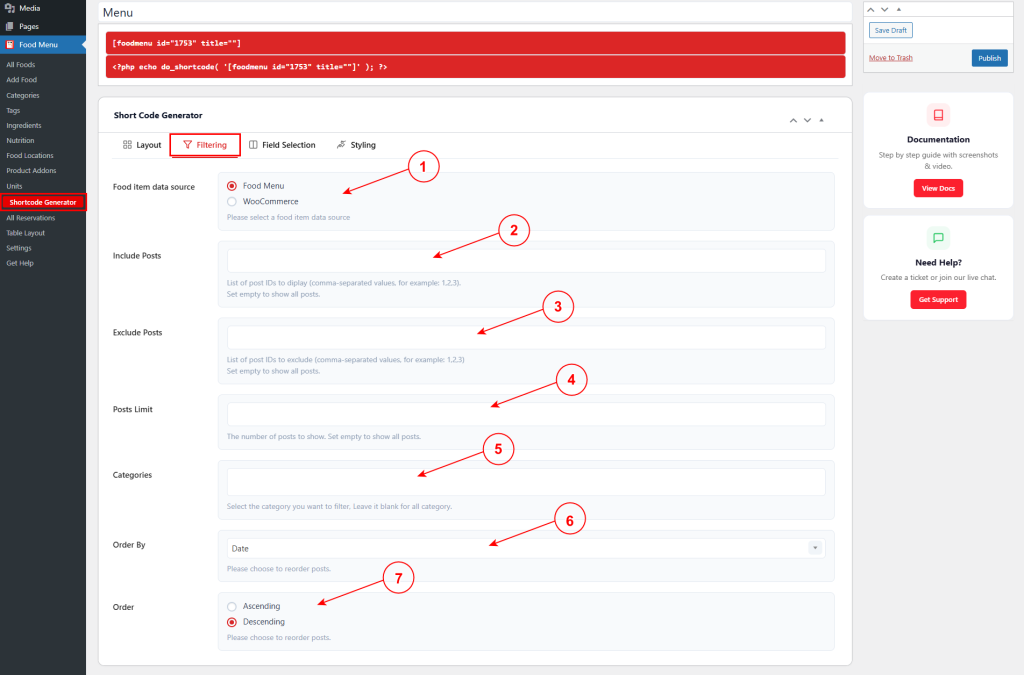
1. Food item data source #

Choose the source of menu items:

  • Food Menu – Use items from Food Menu custom post type.
  • WooCommerce – Use WooCommerce products.

2. Include Posts #

Enter specific post IDs to display, separated by commas (e.g., 1,2,3). Leave empty to show all posts.

3. Exclude Posts #

Enter post IDs to exclude, separated by commas (e.g., 1,2,3). Leave empty to show all posts.

4. Posts Limit #

Set the maximum number of posts to display. Leave empty to show all posts.

5. Categories #

Select specific categories to filter items. Leave blank to show items from all categories.

6. Order By #

Choose how to sort items (e.g., Date, Title, Price, Random, etc.).

7. Order #

Choose sort direction:

  • Ascending – Lowest to highest (A-Z, oldest first, lowest price).
  • Descending – Highest to lowest (Z-A, newest first, highest price).

What are your Feelings

Share This Article :

  • Facebook
  • X
  • LinkedIn
  • Pinterest
Still stuck? How can we help?

How can we help?

Updated on May 10, 2026
LayoutFields Selection
Table of Contents
  • 1. Food item data source
  • 2. Include Posts
  • 3. Exclude Posts
  • 4. Posts Limit
  • 5. Categories
  • 6. Order By
  • 7. Order
Copyright© 2026 RadiusDocs by RadiusTheme