• Classified Listing Docs
    • Classified Listing Plugin
    • Classified Listing All Addons
    • Classified Listing Mobile App
    • Classima Mobile APP
    • Listygo Mobile App
    • Homlisti Mobile App
  • Woocommerce Plugins Docs
    • ShopBuilder Elementor Addon
    • Woo Variation Swatches
    • Woo Variation Gallery
    • Zilly Mobile App
  • General Plugins Docs
    • The Post Grid
    • Testimonial Slider
    • Team Members
    • Food Menu
    • Review & Schema
    • Portfolio
    • Business Review
  • Our Plugins
    • The Post Grid
    • Classified Listing
    • ShopBuilder
    • Food Menu
    • Team
    • Portfolio
    • Testimonial Slider
    • Review & Schema
    • See All Plugins
  • Get Pro
×
  • Classified Listing Docs
    • Classified Listing Plugin
    • Classified Listing All Addons
    • Classified Listing Mobile App
    • Classima Mobile APP
    • Listygo Mobile App
    • Homlisti Mobile App
  • Woocommerce Plugins Docs
    • ShopBuilder Elementor Addon
    • Woo Variation Swatches
    • Woo Variation Gallery
    • Zilly Mobile App
  • General Plugins Docs
    • The Post Grid
    • Testimonial Slider
    • Team Members
    • Food Menu
    • Review & Schema
    • Portfolio
    • Business Review
  • Our Plugins
    • The Post Grid
    • Classified Listing
    • ShopBuilder
    • Food Menu
    • Team
    • Portfolio
    • Testimonial Slider
    • Review & Schema
    • See All Plugins

Getting Started

2
  • System Requirements
  • Installations

Plugin Settings

2
  • General Settings
  • Detail Page Settings

Special Features

10
  • POS Printing PRO
  • QR Table Ordering PRO
  • Food Location
  • Timed Products Pro PRO
  • Custom Order Statuses PRO
  • Order Timeline PRO
  • Order Bumps PRO
  • WhatsApp Order Notifications PRO
  • Product Addons PRO
  • Special Menu Pop-up

Front End Dashboard (Pro)

7
  • General PRO
  • Order Management PRO
  • Inventory PRO
  • Front-End Dashboard – Inventory PRO
  • Kitchen Monitor PRO
  • Create Custom Role PRO
  • Front End Reports PRO

ShortCode Generator

7
  • Layout
  • Filtering
  • Fields Selection
  • Styling
  • Category Filter Layout PRO
  • Carousel Slider Layout PRO
  • Woocommerce Layout PRO

Reservation

6
  • Reservation PRO
  • Normal Form Reservation
  • Build Table Layout PRO
  • Manage Reservation PRO
  • Reservation Front-end PRO
  • Cancel Reservation PRO

Online Ordering (WooCommerce)

7
  • Food Menu Online Ordering PRO
  • Mini Cart
  • Tipping
  • Pickup & Delivery PRO
  • Custom Checkout PRO
  • Checkout Extra Fields PRO
  • Discount

Add-Food-Menu (Post Type)

6
  • Add/ Edit Ingredients PRO
  • Add/ Edit Nutrition PRO
  • Add/ Edit Tags PRO
  • Add/ Edit Food Item
  • Add/ Edit Units PRO
  • Add / Edit Category

How to use

3
  • Using Shortcode
  • Using Elementor Addon
  • Using Gutenberg Addon

Tutorial Video

5
  • Simple Food Menu
  • Online Ordering
  • Table Reservation
  • Product Addon
  • Popup Food Menu
  • Home
  • Docs
  • Online Ordering (WooCommerce)
  • Checkout Extra Fields PRO
View Categories

Checkout Extra Fields PRO

1 min read

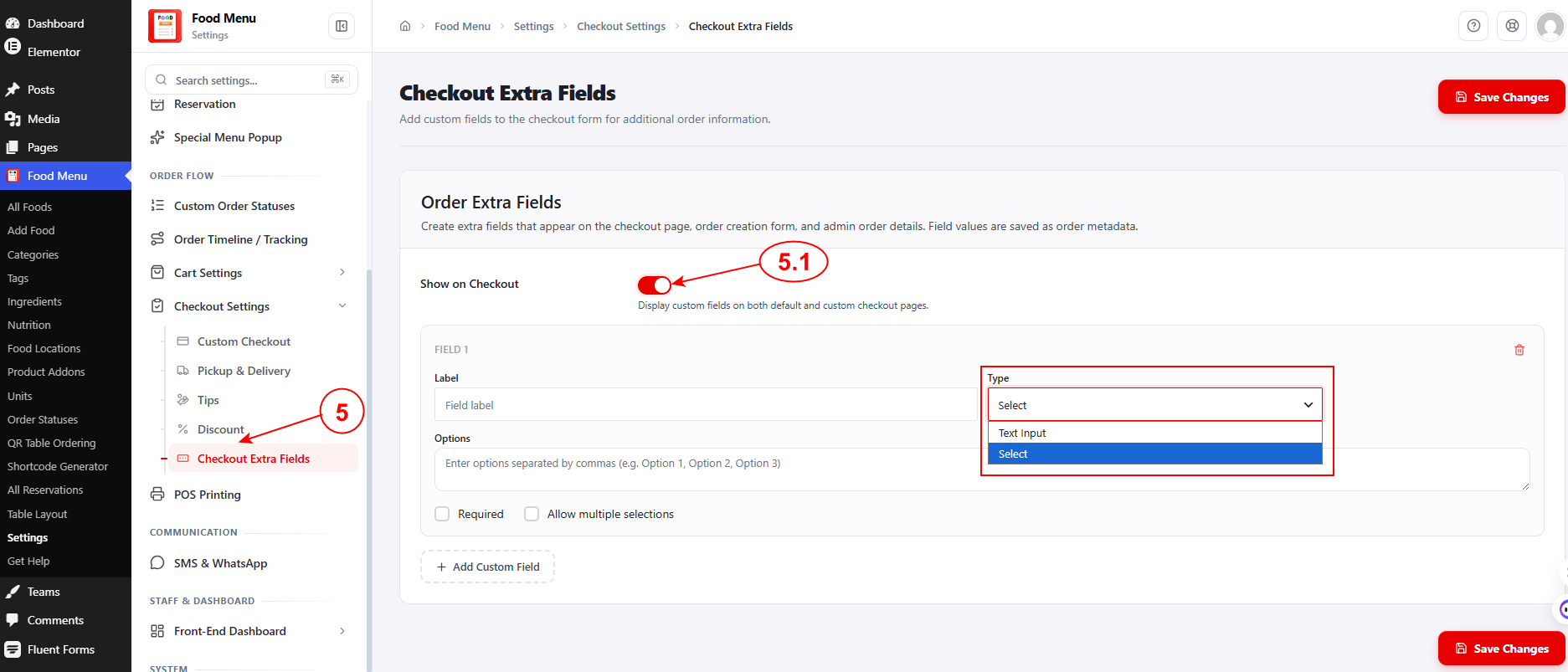
To configure Checkout Custom Fields, navigate to Food Menu → Settings → Checkout Settings → Checkout Extra Fields from your WordPress admin dashboard.

You can add custom fields to the checkout form for collecting additional order information. Field values are saved as order metadata and appear on the checkout page, order creation form, and admin order details.
Why Use Extra Checkout Fields? #

Custom checkout fields help you gather specific information that’s unique to your restaurant’s needs, improving order accuracy and customer satisfaction. Here are some practical use cases:

  • Dietary Restrictions & Allergies – Ask customers about allergies or dietary preferences so kitchen staff can prepare orders safely and appropriately.
  • Special Preparation Instructions – Let customers specify cooking preferences like “extra crispy,” “well done,” or “no ice” that go beyond standard order notes.
  • Delivery Preferences – Collect specific delivery instructions like “leave at door,” “ring bell,” or “call upon arrival” to ensure smooth deliveries.
  • Event Catering Information – For catering orders, gather details like event date, number of guests, or setup requirements.
  • Utensils & Condiments – Ask whether customers need utensils, napkins, or extra condiments, reducing waste and improving sustainability.
  • Gift Messages – For gift orders, provide a field where customers can include a personalized message.
  • Corporate Information – Collect company details, department names, or purchase order numbers for business orders.

These custom fields ensure you capture all the information needed to fulfill orders perfectly, reducing back-and-forth communication and improving the overall customer experience.

What are your Feelings

Share This Article :

  • Facebook
  • X
  • LinkedIn
  • Pinterest
Still stuck? How can we help?

How can we help?

Updated on June 24, 2026
Custom Checkout <span class="pro">PRO</span>Discount
Table of Contents
  • Why Use Extra Checkout Fields?
Copyright© 2026 RadiusDocs by RadiusTheme