
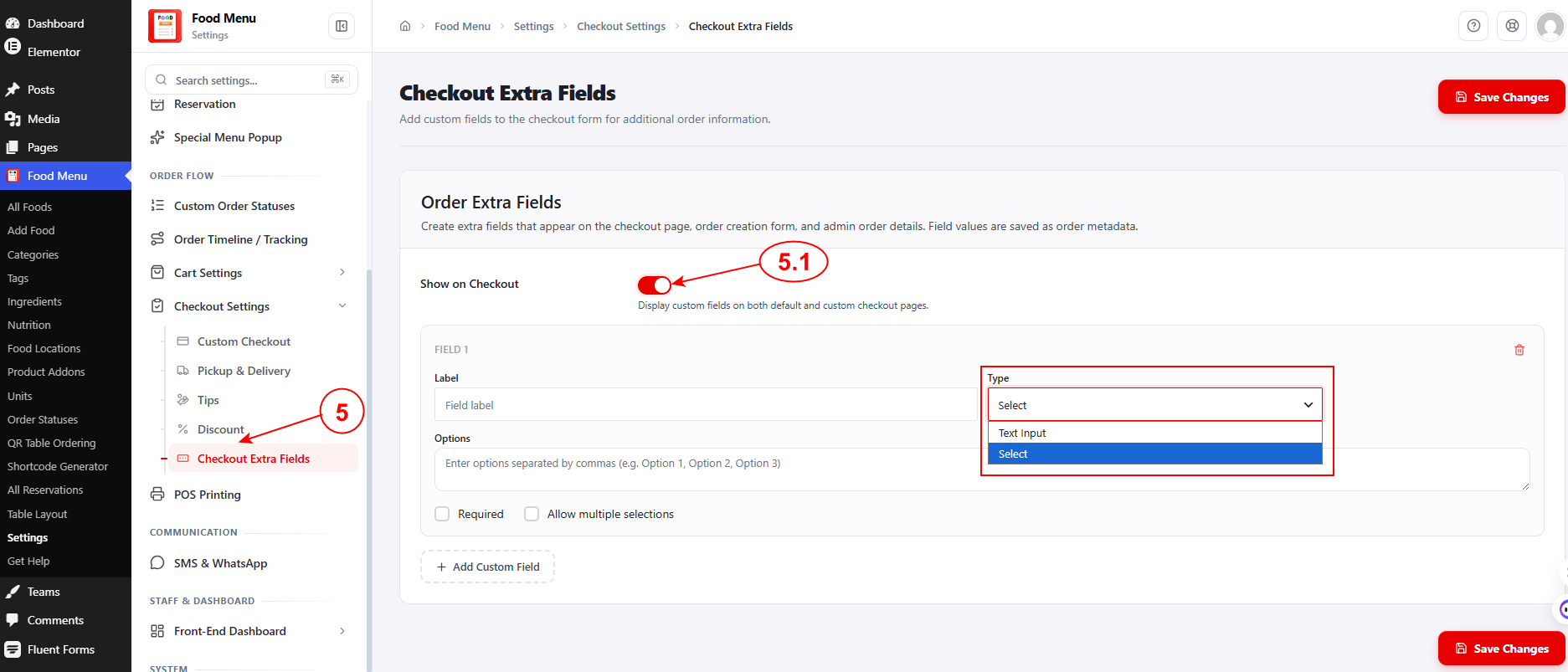
To configure Checkout Custom Fields, navigate to Food Menu → Settings → Checkout Settings → Checkout Extra Fields from your WordPress admin dashboard.
You can add custom fields to the checkout form for collecting additional order information. Field values are saved as order metadata and appear on the checkout page, order creation form, and admin order details.
Why Use Extra Checkout Fields? #
Custom checkout fields help you gather specific information that’s unique to your restaurant’s needs, improving order accuracy and customer satisfaction. Here are some practical use cases:
- Dietary Restrictions & Allergies – Ask customers about allergies or dietary preferences so kitchen staff can prepare orders safely and appropriately.
- Special Preparation Instructions – Let customers specify cooking preferences like “extra crispy,” “well done,” or “no ice” that go beyond standard order notes.
- Delivery Preferences – Collect specific delivery instructions like “leave at door,” “ring bell,” or “call upon arrival” to ensure smooth deliveries.
- Event Catering Information – For catering orders, gather details like event date, number of guests, or setup requirements.
- Utensils & Condiments – Ask whether customers need utensils, napkins, or extra condiments, reducing waste and improving sustainability.
- Gift Messages – For gift orders, provide a field where customers can include a personalized message.
- Corporate Information – Collect company details, department names, or purchase order numbers for business orders.
These custom fields ensure you capture all the information needed to fulfill orders perfectly, reducing back-and-forth communication and improving the overall customer experience.


