
The Filtering tab in the Shortcode Generator controls which food items appear in your menu and in what order.
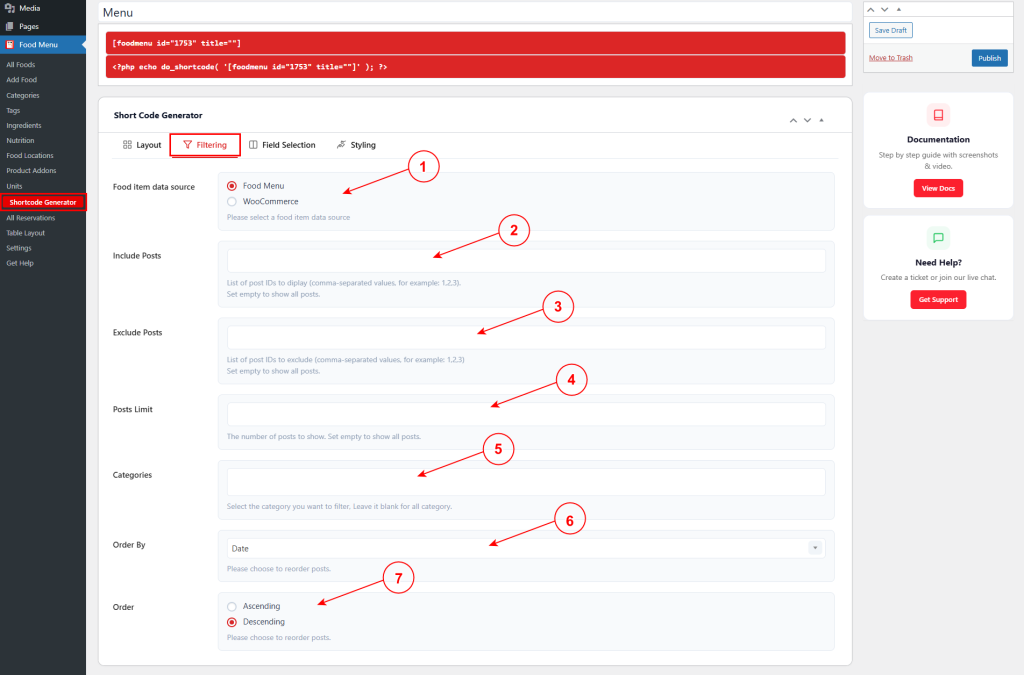
1. Food item data source #
Choose the source of menu items:
- Food Menu – Use items from Food Menu custom post type.
- WooCommerce – Use WooCommerce products.
2. Include Posts #
Enter specific post IDs to display, separated by commas (e.g., 1,2,3). Leave empty to show all posts.
3. Exclude Posts #
Enter post IDs to exclude, separated by commas (e.g., 1,2,3). Leave empty to show all posts.
4. Posts Limit #
Set the maximum number of posts to display. Leave empty to show all posts.
5. Categories #
Select specific categories to filter items. Leave blank to show items from all categories.
6. Order By #
Choose how to sort items (e.g., Date, Title, Price, Random, etc.).
7. Order #
Choose sort direction:
- Ascending – Lowest to highest (A-Z, oldest first, lowest price).
- Descending – Highest to lowest (Z-A, newest first, highest price).


