


On This Page
It’s challenging to choose the right WordPress directory plugin for building a world-class directory or classified ads website. Why? It’s because you can find so many options while searching for such a plugin.
However, among those several plugins, Classified Listing and GeoDirectory are two leading options. That’s why we decided to compare these plugins today in this article about Classified Listing vs. GeoDirectory.
Ensure you read the article to the end, carefully review each plugin’s features, and then choose the one that best suits your needs.
Overview of Classified Listing
Classified Listing is a feature-packed WordPress directory plugin. It helps users create and manage classified ads websites and directory sites. This plugin offers a beginner-friendly interface.
It features options for categorizing listings, adding filters, building listing forms with AI, or using the drag-and-drop form builder. Also, this plugin has options for monetizing directories. Thus, users not only create stunning classified ads or directory websites but also monetize their platforms through various monetization options.
Suppose you want to set up a simple business directory, a marketplace, or a specialized classified ads website. In that case, you can utilize Classified Listing and its powerful features to easily develop world-class websites where users can submit ads for products, services, job listings, and more.
Overview of GeoDirectory
GeoDirectory allows users to build complex and location-based directories. It’s suitable for businesses, service providers, real estate agents, and others who require a website to showcase detailed listings of locations. GeoDirectory enables users to build everything from a simple local directory to a comprehensive, global listings platform.
This WordPress plugin comes with directory-specific features like location-based filters, custom fields, multi-location support, front-end listing submissions, integrated payment systems, and more.
Besides, it offers various add-ons to improve the functionality of a directory website. All these make it an ideal WordPress plugin for building both small directories and large-scale projects with thousands of listings.
Classified Listing vs. GeoDirectory – Feature Comparison
Before you go deeper into this article, we want you to take a look at the table below to get a hint at what you’ll be getting as you read further.
| Feature | Classified Listing | GeoDirectory |
| User Interface | Intuitive, beginner-friendly with detailed documentation and live support | Decent, customizable with a basic analytics dashboard |
| AI Integration | AI support for directory creation, SEO optimization, and content generation | No AI support |
| Form Builder | Drag-and-drop, 14 field types, unlimited custom fields with conditional logic | Drag-and-drop, 12+ field types, niche-specific forms |
| Search & Filtering | AJAX-powered, location-based, Search Alert add-on for saved queries | Basic search; Advanced Search add-on with custom field filtering, geolocation, radius search |
| Monetization | Paid listings, ad packages, membership, claim listings, etc. | Paid listings, claim listings, pay-per-lead, etc. |
| Listing Management | Front-end and back-end submissions, user dashboard for updates, deletions, promotions | Front-end submissions, user dashboard, and more |
| Live Chat | Private, real-time chat with moderation | Not available |
| Mapping Sources | Google Maps, OpenStreetMap integration | Google Maps with advanced styling, multiple view options |
| Add-ons | 18+ add-ons (e.g., Store & Membership, Real Estate Agent, WPML) | 21+ add-ons (e.g., Location Manager, Advanced Search, Custom Post Types) |
| Themes | 12 SEO-optimized, responsive themes | 13 niche-specific themes (e.g., Directory Theme, Real Estate Theme) |
| Mobile App | Android and iOS apps are available | Not available |
| Pricing | $44/year (1 site), $319 lifetime (1 site) | $139/year (1 site), no lifetime deal |
| Ideal User | Suitable for users with small to large-scale directory sites | Appropriate for developers building large and location-heavy websites |
| Free Version | Excellent for creating basic to advanced directories | Doesn’t offer key features without add-ons, making it unfit for comprehensive sites |
| Scalability | Works great for high-traffic websites | If you use add-ons, it becomes good for large-scale directories |
User Interface
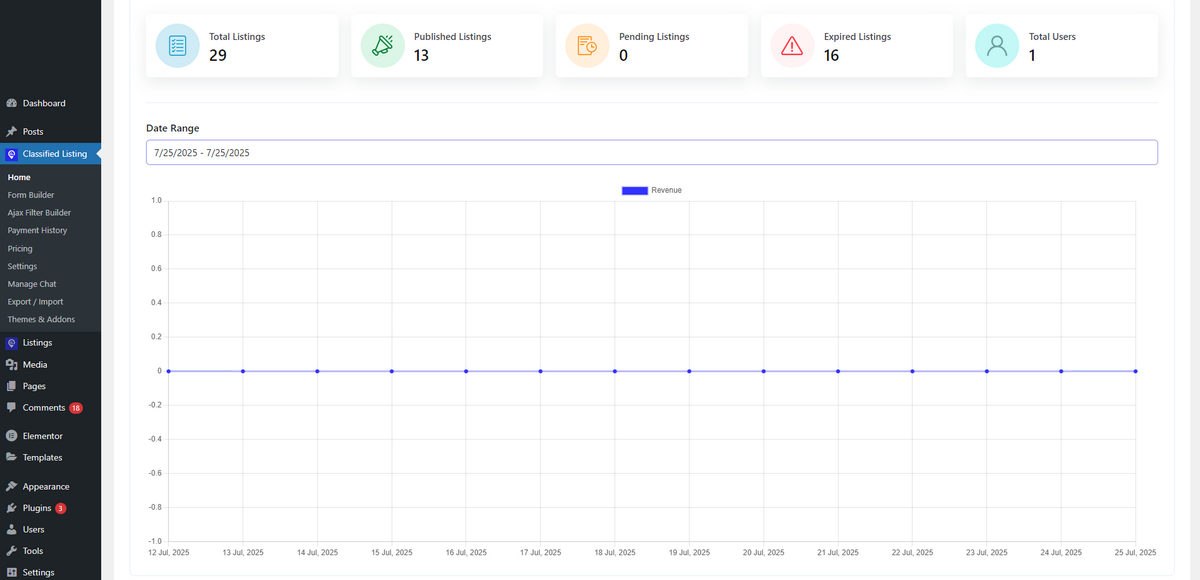
Classified Listing comes with an intuitive and novice-friendly user interface. Anyone can easily navigate its settings and other menus with minimal or no guidance.
Even if users need help, detailed documentation, helpful tutorial videos, blog posts, and live support are available to assist them in utilizing this plugin.
After installing and activating Classified Listing, users with a basic understanding of technology can instantly create and manage listings, as well as edit their classified ads on sites or directory websites.
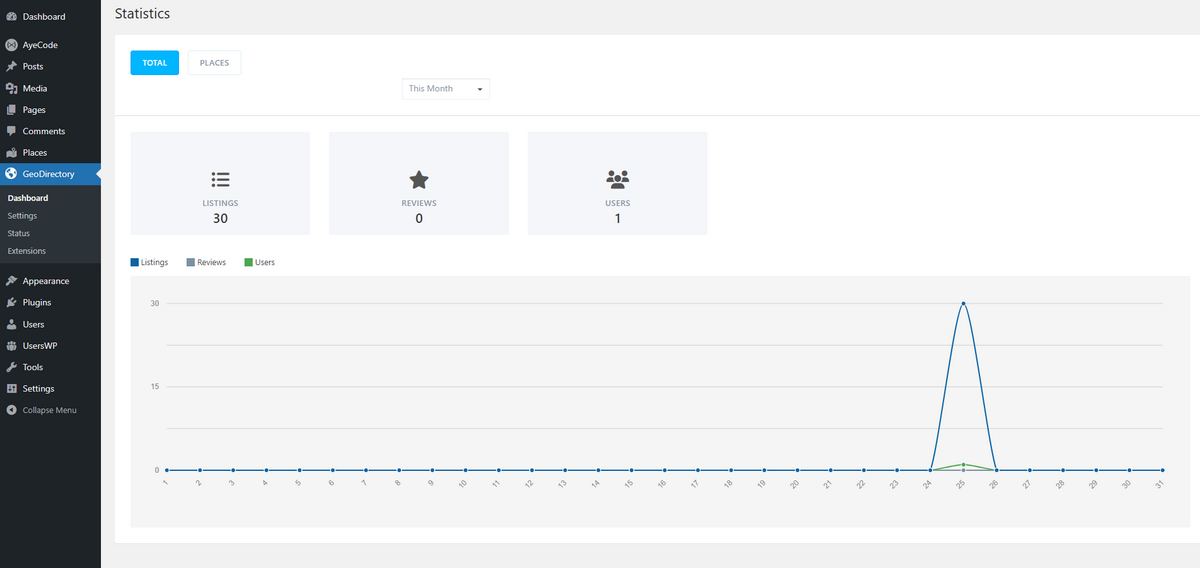
GeoDirectory also has a decent user interface (both frontend and backend). It enables users to easily add and manage listings with customizable fields on both the front end and back end.
Additionally, it features a basic analytics dashboard that displays the number of listings, reviews, and users, allowing you to monitor your website effectively.
AI-Assisted Directory Building
One of the best features of the Classified Listing WordPress directory plugin is its ability to integrate with AI without requiring any third-party tools, unlike the GeoDirectory plugin.
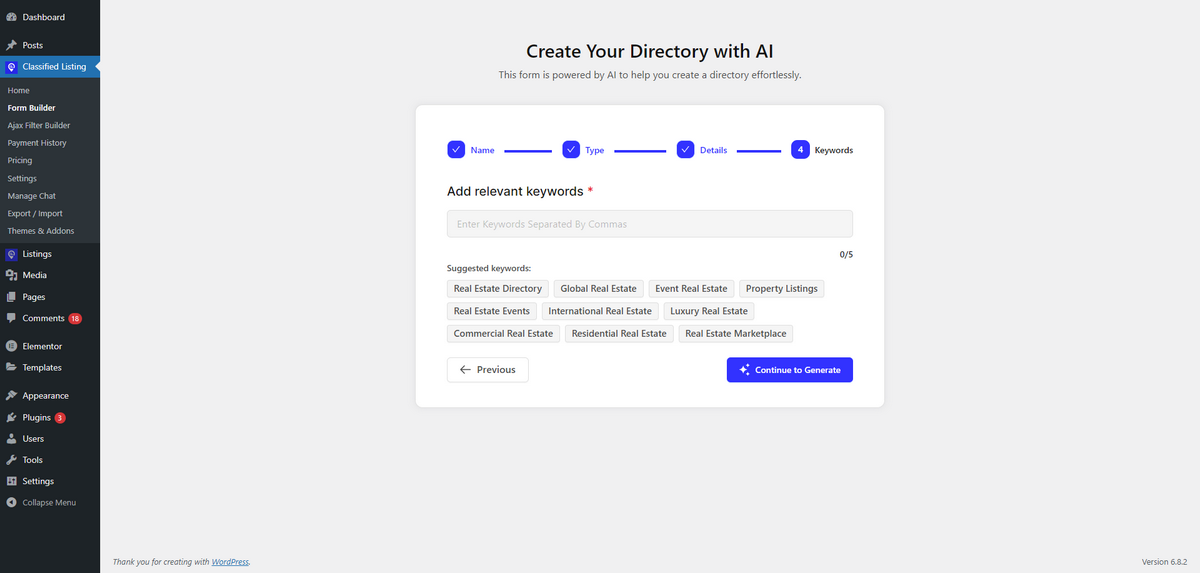
You can simply write the type of directory you want to create, and Classified Listing’s AI will build it before your eyes in minutes! During creation, it provides you with automatic, yet directory-specific, keyword suggestions as well.
That indicates this AI not only builds the directory but also works on your website’s SEO before creating it. Its amazingness doesn’t end here.
Classified Listing allows you to insert your personal account’s API keys for ChatGPT, Gemini, and DeepSeek, enabling your targeted prospects to generate ad content while completing the listing form automatically.
In contrast, GeoDirectory doesn’t come with a native AI feature to help you create full-fledged directory websites. You need to rely on third-party platforms to use GeoDirectory in conjunction with AI and benefit from automation.
So, in this section of the Classified Listing vs. GeoDirectory article, Classified Listing beats GeoDirectory and is a top choice if you want to enjoy AI-assisted directory creation.
Advanced Form Builder
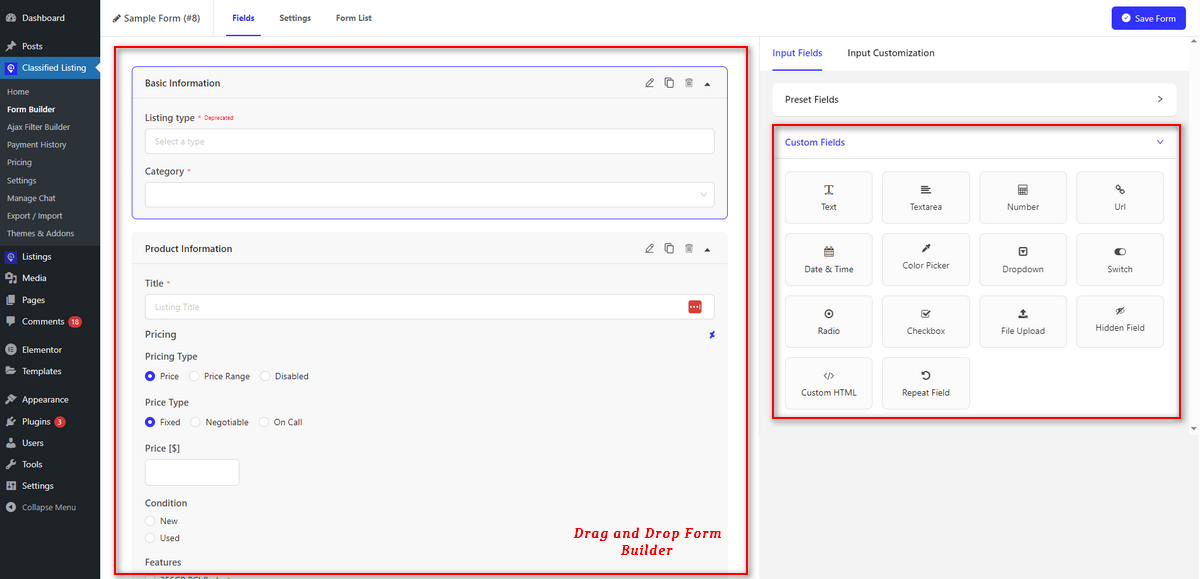
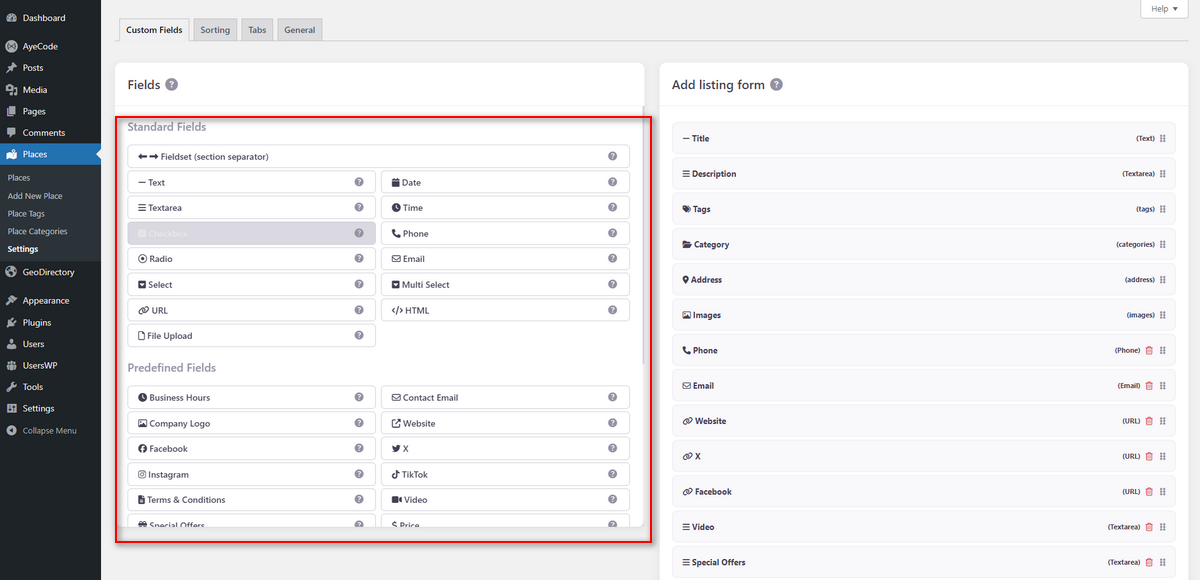
The Classified Listing plugin features an advanced form builder, along with AI capabilities to create multi-directory forms for multiple websites. The Form Builder’s drag-and-drop interface is user-friendly for beginners.
So, you can comfortably build a listing submission form by dragging and dropping your preferred form fields. This Form Builder has 14 custom field types and allows you to create an unlimited number of custom fields with conditional logic.
GeoDirectory’s drag-and-drop form builder supports over 12 field types, and it allows you to build complex, customized forms. Its advanced form-building capabilities are perfect for you if you want to create and manage niche-specific directories.
Search and Filtering
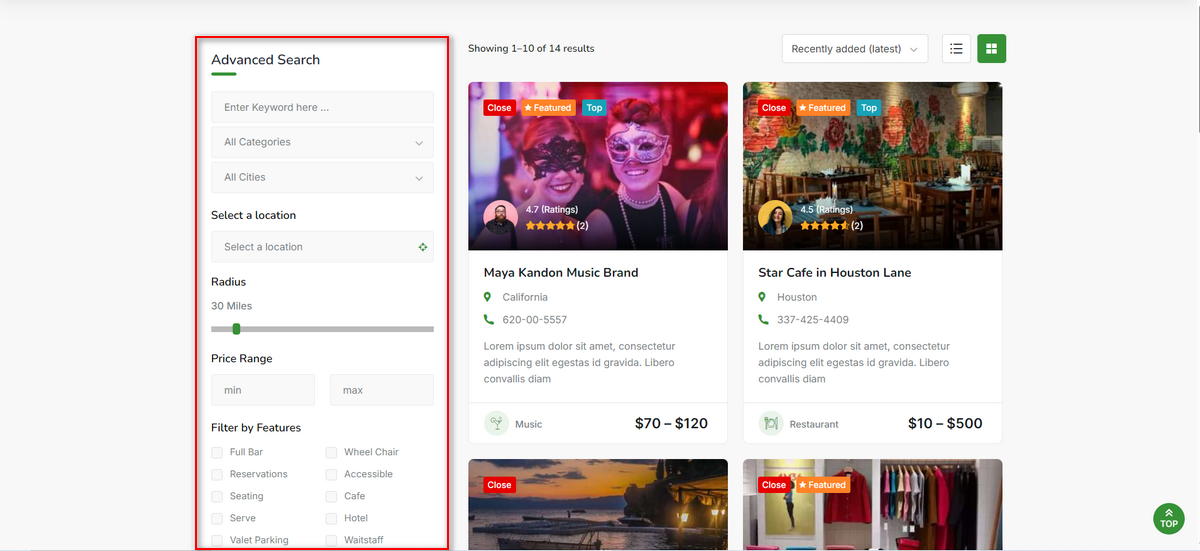
Classified Listing offers your website users the ability to refine their searches with the help of AJAX-powered, customizable filters and location-based search. They can perform searches to quickly find the listings they seek. As a result, they become happy with the browsing experience on your directory website.
To elevate their experience, Classified Listing provides you with a remarkable add-on, Search Alert. It helps users on your website save their search queries and get email notifications when new ads matching their queries are published.
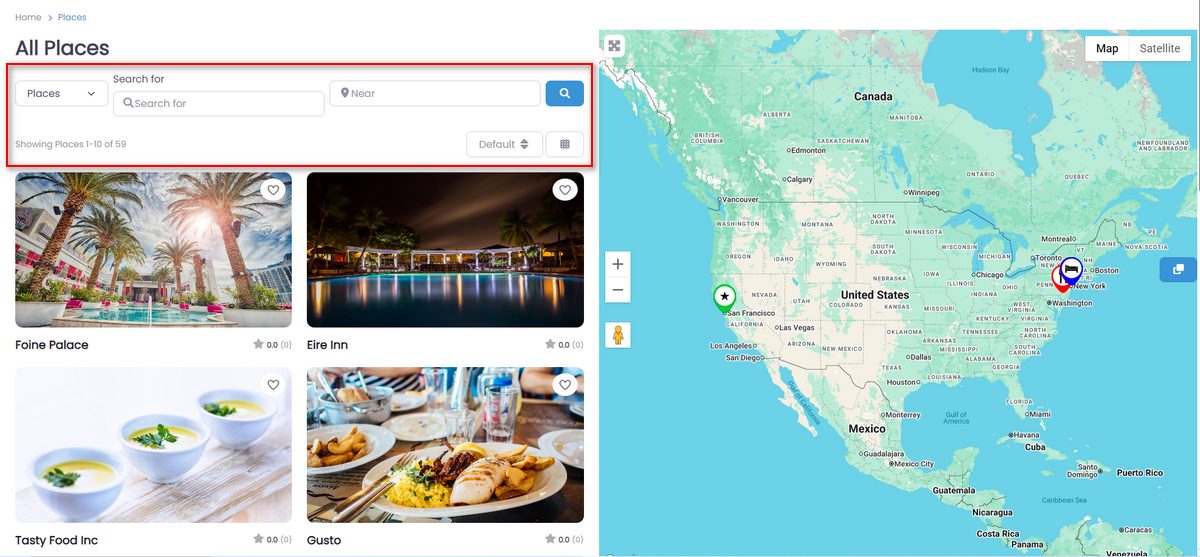
GeoDirectory has a basic search bar that falls short of the capabilities of Classified Listing’s search and filtering. However, GeoDirectory has an Advanced Search add-on that levels up search and filtering to a whole new level.
This add-on integrates features such as custom field filtering, geolocation search, and radius search. It allows users to search for listings by keywords and location.
Monetization Features
Classified Listing doesn’t only help you build directories and classified ads websites, but it also lets you earn money through your websites. Yes! It offers various options to help you generate revenue from your directory or classified ads site.
For example, you can charge people per listing. Create several ad packages like Top Ads, Bump-Up Ads, Featured Ads, Claim Ads, etc. You can create membership packages and also charge people for claiming their listings.
Once you earn money, receive it using PayPal, Stripe, Authorize.net, or other WooCommerce payment gateways.
GeoDirectory also enables business owners to generate revenue with their directory sites. Site owners can implement various monetization strategies with this plugin, such as paid listings, claim listings, pay-per-lead, and pricing packages.
Similar to Classified Listing, GeoDirectory integrates with multiple payment gateways, including PayPal, Stripe, and others. In this section, we can see a tie in the battle between Classified Listing and GeoDirectory.
Listing Submission and Management
Classified Listing provides a well-structured and beginner-friendly system for managing directory listings. Both site admins and users can easily add, edit, and control listings. Users can submit listings directly from the front end, while admins maintain complete oversight through the WordPress dashboard.
A user-friendly front-end dashboard is also available, allowing users to update, delete, promote, or renew their ads with ease.
GeoDirectory also provides an amazing listing creation and management experience. It allows your website users to submit and manage listings on the front end and through the account dashboard.
Private and Live Chat
Classified Listing comes with a private, live chat feature, enabling buyers and sellers to communicate with each other in real-time without sharing their contact details. As a website owner, you can monitor their conversation and filter inappropriate text messages.
GeoDirectory doesn’t offer you this kind of facility. So, here Classified Listing beats GeoDirectory with its advanced, secure, live chat feature.
Multiple Mapping Sources
The Classified Listing connects with Google Maps and OpenStreetMap so that you can easily display listings with precise location accuracy on your directory or classified ads website.
GeoDirectory, on the other hand, concentrates more on the map styling. It offers various map view options, including default view, satellite view, hybrid view, and more. However, it doesn’t utilize any mapping source as the Classified Listing WordPress directory builder.
Addon Integration
The Classified Listing WordPress directory and classified ads website builder offers additional addons to enhance your website’s functionalities and provide users with a better browsing experience.
| # | GeoDirectory Extensions | Classified Listing Addons |
|---|---|---|
| 1 | Booking Appointments | Search Alert |
| 2 | Pay Per Lead | Payfast |
| 3 | Location Manager | Paystack |
| 4 | Advanced Search Add-on | Job Manager |
| 5 | Custom Post Types | Marketplace |
| 6 | Pricing Manager | Listing FAQs |
| 7 | Claim Listings | Claim Listing |
| 8 | BuddyPress Integration | Booking (Reservation & Appointment) |
| 9 | Marker Cluster | PDF Invoices |
| 10 | Events | Elementor Builder |
| 11 | MultiRatings and Reviews | Multi Currency Addon |
| 12 | WP All Import | Seller Verification |
| 13 | GD reCAPTCHA | Mobile no Verification |
| 14 | Social Importer | WPML MultiLingual Addon |
| 15 | Custom Map Styles | BuddyPress Integration |
| 16 | Franchise Manager | BuddyBoss Integration |
| 17 | List Manager | Store & Membership Addon |
| 18 | Ajax Duplicate Alert | Real Estate Agent Addon |
| 19 | Embeddable Ratings Badge | Coupon Addon |
| 20 | Events Tickets Marketplace & More.. | Razorpay Payment |
Theme Integration
Themes make your directory or classified ads website look appealing. However, not all themes can help you achieve your desired outlook for your website, especially when it’s a directory or classified ads site.
That’s why Classified Listing offers some amazing, light, SEO-optimized, and responsive themes that work well with directory and classified ads websites.
| Classified Listing Themes | GeoDirectory Themes |
| 1. CLRestaurant 2. CLDirectory 3. Radius Directory (Free Theme) 4. CLHotel 5. Obitore 6. CLDoctor 7. Servlisting 8. CLPlace 9. CLClassified (Free Theme) 10. CLCar 11. CLProperty 12. ClassiList | 1. Classified Ads Directory Theme 2. Events Directory Theme 3. Job Board Theme 4. Real Estate Directory Theme 5. Directory Theme |
Mobile App Availability
The number of mobile users worldwide has increased significantly over the last few years. Today, virtually everyone prefers doing challenging tasks on their phones that they used to accomplish using their computers.
That said, Classified Listing comes with mobile apps for both Android and iOS. These applications enable you to manage your website using your smartphone. GeoDirectory, in contrast, doesn’t have a mobile app.
User Feedback & Reviews
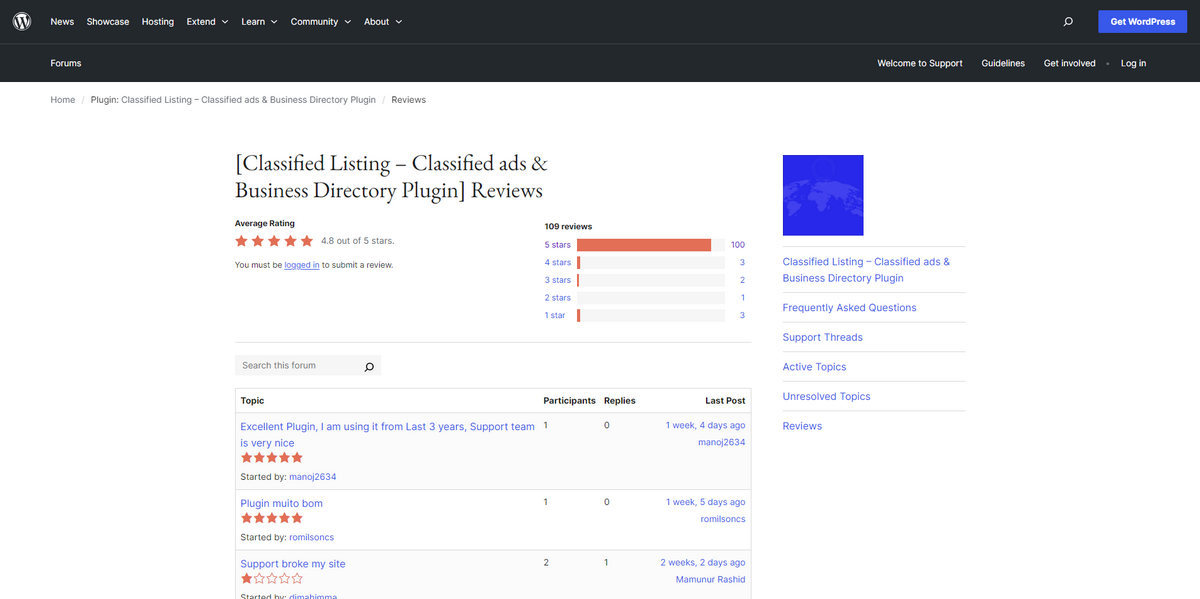
Classified Listing is one of the best directory plugins, praised by users for its stunning features. You’ll find mostly positive reviews with high ratings when you visit the WordPress plugin repository and search for and view this plugin’s user reviews and ratings.
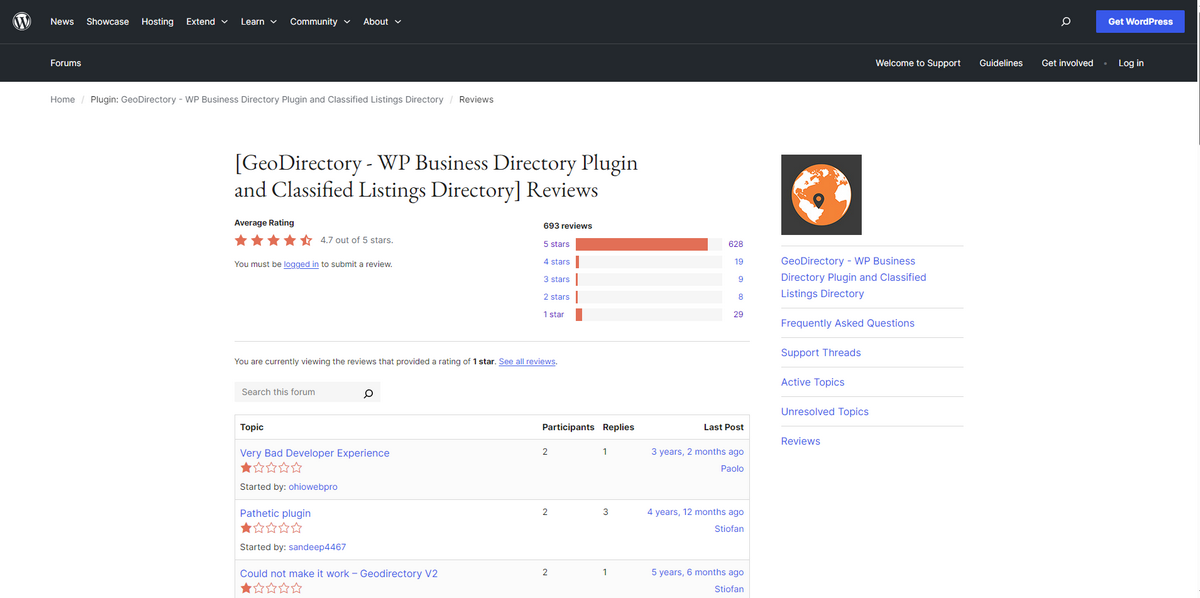
GeoDirectory has mixed reviews on the WordPress plugin repository. Some users praise its excellent customer support and particular features, while others raise questions about the developers’ capabilities.
Pricing
In terms of pricing, Classified Listing is more affordable than GeoDirectory. Let’s inspect each plugin’s pricing plans in the table below.
| Pricing Plan | Classified Listing | GeoDirectory |
| 1-site yearly pricing | $44 | $139 |
| Lifetime deal pricing | $319 (Bundle 1 Site) | No lifetime deal |
Strengths and Weaknesses of These Plugins
We’ll now walk you through the strengths and weaknesses of Classified Listing and GeoDirectory plugins to help you easily pick the right plugin for your job.
Strengths of Classified Listing
- Simple and user-friendly for beginners
- AI-powered directory creation
- Cost-effective
- Various monetization options
- Extensive collection of add-ons
Weaknesses of Classified Listing
- Could come with a better UI
Strengths of GeoDirectory
- Ideal for multi-location, multi-directory websites
- Decent number of themes and add-ons
- Strong geo-location features
- Unique features
Weaknesses of GeoDirectory
- Beginners might get overwhelmed with its technical setup
- No lifetime package
Which is the Winner?
In the battle between Classified Listing and GeoDirectory, both plugins excel at creating robust directory websites. However, Classified Listing emerges as the winner due to its beginner-friendly interface, AI-powered features, and cost-effective pricing.
Its advanced form builder, live chat, and mobile app support enhance the user experience, while extensive add-ons and monetization options make it a versatile solution.
GeoDirectory shines for multi-location directories with strong geolocation features, but lacks native AI and mobile apps. For affordability, ease of use, and innovative AI integration, Classified Listing is the top choice for building and monetizing stunning directory or classified ads websites.



