

On This Page
Big announcement: We’ve released some exclusive features for the Classified Listing plugin in 2025. You can enjoy all the advanced features to maximize the directory site’s functionality.
The world is buzzing with AI power. So, we’ve decided to implement AI features to simplify your directory site management. Effortlessly create user-friendly classified listing sites with AI power, GEO auto-suggestions, smart dependency feature, and many more advanced options. We’re optimistic about helping you create an innovative directory site.
Curious about all the updates added to Classified Listing in 2025? You can explore the Classified Listing Roadmap
Let’s explore the details.
AI-Packed Features of Classified Listing in 2025
We continually strive to push the boundaries and enhance the functionality of the Classified Listing plugin to the fullest extent possible. With the power of AI innovation, we’re trying to empower owners in developing AI-powered and user-centric directory sites.
From writing with AI to form generation, classified Listing allows you to make the best use of AI power. This plugin integrates with ChatGPT, Gemini, and DeepSeek to save you time and help you write content efficiently. Our AI-powered features will make your classified site smarter, interactive, intuitive, and visually stunning.
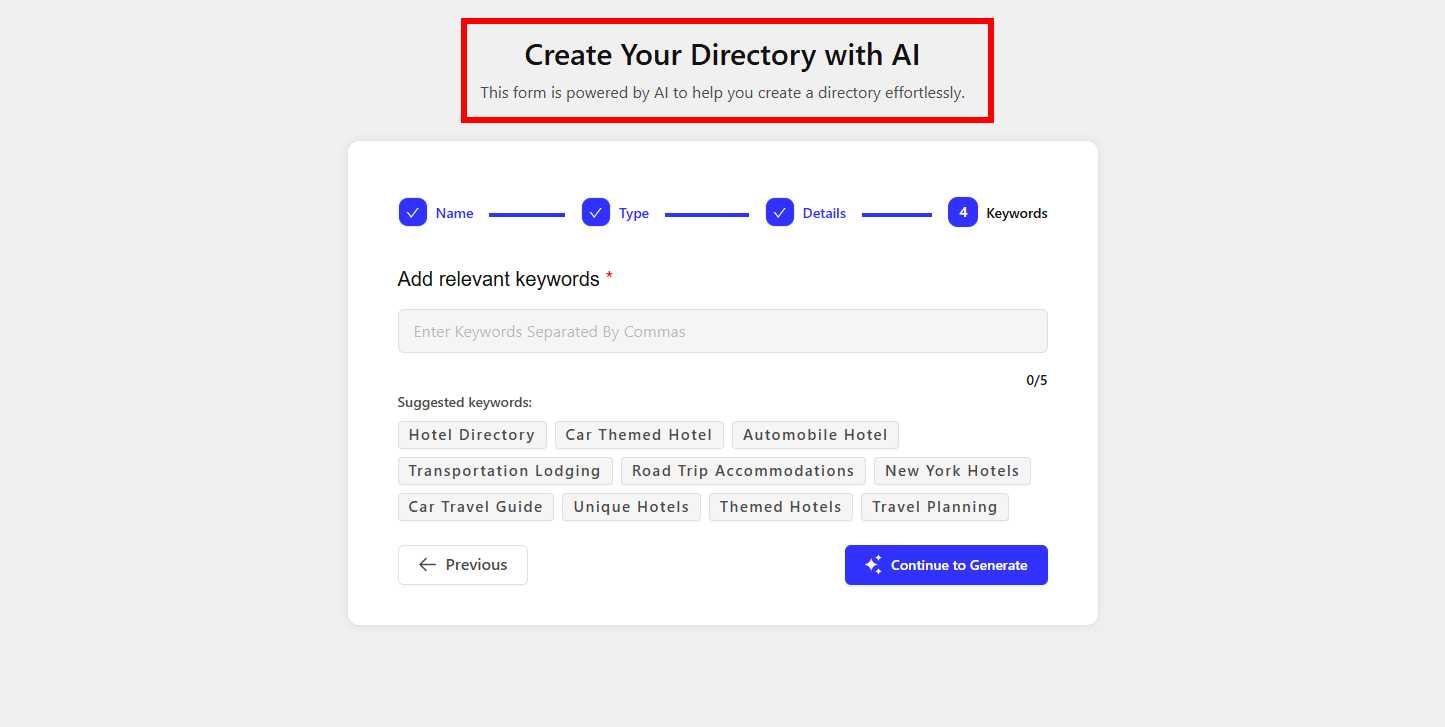
1. AI-Powered Niche Directory Form Builder
Now, it’s super easy to create custom submission forms for different types of listing using AI & drag-and-drop interface. With this feature, you can generate forms for diverse niches like cars, real-estate, restaurants, etc.
Moreover, you can build a multi-directory site effortlessly. You just need to input directory name, location, keywords and AI will automatically generate a custom for with appropriate fields.
2. Write With AI/ Front End AI Integration
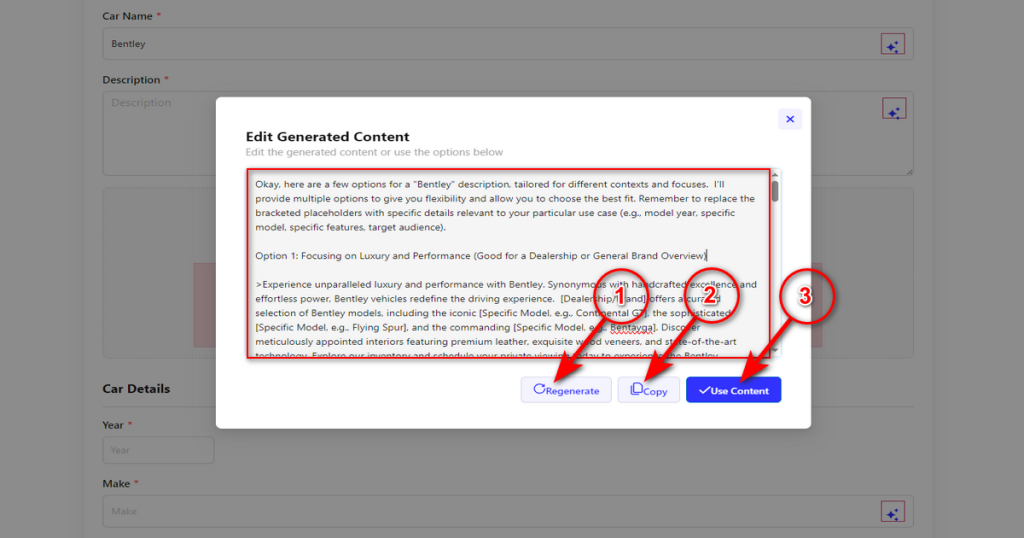
You can allow users to utilize AI during form submission. They can generate titles and descriptions with the help of AI.
When users submit new listing they can effortlessly create titles and high quality description for their products.
3. AI Semantic Search
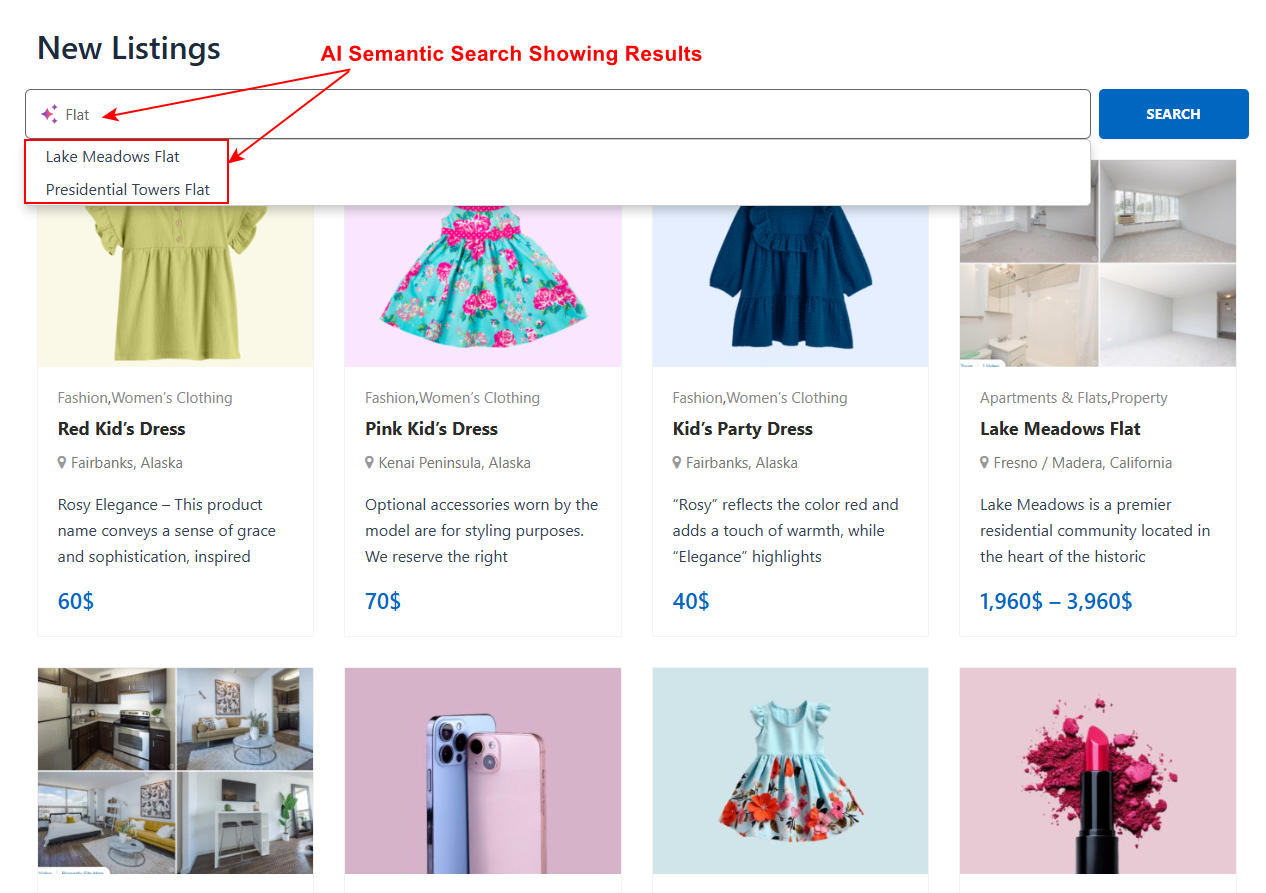
Say goodbye to basic keyword searches, as the Classified Listing team introduces AI-embedded semantic search to understand users’ intentions better. Based on user interactions, AI will deliver more accurate and relevant search results.
AI semantic search uses natural language processing (NLP) and machine learning to interpret the context of a query. It isn’t simply limited to just keyword matching, It understands the relationships between words and concepts to find information that is conceptually related.
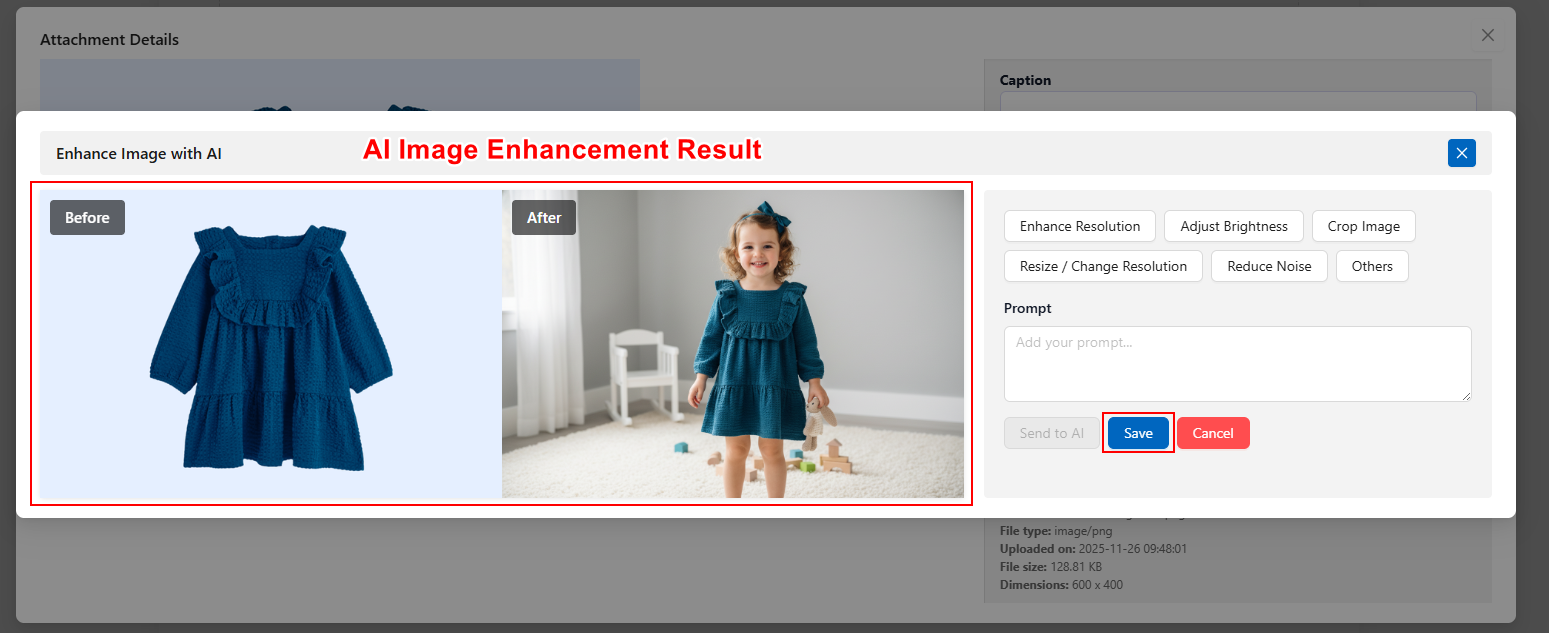
4. AI Image Enhancement:
Classified Listing incorporated AI Image Enhancement feature. This feature uses artificial intelligence to improve the quality of the image instantly. It will make your image more clearer and professional.
With AI image optimization, we’re trying to make the listing visuals more appealing and interactive. This feature utilizes AI to automatically enhance the uploaded images (brightness, cropping, and watermarking).
Latest Features of Classified Listing in 2025
With all the latest updates, you can create any multi-directory & listing website (Local Business, Classified Ads, Doctor Directory, Apartment Rental, Real Estate Ads, Car Rental, Or Any Directory). We focused on enhancing usability, performance, and integration with AI to help users manage their listings with ease.
We primarily researched common pain points in building and managing directory sites and incorporated some transformative features. Let’s dive into the details of each updated feature.
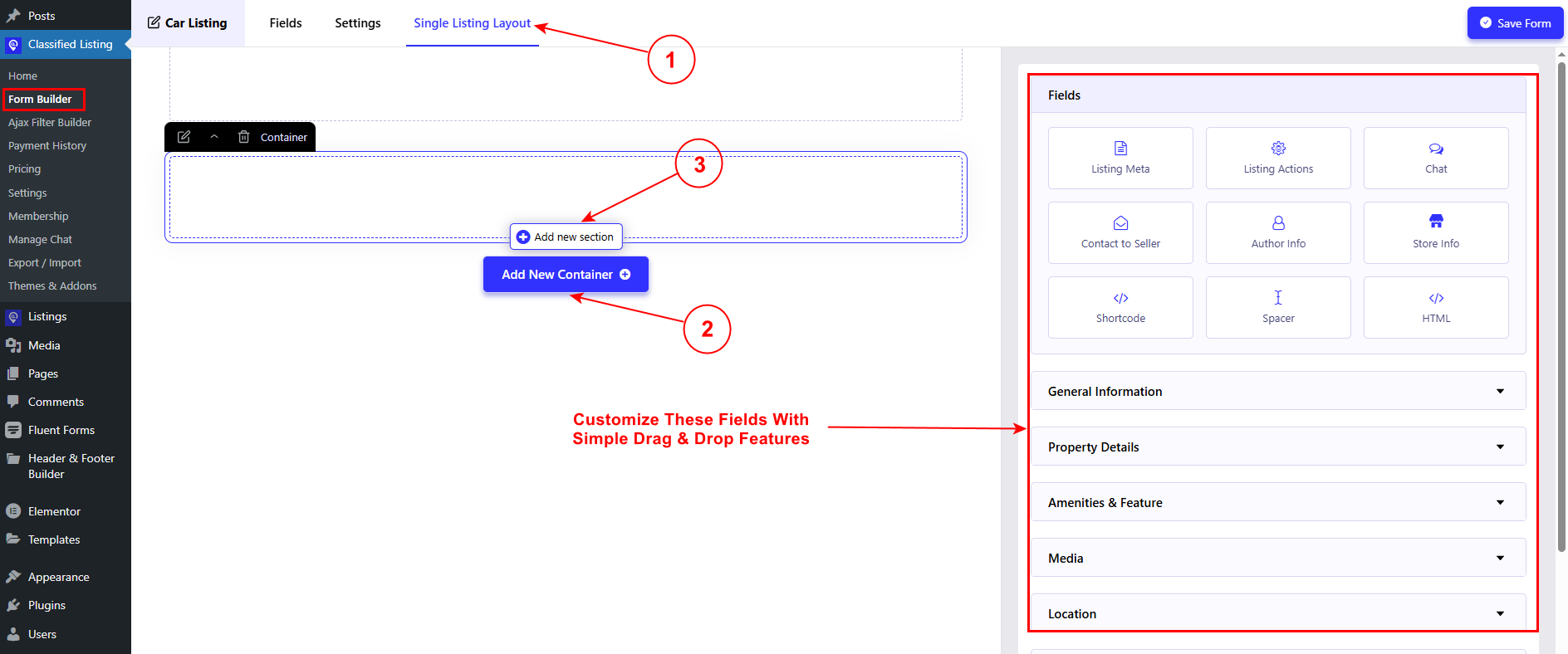
1. Single Listing Layout Builder
The Single Listing Layout Builder allows you to create and customize individual listings through a visually interactive interface. With a simple drag-and-drop feature, you can easily modify any listings according to your preferences. This feature is incorporated with the Form Builder section.
2. Setup Wizard
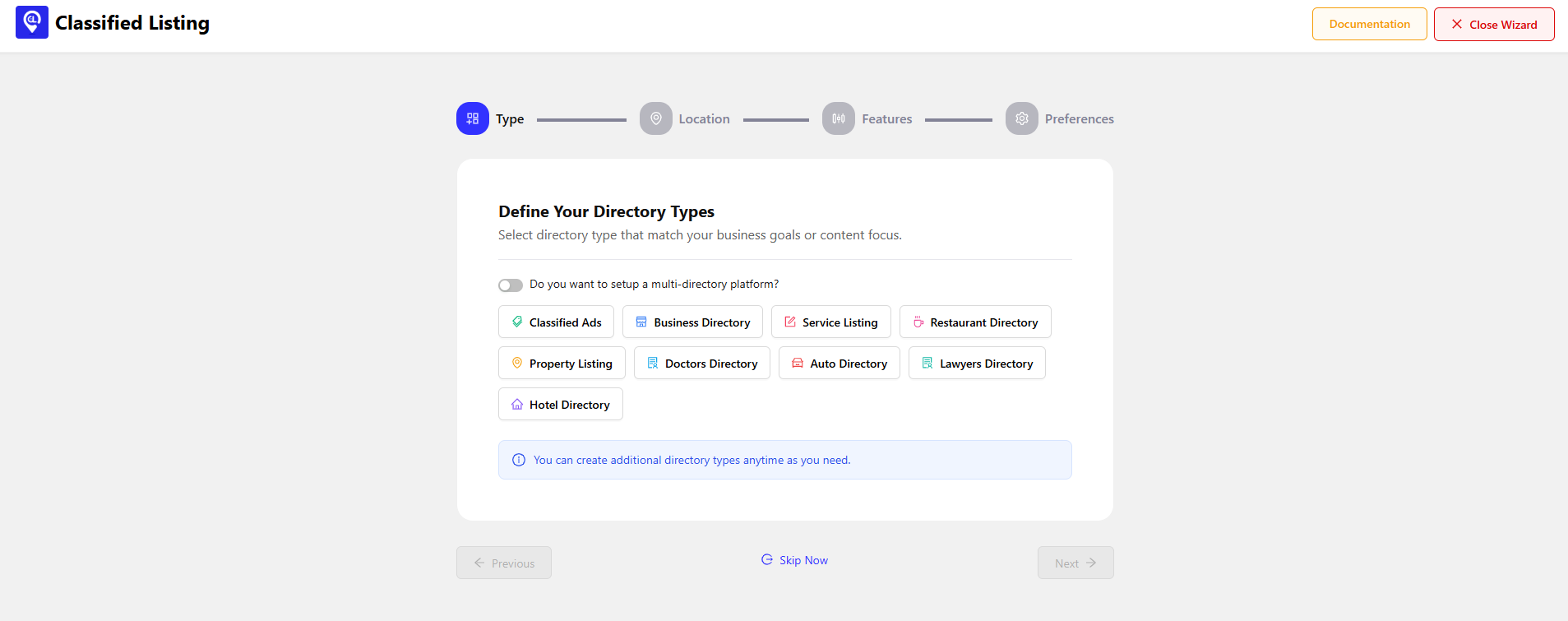
Beginners face difficulties when using a new plugin. The Setup Wizard eases the process with a step-by-step guide. Upon activation, you’ll see the thorough steps for different settings. This will expedite your setup process and enable you to launch your site more quickly.
3. Smart Dependency
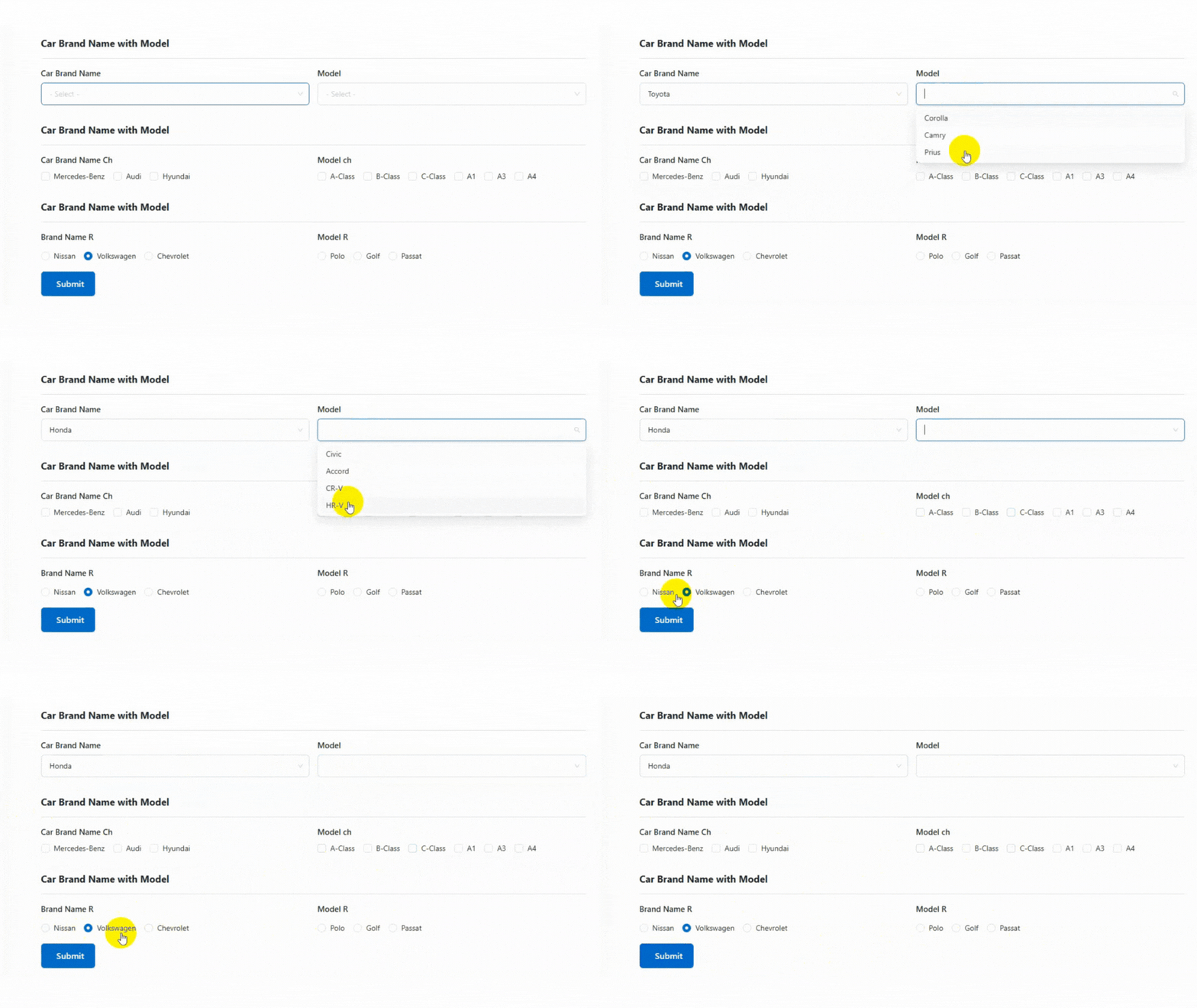
During listing form creation, you need to add some options that are dependent on another section. For example, when developing forms for cars, electronics, and phones, you need to include their brand name, model, configuration, and many other dependent fields.
So, Classified Listing comes with a revolutionary feature. With smart dependency fields, they can appear, disappear, or change based on user selections. You can effortlessly set up smart dependency for Select, Checkbox, and Radio Field.
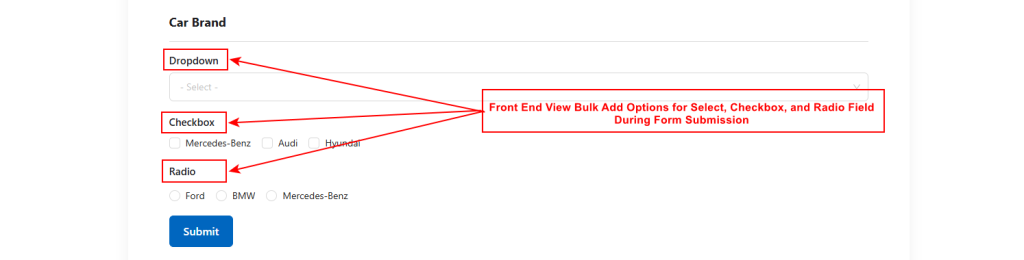
4. Bulk Options For Checkbox, Select, and Radio Fields
Sometimes, during form creation, you need to add multiple items in a single field. Therefore, you must input the items manually, which is a time-consuming process. Classified listing comes with bulk add options. Here, you can instantly add a large number of items in a single field (checkbox, select, and radio fields).
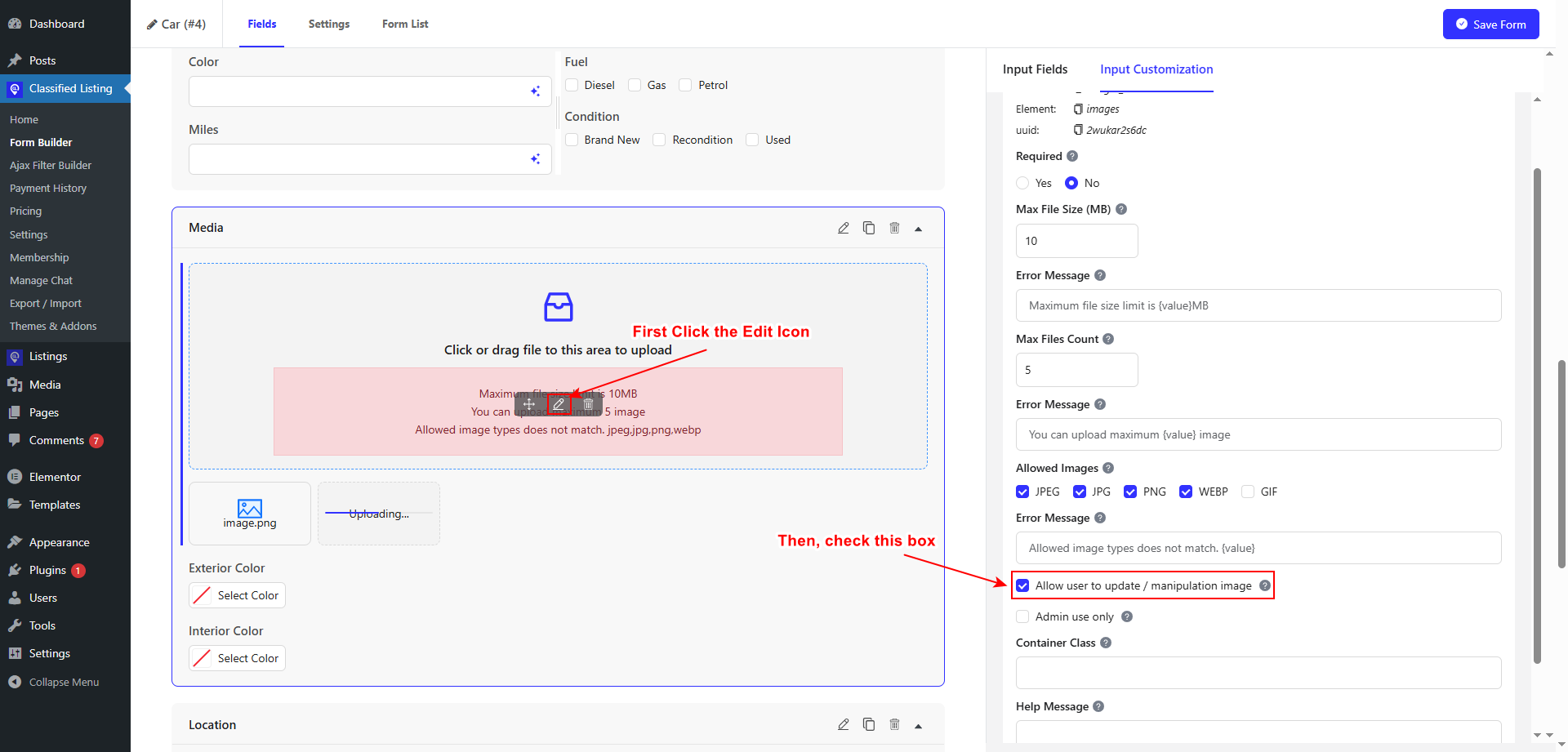
5. Image Crop & Manipulation Functionality for Users
You can allow users to manipulate the image according to their preference. To enable this action, you need to access the specific form builder. Users can upload any image and edit it instantly.
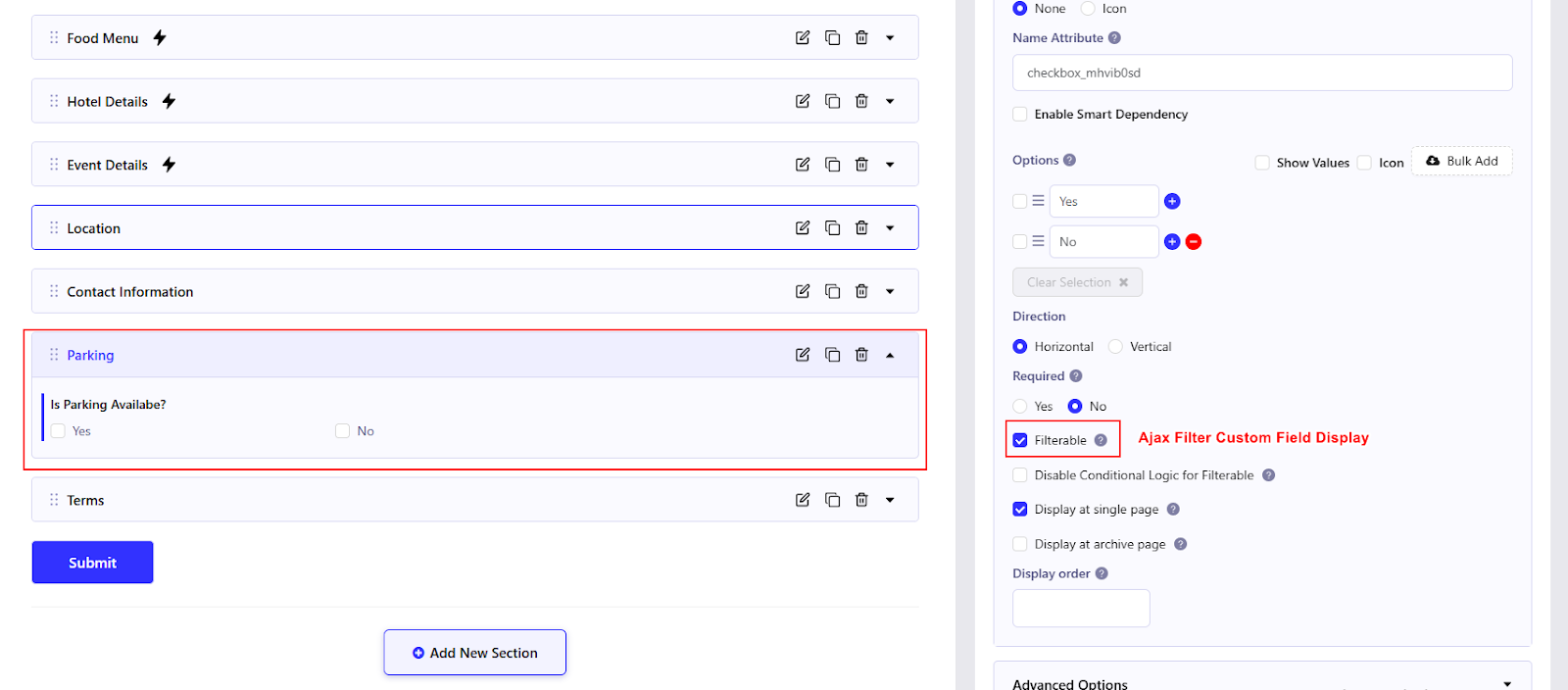
6. Ajax Filter Custom Field Display
With the help of conditional logic from the form builder, dynamically display custom fields via Ajax. It provides a seamless browsing experience without page reloads.
7. Bulk Category Condition
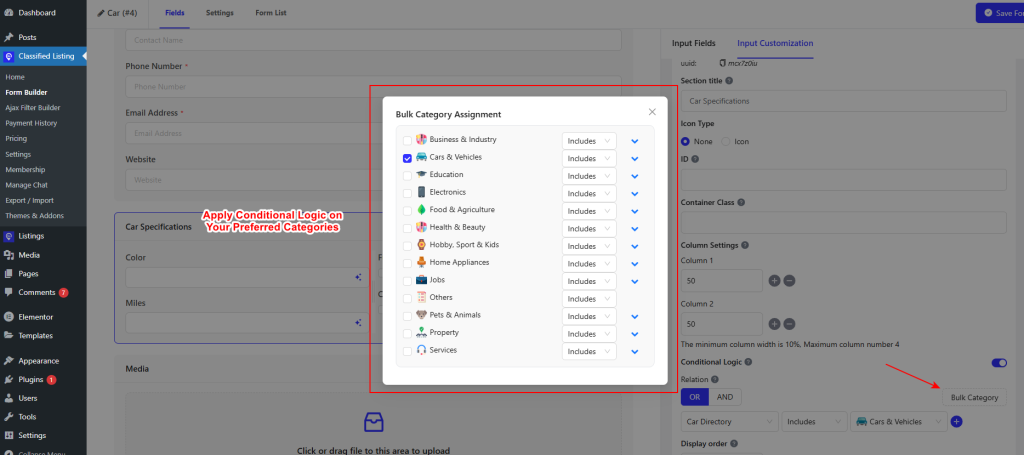
Apply conditions to multiple categories at once. If you have a large-scale site, this feature will be beneficial to you. This feature ensures that your site and form remain relevant across different categories.
You can easily select bulk categories during conditional logic. Just click on the mentioned area in the conditional logic section.
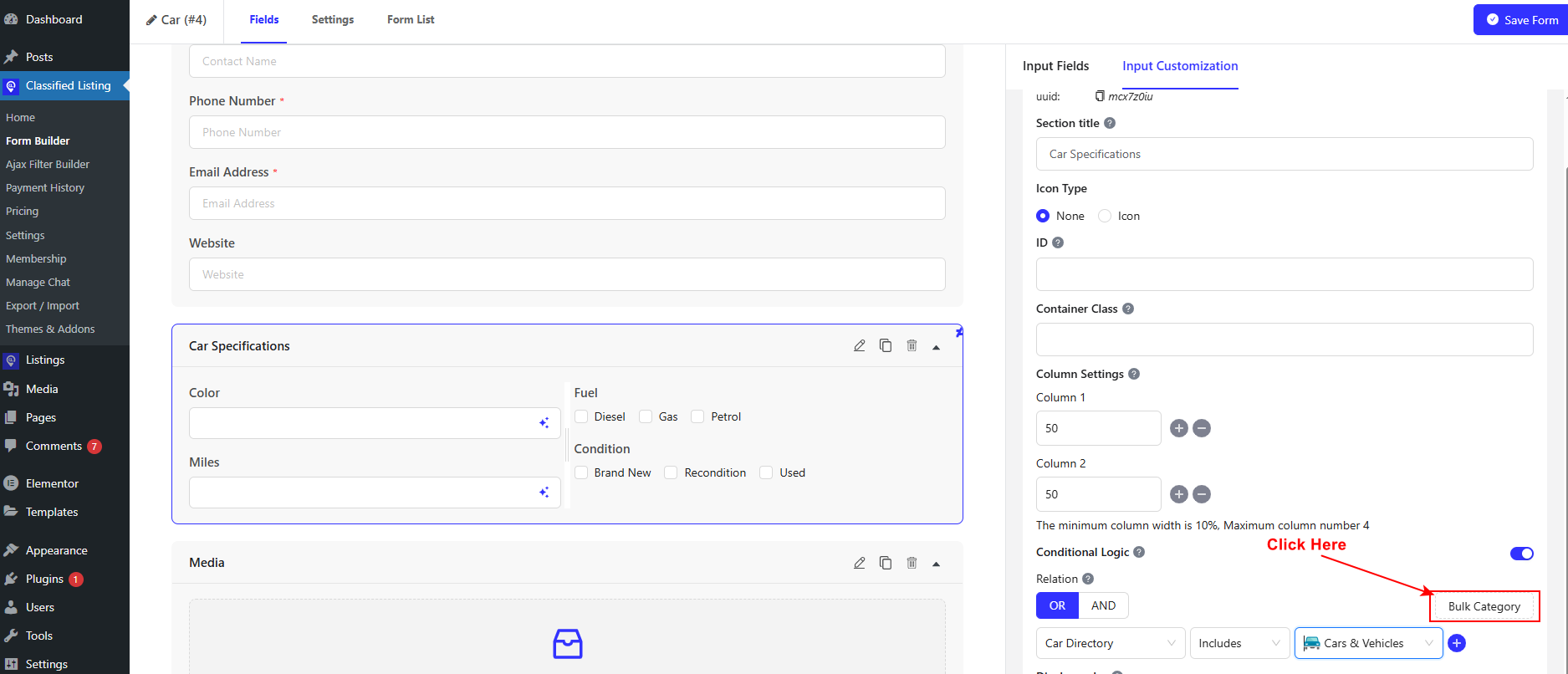
After that, a pop-up will appear. You can freely include and exclude any categories. You can save time with efficient multi-category configuration.
8. Multi-Category Selection During Listing Submission
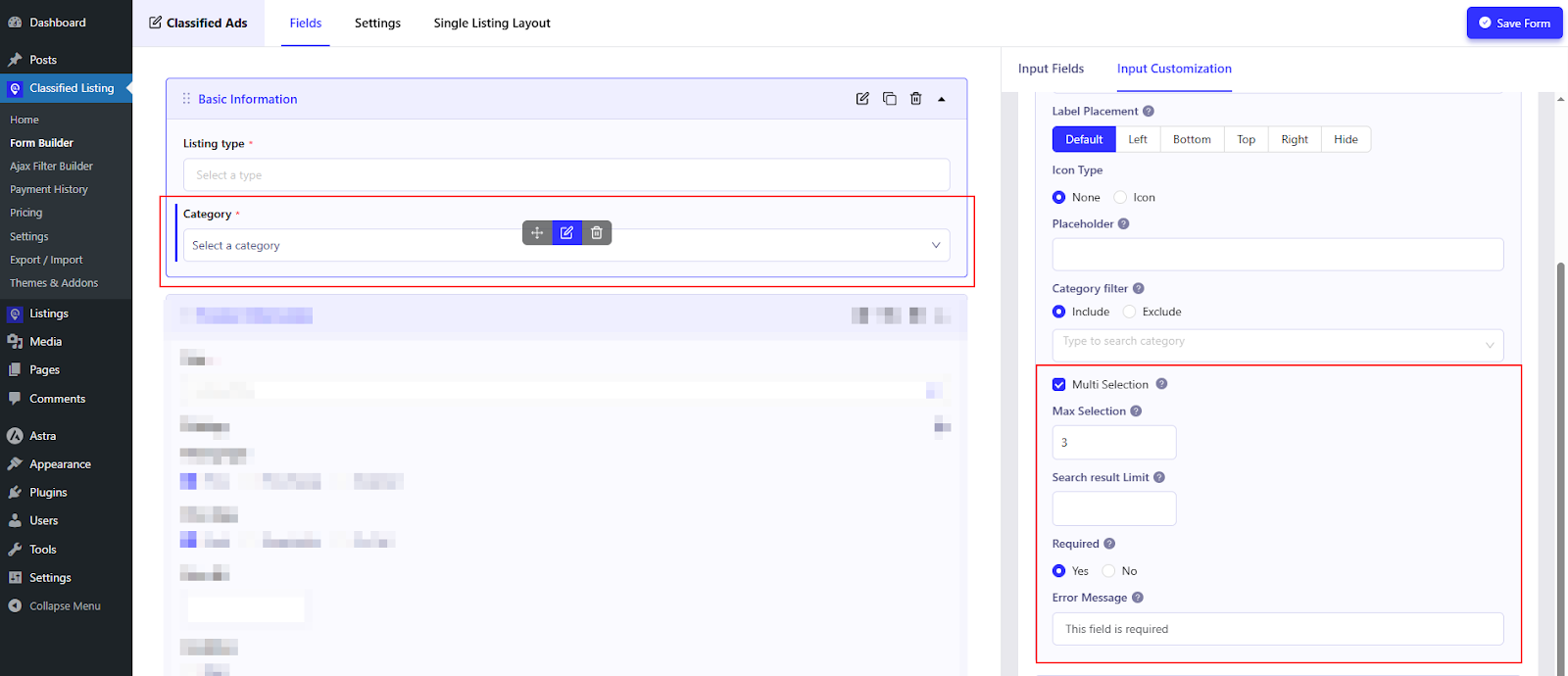
We always try to give users greater flexibility and control during listing submission on your directory site. That’s why we implemented the multi-category selection feature in the Classified Listing plugin.
Users can choose multiple relevant categories of their products during submission and can reach out to a wide range of audience. This feature is perfect for a multi-directory site that contains business listing, service listing, real-estate listings, job portals, and many more categories.
This feature ensures users never feel restricted in choosing categories while listing submission. For example, A user wants to list an ad ‘Luxury Apartment in Rent’. This post falls under the Real-estate, Rental, Apartments category. The ability to select all these categories improves discoverability and helps buyers find exactly what they are looking for.
From an admin perspective, this feature comes with great benefits. You can enhance the structural organization of your directory site. This will ultimately improve user experience.
9. Account Type Selection at Registration Form
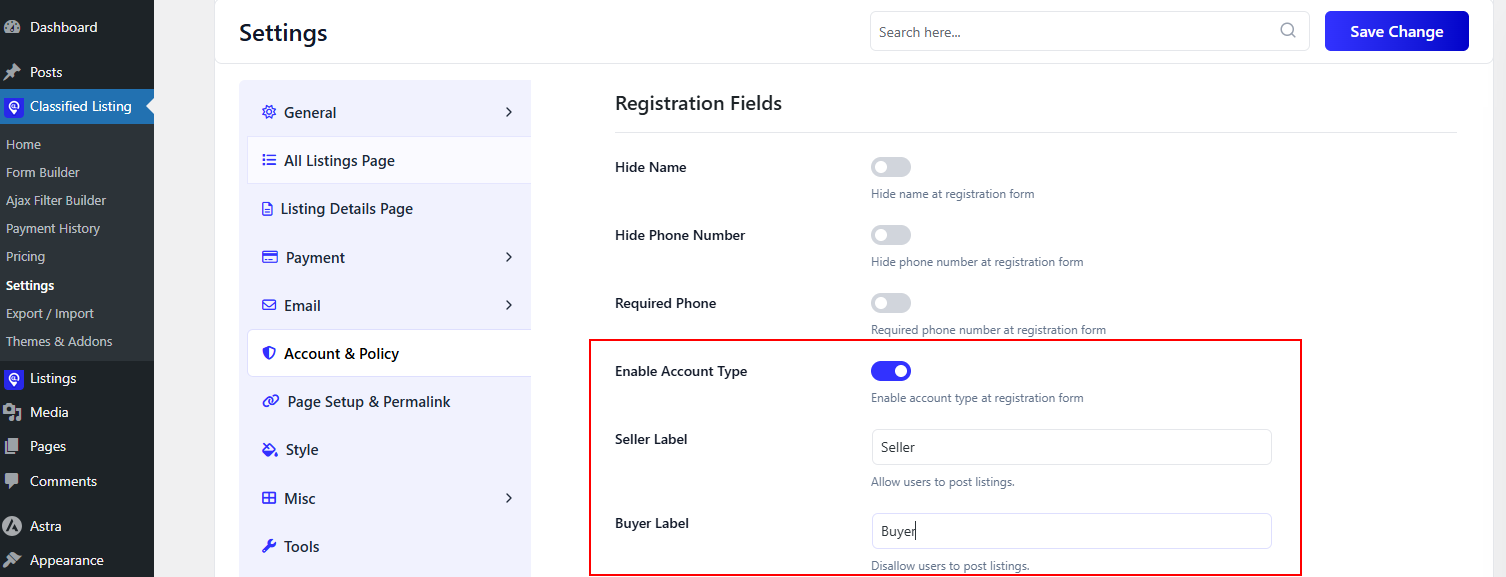
You can increase your directory site’s user experience with the Account Type Selection feature. Without having a default role for everyone, users can choose their preferred role during registration.
Users will get personalized onboarding experience after selecting account type either seller or buyer. To be precise, sellers can get access to listing submission, chat options, and profile management.
Also, as an admin you can manage a well-organized directory site with a secure environment. You can define different permissions for each account type.
10. Chat Media/Attachment Upload
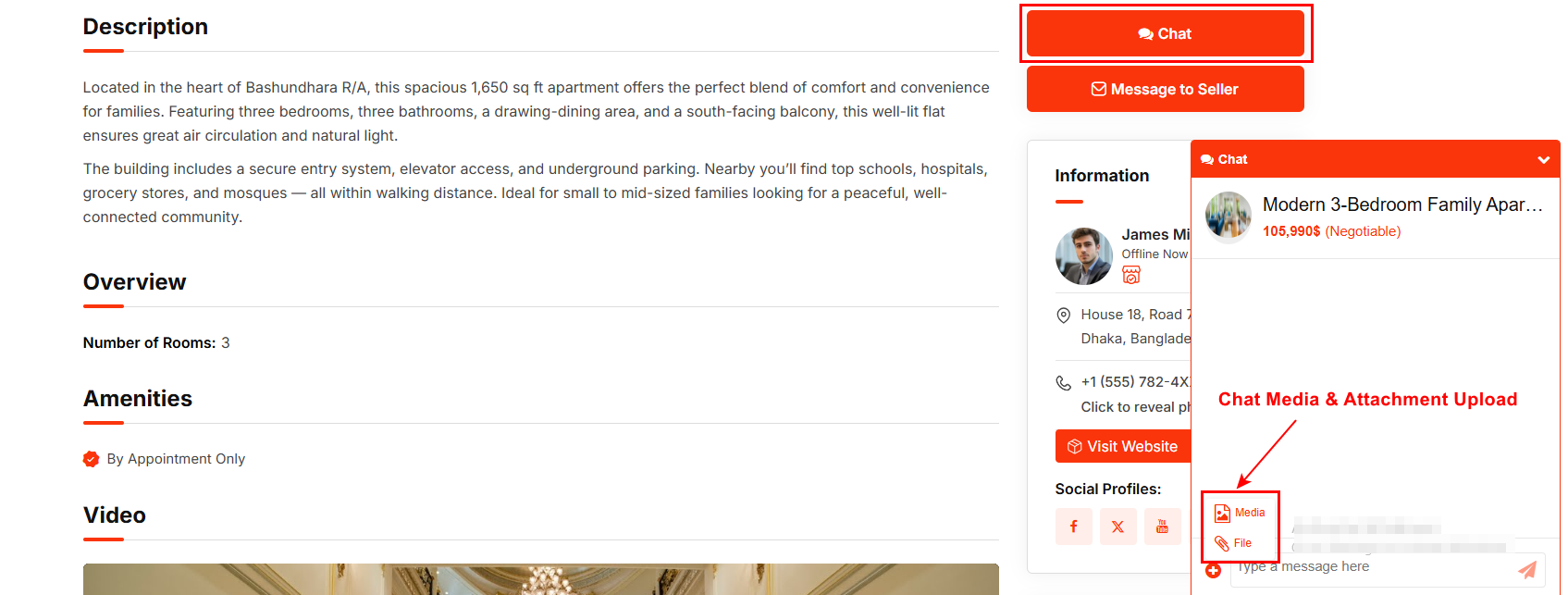
Classified Listing enhanced the chat functionality by enabling the upload of media/attachments. Buyers and sellers can share photos, documents, and other vital files in their private conversations. This ensures better negotiation and richer discussions.
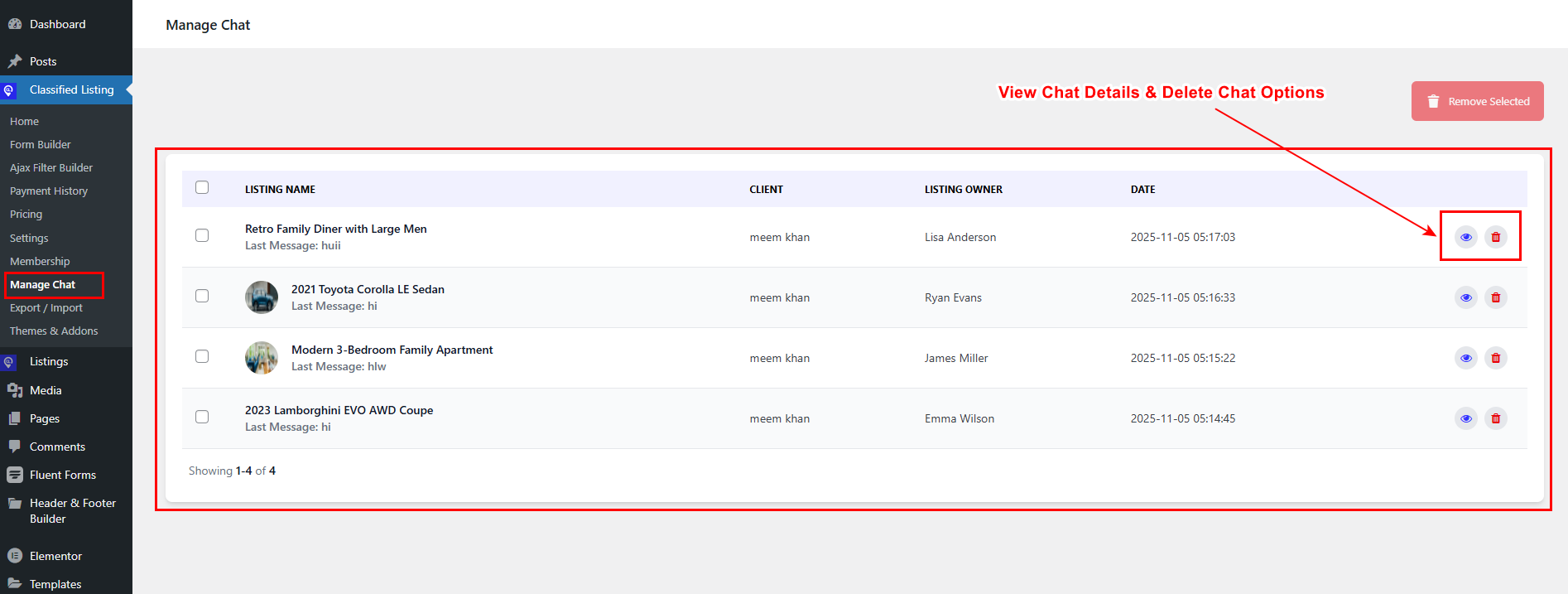
11. Chat Admin Backend
Observe conversations without breaking privacy from the backend. As the site owner, you can monitor chats for moderation and compliance. This is crucial for handling sensitive transactions and preventing spam.
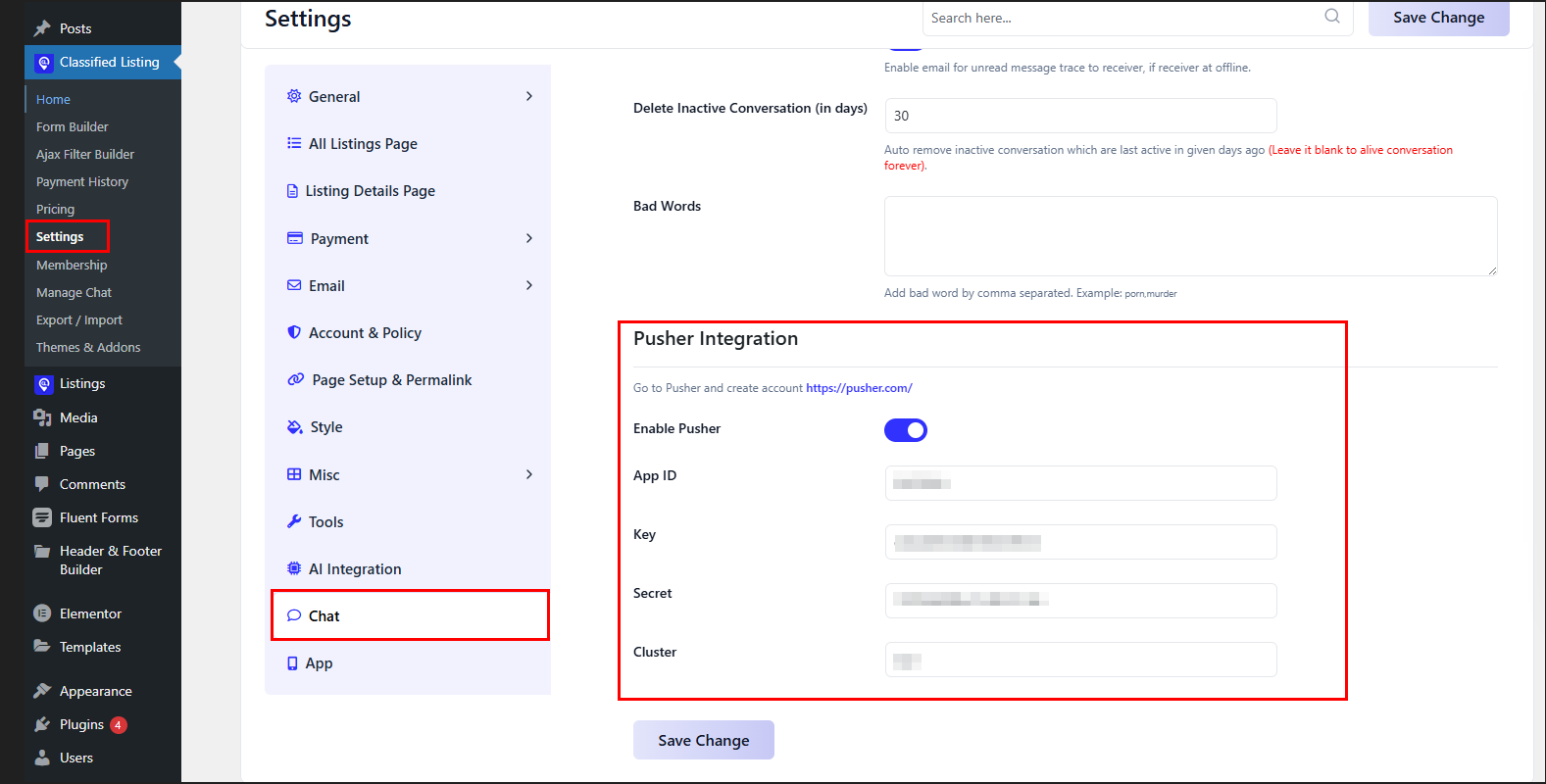
12. Pusher Integration
Pusher is integrated with Classified Listing to enhance chat performance, provide real-time updates, and improve responsiveness. Instant message syncing option enhances user satisfaction.
Powerful Addons of Classified Listing Plugin in 2025
Besides adding and improving new features, we’ve implemented 4 different powerful addons to make your directory site more feature-rich.
These extensions are helpful in creating the most advanced directory WordPress Theme. Let’s have a detailed overview of each of the addons.
1. Toolkit Addon
To ease your directory website development, we’ve added the Classified Listing ToolKit Addon.
When you use this Toolkits with our Archive & Single Page Builder pro addon, you can effortlessly design professional archive and single pages inside Elementor, and Divi editors and on your directory sites.
Elementor Widgets
Let’s explore the Elementor widgets of Classified Listing Toolkits:
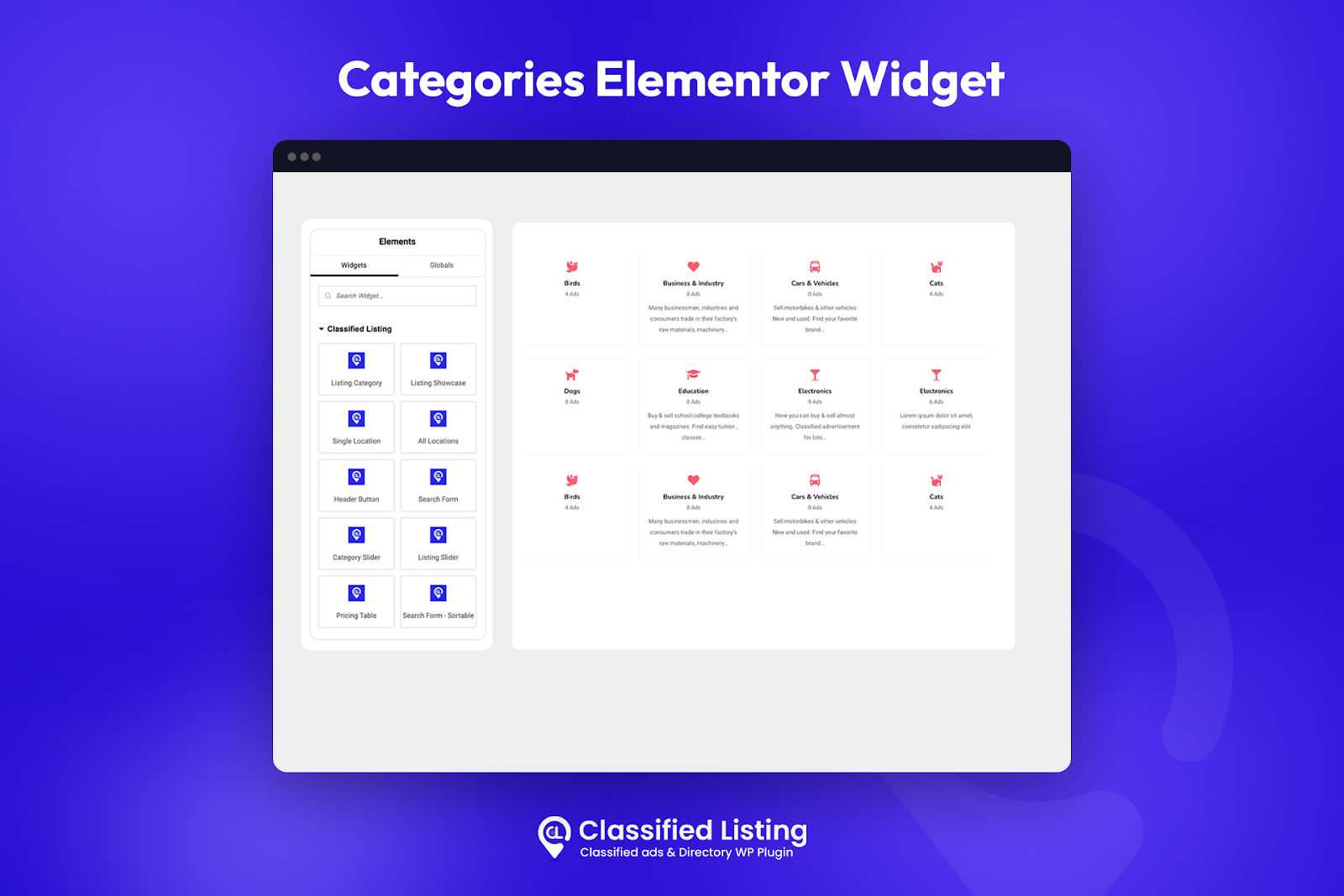
- Listing Category: You can display listing categories in 2 different styles with this widget.
- Category Slider: Add a slider with 2 layout styles and make your category display more appealing.
- Single Location: Showcase a particular location and its ad count in different layouts.
- All Locations: You can creatively present all listing locations in grid or list format.
- Listing Showcase: This widget allows you to display the listings in grid or list format, and each format has multiple layouts!
- Listing Slider: Now, you can exhibit listings in a slider with several styles
- Header Buttons: For easy navigation, you can implement buttons like ‘Compare,’ ‘Favourites,’ ‘Chat,’ ‘My Account,’ and more at the top of the page.
- Search Form: With this widget, you can include a search form in a page
- Search Form—Sortable [Pro]: It’s similar to Search Form widget but has some extra features. You can include or exclude search form fields, customize the search button text, add an icon, and do much more.
- Pricing Table: Design stunning pricing tables in dynamic styles.
- Listing Store: Showcase listing stores on a page in grid and list layouts.
Divi Modules
Go through all the Divi modules Classified Listing Toolkits offers:
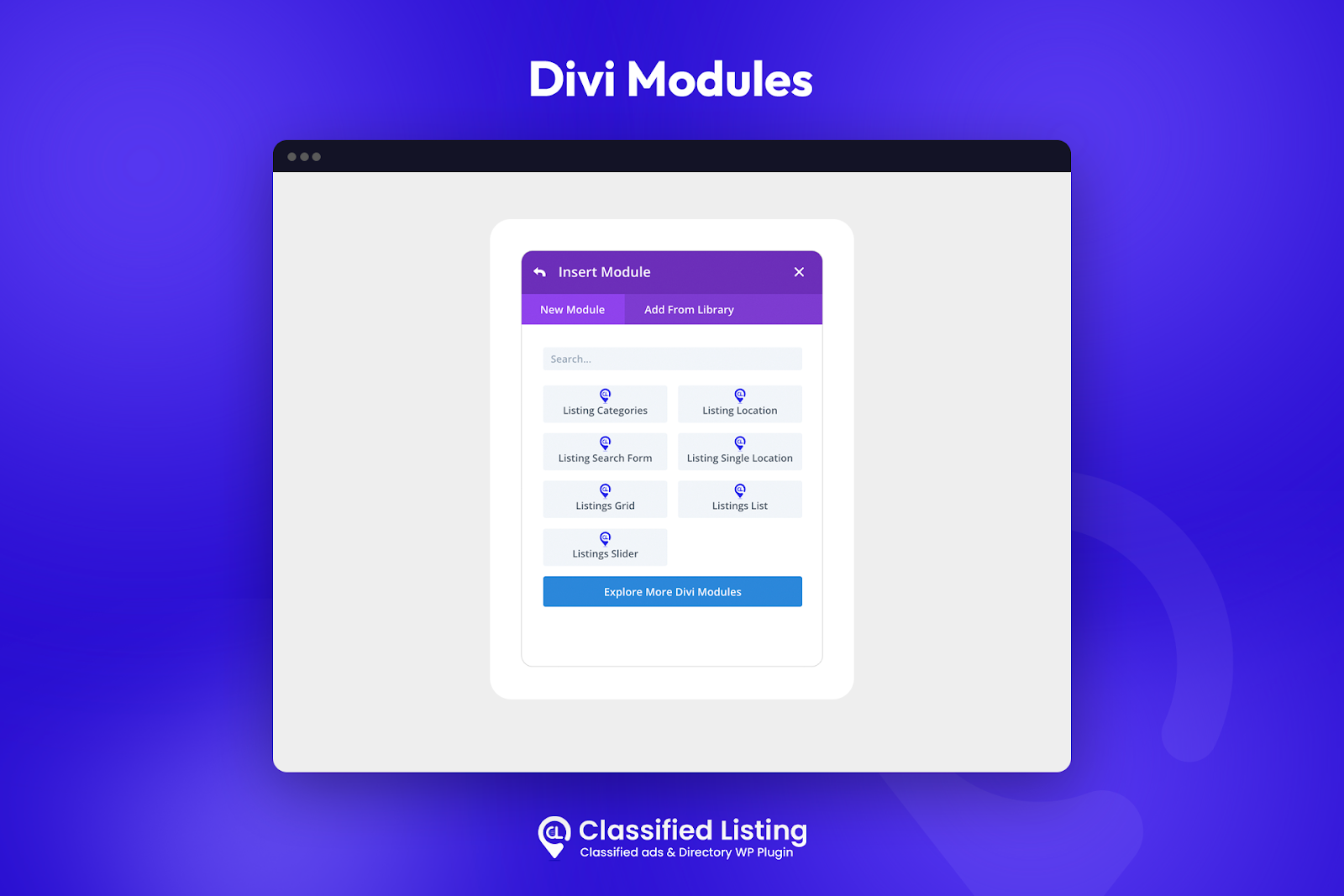
- Listing Categories: With Divi Editor, you can present listing categories on your preferred page.
- Listing Location: Display all listing locations with their ad counts to increase user-engagement.
- Listing Single Location: Showcase a particular listing location with its listing count.
- Listings Grid: Display listings in grid format with various dynamic grid styles.
- Listings List: Present ads in list format and help users easily navigate listings.
- Listings Slider: Implement slider animation of listing to make your site more attractive.
- Listing Search Form: integrate this powerful search form elements to your preferred page in different styles.
- Listing Store: This Divi element permits you to display listing stores in either grid or list layouts.
2. Search Alert Addon
Reach out to your customers without spending a penny on marketing and promotions. Introducing the game changing Search Alert Addon of Classified Listing. With this addon, users can save their searches on your website, get email notifications. This is a really helpful way to increase user-engagement.
The most fun part? This addon allows users on your site to customize how often they get alerts (e.g., instantly, daily, weekly, or monthly). Through My Account Dashboard users can save all the queries for future use.
To extend the plugin’s functionality, a new toolkit add-on has been added. This feature allows deeper customization with an analytical dashboard.
This addon is most suitable for job directory, property directory, and service listing site. So, customers get instant notification when their preferred searched items (job alert, nearby property listings) are available.
3. Job Manager

The Job Manager Addon can transform you directory listing site into a fully functional job listing site. With this addon, you can generate job listings with detailed specifications (job open position, job category, application deadline, salary range, application form, etc) on your job posts.
Moreover, candidates can view their applications with the Job Seeker Dashboard. Also, in the job application form, you can add all the necessary fields and external links. In this way, you can handle job applications hassle-free.
Classified Listing’s Improvements in 2025
Along with adding new functionalities, we’ve also focused on improving the existing features. We’ve already made some advanced improvements to enhance the plugin’s functionalities rapidly. We tried to implement valuable feedback from our community.
Security Update
As cyber threats continue to increase, we emphasize the importance of securing directory sites. Protection against common vulnerabilities gives users peace of mind.
Form Builder Optimization
Forms with smart dependencies now have improved loading time. We fixed the repeater field issue and updated validation rules. Now, even on high-traffic sites, you can easily handle forms with complex logic.
UI & Style Update
We’ve resolved many incompatible styles, elements, and icons to ensure perfect display on different screen sizes.
Boosted Performance
By removing unnecessary dependencies and redundant code, we drastically improved the plugin’s performance.
These improvements aren’t limited. We’re continually trying to adopt new features and upgrade existing ones to maximize the functionality of classified listings.
Essential Things to Consider Before Updating Classified Listing
Backup Your Site
Always remember to back up your site, including the files, media, and images. You can create a clone version of your site and test the update.
Inspect Template Customization
If you customized any classified theme, then you need to test the Classified Listing templates in your child theme.
Check Addon Compatibility
Ensure all your addons, like payment systems, map extensions, and other addons are updated and work smoothly with the new upgrade. Incomplete addons can cause errors in the site.
We strongly recommend that you thoroughly check and update your site’s with the Classified Listing plugin. We update the plugin with the aim of boosting the performance and functionalities of your directory site.
If you encounter any issues or difficulties, you can contact our support team for assistance. We’re always optimistic in making quick resolutions and solving any challenges you face.
Upcoming Features of Classified Listing
We aim to make Classified Listing Plugin more user-focused, powerful, and interactive. We’re introducing some of our upcoming features that will boost engagement, improve communication, and revenue growth.
Advanced Ad Statistics
Users will view detailed analytics for listings. This includes total views, mobile number clicks, and WhatsApp clicks. Through these insights, sellers can understand their listing performance and further optimize the ads for better results.
User Notification for Newly Added Listings
Classified Listing is coming up with an advanced feature, where users will get instant notification whenever a new listing is added. This feature will keep buyers actively engaged in your directory site.
Membership Package With Image Limit
You can create a membership package with custom image number limitation. Through this site owners can differentiate between basic and premium membership packages. More images indicate better visibility- so users will definitely upgrade their subscription.
Wrapping Up
The new updates to Classified Listing in 2025 offer unmatched flexibility and innovation to site owners and developers. With AI integration, smart dependency, Image modification, bulk options, and an advanced form builder, you can effortlessly design and develop an ideal directory site.
If you have any valuable opinions or feedback, you are always welcome to join Our Official Classified Listing Community.
Moreover, Classified Listing has intuitive backend admin settings and an excellent frontend posting management system. You can easily develop a multi-directory site.
FAQs
We’ve integrated AI with our plugin. Hence, from now on, you can easily create directory & Classified ads submission forms based on your listing type using AI! To build one, visit WordPress Admin Panel > Classified Listing > Form Builder. You will see the form builder pop-up with one additional feature, “Create Form With AI.” Click on it
GEO Auto Suggestions pulls from a global database to offer real-time location recommendations as customers type. It’s perfect for real estate, events, or local business directories, improving accuracy,
Yes, all the new added addons are fully compatible with most of the WordPress themes and plugins.



