
Follow the steps below to redeem your code and activate your license. It takes about two minutes.
Step 1: Click the “Get Radius Booking Deal” button below
You’ll be taken to our checkout page.
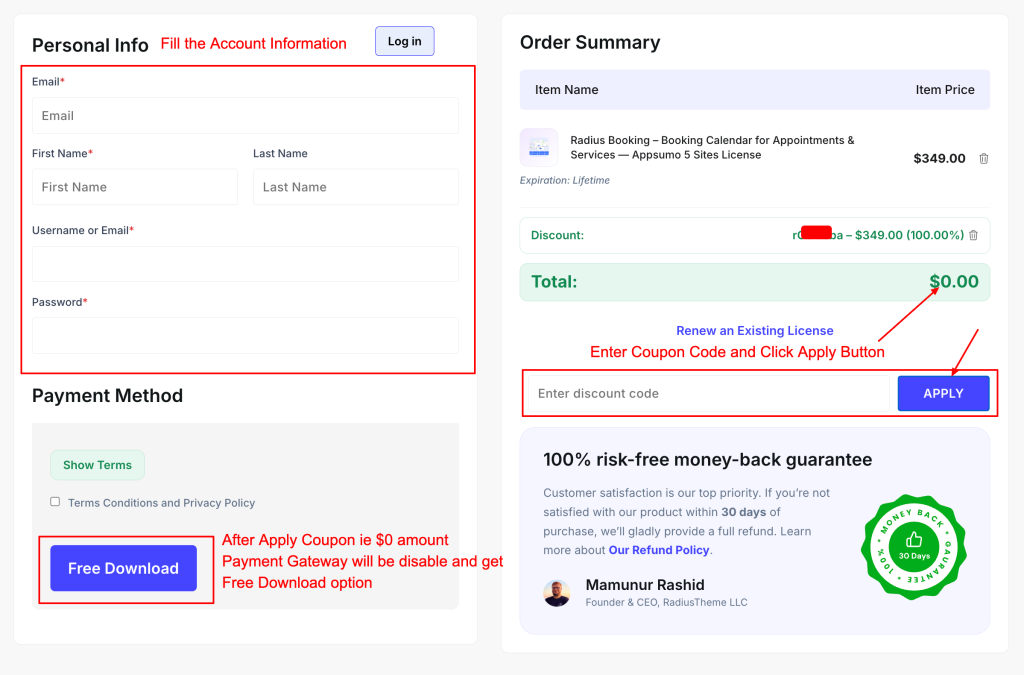
Step 2: Fill in your details on the checkout page
Enter your name, email address and billing information. Your license will be linked to this email, so use one you have access to.
Step 3: Enter your AppSumo coupon code
Find the coupon field on the checkout page and paste the code from your AppSumo purchase, then click Apply.
Step 4: Complete the order at $0
After the coupon is applied, your total will show $0.00. Click Place Order to finish.
Step 5: Download the plugin and activate your license
Check your email for your account details, or log in to your dashboard to download Radius Booking Pro and copy your license key. In WordPress, go to Radius Booking → License, paste the key and click Activate.