
• Classified Listing Docs
    • Classified Listing Plugin
    • Classified Listing All Addons
    • Classified Listing Mobile App
    • Classima Mobile APP
    • Listygo Mobile App
    • Homlisti Mobile App
  • Woocommerce Plugins Docs
    • ShopBuilder Elementor Addon
    • Woo Variation Swatches
    • Woo Variation Gallery
    • Zilly Mobile App
  • General Plugins Docs
    • The Post Grid
    • Testimonial Slider
    • Team Members
    • Food Menu
    • Review & Schema
    • Portfolio
    • Business Review
  • Our Plugins
    • The Post Grid
    • Classified Listing
    • ShopBuilder
    • Food Menu
    • Team
    • Portfolio
    • Testimonial Slider
    • Review & Schema
    • See All Plugins
  • Get Pro
×
  • Classified Listing Docs
    • Classified Listing Plugin
    • Classified Listing All Addons
    • Classified Listing Mobile App
    • Classima Mobile APP
    • Listygo Mobile App
    • Homlisti Mobile App
  • Woocommerce Plugins Docs
    • ShopBuilder Elementor Addon
    • Woo Variation Swatches
    • Woo Variation Gallery
    • Zilly Mobile App
  • General Plugins Docs
    • The Post Grid
    • Testimonial Slider
    • Team Members
    • Food Menu
    • Review & Schema
    • Portfolio
    • Business Review
  • Our Plugins
    • The Post Grid
    • Classified Listing
    • ShopBuilder
    • Food Menu
    • Team
    • Portfolio
    • Testimonial Slider
    • Review & Schema
    • See All Plugins

Getting Started

3
  • System Requirements
  • Installation
  • How to Use (Video)

Main Settings

5
  • General Settings
  • Detail Page Fields Control
  • Front End Forms Fields [Pro]
  • Re-Captcha Settings [Pro]
  • Active License Key

Features

4
  • Add / Edit Categories
  • Add / Edit Testimonials
  • Add / Edit Tags
  • Taxonomy Ordering 

Shortcode Generator

4
  • Layout
  • Filtering
  • Field Selection
  • Styling

Create Different Layouts

3
  • Create Grid Layout
  • Create Slider Layout
  • Create Isotope Filter Layout

Elementor Addons

3
  • Grid Layout
  • Slider Layout
  • Isotope Filter Layout

How to Use Shortcode

1
  • How to Use Direct Shortcode
  • Home
  • Docs
  • Features
  • Add / Edit Categories
View Categories

Add / Edit Categories

< 1 min read

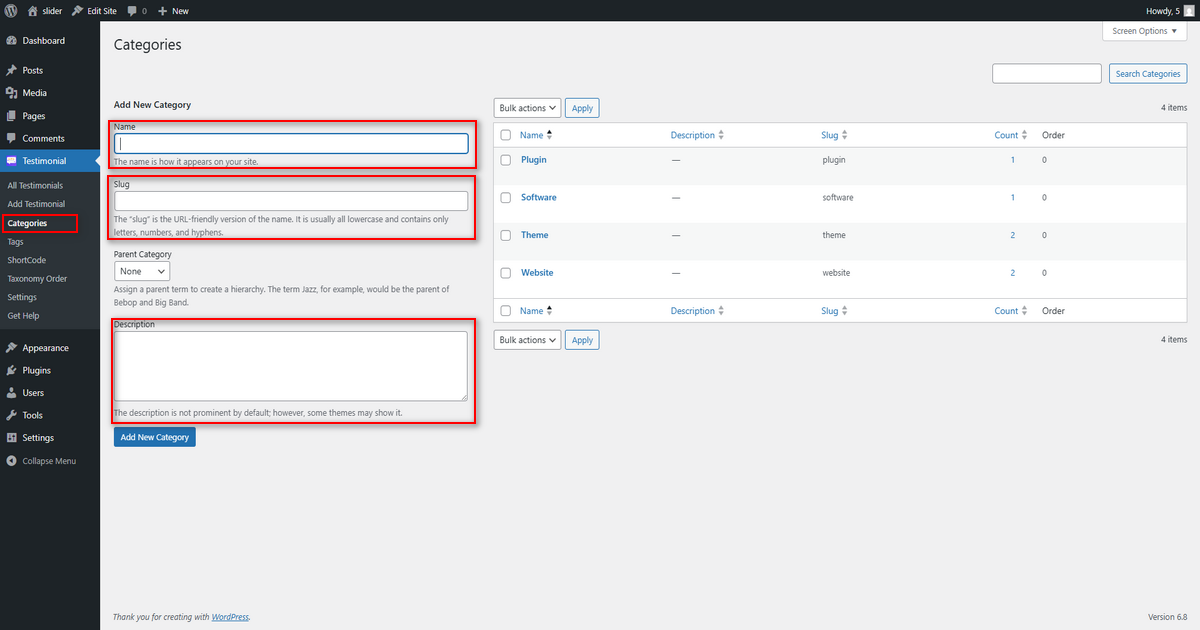
To add/edit a category, navigate the WordPress admin menu, Testimonial => Categories.

Insert the name of the category. This name will appear on your website. The slug will be automatically added. 
Select the parent category if necessary. Add a short description about the designation. Click on “Add New Category”.
What are your Feelings

Share This Article :

  • Facebook
  • X
  • LinkedIn
  • Pinterest
Still stuck? How can we help?

How can we help?

Updated on April 17, 2025
Taxonomy Ordering Add / Edit Testimonials
Copyright© 2026 RadiusDocs by RadiusTheme