
The fourth step of the shortcode generator is Styling. Navigate WordPress admin menu Testimonial => Shortcode Generator => Styling
4.1 Parent Class: You can enter a specific parent class for the shortcode.
4.2 Color Schema: You can set the Primary color, Container background, and Item background color.
4.3 Button Color: Set the button background & text color.
4.4 Padding [Pro]: This padding will activate from item to item. Unit will be pixel, No need to give any unit.
Only integer values will be valid. , e.g, 20 (without postfix like px, em, %, etc). It will be displayed by %. Leave it blank for the default.
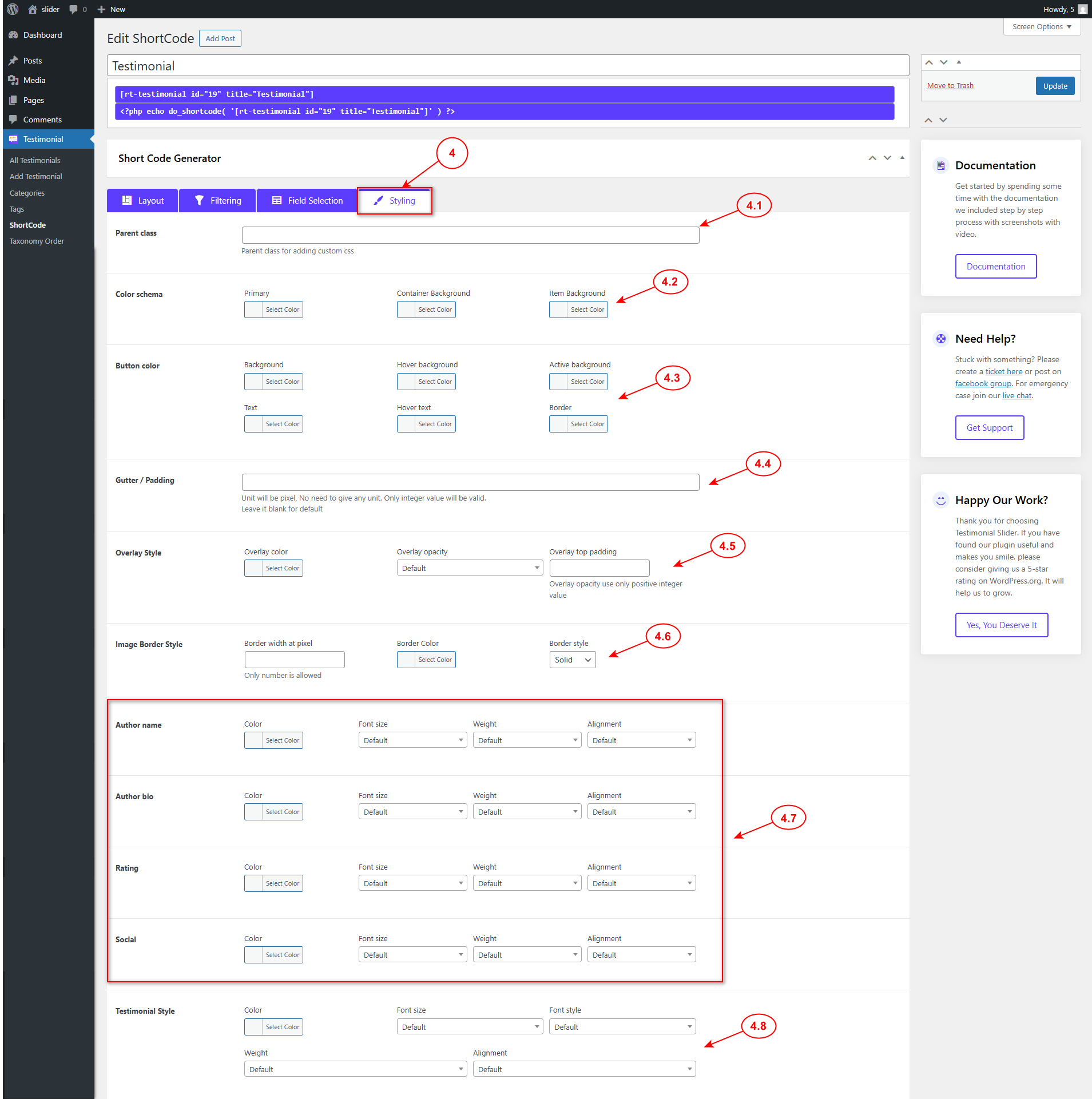
4.5 Overlay Style: Set overlay color, opacity & padding.
4.6 Image Border Style: [PRO] Modify border px, color, and style.
4.7 Other fields’ color: You can customize the author bio, name, rating, and social link fields’ color, font size, weight, etc.4.8 Testimonial Style: Set color, Font size, font style, weight, & Alignment.


