• Classified Listing Docs
    • Classified Listing Plugin
    • Classified Listing All Addons
    • Classified Listing Mobile App
    • Classima Mobile APP
    • Listygo Mobile App
    • Homlisti Mobile App
  • Woocommerce Plugins Docs
    • ShopBuilder Elementor Addon
    • Woo Variation Swatches
    • Woo Variation Gallery
    • Zilly Mobile App
  • General Plugins Docs
    • The Post Grid
    • Testimonial Slider
    • Team Members
    • Food Menu
    • Review & Schema
    • Portfolio
    • Business Review
  • Our Plugins
    • The Post Grid
    • Classified Listing
    • ShopBuilder
    • Food Menu
    • Team
    • Portfolio
    • Testimonial Slider
    • Review & Schema
    • See All Plugins
  • Get Pro
Ă—
  • Classified Listing Docs
    • Classified Listing Plugin
    • Classified Listing All Addons
    • Classified Listing Mobile App
    • Classima Mobile APP
    • Listygo Mobile App
    • Homlisti Mobile App
  • Woocommerce Plugins Docs
    • ShopBuilder Elementor Addon
    • Woo Variation Swatches
    • Woo Variation Gallery
    • Zilly Mobile App
  • General Plugins Docs
    • The Post Grid
    • Testimonial Slider
    • Team Members
    • Food Menu
    • Review & Schema
    • Portfolio
    • Business Review
  • Our Plugins
    • The Post Grid
    • Classified Listing
    • ShopBuilder
    • Food Menu
    • Team
    • Portfolio
    • Testimonial Slider
    • Review & Schema
    • See All Plugins

Getting Started

3
  • System Requirements
  • Installation
  • How to Use (Video)

Plugin Settings

9
  • Active License
  • Common Settings
  • Pop Up Field Selection (PRO)
  • Social Share (PRO)
  • Custom Script
  • AI Integration
  • My Account
  • Event Settings
  • Other Settings

Shortcode Generator

6
  • Style
  • Fields Selection
  • Settings
  • Layout Settings
  • Query Build
  • Front-end Filter

Use Shortcode in Page

4
  • Use Shortcode in Page
  • Use Direct Shortcode
  • Use Elementor Addon
  • Use Gutenberg Addon

Create Different Layouts

6
  • Create List Layout
  • Create Grid Layout
  • Create Grid Filter Layout
  • Create Carousel Slider Layout [PRO]
  • Create WooCommmerce Layout [PRO]
  • Create Easy Digital Downloads Layout [PRO]

Elementor Addons

11
  • Elementor Settings
  • Overview
  • Archive / Single Page Builder
  • Create Front-end Filter
  • Create Slider Layout [PRO]
  • Create List Layout
  • Create Grid Hover layout
  • Create Grid Layout
  • Style Tab
  • Settings Tab
  • Content Tab

Gutenberg Blocks

9
  • Import Layouts and Sections
  • Create Slider Layout [PRO]
  • Create List Layout
  • Create Grid Hover layout
  • Create Grid Layout
  • Style Tab
  • Settings Tab
  • Content Tab
  • Overview

Divi Modules

10
  • Divi Video Tutorial
  • Overview
  • Build Page With Divi
  • Create Grid Layout
  • Create Grid Hover Layout
  • Create List Layout
  • Create Slider Layout
  • Front End Filter Settings
  • Content Tab
  • Design Tab

Features

6
  • Event Integration with The Post Grid [PRO]
  • Front End Submission [PRO]
  • Chat GPT Integration [PRO]
  • Set Archive Layout [PRO]
  • Custom Post Type (CPT) [PRO]
  • Taxonomy Ordering [PRO]

How to Use

5
  • How to Display a Specific Category Page Using Post Grid
  • How to use ACF Plugin?
  • How to Improve Performance?
  • How to Renew a License
  • How to Use Video?

Frequently Asked Questions

4
  • How to make a Custom Read More link?
  • Image Scroll down on Hover
  • How to remove the Import button from gutenberg editor
  • How to Override Layout
  • Home
  • Docs
  • Features
  • Front End Submission [PRO]
View Categories

Front End Submission [PRO]

< 1 min read

0:00 / 0:41
  • View as Markdown Open this page as plain Markdown (opens in a new tab)
  • Open in ChatGPT Ask questions about this page (opens in a new tab)
  • Open in Claude Ask questions about this page (opens in a new tab)
  • Open in Google AI Studio Ask questions about this page (Google account required) (opens in a new tab)

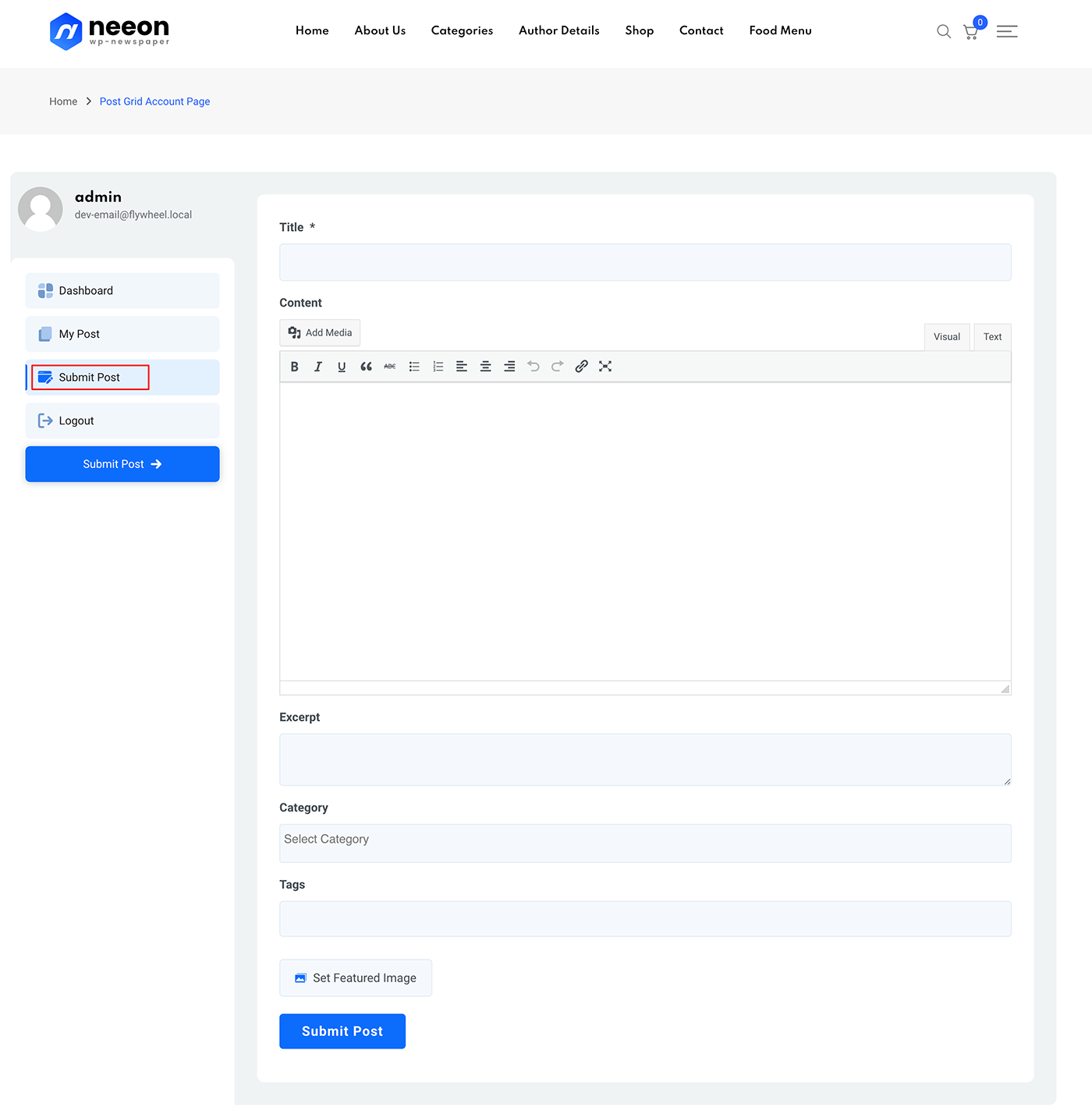
This is a PRO feature. Now using The Post Grid plugin you can submit posts from front end.

Settings #

  1. My Account Page: Create a new page with this shortcode [tpg_my_account] then set the page here from the drop-down.
  2. Post Status: Select after front end post posting which status will be set.
  3. Max Image Size: Set Max image size in bytes remember 1MB = 1048576 byte
  4. Deleted Post: After deleting which status of the post will go?

Dashboard #

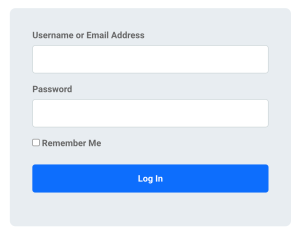
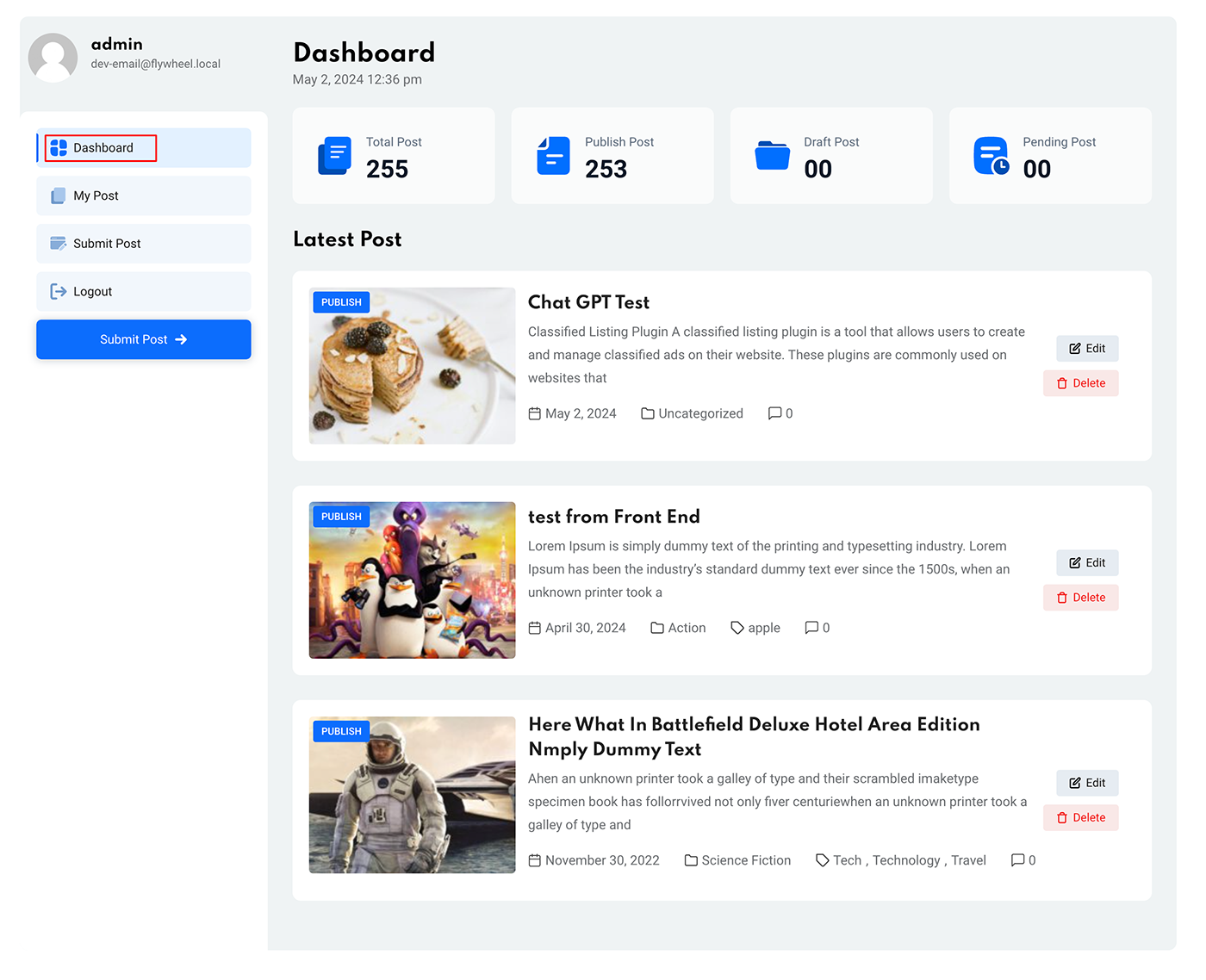
Now, when a user visits the frontend of the “My Account” page without being logged in, they will see the login screen. After logging in, they will access the dashboard menu.
My Posts #

Front End Submission Form #
Video Tutorial: #

What are your Feelings

Share This Article :

  • Facebook
  • X
  • LinkedIn
  • Pinterest
Still stuck? How can we help?

How can we help?

Updated on August 27, 2025
Event Integration with The Post Grid <span class="pro">[PRO]</span>Chat GPT Integration <span class="pro">[PRO]</span>
Table of Contents
  • Settings
  • Dashboard
  • My Posts
  • Front End Submission Form
  • Video Tutorial:
Copyright© 2026 RadiusDocs by RadiusTheme