
The front-end filter is a feature of The Post Grid Addons. But this feature doesn’t work on the TPG – Slider Layout addon. #
First, you have to enable all filter options from [Content > Filter].
Filter settings:
- If you want to show Categories or Tags (taxonomy) in your filter, then you have to check the Taxonomy Filter button in the filter.
- Activate the Author button to display the author in the filter.
- Enable the Order By Filter to show the order by feature in the filter.
- Switch on the Sort Order Filter if you would like to show it in the filter.
- Check the Search Filter to activate the search form in the filter.

Filter Type (Dropdown):
If you keep the default setting from the filter, then the front-end view will be like the image below-

Filter Type (Button):
Select Button from the Filter Type. This will generate a button-style filter box. Please see the screenshot-

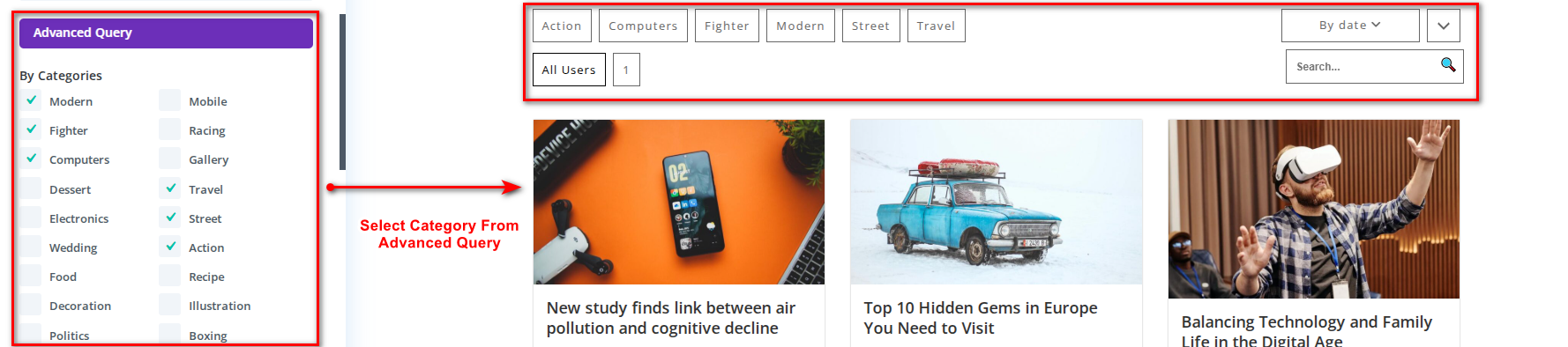
If you do not choose categories from [Query Build > Advanced Query > By Categories ], then all categories will display in the filter wrapper.
But the layout will not look appealing. So you have to choose some categories from Query Build for the best view. Let’s select some categories from the Query Builder and see the result.
Collapsible Filter:
If you would like to make a collapsible filter, then first, you have to choose [ Filter Type = Button and Filter Style = Collapsible] from [ Content > Filter].


