
• Classified Listing Docs
    • Classified Listing Plugin
    • Classified Listing All Addons
    • Classified Listing Mobile App
    • Classima Mobile APP
    • Listygo Mobile App
    • Homlisti Mobile App
  • Woocommerce Plugins Docs
    • ShopBuilder Elementor Addon
    • Woo Variation Swatches
    • Woo Variation Gallery
    • Zilly Mobile App
  • General Plugins Docs
    • The Post Grid
    • Testimonial Slider
    • Team Members
    • Food Menu
    • Review & Schema
    • Business Review
  • Our Plugins
    • The Post Grid
    • Classified Listing
    • ShopBuilder
    • Food Menu
    • Team
    • Portfolio
    • Testimonial Slider
    • Review & Schema
    • See All Plugins
  • Get Pro
×
  • Classified Listing Docs
    • Classified Listing Plugin
    • Classified Listing All Addons
    • Classified Listing Mobile App
    • Classima Mobile APP
    • Listygo Mobile App
    • Homlisti Mobile App
  • Woocommerce Plugins Docs
    • ShopBuilder Elementor Addon
    • Woo Variation Swatches
    • Woo Variation Gallery
    • Zilly Mobile App
  • General Plugins Docs
    • The Post Grid
    • Testimonial Slider
    • Team Members
    • Food Menu
    • Review & Schema
    • Business Review
  • Our Plugins
    • The Post Grid
    • Classified Listing
    • ShopBuilder
    • Food Menu
    • Team
    • Portfolio
    • Testimonial Slider
    • Review & Schema
    • See All Plugins

Getting Started

4
  • Getting Started
  • System Requirements
  • Installation
  • How to Use (Video)

Plugin Settings

3
  • General Settings
  • Detail Page Control
  • Others

Features

5
  • Add / Edit Portfolio
  • Add / Edit Categories
  • Add / Edit Tags
  • Add / Edit Tools
  • Taxonomy Order [Pro]

Shortcode Generate

6
  • Layout
  • Filtering
  • Fields Selection
  • Styling
  • Create Isotope Filter Layout
  • Create Carousel Slider Layout

How to Use

2
  • How to Use Elementor Addon
  • How to Use Gutenberg Addon
  • Home
  • Docs
  • Getting Started
  • Installation
View Categories

Installation

2 min read

The Free version of the Portfolio Plugin is available in the WordPress.org plugin directory. You can install it from your WordPress dashboard. Follow the following steps:

  1. Go to your WordPress Dashboard
  2. Navigate to Plugins > Add New, then type “Portfolio by RadiusTheme” or “TLP Portfolio” in the plugin search box
  3. Find “Portfolio – WordPress Portfolio Showcase Plugin” from the list and click on the “Install Now“ button.
  4. After the completion of installation, click the  “Activate” button.

After activating the plugin you will get the “Portfolio” menu in WordPress admin navigation.

Installing the Pro Version #

The Pro version of the “Portfolio” plugin is a zip file. After purchasing the Pro version you will get a download link in your purchase receipt email with which you can acquire the plugin files. If not, you can log in to RadiusTheme, then go to Purchase History. See below

After the download, you’ll find the files in the zip folder on your computer. You then need to install the “tlp-portfolio-pro.zip”. Once you download the zip file. Please follow the following steps to install the “Portfolio Pro” version.

Note: Install & activate the “Portfolio FREE” version to work PRO version from Version 2.10.8

  1. Go to your WordPress website Dashboard. Navigate to Plugins > Add New.

Now check the options on the top right beside “Add Plugins” for the “Upload Plugins” option. Click on this.

3. Once you click the “Upload Plugin” button, you will get the plugin upload option from your computer. Now select the “tlp-portfolio-pro.zip” file from your computer and click on the “Install Now” button.
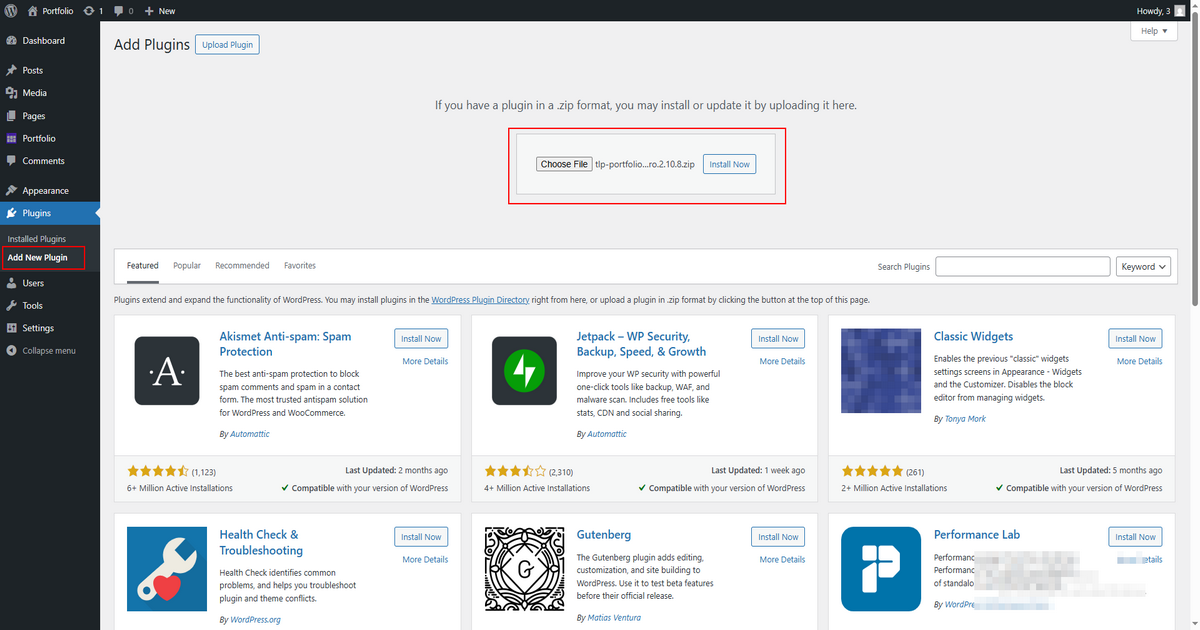
After installing and activating the Pro version, you will get the plugin on your website.

After activating the plugin, you need to activate the plugin again using the license key. You will get the license key in your “Purchase Email” or go to login RadiusTheme.com, then go to purchase history and click on the “License Key“.

Now, click on the “Save Changes” button to update all the settings.

What are your Feelings

Share This Article :

  • Facebook
  • X
  • LinkedIn
  • Pinterest
Still stuck? How can we help?

How can we help?

Updated on April 15, 2025
System RequirementsHow to Use (Video)
Table of Contents
  • Installing the Pro Version
Copyright© 2026 RadiusDocs by RadiusTheme