• Classified Listing Docs
    • Classified Listing Plugin
    • Classified Listing All Addons
    • Classified Listing Mobile App
    • Classima Mobile APP
    • Listygo Mobile App
    • Homlisti Mobile App
  • Woocommerce Plugins Docs
    • ShopBuilder Elementor Addon
    • Woo Variation Swatches
    • Woo Variation Gallery
    • Zilly Mobile App
  • General Plugins Docs
    • The Post Grid
    • Testimonial Slider
    • Team Members
    • Food Menu
    • Review & Schema
    • Portfolio
    • Business Review
  • Our Plugins
    • The Post Grid
    • Classified Listing
    • ShopBuilder
    • Food Menu
    • Team
    • Portfolio
    • Testimonial Slider
    • Review & Schema
    • See All Plugins
  • Buy Now
×
  • Classified Listing Docs
    • Classified Listing Plugin
    • Classified Listing All Addons
    • Classified Listing Mobile App
    • Classima Mobile APP
    • Listygo Mobile App
    • Homlisti Mobile App
  • Woocommerce Plugins Docs
    • ShopBuilder Elementor Addon
    • Woo Variation Swatches
    • Woo Variation Gallery
    • Zilly Mobile App
  • General Plugins Docs
    • The Post Grid
    • Testimonial Slider
    • Team Members
    • Food Menu
    • Review & Schema
    • Portfolio
    • Business Review
  • Our Plugins
    • The Post Grid
    • Classified Listing
    • ShopBuilder
    • Food Menu
    • Team
    • Portfolio
    • Testimonial Slider
    • Review & Schema
    • See All Plugins

Getting Started

2
  • Required Plugin & Themes
  • Purchase the APP

App Installation Preparation

3
  • Required Software and Tools
  • Installation
  • Running the app in device

App Configuration

15
  • App Configuration
  • Configuring App.json file
  • Configuring package.json file
  • Configuring Colors
  • Activating Rest API
  • Configuring Assets (Icon, Logo, Splash etc.) and other things (App Name)
  • Configuring backend related information & In App Pagination
  • App Translation / Changing App Languag
  • Changing all app static texts
  • Map & Location related settings
  • Push Notification
  • Admob (Google Ads) Settings
  • Firebase configuration for OTP verification
  • Misc. Configuration
  • Seller Verification Configuration for App

Social Login

3
  • Apple Login
  • Google Login
  • Facebook Login

Building the Project for Production

4
  • Building the Project for Production
  • General Process
  • iOS Version
  • Android Version

App Build Services (Start from $100)

4
  • NPM error (Invalid version)
  • Common Issue
  • Htaccess file
  • App Build Services (Start from $100)

Misc

3
  • Play store data safety configuration
  • Must perform this before app submission
  • How to Build the APP (Videos)
  • Home
  • Docs
  • Building the Project for Production
  • iOS Version
View Categories

iOS Version

3 min read

0:00 / 2:50
  • View as Markdown Open this page as plain Markdown (opens in a new tab)
  • Open in ChatGPT Ask questions about this page (opens in a new tab)
  • Open in Claude Ask questions about this page (opens in a new tab)
  • Open in Google AI Studio Ask questions about this page (Google account required) (opens in a new tab)

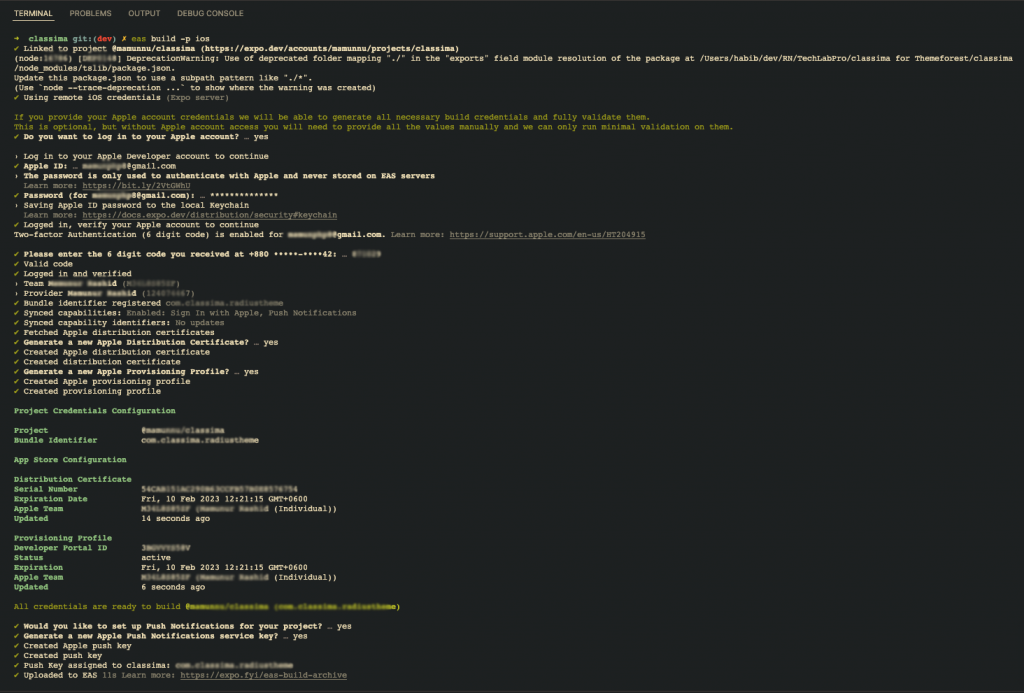
You can build standalone apps for iOS with two different types, an archive or simulator build. With the simulator build, you can test your standalone app on a simulator. If you want to publish your app to the store or distribute it with tools like TestFlight, you have to use the archive.


When building for iOS, you are given a choice of letting Expo create the necessary credentials for you, while still having a chance to provide your own overrides. Your Apple ID and password are needed to create an archive and those are only used locally and are never saved on Expo’s servers.

Step 1: Run command: eas build and select iOS or eas build -p ios

Step 3: Now It’ll ask for your apple user ID and Password. Provide this info.

Step 4: It’ll ask for credentials for your Apple Distribution Certificate, Apple Push Notifications service key, Apple Provisioning Profile etc.If you do have these things, upload them. If you do not know what are these, just select create new.
 Unless you’re very familiar with iOS credentials already, it’s best to let Expo handle the creation & management of all your credentials for you. If you’d like to know more about iOS credentials, here’s a guide with everything you need to know here.

If you plan on providing your own certificates, we recommend creating them in the Apple Developer Portal.

After you provide everything correct, the build process will start.

Step 5: Wait for the build to finish. After finishing the build, you’ll get a direct download link in the terminal window. Besides, the file will be available for downloading for the next 30 days from the day of building in your expo account. You can simply log into your expo account and click on builds option, that will give you the latest builds to download.
If you wish to create a simulator build
#

Step 1: To create your simulator build run “eas build -p ios -e test”. Wait for the build to finish. After finishing the build, you’ll get a direct download link in the terminal window. Besides, the file will be available for downloading for the next 30 days from the day of building in your expo account. You can simply log into your expo account and click on builds option, that will give you the latest builds to download.

eas build -p ios -e test


Note: When you upload the app to app store, to avoid rejection due to in app purchase, you need to temporarily disable in app purchase for the app before submission for review. To do this, login to your admin dashboard and go to Classified Listing > Settings > App and check the box beside “Disable in app purchase” and put specific version number that you are submitting to app store and click Save.After the app gets approved, simply just uncheck the box and save the changes. (This is very important)

For Uploading Apps to the Apple App Store and Google Play, This Link will be helpful.

What are your Feelings

Share This Article :

  • Facebook
  • X
  • LinkedIn
  • Pinterest
Still stuck? How can we help?

How can we help?

Updated on March 6, 2025
General ProcessAndroid Version
Table of Contents
  • If you wish to create a simulator build
Copyright© 2026 RadiusDocs by RadiusTheme